Microsoft’s decision to remove native DVD decoding from Windows 11/10 left millions of users with useless optical drives and spinning discs that refuse to play. Attempting to digitize a modern movie collection to bypass this hardware crisis usually exposes a second, more frustrating problem. Popular open-source tools like HandBrake or VLC constantly fail, crash mid-process, or output files with severe audio sync issues when confronted with heavily encrypted commercial discs.
The era of simple, unencrypted DVDs is over. Studios now protect their physical media with aggressive mechanisms like Disney’s 99-Title DRM, CSS, and intentional bad sectors. Standard rippers fall into these traps, blindly copying 40GB of fake data and overheating your CPU for hours.
To successfully back up a physical collection to a hard drive or Plex server today, you need a decryption engine built for the modern landscape. AnyMP4 DVD Ripper is designed specifically to solve these exact roadblocks. This review breaks down how its advanced title-recognition algorithm and GPU acceleration bypass complex encryptions, turning stubborn 8GB discs into portable, high-quality MP4 files in minutes.
Stop wasting hours with crashing freeware and corrupted files. We have secured a verified 58% coupon code on the AnyMP4 DVD Ripper Lifetime License exclusively for our readers. Unlock the 50x GPU hardware acceleration, permanently bypass all 99-title encryptions, and digitize your entire collection without quality loss.
Click here to claim your 50% Discount Code for AnyMP4 (Instantly applied at checkout).
The Windows 11 DVD Crisis: Why Free Tools Fail
Many users attempt to solve the Windows 11 playback crisis by turning to open-source software. Tools like VLC Media Player and HandBrake are excellent for basic video conversion. However, they are fundamentally ill-equipped to handle modern commercial discs. When you feed them a heavily protected Hollywood movie, the flaws immediately surface.
The HandBrake Nightmare: libdvdcss and 99-Title DRM
HandBrake cannot read encrypted DVDs out of the box. Users are forced to manually search for, download, and install a third-party plugin called libdvdcss. This outdated workaround only defeats basic CSS encryption from the early 2000s.
Modern studios use dynamic encryptions like Disney X-Project or Sony ARccOS. They burn up to 99 fake titles onto a single disc to confuse ripping software. HandBrake cannot distinguish the real movie from the decoys. It will either crash your system by trapping your CPU in an infinite loop, or it will output a scrambled file with out-of-sync audio.
VLC Media Player: The Real-Time Speed Bottleneck
VLC is a highly capable media player, but its conversion feature is a clunky afterthought. It only works on completely unprotected home videos. Even if your disc has zero encryption, VLC encodes video almost in real-time.
Converting a standard two-hour movie takes roughly 110 minutes. Relying on this method to digitize a massive physical collection is a tremendous waste of time. You need a dedicated engine that bypasses manual plugin installations and utilizes modern hardware acceleration.
AnyMP4 DVD Ripper Review (2026 Speed & Decryption Benchmarks)
When free software collapses under the weight of modern encryption, you need a dedicated DVD Ripper tool. AnyMP4 DVD Ripper eliminates the need for manual plugin installations. It identifies the correct main movie title in seconds and utilizes your graphics card to bypass the extraction bottleneck.
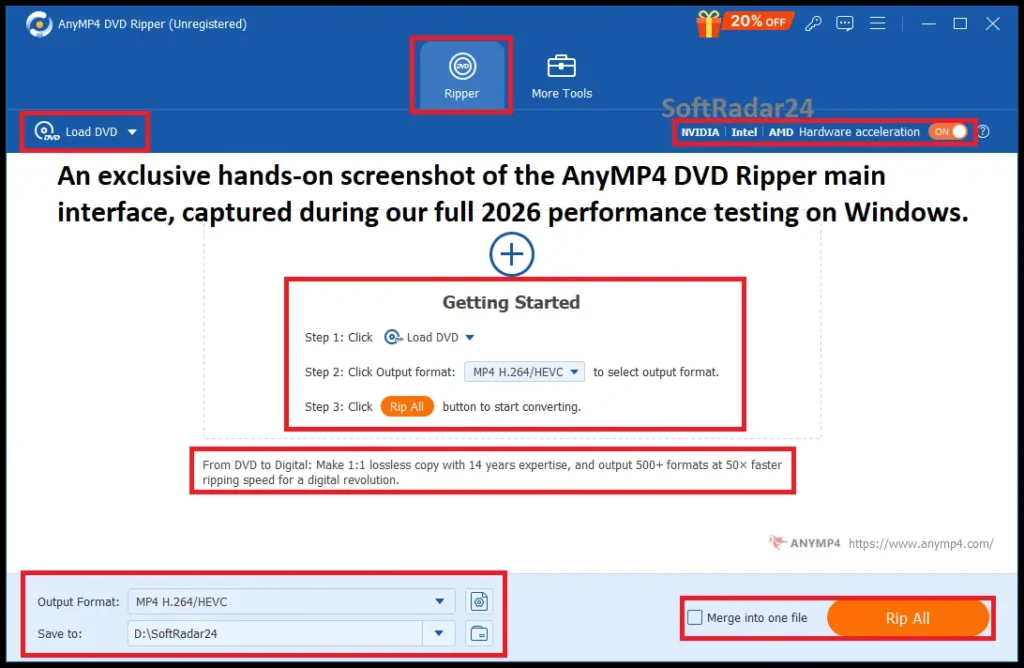
The Decryption Engine: Bypassing Disney 99-Title DRM
Commercial studios author their discs with intentional bad sectors and dozens of decoy files. Instead of blindly reading every corrupted sector like VLC or HandBrake, AnyMP4 DVD Ripper uses a dynamic title-checking algorithm. It acts like a high-end physical DVD player, analyzing the entire disc structure instantly.
When you insert a heavily protected Disney, Sony, or Paramount DVD, the software scans past the fake 40GB files and isolates the single, authentic feature-length movie. It seamlessly bypasses advanced CSS, Region Codes (RCE), and User Operation Prohibitions (UOPs). This guarantees your ripped MP4 file has perfectly synced audio and plays from start to finish without crashing at the 15-minute mark.
50x GPU Acceleration: Rip a 2-Hour Movie in 5 Minutes
Ripping a dual-layer DVD relies heavily on your processor. Using a basic CPU-only encoder turns your computer into a slow, overheating space heater.
AnyMP4 DVD Ripper solves this by offloading the heavy transcoding process to your graphics card. It natively supports hardware acceleration from NVIDIA NVENC, AMD APP, and Intel QSV. By enabling this feature in the settings, the software encodes the video up to 50 times faster than a standard CPU ripper. A full two-hour Hollywood movie is converted to a high-quality H.264 MP4 file in approximately 5 to 8 minutes, leaving your computer perfectly responsive for other tasks.
MP4 vs MKV: Best Format to Rip a DVD to an External Hard Drive
Before you spend hours ripping a 500-disc collection, ensure your new external hard drive or SSD is properly initialized. Windows 11 occasionally fails to automatically assign drive letters to new USB storage, causing the drive to remain hidden. Furthermore, choosing the wrong file system (NTFS vs. exFAT) can prevent your Smart TV or Mac from reading the ripped MP4 files.
Follow the official Microsoft Guide on How to Initialize and Format External Drives to prevent data transfer errors.
Converting a massive physical library requires a strategic choice in digital formats. You do not want to rip 500 movies only to realize your Smart TV refuses to play the audio track. AnyMP4 DVD Ripper supports over 500 profiles, but three specific containers dominate the external hard drive and home server space.
MP4 (H.264/HEVC): Maximum Device Compatibility
MP4 is the universal standard for digital video. Selecting this profile guarantees your ripped movie will open natively on Windows 11, Apple devices, Roku, and Plex media servers. The H.264 codec efficiently compresses a bulky 8.5GB dual-layer DVD down to a highly portable 1.5GB file. The visual quality remains virtually indistinguishable from the original physical disc on a modern screen.
Lossless MKV: The Archival Choice
Hardcore collectors demand perfect preservation. MKV acts as a digital envelope capable of holding multiple uncompressed video, audio, and subtitle tracks simultaneously. Choosing the MKV format inside AnyMP4 DVD Ripper ensures you keep the 5.1 Dolby Digital surround sound, the director’s commentary, and every foreign language subtitle file intact. The resulting file size is larger than a standard MP4, but you lose zero data.
1:1 ISO Image: The Complete Disc Clone
Some users want to preserve the interactive DVD menus, deleted scenes, and exact disc structure. AnyMP4 DVD Ripper handles this perfectly by creating a 1:1 ISO image or DVD Folder backup directly to your hard drive. This method requires absolutely no video transcoding. You simply mount the ISO file on your computer to watch the movie exactly as it behaved in a physical player.
If you are also dealing with physical Blu-ray discs or want to play your newly ripped lossless MKV files with flawless 4K UHD quality, standard media players often struggle with regional locks and high-bitrate stuttering. We strongly recommend pairing your ripper with a dedicated professional player for the ultimate home theater setup.
Read our full performance review and claim your exclusive 50% OFF AnyMP4 Blu-ray Player Discount Code (Verified for 2026).
More Than a Decryption Engine: The Built-In Video Toolkit
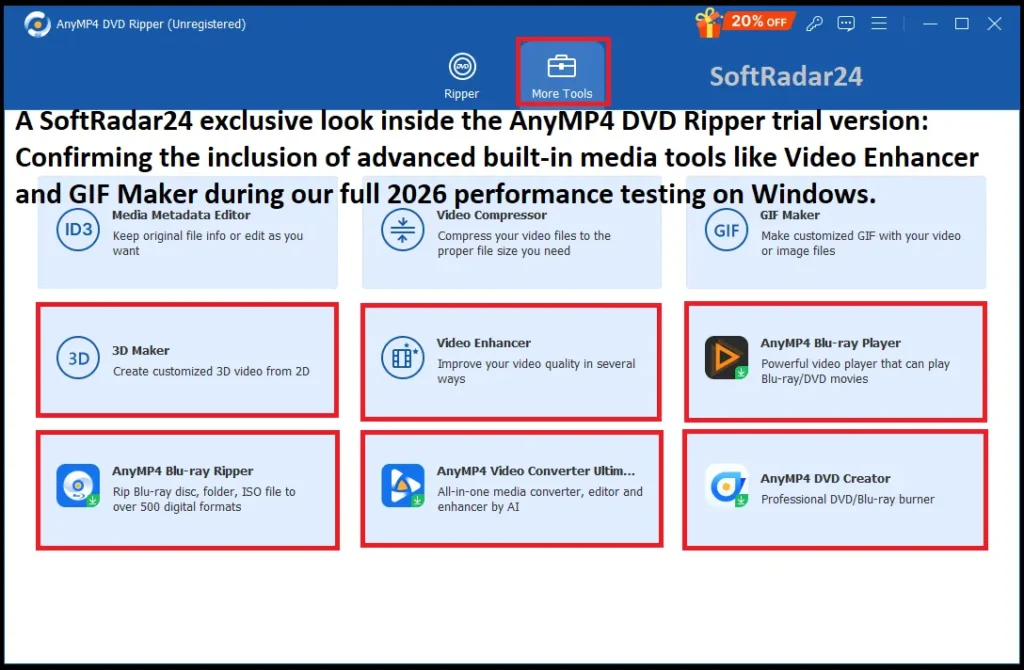
Paying for a premium software license demands more than a single-trick pony. AnyMP4 DVD Ripper justifies its price tag by including a complete video editing studio. You do not need to export your ripped MP4 into heavy editing software like Adobe Premiere to make basic adjustments. Everything happens in the same dashboard before the final conversion begins.
Essential Video Editing: Cut, Crop, and Hardcode Subtitles
Commercial DVDs are notorious for packing unskippable trailers, studio logos, and lengthy end credits. The integrated trimmer lets you cut the video down to the exact frame where the actual movie starts and ends. You save hard drive space and skip the annoyance.
Many old DVDs also feature thick black cinematic bars. The AnyMP4 DVD Ripper crop tool removes these borders instantly, allowing the video to fill your modern 16:9 television perfectly. For foreign films or damaged audio tracks, the software allows you to import external SRT or ASS subtitle files. You can permanently hardcode these subtitles directly into the video file, ensuring they display correctly on every device.
The Video Enhancer and Storage Compressor
Standard DVDs are permanently locked at a low 480p resolution. Playing a raw, unedited 480p file on a massive 65-inch 4K display often results in a blurry, pixelated image. The built-in Video Enhancer applies intelligent filters to optimize brightness, balance contrast, and reduce video noise before the rip is finalized.
For users managing limited storage on a portable hard drive, the Video Compressor tool is a lifesaver. It quickly shrinks large, bulky DVD rips into smaller, highly optimized clips. You maintain control over the final bitrate and resolution without relying on shady, ad-filled compression websites.
Troubleshooting: Common DVD Ripping Errors and Immediate Fixes
Even with premium software, digitizing a massive physical library can expose underlying hardware bottlenecks or severe disc damage. When an extraction fails, the root cause usually points to physical deterioration or a highly specific anti-piracy trap. Here is how AnyMP4 DVD Ripper handles the three most notorious roadblocks.
Audio and Video Out of Sync (A/V Sync Issues)
Watching a movie where the dialogue plays three seconds after the actor moves their lips is infuriating. This synchronization failure happens constantly with open-source tools. It occurs because basic software cannot process Variable Frame Rate (VFR) changes or struggles to align the data streams during heavy decryption.
AnyMP4 DVD Ripper utilizes a dedicated A/V sync engine. It locks the audio and video tracks together at a Constant Frame Rate (CFR) throughout the entire GPU-accelerated conversion. The final exported MP4 file plays perfectly timed dialogue from the opening scene to the end credits.
Ripping Crashes or Fails at 50% (I/O Errors)
You load the disc, start the conversion, and the software completely freezes at the halfway mark, throwing a cryptic “I/O Error.” This crash happens for two reasons. Either your physical disc has deep scratches, or the studio intentionally burned bad sectors into the data layer to break ripping software.
Standard programs attempt to read these broken sectors repeatedly until your computer’s memory overloads and crashes. AnyMP4 DVD Ripper employs an intelligent sector-skipping algorithm. It seamlessly glides over physical scratches and artificial bad sectors. The software recovers every salvageable byte of the movie without halting the extraction process.
Hundreds of Small Output Files (The 99-Title Trap)
Basic software often finishes a rip only to leave your hard drive cluttered with 99 identical, 15-minute video files. This is the hallmark of Disney and Paramount’s file-scrambling DRM. They hide the real movie among dozens of decoy tracks to confuse you.
You do not need to guess which file is the correct one. AnyMP4 DVD Ripper automatically analyzes the theatrical runtime and the internal disc structure. It instantly highlights the single, authentic main title the moment you insert the disc, ignoring the 98 fake files entirely.
How to Rip a Heavily Protected DVD to MP4 in 3 Steps
Digitizing a physical collection should not require an advanced degree in video engineering. AnyMP4 DVD Ripper streamlines the complex decryption and transcoding process into a straightforward, three-step workflow.
Step 1: Load the Disc and Bypass the DRM
Insert your commercial DVD into the optical drive and launch AnyMP4 DVD Ripper. Click the “Load DVD” button at the top left. The software immediately engages its decryption engine. Instead of asking you to manually guess the correct file, it automatically scans the disc, bypasses the CSS or 99-title DRM, and highlights the authentic main movie title in seconds.
Step 2: Select Your Format and Activate GPU Speed
Click the “Rip All to” dropdown menu on the top right. For maximum compatibility with Smart TVs and Windows 11, select the “MP4” format and choose “Same as Source” to retain the original quality. Crucially, look at the bottom of the interface and ensure the “Hardware Acceleration” boxes (NVIDIA/AMD/Intel) are checked to unlock the 50x ripping speed.
Step 3: Start the Extraction
Choose your destination folder on your hard drive at the bottom left. Hit the large “Rip All” button. The software takes over, utilizing your graphics card to encode a standard two-hour Hollywood movie into a portable MP4 file in approximately 5 minutes.
AnyMP4 DVD Ripper Free Trial vs. Full Version
Downloading the AnyMP4 DVD Ripper free trial is a great way to test the software’s user interface and verify that it recognizes your computer’s optical drive. However, relying on the trial version to digitize an actual movie collection is impossible due to strict hardcoded limitations.
The DVD Ripper free trial imposes a severe 5-minute ripping restriction. When you attempt to convert a two-hour movie, the software stops dead at the 5-minute mark, leaving you with an unwatchable, incomplete file. Furthermore, the trial restricts access to the advanced Video Toolkit features, limiting your ability to compress files, create GIFs, or hardcode subtitles.
To successfully extract a complete, full-length movie from start to finish without watermarks or time limits, upgrading to the Full Version is mandatory. A registered lifetime license permanently unlocks the 50x GPU acceleration engine, guarantees immediate updates for newly released DRM protections, and processes unlimited discs without any recurring subscription fees.
While AnyMP4 DVD Ripper handles your standard discs flawlessly, it cannot crack the heavy AACS, BD+, or Cinavia encryptions found on 1080p and 4K UHD Blu-ray media. If your physical collection includes high-definition discs, attempting to use a standard ripper will immediately trigger a “No Valid Source” error. You need a dedicated, heavy-duty extraction engine to preserve that pristine 50GB lossless quality.
Read our ultimate troubleshooting guide and grab your exclusive 50% OFF AnyMP4 Blu-ray Ripper Discount Code (Verified for 2026).
AnyMP4 DVD Ripper Discount Coupon Code 2026
Do not pay the full retail price to digitize your fragile physical media collection. We actively secure and verify the latest AnyMP4 DVD Ripper discount codes directly from the developer to guarantee massive savings for our readers in 2026. Grabbing a lifetime license today unlocks the 50x GPU hardware acceleration and permanent updates without any recurring monthly subscription fees. Claim your exclusive AnyMP4 coupon below to instantly bypass 99-title DRM errors and permanently rescue your DVDs for a fraction of the normal cost.


AnyMP4 DVD Ripper for Windows – 58% OFF
AnyMP4 DVD Ripper for Win / 1-Year License
Convert any DVD to more compatible MP4, MKV, AVI, MOV, or other 500 formats with 50× faster speed.
AnyMP4 DVD Ripper for Win / Lifetime License
Make a quality-lossless ISO/MPG/MKV/MP4 copy of the original DVD, and customize DVD movies up to your needs.
AnyMP4 DVD Ripper for Mac – 58% OFF
AnyMP4 DVD Ripper for Mac / 1-Year License
58% Discount AnyMP4 – Rip DVD movie to 500+ video/audio formats, and rip and copy DVD in 1:1 ratio.
AnyMP4 DVD Ripper for Mac / Lifetime License
AnyMP4 DVD Ripper offers 500+ output formats and customizable format profiles.
AnyMP4 DVD Ripper Technical Specifications
AnyMP4 DVD Ripper FAQ & Troubleshooting
1. Is it illegal to convert a DVD to MP4?
Copyright laws vary by region. In most jurisdictions, converting a legally purchased physical DVD to a digital MP4 format for personal backup and viewing (Fair Use) is entirely legal. However, ripping rented discs or distributing copyrighted movies online is strictly illegal. AnyMP4 DVD Ripper is designed to protect your personal media from physical damage, not for piracy.
2. Why can’t I play a DVD on Windows 11?
Microsoft completely removed native DVD decoding and playback support from Windows 11. Even if your external drive is recognized by the system, you will need third-party software to watch a movie. Instead of struggling with live playback, the most efficient solution is to rip the disc to an MP4 file using AnyMP4, which will play natively on Windows 11 without any extra decoders.
3. Can a DVD last 100 years?
No. Physical media is highly susceptible to “disc rot,” a chemical deterioration of the data layer. Depending on storage conditions, humidity, and manufacturing quality, a DVD usually begins to degrade within 10 to 15 years. Digitizing your collection to a hard drive is the only permanent way to prevent total data loss.
4. Is DVD quality 480p or 720p?
Standard commercial DVDs are natively 480p (NTSC) or 576p (PAL). They are not high-definition (HD) 720p or 1080p formats. If a raw DVD looks blurry on your 4K television, it is due to this low resolution. AnyMP4 DVD Ripper includes a built-in Video Enhancer to optimize this standard definition output for modern, larger screens.
5. Is HandBrake or MakeMKV better than AnyMP4 DVD Ripper?
It depends on your goal. HandBrake is great for unprotected files but fails on heavily encrypted 99-title discs without manual plugins. MakeMKV bypasses encryption well but creates massive 30GB+ uncompressed files. AnyMP4 DVD Ripper provides the perfect middle ground: it instantly cracks complex DRM and uses GPU acceleration to output a highly compressed, lossless 1.5GB MP4 file.