Physical media is not eternal. Whether due to the chemical breakdown known as “Disc Rot,” accidental scratches, or simply the disappearance of DVD players from modern living rooms, your movie collection is slowly fading away. This inevitable decay leads to a critical problem: losing your precious memories and expensive Hollywood libraries forever.
The solution is urgent digitization. WonderFox DVD Ripper Pro emerges not just as a tool, but as a necessary “Digital Lifeboat.” It bridges the gap between fragile plastic discs and permanent digital preservation, allowing you to convert encrypted, old, or region-locked DVDs into future-proof formats like MP4 and HEVC before it’s too late.
WonderFox DVD Ripper Pro Coupon Code Applied Automatically at Checkout – Last Update: May 11, 2026.
What is WonderFox DVD Ripper and Why Do You Need It?
At its core, WonderFox DVD Ripper Pro is a military-grade archiving software engineered to bypass the complex “Digital Rights Management” (DRM) protections that block standard converters. While free tools like HandBrake often fail or crash when encountering Disney’s X-project DRM or Sony’s ARccOS protection, WonderFox uses a proprietary decryption algorithm to unlock these barriers instantly.
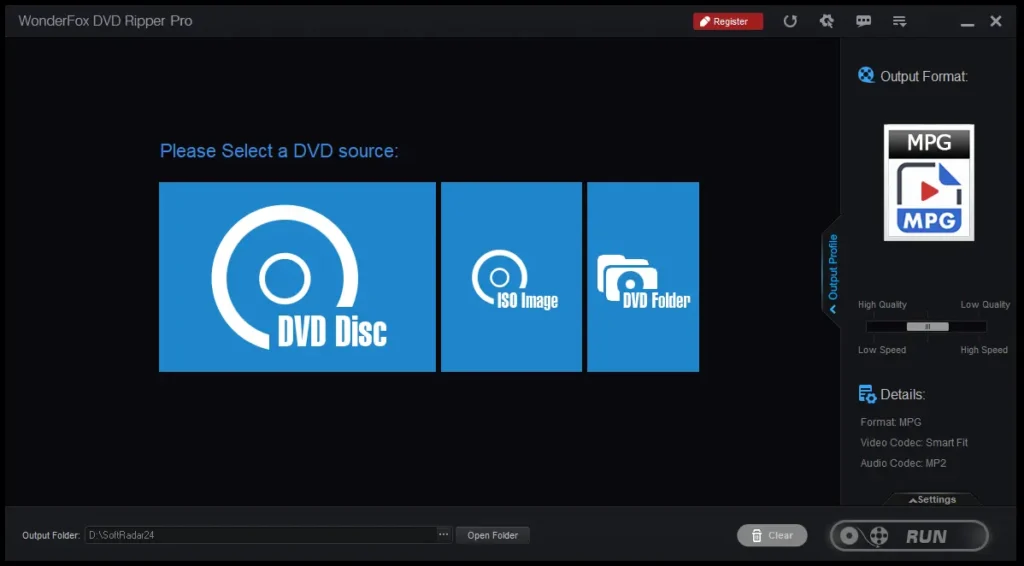
You need this software because it eliminates the technical headache of ripping. It doesn’t require third-party plugins (like libdvdcss) or complex bitrate calculations. It automatically detects the “Main Movie” file from 99 confusing titles, removes the region code locks, and delivers a clean, playable digital file compatible with your iPhone, Plex Server, or NAS drive in minutes.
GPU Acceleration
NVIDIA/Intel QSV Powered
150-min Movie in 10 mins
Decryption Tech
Unlocks Disney X-project,
Sony ARccOS & Region Codes
1:1 Archiving
Lossless ISO Backup
Preserves Tracks & Subs
Fix “Format Not Supported” Errors
If you encounter the dreaded “Cannot play back the file. The format is not supported” error in Windows Media Player, it confirms that your PC lacks the necessary codecs for older media types (like DVD VOB files).
Instead of installing risky codec packs, Microsoft’s troubleshooting suggests verifying file compatibility. Converting your media to standard MP4 solves this instantly.
Reference: Microsoft Support: “Format Not Supported” Error 80040265.
Reasons to Upgrade to PRO Edition: Solving the “Lite” Limitations
The WonderFox DVD Ripper Free version is a decent preview, but for serious collectors, it hits a wall. Here is why the Pro upgrade is essential based on real-world scenarios:
A. The “Overnight Ripping” Problem vs. GPU Acceleration
The Problem: Standard ripping relies heavily on your CPU. Converting a dual-layer DVD (8.5GB) can take 60 to 90 minutes on the Free version, turning your PC into a sluggish heater.
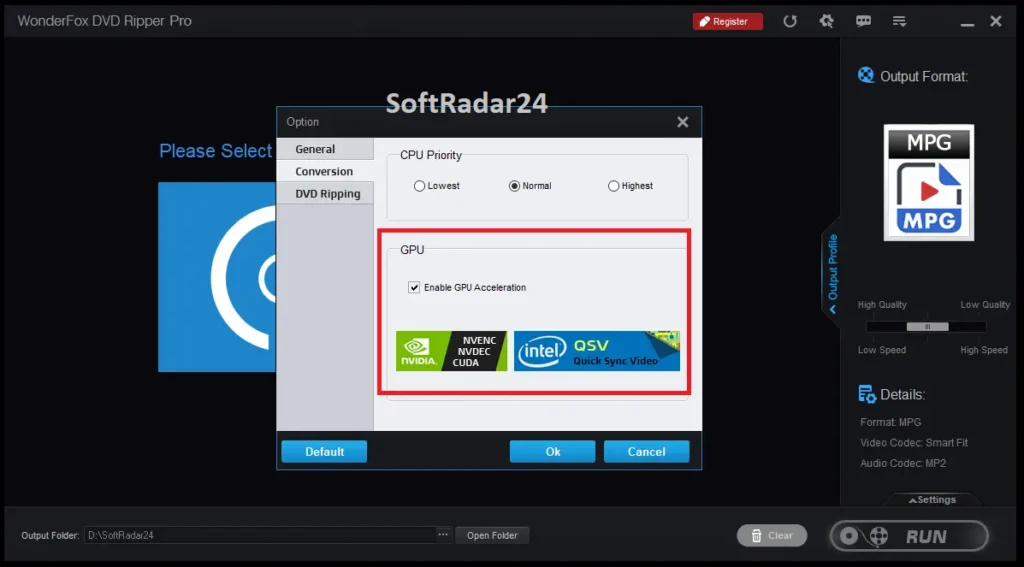
The WonderFox DVD Ripper Pro Solution: The Pro edition activates Hardware Acceleration (NVIDIA NVENC / Intel QSV). By offloading the task to your graphics card, it rips a 150-minute movie in just 10 minutes with zero quality loss, freeing up your CPU for other tasks.
B. The “Read Error” Frustration vs. Advanced Decryption
The Problem: When you try to rip a new Hollywood blockbuster or a classic Disney animation with free tools, you often get a “No Valid Source Found” error. This is due to aggressive copyright encryption schemes.
The Pro Solution: WonderFox DVD Ripper Pro is constantly updated to handle the latest CSS, RCE, APS, and UOP protections. It treats a heavily encrypted commercial disc just like a home video, bypassing region codes (1-6) automatically.
C. The “Skipping Scenes” Nightmare vs. Error Correction
The Problem: Old DVDs often have micro-scratches or fingerprints that cause standard players to freeze or skip scenes during playback.
The Pro Solution: The Pro engine features sophisticated Error Correction Technology. It reads through the damaged sectors, reconstructs the missing data where possible, and forces a continuous rip, effectively “resurrecting” unplayable discs.
Key Features: Beyond Basic Conversion
- ✔
1:1 ISO & DVD Folder Cloning: For purists who demand perfection. Create an exact digital replica of the physical disc, preserving all audio tracks, subtitles, and menus without any compression. - ✔
Smart “Main Movie” Detection: Stop guessing which title is the real movie. The dvd ripper software analyzes the disc structure and automatically selects the correct feature film, ignoring trailers and fake titles used to fool rippers. - ✔
HEVC (H.265) Compression: Reduce file size by up to 50% compared to traditional H.264 without sacrificing visual quality—perfect for storing massive libraries on limited hard drive space. - ✔
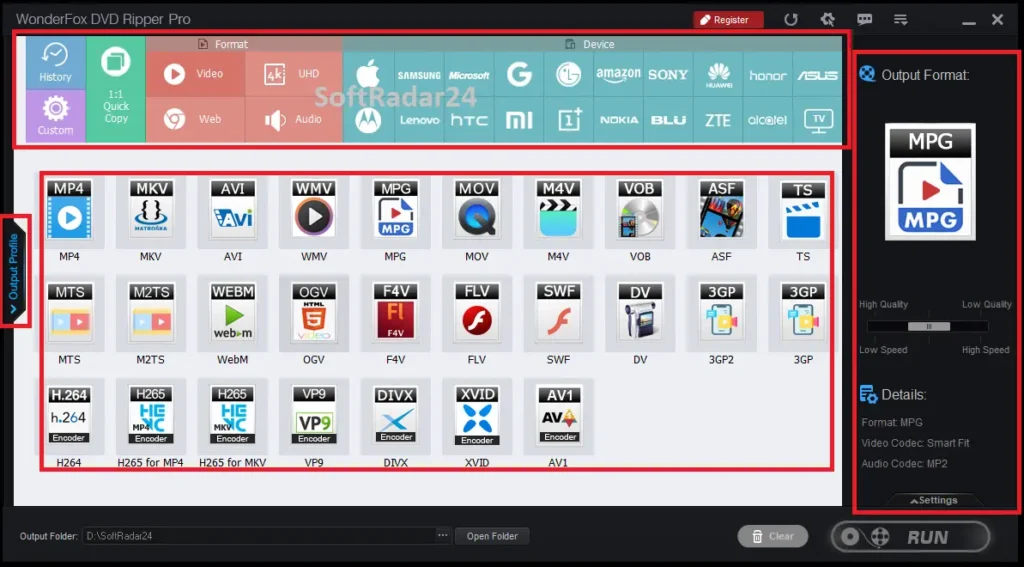
Optimization for 500+ Devices: Pre-configured profiles ensure your rip looks perfect on iPhone 15, iPad Pro, Samsung TV, or PS5 without you needing to know technical bitrate settings.
WonderFox DVD Ripper Free vs. Pro Edition Compare
According to official data, the Free (Lite) version is strictly designed for basic MPG conversion. For serious archiving and damaged discs, the difference is night and day.
| Feature | DVD Ripper Lite (Free) | WonderFox DVD Ripper Pro |
|---|---|---|
| Basic Ripping (MGM, Disney, Sony) | ✅ Yes | ✅ Yes |
| Output Formats | ⚠️ MPG Only (Fast) | 🚀 300+ Formats (MP4, HEVC, MKV) |
| Hardware Acceleration (GPU) | ❌ No | ✅ 50X Faster (NVIDIA/Intel) |
| Repair Scratched/Old DVDs | ❌ No | ✅ Exclusive Tech |
| 1:1 ISO & Folder Backup | ✅ Yes | ✅ Yes (Lossless) |
| Extract Audio (MP3/WAV) | ❌ No | ✅ Yes |
WonderFox DVD Ripper Safe Download
Downloading ripping software can often feel risky due to bundled adware found in many free alternatives. However, the Official WonderFox DVD Ripper Installer on SoftRadar24 is verified clean, containing zero malware or bloatware. We strongly recommend downloading the trial version to run a “Test Rip” on your most scratched DVD; seeing the software successfully rescue a damaged disc is the best proof of its capability. It is a lightweight, non-intrusive utility that respects your system resources while delivering heavyweight performance. Secure your digital legacy today by installing the verified version below.
WonderFox DVD Ripper Pro (Free Trial)
🛡️ Official DVD Ripper Pro Installer: 100% Verified Clean & Safe.
💡 Why the “Lite” Version Isn’t Enough for Collectors
While the Free version is decent for a quick MPG backup, it lacks the Error Correction Engine. If your DVDs have scratches, fingerprints, or “read errors” (which happens to 90% of old discs), the Free version will likely fail or crash. The WonderFox DVD Ripper Pro version‘s algorithm ignores these physical defects, forcing a clean digital copy where others fail.
WonderFox DVD Ripper Pro Coupon Code 2026
Stop searching for unreliable codes on expired coupon sites. As an officially verified WonderFox partner, SoftRadar24 brings you direct access to the lowest authorized prices on the web, saving you up to 83% OFF the retail tag. All licenses listed below are 100% genuine, eligible for official lifetime updates, and delivered instantly to your inbox—guaranteeing you the full power of GPU-accelerated ripping without the premium cost.
🔥 WonderFox DVD Ripper Exclusive Deals
Select the license tier that best fits your setup below. We highly recommend the Discount Pack for complete video freedom or the Family Pack for multi-PC households. All options are one-time purchases (no subscriptions).
WonderFox DVD Ripper Pro – Lifetime (1 PC)
🔥 Best Deal: Official Lifetime License for 1 PC. Instant digital delivery via email. Includes free lifetime upgrades & tech support.
Discount Pack: DVD Ripper + HD Video Converter
🚀 2-in-1 Ultimate Suite: Get both DVD Ripper Pro AND HD Video Converter Factory Pro. Official Lifetime License for 1 PC.
WonderFox DVD Ripper Pro – Lifetime License
100% Genuine Lifetime License with Global Activation. Secure checkout and instant key delivery.
WonderFox DVD Ripper Pro – Family Pack (3 PCs)
👨👩👧👦 Best Value for Home: Official Lifetime License valid for up to 3 PCs. Perfect for families with multiple computers.
100% Secure Checkout
256-bit SSL Encyption. Your payment data is strictly protected and never stored.
Instant Delivery
Automated system. Receive your official license key via email within minutes.
Lifetime Service
Free lifetime upgrades. Lost your key? We retrieve it for free anytime.
👍 The Good (Pros)
- ✅ Decryption Power: Bypasses Disney X-project & Sony ARccOS.
- ✅ GPU Acceleration: 50x faster ripping with NVIDIA/Intel QSV.
- ✅ 1:1 Archiving: Creates lossless ISO images & DVD Folders.
- ✅ Disc Rescue: Error correction reads scratched/old discs.
- ✅ Smart Detection: Auto-finds the “Main Movie” title instantly.
- ✅ Format Freedom: Converts to MP4, MKV, HEVC, iPhone, etc.
- ✅ Region Free: Unlocks Region Codes (1-6) automatically.
- ✅ Small Size: HEVC codec reduces file size by 50%.
👎 The Bad (Cons)
- ❌ Lite is Slow: Free version lacks GPU acceleration support.
- ❌ Windows Only: No native macOS version (Win OS only).
- ❌ Retro UI: Interface is functional but looks a bit dated.
- ❌ Trial Limit: Free version only converts 5 minutes of video.
WonderFox DVD Ripper Pro vs. WinX DVD Ripper Platinum
We analyzed the official technical specifications of both industry leaders side-by-side. Below is the unbiased, raw feature breakdown to help you decide which engine fits your specific workflow.
| Feature Category | WonderFox DVD Ripper Pro | WinX DVD Ripper Platinum |
|---|---|---|
| 1. CORE RIPPING ENGINE | ||
| Disney/Hollywood Decryption | Official Support (Disney, MGM, Paramount, Warner Bros, Sony listed) | Advanced Support (Handles “99-Title” & Japanese DVDs specifically) |
| Damaged/Scratched Discs | ✅ Yes (Error Correction) | ✅ Yes (Old/Scratched Support) |
| 2. SPEED & TECHNOLOGY | ||
| Hardware Acceleration | NVIDIA / CUDA / QSV “Up to 50X Faster Speed” | Level-3 Hardware Accel “Premier Tech / 47x Real-time” |
| Image Engine | Standard High Quality | ✅ HQ Engine + De-interlacing |
| 3. OUTPUT & FORMATS | ||
| Standard Video | MP4, MKV, MOV, WEBM, AVI | MP4, AVI, MOV, WMV |
| Modern Codecs | ✅ H.265, AV1, VP9, ProRes (More Modern Options) | ✅ H.264 & HEVC (Standard High Efficiency) |
| Audio Extraction | ✅ Yes (Extract Soundtracks) | Via Codec Adjustment |
| 4. 1:1 BACKUP MODES | ||
| Lossless Copy | ISO Image, DVD Folder, MKV | ISO Image, MPEG2 File, Main Title Backup |
| 5. EDITING TOOLS | ||
| Features | Clip, Crop, Effects, Add/Remove Subtitles | Trim, Crop, Expand, Subtitle Select/Add |
SoftRadar24 Final Verdict
WonderFox DVD Ripper Pro is the “Swiss Army Knife” of digital archiving. It abandons the complex learning curve of HandBrake in favor of a streamlined, “Load-and-Go” workflow that simply works. While the interface may look deceptively simple, the engine underneath is powerful enough to handle the toughest encryptions Hollywood throws at it. For anyone valuing their time and the preservation of their movie collection, this software is not just a purchase; it is an investment in digital immortality. Highly Recommended.
How to Rip DVD to Digital in 3 Steps
Forget complex settings and bitrate calculations. WonderFox DVD Ripper automates the decryption process into a simple “Load, Pick, Run” workflow:
Insert your DVD and click “DVD Disc”. The software instantly decrypts the protection and auto-selects the “Main Movie” title for you.
Click the output profile image. Select “MP4” for best compatibility, “ISO” for 1:1 backup, or choose your specific device (iPhone, TV, etc.).
Hit the big “Run” button. The Hardware Acceleration will kick in, converting a full-length movie in as little as 10 minutes.
System Requirements & Tech Specs
WonderFox DVD Ripper is exceptionally lightweight, but to utilize the maximum ripping speed (50x), ensure your hardware supports GPU acceleration.
| Supported OS | Windows: 11, 10, 8.1, 8, 7, Vista, XP (Both 32-bit & 64-bit compatible) *Note: Not compatible with macOS natively. |
| Hardware Specs | Processor: 1GHz Intel/AMD (Multi-core recommended for fast ripping) RAM: 512MB Minimum (4GB+ Recommended for 4K Upscaling) Storage: 100MB for Installation (10GB+ Free Space for ISO Files) GPU: NVIDIA / Intel QSV / AMD (Required for Hardware Acceleration) |
| Supported Inputs | DVD Disc (DVD-9, DVD-5), ISO Image, DVD Folder (Video_TS), Region Locked Discs (1-6), CSS Encrypted Discs |
| Output Formats | Video: MP4, MKV, AVI, MPG, MOV, HEVC (H.265), WMV Backup: 1:1 ISO Image, DVD Folder (Lossless) Audio: MP3, WAV, FLAC, ALAC (Extract Audio Only) |
Frequently Asked Questions (FAQ)
1. Is WonderFox DVD Ripper legal to use?
In most jurisdictions, making a backup copy of a DVD you legally own for personal use (format shifting) is a gray area but generally accepted. However, ripping rental discs or distributing the files online is strictly illegal. Always check your local copyright laws.
2. How is this different from HandBrake?
HandBrake is a transcoder, not a decryptor. It cannot rip commercial, copy-protected DVDs without installing third-party files like libdvdcss. WonderFox handles all encryption natively out of the box and is significantly faster due to better GPU support.
3. Can it upscale old DVDs to 1080p or 4K?
Yes. While DVDs are natively 480p/576p, WonderFox DVD Ripper includes an upscaling algorithm that improves the visual quality when converting to HD formats, making them look sharper on modern large screens.
4. Will it work on scratched discs?
Yes. The software includes “Error Correction” technology that attempts to read through physical damage. While it cannot fix a cracked disc, it is highly effective at recovering video from moderately scratched surfaces.
5. Does the Pro version have a time limit?
If you purchase the “Lifetime License,” it never expires and includes free lifetime updates. The “1-Year License” is valid for 12 months. The Free trial version has limitations on the length of video it can convert (usually 5 minutes).
6. Can I rip just the audio?
Absolutely. You can extract soundtracks or dialogue directly to MP3, WAV, or FLAC formats without converting the video portion.
7. What is “1:1 Copy” mode?
This mode copies the DVD data exactly as it is to an ISO image or DVD Folder without any compression or quality loss. It is the ideal method for creating a perfect digital archive.
8. Does it support subtitles?
Yes. You can choose to “Soft Code” subtitles (turn them on/off in your player) or “Hard Burn” them directly into the video image. It also allows you to keep multiple subtitle tracks.
9. Is it compatible with Windows 11?
WonderFox DVD Ripper Pro is fully optimized for Windows 11, 10, 8, and 7. It is lightweight and does not require high-end specs to run efficiently.
10. Why is the file size smaller than the original DVD?
DVDs use the older MPEG-2 codec, which is inefficient. WonderFox converts this to modern H.264 or HEVC codecs, which can maintain the same visual quality while using 50-70% less storage space.
🤝 Affiliate Disclosure: Our Transparency Promise
Transparency is one of our core values at SoftRadar24. We believe in building a relationship of trust with our visitors. Before you explore our software deals and reviews, we want you to understand exactly how this website operates and how we are funded.
How We Are Funded
SoftRadar24 is a reader-supported independent publication. We are not owned by any software giant. To keep this website free for you—without cluttering it with annoying pop-up ads—we participate in various Affiliate Marketing Programs.
What Does This Mean for You?
When you click on a link (like “Buy Now”) and make a purchase, we may earn a referral commission.
✅ No Extra Cost: This commission comes at no extra cost to you. In fact, our direct partnerships often unlock exclusive coupons that make the product cheaper than the regular price.
The purchase process happens entirely on the official vendor’s secure website. We simply refer you to them; we do not process payments.