Is your Windows PC slowing down due to accumulated software junk, or are you struggling to remove programs that refuse to be deleted? Over time, every computer accumulates residual files, broken registry keys, and bloatware that the standard Windows “Add/Remove Programs” utility simply cannot detect or delete.
IObit Uninstaller PRO 15 is not just a deletion tool; it is a comprehensive system hygiene utility designed to forcefully remove stubborn software, malicious browser plugins, and bundleware. By tracking installation processes in real-time and cleaning up 100% of the leftovers, it ensures your PC remains as fast and clean as the day you bought it. In this review, we analyze why this tool is an essential upgrade for any Windows user in 2026..
What is IObit Uninstaller PRO 15 and Why Do You Need It?
Unlike the default uninstaller built into Windows, which only runs the program’s built-in uninstallation script, IObit Uninstaller PRO 15 utilizes a powerful scanning engine to dig deep into the system. When a standard uninstaller finishes, it often leaves behind gigabytes of useless data in the “AppData” folders and the Windows Registry. IObit identifies these remnants and wipes them out completely.
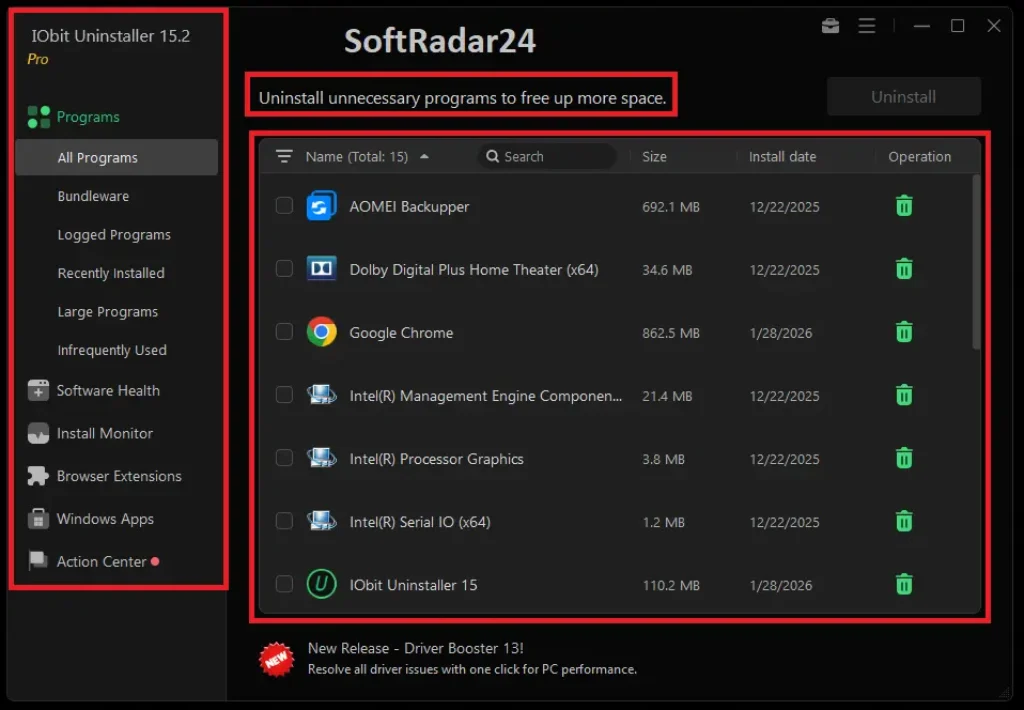
The software is engineered to handle “Stubborn Programs”—software with corrupted uninstallation files or hidden mechanisms that prevent removal. Furthermore, its “Install Monitor” technology logs every system change made during a program’s installation. This allows you to revert those changes entirely if you decide to remove the app later, ensuring a perfect reversal with zero impact on system stability.
💻 Manual vs. Automatic:
Windows offers a standard method to remove apps via Settings. While useful for basic apps, this official method often leaves behind “Registry Junk” and empty folders. IObit Uninstaller automatically detects these leftovers that the manual method misses.
15 Reasons to Upgrade to PRO Edition (Proven Benefits)
While the free version offers basic functionality, the IObit Uninstaller PRO edition unlocks the full potential of the software. Here are the specific problems users face and how the PRO version solves them:
Category A: Deep Cleaning & Removal Capabilities
- Problem: Programs Refuse to Uninstall
Solution: The PRO engine supports removing 4000+ stubborn programs that generate errors or lack an uninstaller file. - Problem: Hidden “Bundleware” Installations
Solution: It automatically detects and removes bundled third-party software installed without your explicit consent alongside main programs. - Problem: Bloated Windows Apps
Solution: You can uninstall unwanted Windows Apps (Bloatware) even under a non-administrative account, freeing up valuable disk space. - Problem: Android App Leftovers (Windows 11)
Solution: Fully supports the uninstallation of Android apps on Windows 11 subsystems with a single click. - Problem: Corrupted Uninstallers
Solution: The “Fix Uninstall Issues” feature can repair corrupted uninstallation paths, allowing you to remove broken software safely.
Category B: System Security & Privacy
- Problem: Malicious Browser Extensions
Solution: Identifies and removes malicious plug-ins and toolbars from Edge, Chrome, Firefox, and IE that track your data or inject ads. - Problem: Adware & Notification Spam
Solution: The “Software Health” module blocks annoying browser notification prompts and popup ads that interrupt your workflow. - Problem: Privacy Traces
Solution: Automatically scans for and removes residual files and privacy traces left by uninstalled programs to prevent data recovery. - Problem: System Instability
Solution: By cleaning invalid registry entries linked to deleted software, it prevents system crashes and “Blue Screen” errors. - Problem: Unwanted System Changes
Solution: The “Install Monitor” automatically reverts system changes (files/services) made by a program if you decide to uninstall it later.
Category C: Speed & User Experience
- Problem: Outdated Software Vulnerabilities
Solution: The 1-click Updater scans and updates all your important software (like WinRAR, Zoom, Chrome) to the latest secure versions. - Problem: Slow PC Startup Times
Solution: It allows you to manage and stop unnecessary startup programs that launch with Windows, significantly reducing boot time. - Problem: Complex Manual Cleaning
Solution: The IObit Uninstaller PRO version performs “Automatic Leftover Cleanup” without requiring user intervention after a standard uninstall. - Problem: File Recovery Risks
Solution: The “File Shredder” feature securely and permanently deletes unwanted files, making them unrecoverable by data theft tools. - Problem: Lack of Support
Solution: PRO users get access to premium 24/7 technical support to resolve specific system issues immediately.
🥊 The Ultimate Showdown: Still undecided? We tested IObit against its biggest rival in a brutal head-to-head battle. See who won the IObit Uninstaller vs. Revo Uninstaller Review.
Key Technical Features
Understanding the core technologies behind IObit Uninstaller PRO 15 reveals why it outperforms standard tools. The software operates on a strict “Zero Leftover” policy.
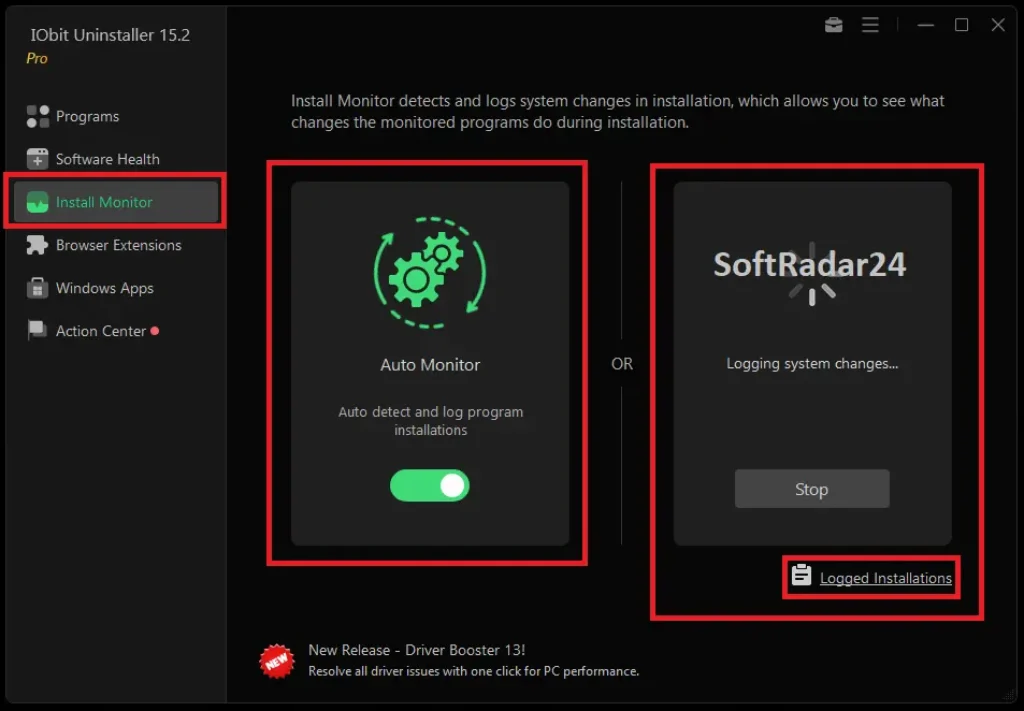
Real-Time Install Monitor: This is arguably the most critical feature for power users. Instead of relying on a snapshot, the monitor runs in the background. When you install a new app, IObit logs every file created and every registry key modified. This creates a detailed map of the installation, ensuring that uninstallation is surgical and complete.
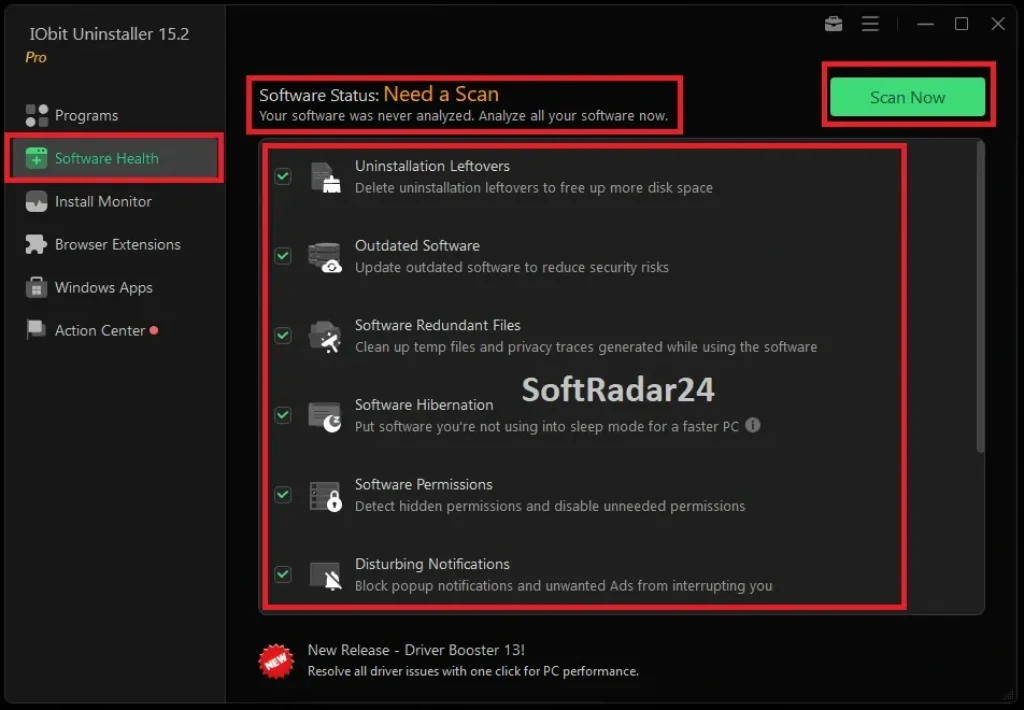
Software Health Module: This is a proactive maintenance tool. It doesn’t just wait for you to delete something; it actively scans for software permissions, disables unneeded startup items, and blocks browser notifications that distract you. It effectively acts as a system optimizer dedicated purely to software management.
IObit Uninstaller: Free vs. PRO Comparison
Is the IObit Uninstaller PRO version worth the investment? The table below provides a brutal, transparent comparison of what you get with each edition.
| Feature / Capability | Free Edition | PRO Edition |
|---|---|---|
| 🚀 Stubborn Program Removal Removes 4000+ programs that refuse to uninstall. |
❌ | ✅ YES |
| 🦠 Malicious Plugin Removal Deletes harmful extensions and adware. |
❌ | ✅ YES |
| 📦 Bundleware Detection Removes unwanted software installed alongside main apps. |
❌ | ✅ YES |
| 🔄 1-Click Software Updater Updates outdated software instantly. |
❌ | ✅ YES |
| 🔙 Auto Revert System Changes Reverses file/registry modifications during uninstall. |
❌ | ✅ YES |
| 🧹 Auto Leftover Clean Deep cleans registry and files automatically. |
Basic | ✅ Deep |
| 🪟 Windows Apps Removal Removes built-in bloatware. |
✅ | ✅ YES |
Safe Download & Installation Guide (No Crack)
Many users search for “IObit Uninstaller PRO Crack” or “Keygen,” but this poses a significant security risk. Cracked software often contains hidden ransomware or crypto-miners that can damage your hardware.
We strongly recommend downloading the official version. You can use the free trial to test the basic features safely. If you require the advanced cleaning power of the IObit Uninstaller PRO edition, our exclusive discount offers a legitimate license for less than the price of a coffee.
💡 Expert Note: Always download from authorized sources to ensure the digital signature is valid. The button below links directly to the official latest version.
IObit Uninstaller PRO 15 Pricing & Coupon 2026
Investing in system maintenance software is cheaper than repairing a slow computer. While the official global price is competitive, SoftRadar24 offers exclusive access to discounted license keys.
Instead of paying the full retail price of $59.93, you can secure a genuine, 1-year license for 3 PCs at a fraction of the cost. This license includes free technical support and all feature updates throughout the subscription period.
🎁 Exclusive 5-in-1 Mega Bundle
Why settle for one? Get the complete PC optimization suite for the price of a coffee.
- 🚀 IObit Uninstaller 15 PRO MAIN ITEM
- 🔒 Protected Folder FREE GIFT
- 🪟 Start Menu 8 PRO FREE GIFT
- 🔄 IObit Software Updater FREE GIFT
- ⚡ Smart Defrag PRO FREE GIFT
SoftRadar24 Final Verdict: Is It Worth It?
After extensive testing, IObit Uninstaller PRO proves to be an indispensable tool for Windows users. It bridges the gap between simple deletion and complete system hygiene. If you frequently install and test new software, or if you are dealing with a cluttered PC that has slowed down over the years, this tool is mandatory.
Who is it for?
It is ideal for users who want a “set it and forget it” solution for PC health, as well as tech enthusiasts who need granular control over their system files.
Our Rating: 9.8/10 – Highly Recommended for its efficiency, safety, and ease of use.
Frequently Asked Questions (FAQ)
Q: Does it delete my personal files?
A: No. IObit Uninstaller Pro only targets program files, registry keys, and temporary data associated with the installed software. Your documents, photos, and videos are safe.
Q: Can I reinstall the program if I format my PC?
A: Yes. Your license key is tied to your account/email. You can reinstall the software and reactivate it using the same key on the same device.
Q: Does it support Windows 11?
A: Yes, it is fully optimized for Windows 11, Windows 10, 8.1, 8, and Windows 7.
Q: How does the “Stubborn Program” removal work?
A: It uses a proprietary database to identify the installation paths of known difficult programs and forcefully deletes the files even if the uninstaller is missing.
Q: Is the license a one-time purchase?
A: The standard license is usually a 1-year subscription, which ensures you always have the latest virus definitions and cleaning algorithms.
Q: What happens if I uninstall the PRO version?
A: The programs you uninstalled using IObit will remain deleted, but you will lose the real-time installation monitoring and automatic cleaning features.
🤝 Affiliate Disclosure: Our Transparency Promise
Transparency is one of our core values at SoftRadar24. We believe in building a relationship of trust with our visitors. Before you explore our software deals and reviews, we want you to understand exactly how this website operates and how we are funded.
How We Are Funded
SoftRadar24 is a reader-supported independent publication. We are not owned by any software giant. To keep this website free for you—without cluttering it with annoying pop-up ads—we participate in various Affiliate Marketing Programs.
What Does This Mean for You?
When you click on a link (like “Buy Now”) and make a purchase, we may earn a referral commission.
✅ No Extra Cost: This commission comes at no extra cost to you. In fact, our direct partnerships often unlock exclusive coupons that make the product cheaper than the regular price.
The purchase process happens entirely on the official vendor’s secure website. We simply refer you to them; we do not process payments.