
Quick Summary
Kerish PC Doctor is a Windows maintenance and system-care toolkit that combines automatic PC maintenance, error correction, junk-file cleanup, real-time failure prevention, hardware monitoring, driver tools, game acceleration, deleted-file recovery, Windows tuning and secure file shredding. It is strongest for users who want several Windows maintenance jobs in one application instead of buying a separate cleaner, hardware monitor, troubleshooting utility and basic driver tool.
- Best for
- Windows maintenance · hardware monitoring · common PC repairs · driver upkeep · cleanup
- Platforms
- Windows 11 / 10 / 8 (8.1) / 7
- License
- 1-Year / 2-Year / 3-Year · 1–3 PCs
- Key limitation
- Windows only; smart defragmentation excludes SSDs
Kerish PC Doctor Pricing, Coupon Code & License Options
Choose a 1-, 2- or 3-year Kerish PC Doctor license for 1–3 Windows PCs. Each listed term includes free updates, free technical support and license-key recovery if the key is lost.
The current SoftRadar24 prices are $8.10 for 1 year, $10.81 for 2 years and $13.51 for 3 years. The license period starts when the activation key is issued rather than when it is first entered into Kerish PC Doctor.
Current Kerish PC Doctor License Prices
- Kerish PC Doctor · 1-Year License · 1–3 PCs · $8.10
- Kerish PC Doctor · 2-Year License · 1–3 PCs · $10.81
- Kerish PC Doctor · 3-Year License · 1–3 PCs · $13.51
Kerish PC Doctor · 1-Year License
1–3 Windows PCs · 1-year license
Included with this license- Kerish PC Doctor for 1–3 Windows PCs for one year
- Free application updates during the license period
- Free technical support
- License-key recovery service if the key is lost
All three options cover 1–3 PCs and carry the same update, support and license-recovery benefits. Choose by the length of coverage you need; the longer license terms reduce how often you need to replace an expired key.
Kerish states that separate license-key validity periods cannot be combined. Its published 30-day money-back guarantee also excludes reseller or partner orders; the linked checkout is processed by 2Checkout as an authorized reseller and merchant of record.
Can This Software Do What I Need?
Kerish PC Doctor is designed around ongoing Windows maintenance rather than one isolated repair. It is a strong fit when you want cleanup, monitoring, common-problem repair and supporting utilities together, but a dedicated product can make more sense when one specialist job is your only priority.
I want one Windows tool for routine maintenance, cleanup and common repairs
All-in-one PC maintenance
SupportedKerish PC Doctor combines automatic maintenance, junk cleanup, error correction, real-time failure prevention, Windows tuning and a list-based PC problem solver in one application.
I need temperature, load and laptop-battery monitoring
Hardware condition monitoring
SupportedThe hardware monitor tracks component temperature and load, while the current 4.95 feature set also includes laptop-battery condition monitoring and motherboard voltage monitoring where supported by the hardware.
I want to update Windows device drivers inside the maintenance suite
Integrated driver tool
SupportedKerish PC Doctor includes Driver Update for more than 100,000 known devices with monthly database updates, plus Driver Manager functionality documented for driver backup. A dedicated driver updater is a better fit when driver management is the main reason for buying.
I need to recover a file I deleted by mistake
Deleted-file recovery
SupportedFile Recovery is part of the documented Kerish PC Doctor tool set and is intended to recover data after deletion. Kerish does not publish a universal recovery-success rate for File Recovery.
I want to permanently destroy a sensitive file
Secure deletion
SupportedKerish PC Doctor includes File Shredder for intentional data destruction. Version 4.95 added configurable information-erasure methods, so this is a separate workflow from ordinary deletion or File Recovery.
I want Windows game acceleration without a separate gaming utility
Game-oriented resource optimization
SupportedKerish PC Doctor includes game-acceleration technology and its product history documents live application optimization for distributing CPU time between running processes. It is a maintenance-oriented boost feature rather than a claim of a guaranteed FPS increase.
I want to defragment an SSD
SSD maintenance
Not supportedKerish PC Doctor’s current product page explicitly excludes SSDs from its smart defragmentation routine. Disk cleanup remains a separate maintenance function.
I need predicted SSD or HDD remaining lifespan and failure-time estimates
Dedicated disk-health prediction
Better fitKerish PC Doctor monitors hardware and includes disk-care tools, but Kerish Products now positions its separate Kerish Disk Health application for remaining-life percentage, estimated time to failure and storage-health warning workflows.
I use macOS or Linux
Operating-system support
Not supportedThe current Kerish PC Doctor product and download pages list Windows editions only. No current macOS or Linux edition is documented.
My main priority is a dedicated antivirus with published specialist protection technology
Security-first purchase
Better fitKerish PC Doctor includes virus protection and security-parameter monitoring, but Kerish does not publish a quantified detection rate or specialist lab score for the product. A security-focused suite is easier to evaluate when malware protection is the primary purchase criterion.
How It Works
Kerish PC Doctor separates maintenance, hardware monitoring, updates, tools and support into different areas. Start with the task you actually need rather than treating every slowdown as the same problem.
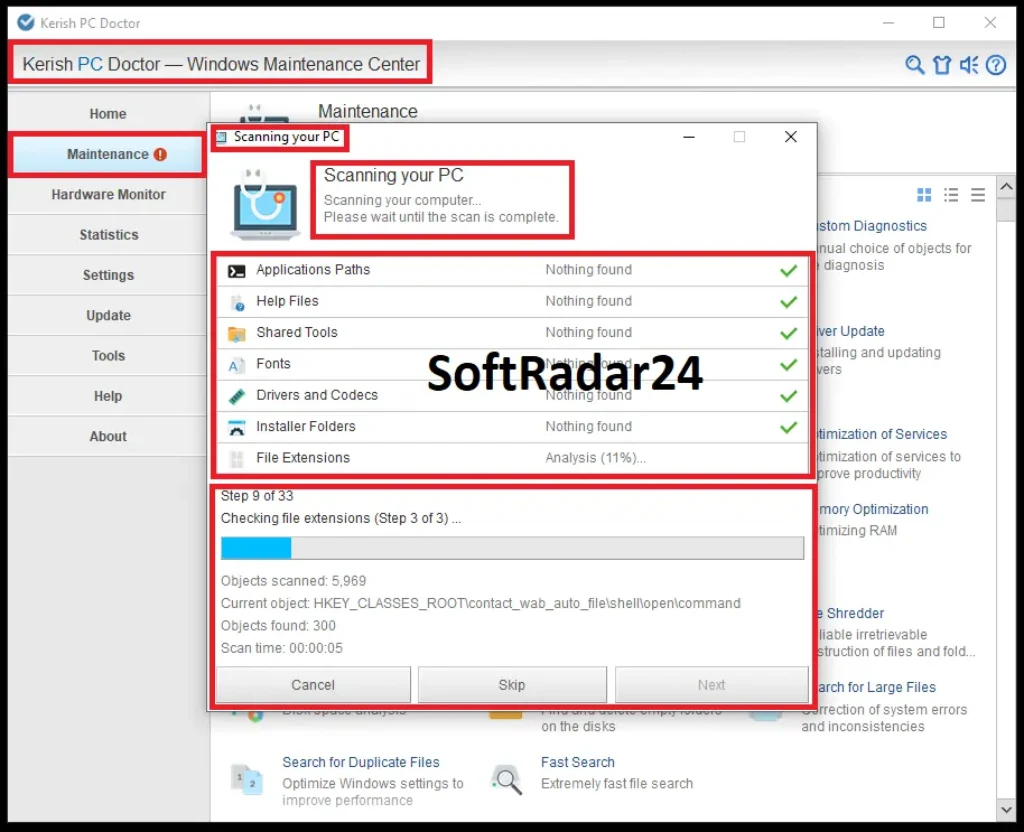
Run a Windows Maintenance Scan
- Open Kerish PC Doctor and select the Maintenance area.
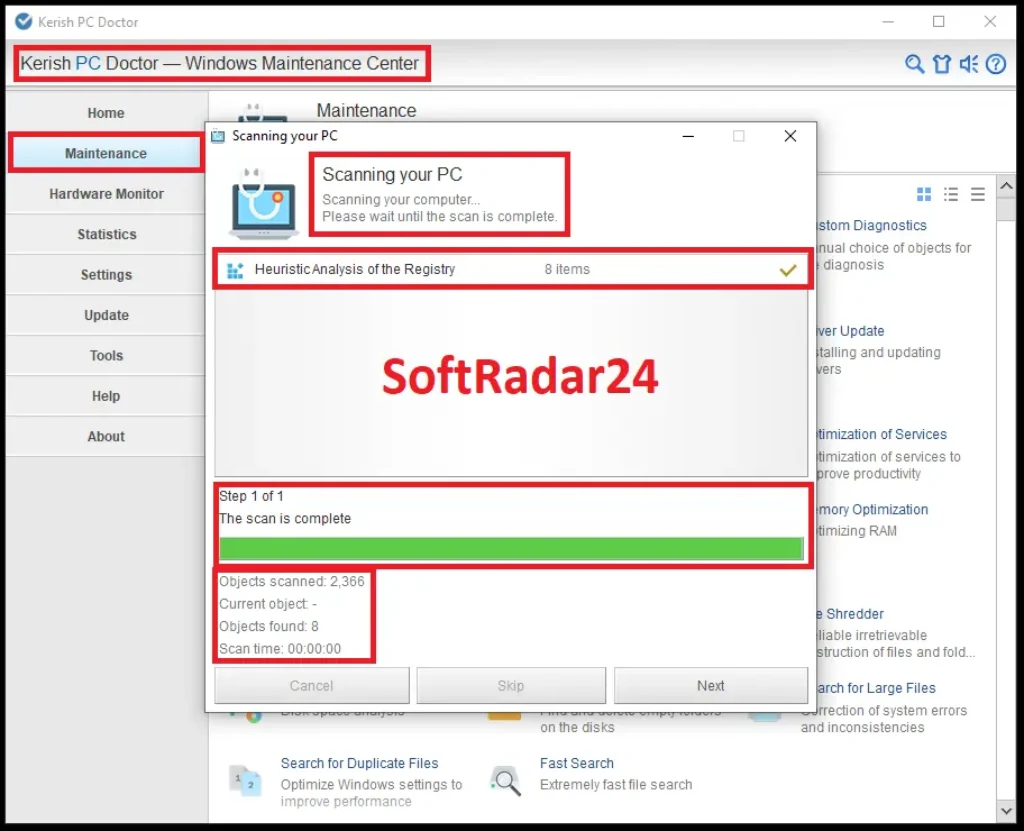
- In Kerish PC Doctor, start the PC scan and let the diagnostic sequence inspect the configured maintenance categories.
- In Kerish PC Doctor, review the reported items before applying the available repair or cleanup action.
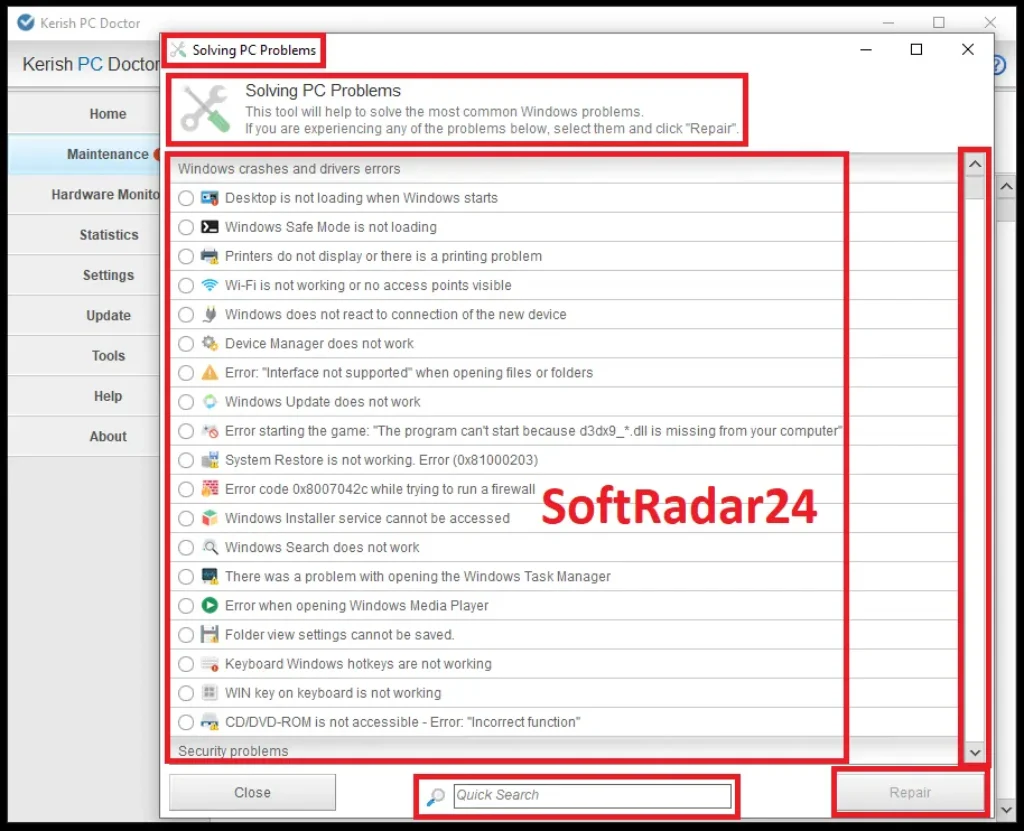
Repair a Common Windows Problem
- Open Kerish PC Doctor and enter the Solving PC Problems tool.
- In Kerish PC Doctor, choose the Windows problem that matches the symptom shown on your PC.
- In Kerish PC Doctor, use the available Repair action for the selected problem.
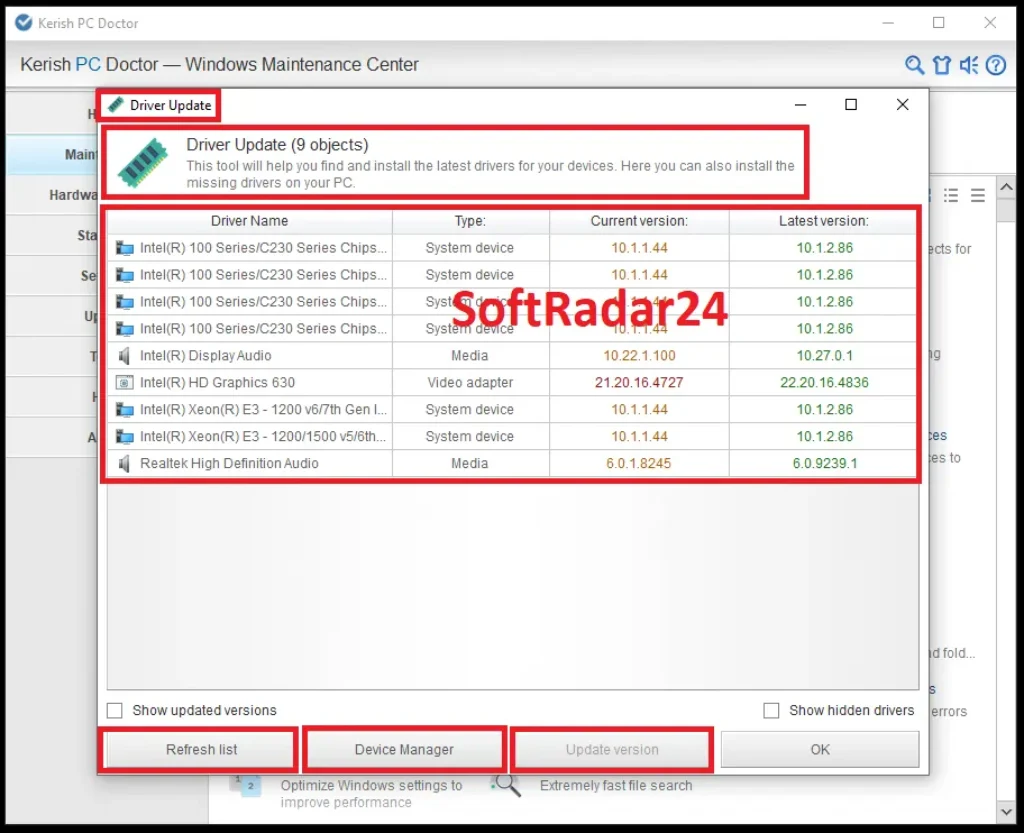
Check for Device Driver Updates
- Open Kerish PC Doctor and select the Driver Update tool.
- In Kerish PC Doctor, refresh the driver list so the installed devices can be compared with the available driver database.
- In Kerish PC Doctor, review the device name, current version and available version before choosing an update.
Activate a Paid License Key
- Open Kerish PC Doctor and select Help and Support in the main application window.
- In Kerish PC Doctor, click Activate Kerish PC Doctor.
- In Kerish PC Doctor, enter the registration data in the activation fields and click Next.
- Kerish PC Doctor displays a successful-activation message when the registration data is accepted.
Product Interface & Workflow
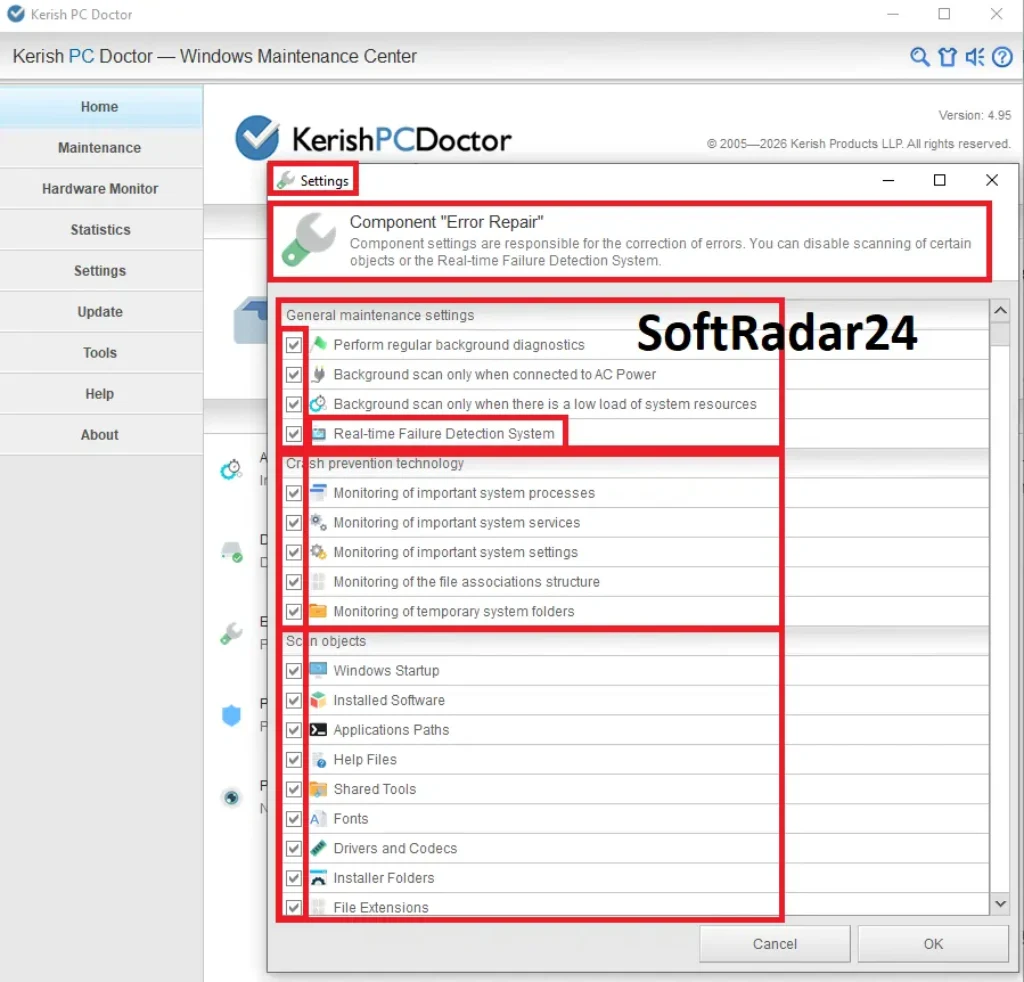
The interface organizes the product around maintenance categories and separate specialist tools. The views below show the product artwork and the diagnostic, troubleshooting, driver, registry and real-time failure-detection workflows.
Compatibility & Coverage
Kerish PC Doctor is a Windows-only product. The current product page lists Windows 11 through Windows 7, while the download page provides a Windows installer for both 32-bit and 64-bit systems.
| Area | Current coverage | Decision note |
|---|---|---|
| Windows | Windows 11 / 10 / 8 (8.1) / 7 | These are the operating systems listed on the current Kerish PC Doctor product page. |
| Architecture | 32-bit and 64-bit Windows installer | The current Kerish download page provides one PC Doctor installer family for both architectures. |
| macOS / Linux | No current edition listed | Choose another product if the computer does not run Windows. |
| License devices | 1–3 PCs | The 1-, 2- and 3-year license options use the same 1–3 PC allowance. |
| Portable use | Portable installation mode documented for version 4.95 | The 4.95 release notes describe an installation option for a USB-drive portable version. |
| Disk optimization | Cleanup plus smart defragmentation for non-SSD drives | The current product page explicitly excludes SSDs from smart defragmentation. |
| Driver database | 100,000+ known devices · monthly updates | Useful as an integrated maintenance feature; dedicated driver tools may offer a broader driver-first workflow. |
Features & Capabilities
The useful way to evaluate Kerish PC Doctor is by maintenance job. Its feature set spans routine cleanup, real-time monitoring, repair, driver management, performance tools and file utilities rather than focusing on a single scan type.
Maintenance & Failure Prevention
- Automatic computer maintenance and error correction
- Junk-file cleanup and disk-care routines
- Real-Time Failure Detection System
- Common Windows problem list with repair actions
Hardware & Disk Monitoring
- Temperature and load monitoring for supported computer components
- Laptop-battery physical-condition monitoring
- Motherboard power-supply voltage monitoring where supported
- Desktop hardware-monitor widget and S.M.A.R.T.-based disk features documented in the product history
Drivers & Windows Tools
- Driver Update database for more than 100,000 known devices with monthly updates
- Driver Manager with driver-backup functionality
- Windows tuning for hidden system settings
- System Restore, Windows Update, process, network and service tools documented in the current product lineage
Performance & Gaming
- Game-acceleration technology
- Application live optimization for distributing CPU time between running processes
- Memory and startup optimization tools documented in the product history
- Internet Booster with updated controls in version 4.95
Recovery, Deletion & File Utilities
- File Recovery for data deleted from the PC
- File Shredder for intentional irreversible deletion
- Configurable information-erasure methods in version 4.95
- Large-file, duplicate-file and disk-space analysis tools documented in the product history
Security & Administration
- Vendor-described virus protection
- Monitoring of important security parameters
- Recommendations for Windows configuration and privacy-related settings
- Portable USB-drive installation mode and automatic PC shutdown timer in version 4.95
Important Conditions & Limitations
Kerish PC Doctor is broad, but several boundaries affect the buying decision: it is Windows-only, the trial is time-limited, SSDs are excluded from smart defragmentation, and not every historically documented module should be assumed to remain a current purchase reason.
Windows Only
The current product and download pages list Windows 11, 10, 8/8.1 and 7. There is no current macOS or Linux edition documented by Kerish Products.
Smart Defragmentation Excludes SSDs
Kerish explicitly excludes SSDs from its smart defragmentation routine. Do not buy the product expecting it to defragment solid-state drives; cleanup and other maintenance functions are separate from defragmentation.
The Free Period Ends After 15 Days
Kerish’s EULA states that the trial runs for 15 days from installation. Continued use after the trial requires a paid license key.
License Time Starts When the Key Is Issued
The purchase terms state that the license period begins when the activation key is issued, not when the key is later entered into the program. Delaying activation does not delay the start of the paid term.
Separate License Periods Cannot Be Combined
Kerish states that the validity periods of different license keys cannot be combined. Choose the 1-, 2- or 3-year term that matches the coverage period you want instead of assuming separate keys will stack.
Software Update Was Marked for Discontinuation
Kerish announced in September 2024 that the PC Doctor Software Update tool would become unavailable and that support for the feature would be discontinued. Do not treat third-party application updating as a current reason to buy unless Kerish documents a newer replacement.
Virus Protection Is a Vendor-Documented Capability
The current product page says Kerish PC Doctor defends the computer against viruses and monitors security parameters, but it does not publish a quantified detection rate or specialist lab score on the product pages used here. Users buying primarily for malware protection may prefer a security-focused suite with a clearly documented antivirus engine.
The 30-Day Vendor Refund Guarantee Has Channel Exclusions
Kerish’s refund policy offers refunds within 30 days of an original purchase but explicitly excludes reseller and partner orders. Because the linked checkout is processed by 2Checkout as an authorized reseller and merchant of record, the Kerish direct-purchase guarantee should not be represented as applying to these reseller checkout links.
Free Trial / Free Version
Kerish PC Doctor provides a 15-day free trial. The EULA states that the trial begins when the software is installed and that a paid license key is required to continue using the product after the trial period.
| Trial item | Current official information | Decision note |
|---|---|---|
| Duration | 15 days | The trial period begins from installation. |
| After trial | Paid license key required | Purchase and activate a key to continue using Kerish PC Doctor. |
| Module-specific quotas | Not specified by Kerish | Kerish specifies the 15-day time limit but does not list separate export, scan or repair quotas. |
| Activation path | Help and Support → Activate Kerish PC Doctor | Enter the registration data and continue with Next. |
System Requirements
Kerish publishes the supported Windows versions, installer architecture and current application size, but does not list a current minimum CPU or RAM specification.
| Requirement | Current value | Decision note |
|---|---|---|
| Operating system | Windows 11 / 10 / 8 (8.1) / 7 | Current official support list. |
| Installer architecture | 32-bit and 64-bit Windows | Both architectures are listed on the official download page. |
| Current product version | 4.95 | The current product page lists version 4.95. |
| Application size | 48.3 MB | This is the size shown on the current product page, not a complete free-disk-space requirement. |
| CPU / RAM minimum | Not specified by Kerish | Check with Kerish support if the PC is unusually old or resource-constrained. |
| Portable installation | Available in version 4.95 | The 4.95 release notes document a portable version option for a USB drive during installation. |
Alternatives & Better-Fit Options
Kerish PC Doctor is a broad Windows maintenance suite. If your priority is a different balance of antivirus protection, automatic optimization, dedicated driver management or PC cleaning, compare the options below. For the Kerish catalog and SoftRadar24 purchase information, visit the Kerish PC Doctor software page on SoftRadar24.
Advanced SystemCare Ultimate
A better fit when antivirus protection is central to the purchase. IObit positions Ultimate as a combined PC cleaner, speed tool and antivirus suite with Bitdefender real-time protection.
Advanced SystemCare Pro
A useful comparison when your priority is automated Windows cleaning, optimization, privacy protection and background PC care rather than Kerish’s particular mix of hardware monitoring and maintenance utilities.
IObit Driver Booster PRO
A better fit when driver detection, repair, backup and update workflow is the main job. Driver Booster PRO is a dedicated Windows driver updater rather than a general PC maintenance suite.
Wise Care 365
A useful alternative when you want a Windows PC cleaner and system optimizer with disk cleanup, registry cleanup, privacy tools and real-time protection against unwanted system changes.
FAQ
These answers cover license-management and usage details that can matter after installation or purchase.
Can I recover a lost Kerish PC Doctor license key?
Yes. Kerish Products provides a license-restoration service through its support area, and the current purchase page lists license recovery as an included benefit.
Is a Kerish PC Doctor license transferable to another person?
Kerish’s EULA describes the right to use the software as personal, non-exclusive and non-transferable. It also says the license key is confidential and should not be provided to third parties.
Can I use Kerish PC Doctor for commercial purposes?
Kerish’s EULA says the software may not be sold, resold, rented, leased or used in parts for commercial purposes except where the manufacturer permits it. Business use should therefore be checked against the current license terms before deployment.
Does a Kerish PC Doctor key apply to future program versions?
The current purchase page says the license applies to all versions of the application and includes free updates. The separate license expiration date still controls how long the paid service remains active.
Where can I see how many days remain on my Kerish PC Doctor license?
Open the About section in Kerish PC Doctor. Kerish’s activation guide says this area shows the license expiration date and the number of days remaining.
What happens to a Kerish PC Doctor license after an approved refund?
Kerish’s refund policy says the license key is blocked after a refund is processed. The same policy states that its 30-day money-back guarantee does not apply to reseller or partner orders.





