Modern Windows PCs rarely fail overnight — problems usually grow silently in the background through everyday use, incomplete updates, background software, and small system conflicts that go unnoticed for months or even years.
What starts as a slightly slower PC startup can eventually turn into frequent crashes, unstable performance, privacy concerns, or unexplained security risks. For many users worldwide, these issues feel random and disconnected, making it difficult to understand where the real problem actually lies. The truth is that system speed, stability, and security are closely connected at a deeper level. When core Windows functions lose balance, performance drops and protection weakens at the same time — even on relatively new Windows PCs.
That’s why fixing individual issues in isolation is often not enough. To truly restore a PC’s reliability, the underlying system health must be addressed first. The sections below break down the most common real-world PC problems users face globally — and explain how Advanced SystemCare 19 Pro tackles them methodically, without guesswork, technical headaches, or trial-and-error fixes.
IObit Uninstaller 15 vs. Revo Uninstaller 5: Who Removes More Junk?
The default Windows uninstaller often leaves behind “Leftover Files” and broken registry entries that Advanced SystemCare has to clean up later. We tested the two industry giants to see which tool removes programs permanently.
Read the Full Review & Comparison ➔Why Advanced SystemCare Pro Covers Both Speed & Security
Most users treat performance problems and security risks as two separate issues. In reality, they often originate from the same underlying system weaknesses. Unoptimized background processes, outdated components, and hidden system conflicts don’t just slow a PC down — they also create entry points for modern threats. When system resources are mismanaged, security becomes fragile by default.
Advanced SystemCare Pro 19 addresses this problem at the system level. Instead of handling speed and protection as isolated features, it restores balance across core Windows functions — reducing unnecessary load while closing structural vulnerabilities. This unified approach is why users experience both a faster and safer PC, without needing multiple tools or constant manual intervention.
Looking for the best deal? Save up to 96% on the IObit 8-in-1 Super Value Pack (includes Advanced SystemCare 19 Pro + Driver Booster 13 Pro + Uninstaller). Licenses start from just $8.39.
How ASC Pro Fixes Common PC Problems and Improves Overall System Health
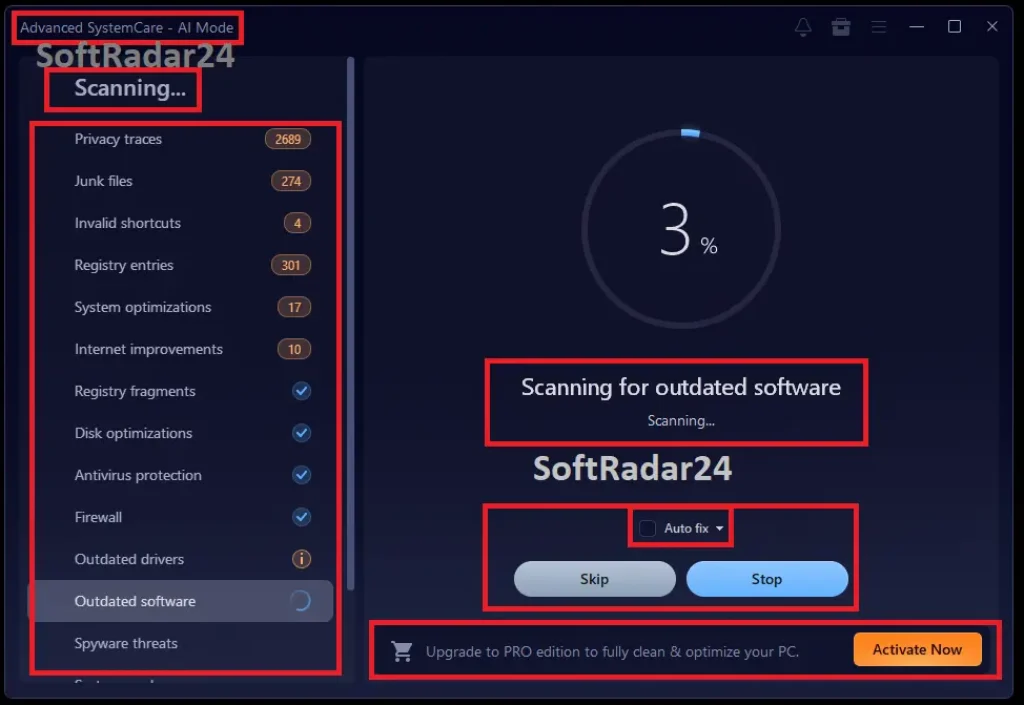
Advanced SystemCare Pro works by identifying the underlying causes behind common PC problems instead of masking visible symptoms. Its system-wide approach helps improve performance, stability, and security at the same time. The following sections focus on how individual issues are diagnosed and fixed in practice.
Fix PC Crashes, Blue Screen Errors, and Disk Issues with Advanced SystemCare Pro
⛔ Why does my PC keep crashing and showing blue screen errors?
This issue is often caused by corrupted system files, registry conflicts, disk errors, or unstable background processes that silently build up over time.
🛡️ The Fix: Core System File Recovery with Advanced SystemCare Pro
- ✔ Restores damaged Windows system components
- ✔ Resolves low-level instability triggers
- ✔ Reinforces OS reliability at its foundation
⛔ Is the Blue Screen of Death (BSOD) fixable without reinstalling Windows?
Most BSOD errors are software-related and caused by system conflicts, outdated entries, or improper shutdowns — not hardware failure.
🛡️ The Fix: Conflict Resolution Engine Inside Advanced SystemCare Pro
- ✔ Identifies hidden software clashes
- ✔ Normalizes system behavior without OS reset
- ✔ Preserves existing Windows installations safely
Microsoft Support: Windows Unexpected Restarts & BSOD
“An unexpected restart might be caused by a hardware device, its driver, or software. A stop code, such as PAGE_FAULT_IN_NONPAGED_AREA or MEMORY_MANAGEMENT will appear at the bottom of the screen.”
⛔ Can disk errors cause random PC crashes and restarts?
Yes. Disk errors can prevent Windows from accessing critical system files correctly, leading to freezes, crashes, or sudden restarts.
🛡️ The Fix: Intelligent Disk Health Repair by Advanced SystemCare Pro
- ✔ Repairs file-access interruptions
- ✔ Stabilizes read/write operations
- ✔ Prevents crash loops caused by disk faults
⛔ Why does my PC blue screen during startup or boot?
Startup BSODs usually happen due to broken system files, failed updates, or excessive system junk interfering with boot processes.
🛡️ The Fix: Boot-Level Cleanup & Load Control via Advanced SystemCare Pro
- ✔ Removes boot-time obstructions
- ✔ Streamlines startup execution paths
- ✔ Ensures smoother Windows initialization
⛔ Can corrupted registry files cause PC crashes?
Corrupted or invalid registry entries can disrupt system communication and trigger crashes or blue screen errors.
🛡️ The Fix: Precision Registry Repair System in Advanced SystemCare Pro
- ✔ Targets only high-risk registry faults
- ✔ Restores internal system pathways
- ✔ Minimizes crash-inducing misconfigurations
⛔ Why does my PC crash more often as it gets older?
Over time, unused files, background services, fragmented data, and outdated system entries slowly degrade system stability.
🛡️ The Fix: Long-Term System Renewal with Advanced SystemCare Pro
- ✔ Eliminates accumulated system decay
- ✔ Rebalances background workload
- ✔ Restores consistency to aging PCs
⛔ Can fixing system errors really prevent future crashes?
Small unresolved system errors often snowball into major crashes if ignored over time.
🛡️ The Fix: Predictive Stability Shield in Advanced SystemCare Pro
- ✔ Flags weaknesses before failure occurs
- ✔ Reinforces vulnerable system zones
- ✔ Disrupts crash patterns early
⛔ How does Advanced SystemCare Pro keep Windows stable long term?
One-time fixes are not enough; Windows requires continuous care to remain stable and reliable.
🛡️ The Fix: Persistent Stability Framework Powered by Advanced SystemCare Pro
- ✔ Maintains system equilibrium over time
- ✔ Continuously supervises critical operations
- ✔ Sustains smooth performance without degradation
Speed Up a Slow PC and Boost Performance Using Advanced SystemCare Pro
⛔ Why is my PC so slow even when nothing is running?
Many users notice extreme slowness despite having no open programs.
🛡️ The Fix: Hidden Resource Drain Control with Advanced SystemCare Pro
Silent background components and dormant tasks continue consuming power even when the desktop looks idle.
- ✔ Identifies concealed system load
- ✔ Releases locked processing capacity
- ✔ Restores idle-state efficiency
⛔ Why does my computer get slower over time?
PCs often feel fast when new but gradually lose performance.
🛡️ The Fix: Performance Decay Reversal Engine in Advanced SystemCare Pro
Accumulated digital residue and aging configurations quietly weigh the system down.
- ✔ Clears long-term performance buildup
- ✔ Refreshes outdated operating parameters
- ✔ Preserves speed consistency over time
⛔ How can I make my PC run faster without upgrading hardware?
Not everyone wants to buy more RAM or a new PC.
🛡️ The Fix: Software-Level Speed Unlock with Advanced SystemCare Pro
Intelligent system tuning can unlock unused performance potential already inside your PC.
- ✔ Reclaims dormant memory space
- ✔ Refines launch-time execution flow
- ✔ Sharpens overall system reactions
⛔ Why is my PC laggy for no reason?
Random lag spikes make everyday tasks frustrating.
🛡️ The Fix: Live Bottleneck Interruption via Advanced SystemCare Pro
Momentary slowdowns often come from short-lived system congestion rather than constant overload.
- ✔ Interrupts sudden performance spikes
- ✔ Smooths task execution flow
- ✔ Minimizes micro-freezes and delays
⛔ How do I find out what is slowing down my PC?
Identifying performance issues manually is difficult for most users.
🛡️ The Fix: System Slowdown Source Mapping with Advanced SystemCare Pro
The software isolates exact components and behaviors responsible for reduced speed.
- ✔ Visualizes system drag points
- ✔ Highlights abnormal resource patterns
- ✔ Applies targeted speed corrections
⛔ Can cleaning my PC actually make it faster?
Users often wonder if cleanup tools really improve speed.
🛡️ The Fix: Digital Waste Elimination System in Advanced SystemCare Pro
Removing unnecessary data reduces internal friction across system operations.
- ✔ Eliminates redundant storage clutter
- ✔ Clears residual application traces
- ✔ Enhances task execution speed
⛔ Is my PC slow because of a virus or hidden threats?
Malware often disguises itself as normal system activity.
🛡️ The Fix: Performance-Safe Threat Removal with Advanced SystemCare Pro
Undetected threats quietly consume resources while avoiding user attention.
- ✔ Neutralizes stealth performance hijackers
- ✔ Secures processing power from abuse
- ✔ Restores trusted system behavior
⛔ How does Advanced SystemCare Pro keep my PC fast long term?
One-time speed fixes rarely last.
🛡️ The Fix: Sustained Speed Preservation Model in Advanced SystemCare Pro
Ongoing system conditioning prevents gradual performance erosion.
- ✔ Maintains speed equilibrium continuously
- ✔ Prevents gradual slowdown cycles
- ✔ Keeps everyday performance consistent
Protect Your PC from Security, Privacy, and Hidden Threats with Advanced SystemCare Pro
⛔ How do I know if my PC is infected with hidden spyware?
Many threats operate silently without obvious warning signs.
🛡️ The Fix: Deep Spyware Exposure Handling with Advanced SystemCare Pro
Data-harvesting threats often disguise themselves as harmless background components.
- ✔ Uncovers concealed surveillance activity
- ✔ Eliminates covert data-collection modules
- ✔ Reclaims both speed and personal privacy
⛔ Can hackers really see my screen or access my PC remotely?
Unauthorized remote access is a growing privacy concern.
🛡️ The Fix: Unauthorized Access Shutdown via Advanced SystemCare Pro
Hidden control channels can allow outsiders to interact with your system unnoticed.
- ✔ Seals covert remote entry points
- ✔ Flags abnormal connection behavior
- ✔ Locks down system interaction paths
⛔ Why do ads and pop-ups keep appearing even with an ad blocker?
Some ads bypass traditional browser-based blockers.
🛡️ The Fix: System-Wide Ad Injection Suppression in Advanced SystemCare Pro
Intrusive ads often originate from software layers outside the browser itself.
- ✔ Neutralizes background ad injectors
- ✔ Removes residual advertising components
- ✔ Creates a cleaner browsing environment
⛔ Is my personal data exposed to untrusted programs?
Many applications access sensitive data without clear consent.
🛡️ The Fix: Sensitive Data Access Control by Advanced SystemCare Pro
Unknown programs may quietly scan files and user information.
- ✔ Limits unauthorized file interaction
- ✔ Contains intrusive application behavior
- ✔ Reinforces personal data boundaries
⛔ Can outdated software put my PC at security risk?
Unpatched programs are common attack targets.
🛡️ The Fix: Vulnerability Window Reduction with Advanced SystemCare Pro
Old software versions often leave exploitable gaps behind.
- ✔ Identifies risky outdated components
- ✔ Shrinks known exploit opportunities
- ✔ Keeps system defenses current
⛔ Why does my browser track me even in private mode?
Online tracking goes beyond cookies.
🛡️ The Fix: Cross-Session Tracking Disruption by Advanced SystemCare Pro
Advanced tracking relies on behavioral and device-based identifiers.
- ✔ Breaks persistent tracking patterns
- ✔ Masks identifiable browsing signals
- ✔ Reduces long-term traceability
⛔ Can my PC be attacked even with antivirus installed?
Antivirus alone may not cover all threat vectors.
🛡️ The Fix: Multi-Surface Threat Containment Using Advanced SystemCare Pro
Modern attacks often exploit areas outside traditional virus detection.
- ✔ Covers overlooked attack surfaces
- ✔ Reinforces system entry points
- ✔ Reduces exposure beyond signature-based scans
⛔ How does Advanced SystemCare Pro protect my PC long term?
One-time scans do not stop evolving threats.
🛡️ The Fix: Persistent Security Reinforcement Framework in Advanced SystemCare Pro
Protection must adapt as threat techniques change.
- ✔ Maintains defense readiness over time
- ✔ Responds to newly emerging risks
- ✔ Preserves long-term system trust
Fix Full C Drive & Storage Space Problems with Advanced SystemCare Pro
⛔ Why does my C drive keep filling up automatically?
Windows silently stores temporary files, update leftovers, system logs, and cached data that accumulate over time — even if you rarely install new software.
🛡️ Smart Storage Cleanup Powered by Advanced SystemCare Pro
Advanced SystemCare Pro locates deeply hidden junk files that standard Windows cleanup tools often overlook, safely freeing system drive space without touching essential data.
- ✔ Removes update residue and system cache
- ✔ Cleans hidden temporary folders
- ✔ Restores usable C drive space safely
⛔ Can low disk space slow down my PC?
When free space on the system drive drops too low, Windows struggles to manage memory, background services, and system operations efficiently.
🛡️ Performance-Oriented Storage Optimization with Advanced SystemCare Pro
By reclaiming critical disk space and optimizing how Windows uses storage, Advanced SystemCare Pro helps restore smooth system performance and faster response times.
- ✔ Frees space required for system stability
- ✔ Improves virtual memory efficiency
- ✔ Reduces lag caused by low disk space
⛔ Why do deleted programs still leave my C drive full?
Many applications leave behind residual files, logs, and configuration data even after being uninstalled, quietly consuming valuable storage.
🛡️ Residual Data Removal Using Advanced SystemCare Pro
Advanced SystemCare Pro detects orphaned files and leftover program traces, clearing unnecessary data that standard uninstallers fail to remove.
- ✔ Eliminates leftover installation files
- ✔ Cleans unused configuration traces
- ✔ Prevents long-term storage bloat
⛔ Is it safe to clean system files to free up disk space?
Many users hesitate to clean system-related files out of fear of damaging Windows or losing important data.
🛡️ Safe System-Level Cleanup with Advanced SystemCare Pro
Advanced SystemCare Pro distinguishes between critical system components and obsolete data, ensuring only safe-to-remove files are cleaned.
- ✔ Protects essential Windows files
- ✔ Removes outdated system clutter
- ✔ Maintains long-term system stability
⛔ How can I prevent my C drive from filling up again?
Without ongoing maintenance, temporary files and system clutter quickly return, causing repeated low-storage warnings.
🛡️ Ongoing Storage Management with Advanced SystemCare Pro
Advanced SystemCare Pro provides automated cleanup and continuous monitoring to keep system storage under control long term.
- ✔ Scheduled cleanup tasks
- ✔ Prevents future storage buildup
- ✔ Keeps the system drive consistently healthy