
Quick Summary
Advanced SystemCare Ultimate is a Windows security-and-optimization suite that combines real-time antivirus protection with one-click cleanup, startup tuning, junk-file removal, privacy tools, software updating and routine system maintenance. It is designed for people who want one dashboard for malware defense and everyday PC care instead of running separate utility categories.
- Best for
- all-in-one Windows protection, cleanup, speed tuning and privacy maintenance
- Platforms
- Windows
- Current campaign
- 1-Year / 3 PCs · Gift Pack · Renewal
- Key limitation
- Windows-only; avoid pairing with another full antivirus
Advanced SystemCare Ultimate Pricing, Discount Code & License Options
The approved SoftRadar24 Advanced SystemCare Ultimate offers below already include the current discount through the provided checkout links. No manual coupon-code entry is required.
Advanced SystemCare Ultimate is a Windows product. The Gift Pack is selected first because it matches the standard product price while adding extra utilities.
Current Advanced SystemCare Ultimate License Prices
The purchase selector currently includes the following approved SoftRadar24 options:
- Advanced SystemCare Ultimate 18 with Gift Pack [4 in 1] · 1 Year / 3 PCs · US$8.44
- Advanced SystemCare Ultimate 18 · 1 Year / 3 PCs · US$8.44
- Advanced SystemCare Ultimate Professional License Key Renewal · Renewal · US$7.14
Advanced SystemCare Ultimate 18 with Gift Pack [4 in 1]
Windows · 1 year · 3 PCs for Advanced SystemCare Ultimate 18
Included with this package- Advanced SystemCare Ultimate 18 — 1 year subscription / 3 PCs
- Protected Folder — 1 year subscription
- Smart Defrag 12 PRO — 1 year subscription / 1 PC
- IObit Uninstaller PRO 15 — 1 year subscription / 1 PC
US$8.44one-time checkout
Current discount automatically applied
Buy NowGift Pack [4 in 1] · 1 Year / 3 PCs
Selected first because it adds three companion tools while matching the current standard-license price.
Confirm the package type before checkout. The main Advanced SystemCare Ultimate license covers 3 PCs, while some companion tools in the Gift Pack are listed for 1 PC.
Can This Software Do What I Need?
Advanced SystemCare Ultimate makes the most sense when security and PC maintenance are both part of the same problem. The right fit depends on whether you need antivirus coverage, cleanup and speed tools together, or only one of those jobs.
I want one program that handles malware protection and everyday PC cleanup
Security + maintenance in one suite
SupportedAdvanced SystemCare Ultimate is built for this exact use. It combines Bitdefender-engine real-time antivirus protection with junk cleaning, startup optimization, registry repair, browser tuning, privacy tools and software updating in one dashboard.
My Windows PC feels cluttered, slow at startup and full of junk files
Performance maintenance
SupportedAdvanced SystemCare Ultimate includes one-click cleanup, AI-powered deep cleaning, startup management, memory release and CPU Saver features. It is a good fit when slowdowns come from clutter, background load or poor maintenance rather than failing hardware.
I already use another antivirus and only want tune-up tools
Avoid overlapping real-time antivirus
Better fitA lighter optimizer such as Advanced SystemCare Pro can be the cleaner choice when antivirus coverage is already handled elsewhere. That reduces overlap and avoids paying for a security layer you may not use.
I mainly want anti-malware protection, not a large optimization suite
Security-first purchase
Better fitIObit Malware Fighter Pro is the more focused path if your main decision is about malware defense. Advanced SystemCare Ultimate is better when you also want cleaning, speed tuning, privacy and maintenance in the same product.
I look after several family or household PCs and want one low-cost license
Multi-PC value
SupportedThe current SoftRadar24 Advanced SystemCare Ultimate offers are structured around 3-PC coverage for the main product, which suits families or people maintaining more than one Windows machine.
I want uninstall, defrag and folder-lock tools in addition to the main suite
Broader utility bundle
SupportedChoose the Gift Pack [4 in 1]. It adds Protected Folder, Smart Defrag 12 PRO and IObit Uninstaller PRO 15 alongside Advanced SystemCare Ultimate 18, which is a strong fit when you want a broader maintenance toolkit rather than the main product alone.
I use macOS or need cross-platform coverage
Platform limit
Different taskAdvanced SystemCare Ultimate is a Windows product. It is not the right purchase for Mac-only environments or for teams that require one license family across Windows and macOS.
I expect a dramatic speed increase on a PC with failing hardware or a nearly full SSD
Performance expectation check
ConditionalAdvanced SystemCare Ultimate can improve startup load, remove junk and reduce some software overhead, but it cannot fix worn storage, bad RAM, thermal throttling or very old hardware. Buy it for maintenance and protection value—not as a replacement for hardware troubleshooting.
How It Works
Advanced SystemCare Ultimate is organized around recurring maintenance tasks. The typical workflow starts with a health check, then moves into antivirus scanning, speed tools, privacy cleanup and software updating according to what your PC actually needs.
Run a One-Click Health Check
- Open Advanced SystemCare Ultimate and start with the main health-check or care workflow to scan for junk files, privacy traces, registry clutter and common system issues.
- Review the scan results in Advanced SystemCare Ultimate instead of blindly fixing every item if you want tighter control over what gets cleaned.
- Apply the fixes in Advanced SystemCare Ultimate and restart Windows if the software recommends it after a larger repair or cleanup pass.
Check Antivirus Protection and Run a Scan
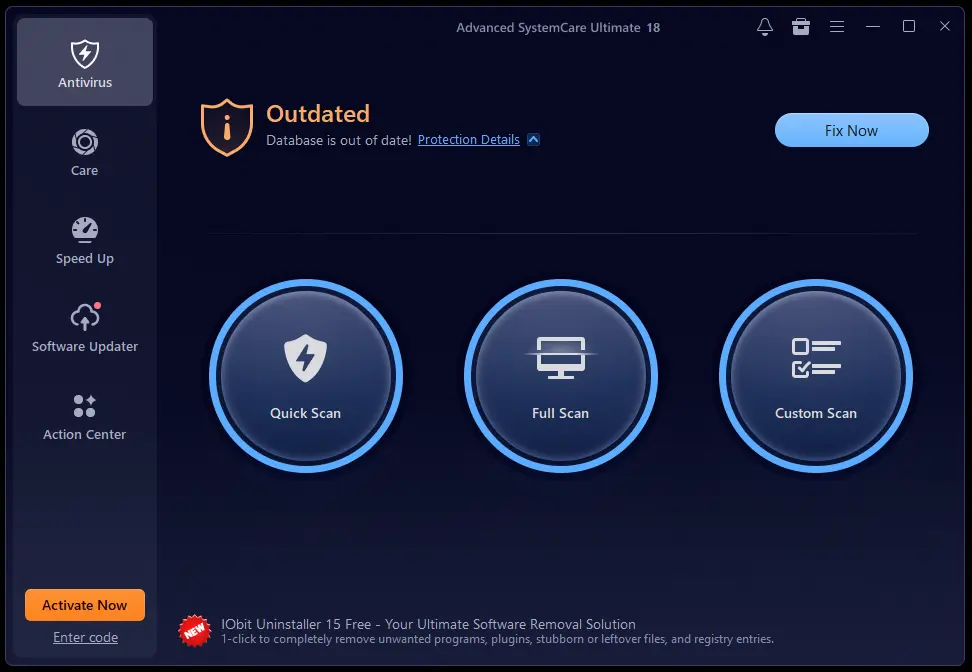
- Go to the Antivirus section in Advanced SystemCare Ultimate and confirm whether the protection database is current.
- Use Quick Scan for a fast routine check or Full Scan in Advanced SystemCare Ultimate when you want broader inspection of the system.
- Review detections carefully before removal if there is any chance a flagged item could be a trusted tool or business file.
Tune Startup and Background Performance
- Use the Speed Up area in Advanced SystemCare Ultimate to review startup items, memory use and CPU load.
- Let Advanced SystemCare Ultimate disable or optimize only the entries you understand, especially on a work PC with business software that must launch automatically.
- Measure the practical result after a reboot so you can judge whether the cleanup improved startup time and general responsiveness.
Use Privacy and Software Maintenance Tools
- Open the Privacy tools in Advanced SystemCare Ultimate to sweep browsing traces, review Anti-Tracking behavior and protect sensitive data with Safe Folder when needed.
- Use Software Updater in Advanced SystemCare Ultimate to patch outdated applications and reduce security exposure from older installed programs.
- If you chose the Gift Pack, install the companion tools only on the machines that actually need them because the extra utilities do not all share the same device entitlement as the main 3-PC license.
Product Interface & Workflow
The product interface separates the main categories clearly. Antivirus, Care, Speed Up, Software Updater and Action Center are available from the left navigation, which makes it easy to move between protection, cleanup and maintenance tasks without opening separate utilities.
Compatibility & Coverage
Advanced SystemCare Ultimate is a Windows desktop product. Its practical coverage is broader than simple virus scanning because it also handles cleanup, startup tuning, privacy sweeps, software updating and basic system maintenance in the same environment.
| Area | Current documented coverage | Decision note |
|---|---|---|
| Operating system | Windows XP / Vista / 7 / 8 / 8.1 / 10 / 11 | Windows-only product; no macOS edition. |
| Program size | Version 18.4.0 · 150 MB download | Light download size does not reflect the eventual security databases and ongoing updates after installation. |
| Protection scope | Real-time antivirus protection powered by Bitdefender engine plus privacy and ransomware-related protection tools | Good fit when you want integrated defense and tune-up features together. |
| Performance scope | Startup optimization, memory release, CPU Saver, junk cleanup, registry cleanup and browser tuning | Best results come from well-maintained PCs; hardware limitations still matter. |
| Maintenance scope | Health Check, AI-powered deep cleaning and 1-click software updating | Useful when outdated software and system clutter are part of the overall problem. |
| Current SoftRadar24 license shape | Main product licenses centered on 1 Year / 3 PCs; separate renewal option available | The Gift Pack adds 1-PC companion tools, so check entitlements carefully. |
Features & Capabilities
Advanced SystemCare Ultimate stands out by covering three layers at once: protection, performance and privacy. Its real value is not a single feature, but the convenience of handling routine PC-care jobs from one console.
Antivirus & Security
- Bitdefender-engine real-time protection
- Vendor states coverage for 220,000,000+ threats
- Protection against viruses, spyware and ransomware-related risks
- Quick Scan, Full Scan and Custom Scan choices
- Block untrusted programs from accessing data
Cleanup & Optimization
- AI-powered deep cleaning for junk, caches and leftover files
- Registry cleaning and repair tools
- Startup optimization for faster boot behavior
- Memory Release and CPU Saver to reduce background load
- Health Check that analyzes and auto-fixes common PC issues
Privacy & Safe Browsing
- Anti-Tracking to clean browsing traces
- Identity Masking to reduce online fingerprint exposure
- Safe Folder to protect sensitive files
- Privacy cleanup for common local traces
- Security-oriented browsing assistance and data-protection tools
Maintenance & Companion Tools
- Software Updater with 1-click update checking
- Action Center for add-on tools and utility access
- Gift Pack option with Protected Folder, Smart Defrag 12 PRO and IObit Uninstaller PRO 15
- 3-PC main license focus for household or multi-PC use
- Premium technical-support positioning on the paid product page
Important Conditions & Limitations
Advanced SystemCare Ultimate is useful, but a responsible buying decision needs clear boundaries. It is a Windows-focused suite, not a cure-all for every PC problem, and some buying scenarios are better served by a simpler or more focused product.
Windows-Only Product
Advanced SystemCare Ultimate is designed for Windows. It is not the right purchase if your main computer uses macOS or if you need one license family across multiple operating systems.
Be Careful with Overlapping Real-Time Antivirus
Advanced SystemCare Ultimate includes real-time antivirus protection. If you already run another full antivirus suite, stacking two always-on products can create overlap, duplicate alerts or unnecessary system load. In that situation, Advanced SystemCare Pro or a dedicated optimizer can be the cleaner purchase.
Performance Claims Depend on the PC
The official page presents “up to 2× faster PC” and “up to 3× faster Internet” style claims. Those are vendor maximums, not guaranteed results for every Windows machine. The biggest gains usually come from cleaning clutter, reducing startup load and patching neglected systems—not from magically fixing weak hardware.
Optimization Tools Do Not Replace Hardware Diagnosis
If a PC is slow because of overheating, failing storage, defective RAM or a nearly full drive, Advanced SystemCare Ultimate will not solve the root hardware problem. Use it for maintenance, not as a substitute for hardware troubleshooting.
Gift Pack Entitlements Are Mixed
The current Gift Pack is attractive, but the included tools do not all follow the same device count as the main 3-PC Advanced SystemCare Ultimate license. Review which extras are 1-PC subscriptions before purchase so the package matches your real setup.
Registry Cleaning Should Be Treated as Routine Maintenance, Not a Miracle Fix
Registry cleanup can help remove invalid leftovers and tidy a neglected system, but it should not be treated as the main reason a modern Windows PC becomes dramatically faster. The strongest value of Advanced SystemCare Ultimate comes from the combined suite, not from registry cleaning alone.
The Trial Does Not Replace a Long-Term Paid License
The official product page positions a 30-day free trial. That is enough to test the dashboard, scanning and maintenance flow, but it is not a substitute for an ongoing paid license if you want lasting real-time protection and the full premium experience.
This Is Not a Server or Enterprise Security Platform
Advanced SystemCare Ultimate is aimed at consumer and small-office Windows PCs. It is not an enterprise endpoint-management system with centralized administration, policy deployment or security reporting across a managed fleet.
Free Trial / Free Version
The official product page offers a free download and states that you can try all features free for 30 days. That makes the trial suitable for testing how Advanced SystemCare Ultimate behaves on your own Windows PC before choosing a paid license.
| What to test | Why it matters | Best pre-purchase check |
|---|---|---|
| Antivirus fit | You need to decide whether this suite should become your main real-time protection layer. | Install the trial and confirm it fits your security setup without conflicts or unnecessary load. |
| Cleanup results | Optimization value is PC-specific. | Run a health check and compare startup behavior, disk clutter and general responsiveness before and after. |
| Privacy tools | Features such as Anti-Tracking and Safe Folder are part of the product’s value. | Test the exact privacy tools you expect to rely on instead of buying only for the antivirus label. |
| Software Updater | Outdated software is a real maintenance issue for many home PCs. | See whether Advanced SystemCare Ultimate identifies the programs you actually keep installed. |
| Multi-PC decision | The current commercial appeal is strongest on the 3-PC offers. | Test the product on the main machine first, then decide whether the 3-PC package suits the rest of your household PCs. |
System Requirements
The official page highlights broad Windows compatibility and a 150 MB download. Practical performance will still depend on the health of the system and whether you are adding this suite to an already crowded security setup.
| Requirement | Current documented value | Decision note |
|---|---|---|
| Operating systems | Windows XP / Vista / 7 / 8 / 8.1 / 10 / 11 | Current official compatibility line. |
| Current version | 18.4.0 | Shown on the product page at the time of this content build. |
| Download size | 150 MB | Initial installer size only; additional updates and signature data may increase total footprint. |
| Device profile | Windows desktop / laptop PCs | Consumer-oriented environment rather than managed enterprise deployment. |
| Internet | Recommended for updates, signature refresh and software-updating tasks | Important if you want current protection and the maintenance tools to stay useful. |
Alternatives & Better-Fit Options
Choose the alternative according to the real job you need done. For the broader IObit product catalog and deal page, visit the IObit software page on SoftRadar24.
IObit Malware Fighter Pro
A better fit when your main buying goal is malware protection rather than a larger optimization suite. Choose this route if you want security emphasis first and do not need the full cleanup-and-speed package.
Advanced SystemCare vs Wise Care 365
Useful if you are still deciding between broader PC-maintenance approaches and want a focused comparison between two well-known cleanup-and-optimization directions before choosing a product family.
Advanced SystemCare Pro
The right alternative when you want the Advanced SystemCare optimization environment without paying for a bundled real-time antivirus layer. It is often the cleaner path for users already committed to another security solution.
IObit PC Optimization Bundle
Relevant when you want a broader bundle-style purchase focused on general Windows maintenance tools. Compare the included utilities and the role of antivirus before deciding whether Advanced SystemCare Ultimate or a bigger maintenance bundle suits you better.
FAQ
These answers cover pricing, licensing, bundle structure, Windows compatibility and the purchase questions that matter most before buying Advanced SystemCare Ultimate.
How much does Advanced SystemCare Ultimate cost with the current SoftRadar24 offers?
The current approved SoftRadar24 offers are US$8.44 for Advanced SystemCare Ultimate 18 with Gift Pack [4 in 1], US$8.44 for the standard 1 Year / 3 PCs license, and US$7.14 for the renewal offer.
Does Advanced SystemCare Ultimate include antivirus protection?
Yes. Advanced SystemCare Ultimate combines optimization and privacy tools with real-time antivirus protection based on the Bitdefender engine.
What is the difference between Advanced SystemCare Ultimate and Advanced SystemCare Pro?
Advanced SystemCare Ultimate adds a real-time antivirus layer on top of the cleaning, optimization and privacy toolkit. Advanced SystemCare Pro is the better fit when you want the maintenance environment without paying for a bundled antivirus component.
What does the Advanced SystemCare Ultimate Gift Pack include?
The current Gift Pack [4 in 1] includes Advanced SystemCare Ultimate 18 for 3 PCs plus Protected Folder, Smart Defrag 12 PRO and IObit Uninstaller PRO 15. Review the device terms carefully because the companion tools are not all licensed the same way as the main 3-PC product.
Is Advanced SystemCare Ultimate Windows-only?
Yes. Advanced SystemCare Ultimate is a Windows product and the current official page lists compatibility from Windows XP through Windows 11.
Can I use Advanced SystemCare Ultimate if I already have another antivirus?
You can test that setup, but it is usually better to avoid overlapping always-on antivirus suites unless you know the arrangement is stable. If another security suite is already your main protection layer, Advanced SystemCare Pro may be the cleaner purchase.
Is there a free trial for Advanced SystemCare Ultimate?
Yes. The official page says you can try all features free for 30 days, which is enough time to test the dashboard, antivirus layer and performance-maintenance tools on your own PC.
What is the Advanced SystemCare Ultimate renewal option for?
The renewal offer is for existing Advanced SystemCare Ultimate users who want to continue the paid license at a lower current price than the first-time package offers. Confirm the exact term shown at checkout before purchase.
Can Advanced SystemCare Ultimate fix every cause of a slow PC?
No. Advanced SystemCare Ultimate can clean clutter, optimize startup behavior and improve maintenance, but it cannot fix failing hardware, overheating, damaged Windows installations or very old components that need replacement.
What refund promise is shown on the official page?
The current official product page advertises a 60-day money-back guarantee.





