

Quick Summary
Epubor Audible Converter is a Windows and macOS audiobook utility for turning supported Audible library titles and locally downloaded AAX files into MP3, M4B or MP4 for offline playback outside the Audible app. Epubor Audible Converter can load an Audible library after account sign-in, accept supported AAX files by drag and drop, split long books by chapter and preserve useful audiobook metadata during conversion.
- Best for
- Audible AAX to MP3/M4B · chapter splitting · local audiobook backup · offline player compatibility
- Platforms
- Windows and macOS
- License
- 1-Year · 5-Year · Lifetime
- Key limitation
- Audible podcasts and collections are not supported
Epubor Audible Converter Pricing, Discount Code & License Options
The current 20% Epubor Audible Converter discount is applied automatically through the approved SoftRadar24 checkout links below. No manual coupon-code entry is required.
Choose Windows or macOS first, then select the license period. The 1-Year option is selected first because it is the lowest-priced current SoftRadar24 license at $23.99.
Current Epubor Audible Converter License Prices
The purchase selector currently includes these approved SoftRadar24 options:
- Epubor Audible Converter · Windows / 1 PC · 1 Year · $23.99
- Epubor Audible Converter · Windows / 1 PC · 5 Years · $31.99
- Epubor Audible Converter · Windows / 1 PC · Lifetime · $55.99
- Epubor Audible Converter for Mac · 1 Mac · 1 Year · $23.99
- Epubor Audible Converter for Mac · 1 Mac · 5 Years · $31.99
- Epubor Audible Converter for Mac · 1 Mac · Lifetime · $55.99
Epubor Audible Converter · 1-Year License
Windows · 1 PC · 1-year license
Included with this license- One year of Epubor Audible Converter use on 1 Windows PC
- MP3, M4B and MP4 output for supported Audible audiobooks
- Audible library loading and supported local AAX drag-and-drop conversion
- Chapter splitting plus version upgrades during the license period
The 1-Year license has the lowest entry price. The 5-Year option costs only US$8.00 more at the current SoftRadar24 price, while Lifetime is the long-term choice for repeated library conversion on one computer.
Applicable tax can change the final total. Confirm the operating system and license period before payment because Windows and Mac use separate checkout products.
Can This Software Do What I Need?
Epubor Audible Converter is useful when an audiobook you can legitimately access is locked to a playback workflow that does not fit the device or library you actually use. Before buying, separate four different problems: converting a purchased AAX title to a standard file, moving a title to a supported MP3 player, keeping chapter/metadata structure for a local audiobook server, and trying to use membership-only or app-managed content that does not behave like a purchased desktop download.
I want to play my purchased Audible book on an old MP3 player or car stereo
Maximum device compatibility
SupportedConvert the supported Audible title to MP3 with Epubor Audible Converter. MP3 is the safest choice when the destination is a basic player that does not understand Audible AAX or audiobook-oriented M4B files. If the book is very long, chapter splitting can make navigation easier on players with weak seeking controls.
My MP3 player is officially supported by AudibleSync on Windows 10 or 11
Native Audible transfer may already solve it
Better fitAudible currently provides AudibleSync for Windows 10/11 and says it can download purchased titles and transfer them to compatible MP3 or accessibility devices after device activation. If your player is on Audible’s supported-device list and that workflow meets your needs, you may not need Epubor Audible Converter. Epubor becomes more relevant when you need an ordinary MP3/M4B file for a device, app or local library outside AudibleSync’s supported-device model.
I need chapter names, cover art and metadata to stay useful in Audiobookshelf, Plex or another local library
Library organization and chapter fidelity
ConditionalEpubor Audible Converter documents metadata preservation and chapter splitting, which is useful for self-hosted audiobook libraries. The exact chapter-title and tag result can vary by title and output path, so do not process a large library blindly. Use the free one-book trial on a title with named chapters, cover art and series metadata, then verify the finished file in the exact server or player you plan to use.
I want one audiobook file with chapter-friendly playback and bookmarks
Audiobook-oriented format
SupportedChoose M4B in Epubor Audible Converter when your player supports it. M4B is generally better suited to dedicated audiobook apps because it can work more naturally with chapter navigation and position memory, while MP3 remains the broader compatibility choice.
I have an AAX file already saved on my Windows PC or Mac and do not want to sign in inside the converter
Local AAX import
SupportedThe current Epubor Audible Converter workflow supports drag-and-drop conversion of locally downloaded AAX files. This lets you process a compatible desktop AAX file without using the library-login route. Use the free trial with one real AAX title before buying if local-file conversion is the only workflow you need.
The Audible website does not show a Download button for the title
Library access differs by title type
ConditionalEpubor Audible Converter can sign in to a supported Audible region and load accessible library titles directly. However, Audible currently allows computer downloads only for titles purchased with cash or credits; Plus Catalog and other membership-only access can follow different rules. Do not assume membership access is equivalent to owning a downloadable desktop AAX file.
I want a local backup for a NAS or personal audiobook server
Long-term local library
SupportedEpubor Audible Converter can create MP3 or M4B files that are easier to place in a normal folder structure and index with self-hosted audiobook software. Audiobookshelf, for example, supports both formats and notes that M4B is convenient when you want one file per book, while MP3 has broader device support. For a server library, test chapter markers, narrator/author metadata, cover art and seeking before converting hundreds of titles.
I need to split a 20-hour or 50-hour audiobook into manageable chapters
Long-book navigation
SupportedEnable Split by chapters before starting the Epubor Audible Converter job. This is especially useful for car stereos and basic media players that resume poorly or make it difficult to seek through a single very long audio file.
I copied an AAXC file from the Audible Android app and want to drag it into Epubor Audible Converter
Mobile download format
Verify firstDo not treat an app-managed Android AAXC download as the same thing as a desktop AAX file. Epubor’s current guidance documents direct drag-and-drop for AAX, while its library-login workflow can download the required Audible data internally. If your only source is a mobile AAXC file, test that exact case before purchasing.
I want to convert Audible podcasts or collections to MP3
Unsupported content type
Not supportedEpubor’s current user guide explicitly says Epubor Audible Converter does not support Audible podcasts or collections. Buy it for supported audiobook titles, not for podcast-library conversion.
I only need ordinary Audible offline listening on my phone
Native app already solves it
Better fitThe Audible app already lets eligible titles download for offline listening. Epubor Audible Converter becomes useful when you specifically need a standard local file, another playback device, chapter-separated exports or a computer-side archive outside the Audible app.
I need to turn my own MP3 files into a polished M4B audiobook
Reverse conversion / audiobook authoring
Different taskEpubor Audible Converter is designed around Audible-to-standard-format conversion. Creating a new M4B audiobook from arbitrary MP3 files is an audiobook-authoring task and may require a different workflow that can build chapters, tags and book metadata from your source files.
How It Works
Epubor Audible Converter provides two practical input routes: load accessible titles from your Audible library after sign-in, or drag a supported local AAX file into the application. From there, choose the output format and whether the audiobook should remain one file or be divided by chapter.
Convert an Audible Library Title to MP3
- Open Epubor Audible Converter and choose the correct Audible region before signing in to the Audible account that contains the accessible audiobook.
- Refresh the library in Epubor Audible Converter and drag the audiobook from the left library panel into the conversion area.
- Choose MP3 in Epubor Audible Converter when the destination is an older media player, car stereo or another device where broad compatibility is the priority.
- Enable Split by chapters in Epubor Audible Converter when you want separate chapter files, then start the conversion.
- Use the Open command in Epubor Audible Converter after completion to locate the converted files and verify several chapters before copying them to another device.
Convert a Downloaded AAX File Without Library Sign-In
- Download the audiobook to the computer in a supported AAX form while you still have legitimate access to the title.
- Open Epubor Audible Converter and drag the local AAX file into the main conversion panel.
- Choose MP3, M4B or MP4 in Epubor Audible Converter according to the destination player and whether audiobook-specific chapter behavior matters.
- Run the Epubor Audible Converter job and open the output folder when the conversion completes.
Keep Chapter Navigation with Epubor Audible Converter
- Add the Audible audiobook to Epubor Audible Converter through the library or supported AAX-file route.
- Select Split by chapters before conversion when your destination works better with separate chapter files.
- Choose M4B instead when your playback software supports audiobook-oriented chapter and position handling inside a single file.
- After conversion, test chapter order and resume behavior in the actual player you intend to use.
Product Interface & Workflow
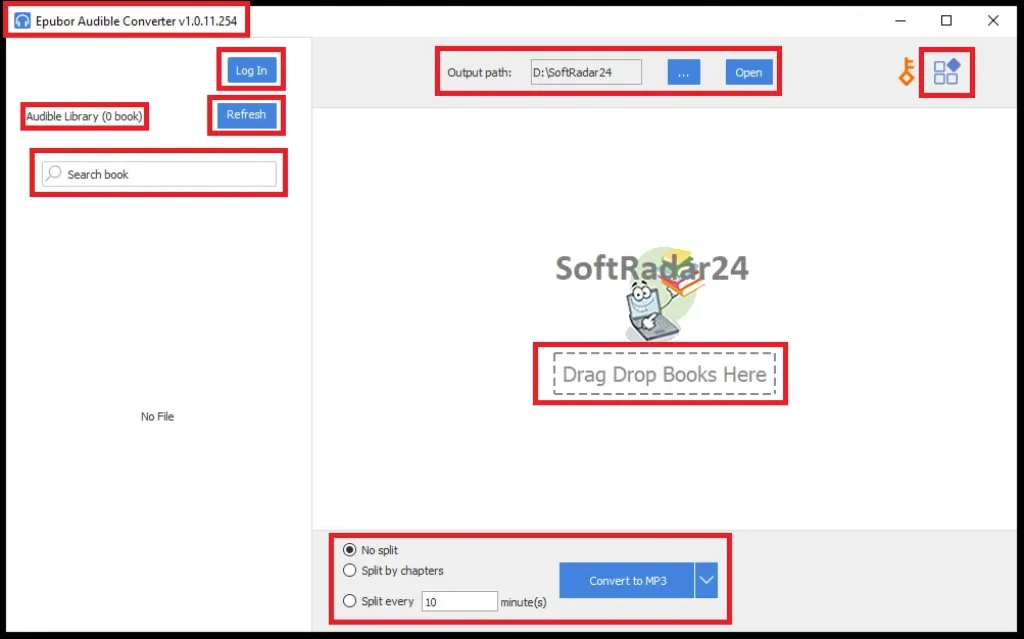
Epubor Audible Converter uses a two-panel library/conversion layout. The left side holds the Audible library when you sign in, while the main area accepts selected titles or supported AAX drag-and-drop input. Output path, chapter splitting and format selection remain visible without burying the core workflow inside multiple setup screens.
Compatibility & Coverage
The practical compatibility question is not only Windows versus Mac. It is also the difference between purchased Audible titles, membership-only access, desktop AAX downloads and app-managed mobile files. Epubor Audible Converter is strongest when the audiobook is visible and playable in the supported Audible library workflow or already exists as a compatible AAX file on the computer.
| Area | Current documented coverage | Decision note |
|---|---|---|
| Desktop platforms | Separate Windows and macOS editions | Use the matching checkout license; Windows and Mac products are separate. |
| Audible library input | Sign in inside Epubor Audible Converter, choose the correct region and refresh the library | The title must remain accessible/playable in the supported Audible account workflow. |
| Local file input | Current release documents drag-and-drop conversion of AAX files | Best route when you already possess a compatible desktop AAX download. |
| Output formats | MP3 · M4B · MP4 | MP3 favors broad playback; M4B is often preferable for audiobook-focused apps. |
| Chapter handling | Split by chapters option | Useful for very long books and basic players with limited seeking/resume controls. |
| Official MP3-device route | AudibleSync on Windows 10/11 can transfer downloaded titles to compatible MP3 and accessibility devices | If your hardware is officially supported, test AudibleSync before buying a converter solely for that device. |
| Unsupported content | Audible podcasts and collections | Explicitly excluded in the current Epubor Audible Converter user guide. |
Purchased Audible Titles vs. Membership-Only Titles
Audible currently allows titles purchased with cash or credits to be downloaded to a computer. Plus Catalog titles can be downloaded inside the Audible app for offline listening but cannot be downloaded to a computer as ordinary purchased-title downloads. Epubor Audible Converter should therefore not be treated as a way to turn temporary membership access into permanent ownership. Confirm the title type and trial compatibility before purchase.
AAX vs. AAXC
AAX is the desktop file type Epubor currently documents for direct drag-and-drop conversion. Audible mobile apps can use app-managed AAXC-style data that is not equivalent to a normal desktop AAX file. For a title that exists only inside a mobile app, the safer Epubor Audible Converter route is to use the supported library workflow or obtain a proper computer download when Audible provides one.
Features & Capabilities
Epubor Audible Converter focuses on audiobook portability rather than general audio editing. Its most useful features solve the practical friction around proprietary Audible files: getting an accessible title onto a computer, choosing a standard output, preserving useful book information and making very long recordings easier to navigate.
Audible Library & AAX Input
- Audible-region selection and account sign-in inside Epubor Audible Converter
- Refreshable Audible library panel
- Drag-and-drop support for compatible local AAX files
- Multiple titles can be added to the conversion area for sequential processing
MP3, M4B & MP4 Output
- MP3 for broad compatibility with players, cars and ordinary media software
- M4B for audiobook-oriented playback where supported
- MP4 as an additional supported output option
- Output-folder access directly from the Epubor Audible Converter interface
Chapter & Metadata Handling
- Split by chapters before conversion
- Preservation of audiobook metadata in the documented conversion workflow
- Better handling of very long audiobooks on devices with poor seeking controls
- Standard local files that are easier to organize in normal folders or compatible media libraries
Performance & Updates
- Epubor advertises at least 60× conversion speed for its general conversion workflow
- Epubor advertises much higher maximum speeds for some M4B/MP4 paths; real speed depends on title and workflow
- Current product page lists Epubor Audible Converter V1.0.11.254
- Version upgrades are included during the purchased license period
Important Conditions & Limitations
Audiobook conversion depends on both Epubor Audible Converter and the way Audible currently exposes the title. A title can be playable in an app yet unavailable as a computer download, mobile AAXC data can behave differently from desktop AAX, and temporary catalog access should not be confused with a purchased audiobook.
Audible Podcasts and Collections Are Not Supported
Epubor’s current user guide explicitly says Epubor Audible Converter does not work with Audible podcasts or collections. If those content types are your main reason for buying, the software is not the correct fit.
Purchased Titles Do Not Disappear Just Because You Cancel Membership
Audible currently states that titles purchased with a credit or credit card are yours to keep. Included Plus Catalog titles are different: they can become locked when membership ends or when a title leaves the catalog. Do not buy Epubor Audible Converter because you mistakenly believe canceling Audible automatically deletes purchased books; buy it when you specifically need a standard local file or playback outside Audible’s normal ecosystem.
Temporary Membership Access Is Not the Same as a Purchased Audiobook
Audible distinguishes purchased titles from Plus Catalog and other membership-based access. Purchased titles can remain in the library after membership changes, while included titles can become unavailable when membership or catalog availability changes. Use Epubor Audible Converter only where you have continuing lawful access and the required source can be loaded.
Direct AAX Import and Mobile AAXC Are Different Workflows
Current Epubor documentation clearly supports local AAX drag-and-drop. It does not make the same simple direct-import promise for an AAXC file copied from an Android app. Do not purchase specifically for local AAXC drag-and-drop without testing the exact source first.
MP3 Is Universal, but M4B Can Be Better for Audiobooks
MP3 is widely compatible, but long audiobooks can be less convenient when the player has weak bookmark or chapter support. M4B is often a better archive/playback choice for modern audiobook apps. Choose the format for the actual playback device instead of defaulting to MP3 merely because it is familiar.
Chapter Markers and Chapter Names Are Not the Same Thing
A converted audiobook can have valid chapter boundaries while still using generic names such as Chapter 1, Chapter 2 or different metadata from the Audible app. Epubor documents chapter splitting and metadata preservation, but buyers building a curated Audiobookshelf/Plex library should test one title with named chapters and confirm the exact result before committing a large collection.
“Original Quality” Is a Vendor Claim, Not a Reason to Skip Testing
Epubor markets original-quality output and preservation of codec/channel/bit-rate parameters in supported workflows. Changing an audiobook into MP3 can still involve codec conversion, so compare a trial output with the source if audio fidelity is especially important. M4B/MP4 paths may behave differently from MP3 conversion.
The Headline Speed Figures Are Maximum Claims
Epubor advertises at least 60× conversion and substantially higher maximum figures for some M4B/MP4 paths. Do not treat those numbers as guaranteed conversion times for every audiobook. Download speed, title length, source format, account access and the selected output path all affect the real job.
Library Sign-In Means You Are Authenticating Inside Third-Party Software
The current Epubor Audible Converter library workflow asks you to sign in to Audible inside the application. If you prefer not to authenticate in third-party software, use the supported local AAX drag-and-drop route when Audible provides a proper desktop download for your purchased title.
Screen-Reader Users Should Check the Special Accessibility Build
Epubor’s current FAQ provides a special Epubor Audible Converter version for visually impaired users. If keyboard navigation or screen-reader accessibility is essential, use that specific build and test it before buying instead of assuming the standard interface meets your accessibility needs.
DRM and Personal Backup Rules Vary by Jurisdiction
Epubor Audible Converter is marketed for converting and backing up audiobooks you are entitled to access. Copyright, license and anti-circumvention rules differ by country. Do not redistribute converted books, share them publicly or use the software to obtain content you have not legitimately acquired.
The Refund Policy Has Compatibility Conditions
Epubor generally offers a 30-day refund period for the 1-Year, 5-Year and Lifetime licenses shown here, but its current refund policy recommends trying the software before purchase and specifically warns that audiobook-platform protection changes can affect compatibility. The policy should not be read as a promise of permanent compatibility with every future Audible change.
Free Trial / Free Version
Epubor Audible Converter has a real functional trial rather than a simple demo screen. The current user guide says the trial can download and convert one Audible audiobook for free. Use that single-book allowance on the exact workflow that matters most to you.
| What to test | Why it matters | Best pre-purchase check |
|---|---|---|
| Your actual Audible region/account | Library loading depends on the correct account region and accessible titles. | Sign in with the trial and confirm the title you care about appears before purchasing. |
| Local AAX drag-and-drop | This is the privacy-preferred route for users who do not want in-app Audible sign-in. | Use your one trial book on a real AAX file from your computer. |
| MP3 vs. M4B output | The best format depends on the destination player. | Convert a book in the format you plan to use and verify resume/chapter behavior. |
| Chapter splitting | Long-book navigation is a major reason to use a dedicated Audible converter. | Enable Split by chapters and check that the resulting order works on your actual player. |
| Chapter / metadata fidelity | Local audiobook-server users often depend on correct chapters, cover art and tags. | Use a title with named chapters and inspect the finished MP3/M4B in your actual player or Audiobookshelf/Plex setup. |
| AudibleSync alternative | A compatible MP3 player may already be supported by Audible’s own Windows transfer tool. | Check whether AudibleSync solves your exact device before paying only for MP3-player transfer. |
| Long-term compatibility | Audible can change download/protection behavior over time. | Do not skip the trial merely because the software worked with an older library or previous release. |
System Requirements
Epubor publishes separate Windows and Mac builds rather than one cross-platform installer. The supplied product pages do not provide one complete CPU/RAM requirement table, so the most important practical requirements are a supported desktop build, enough storage for long audiobooks and an Internet connection when using Audible library sign-in/download.
| Requirement | Current documented position | Decision note |
|---|---|---|
| Windows | Separate Epubor Audible Converter for Windows; current installer is 64-bit by default and Epubor provides a 32-bit installer | Use the matching build for the Windows architecture. |
| macOS | Separate Epubor Audible Converter for Mac; Epubor also documents Apple Silicon compatibility | Use the current Mac build and test the trial on the exact macOS release. |
| Internet | Required for Audible account sign-in, library refresh and title download through the integrated workflow | Local AAX drag-and-drop can avoid Audible account sign-in when you already have a compatible file. |
| Storage | No single fixed working-space figure is published on the supplied pages | Keep enough free space for temporary Audible data plus the converted MP3/M4B/MP4 library. |
| Audible access | The title must be accessible in the account/library workflow or available as a supported local AAX file | Trial-test titles that use unusual membership or regional access rules. |
Alternatives & Better-Fit Options
Epubor Audible Converter is specifically an audiobook conversion tool. Choose another Epubor utility when the source is an eBook service or an ordinary document format rather than an Audible audiobook. For the wider product family and current offers, visit the Epubor software page on SoftRadar24.
Epubor Ultimate
Choose Epubor Ultimate when the library problem involves Kindle, Kobo or other supported eBook formats rather than Audible audio. It is aimed at eBook conversion and DRM-related book workflows, while Epubor Audible Converter is specialized for audiobook files and playback formats.
Epubor Nook Converter
A better fit when your purchased reading library is tied to Nook. It addresses Nook eBook portability rather than AAX audiobook conversion, so it belongs to a different part of a digital-library backup strategy.
Epubor eBook Converter
Use Epubor eBook Converter when you already have ordinary eBook files and mainly need format conversion for readers or apps. It is not a substitute for Epubor Audible Converter when the source is an Audible audiobook.
Epubor Hoopla Converter
Relevant when the media-access problem is tied to Hoopla rather than Audible. Keep the two services separate because their download models, content types and access conditions are different even when both can involve offline media use.
FAQ
These answers cover current Epubor Audible Converter prices, license terms, output formats, trial rules and compatibility details that can change whether the software fits your audiobook library.
How much does Epubor Audible Converter cost with the current SoftRadar24 discount?
The current SoftRadar24 prices are $23.99 for 1 Year / 1 PC or Mac, $31.99 for 5 Years / 1 PC or Mac, and $55.99 for Lifetime / 1 PC or Mac. The corresponding reference prices are $29.99, $39.99 and $69.99.
Is there an Epubor Audible Converter coupon code or discount?
Yes. The approved SoftRadar24 checkout links currently apply a 20% Epubor Audible Converter discount automatically. You do not need to enter a coupon manually.
Does Epubor Audible Converter have a lifetime license?
Yes. The current SoftRadar24 Lifetime price is $55.99 for the Windows or Mac edition on one computer. The lifetime plan includes lifetime version upgrades according to Epubor’s current purchase page.
Can Epubor Audible Converter convert AAX to MP3 without iTunes?
Yes. Epubor Audible Converter does not require iTunes for its current AAX conversion workflow. You can load supported Audible titles through the integrated library or drag a compatible local AAX file into the converter.
Should I convert Audible to MP3 or M4B?
Choose MP3 for the widest compatibility with car stereos, old players and ordinary media apps. Choose M4B when your listening software supports audiobook-oriented chapter and resume behavior and you want a cleaner single-book library format.
Can Epubor Audible Converter split audiobooks by chapter?
Yes. The current Epubor Audible Converter interface includes a Split by chapters option before conversion. This is especially useful for very long books and basic players that make seeking through one huge file difficult.
Can Epubor Audible Converter convert Audible Plus Catalog books?
Do not assume Plus Catalog access behaves like a purchased title. Audible currently says Plus Catalog titles can be downloaded in the app for offline listening but cannot be downloaded to a computer as purchased-title downloads. Test the exact library title in Epubor Audible Converter before buying for this use.
Can Epubor Audible Converter convert AAXC files copied from Android?
The current Epubor documentation clearly supports local AAX drag-and-drop, while mobile AAXC is handled differently. If your only source is an AAXC file copied from Android, verify it in the trial first instead of assuming direct local import works like AAX.
Does Epubor Audible Converter support Audible podcasts?
No. Epubor’s current user guide explicitly states that Audible podcasts and collections are not supported by the current Epubor Audible Converter plan.
What is the Epubor Audible Converter free-trial limit?
The current user guide says the trial can download and convert one Audible audiobook for free. Use that allowance on the exact account, source and output format you intend to use after purchase.
Can I move my Epubor Audible Converter license to a new computer?
Epubor’s current purchase FAQ says you can de-register the software from the old computer and then install/register it on the new one. Use the built-in or online license-retrieval options if you need the registration details again.
Do I need Epubor Audible Converter to use Audible on an MP3 player?
Not always. Audible currently offers AudibleSync on Windows 10/11 for transferring purchased titles to compatible MP3 and accessibility devices. Epubor Audible Converter is more useful when your device is not covered by that workflow or when you specifically need a normal MP3/M4B file for another player or local library.
Will I lose my purchased Audible books if I cancel my membership?
Audible currently says titles purchased with a credit or credit card are yours to keep. Plus Catalog and other included membership titles are different and can become locked when membership ends or access changes.
Does Epubor Audible Converter preserve chapter names and metadata?
Epubor documents metadata preservation and chapter splitting, but exact chapter-title fidelity can vary by title and output workflow. If named chapters, cover art or series metadata matter for Audiobookshelf, Plex or another library manager, use the one-book trial and inspect that exact result before converting a large collection.
What is the Epubor Audible Converter refund period?
The current 1-Year, 5-Year and Lifetime purchase options carry a 30-day money-back period. Epubor’s refund policy still recommends try-before-you-buy and warns that future audiobook-platform protection changes can affect compatibility.





