
Quick Summary
Epubor Ultimate is a Windows and macOS eBook DRM-removal and format-conversion tool for purchased Kindle, Kobo, Adobe Digital Editions and other supported eBook libraries. Its practical value is not simply changing EPUB to PDF: Epubor Ultimate first helps make supported purchased eBooks portable, then converts them to EPUB, MOBI, AZW3, DOCX, TXT or PDF and lets you edit metadata before moving the resulting files to another reader or archive. In 2026, the most important buying question is source compatibility, especially for Amazon Kindle, because Kindle desktop apps, KFX protection and Kindle firmware change more quickly than the basic converter interface.
- Current product branch
- Epubor Ultimate 3.0.16.6835 · released August 18, 2026
- Current direct outputs
- EPUB · MOBI · AZW3 · DOCX · TXT · PDF
- Core supported ecosystems
- Kindle · Kobo · Adobe Digital Editions / ACSM-derived EPUB/PDF · other supported purchased eBooks
- Platforms
- Windows and macOS · platform-specific licenses
Purchase Options
License & Purchase · Epubor Ultimate · 20% OFF Official Discount & Coupon Code
Choose Windows or macOS first because Epubor Ultimate licenses are platform-specific, then choose how long you want update coverage. The options below preserve the six existing SoftRadar24 campaigns from this Product page.
1-Year License
1 Windows PC · 1-year Epubor Ultimate license
Included with this license- Epubor Ultimate for 1 Windows PC
- Full-book processing instead of the 20% TXT-only trial output
- Free version upgrades during the 1-year license period
- Current official order terms list a 30-day money-back window and free remote assistance
US$23.99/ year
Discount automatically applied
Buy NowWindows · 1-Year License · 1 PC
The current SoftRadar24 checkout reduces the Windows 1-year campaign from US$29.99 to US$23.99 before applicable tax.
Epubor’s current public order page also offers 1-month, 3-month, family and other license lengths in addition to the options kept here. The six SoftRadar24 campaigns remain 1-year, 5-year and Lifetime single-device licenses. Review the final platform, license term, tax, refund conditions and total price at checkout before paying.
Can This Software Do What I Need?
Epubor Ultimate is most useful when the source eBook is purchased, locally available through a currently supported reading workflow, and you need a portable output such as EPUB or PDF. Kindle compatibility is the hardest part in 2026, so the decision guide separates the new Windows app, legacy Kindle software, Mac, Kindle e-ink firmware, Adobe ACSM, Kobo, Nook, rentals and DRM-free files instead of treating every eBook as the same case.
I want to convert purchased Kindle books to EPUB or PDF
Kindle to EPUB / Kindle to PDF
Yes — if the current Kindle path is supportedEpubor Ultimate can convert supported purchased Kindle books to EPUB, PDF, MOBI, AZW3, DOCX or TXT after the book is available through a compatible Kindle app or e-ink device workflow. Amazon changes Kindle DRM and app behavior frequently, so test one newly purchased title with the current Epubor Ultimate trial before buying.
I use the new Kindle for Windows 11 app from the Microsoft Store
Current Windows 11 Kindle workflow
Yes — latest Epubor UltimateEpubor’s current product page says the latest Epubor Ultimate supports Kindle for Windows 11 from the Microsoft Store. Version 3.0.16.6835, released August 18, 2026, also adds an option to manually set the Kindle library path.
I still use the legacy Kindle for PC application
Legacy Kindle for PC
Special compatibility branchEpubor’s 2026 guidance separates legacy Kindle from the new Microsoft Store app. It currently recommends Kindle for PC 2.9.1 together with Epubor Ultimate 3.0.16.599 for the legacy route rather than assuming the newest Epubor build is always the correct companion.
I want to process purchased Kindle books on a Mac
Kindle for Mac
Conditional — test before buyingEpubor currently documents Kindle for Mac 7.53 as a working route for many users and says later app versions can introduce unsupported protection changes. Mac workflows are more version-sensitive than the normal converter interface suggests, so use the trial on the actual Mac and actual purchased book first.
I connect a Kindle Paperwhite, Oasis or other e-ink Kindle by USB
Kindle e-ink device
Firmware-dependentEpubor Ultimate can detect supported Kindle e-ink devices, but current Epubor guidance warns that newer Kindle firmware can block device-based processing. The vendor’s August 2026 guidance says firmware 5.18.5 and later is not supported by the traditional e-ink workflow.
I want to convert Kindle Unlimited, Prime Reading or borrowed library books
Rental / loan content
NoEpubor’s current FAQ says Epubor Ultimate is intended for books you own and does not support rented books such as Kindle Unlimited, Prime Reading and Kobo Plus. Its Kindle-to-PDF guide likewise says rented Kindle titles cannot be converted.
I downloaded an ACSM file and want EPUB or PDF
ACSM / Adobe Digital Editions
Yes — after the ACSM is fulfilledAn ACSM file is the delivery/license step, not the final eBook itself. The stable workflow is to open the ACSM with an authorized Adobe Digital Editions environment so the actual EPUB or PDF is downloaded; Epubor Ultimate can then process supported purchased Adobe-protected EPUB/PDF files.
My ACSM source is a PDF but I want EPUB
ACSM source-format reality
Conversion is possible, but source mattersOpening an ACSM does not guarantee an EPUB. Epubor’s own ACSM guide notes that if the original publication is PDF, Adobe Digital Editions downloads a PDF. Epubor Ultimate can then convert the resulting supported book, but it should not be described as turning the ACSM token itself directly into every format.
I want to move purchased Kindle books to Kobo
Kindle to Kobo
Yes — through EPUBEpubor’s current Kindle-to-Kobo workflow uses Epubor Ultimate to prepare a DRM-free EPUB, then transfers that EPUB to the Kobo reader. Epubor Ultimate handles the compatibility/conversion stage; it is not a cloud-to-cloud Kindle/Kobo synchronization service.
I have a DRM-free EPUB and only want to read it on Kindle Paperwhite
EPUB to Kindle
Epubor Ultimate may be unnecessaryAmazon’s current Send to Kindle workflow accepts DRM-free EPUB and performs the Kindle-side conversion automatically. If the EPUB is already DRM-free, use Send to Kindle first instead of buying Epubor Ultimate only to make a Kindle-readable copy.
My main goal is creating and managing Kindle Collections
Kindle collection management
Not the core productEpubor Ultimate can help prepare or back up supported books, but Epubor’s current collections guide relies on Amazon/Kindle collection tools and other library-management methods. Do not buy Epubor Ultimate expecting a dedicated Kindle Collections Manager.
I need current Barnes & Noble Nook books
Nook eBooks / Nook audiobooks
Better fit: Epubor Nook ConverterEpubor’s own current Epubor Ultimate guide says the old Nook Windows app was discontinued and that the company released Epubor Nook Converter for the newer Nook Android/emulator workflow. Current Nook purchases should therefore be routed to the specialized product.
I need to convert Audible AA or AAX audiobooks
Audible audiobooks
Better fit: Epubor Audible ConverterEpubor Ultimate is an eBook-focused product. Audible AA/AAX audiobook conversion belongs to Epubor Audible Converter, which is a separate specialized application.
My EPUB or PDF is already DRM-free and I only need a different eBook format
Format conversion without DRM
Better fit: Epubor eBook ConverterIf protection removal is not part of the job, the simpler Epubor eBook Converter is the cleaner fit for normal format conversion. Epubor Ultimate earns its value when source DRM and retailer-specific library handling are actually part of the problem.
I want to fix title, author, cover or publisher metadata before archiving
Metadata cleanup
YesEpubor Ultimate includes metadata editing for title, author, identifiers, publication date, language, publisher, introduction and cover, which is useful when building a cleaner long-term local library.
How It Works
The reliable Epubor Ultimate workflow is source first, conversion second: make sure the purchased book can actually be opened in a supported app or e-reader, let Epubor Ultimate detect or import that local book, process it, then choose the destination format. This matters because most current failures happen before ordinary format conversion even begins.
Start with a Supported Local Source
Epubor Ultimate’s own quick-start guide says the purchased book must first be readable in the relevant desktop reading app or supported e-reader. Epubor Ultimate then detects downloaded libraries from Kindle, Adobe Digital Editions, Kobo and supported connected devices.
- Download and open the purchased eBook in the currently supported Kindle, Kobo or Adobe Digital Editions workflow.
- Launch the current Epubor Ultimate build and use the retailer/device tab that matches the source library.
- Drag the detected title into the processing area or add a supported local file manually when the workflow permits it.
Kindle in 2026: Choose the Correct Source Path Before Converting
Kindle is no longer one desktop workflow. The current Microsoft Store Kindle app, legacy Kindle for PC, Kindle for Mac and e-ink Kindle devices have different compatibility conditions. That is why an Epubor Ultimate update can solve one Kindle path while a specific older Epubor build remains necessary for another.
| Kindle source | Current Epubor position | What to verify |
|---|---|---|
| Kindle for Windows 11 / Microsoft Store | Supported by the latest Epubor Ultimate | Use the current build and confirm the downloaded Kindle library is detected. |
| Legacy Kindle for PC | Separate compatibility route | Current vendor guidance pairs Kindle for PC 2.9.1 with Epubor Ultimate 3.0.16.599. |
| Kindle for Mac | Version-sensitive | Vendor currently recommends Kindle for Mac 7.53 for many 2026 workflows; test before purchase. |
| Kindle e-ink via USB | Firmware-sensitive | Recent firmware can block the traditional device workflow; current vendor guidance flags 5.18.5+. |
ACSM Is a Delivery File, Not the Finished eBook
An ACSM file tells Adobe Digital Editions how to obtain the purchased or authorized publication. Open it in the authorized Adobe workflow first; the result may be EPUB or PDF depending on what the publisher supplied. Epubor Ultimate then works with the supported downloaded eBook rather than treating the ACSM token itself as the final book.
- Fulfill the ACSM in an authorized Adobe Digital Editions environment and make sure the resulting eBook can be opened.
- Let Epubor Ultimate load the supported Adobe Digital Editions library or add the downloaded EPUB/PDF as supported.
- Choose the final format based on the destination rather than assuming ACSM always means EPUB.
Choose the Output for the Device or Archive You Actually Need
| Output | Best fit | Important current detail |
|---|---|---|
| EPUB | Kobo, Apple Books, many EPUB readers and modern Send to Kindle | Amazon’s Send to Kindle accepts DRM-free EPUB; simply copying EPUB over USB is not the same workflow. |
| Fixed-layout reading, printing or document-oriented archiving | Layout quality depends on the source eBook structure; the free trial is not representative because trial output is TXT. | |
| AZW3 / MOBI | Local legacy Kindle-format workflows where they are still useful | Modern Send to Kindle should generally start from DRM-free EPUB rather than relying on old MOBI-upload advice. |
| DOCX / TXT | Text extraction, editing or research workflows | TXT is also forced by the free trial, where images and original formatting are intentionally lost. |
Product Interface & Workflow
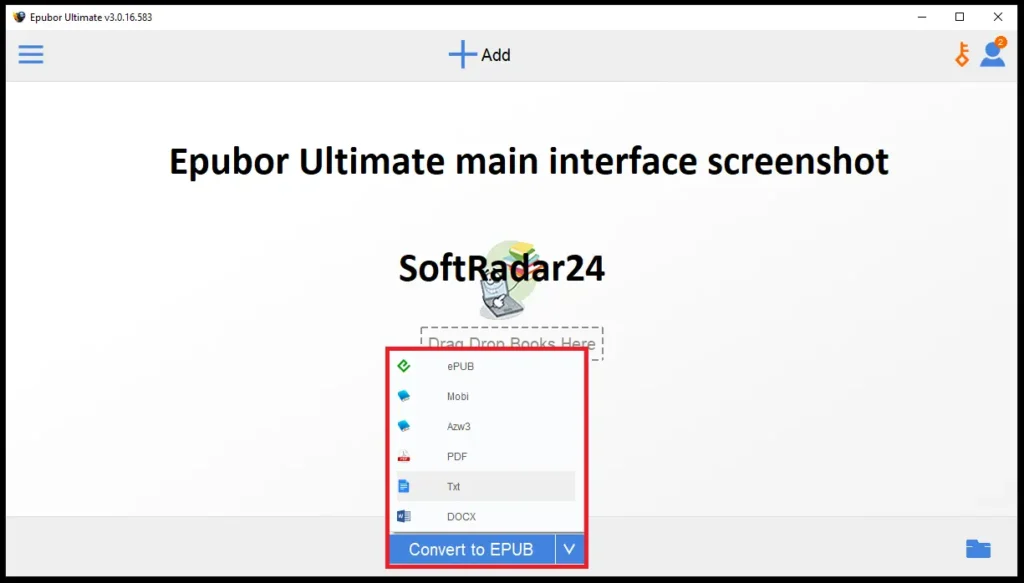
The visuals below are reused from the existing SoftRadar24 Epubor Ultimate article. They show our own hosted product artwork and Epubor Ultimate interface/settings captures. No vendor-hosted image is introduced.
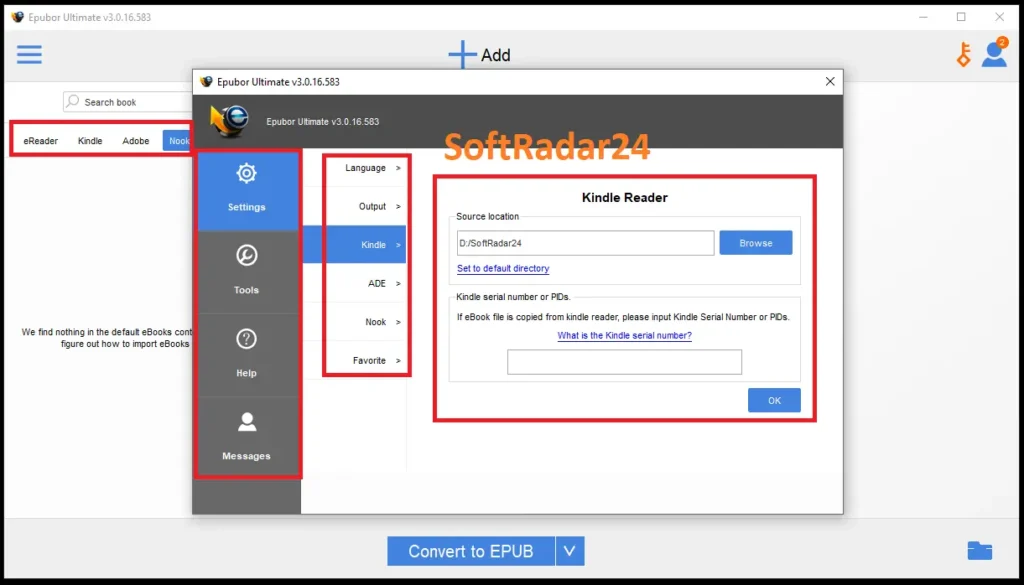
Compatibility & Coverage
Epubor Ultimate runs on Windows and macOS, but retailer compatibility is more important than raw OS support. The same Epubor Ultimate interface can work with Kindle, Kobo and Adobe libraries only when the purchased book has been obtained through a currently compatible app, device or Adobe workflow.
Retailer / Reading-App Coverage
| Source | Current Epubor Ultimate coverage | Key condition |
|---|---|---|
| Kindle for Windows 11 / Microsoft Store | Supported by latest Epubor Ultimate | The official product page explicitly lists current support; compatibility patches can change quickly. |
| Legacy Kindle for PC | Supported through a separate vendor-recommended version pairing | Current 2026 vendor guidance uses Kindle for PC 2.9.1 with Epubor Ultimate 3.0.16.599. |
| Kindle for Mac | Conditional / version-sensitive | Current vendor guidance commonly uses Kindle for Mac 7.53; newer app changes can break the workflow. |
| Kindle e-ink devices | Supported only on compatible device/firmware paths | Recent Kindle firmware can block device-based processing; current vendor guidance flags firmware 5.18.5 and later. |
| Kobo Desktop / supported Kobo e-readers | Supported | Purchased Kobo books must be locally available through the compatible Kobo workflow. |
| Adobe Digital Editions | Supported for compatible purchased EPUB/PDF | ACSM must first be fulfilled so the actual EPUB or PDF exists in the authorized Adobe library. |
| Current Nook purchases | Not the recommended Epubor Ultimate path | Epubor now directs current Nook workflows to Epubor Nook Converter. |
Input & Output Format Coverage
| Item | Current coverage | Practical use |
|---|---|---|
| Input formats | KFX, EPUB, PDF, AZW, AZW1, AZW3, AZW4, MOBI, PRC, TPZ, Topaz, TXT and HTML | Input support does not override DRM/source-app compatibility; the book still needs a supported acquisition path. |
| EPUB output | Supported | Best general-purpose portable choice for Kobo, Apple Books, many reading apps and modern Send to Kindle. |
| PDF output | Supported | Useful for fixed-layout reading, printing and document-oriented archiving. |
| MOBI / AZW3 output | Supported | Useful for some local or legacy Kindle workflows; Send to Kindle now favors DRM-free EPUB. |
| DOCX / TXT output | Supported | Useful for text-oriented workflows; the free trial itself is restricted to TXT. |
| Metadata editing | Supported | Title, author, identifiers, date, language, publisher, introduction and cover can be edited. |
Features & Capabilities
Epubor Ultimate is best understood as a bridge between retailer-specific eBook libraries and open local formats. The useful feature groups are source-library detection, DRM-aware processing for supported purchased titles, multi-format conversion and library cleanup—not a generic promise to unlock every protected file.
Kindle / Kobo / Adobe Library Detection
- Automatic loading of supported books downloaded through compatible Kindle, Kobo and Adobe Digital Editions desktop workflows
- Automatic detection of supported connected e-readers, including compatible Kindle and Kobo devices
- Current Kindle for Windows 11 / Microsoft Store support in the latest Epubor Ultimate
- Manual Kindle library-path control added in Epubor Ultimate 3.0.16.6835
DRM-Aware Processing for Purchased eBooks
- Processing for supported purchased Kindle KFX/AZW-family books
- Support for compatible Adobe ADEPT-protected EPUB/PDF purchased through Adobe-based retailers
- Support for compatible Kobo-protected books downloaded through supported Kobo workflows
- Purchased-content focus; rented and subscription-loan books are excluded by current Epubor policy
Multi-Format eBook Conversion
- Output to EPUB, MOBI, AZW3, DOCX, TXT and PDF
- Batch conversion after the supported books are available locally
- EPUB output for Kobo, Apple Books and modern Send to Kindle workflows
- PDF, DOCX and TXT options for document-oriented reading, printing or text workflows
Metadata & Local Library Cleanup
- Edit title and author information
- Edit identifiers, publishing date, language and publisher
- Change introduction and book cover
- Use the resulting local files for authorized backup or transfer to another compatible reading device
Important Conditions & Limitations
The difficult part of Epubor Ultimate is not choosing EPUB versus PDF; it is maintaining a compatible path to the purchased source book. Amazon, Adobe and Kobo can change apps, authorization systems, DRM and device firmware independently of Epubor Ultimate, so these conditions belong in the buying decision rather than in troubleshooting after purchase.
Kindle Compatibility Is a Moving Target
Amazon has changed the Kindle desktop apps, KFX protection and device firmware repeatedly. Epubor Ultimate 3.0.16.6835 supports the current Microsoft Store Kindle app, but another Kindle route may require a different Epubor build. A compatibility statement should therefore be tied to the source app/device, not treated as a permanent universal promise.
Latest Epubor Ultimate Is Not Always the Correct Build for Legacy Kindle for PC
Epubor’s current 2026 guidance pairs legacy Kindle for PC 2.9.1 with Epubor Ultimate 3.0.16.599, while the latest Epubor Ultimate supports the new Microsoft Store Kindle app. Updating everything blindly can therefore be the wrong troubleshooting move for a legacy Kindle workflow.
Kindle for Mac Requires More Compatibility Checking
Current Epubor guidance recommends Kindle for Mac 7.53 for many 2026 workflows and documents additional Mac-specific compatibility conditions. Because vendor guidance can involve older Kindle versions and system-level changes, Mac users should test the real purchased book before paying rather than assume Windows instructions transfer directly.
Newer Kindle e-Ink Firmware Can Block the Device Workflow
Epubor’s current August 2026 guidance warns that Kindle firmware 5.18.5 and later blocks the traditional e-ink device route. A USB-connected Kindle is therefore not automatically a permanent fallback if its firmware has already moved beyond the supported path.
Kindle Unlimited, Prime Reading and Other Rental Books Are Not Supported
Epubor’s current FAQ says Epubor Ultimate is for books the user owns and does not support rented books such as Kindle Unlimited, Prime Reading and Kobo Plus. Its Kindle-to-PDF guide likewise says purchased Kindle books can be converted while rented titles cannot.
An ACSM File Is Not the eBook
ACSM is a fulfillment/delivery file used by an Adobe authorization workflow. It must first resolve to the actual EPUB or PDF. If the publication supplied by the retailer is PDF, opening the ACSM does not magically make the original source EPUB.
Adobe DRM Support Is Specific, Not Universal PDF Decryption
Epubor’s PDF DRM documentation applies to Adobe ADEPT-protected PDFs that can be read through Adobe Digital Editions. A random password-protected, enterprise-protected or otherwise encrypted PDF should not be assumed to be supported just because the file extension is PDF.
Current Nook Books Belong to Epubor Nook Converter
Epubor’s own Epubor Ultimate guide says the Nook Windows app was discontinued and made the old Epubor Ultimate Nook route impractical for new downloads. The company now uses Epubor Nook Converter for the current Nook Android/emulator workflow.
Audible Audiobooks Require a Different Epubor Product
Epubor Ultimate is an eBook conversion and DRM-removal tool. Audible AA/AAX audio processing is handled by Epubor Audible Converter; it should not be inferred from Epubor Ultimate’s broad eBook retailer support.
The Free Trial Does Not Show Paid-Output Layout Quality
The Epubor Ultimate trial processes only 20% of each book and forces the result to TXT. Images and original formatting are lost in that trial output. The paid version processes the full book from the beginning and is intended to preserve the original content/formatting much more closely.
Modern Send to Kindle No Longer Needs MOBI as the Default Choice
Amazon’s current Send to Kindle route accepts DRM-free EPUB and converts it for the Kindle library. Old advice that tells every user to make MOBI before sending a book to Kindle is no longer the best default workflow.
Kindle Collections Management Is Not a Core Epubor Ultimate Feature
Epubor’s current collections guide focuses on Amazon’s collection tools, the Kindle itself and other library-management methods. Epubor Ultimate can prepare compatible local books, but it is not a dedicated collection-management application.
A Successful Conversion Still Depends on a Complete Local Download
Epubor Ultimate’s normal workflow starts from a book that can already be opened in the supported source app/device. If the retailer app did not finish downloading the book or the local library is no longer compatible, format conversion settings cannot fix the missing source.
DRM and Circumvention Rules Vary by Jurisdiction
Use Epubor Ultimate only for content you are authorized to process. Personal backup, format shifting and circumvention rules are not identical worldwide, and converted files should not be redistributed simply because the software can create a portable copy.
Free Trial / Free Version
Epubor Ultimate has a free trial, but it is designed mainly to prove source detection and processing compatibility rather than to preview the final paid-layout quality. The current user guide says the trial converts only 20% of each book and forces the result to TXT.
| Free access | What you can do | What requires payment |
|---|---|---|
| Epubor Ultimate free trial | Test whether Epubor Ultimate detects a real purchased book from your current Kindle, Kobo or Adobe workflow and processes the first 20% of that book. | Trial output is TXT only; images and original formatting are lost. A paid license processes the full book from the beginning and enables the normal EPUB, MOBI, AZW3, DOCX, TXT and PDF output choices. |
| Vendor-run free-license programs | Epubor currently advertises separate ways to earn a free or temporary license through user stories, editorial/translation contributions, product feedback, social activity and selected partner promotions. | These are Epubor-run programs rather than a SoftRadar24 promotion. Eligibility, license duration and participation requirements can change, so check Epubor’s current terms before contributing. |
System Requirements
The current Epubor Ultimate Product, Order and User Guide pages do not publish a clean modern CPU/RAM/storage specification table. The requirements that matter most are therefore the operating system and the compatible retailer app/device path. Older hardware figures from the previous SoftRadar24 article are not carried forward as current official minimums.
| Requirement | Supported / Required | Notes |
|---|---|---|
| Operating system | Windows or macOS | Epubor publishes separate Windows and Mac editions, and the Purchase licenses are platform-specific. |
| Current Windows 11 Kindle path | Microsoft Store Kindle app + latest Epubor Ultimate | The current product page explicitly supports Kindle for Windows 11; Epubor Ultimate 3.0.16.6835 adds manual Kindle-library-path control. |
| Legacy Kindle for PC path | Version-specific | Current 2026 vendor guidance pairs Kindle for PC 2.9.1 with Epubor Ultimate 3.0.16.599. |
| Kindle for Mac path | Version-sensitive | Current vendor guidance commonly uses Kindle for Mac 7.53 and recommends testing because newer Kindle app changes may be unsupported. |
| Kindle e-ink USB path | Compatible device and firmware required | Current vendor guidance warns that firmware 5.18.5 and later blocks the traditional device-based workflow. |
| Adobe / ACSM workflow | Authorized Adobe Digital Editions environment for standard ACSM fulfillment | The ACSM must resolve to the actual purchased EPUB/PDF before Epubor Ultimate can work with the supported local eBook. |
| Kobo workflow | Compatible Kobo Desktop or supported Kobo e-reader path | The purchased Kobo book must be available locally through a supported workflow. |
| Administrator / installation note | Epubor’s user guide recommends installing/running with administrator privileges on Windows in some Kindle KFX workflows | If using a non-admin Windows account, confirm that Epubor Ultimate can still access the correct user’s downloaded Kindle library. |
| CPU / RAM / installation storage | Not specified on the current official Product / Order / User Guide pages reviewed | Do not treat the previous article’s legacy hardware numbers as verified current requirements. |
Alternatives & Better-Fit Options
Epubor Ultimate is the broad eBook DRM-removal/conversion product in Epubor’s lineup, but a narrower tool is often the better choice when the source is Nook, Audible or already DRM-free. For Epubor-wide offers and related software, visit the Epubor page on SoftRadar24.
Epubor Nook Converter
The correct specialized route for current Barnes & Noble Nook eBooks and Nook audiobooks. Epubor’s own Epubor Ultimate guide says the discontinued Nook Windows app made the old Ultimate-based Nook workflow impractical for new downloads.
Epubor Audible Converter
The better fit for Audible AA/AAX audiobooks. Epubor Ultimate is built around eBooks; Audible conversion is a separate audio-specific workflow.
Epubor eBook Converter
A cleaner and lower-scope choice when your EPUB, PDF, MOBI or other eBook files are already DRM-free and the only job is changing format. Use Epubor Ultimate when DRM/source-library handling is actually required.
FAQ
These questions focus on the compatibility details that matter in 2026: the new Kindle for Windows app, legacy Kindle software, Mac, e-ink firmware, ACSM, Kindle Unlimited, Nook, Audible, trial limits and the difference between Epubor Ultimate and the simpler Epubor eBook Converter.
What is the current version of Epubor Ultimate?
The current official Epubor Ultimate product page lists version 3.0.16.6835 dated August 18, 2026. Its published change adds an option to manually set the Kindle library path in Settings.
What can Epubor Ultimate convert?
The current official product page lists KFX, EPUB, PDF, AZW, AZW1, AZW3, AZW4, MOBI, PRC, TPZ, Topaz, TXT and HTML as inputs, with EPUB, MOBI, AZW3, DOCX, TXT and PDF as outputs. Actual DRM processing still depends on a supported retailer/app/device workflow.
Does Epubor Ultimate support the new Kindle for Windows 11 app?
Yes. The current official Epubor Ultimate product page explicitly says the latest version supports Kindle for Windows 11 from the Microsoft Store. Because Amazon and Epubor update this workflow frequently, test a current purchased title before relying on long-term compatibility.
Does Epubor Ultimate still support legacy Kindle for PC?
Yes through a separate compatibility route. Epubor’s current 2026 guidance recommends Kindle for PC 2.9.1 together with Epubor Ultimate 3.0.16.599 for the legacy Kindle application rather than assuming the latest Epubor Ultimate build is the right one.
Does Epubor Ultimate work with Kindle books on Mac?
Conditionally. Epubor currently documents Kindle for Mac 7.53 as a working route for many 2026 Mac workflows, while newer Kindle versions can introduce unsupported protection changes. Mac users should test the actual purchased title and current app combination before buying.
Can Epubor Ultimate process books from a Kindle Paperwhite or other e-ink Kindle?
Only when the device and firmware are still compatible. Epubor’s current August 2026 guidance warns that newer Kindle firmware can block the traditional device-based workflow and flags firmware 5.18.5 and later as unsupported for that route.
Can Epubor Ultimate convert Kindle Unlimited or Prime Reading books?
No as a normal supported use case. Epubor’s current FAQ says rented books are not supported and specifically identifies Kindle Unlimited, Kindle Prime Reading and Kobo Plus as rentals. The current Kindle-to-PDF guide says purchased Kindle books can be converted, not rented titles.
Can Epubor Ultimate convert ACSM to EPUB or PDF?
Epubor Ultimate can work with the supported EPUB or PDF obtained from an ACSM purchase workflow, but the ACSM file itself is a delivery/license file rather than the finished eBook. The stable Adobe workflow first fulfills the ACSM in an authorized Adobe Digital Editions environment, which downloads the actual EPUB or PDF.
Why did my ACSM download become PDF instead of EPUB?
Because ACSM does not define the publication’s final format. Epubor’s own ACSM guide says that if the original source supplied by the publisher is PDF, Adobe Digital Editions downloads a PDF. Epubor Ultimate can then convert the supported resulting book if a different output is needed.
Can Epubor Ultimate remove DRM from any PDF?
No. Epubor’s PDF DRM documentation applies specifically to supported Adobe ADEPT-protected PDF eBooks that can be read in Adobe Digital Editions. A password-protected PDF or another unrelated DRM/encryption system should not be assumed to be supported.
Can I transfer purchased Kindle books to Kobo with Epubor Ultimate?
Yes as a conversion workflow. Epubor’s current guide uses Epubor Ultimate to create a DRM-free EPUB from a supported purchased Kindle book, then transfers that EPUB to Kobo. Epubor Ultimate is not a direct Amazon-to-Kobo cloud synchronization service.
Do I need Epubor Ultimate just to read a DRM-free EPUB on Kindle Paperwhite?
Usually no. Amazon’s current Send to Kindle service accepts DRM-free EPUB and converts it for Kindle delivery. If the EPUB is already DRM-free, use Send to Kindle first; Epubor Ultimate is valuable upstream when DRM or retailer-specific source formats still need to be handled.
Does Epubor Ultimate manage Kindle Collections?
Not as a dedicated collection manager. Epubor’s current Kindle Collections guide focuses on Amazon/Kindle collection tools and other library-management methods. Epubor Ultimate can prepare supported local eBooks, but collection organization is not its core job.
Does Epubor Ultimate still work with current Nook books?
Epubor no longer recommends Epubor Ultimate as the normal current Nook solution. Its own user guide says the discontinued Nook Windows app made that workflow impractical and directs current Nook eBook/audiobook users to Epubor Nook Converter.
Can Epubor Ultimate convert Audible AA or AAX audiobooks?
No. Epubor Ultimate is an eBook-focused product. Audible AA/AAX conversion is handled by the separate Epubor Audible Converter.
What is the Epubor Ultimate free-trial limit?
The current Epubor Ultimate user guide says the free trial processes only 20% of each book and saves the result as TXT, so images and original formatting are lost. A paid license processes the full book from the beginning and enables the normal output-format choices.
What is the difference between Epubor Ultimate and Epubor eBook Converter?
Epubor Ultimate is the better fit when supported purchased books are DRM-protected or need retailer-specific library handling before conversion. Epubor eBook Converter is the cleaner option when the files are already DRM-free and you only need ordinary format conversion.
Are Windows and macOS Epubor Ultimate licenses interchangeable?
No. Epubor sells separate Windows and Mac editions, and the existing SoftRadar24 Purchase options use different platform-specific product licenses. Choose the operating system before buying.
Does Epubor offer legitimate ways to get an Epubor Ultimate free license?
Epubor currently advertises vendor-run programs that may provide free licenses in exchange for activities such as a user story, editorial or translation contributions, product feedback, selected social activity or partner promotions. These are Epubor-run programs rather than a SoftRadar24 promotion, and the requirements can change.
Is the Epubor Ultimate 20% official discount available for Windows and Mac?
The six current SoftRadar24 campaign checkouts cover Windows and macOS 1-year, 5-year and Lifetime licenses. Each checked campaign currently shows a 20% reduction from its displayed reference price. Verify the final platform, license term, tax and total at checkout.





