

Quick Summary
Epubor Readly Mate is a Windows and macOS magazine downloader that turns supported Readly magazines and newspapers saved to your account into standalone PDF files. The current 1.0.2.47 release can sign in to Readly/Cafeyn directly on PC or Mac, synchronize saved issues, batch-download multiple titles and create local PDFs that can be opened in ordinary PDF readers, transferred to compatible e-readers or printed where permitted.
- Best for
- Readly-to-PDF · PC/Mac offline reading · Kindle/Kobo/reMarkable transfer · printing selected personal-use material
- Platforms
- Windows and macOS
- License
- 1-Year · 5-Year · 5-PC/Mac Family
- Key limitation
- Requires account access and saved Readly issues
Epubor Readly Mate Pricing, Discount Code & License Options
The current 20% Epubor Readly Mate discount is applied automatically through the approved SoftRadar24 checkout links below. No manual coupon-code entry is required.
Choose Windows or macOS first, then select the license duration and computer allowance. The Windows 1-Year option is selected first because it is the lowest-priced current SoftRadar24 option at $23.99.
Current Epubor Readly Mate License Prices
The purchase selector currently includes these approved SoftRadar24 options:
- Epubor Readly Mate · Windows / 1 PC · 1 Year · $23.99
- Epubor Readly Mate · Windows / 1 PC · 5 Years · $39.99
- Epubor Readly Mate · Windows / 5 PCs · 5 Years · $79.99
- Epubor Readly Mate for Mac · 1 Mac · 1 Year · $23.99
- Epubor Readly Mate for Mac · 1 Mac · 5 Years · $39.99
- Epubor Readly Mate for Mac · 5 Macs · 5 Years · $79.99
Epubor Readly Mate · 1-Year License
Windows · 1 PC · 1-year license
Included with this license- One year of Epubor Readly Mate use on 1 Windows PC
- Convert supported saved Readly magazines and newspapers to PDF
- Batch-download multiple saved issues to a local output folder
- One year of free version upgrades and remote assistance
The 1-Year license is the lowest-cost entry point. Choose the 5-Year single-computer option for longer use or the 5-PC/Mac Family option when several computers need the software.
Applicable tax can change the final checkout total. Windows and Mac use separate products, and the 5-computer Family license shown here runs for 5 years.
Can This Software Do What I Need?
Epubor Readly Mate is a better fit for file portability than for ordinary subscription reading. If the Readly app already gives you the offline access you need, keep using it. Consider Epubor Readly Mate when the missing capability is a standalone PDF, PC/Mac offline access, e-reader transfer, batch local archiving or higher-quality printing than a one-page screenshot workflow.
Can I download a Readly magazine as a normal PDF on my PC or Mac?
Standalone computer file
SupportedYes for supported saved issues. Epubor Readly Mate 1.0.2.47 can sign in to the Readly/Cafeyn account directly on Windows or Mac, synchronize saved titles and download selected magazines or newspapers to a local PDF output folder. The current release no longer requires the older emulator-first workflow for normal Readly downloading.
Can I read Readly magazines offline on a Windows PC or Mac?
Computer-side offline reading
SupportedReadly’s normal browser reader requires online access, while Epubor Readly Mate creates local PDF files that can be opened later in a PDF reader without using the web reader. This is different from Readly’s own mobile offline mode, which stores downloads inside the supported app.
I only need Readly offline on my phone or tablet for a flight
Native mobile offline mode
Better fitUse Readly’s own app first. Readly currently supports offline downloads in its mobile app and allows a configurable offline library of roughly 10–500 issues, subject to device storage. Epubor Readly Mate is unnecessary when app-based offline reading already solves the problem.
Can I put Readly magazines on Kindle, Kobo or reMarkable?
PDF-capable e-reader transfer
ConditionalEpubor Readly Mate can create PDF files that can then be transferred with methods such as Send to Kindle or USB when the destination device supports PDF. Magazine pages are fixed-layout and can be uncomfortable on smaller monochrome E Ink screens, so test one issue for page size, text readability and zoom behavior before converting a large collection.
Can I print a recipe, sewing pattern, crossword or article from Readly?
Personal-use printing
SupportedA local PDF is much easier to print than repeatedly capturing one screen at a time. Epubor says Readly Mate preserves the original layout and high-resolution page appearance. Use the three-magazine trial to inspect text and image quality on a real printout, and print only material you are permitted to reproduce.
I want to batch-download many saved Readly issues instead of handling them one by one
Batch PDF archive
SupportedEpubor Readly Mate supports selecting multiple saved magazines and newspapers for local PDF download. Before a large batch, confirm the output folder has enough free space and test several different publication layouts because full-color magazines can create large PDF archives.
My saved Readly magazine does not appear inside Epubor Readly Mate
Library synchronization issue
ConditionalEpubor’s current guide says starring an issue is not enough. Open the magazine with Read this issue so it enters the Saved category correctly, then restart Epubor Readly Mate to refresh and resynchronize the library. Also confirm the Internet connection is stable when the download itself fails.
The login window says Cafeyn instead of Readly
Current account migration
SupportedThat can be normal in the current workflow. Readly joined Cafeyn in 2026 and Epubor’s current guide says the two now share the login interface used by Readly Mate. Sign in with the Readly credentials that apply to the migrated account and select the appropriate profile.
I created my Readly account with Google or Facebook sign-in
Authentication limitation
Verify firstEpubor’s current Readly Mate guide says third-party Google and Facebook login are not supported; the software expects an email-and-password login. Make sure you can authenticate with a normal Readly/Cafeyn email and password before buying specifically for this account.
I use an Amazon Fire device and the new Readly app is no longer available
Post-Cafeyn device change
ConditionalReadly’s current transition guidance says the new app is not available for Amazon devices and recommends the web version instead. A PDF created with Epubor Readly Mate can be another route when the particular Amazon device can open transferred PDFs, but test page readability before treating that as a replacement for the previous app experience.
I want to keep issues after they leave my app download list or my subscription changes
Long-term local archive
ConditionalEpubor Readly Mate creates standalone PDFs from supported issues while your account can access them. That is technically different from Readly’s app-managed offline cache. Subscription access, publisher rights and local-copy rules still apply, so archive only material you are entitled to save and do not redistribute converted publications.
How It Works
The current Epubor Readly Mate workflow is simpler than the older emulator-based setup. Version 1.0.2.47 added direct Readly downloading on PC and Mac, so the normal process now starts by preparing the issue in your Readly account, then synchronizing it inside Readly Mate.
Save a Readly Issue So Epubor Readly Mate Can Detect It
- Open the Readly website and locate the magazine or newspaper you want to process with Epubor Readly Mate.
- Click the Star icon, then open the issue with Read this issue. Epubor’s current guide says starring a title alone may not make it detectable.
- If your Readly subscription allows only one simultaneous reader, log out of the Readly website before opening Epubor Readly Mate. Multi-user plans can skip this when another allowed session remains available.
Download a Readly Magazine as PDF on Windows or Mac
- Launch Epubor Readly Mate and sign in with the email and password for the Readly account. A Cafeyn-branded login screen can appear because of the current Readly/Cafeyn integration.
- Select the correct profile, then restart Epubor Readly Mate so the application can synchronize and display the saved titles in the left-side library.
- Drag the required magazine or newspaper from the Epubor Readly Mate library into the download panel.
- Click Download in Epubor Readly Mate and keep the Internet connection stable until the issue is complete.
- Use Open after completion to locate the PDF output folder and inspect several pages before moving or printing the file.
Batch-Download Several Saved Issues
- Prepare the issues in Readly so they appear in the Saved category before opening Epubor Readly Mate.
- After synchronization, add multiple supported magazines or newspapers to the Epubor Readly Mate download panel.
- Confirm the output drive has enough free storage for a batch of image-heavy PDFs, then start the download.
- Open a few finished PDFs and check page order, text clarity, images and file size before starting a much larger archive.
Move a Converted Readly PDF to an E-Reader
- Create the PDF with Epubor Readly Mate and open it first on the computer to verify the issue is complete.
- For Kindle hardware that accepts PDFs, use Send to Kindle or another supported transfer method. For Kobo or reMarkable, use the device’s supported USB/cloud document workflow.
- Check text size, crop margins, page orientation and zoom on the actual e-reader. Magazine PDFs retain fixed page layouts and may not reflow like EPUB books.
Product Interface & Workflow
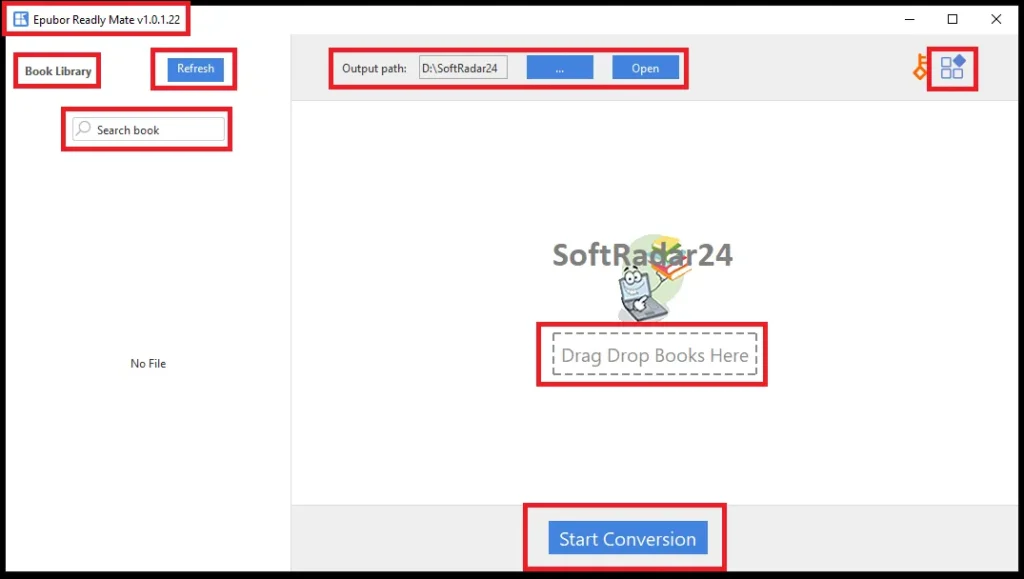
Epubor Readly Mate uses a library panel on the left and a download/conversion workspace on the right, with an output path and direct access to completed files. The current release is 1.0.2.47 and adds direct Readly downloading on Windows and Mac. The interface screenshot below captures the earlier 1.0.1.22 generation, so some current login and download controls can differ.

Compatibility & Coverage
Epubor Readly Mate is available in separate Windows and macOS builds. Its output is PDF, so the finished file can move beyond the Readly app, but the source still depends on account access and successful synchronization of saved Readly titles.
| Area | Current documented coverage | Decision note |
|---|---|---|
| Windows | Separate Windows installer (.exe) | No exact Windows-version floor is published on the supplied current product/user-guide pages; test the trial on your actual system. |
| macOS | Separate Mac download (.zip) | No exact macOS-version floor is published on the supplied current product/user-guide pages; test the trial on your actual Mac. |
| Current release | Readly Mate 1.0.2.47 · April 29, 2026 | Major update adds direct Readly downloading on PC/Mac. |
| Source content | Supported Readly magazines and newspapers saved to the account | An issue may need both Star and Read this issue actions before it appears in Epubor Readly Mate. |
| Output | Fixed-layout PDF preserves the magazine page design but does not reflow like an EPUB. | |
| Login | Readly/Cafeyn email and password | Current Epubor documentation says Google and Facebook third-party login are not supported. |
| Readly native offline mode | Current Readly support: configurable 10–500 downloaded issues on supported mobile devices, subject to storage | Those downloads remain app-managed; they are not the same as local standalone PDFs. |
| Readly devices | Current Readly support allows up to 5 devices simultaneously | The device allowance belongs to Readly, not to the Epubor software license. |
Current Readly/Cafeyn Transition
Readly moved users to a new app and website during 2026 as part of its integration with Cafeyn. Current Readly support says iPhone/iPad users need iOS 15+ for the new app and Android users need Android 8+. It also says the new Readly app is not available for Amazon devices, although browser access remains available. Epubor Readly Mate has been updated for the current Readly/Cafeyn login flow.
PDF on Kindle, Kobo and reMarkable
PDF support does not guarantee an ideal magazine-reading experience. Full magazine pages can contain small multi-column text, edge-to-edge images and fixed page dimensions. Larger color tablets usually display those layouts more naturally than small monochrome e-readers. Use the trial on the exact publication and device before buying primarily for e-reader transfer.
Features & Capabilities
Epubor Readly Mate is intentionally narrow: its job is to turn supported Readly magazines and newspapers into ordinary local PDFs. The important capabilities are direct account synchronization, batch issue selection, original-layout PDF output and portability to standard PDF tools and devices.
Direct Readly/Cafeyn Library Access
- Current 1.0.2.47 release supports direct Readly downloading on PC and Mac
- Readly/Cafeyn account sign-in through email and password
- Profile selection after authentication
- Automatic synchronization of properly saved titles after restart
PDF Download & Batch Processing
- Download supported magazines and newspapers as local PDF files
- Select multiple saved issues for batch processing
- Configurable local output path
- Open completed files directly from the application workflow
Layout & Reading Portability
- Vendor claims preservation of original page layout and high-resolution appearance
- PDF output readable with standard compatible PDF software
- Transferable to PDF-capable tablets and e-readers
- Useful for PC/Mac offline reading outside Readly’s browser reader
Printing & Local Organization
- Local PDFs can be opened in ordinary PDF software for permitted printing
- More practical for multi-page printing than one-page screenshot capture
- Standalone files can be organized in normal folders and backed up with your other documents
- Three complete magazines can be converted with the current trial before purchase
Important Conditions & Limitations
The biggest risks are assuming every saved issue will sync automatically, buying for a login method the software does not support, treating PDF output as perfect on every e-reader, or following obsolete emulator instructions that no longer match the current release.
The Current Version Uses Direct PC/Mac Downloading
Readly Mate 1.0.2.47 introduced direct Readly downloading on PC and Mac. Older Epubor tutorials and older interface captures may still describe Android Studio or LDPlayer. Those emulator steps belong to an earlier generation of the workflow and should not be treated as the normal requirement for the current direct-login release.
Google and Facebook Sign-In Are Not Supported
Epubor’s current user guide requires Readly/Cafeyn authentication with an email address and password. If your normal Readly access relies on Google or Facebook sign-in, establish a working email/password login or test the trial before purchasing.
Saving an Issue with the Star Icon Alone May Not Be Enough
The current Epubor Readly Mate guide says you must also open the issue with Read this issue. If the magazine does not appear, complete that step and restart Epubor Readly Mate so it resynchronizes the saved library.
A Stable Internet Connection Is Required for Account Sync and Download
The finished PDF can be read offline, but creating it is not an offline operation. Epubor’s troubleshooting guidance specifically says to verify the Internet connection when a Readly magazine fails to download.
Readly Native Offline Downloads and Local PDFs Are Different
Readly currently allows roughly 10–500 issues to be downloaded inside its supported mobile app, depending on settings and available storage. Those issues remain part of the Readly app environment. Epubor Readly Mate instead creates a normal PDF file on the computer. Buy the converter only if that file-level portability is actually useful to you.
PDF Does Not Automatically Mean Comfortable E-Ink Reading
Magazine PDFs preserve fixed layouts. A 6-inch monochrome reader may require frequent zooming and panning, while a larger color tablet can be much easier to use. The ability to transfer a PDF to Kindle, Kobo or reMarkable is not the same as having a reflowable magazine optimized for that screen.
Original-Quality Output Is a Vendor Claim That Should Be Trial-Tested
Epubor says Readly Mate keeps the original layout, high resolution and clarity. Printing and image-heavy magazines are where quality differences become most visible, so use the three-magazine trial on a representative issue and compare small text, photographs and page edges before buying for archival or print work.
Current Readly Platform Changes Can Affect Compatibility
Readly’s 2026 move toward Cafeyn changed the app, website and login environment, and Epubor released 1.0.2.47 specifically to support the newer PC/Mac workflow. Future platform changes can require another software update, so test the current build instead of assuming an old workflow will remain unchanged indefinitely.
PDF Conversion Does Not Grant Redistribution Rights
A Readly subscription provides access to publisher content; creating a local PDF does not transfer the copyright in that publication. Use Epubor Readly Mate only for issues you are legitimately entitled to access and only for copying, archiving or printing uses allowed by the applicable subscription terms and laws. Do not redistribute converted magazines or newspapers.
Refund Terms Depend on the License
The approved 1-Year, 5-Year and 5-computer Family licenses on this page are covered by Epubor’s current 30-day money-back period. Epubor’s shorter 1-Month and 3-Month products use a 7-day period, but those shorter licenses are not part of the approved SoftRadar24 purchase selector here.
Free Trial / Free Version
The current Epubor Readly Mate trial converts three complete Readly magazines for free. That is enough to test account synchronization, PDF quality, printing and e-reader readability before buying a longer license.
| What to test | Why it matters | Best pre-purchase check |
|---|---|---|
| Readly/Cafeyn login | Third-party Google/Facebook sign-in is not supported. | Confirm that your account works with email and password inside the current Epubor Readly Mate login flow. |
| Saved-title detection | Starring an issue alone may not make it appear. | Use Star + Read this issue, restart Epubor Readly Mate and confirm the title synchronizes. |
| PDF page quality | Small text and detailed images expose conversion-quality problems quickly. | Use one trial magazine with dense text, photography and two-page spreads. |
| Printing | Print quality is different from on-screen quality. | Print one permitted page containing both text and images and inspect sharpness and crop margins. |
| Kindle/Kobo/reMarkable | Fixed-layout magazine PDFs can be awkward on small e-readers. | Transfer one trial PDF and test zoom, page turns, orientation and text readability on the actual device. |
| Batch workflow | Large magazine libraries can consume substantial disk space. | Convert several different issue types and measure average PDF size before planning a large archive. |
System Requirements
Epubor publishes current Windows and Mac builds but does not provide a complete CPU, RAM or exact operating-system-version table on the supplied Readly Mate pages. The requirements below therefore separate documented facts from practical needs instead of inventing minimum specifications.
| Requirement | Current documented position | Decision note |
|---|---|---|
| Windows | Dedicated Windows .exe installer | Exact supported Windows version range is not published on the supplied current pages; trial-test your actual PC. |
| macOS | Dedicated Mac .zip installer | Exact supported macOS version range is not published on the supplied current pages; trial-test your actual Mac. |
| Current version | 1.0.2.47 · released April 29, 2026 | Current direct PC/Mac Readly workflow; no normal emulator setup required. |
| Internet | Required for login, library synchronization and issue download | The completed PDF itself can then be read locally without Internet. |
| Account login | Readly/Cafeyn email and password | Google/Facebook third-party login is not supported by the current Epubor workflow. |
| Storage | No fixed working-space minimum is published | Keep enough space for full-color PDFs; batch archives can grow quickly. |
Alternatives & Better-Fit Options
Choose the alternative according to the content platform rather than assuming one Epubor tool covers every digital library. For the wider product catalog and current offers, visit the Epubor software page on SoftRadar24.
Epubor Audible Converter
Choose Epubor Audible Converter when the source is an Audible audiobook rather than a Readly magazine. Its workflow focuses on AAX audiobook conversion, MP3/M4B output and chapter handling instead of fixed-layout magazine PDFs.
Epubor Ultimate
A better fit for supported Kindle, Kobo and other eBook-library conversion tasks. Epubor Ultimate handles book formats, while Epubor Readly Mate is specifically designed around Readly magazine and newspaper PDF output.
Epubor Nook Converter
Use Epubor Nook Converter when the locked library is Barnes & Noble Nook. It addresses eBook portability rather than magazine-page archiving.
Epubor Kinoppy Mate
Relevant for Kinokuniya/Kinoppy digital reading libraries. Choose it when the content source is Kinoppy instead of Readly so the extraction/conversion workflow matches the platform that actually holds the material.
Epubor Hoopla Converter
A platform-specific alternative for supported Hoopla content. Hoopla’s access model differs from Readly’s magazine subscription, so the two converters should not be treated as interchangeable.
Epubor Telstory Converter
Choose Epubor Telstory Converter for supported Telstory content rather than Readly issues. It belongs to a different digital-content ecosystem and solves a different source-format problem.
Epubor eBook Converter
Use Epubor eBook Converter when you already have ordinary eBook files and mainly need conversion between compatible reading formats. It is not the correct tool for downloading Readly magazine issues.
Epubor Audiobooks Mate
A better fit when the source problem involves another supported audiobook ecosystem. Choose based on the service that owns or supplies the media rather than the fact that both products create more portable local files.
FAQ
These answers cover Epubor Readly Mate pricing, PDF downloading, offline reading, printing, e-reader transfer and current Readly/Cafeyn compatibility.
How much does Epubor Readly Mate cost with the current SoftRadar24 discount?
Current SoftRadar24 prices are $23.99 for 1 Year / 1 PC or Mac, $39.99 for 5 Years / 1 PC or Mac, and $79.99 for 5 Years / up to 5 PCs or Macs. The corresponding reference prices are $29.99, $49.99 and $99.99.
Is there an Epubor Readly Mate coupon code or discount?
Yes. The approved SoftRadar24 checkout links currently apply a 20% Epubor Readly Mate discount automatically. No manual coupon-code entry is required.
Can Epubor Readly Mate download Readly magazines as PDF?
Yes. The current 1.0.2.47 release can synchronize supported saved Readly magazines and newspapers and download selected issues as local PDF files on Windows or Mac.
Does Epubor Readly Mate still require Android Studio or LDPlayer?
Not for the normal current workflow. Epubor Readly Mate 1.0.2.47 added direct Readly downloading on PC and Mac. Emulator-based instructions belong to earlier versions and can still appear in older tutorials or screenshots.
Can I download Readly magazines directly to a PC without Epubor Readly Mate?
Readly provides browser reading on a computer, but its current native offline-download workflow is app-based on supported mobile devices. Epubor Readly Mate is useful when you specifically need a standalone PDF on Windows or Mac rather than browser access.
Can I read Readly magazines offline without Epubor Readly Mate?
Yes on supported mobile devices. Readly’s current support says its app can download roughly 10–500 issues for offline reading depending on your configured limit and available storage. Buy Epubor Readly Mate only when you need a normal PDF or another device/file workflow.
Can I read Readly magazines on Kindle, Kobo or reMarkable?
A PDF created by Epubor Readly Mate can be transferred to a compatible PDF-capable e-reader using the device’s supported transfer method. Magazine layouts are fixed and can be difficult to read on small E Ink screens, so test a trial PDF on the exact device first.
Can I print pages from a Readly magazine?
A converted Readly Mate PDF can be opened in normal PDF software and printed where your personal use and applicable rights permit it. This is more practical for multiple pages than screenshotting each page individually. Test print quality with the three-magazine trial.
How many Readly magazines can I download for offline reading in the Readly app?
Current Readly support says the app can be configured for between 10 and 500 downloaded issues, subject to available device storage. That app limit is separate from Epubor Readly Mate’s local PDF workflow.
Why does Epubor Readly Mate show a Cafeyn login page?
Readly joined Cafeyn during 2026, and Epubor’s current documentation says the services now share the login interface used by Readly Mate. A Cafeyn-branded login page can therefore be expected in the current workflow.
Why can’t Epubor Readly Mate detect a magazine I saved?
Epubor says clicking the Star icon alone can be insufficient. Open the title with Read this issue, then restart Epubor Readly Mate so the software refreshes and resynchronizes the saved library.
Can I log in to Epubor Readly Mate with Google or Facebook?
No according to the current Epubor Readly Mate user guide. The current workflow requires an email-and-password login for the Readly/Cafeyn account.
What is the Epubor Readly Mate free-trial limit?
The current trial allows three complete Readly magazines to be converted to PDF for free. Use the allowance to test login, issue detection, PDF quality, printing and your intended e-reader before purchase.
Can I move my Epubor Readly Mate license to a new computer?
Epubor’s current purchase FAQ says you can de-register the software from the old computer and then install/register it on the new one. License retrieval is also provided during the license period.
What is the Epubor Readly Mate refund period?
The approved 1-Year, 5-Year and 5-computer Family licenses shown here use a 30-day money-back period. Shorter Epubor 1-Month and 3-Month licenses use 7 days, but those shorter options are not part of this SoftRadar24 purchase selector.





