Epubor Audiobooks Mate Review: How to Download & Convert Audiobooks.com to MP3 (2026 Guide) + Discount Codes
You love listening to stories on Audiobooks.com. It is a great alternative to Audible. But there is a massive problem that most users realize too late: You are only renting those books.
Even if you “bought” the book with your monthly credits, you can only listen to it inside their specific app. You cannot transfer it to your MP3 player, your car’s USB stick, or your Apple Watch. Worst of all, if you ever decide to cancel your monthly subscription, you risk losing access to the library you paid for.
This is where Epubor Audiobooks Mate comes in.
Think of this software not as a “converter,” but as a “liberator.” It connects to your account, downloads your audiobooks, strips the digital lock (DRM), and converts them into high-quality MP3 files that you truly own forever.
📚 Digital Freedom Series
We believe you should own what you buy. Just like audiobooks, eBook platforms often trap your files. If you also use Barnes & Noble’s Nook, check out our popular guide on how to liberate those books too.
👉 Read Next: How to Download Nook Books to PC/Mac (Step-by-Step)
Why Do You Need This Tool? (The Benefits)
Most converters are complicated. They ask you to find file paths or install virtual sound cards. Epubor Audiobooks Mate is different because it is designed for “non-tech” people.
🚀 Auto-Sync Magic
Forget about downloading files manually. Just log in inside the software, and your entire library appears instantly. It’s like magic.
🎧 100% Original Quality
It doesn’t “record” the audio (which takes hours). It decrypts the original file. You get crystal clear, studio-quality sound in seconds.
⚡ Batch Download
Have 50 books? Don’t click 50 times. Select “All” and download your entire collection while you drink your coffee.
🔓 True Ownership
Once converted to MP3, you can cancel your Audiobooks.com subscription and keep the files forever. No more monthly fees just to re-listen.
How to use Epubor Audiobooks Mate
We tested the software ourselves. Here is the exact path to freedom, explained simply.
Step 1: Launch and Log In (The Tricky Part)
Download and install the software. When you open it, you will see a login window.
⚠️ Critical Warning: Do You Use “Login with Google/Facebook”?
This is the #1 problem users face. The software cannot open the Google or Facebook popup window to log you in. It only accepts a standard Email and Password.
The Solution: Go to the Audiobooks.com website > My Account > Settings. Choose “Reset Password” or “Create Password.” This gives your account a dedicated password so you can log into the Epubor software successfully.
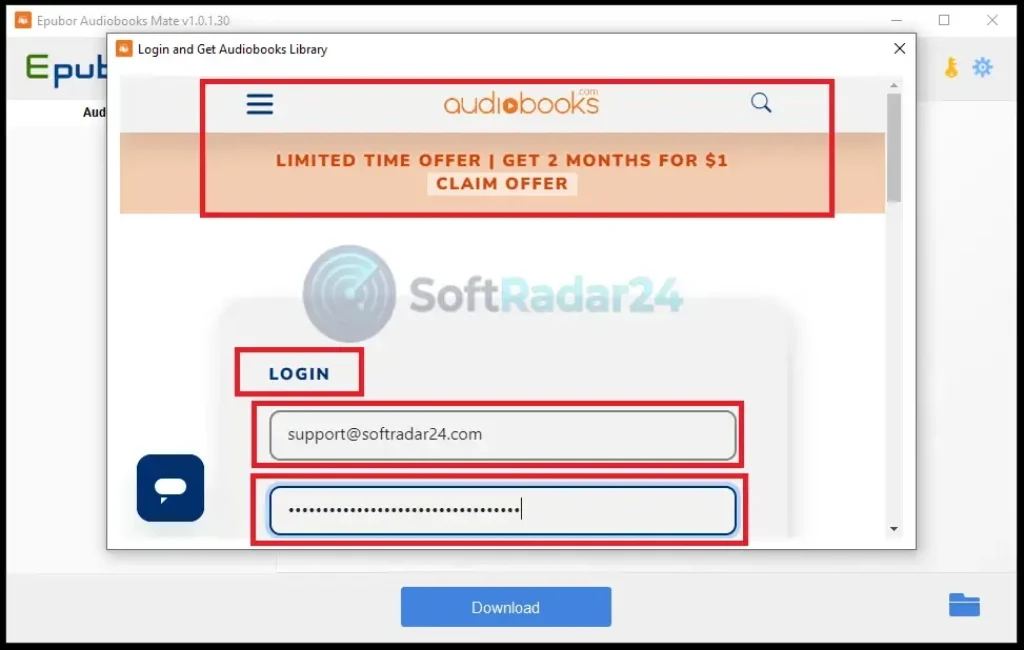
🔑 **Login Tip:** The software requires a direct Email/Password. If you usually sign in with Google or Facebook, you must create a separate password on the Audiobooks.com website first.
Enter your email and password. The software will connect to the Audiobooks.com server securely.
Step 2: Load Your Library
Once logged in, look at the Left Panel. You don’t need to do anything. The software automatically scans your “My Books” section and lists every single book you have ever purchased.
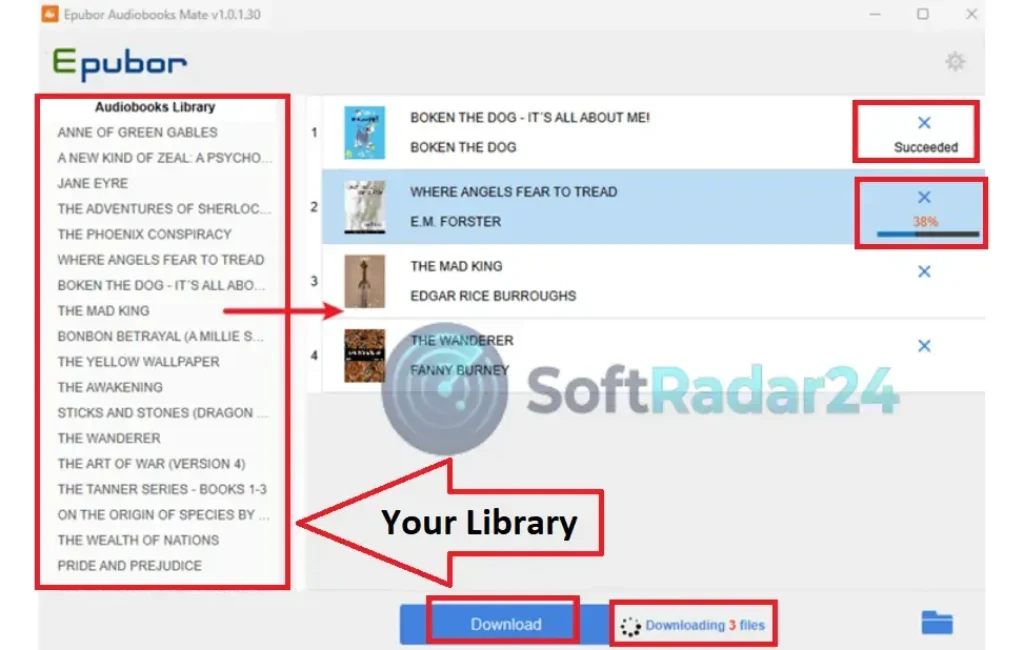
**Instant Sync:** As soon as you log in, your entire purchased collection appears in the left column. No manual searching required—just drag and drop.
Don’t see a book? Click the “Refresh” button at the top to sync again.
Step 3: Drag, Drop, and Convert
This is the fun part.
- Select the books you want to save from the left list.
- Drag them to the big empty space on the Right Panel.
- Click the big blue button that says “Download”.
You will see a progress bar. Because it is optimized for speed, a 10-hour book typically takes less than 1 minute to unlock.
Step 4: Find Your Files
When it finishes, a small text saying “Succeeded” will appear. Click on the Blue Folder Icon next to it.
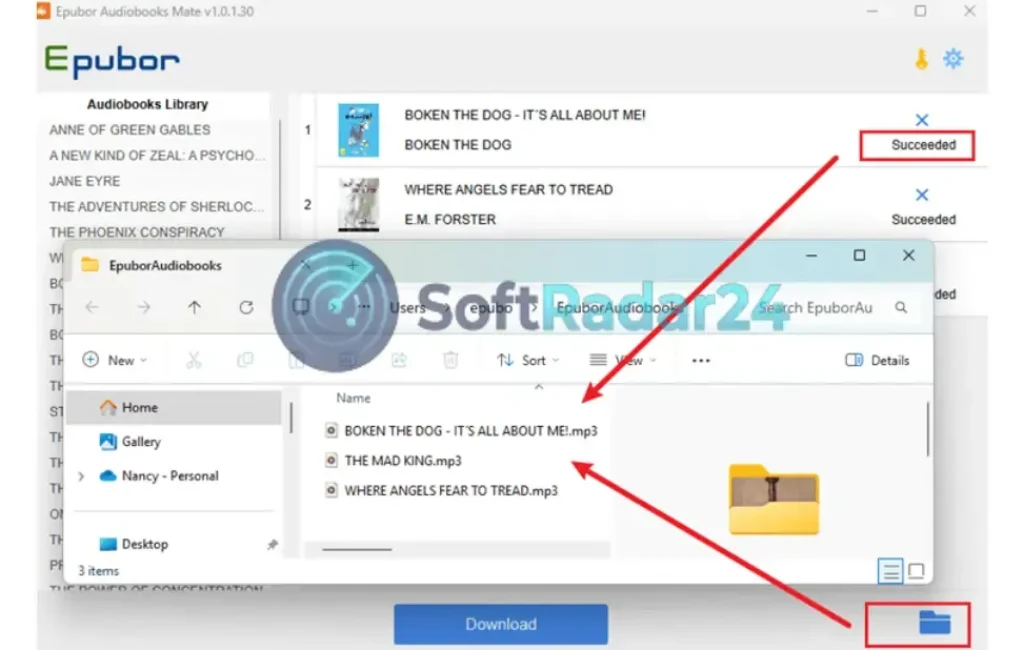
**Mission Accomplished:** These are standard MP3 files. You can now copy them to your iPhone, Android, or car USB without any restrictions.
Voila! There are your MP3 files. No DRM, no encryption. Just pure audio files that you can copy to your phone, tablet, or USB stick.
📥 Download Epubor Audiobooks Mate (Try It Free)
Epubor Audiobooks Mate for Windows
🪟 Instant Sync & Download: Automatically detects your library without manual searches. The fastest way to backup Audiobooks.com to MP3 on Windows 11/10.
Epubor Audiobooks Mate for Mac
🍎 Apple Silicon Ready: Fully optimized for M1, M2 & M3 chips. Convert your rented audiobooks to permanent MP3 files on your Mac securely.
Epubor Audiobooks Mate Discount Coupon Code 2026
Investing in the permanent ownership of your digital library is a smart move, but saving money while doing it is even smarter. As a SoftRadar24 reader, you don’t have to pay the full retail price. We have secured an exclusive 20% OFF coupon valid throughout 2026, making this essential backup tool even more affordable. Think of it as a small one-time fee to insure your entire audiobook collection against future subscription hikes or cancellations.
✂️ Coupon Applied Automatically at Checkout
🪟 Epubor Audiobooks Mate for Windows (20% OFF)
Epubor Audiobooks Mate for Win – 1 Year License
🔥 20% OFF Deal: The perfect starter pack. Download and convert your current Audiobooks.com library to MP3 on 1 PC.
Epubor Audiobooks Mate for Win – 5 Years License
🔥 BEST VALUE: Secure your audio collection for the long term. Get 5 years of updates and priority support for 1 PC.
Epubor Audiobooks Mate for Win – Family Pack (5 Years)
👨👩👧👦 Family Saver: Share the freedom. Install on up to 5 PCs so the whole family can backup their own audiobook accounts.
🍎 Epubor Audiobooks Mate for Mac (20% OFF)
Epubor Audiobooks Mate for Mac – 1 Year License
🔥 20% OFF Deal: Quick solution for Apple users. Decrypt your rented books and transfer them to iTunes/Apple Music instantly.
Epubor Audiobooks Mate for Mac – 5 Years License
🌟 RECOMMENDED: Fully optimized for macOS (Intel & M1/M2/M3). Keep your library safe through future macOS updates.
Epubor Audiobooks Mate for Mac – Family Pack (5 Years)
👨👩👧👦 Team License: The most economical choice for Apple households. License up to 5 Macs for one low price.
🛡️ Buy with Confidence (Transparency Check)
We believe in total transparency. Epubor is not a new player; they have been serving the eBook community for over a decade. Don’t just take our word for it—see what real verified users are saying about their support and software reliability.
⚖️ Epubor Audiobooks Mate Pros & Cons: The Honest Breakdown
👍 The Good (Pros)
-
✔
Zero Quality Loss: Unlike screen recorders, it decrypts the original file directly. You get the exact same audio quality as the source. -
✔
Instant Library Sync: The auto-detect feature is a lifesaver. No need to hunt for download links manually. -
✔
Keeps Chapters Intact: It preserves chapter information, so you can skip through tracks easily on your car stereo or iPod. -
✔
Lightning Speed: Decrypts hours of audio in minutes (approx. 60X faster than real-time recording).
👎 The Bad (Cons)
-
✖
The “SSO” Annoyance: You cannot log in with Google/Apple directly. You must create a separate password on the site first (as explained above). -
✖
Specific Utility: It only works for Audiobooks.com. It does NOT support Audible or Scribd (you need different tools for those). -
✖
Old-School Interface: The UI looks a bit dated (Windows 7 style), though it is very functional and simple to use.
💡 The SoftRadar24 Verdict
If you are a heavy user of Audiobooks.com, Epubor Audiobooks Mate is not a luxury; it is a necessity. It is the only way to safeguard your library against subscription cancellations or price hikes. The “Google Login” issue is a small annoyance, but the workaround is easy. For the speed, simplicity, and freedom it offers, we give it a solid recommendation.
Save your library before it’s too late.
🤔 Frequently Asked Questions (The Honest Truth)
1. Does this work with Audible (Amazon) books?
No. This specific tool is built only for Audiobooks.com. The encryption methods are different. If you need to convert Audible books, you need its brother software, “Epubor Audible Converter.”
2. Is it legal to use Epubor Audiobooks Mate software?
It falls under “Fair Use” in many regions if you are creating a backup for personal use. You paid for the content, and you have the right to listen to it on your preferred device. However, sharing or selling these MP3 files is illegal piracy.
3. I signed up with Apple ID. How do I log in?
As mentioned in the guide above, the software doesn’t support “Sign in with Apple.” You must go to the Audiobooks.com website and use the “Forgot Password” feature to generate a standalone password for your account email.
4. Does it keep the Chapter information?
Yes! This is a huge advantage over recording tools. Epubor Audiobooks Mate preserves the metadata. If your book has 20 chapters, the MP3 file will have chapter markers (or split files) so you can navigate easily.
5. Why is my conversion failing?
Ensure your internet connection is stable. The software needs to download the source file first. Also, make sure your Audiobooks.com subscription is active during the download moment.
6. Can I convert podcasts from Audiobooks.com too?
Generally, yes. If the podcast is in your “My Books” library and uses the same delivery format as audiobooks, the software can detect and download it to MP3.
7. How fast is the download speed?
It depends on your internet, but the conversion itself is almost instant (60X speed). It doesn’t re-encode the audio; it just strips the wrapper. You won’t wait hours for a book to finish.
8. Can I transfer these Audiobook MP3 files to my iPhone?
Yes. Once you have the MP3 files on your computer, you can drag them into Apple Music (iTunes) or any other cloud player and sync them to your iPhone instantly.
9. What are the limitations of the Free Trial?
The free trial version allows you to verify that it works. It usually converts only a few minutes of each book. To unlock the full length, you need a license key.
10. Why should I choose Epubor Audiobooks Mate instead of a free recording device?
Time and Quality. A free recorder requires you to play the book in real-time (20 hours for a 20-hour book) and captures system sounds/noise. Epubor does it in minutes with mathematical perfection.
🤝 Affiliate Disclosure: Our Transparency Promise
Transparency is one of our core values at SoftRadar24. We believe in building a relationship of trust with our visitors. Before you explore our software deals and reviews, we want you to understand exactly how this website operates and how we are funded.
How We Are Funded
SoftRadar24 is a reader-supported independent publication. We are not owned by any software giant. To keep this website free for you—without cluttering it with annoying pop-up ads—we participate in various Affiliate Marketing Programs.
What Does This Mean for You?
When you click on a link (like “Buy Now”) and make a purchase, we may earn a referral commission.
✅ No Extra Cost: This commission comes at no extra cost to you. In fact, our direct partnerships often unlock exclusive coupons that make the product cheaper than the regular price.
The purchase process happens entirely on the official vendor’s secure website. We simply refer you to them; we do not process payments.