

Kinokuniya’s Kinoppy digital bookstore is an exceptional resource for Japanese literature, academic texts, and manga, attracting readers globally. However, building a digital library on this platform comes with a significant hardware restriction. Downloaded titles are heavily encrypted and locked into the proprietary KBE format. This strict DRM means you cannot transfer your legally purchased books to dedicated e-ink devices like Kindle or Kobo. Instead, you are forced to read on glowing screens through the official app, leaving your collection constantly vulnerable to international geo-blocking or unexpected platform closures.
To regain full ownership of your media, you need a reliable extraction tool like Epubor Kinoppy Mate. This specialized software seamlessly detects your hidden local downloads and performs a direct Kinoppy to EPUB conversion. By completely removing the DRM encryption, it turns isolated KBE files into standard, universally accessible documents. Once your books are liberated into the standard EPUB format, you can easily archive them on your local hard drive, or use secondary tools to format them into PDF, ensuring your favorite reads are permanently available for comfortable, offline e-ink reading.
Important Pre-Requisites: Supported Kinoppy Formats and System Limitations
Before diving into the extraction process, it is crucial to understand exactly how Epubor Kinoppy Mate interacts with Kinokuniya’s digital library to ensure a successful conversion. Unlike generic converter tools, this software requires a specific environment and has strict format boundaries.
- Strictly EPUB-Only Compatibility: The software is highly optimized to bypass DRM exclusively on Kinoppy EPUB files (both text-based and image-based/manga formats). It cannot detect or convert older proprietary formats such as .book or XMDF. If your purchased title is in one of these legacy formats, it will not appear in the software’s synchronization list.
- The Emulation Requirement: Direct extraction from the native Windows or Mac Kinoppy desktop applications is not possible due to their complex encryption architecture. Instead, the process requires setting up an Android Emulator (specifically Android Studio) to act as a secure bridge for the KBE files.
- Security Software Interference: Aggressive background scanning from antivirus software (such as Norton, ESET, or Trend Micro) can block the software’s “Sync” function. You may need to temporarily pause these shields during the initial detection phase to allow the tool to locate your hidden downloaded media.
How to Extract Kinoppy Books to EPUB: Step-by-Step Guide
Converting your Kinokuniya digital library requires establishing a specific virtual environment before the software can process the files. Follow these exact technical steps to ensure Epubor Kinoppy Mate can successfully detect and bypass the DRM on your KBE files.
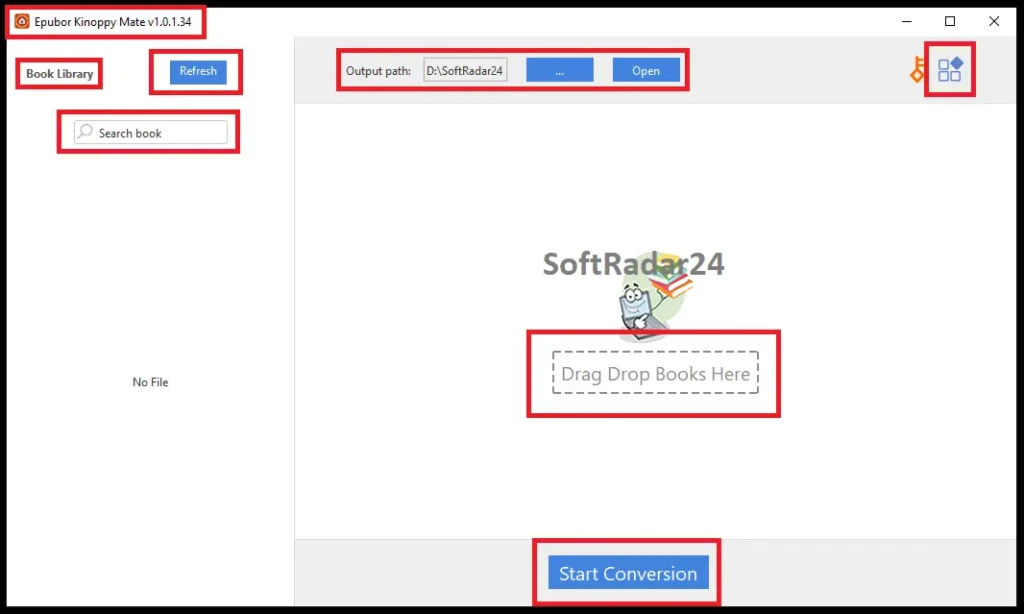
- Step 1: Configure the Correct Emulator (OS Dependent): The required virtual environment differs based on your computer.
- – For Windows Users: Android Studio frequently freezes when downloading large manga files. Instead, install LDPlayer 9. Crucial step: You must open the LDPlayer settings, enable both ROOT Permission and ADB Debugging, and restart the emulator for the sync process to work.
- – For Mac Users: LDPlayer is not supported on Mac. Install Android Studio, open the Virtual Device Manager, and create a device using Pixel 6 Pro hardware. You must strictly apply the Android 14.0 (Google APIs) system image.
- Step 2: Install the Kinoppy Application: Launch your configured virtual environment. For Windows (LDPlayer), simply download the Kinoppy APK file from your browser and drag it directly into the emulator window to install. For Mac (Android Studio), first install the APKPure app via your browser, open it, and search for the official Kinoppy app to install it onto your virtual device.
- Step 3: Download Your Books Locally: Open the Kinoppy app inside your emulator and log in with your Kinokuniya credentials. Navigate to your digital bookshelf. To securely save a title to the virtual local drive, double-click the book cover. Ensure the download process is entirely finished before moving forward.
- Step 4: Sync and Convert with Epubor Kinoppy Mate: Keep the emulator running in the background and open the converter on your desktop. Click the Sync button at the top left. (Note: If the books do not appear immediately, click the sync button a few more times). Once the software detects your hidden KBE downloads, drag the titles to the right processing panel and click Start Conversion. Your DRM-free EPUB files will be instantly saved to your local output folder.
How to Convert Kinoppy Books to PDF and Kindle Formats
While Epubor Kinoppy Mate is the essential bridge for removing DRM from Kinokuniya’s KBE files, it is important to note its export limitations. The software natively outputs your library strictly as standard, DRM-free EPUB documents. It does not feature a direct PDF or Kindle (AZW3/MOBI) output button within its interface.
However, because the DRM is permanently stripped during the initial extraction, transforming these clean EPUBs into other formats is entirely unrestricted. If you prefer to read on a dedicated Amazon Kindle or want to annotate academic texts in PDF format, you simply need a secondary formatter. You can drop your newly generated, DRM-free EPUB files into free library management software like Calibre or use Epubor Ultimate to quickly convert them into standard PDF or AZW3 formats without any additional cost.
Feature Comparison: Standard Kinoppy App vs. Epubor Kinoppy Mate
The following breakdown illustrates exactly how the conversion software eliminates Kinokuniya’s strict KBE encryption, geo-blocking, and hardware limitations. It clearly demonstrates the transition from a restricted, app-dependent library into a permanently accessible, DRM-free EPUB collection ready for any offline e-ink device.
| Feature / Limitation | Official Kinoppy Experience | With Epubor Kinoppy Mate |
|---|---|---|
| E-Reader Compatibility | Locked to phones, tablets, and PC screens | Full e-ink support (Amazon Kindle, Kobo, reMarkable) |
| File Format | Encrypted KBE (Kinoppy Book EPUB) files | Universal DRM-free EPUB documents |
| Geo-Blocking & Access | App requires login; prone to 403 Forbidden errors | 100% offline access; immune to international geo-blocking |
| Library Ownership | Dependent on Kinokuniya servers and active account | Permanent local backup on your personal hard drive |
| Supported Conversions | Opens all purchased store formats | Converts EPUB/Manga only (No .book or XMDF support) |
| PDF Format Output | Not possible | Achievable freely via secondary tools (like Epubor Ultimate) |
Epubor Kinoppy Mate Discount Coupon Code
Unlocking your Kinokuniya library is now more affordable with our verified 20% Epubor Kinoppy Mate coupon code. Applying this official promo at checkout instantly reduces the cost of permanently securing your KBE files into DRM-free EPUB formats. Whether you are installing the Windows or Mac version, take advantage of this exclusive offer to bypass platform restrictions and fully own your digital books without paying the full retail price.


20% OFF – Epubor Kinoppy Mate for Windows

Epubor Kinoppy Mate for Windows (1-Year / 1 PC)
Perfect 1-year Windows plan to bypass KBE encryption. Convert Kinokuniya books to DRM-free EPUB.
Epubor Kinoppy Mate for Windows (5-Years / 1 PC)
Secure your digital library for 5 years on one Windows PC. Effortlessly convert Kinoppy KBE to EPUB.
Epubor Kinoppy Mate for Windows (5-Years / 5 PCs)
Best value for families. Run the converter on up to 5 Windows PCs to batch process Kinokuniya books to EPUB.
20% OFF – Epubor Kinoppy Mate for Mac
Epubor Kinoppy Mate for Mac (1-Year / 1 Mac)
Essential 1-year Mac license to unlock Kinoppy downloads. Instantly turn protected KBE files into EPUBs.
Epubor Kinoppy Mate for Mac (5-Years / 1 Mac)
Long-term 5-year Mac plan. Reliably remove DRM and convert Kinokuniya titles to standard EPUB files.
Epubor Kinoppy Mate for Mac (5-Years / 5 Macs)
Share this 5-device Mac license with your family. Enjoy 5 years of unlimited Kinoppy EPUB extractions.
Epubor Kinoppy Mate Frequently Asked Questions
Before configuring your emulator or converting KBE files, review these essential technical details about Epubor Kinoppy Mate. The answers below address specific format limitations and export capabilities to ensure a flawless extraction of your Kinokuniya digital library.
Can Epubor Kinoppy Mate convert every book purchased from Kinokuniya?
Epubor Kinoppy Mate is specifically engineered to bypass DRM on standard Kinoppy EPUB files, which covers the vast majority of text-based literature and manga on the platform. It does not support or detect legacy proprietary file types such as .book or XMDF. If a purchased Kinokuniya title is delivered in one of these older formats, the converter will not display it in the synchronization panel.
Does Epubor Kinoppy Mate export Kinokuniya titles directly to PDF or Kindle formats?
The primary function of Epubor Kinoppy Mate is to permanently strip KBE encryption and generate a clean, universally readable EPUB document. While the software interface lacks a native PDF or AZW3 export button, you can simply drag your newly generated DRM-free EPUB files into secondary management tools like Calibre or Epubor Ultimate to format them perfectly for any offline e-ink device.
Why is an Android emulator required to use Epubor Kinoppy Mate?
The native Windows and Mac desktop versions of the Kinoppy application utilize a highly complex encryption architecture that blocks direct file access. Setting up a specific virtual environment, such as LDPlayer 9 or Android Studio, creates a secure bridge. This allows Epubor Kinoppy Mate to safely locate, sync, and process the hidden KBE downloads without triggering the platform’s security algorithms.
What are the restrictions of the Epubor Kinoppy Mate free trial version?
Users downloading the unregistered version of Kinoppy Mate can fully evaluate its capabilities without any expiration date. The free trial allows you to successfully convert and save exactly three Kinokuniya books in their entirety. This provides a perfect opportunity to test the emulator synchronization and verify the quality of the DRM-free EPUB output before committing to a paid license.





