

Upscale, stabilize, and convert your videos instantly with WinXvideo AI. Instead of risking your PC with dangerous keygens or malware, use our verified, 100% legal giveaway license key below to unlock AI-powered video enhancement for free.
💡 Critical Limitation Warning: The free giveaway license is restricted to version 3.2 and locks AI enhancements to standard HD (no 2K/4K upscaling) with a 60 FPS limit. It also excludes future upgrades. To unlock full 4K/8K AI capabilities, 240 FPS conversion, and lifetime future updates, claim our exclusive 50% official coupon on the WinXvideo AI Discount Code page.
Giveaway License Details
| Product Name: | WinXvideo AI (Version 3.2) |
| License Type: | Lifetime (For v3.2 only, no free upgrades) |
| License Key: | AIPYB-MX55M-HF553-MTVVC |
| Official Download: | Download Official Setup |
How to Activate WinXvideo AI Free Key?
Download the official installation file using the secure link provided above.
Install the software on your Windows 7, 8/8.1, 10, 11 computer.
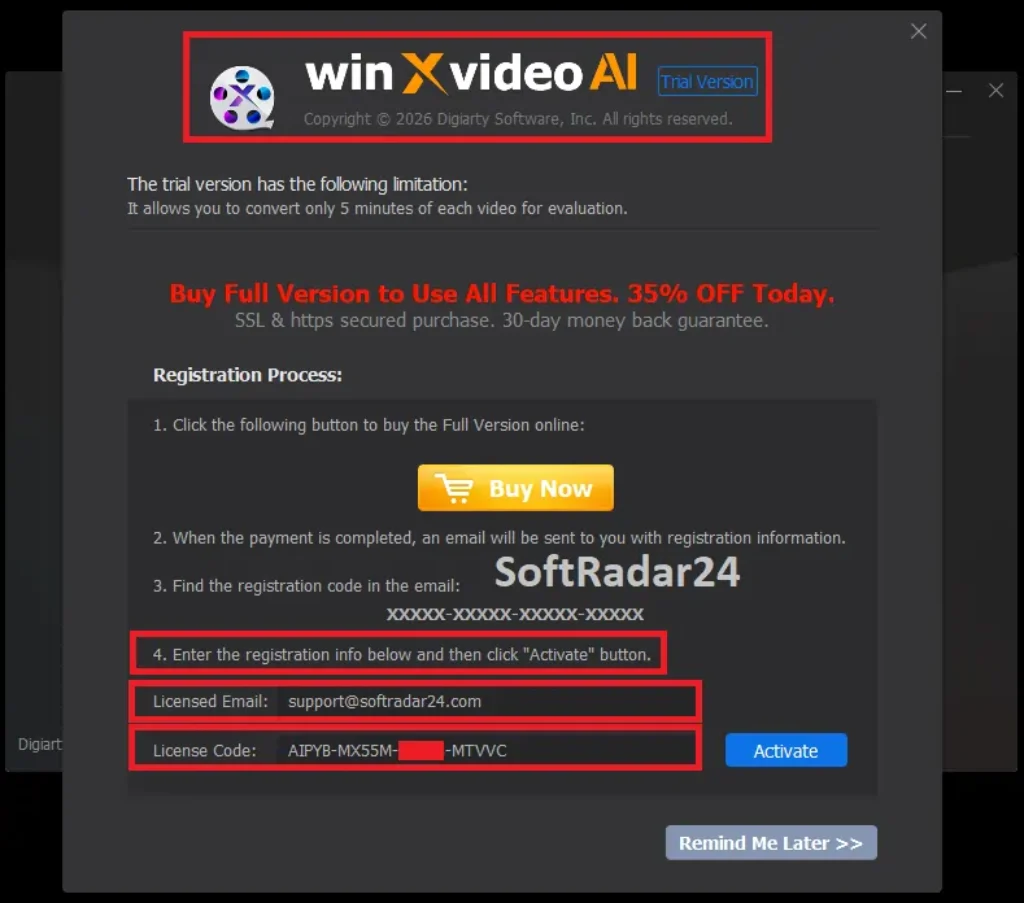
Launch the program and navigate to the registration menu.
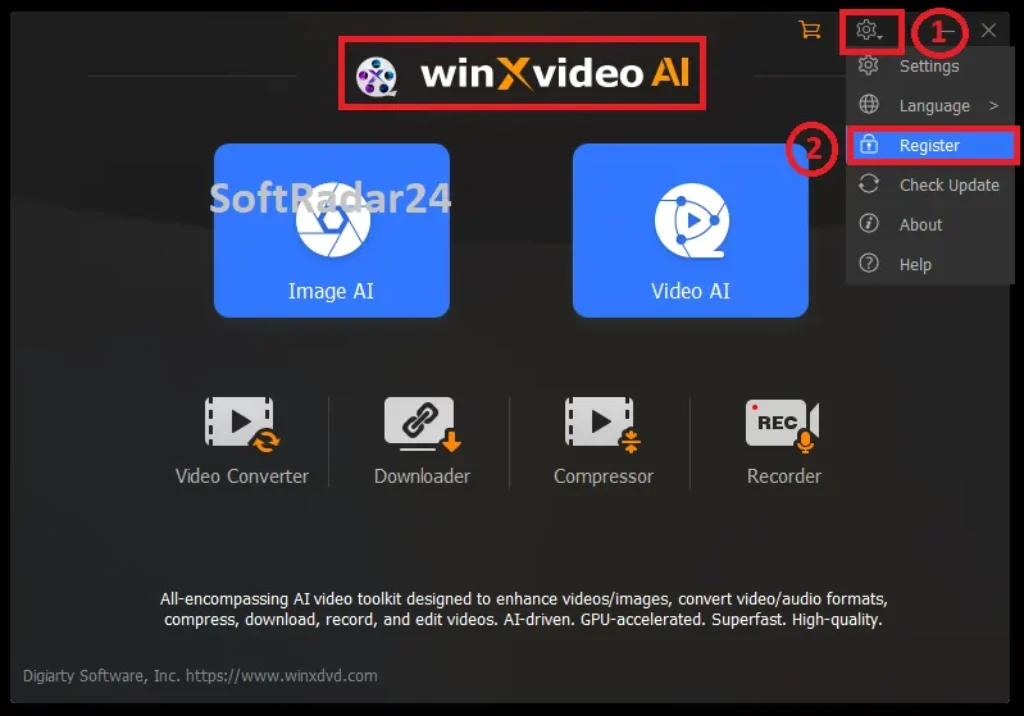
Paste your free license code (AIPYB-MX55M-HF553-MTVVC) and click activate.
Why Use a Legit License Instead of a Crack?
Searching for a WinXvideo AI crack often leads to downloading ransomware or spyware that compromises your system. A legit giveaway license guarantees you receive a safe, virus-free application with basic official technical support, keeping your personal data secure from hackers.
Quick Overview: What is WinXvideo AI?
- AI-Powered Enhancement: Utilizes deep learning to upscale low-resolution videos, stabilize shaky footage, and boost frame rates effortlessly.
- Full GPU Acceleration: Supports Intel, AMD, and NVIDIA hardware acceleration, delivering processing speeds up to 47x faster without overloading your CPU.
- Massive Format Support: Converts across 370+ input and 420+ output formats including 4K/8K MP4, MKV, FLAC, and AAC.
- Lossless Compression: Reduces heavy video file sizes by up to 90% while maintaining 98% of the original image quality.
System Requirements
Supported OS: Microsoft Windows 7, 8/8.1, 10, 11 or later (64-bit version supported)
Processor: Multi-core processor (Intel i5, i7, or AMD equivalent) for efficient rendering.
RAM: Minimum 1GB RAM (Recommended: 2GB or above).
GPU: Modern graphics card required for hardware acceleration.
-APIs for GPU Computing: Vulkan ≥ 1.2.x, OpenCL ≥ 1.0.
-NVIDIA: Quadro 410 or higher, GeForce GT 630 or higher, GeForce GTX645 or higher
-Intel: Intel® UHD Graphics 620 (WHL GT2) or higher, Graphics 510 or higher.
-AMD: AMD Radeon RX550 series or higher.
Supported Formats & Devices
| Format Category | Supported Formats |
|---|---|
| 4K / HD Video | AV1, MKV (AV1), 4K MP4 (H264), 4K HEVC (HEVC), 4K MKV (H264), 4K MOV (H264), 4K ProRes (PRORES), 4K WebM (VP8/VP8), TS HD (MPEG2), AVC HD (H264), MKV HD (H264), MPEG HD (MPEG2) |
| General Video | MP4 (H264/MPEG4), HEVC, AVI (DivX/Xvid), MPEG (MPEG4), MKV (H264), MOV (H264), DivX, WebM (VP8), WMV (WMV2), M4V (H264), DV (DV-NTSC), F4V (H264), FLV (H263), 3GP (H263), 3G2 (Xvid), ASF (MPEG4), MPEG1, MPEG2, OGV, SWF, NTSC VOB (MPEG2), PAL VOB (MPEG2) |
| Web Sharing | YouTube (MP4, FLV), Facebook (MP4, MOV, AVI, FLV), Vimeo (H264), WMV (WMV2), AVI (DivX), MOV (MPEG4), MP4 (MPEG4), FLV (H264) |
| Audio & Image | MP3, M4A, AAC, iPhone Ringtone, AC3, WMA, AIFF, CAF, DTS, OGG, WAV, FLAC, PNG, JPG | Input Formats & Sources |
| Video (8K/4K/2K/HD/SD) | AV1, H.264/MPEG-4 AVC, H.265/HEVC, H1V, AVI, MKV, MMV, MP4, MPE, MPEG, MPEG2, MOD, TOD, MOV, QT, AVCHD, AVS, AMV, ASF, M1V, M2P, M2TS, M2V, MP2V, MPEG4, MPG, MPG4, MTS, MTV, MXF, WMV, FLV, F4V, DIV, DAT, DAV, DV, DVR-MS, DivX, Xvid, XAVC-S, XWMV, RM, RMVB, RPM, RT, VOB, 3G2, 3GP, 3GP2, 3GPP, Google TV, WebM, WM, WMP, WTV, VP6, VP8, VP9, VPX, VRO, YUV411, G2M4, iCod, mp2v, OGM, OGV, SWF, TS |
| Image | PNG, JPG, PBM, XBM, JPEG, PGM, PPM, XPM, TIF, TIFF, WebP, BMP, AVIF, JFIF, HEIC |
| Audio | MP3, AAC, AC3, DTS, FLAC, M2A, M4A, AIFF, AMR, A52, AIF, ANX, AOB, APE, AQT, ASX, AXA, MKA, MLP, MP1, MP2, MPA, MPC, OGA, OGG, OMA, RA, RAM, SPX, VQF, WAV, WMA, WV, XA, XM, TTA, VOC |
| Website (1000+ Sites) | YouTube, Yahoo, Google Plus, Facebook, DailyMotion, Vevo, Break, CBS, UStream, MTV, Vimeo, Niconico, SoundCloud, Audiomack, etc. |
| Other | HDR, 2D, 3D, 360° VR, Alpha videos, M3U8 content folder, M3U8 link |
Want to see how this AI converter performs in deep benchmarking tests? Read our comprehensive WinXvideo AI Review to explore all premium features, pros, and cons.
WinXvideo AI Frequently Asked Questions
Are there any limitations on the free WinXvideo AI license code?
The giveaway license provides lifetime access strictly to version 3.2. Users activating the software with this promotional code will not receive future upgrades, bug fixes, or official technical support from the developer. While it permanently unlocks the core features of the current build, those who want continuous access to upcoming AI models and new tools should consider claiming a discounted lifetime plan.
What are the WinXvideo AI giveaway restrictions?
Free promotional versions deliberately cap certain high-end capabilities to separate them from the premium tier. Specifically, the AI enhancement features are restricted to standard HD quality, meaning 2K or 4K upscaling is disabled. Additionally, the frame rate interpolation is locked at a maximum of 60 FPS. If your workflow requires true 4K/8K upscaling or smooth 240 FPS conversion, upgrading to the unrestricted full version is highly recommended.
What is WinXvideo AI and what is it used for?
This software is a comprehensive, GPU-accelerated multimedia toolkit designed to enhance, convert, compress, and record digital media. Content creators and home users rely on its deep-learning AI to upscale low-resolution videos, stabilize shaky smartphone footage, and convert media files across hundreds of formats without losing original quality. It essentially acts as an all-in-one workstation for safely optimizing video and audio files without needing multiple heavy editing programs.
Does WinXvideo AI really work?
Real-world benchmarking and user feedback demonstrate a significant improvement in video clarity, especially when restoring old, pixelated footage or smoothing out shaky camera recordings. The software utilizes dedicated hardware acceleration (Intel, AMD, NVIDIA) to process intensive AI algorithms quickly, preventing your CPU from overloading. While it cannot magically create missing details in severely corrupted files, it highly effectively polishes, upscales, and refines standard media into professional-looking formats.





