The AI video enhancement industry is currently experiencing an unprecedented explosion, driven by a universal demand to rescue heavily compressed web footage, digitize degrading VHS archives, and upscale standard-definition clips for modern 4K displays. However, this sudden technological leap has inadvertently created a massive hardware divide, leaving average consumers frustrated as industry-standard applications like Topaz Video AI demand top-tier graphics cards and exorbitant subscription fees just to render a few minutes of enhanced footage. Most casual creators and home archival enthusiasts do not have access to dedicated professional workstations, forcing them to navigate a chaotic market flooded with subpar online converters, misleading free trials, and unstable freeware that frequently crashes before the export bar even reaches the halfway mark.
Positioned precisely to bridge this widening gap, WinX DVD – Winxvideo AI enters the arena not as a Hollywood-grade studio suite, but as a highly optimized, pragmatic toolkit engineered specifically to run smoothly on older Windows computers and mid-range hardware. Originally known as a standard HD video converter (Winxvideo AI), the software recently underwent a complete architectural overhaul to integrate deep learning models, allowing it to handle complex computational tasks like motion blur reduction, 60fps frame interpolation, and 4K super-resolution without instantly overheating standard desktop processors.
Stripping away the aggressive marketing claims and the harsh limitations of its trial version, we will evaluate exactly how its latest Gen Detail V3 algorithms perform under real-world constraints, exposing the inevitable artifacting issues at extreme frame rates while identifying precisely who will benefit from this budget-friendly upscaler and who should look elsewhere.
Winxvideo AI is heavily optimized for Windows architecture. If you edit primarily on macOS, you need its dedicated Apple Silicon counterpart for seamless hardware acceleration without crashing. We have tracked down a verified 67% discount on the ultimate Mac-native video enhancer specifically for our readers.
Click here to claim your Macxvideo AI Coupon Code and upscale 4K videos natively on your Mac.
Key Features of Winxvideo AI: What It Actually Does
WinX DVD – Winxvideo AI is not a single tool. It is a combined suite of deep-learning algorithms and traditional video processing modules. Stripping away the marketing jargon, here is exactly what the software engine offers and how it performs in practical scenarios.
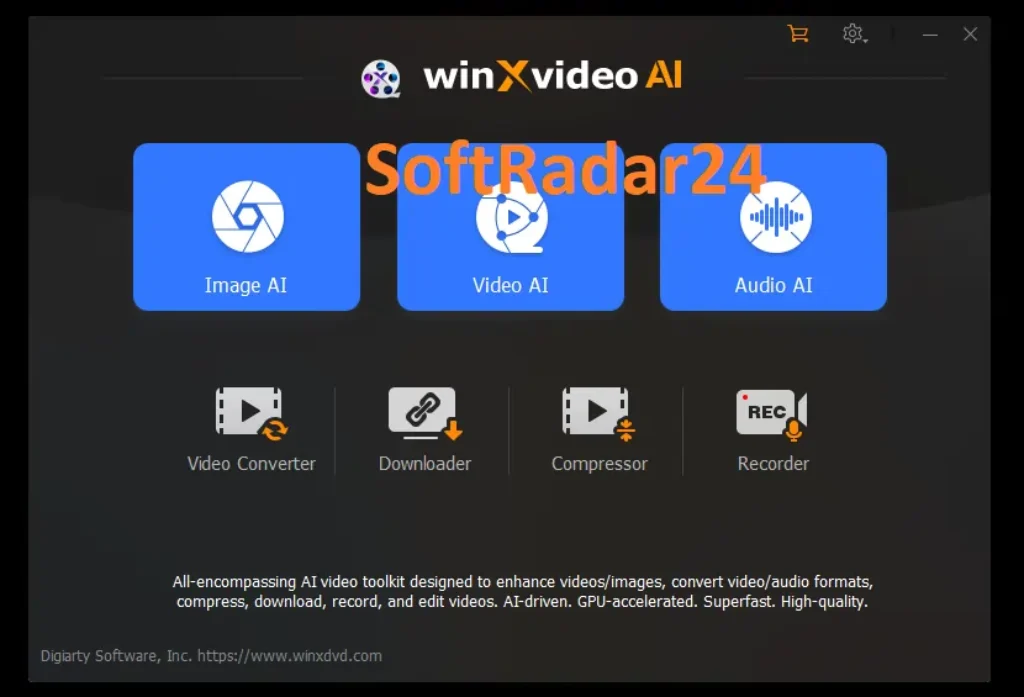
- Super Resolution AI (4K/8K Upscaling): The software utilizes neural networks to reconstruct missing pixels in low-resolution footage. It features four distinct models. Gen Detail V3 focuses on skin, hair, and architectural textures. Real Smooth V3 targets 2D animations and glass surfaces.
Pro Tip: The official developer guide secretly advises against upscaling directly by 400%. For the best visual fidelity, run a two-step 200% multiplier instead of a single 4X upscale.
- Frame Interpolation (Smoother AI): This module analyzes motion vectors between consecutive frames to generate entirely new intermediate frames. It can boost standard 24fps or 30fps video up to 60, 120, 240, or even 480fps for slow-motion effects.
Reality Check: While 60fps conversions look buttery smooth, pushing the AI to 120fps or higher often introduces visible “ghosting” and morphing artifacts during complex, fast-paced camera pans.
- Video Stabilization AI: Designed to rescue shaky handheld footage from smartphones, GoPros, and drones. It offers a Two-Pass mode for deeper analysis and four presets (Best Stability, Fastest, Balanced, Minimum Crop).
Reality Check: It effectively smooths out minor micro-jitters. However, for heavy action shakes, the software compensates by aggressively cropping the video frame, which may cut off important subjects on the edges.
- Image & Face Restoration AI: The Winxvideo AI includes a generative image engine. It colorizes black-and-white photos, removes severe pixelation, and features three targeted Face Restoration modes (High Quality Faces, Center Face, All Faces) to reconstruct blurred facial details without making them look plastic.
- Audio AI & Vocal Remover (New): The Winxvideo AI latest update introduces targeted audio suppression. It instantly isolates and removes background noise like wind, hums, and keyboard clicks. The AI Vocal Remover can also separate instrumental stems from vocals for a cappella or karaoke tracks.
- The Legacy Toolkit (Compress, Convert, Record): Winxvideo AI retains its legacy processing power. It compresses heavy GB-sized HEVC/AV1 files into MBs with minimal quality loss. It also includes a 4K 60fps screen recorder and a built-in editor. Advanced users can even manipulate the GOP (Group of Pictures) value—lowering it to 30-60 for fast-paced action or keeping it at 90-250 for static scenes to balance quality and file size.
Hardware Requirements: Will It Crash Your PC?
AI video processing is notoriously demanding. Competitors like Topaz Video AI require massive VRAM and will instantly crash older machines. Winxvideo AI takes a completely different approach. It is specifically optimized for budget builds and mid-range laptops by leveraging Microsoft’s native hardware-accelerated video processing APIs, effectively offloading the heavy rendering tasks from your CPU directly to your graphics card.
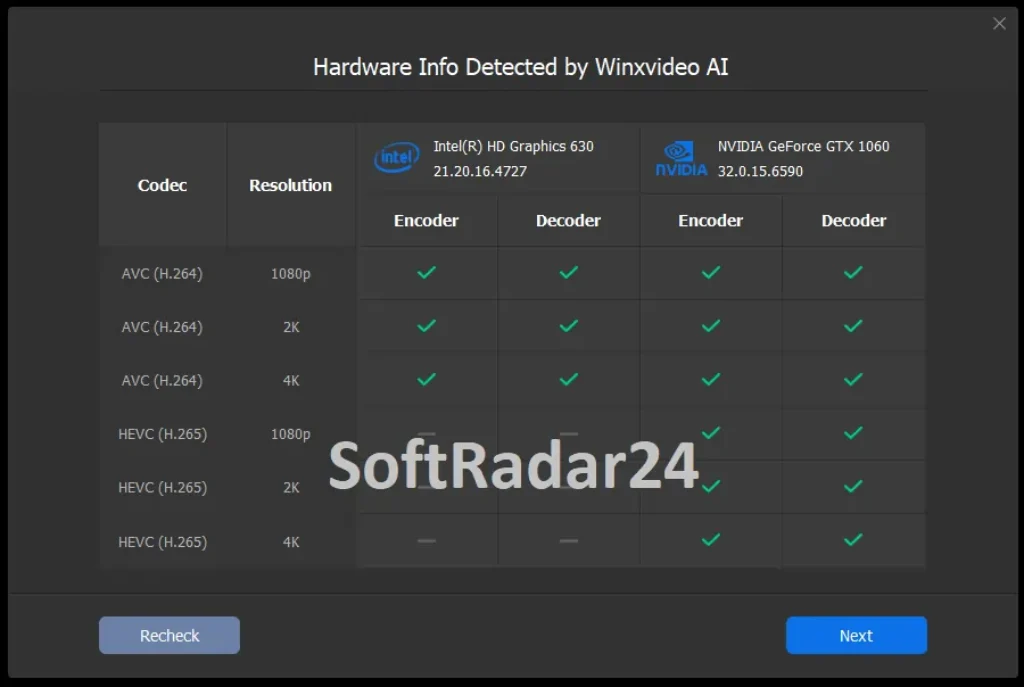
However, the software is not magic. You still need a minimum of 2GB RAM and Vulkan 1.2 support. Without a compatible GPU, the program will throw a “No Vulkan found” error and refuse to process any AI tasks. If you are running an Intel UHD Graphics 620 or a basic AMD Radeon RX550, Winxvideo AI will successfully render your files. Most professional studio alternatives will not even launch on these specifications.
Winxvideo AI vs. The Heavyweights
Evaluating an upscaler requires looking at the broader market. Here is how Winxvideo AI stacks up against the two biggest competitors in the AI video enhancement industry.
Winxvideo AI vs. Topaz Video AI
Topaz Video AI is the undisputed industry standard for pixel perfection. It excels at complex noise removal and supports massive 16K upscaling. However, Topaz demands a heavy hardware investment. It requires a high-end dedicated GPU and costs $299 per year. Winxvideo AI sacrifices roughly 10% to 15% of that peak visual fidelity. In return, it delivers a much faster, beginner-friendly workflow that runs on standard laptops for a fraction of the price.
Winxvideo AI vs. UniFab All-In-One
UniFab is a premium mid-range competitor. Hardware benchmarks indicate that UniFab handles severe night-time noise and compression artifacts slightly better than Winxvideo. UniFab also provides native Mac support and SDR-to-HDR10 conversion. The downside is the cost. The complete UniFab AI suite forces a $299 bundle investment. Winxvideo AI lacks the HDR conversion but remains the ultimate cost-effective choice for Windows users.
Final Verdict: Who Should Actually Buy Winxvideo AI?
Winxvideo AI bridges the gap between basic free converters and expensive Hollywood studio software. It is a highly practical utility for everyday media rescue, provided you manage your expectations regarding extreme frame rate manipulation.
✅ Buy Winxvideo AI if:
- You run a mid-range or older Windows desktop.
- You need to digitize and upscale old DVDs or 480p home videos.
- You want a simple, one-click enhancement workflow without complex timelines.
- You frequently need to compress massive 4K files into smaller MBs for web sharing.
❌ Skip Winxvideo AI if:
- You edit primarily on a Mac (the core AI features are heavily Windows-optimized).
- You demand flawless 120fps motion interpolation for fast-paced action sports.
- You require advanced color grading or SDR-to-Dolby Vision HDR conversion.
- You already own a high-end RTX 40-series workstation capable of running Topaz Video AI.
Winxvideo AI Discount Coupon Codes 2026
Do not pay the full retail price for Winxvideo AI. The official developer frequently runs hidden promotional campaigns. You can bypass the restrictive trial limits today at a fraction of the original cost. We track the latest 2026 discount links to guarantee the lowest possible checkout price. Review the active license tiers below and secure your lifetime access before the current promotion expires.
Active 2026 Promotional Deals:
- 1 Year License (Up to 3 PCs): $19.95 (Normal price: $39.95 — 50% Off)
- Lifetime License (1 PC): $29.95 (Normal price: $69.95 — Save $40)
- Family Lifetime License (3-5 PCs): $39.95 (Normal price: $119.90 — Best Value)
- Creator Bundle (Winxvideo AI + Aiarty Image Enhancer): $99.00 (Normal price: $224.95 — Save $125)
👉 80% OFF – WinX Media Master 5-in-1 Discount Code
Why settle for just an AI upscaler? Get the ultimate WinX DVD multimedia package. This exclusive bundle includes the Lifetime License of Winxvideo AI alongside industry-leading processing tools at a fraction of the cost:
- Winxvideo AI [Lifetime License]
- WinX DVD Ripper Platinum [Lifetime / 1 PC]
- WinX MediaTrans [Lifetime / 1 PC]
- WinX DVD Copy Pro [Lifetime / 1 PC]
- Bonus Gift: 5KPlayer



Winxvideo AI [1 Year License/3 PCs]
Ideal for budget-conscious users needing short-term AI video enhancement across multiple devices.
Winxvideo AI (Lifetime / 1 PC)
Secure permanent access to all AI upscaling and processing features for a single primary workstation.
Winxvideo AI (Family Lifetime / 3-5 PCs)
The ultimate cost-effective solution to equip your entire household with lifetime AI video capabilities.
Winxvideo AI + Aiarty Image Enhancer
A comprehensive creator bundle combining top-tier video stabilization with generative image restoration tools.
Winxvideo AI Trial vs. Full Version: Why Upgrade?
| Comparison between | Winxvideo AI Trial | Winxvideo AI Full Version |
|---|---|---|
| AI Video Enhancement | ||
| • Enhance low quality videos to 1080p or 4K. Remove noise, blur, compression artifacts. | 5 mins video | ✅ |
| • Stabilize shaky videos shot on your GoPro, smartphone, drone, or handheld camera | 5 mins video | ✅ |
| • Increase video frame rates to 60/120fps and create smooth slow-motion | 5 mins video | ✅ |
| • Two renovated AI models boost Video Super Resolution, 40%–80% faster, sharper than ever | 5 mins video | ✅ |
| AI Image Enhancement | ||
| • Denoise, unblur, retouch, and upscale images to 4K, 8K, or 10K | 5 images | ✅ |
| • Restore face photos, colorize black & white images | 5 images | ✅ |
| • Advanced AI architecture for image training | Periodically | Bi-monthly |
| AI Audio Enhancement | ||
| • AI Audio Noise Reduction: Remove background noise from audio/video | 5 mins Audio/Video | ✅ |
| • AI Vocal Remover: Easily isolate vocals or instrumentals from audio/video | 5 mins Audio/Video | ✅ |
| All-in-one Video Toolbox | ||
| • Convert MP4, MKV, MOV, AVI, MP3, and more | 5 mins video | ✅ |
| • Compress video file size by up to 90% seamlessly | HD | 4K, HD |
| • Download video, audio, playlist, channel, M3U8, live stream, subtitle | 300+ sites supported | 1000+ sites supported |
| • Record screen, webcam, and both in picture-in-picture mode; Support 4K recording at 60fps | With watermark | Without watermark |
| • Basic Edit: Trim/Crop/Split/Merge, Rotate/Flip, Add subtitles, effects, watermarks, and create GIFs etc | 5 mins video | ✅ |
| Purchase Benefits | ||
| • Get free updates on future versions with continuously improved AI models | – | ✅ |
| • 30-day money back guarantee | – | ✅ |