
Quick Summary
Macxvideo AI is a macOS media toolkit that combines AI-assisted video, image and audio enhancement with conversion, compression, downloading, screen recording and basic editing. Its clearest fit is a Mac user who wants several practical media jobs in one application without learning a timeline-based professional editor. The current release can upscale video to 4K, process 8K source files, enhance images to higher resolutions, interpolate frames, stabilize footage and use Apple hardware acceleration where supported.
- Best for
- Mac users who need AI enhancement plus conversion, compression, recording and lightweight editing in one app
- Current platform
- macOS 10.15 Catalina or later · Intel and Apple silicon support
- Current release
- Version 3.15 · released August 19, 2026
- Important boundary
- Not a DVD decrypter, full nonlinear editor, forensic restoration service or Windows application
Purchase Options
License & Purchase · Macxvideo AI · Official Discount Codes & Lifetime Deals
Note: All MacX Video Converter Lifetime users can get Winxvideo AI Lifetime at $15.95 as exclusive offer. Lifetime / 1 Mac is selected first because it removes annual renewal and the current SoftRadar24 campaign reduces the US$69.95 comparison price to US$15.95. Choose the 3-in-1 toolkit only if you also need DVD ripping and iPhone/iPad media transfer.
Macxvideo AI · Lifetime License
1 Mac · one-time payment · lifetime use and upgrades
Included with this option- Macxvideo AI full license for one Mac
- Unlimited paid-version access to the documented AI and video tools
- Lifetime product upgrades and future versions under the current offer
- Technical support and the vendor’s conditional 30-day refund policy
US$15.95one-time payment
Save US$54.00 automatically applied
Buy NowmacOS · Lifetime · 1 Mac
Best fit when one Mac needs ongoing access without an annual renewal. The license covers Macxvideo AI itself; it does not include a DVD ripper or iPhone transfer application.
At the August 22 check, the standard public purchase page displayed a higher Lifetime / 1 Mac price than the SoftRadar24 campaign checkout. Campaigns can change, so the product name, Mac count, renewal setting, optional extras, tax and final checkout total control the purchase. The 1-year option renews at the then-listed annual rate unless canceled. The 30-day refund policy is conditional rather than an unconditional try-and-return promise.
Can This Software Do What I Need?
Macxvideo AI covers several media tasks, but “supports 8K” is not the same claim as “AI-upscales video to 8K,” and enhancement is not the same as recovering the original scene. Use the matrix below to match the real job before choosing a license.
I want to upscale an old 480p or 720p video to 1080p or 4K
AI video super resolution
ConditionalVideo AI offers 2×, 3× and 4× scaling plus resolution presets up to 4K. It can reduce visible blur, noise and compression damage, but newly generated detail is an estimate. Preview a short representative section before processing a long archive.
I want to clean noisy, soft or compressed footage without increasing resolution
Denoise and deblur at 1×
SupportedEnhance Video (1×) keeps the source resolution while targeting noise, blur and pixelation. Model choice still matters: detailed live footage, smooth graphics, animation and photorealistic material are not treated identically.
I need to stabilize shaky phone, GoPro or drone footage
Video stabilization
ConditionalThe stabilization module provides adjustable modes, crop ratios and processing choices. Stabilization normally needs some cropping and cannot guarantee a clean result when motion blur, rolling shutter or extreme movement has already damaged individual frames.
I want smoother 24/30fps video or slow motion
AI frame interpolation
ConditionalThe app can generate intermediate frames and offers multipliers that can be repeated for higher frame rates. Fast movement, occlusion and hard scene changes can create ghosting or warped objects; the Skip Scene Changes control reduces, but does not eliminate, that risk.
I want to enlarge, denoise, restore faces or colorize old photos
Image AI
ConditionalImage AI provides enhancement, face restoration and black-and-white colorization, with output promoted up to 10K. Reconstructed facial detail and predicted color are generated interpretations, so retain the original and inspect eyes, teeth, hair, hands and text closely.
I need to remove background noise or separate vocals and instruments
Audio AI
ConditionalAudio suppression targets noise such as hum, wind and keyboard sound, while Vocal Remover separates voice and instrumental content. Overlapping frequencies can leave residues or remove part of the wanted sound, so audition the result before replacing a master file.
I need to convert or batch-process 4K, 8K, HDR, HEVC, AV1, MOV or MKV files
Format conversion
SupportedThe current technical reference lists broad video, image and audio input coverage, including 8K/4K sources, and common outputs such as H.264, HEVC, AV1, MOV, MKV, MP4 and ProRes. Exact codec, container, alpha, subtitle and audio-track needs should still be tested with a sample.
I want to reduce a large 4K or 8K file for storage or sharing
Video compression
ConditionalYou can set format, codec, bitrate, resolution, GOP and a target size. Greater reduction usually means more visible loss; the promoted “up to 90% smaller” and quality figures are scenario-dependent rather than a promise for every source.
I need trimming, cropping, merging, subtitles, watermarks or simple effects
Lightweight editing
SupportedThe toolkit includes cut, split, merge, crop, rotate, speed, subtitle, watermark, filter, GIF and related utilities. It is useful for finishing and file preparation, not a substitute for a multi-track editor with advanced color, masking, keyframes and project management.
I want to record my screen, webcam and audio
Screen recording
ConditionalThe recorder supports screen, webcam, picture-in-picture and audio workflows, with 4K/60fps listed for the current product. Actual capture resolution and smoothness depend on the display, Mac, encoder, storage speed and concurrent workload.
I want to save public online video, audio, playlists or M3U8 media
Online downloader
ConditionalThe downloader covers single items, batches, playlists, channels and M3U8 workflows where the site and media remain technically supported. Download only content you own or are permitted to save; protected streams, login-only media and changing site rules can prevent access.
I need to decrypt or rip a physical DVD
DVD digitization
Not supportedMacxvideo AI can enhance or convert an existing DVD rip, but it is not the DVD-decryption stage. The 3-in-1 purchase option includes the separate MacX DVD Ripper Pro application for that workflow; local law and disc rights still apply.
I use Windows and want the closest Digiarty counterpart
Windows platform
Better fitMacxvideo AI is the macOS product. Winxvideo AI is the closer Windows-oriented route; compare its current hardware support and license before purchase rather than trying to use the Mac installer on Windows.
I want a broad converter for either Windows or macOS with separate AI tools and 8K workflows
Cross-platform converter comparison
Better fitAiseesoft Video Converter Ultimate is a relevant comparison for broad format conversion and separate Windows/macOS campaign licenses. Its AI Enhancer uses a different workflow and may involve credits, so it is a better fit only after comparing the exact task and cost model.
I need guaranteed recovery of faces, text, license plates or forensic evidence
Ground-truth restoration
Not supportedAI can create plausible detail, but it cannot prove that a generated face, character or object matches missing source information. Do not use an enhanced output as authenticated evidence without preserving the original and following an appropriate forensic process.
How It Works
A sensible first run is detect hardware, choose one module, preview a short sample, compare settings and export to a new file. That workflow gives you evidence about your own Mac and media instead of relying on a universal speed or quality percentage.
Start with the Module That Matches the Job
| Module | Use it for | First decision |
|---|---|---|
| Video AI | Super resolution, denoise/deblur, stabilization and frame interpolation | Choose the model and whether you need 1× cleanup or higher resolution. |
| Image AI | Image enhancement, face restoration and colorization | Protect the original and inspect generated facial or text detail. |
| Audio AI | Background-noise reduction and vocal/instrument separation | Preview for missing wanted sound or separation residue. |
| Converter / Compressor | Format, codec, resolution, bitrate, target-size and batch jobs | Decide whether compatibility, size or maximum quality has priority. |
| Downloader / Recorder | Permitted online media and screen, webcam or audio capture | Confirm rights, source availability and capture settings. |
Use a Short Representative Sample First
- Keep the original file unchanged and duplicate a short section containing faces, movement, text, fine texture and the defects you want to improve.
- Let the application complete hardware detection, then confirm that the intended acceleration path is available on the Mac.
- Choose the module and model that matches the source. Gen Detail, Real Smooth, Anime and photorealistic material are designed for different visual patterns.
- Preview 1×, 2× and any stronger setting you are considering. The guide notes that very large scaling can look less natural and recommends testing staged 2× processing instead of assuming one 4× pass is best.
- Select output codec, quality, GOP and destination, export to a new file, then compare at normal viewing size as well as 100% magnification.
Separate DVD Extraction from AI Enhancement
For a disc workflow, first create a permitted digital video file with a DVD-ripping application, then import that file into Macxvideo AI for deinterlacing, denoise, stabilization, scaling or conversion. The two stages solve different problems, which is why the 3-in-1 toolkit includes MacX DVD Ripper Pro as a separate application.
Treat Online Download Support as Changeable
Paste or analyze a supported public URL, choose the available media stream and save only content you are allowed to download. A listed website count is not a permanent compatibility guarantee because platforms change delivery methods, authentication and restrictions independently of the desktop app.
Product Interface & Workflow
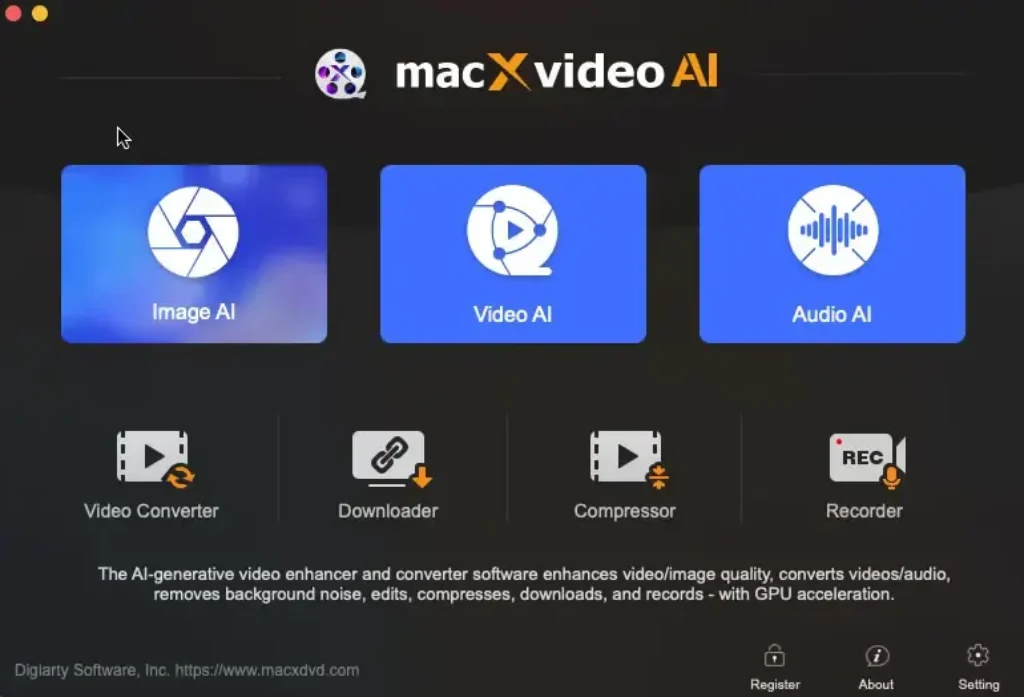
The retained SoftRadar24-hosted screenshot shows the module-based Macxvideo AI workspace. The current public release is version 3.15, so individual labels or controls may differ from the captured build.
Compatibility & Coverage
Macxvideo AI is the macOS application in Digiarty’s current product line. It supports both Intel and Apple silicon Macs, but the minimum ability to install the app is not the same as the recommended configuration for long AI renders.
| Area | Current coverage | Decision note |
|---|---|---|
| Operating system | macOS 10.15 Catalina or later | The recommended AI configuration lists macOS 13 Ventura or later. |
| Processor | Apple M1/M2/M3/M4 series or Intel Core i5 6th generation or newer | Apple silicon is the preferred route for Core ML and Metal optimization. |
| Minimum memory / storage | 4 GB RAM · 8 GB free disk space | These are installation-level minimums, not a promise of comfortable 4K AI processing. |
| Recommended AI setup | Apple silicon · 16 GB RAM · 32 GB free disk space · macOS 13+ | Long clips and higher-resolution outputs also need space for source, cache and exported files. |
| Video input | 8K, 4K, 2K, HD and SD across AV1, H.264, HEVC, MOV, MKV, MP4, ProRes-related and many legacy sources | Input support does not mean every codec feature can be copied unchanged to every output. |
| Image input | PNG, JPEG, TIFF, WebP, BMP, AVIF, HEIC and other listed formats | Preserve the original file and metadata before AI restoration. |
| Audio input | MP3, AAC, AC3, DTS, FLAC, M4A, WAV, WMA and other listed formats | Vocal separation quality depends on how strongly voice and instruments overlap. |
| Windows | No native Macxvideo AI Windows installer | Use the separate Windows-oriented Winxvideo AI product instead. |
Features & Capabilities
The product is easier to understand when AI reconstruction, ordinary media processing and capture/download tools are separated. A feature being present does not mean it is the strongest specialist tool for that job.
Video AI
- Super resolution with 1× enhancement and 2×, 3× or 4× scaling
- Resolution presets through 4K for AI-enhanced video output
- Models for detail-heavy footage, smooth surfaces, animation and photorealistic material
- Frame interpolation with scene-change controls and repeatable multipliers
- Video stabilization with adjustable mode, crop and processing settings
- Keep Original Colors control for color shifts after super resolution
Image & Audio AI
- Image denoise, deblur, enlargement and generated-detail enhancement
- Face restoration for individual or multiple faces
- Black-and-white photo colorization
- Background-noise suppression for audio and video
- Vocal and instrumental separation
Convert, Compress & Edit
- Batch video and audio conversion with format and device profiles
- H.264, HEVC, AV1, MOV, MKV, MP4, ProRes and other current/legacy formats
- Codec, resolution, frame rate, quality, bitrate and GOP controls
- Target-size compression for large 8K, 4K and HD files
- Cut, trim, split, merge, crop, rotate, speed, effects, subtitles and watermarks
- GIF, M3U8, lens correction, snapshot and related utility tools
Download & Record
- Single-video, batch, playlist and channel download workflows where supported
- M3U8 VOD/live and subtitle handling documented in the current guide
- Screen, webcam, picture-in-picture and audio-only recording
- Current product listing includes capture up to 4K at 60fps on suitable hardware
- Paid-license access removes the trial recorder watermark
Important Conditions & Limitations
These boundaries are central to an honest Macxvideo AI review. They explain where a useful enhancement can become an artificial result, and where a broad toolkit still needs a separate specialist application.
4K Output Does Not Restore Ground Truth
Super resolution predicts pixels that are missing from the source. It can improve perceived clarity and reduce defects, but it cannot prove the real appearance of unreadable text, a blurred face or an obscured object. Preserve originals and describe enhanced media as processed.
“8K Support” Needs Context
The technical reference lists 8K video among supported inputs and the converter/compressor can process high-resolution media. The current AI guide describes video upscaling presets through 4K. Do not present those two facts as a promise that Video AI creates an 8K enhanced video.
Higher Scaling Can Look Less Natural
The current guide says stronger multipliers can produce a less natural result and suggests comparing staged 2× processing with a single 4× pass. More pixels are not automatically more accurate detail.
Frame Interpolation Can Create Artifacts
Generated frames can fail around cuts, fast limbs, crossing objects, water, smoke and fine repeating patterns. Skip Scene Changes and sensitivity controls help, but the safest approach is to inspect motion frame by frame around difficult scenes.
Stabilization Trades Image Area for Steadiness
Digital stabilization generally repositions and crops frames. Heavy shake, rolling shutter and motion blur may leave distortion even when movement becomes smoother. Check edge subjects and final framing before accepting a long export.
AI Processing Depends Heavily on Hardware
The 4 GB RAM and 8 GB disk figures are minimum requirements. The official recommended setup rises to Apple silicon, 16 GB RAM, 32 GB free space and macOS 13 or later. Render time also changes with source length, resolution, model, codec and selected quality mode.
Performance Percentages Are Scenario-Specific
Claims such as up to 47× processing, very low CPU use, up to 90% compression and high retained quality describe selected hardware and workflows. They should not be converted into a guaranteed result for every codec, source and Mac without a reproducible benchmark.
Color and Reconstructed Faces Need Human Review
The guide acknowledges that super resolution can shift colors and provides a Keep Original Colors control. Face restoration and colorization also infer missing information. Compare against the source, keep an unmodified master and avoid treating generated color or facial detail as historical proof.
Downloader Coverage Can Change
Website support depends on public delivery methods and can break when a platform changes its player, authentication or terms. The downloader is not a promise to bypass DRM, subscriptions or access controls. Use it only for media you own or are authorized to save.
Macxvideo AI Does Not Rip DVDs by Itself
The application can convert and enhance an already digitized DVD video. Physical-disc extraction and copy-protection handling belong to the separate MacX DVD Ripper Pro application included in the 3-in-1 toolkit option.
The Trial Download Limit Is Inconsistently Documented
The current user guide says trial downloads are limited to 1080p, while another current product page still describes a 720p cap. Because the official pages disagree, test one permitted download in the current trial and treat the installed build as the deciding evidence.
The Editor Is a Finishing Toolkit
Cut, crop, merge, subtitles, effects and speed controls cover common file-preparation tasks. The app does not become a full nonlinear editor with advanced tracks, compositing, color management, motion graphics and collaborative project controls.
Free Trial / Free Version
The free download is an evaluation build, not an unrestricted permanent edition. It is most useful for confirming installation, hardware detection, model behavior and export quality with short samples.
| Area | Current trial boundary | What to test |
|---|---|---|
| Video AI / Image AI | Up to five watermark-free exports; later exports contain a watermark | Use different source types rather than five near-identical clips. |
| Audio AI | Up to five watermark-free video exports or audio processing up to five minutes | Check voice, music and difficult overlapping frequencies. |
| Converter / Compressor / Editor | Processes video with a maximum length of five minutes | Test the exact codec, subtitles, audio tracks and output profile you need. |
| Screen Recorder | Trial recordings carry a watermark | Check frame rate, audio sync, webcam and capture load. |
| Downloader | Resolution cap is described as 1080p in the current guide and 720p on another current page | Verify the installed build with one permitted public item. |
| Updates | Future upgrades and newly added AI features are not included with the trial | Base the purchase on current capability, not an assumed future feature. |
System Requirements
The minimum column describes the current official entry point. The recommended configuration is the more realistic reference for repeated AI enhancement and high-resolution media work.
| Requirement | Minimum | Recommended for AI work |
|---|---|---|
| Current version | 3.15 · released August 19, 2026 | |
| Operating system | macOS 10.15 Catalina or later | macOS 13 Ventura or later |
| Processor | Apple M1/M2/M3/M4 series or Intel Core i5 6th generation or newer | Apple M-series silicon |
| Graphics / AI path | Mac compatible with macOS 10.15; the guide also references Metal-compatible Intel or AMD graphics for optimized inference | Apple silicon using Core ML and Metal |
| Memory | 4 GB RAM | 16 GB RAM or more |
| Free disk space | 8 GB | 32 GB or more, plus room for source, temporary and output files |
| Registration | Internet connection required when registering the license email and code | |
Alternatives & Better-Fit Options
Compare alternatives by the actual job—Mac or Windows support, conversion depth, AI workflow, DVD handling and licensing—not by the largest advertised resolution. For current same-brand products and offers, visit the MacX DVD software page on SoftRadar24.
AnyMP4 Video Converter Ultimate
A relevant Windows/macOS comparison when broad format conversion, compression and a large toolbox matter more than choosing Digiarty’s Mac-specific workflow. Compare its current AI tools and platform-specific license before deciding.
WonderFox HD Video Converter Factory Pro
A Windows-focused alternative for conversion, compression, downloading and practical media utilities. It is not the choice for a Mac-only workflow, but it can be a better fit when AI restoration is secondary to everyday Windows conversion.
FAQ
These answers focus on current version, platform, 4K/8K meaning, trial restrictions, license terms and realistic AI output.
What is Macxvideo AI?
Macxvideo AI is a macOS media application from Digiarty Software. It combines AI video, image and audio enhancement with format conversion, compression, online-media downloading, screen recording and basic editing tools.
What is the current version of Macxvideo AI?
The official update page lists Macxvideo AI version 3.15, released August 19, 2026. The release added a Keep Original Colors option for AI Video Super Resolution and fixed a YouTube analysis-engine update issue.
Does Macxvideo AI work on Windows?
No. Macxvideo AI is the macOS product and currently requires macOS 10.15 or later. Windows users should compare the separate Winxvideo AI product and its own system requirements and license.
Can Macxvideo AI upscale video to 4K or 8K?
The current AI guide describes video super-resolution scaling and presets through 4K. The technical specifications list 8K video as supported input for processing and conversion. That does not establish an 8K AI-enhanced video-output promise.
Can Macxvideo AI fix blurry or pixelated video?
It can reduce visible blur, noise, pixelation and compression artifacts and can generate additional detail through AI models. Results depend on the source, and generated detail is an estimate rather than a recovery of information that was never captured.
Does Macxvideo AI support Apple silicon and Intel Macs?
Yes. The minimum processor listing includes Apple M1 through M4 series chips and Intel Core i5 6th generation or newer. The recommended AI configuration uses Apple silicon, 16 GB RAM, 32 GB free space and macOS 13 or later.
Is Macxvideo AI free?
It has a free evaluation build, not an unrestricted permanent free edition. Trial limits include five watermark-free AI exports, five-minute limits for standard video tools, a recorder watermark and a restricted downloader.
What are the Macxvideo AI trial limits?
Video AI and Image AI allow up to five watermark-free exports. Audio AI allows up to five watermark-free video exports or audio processing up to five minutes. Converter, Compressor and Editor process up to five minutes, and trial screen recordings carry a watermark.
Is the Macxvideo AI trial downloader limited to 720p or 1080p?
Current official pages are inconsistent: the user guide says 1080p, while another current product page says 720p. Test one permitted item in the installed trial and use the current build’s displayed limit as the deciding evidence.
Can Macxvideo AI rip or decrypt DVDs?
No. It can convert and enhance video after a DVD has been digitized, but disc extraction and decryption require a separate application. The 3-in-1 toolkit option includes MacX DVD Ripper Pro for that stage.
Does frame interpolation always produce clean slow motion?
No. It can create smoother motion by generating intermediate frames, but fast movement, occlusion and scene changes can produce ghosting or distortion. Skip Scene Changes and sensitivity controls help, and difficult sections still require visual review.
What is included in the MacX Media ToolKit 3-in-1 bundle?
The current bundle includes lifetime licenses for Macxvideo AI, MacX DVD Ripper Pro and MacX MediaTrans for one Mac, plus 5KPlayer as a lifetime-use gift. Confirm every product and license term in the final checkout.
Is the Macxvideo AI Lifetime / 1 Mac license a subscription?
No. The Lifetime / 1 Mac campaign is presented as a one-time payment with lifetime use and upgrades for one Mac. The separate 1-year plan is a renewing subscription, so verify the selected option before payment.
Does the 1-year Macxvideo AI plan renew automatically?
The current public purchase page describes the 1-year plan as billed yearly and publishes a renewal amount after the first term. Review the current renewal price and cancellation setting in checkout because campaign and renewal terms can change.
Does Macxvideo AI have a money-back guarantee?
Digiarty publishes a 30-day refund policy, but eligibility is conditional. The policy describes refunds for qualifying technical problems that support cannot resolve, so it should not be presented as an unconditional 30-day free trial.
Can Macxvideo AI replace a professional video editor?
Not for advanced editing. It covers trimming, cropping, merging, subtitles, effects, watermarks, speed changes and similar utilities, but it is not a full multi-track editor for advanced color, compositing, keyframes and large project management.





