Revo Registry Cleaner Pro is a dedicated Windows registry cleaner designed to remove invalid entries, repair registry errors, and improve overall PC performance without compromising system safety. Over time, outdated keys, broken paths, and leftover data from uninstalled programs can build up and affect system speed and stability, making regular registry maintenance essential.
Equipped with advanced scanning technology and multiple cleaning modes, Revo Registry Cleaner 2.1.0 detects and cleans unnecessary registry entries while protecting critical components. Integrated backup and restore options ensure that every change can be reversed at any time, adding an extra layer of reliability. For users focused on fixing registry issues, optimizing Windows performance, and maintaining long-term system stability, it offers a controlled and efficient solution without unnecessary complexity.
In this Revo Registry Cleaner review, we will examine how this tool actually performs. We also secured an exclusive 50% Revo Registry Cleaner Pro discount for our readers. You can claim a lifetime license starting at just $9.99 (1-year updates) or $10.00 (2-year updates). If you prefer running the software directly from a USB drive, the Portable edition is available for $11.33 (1-year) and $14.66 (2-years).
While targeted registry maintenance is vital for system stability, achieving peak PC performance often requires a comprehensive approach. Beyond registry cleaning, managing temporary disk files, optimizing RAM usage, and securing your digital privacy are essential steps for a healthy operating system. For users looking to complement their registry management with an all-in-one system tuning utility, expanding your toolkit ensures that both your disk space and Windows system performance are fully optimized.
🎁 Special Offer: Perform complete system maintenance with WiseCleaner’s special packages offering discounts of up to 90%. Claim your Wise Care 365 Pro Coupon Code to maximize your PC’s potential today.
Key Features of Revo Registry Cleaner Pro
- Advanced Registry Cleaning: Detects and removes invalid registry entries, broken links, and leftover data to help fix registry errors and improve overall system performance.
- Multiple Scan Modes: Offers flexible scanning options, allowing quick checks or deep registry scans depending on your needs and experience level.
- Real-Time Registry Monitoring: Tracks changes made to the Windows registry, giving users better visibility and control over system modifications.
- Safe Backup & Restore: Automatically creates backups before any changes, ensuring that registry edits can be safely reversed at any time.
- Registry Optimization Tools: Fine-tunes registry structure to support faster system response, smoother performance, and improved Windows stability.
- Custom Cleaning Control: Allows inclusion or exclusion of specific registry areas for more precise and controlled cleaning.
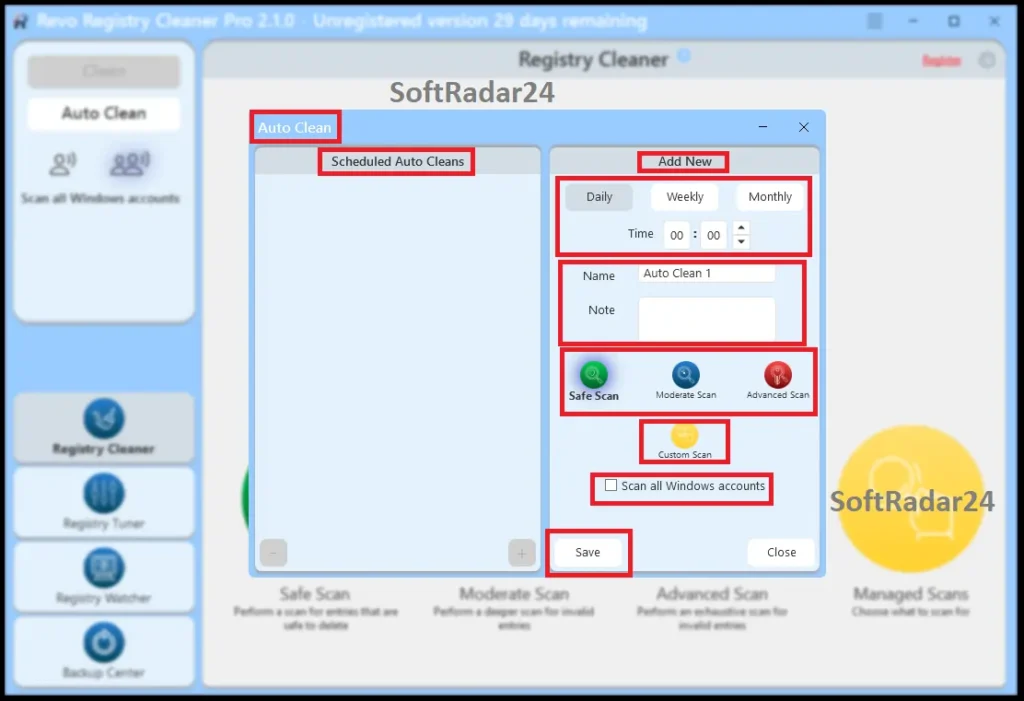
- Automated Maintenance: Enables scheduled scans and automatic cleaning to keep the registry optimized without manual effort.
- User-Friendly Interface: Designed for both beginners and advanced users, making it easy to fix registry issues without technical complexity.
Optimizing Windows 10 & 11: How to Fix Registry Errors Effortlessly
Maintaining a clean and stable registry is essential for keeping Windows 10 and Windows 11 running smoothly. As the system accumulates invalid entries and outdated keys, performance issues and registry errors can become more noticeable over time. Revo Registry Cleaner Pro simplifies this process by combining intelligent scanning with safe, controlled cleaning.
With flexible scan modes and built-in backup protection, registry errors can be identified and resolved without risking critical system data. Unnecessary entries are removed, while essential components remain untouched, ensuring system stability throughout the process. This approach not only helps fix registry errors but also improves overall PC performance, reduces system slowdowns, and supports a more responsive Windows environment without requiring advanced technical knowledge.
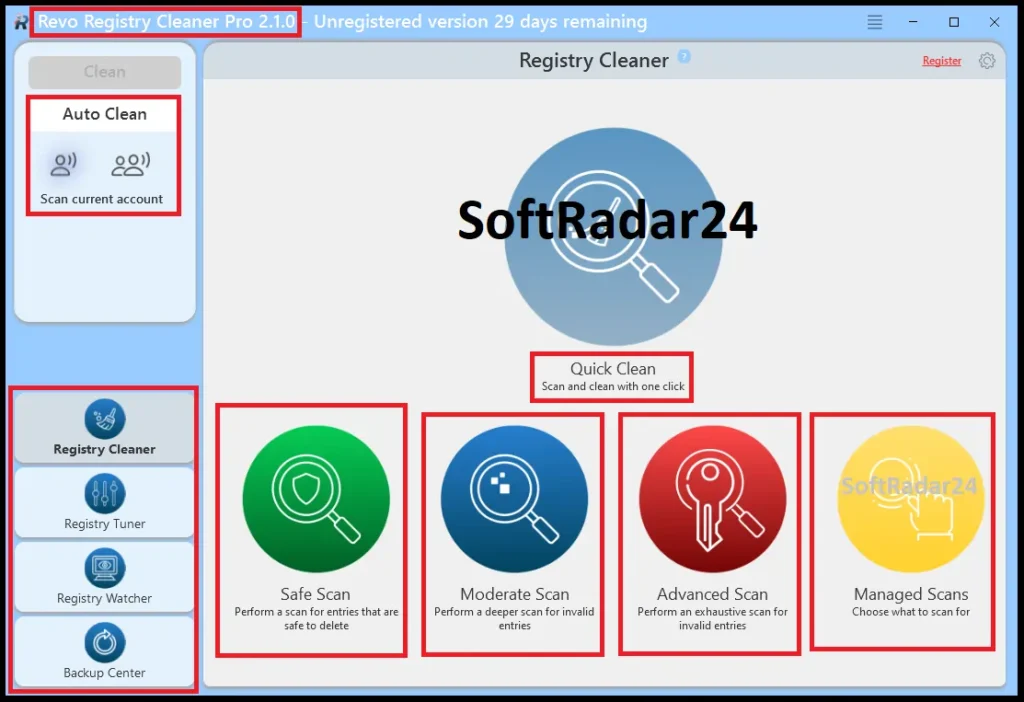
Step 1: Scan the Registry for Errors
Start by running a full registry scan to detect invalid entries, broken paths, and outdated keys. Revo Registry Cleaner Pro uses advanced scanning algorithms to quickly identify issues that may be slowing down your system. A deep scan is recommended for a more thorough analysis, especially if the system hasn’t been optimized for a while.
Step 2: Review Detected Issues Carefully
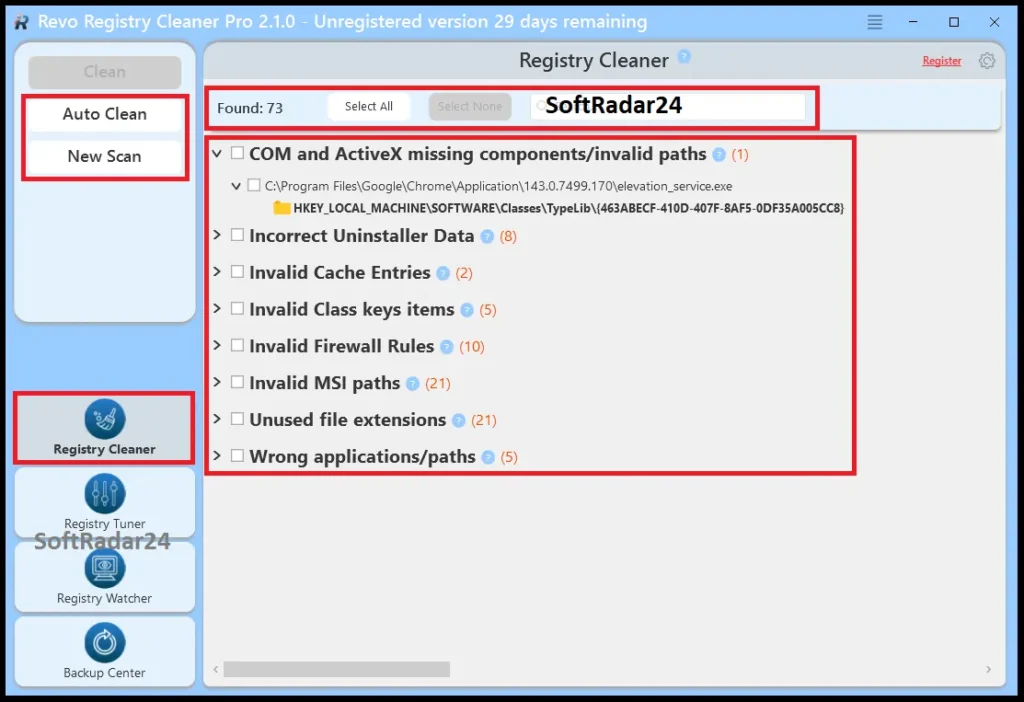
Once the scan is complete, review the detected registry errors before applying any changes. This step gives you better control over what will be removed or fixed. While most entries are safe to clean, checking the results ensures that nothing important is unintentionally affected.
Step 3: Create a Backup Before Cleaning
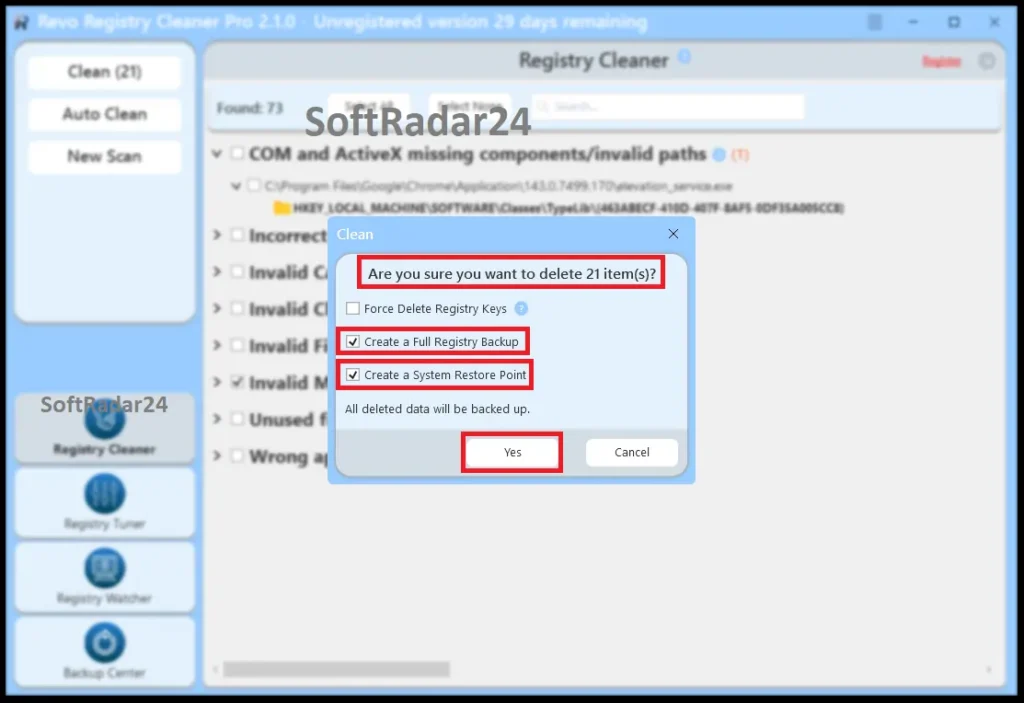
Before making any modifications, always create a full registry backup. This ensures that all changes can be reversed if needed. Built-in backup and restore options provide an extra layer of safety, allowing you to proceed with confidence.
Step 4: Clean and Repair Registry Entries
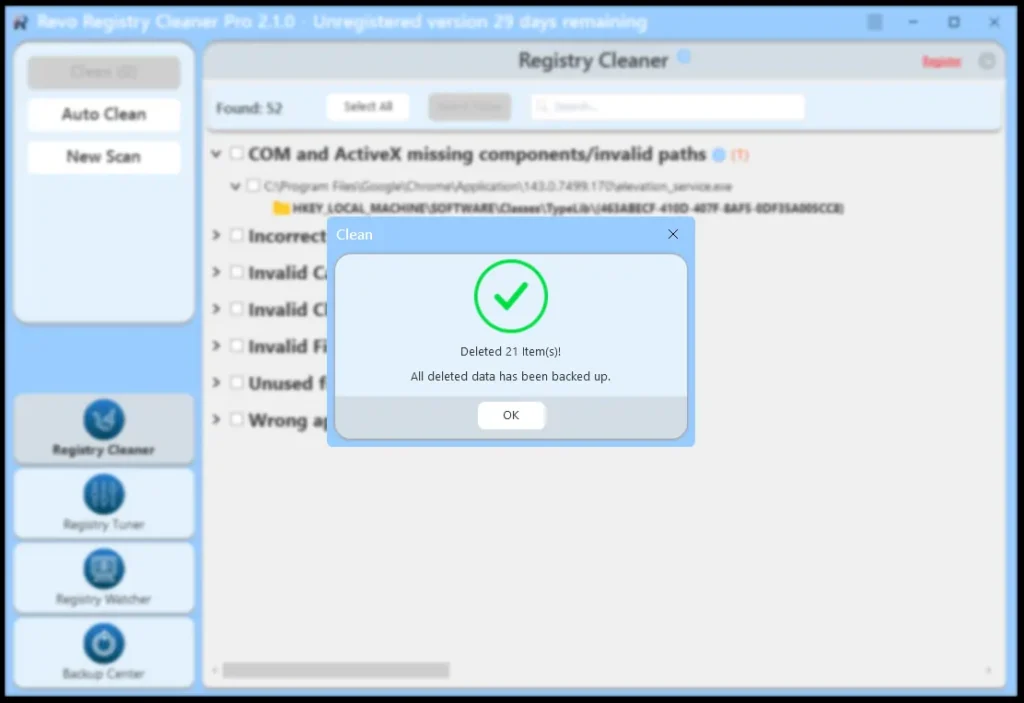
Apply the cleaning process to remove invalid entries and repair broken registry keys. This step helps eliminate unnecessary clutter, which can improve system responsiveness and reduce common errors. The process is designed to be safe, targeting only non-essential data.
Step 5: Optimize and Maintain Performance
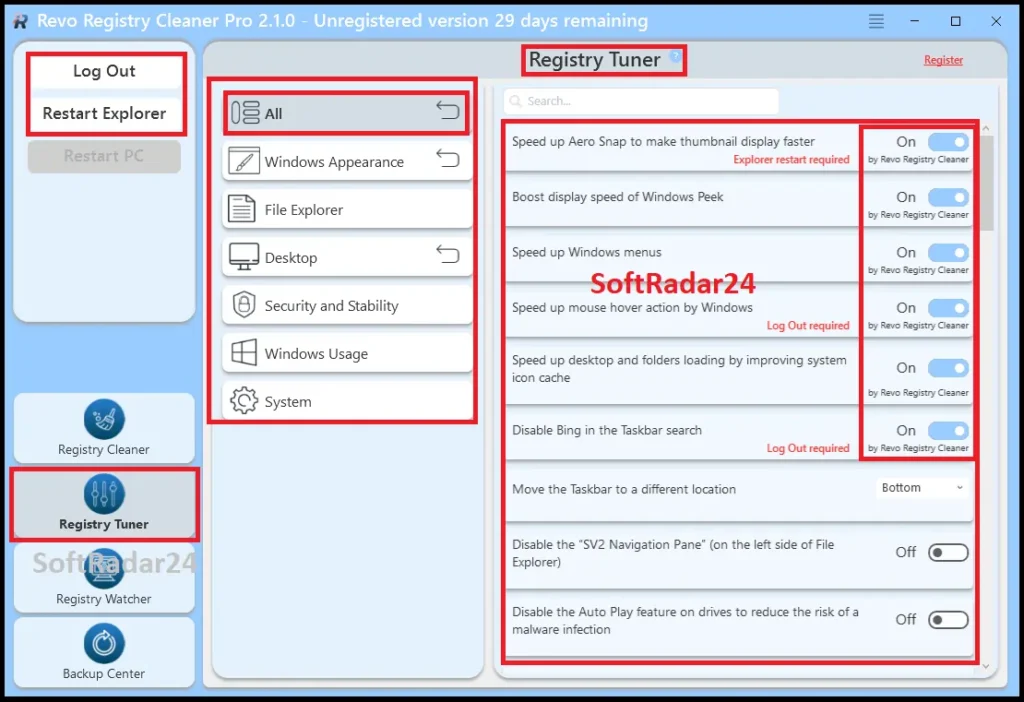
After cleaning, use optimization tools to fine-tune the registry structure. This helps Windows 10 and 11 run more efficiently, improving startup times and overall system performance. Regular maintenance ensures that new errors don’t accumulate over time.
Step 6: Enable Automatic Maintenance
To keep your system in optimal condition, enable scheduled scans and automatic cleaning. This allows continuous registry maintenance without manual effort, ensuring long-term stability and consistent performance.
If you research the safe way to clean the registry for Windows 11 on official Microsoft forums, you will find a common consensus among tech experts: manual registry editing or using PowerShell scripts without extensive knowledge is highly risky. Community experts actively recommend relying on trusted, automated registry cleaners or leaving the entries alone to avoid system corruption. This is exactly why Revo Registry Cleaner Pro relies on an automated Backup Center and algorithm-based exclusions—it removes the human error element entirely, offering the safe environment that standard Windows tools cannot provide.
Revo Registry Cleaner: Free vs Pro vs Pro Portable Compare
Below, we compare the critical differences to help you decide if the Professional edition upgrade is worth the investment.
| Feature | Revo Registry Cleaner Free | Revo Registry Cleaner Pro | Revo Registry Cleaner Pro Portable |
|---|---|---|---|
| Registry Item Removal | ✅ Yes | ✅ Yes | ✅ Yes |
| Advanced Scanning Algorithms | ✅ Yes | ✅ Yes | ✅ Yes |
| 4 Scan modes | ✅ Yes | ✅ Yes | ✅ Yes |
| 15+ Scanning Categories | ✅ Yes | ✅ Yes | ✅ Yes |
| Windows Registry Tuner | ✅ Yes | ✅ Yes | ✅ Yes |
| Windows Registry Watcher | ❌ No | ✅ Yes | ✅ Yes |
| Registry Key Include List | ❌ No | ✅ Yes | ✅ Yes |
| Multiple User Accounts Scanning | ❌ No | ✅ Yes | ✅ Yes |
| Auto Clean & Backup | ❌ No | ✅ Yes | ❌ No |
| Unlimited computers | ❌ No | ❌ No | ✅ Yes |
| Suitable for use with USB stick | ❌ No | ❌ No | ✅ Yes |
SoftRadar24 Analysis: If you only need to run a basic scan on a single, personal computer occasionally, the Free edition will get the job done. However, for continuous system optimization or managing multiple devices, upgrading to Revo Registry Cleaner Pro or the Portable version is crucial. The Free version strictly limits you to scanning the current user account and lacks the vital “Auto Clean & Backup” scheduling. This means you must manually execute scans and backups every time—a tedious process that the Pro versions completely automate. Furthermore, if you handle PC maintenance for a family or an IT environment, the Portable license allows you to run the fully unlocked software directly from a USB stick across unlimited computers without installation.
Revo Registry Cleaner Pro Discount Coupon Code 2026
Finding a valid promotional offer shouldn’t involve testing endless expired links across the web. We provide direct access to an official 50% price promo code, eliminating the hassle of searching for and manually entering working codes. Simply click the purchase link below, and your Revo Registry Cleaner Pro discount code for 2026 will be automatically applied to your cart on the official checkout page.
Revo Registry Cleaner Coupon Applied Automatically at Checkout


While a dedicated registry cleaner is excellent for resolving existing system errors, preventing future registry bloat requires addressing how applications are removed in the first place. Standard Windows uninstallations notoriously leave behind hidden folders and invalid registry keys that progressively degrade PC performance. To tackle the root cause of digital clutter, pairing your registry maintenance with a professional software removal tool ensures that every stubborn program, browser extension, and lingering file trace is completely eradicated from your hard drive.
🎁 Special Offer: Complete your PC optimization toolkit with an official 75% discount on the industry-leading removal software. Claim your Revo Uninstaller Pro Coupon Code to permanently delete stubborn applications today.

Revo Registry Cleaner Pro (1 Year) – Lifetime usage license
Ideal for individual users looking to safely optimize their PC performance with a full year of premium updates and an unrestricted lifetime core license.
Revo Registry Cleaner Pro (2 Years) – Lifetime usage license
Secure long-term system stability with two full years of official updates alongside a permanent lifetime license for maximum value.
Revo Registry Cleaner Pro Portable (1 Year) – Lifetime usage license
The ultimate choice for IT technicians and multi-device households, allowing you to run the optimizer directly from a USB stick on unlimited computers.
Revo Registry Cleaner Pro Portable (2 Years) – Lifetime usage license
Maximize your PC maintenance toolkit with two years of portable updates, guaranteeing safely optimized performance across any machine without installation.