
Quick Summary
VideoProc Converter AI is a Windows and macOS media toolkit that combines AI video, image and audio enhancement with conversion, compression, DVD processing, quick editing, online-media downloading and screen/webcam recording. It is strongest when one project needs several jobs: upscale low-resolution footage, generate higher frame rates, stabilize shaky clips, restore or colorize photos, separate vocals, reduce background noise, convert large 4K/8K files, compress delivery copies and record tutorials without moving between several separate utilities.
- Best for
- AI video upscaling · frame interpolation · 4K/8K conversion · compression · image/audio AI · screen recording
- Platforms
- Windows & macOS
- License
- 1-Year / Lifetime / Family Lifetime
- Key limitation
- AI results and speed depend heavily on source and GPU
VideoProc Converter AI Pricing, Discount Code & License Options
The current VideoProc Converter AI coupon discount is applied automatically through the SoftRadar24 checkout links below. No manual coupon-code entry is required.
The lowest current entry price is $19.95 for the 1-Year / 1-PC license. Lifetime is $29.95 for 1 PC, Family Lifetime is $39.95 for up to 5 PCs, and the Aiarty creative-tools Lifetime offer is $129.00.
Current VideoProc Converter AI License & Bundle Prices
- VideoProc Converter AI · 1-Year Subscription · 1 PC · $19.95 · Regular $59.95 · Save 67%
- VideoProc Converter AI · Lifetime · 1 PC · $29.95 · Regular $78.90 · Save 62%
- VideoProc Converter AI · Family Lifetime + Gifts · Up to 5 PCs · $39.95 · Regular $119.90 · 67% OFF
- Aiarty Image & Video Tools Bundle · Lifetime · $129.00 · 62% discount · Save $214
VideoProc Converter AI · 1-Year Subscription
1 PC · 1-year license · Windows or macOS platform-specific edition
Included with this license- VideoProc Converter AI for one computer for one year
- Video AI, Image AI and Audio AI tools
- Conversion, compression, DVD, quick-edit, download and recording modules
- Full-version processing without the Free-version export/time limits
The 1-Year license has the lowest upfront cost. Lifetime adds $10 for long-term use on one computer, while Family Lifetime adds another $10 and expands current coverage to up to 5 PCs. Windows and Mac licenses are platform-specific.
Choose the Windows or Mac license edition that matches the computer you will activate. A Windows license does not activate the Mac edition, and a Mac license does not activate the Windows edition.
Can This Software Do What I Need?
VideoProc Converter AI covers several jobs that are often bought as separate utilities. The key is knowing where AI enhancement helps, where normal conversion is enough, and where the task belongs to a full editor or another specialist tool.
I need to convert 4K/5.3K, HEVC, AV1, HDR or camera footage
Large modern-media conversion
SupportedVideoProc Converter AI handles 370+ input codecs and 420+ output formats, including H.264, HEVC and AV1 combinations. Hardware acceleration can reduce processing time on compatible Intel, NVIDIA, AMD and Apple Silicon systems. Test the target device before choosing a less universally supported codec such as AV1.
I want to upscale an old 480p/720p/1080p video to 4K
AI Super Resolution
SupportedSuper Resolution supports 2x, 3x and 4x video upscaling up to 4K. Gen Detail V3 favors generated texture/detail; Real Smooth V3 emphasizes restoration, smoothing and fidelity; Anime is tuned for illustrated footage. The extra detail is AI-estimated rather than a recovery of information the original camera never captured.
I want to convert 30fps footage to 60, 120, 240 or 480fps
AI Frame Interpolation
SupportedFrame Interpolation generates new frames between the originals and supports high-frame-rate and slow-motion workflows. Preview fast motion, thin objects, occlusions and scene cuts carefully because generated intermediate frames can still produce warping, double edges or ghosting in difficult material.
I need to stabilize shaky GoPro, drone or phone video
Stabilization with crop/edge trade-offs
ConditionalThe stabilization module provides two modes, four presets, three crop modes, speed/quality controls and edge-fill options. Stronger stabilization can require cropping or reconstructed edges, so compare the preview against the original framing rather than judging only by how still the center of the picture becomes.
I need to compress a large 4K video for storage or sharing
Target-size and codec compression
SupportedThe Compressor can target a percentage or size and change codec, resolution, bitrate, frame rate and GOP. Large size reductions normally involve re-encoding and can reduce quality; visually similar is not mathematically lossless. Use Auto Copy when you only need a compatible container change without re-encoding.
I only want MKV to MP4 without changing video quality
Remux vs. re-encode
ConditionalAuto Copy can copy compatible video/audio streams bit-for-bit into another container without re-encoding. That is the true no-generation-loss path. If the target container cannot carry the streams or you change codec, resolution or bitrate, VideoProc must re-encode.
I want to restore old portraits or blurry faces
AI Face Restoration
SupportedFace Restoration provides multiple model approaches for portraits, old photos and group shots. AI can create plausible eyes, skin and hair texture, but generated facial detail should not be treated as historically exact evidence of how a person originally looked.
I want to colorize black-and-white family photos
Predicted color, not recovered color
SupportedPhoto Colorization predicts plausible colors for monochrome and faded images. Because a black-and-white source does not contain the original chroma information, the output is an AI interpretation—not proof of the exact historical colors.
I want to remove vocals or keep only vocals from a song
AI source separation
SupportedVocal Remover can Keep Vocals or Keep Instrumentals and provides a short preview before export. Separation quality depends on the mix; reverb, doubled vocals and instruments sharing the same frequency region can leave bleed or artifacts. Use only audio you are permitted to transform or publish.
I need to remove wind, hiss, fan or street noise from speech
AI Noise Suppression
SupportedNoise Suppression handles common background noise in interviews, podcasts, vlogs and recordings. Increase attenuation conservatively: stronger removal can affect the wanted voice when noise overlaps speech frequencies. Balance removal strength against speech naturalness instead of treating maximum suppression as automatically best.
I need 4K screen + webcam recording with picture-in-picture
Recorder and chroma-key workflow
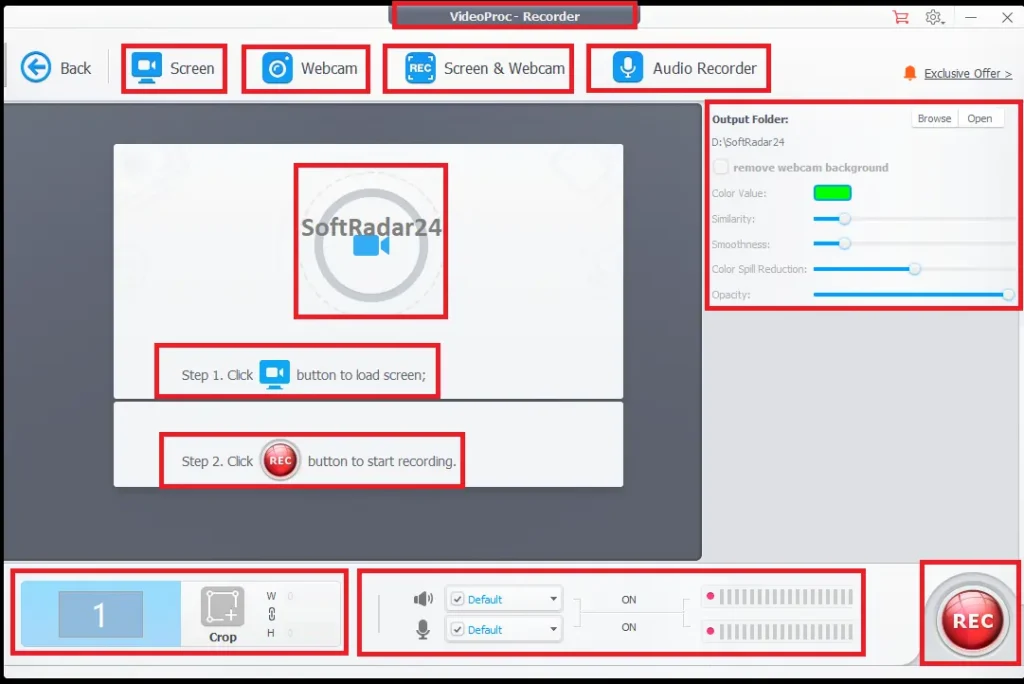
SupportedThe Recorder supports screen, webcam and combined screen+webcam capture, up to 4K 60fps where the system supports it, plus picture-in-picture, microphone/system audio, annotations and chroma-key/green-screen workflows.
I want to save online video, audio, subtitles or a playlist
Downloader with rights restrictions
ConditionalThe Downloader handles individual URLs, playlists/channels, subtitles, M3U8 and interrupted-download resume workflows. Use it only for material you own, content you are authorized to save, or downloads permitted by the service and applicable law.
I need to digitize or back up a DVD
DVD conversion and structural backup
ConditionalThe DVD module accepts discs, VIDEO_TS folders and ISO images and can create MP4/MKV derivatives or 1:1 ISO/VIDEO_TS-style backups. Use only discs you are permitted to process; copyright and anti-circumvention rules vary by jurisdiction.
I need a full multitrack editor for complex timelines, grading and project management
Quick editor vs. full NLE
Different taskVideoProc Converter AI includes trim, crop, split, merge, rotate, speed, subtitle, watermark and repair tools, but it is not positioned as a replacement for a full non-linear editor with deep multitrack timelines, advanced compositing and project-management workflows.
My computer has an older or weak GPU
AI workloads can be hardware-intensive
ConditionalClassic conversion features have modest requirements, but AI Super Resolution and Frame Interpolation require substantially more compute. Newer acceleration paths need modern DirectX/CUDA/CoreML support. Use the Free version with a representative clip to judge speed before buying primarily for AI processing.
How It Works
VideoProc Converter AI is modular: start from the task tile instead of forcing every file through the same converter. Preserve the source media, test one representative export, then scale proven settings to the rest of the batch.
Upscale Low-Resolution Video to 4K
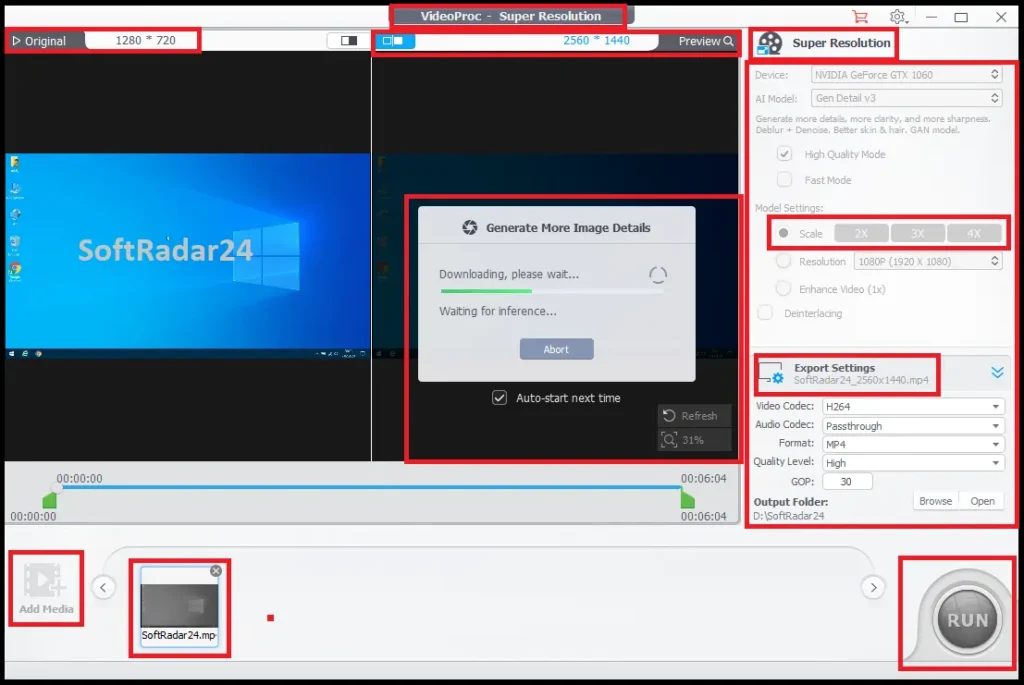
- Open VideoProc Converter AI and enter Super Resolution, then import a representative low-resolution or old clip.
- Choose the model according to the source: Gen Detail V3 for more generated texture/detail, Real Smooth V3 for smoother restoration/denoise, or Anime for illustrated footage.
- Choose a 2x, 3x or 4x scale that stays within the 4K video output ceiling.
- Preview difficult areas such as faces, hair, text, foliage and compression artifacts before exporting.
- Keep the original clip unchanged for comparison and future reprocessing.
Create Higher Frame Rates or Slow Motion
- Open Frame Interpolation and load the source clip.
- Choose the interpolation multiplier/frame-rate target for the intended smooth-motion or slow-motion result.
- Preview scene cuts, fast limbs, wheels, water, fences and foreground/background crossings because these stress generated frames.
- Export a short sample before processing a long recording or large batch.
Compress a Large 4K Video
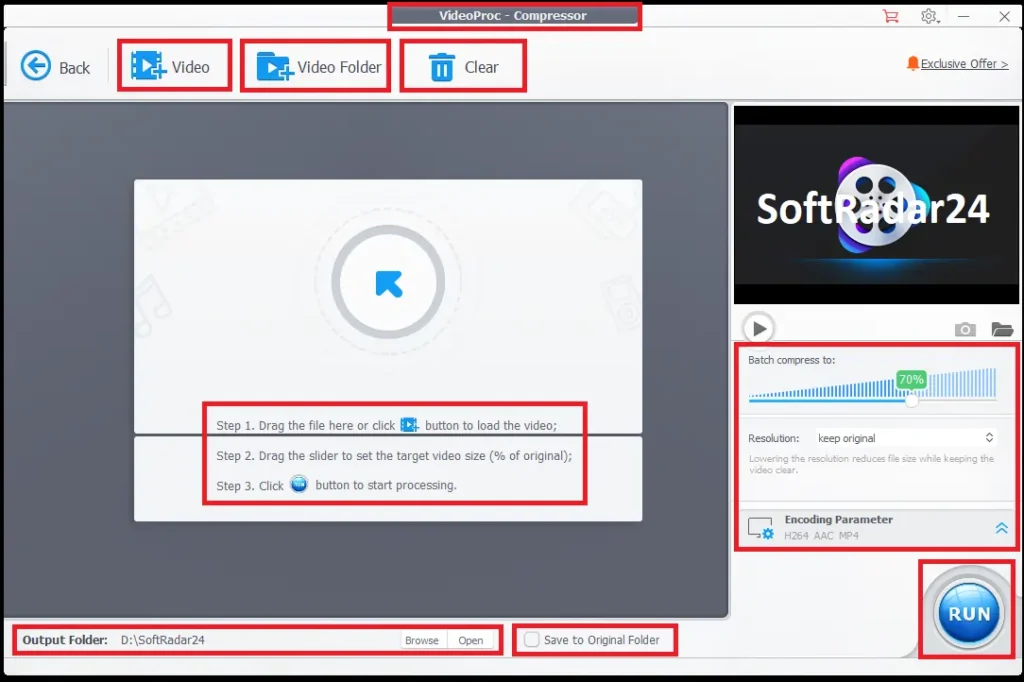
- Open Compressor and add the large media file or batch.
- Set a target size/percentage or adjust codec, bitrate, resolution, frame rate and GOP manually.
- Choose H.264 when broad device compatibility matters; consider HEVC or AV1 when the destination supports them and smaller files are more important.
- Export a representative sample and compare motion/detail before compressing the full set.
Remove Background Noise or Separate Vocals
- Open Audio AI and choose Noise Suppression for unwanted ambience or Vocal Remover for source separation.
- For noise removal, start with moderate attenuation and increase only as necessary; excessive suppression can thin or distort speech.
- For source separation, choose Keep Vocals or Keep Instrumentals and use the preview to check bleed/artifacts before full export.
- Export only media you have the right to transform and publish.
Record Screen and Webcam Together
- Open Recorder and choose Screen, Webcam or Screen & Webcam.
- Select the capture area, camera position, microphone/system-audio sources and recording quality.
- Use picture-in-picture, annotations or chroma key when the tutorial or presentation needs them.
- Record a short test to confirm audio sync and legibility before a long session.
Product Interface & Workflow
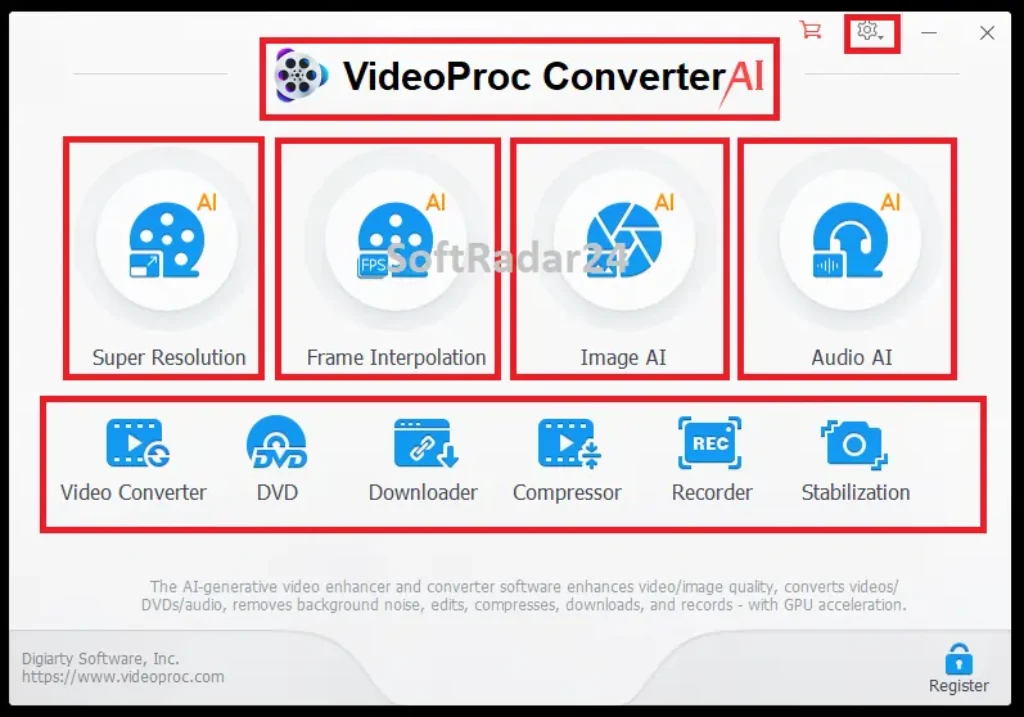
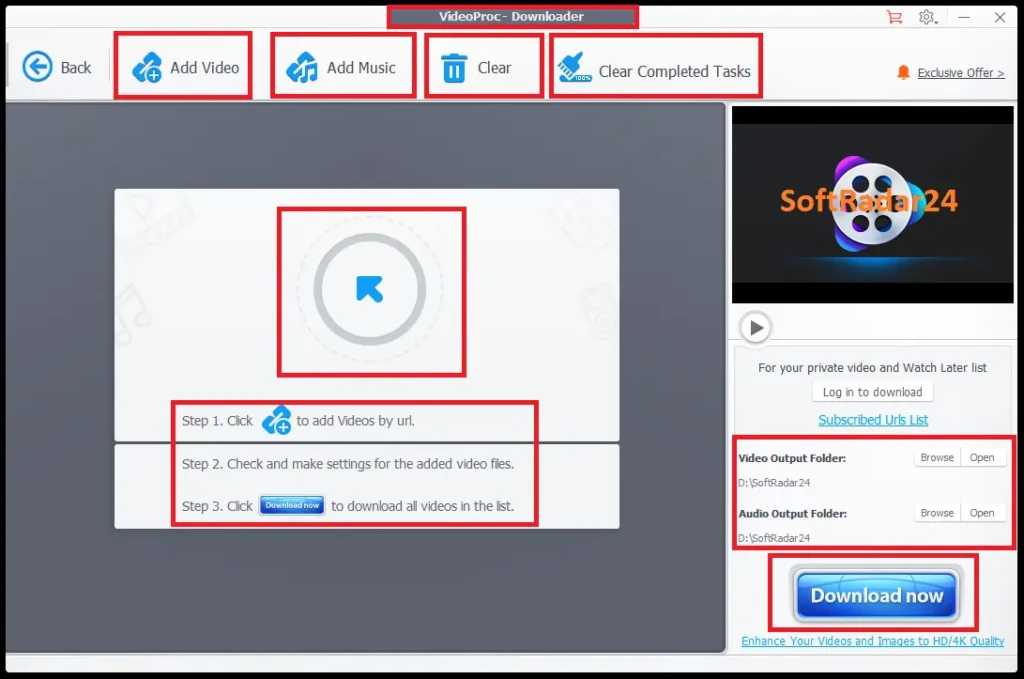
The dashboard separates AI enhancement from conventional media tasks, making it easier to choose the correct processing path instead of treating every file as a generic conversion job.
Compatibility & Coverage
Classic conversion features run on older Windows/macOS versions than the newest AI acceleration paths. Check both the operating system and GPU/API requirements when AI is the reason for buying.
| Area | Current coverage | Decision note |
|---|---|---|
| Windows classic features | Windows 7 / 8 / 8.1 / 10 / 11 or later · 32/64-bit | Conversion/editing requirements are lighter than modern AI workloads. |
| macOS classic features | macOS 10.13+ | macOS 10.15+ is required for AI capabilities. |
| Apple Silicon | M1 / M2 / M3 / M4 / M5 · Pro/Max/Ultra families | macOS 13+ enables CoreML hardware acceleration for Super Resolution. |
| AI RAM/storage | 2 GB RAM minimum · 1 GB disk for AI tools | Long/large 4K jobs can need far more working memory/storage in practice. |
| Frame Interpolation | GPU + Vulkan 1.2.x-class support | GPU/API compatibility is a real buying check. |
| Stabilization | CPU/GPU + OpenCL 1.0+ | Two modes, four presets and three crop modes are available. |
| New Super Resolution acceleration | DirectX 12 DirectML or supported NVIDIA TensorRT/CUDA paths on Windows | Older GPUs may use legacy models or run much more slowly. |
| Video input | Up to 8K · 370+ input codecs/formats | Includes MP4, MKV, MOV, HEVC, AV1, MXF, MTS/M2TS, XAVC-S and more. |
| Video output | 420+ outputs | MP4 supports H.264/AVC, H.265/HEVC, MPEG-4 and AV1; MOV includes H.264 and ProRes. |
| Image AI | PNG, JPG/JPEG, TIFF, WEBP, BMP, AVIF and more | Image Super Resolution can scale supported images to 8K/10K. |
H.264 vs. HEVC vs. AV1
H.264 remains the safest general-purpose output when playback compatibility matters most. HEVC can reduce bitrate efficiently on supported devices. AV1 can provide strong compression in modern environments, but encoding can be heavier and older TVs, editors or devices may not support it. Choose the codec around the real destination rather than the newest specification.
Auto Copy vs. Re-Encoding
Auto Copy/remuxing keeps compatible existing streams instead of encoding them again. That can make a container change fast and bit-for-bit at the stream level. Once you change codec, resolution, frame rate, bitrate, apply AI, stabilize, compress or otherwise process pixels, VideoProc creates a new encode and the result should be judged as a derivative.
Features & Capabilities
The product is unusually broad, so the useful way to evaluate it is by workload rather than by counting buttons. Each group below solves a materially different media problem.
Video AI
- Super Resolution: 2x / 3x / 4x video upscaling to 4K
- Gen Detail V3, Real Smooth V3, Anime and legacy/general model choices
- Frame Interpolation for higher frame rates and slow-motion workflows
- Stabilization with mode, preset, crop, edge-fill and batch controls
Image AI
- Image upscaling to 8K/10K
- Denoise, deblur and detail generation
- Face Restoration with multiple model approaches
- Black-and-white/faded photo colorization with AI-predicted colors
Audio AI
- Keep Vocals or Keep Instrumentals source separation
- Short preview before vocal-removal export
- DNN/RNN-based background-noise suppression
- Noise attenuation and post-filter controls for balancing cleanup against voice quality
Converter & Compressor
- 370+ input codecs and 420+ output formats
- H.264, HEVC, AV1, ProRes and device/web profiles
- Auto Copy for compatible no-reencode remuxing
- Target-size compression plus bitrate/resolution/frame-rate/GOP controls
DVD, Quick Edit & Repair Tools
- DVD disc, VIDEO_TS and ISO workflows
- MP4/MKV conversion plus ISO/VIDEO_TS structural backup options
- Trim, split, crop, merge, rotate, flip and speed control
- Subtitles, watermark, de-fisheye, de-noise, deinterlace and A/V sync tools
Downloader & Recorder
- URL, playlist/channel, subtitles and M3U8 download workflows for permitted media
- Interrupted-download resume support
- Screen, webcam and combined recording modes
- Up to 4K 60fps recording, picture-in-picture, annotations and chroma key where supported
Important Conditions & Limitations
VideoProc Converter AI can do many jobs well, but “AI,” “lossless,” “47x” and “90% smaller” need to be interpreted correctly. These limits matter more than the length of the feature list.
AI Enhancement Generates Plausible Detail
Super Resolution can make low-resolution footage look cleaner and more detailed, but new high-frequency detail is inferred by a model. It is not a forensic reconstruction of pixels that were never captured. Preserve originals for archival, evidentiary or historically sensitive use.
AI Colorization Predicts Colors
A black-and-white photo does not contain the original color channels. Colorization can create a convincing interpretation, but clothing, paint, skin tones and background objects can be historically wrong. Keep the monochrome original alongside the colorized derivative.
Frame Interpolation Can Create Artifacts
Generated frames are most stressed by fast movement, occlusions, scene cuts, water, wheels, fences and thin objects. Higher frame rates do not guarantee cleaner motion in every scene. Preview difficult sections before processing an entire project.
Stabilization Can Trade Shake for Crop or Reconstructed Edges
Stabilization needs room to compensate for camera motion. Cropping, filled borders or edge reconstruction may be required, and aggressive settings can distort framing. Use the before/after preview and choose the least aggressive correction that solves the real problem.
AI Workloads Need More Hardware Than Basic Conversion
Classic conversion has modest requirements, while new AI models rely on GPU/API paths such as Vulkan, DirectX 12/DirectML, CUDA/TensorRT or CoreML. Long 4K footage can also require substantial temporary storage and processing time. A supported operating system alone does not guarantee fast AI performance.
“Up to 47x” Is a Best-Case Performance Claim
VideoProc markets hardware-accelerated processing at up to 47x real-time speed. Actual throughput depends on source codec, output codec, resolution, filters, AI model, GPU/CPU, storage and whether the task can use hardware acceleration. Do not plan production deadlines from the headline multiplier alone.
Heavy Compression Is Not Lossless
A 90%+ size reduction can still look good at normal viewing distance, but it normally discards information when video is re-encoded. Auto Copy is the appropriate no-reencode path when the existing streams already fit the target container. Compression and lossless remuxing are different operations.
Downloader Use Depends on Rights and Platform Rules
The downloader is useful for permitted archiving and offline workflows, but technical ability does not grant copyright or contractual permission. Save only media you own, are licensed to download, or the service allows you to save.
DVD Processing Can Have Legal Restrictions
VideoProc supports DVD conversion and structural backup workflows, including ISO/VIDEO_TS. Whether bypassing protection or making a copy is permitted depends on the disc, ownership, license terms and jurisdiction. Use the DVD module only where your intended use is lawful.
It Is a Media Toolkit, Not a Full NLE
The quick-edit and repair tools are useful for conversion preparation and fast fixes, but complex multitrack editing, advanced grading, compositing and large project/timeline management belong in a dedicated non-linear editor.
Licenses Are Platform-Specific
A Windows license activates the Windows edition; a Mac license activates the Mac edition. Choose the platform you actually use rather than assuming one code unlocks both operating systems.
Free Trial / Free Version
The Free version does not require signup or a credit card and does not impose a file-size limit per task. Its meaningful limits are based on export count, clip duration, download resolution or recording behavior depending on the module.
| Module | Current Free-version limit | Best way to test |
|---|---|---|
| Video Super Resolution | 5 watermark-free exports | Use representative low-light, face, text and texture scenes. |
| Frame Interpolation | 5 watermark-free exports | Test fast motion, occlusion and scene cuts. |
| Stabilization | 5 watermark-free exports | Compare crop/edge behavior at the strength you actually need. |
| Image Super Resolution | 5 watermark-free exports | Inspect fine texture and generated detail at 100% view. |
| Noise Suppression | Video: 5 watermark-free exports · Audio: file under 5 minutes | Use the real microphone/noise profile from your project. |
| Video/audio conversion | File under 5 minutes | Test the exact source codec and destination device/editor. |
| DVD | File under 5 minutes | Test the exact disc/source workflow you need. |
| Compression & quick editing | File under 5 minutes | Compare output quality at your target size. |
| Downloader | Free output below 1080p | Use only an authorized/permitted download source. |
| Screen Recorder | Windows: watermark · Mac: 5-minute limit | Check webcam, microphone, system audio and capture quality together. |
System Requirements
Separate the requirements for classic media tools from the requirements for AI acceleration. A computer can run ordinary conversion while being poorly suited to the newest AI models.
| Requirement | Current value | Decision note |
|---|---|---|
| Windows | Windows 7 / 8 / 8.1 / 10 / 11 or later · 32/64-bit | Classic conversion/media tools. |
| macOS classic | macOS 10.13+ | AI capabilities require macOS 10.15+. |
| CPU | 1 GHz Intel/AMD minimum | Minimum for the application, not a practical target for heavy AI workloads. |
| Classic RAM | 1 GB minimum · 2 GB+ recommended | AI tools require at least 2 GB. |
| Classic installation space | 200 MB | AI tools list 1 GB; project/temp/output storage is additional. |
| NVIDIA baseline | GeForce GT 630+ | Newer AI models can require much newer GPU/API capabilities. |
| Intel baseline | Intel HD Graphics 2000+ | DirectML Gen Detail/Real Smooth paths require newer DirectX 12-capable hardware. |
| AMD baseline | Radeon HD 7700 series+ | Newer AI acceleration paths can require newer GPUs. |
| Apple Silicon | M1 / M2 / M3 / M4 / M5 families | macOS 13+ is listed for CoreML Super Resolution acceleration. |
| Frame Interpolation | GPU + Vulkan 1.2.x | Check compatibility before buying primarily for high-FPS AI workflows. |
Alternatives & Better-Fit Options
Choose an alternative when your priority is narrower—Windows video AI, Mac enhancement, a bundled media suite or a more traditional converter. For the wider WinX/VideoProc catalog and current offers, visit the WinX DVD & VideoProc software page on SoftRadar24.
Winxvideo AI
A close Windows-focused comparison when video conversion, compression, download and AI enhancement are the main workload. Compare the exact AI models and platform coverage rather than choosing from feature count alone.
WinX Media Master 5-in-1 Bundle
A better fit when you want several dedicated WinX utilities together instead of one integrated media application. It is relevant when separate product licenses suit the workflow better than VideoProc Converter AI’s single-dashboard approach.
Macxvideo AI
A Mac-oriented alternative for users whose main priority is AI video enhancement and high-resolution processing rather than the full VideoProc mix of DVD, downloader, recorder and image/audio tools.
WonderFox HD Video Converter Factory Pro
A Windows-focused traditional converter/media toolbox when broad conversion and practical processing matter more than the newer generative AI restoration features.
FAQ
These answers cover the buying and workflow questions that most often determine whether VideoProc Converter AI is the right tool.
What does VideoProc Converter AI do?
It combines AI video, image and audio enhancement with video/audio conversion, compression, DVD processing, quick editing, online-media downloading and screen/webcam recording on Windows and macOS.
Can VideoProc Converter AI upscale 720p or 1080p video to 4K?
Yes. Super Resolution supports 2x, 3x and 4x video scaling up to 4K. Choose the model according to whether the source needs more generated detail, smoother restoration or anime-specific processing.
Does AI upscaling recover real detail that was missing?
It can create a sharper and more plausible high-resolution image, but newly generated detail is model inference—not guaranteed recovery of information the source never captured. Preserve the original for archive or evidentiary use.
Can it convert 30fps video to 60, 120, 240 or 480fps?
Yes. Frame Interpolation generates intermediate frames for high-frame-rate and slow-motion workflows. Difficult motion can still create artifacts, so preview real footage first.
Can stabilization fix shaky video without cropping?
Not always. The module includes three crop modes and edge-fill options because compensating for camera motion can expose missing frame edges. Use the lowest correction strength that gives acceptable stability and framing.
Which output is better: H.264, HEVC or AV1?
H.264 is the safest for broad compatibility. HEVC can reduce bitrate efficiently on supported devices. AV1 can provide strong compression in modern environments but may encode more slowly and is less universal on older hardware or software.
Can VideoProc change MKV to MP4 without quality loss?
Yes when Auto Copy can remux compatible existing streams without re-encoding. If the target container requires a codec change or you alter bitrate, resolution or frame rate, it must re-encode and is no longer a bit-for-bit stream copy.
Can VideoProc compress 4K video without quality loss?
Heavy size reduction normally requires re-encoding, so it should not be called mathematically lossless. A well-chosen codec and bitrate can remain visually close to the source. Auto Copy is the no-reencode path when you only need a compatible container change.
How accurate is AI photo colorization?
It predicts plausible colors from monochrome content. The result can look convincing but cannot prove the true historical color of clothing, objects or scenery. Keep the original black-and-white image alongside the generated version.
Does Vocal Remover produce a perfectly clean instrumental?
Not in every mix. Reverb, overlapping frequencies and layered vocals can leave bleed or artifacts. Use the preview before exporting and test the exact recording rather than assuming perfect studio stems.
How should I set background-noise removal?
Start conservatively. Light attenuation can clean mild hiss or fan noise while stronger removal can affect speech when frequencies overlap. Increase the attenuation and post-filter settings only until unwanted noise is controlled without making the wanted voice thin or artificial.
Can VideoProc record screen and webcam together?
Yes. The Recorder supports combined screen/webcam capture, picture-in-picture, microphone/system audio, annotations and chroma key, with up to 4K 60fps recording where the system supports it.
Can VideoProc back up DVDs?
Yes. The DVD module supports disc, VIDEO_TS and ISO workflows, including video conversion and 1:1 ISO/VIDEO_TS-style backup paths. Use the feature only for media and copying activity permitted where you live.
Is it legal to download online videos with VideoProc?
The software can save media from supported online sources, but technical capability does not grant permission. Download only content you own, are licensed to save, or the platform or service permits you to download.
What is the current VideoProc Converter AI coupon code and discount?
SoftRadar24 currently provides VideoProc Converter AI from $19.95 with the discount applied automatically. The 1-Year offer saves 67%, the 1-PC Lifetime offer is $29.95 with 62% saving, and Family Lifetime is $39.95 with 67% off.
How much is the VideoProc Converter AI Lifetime license?
The current 1-PC Lifetime price is $29.95. Family Lifetime for up to 5 PCs is $39.95. Licenses are platform-specific, so choose the Windows or Mac edition that matches the computer you will activate.
What are the VideoProc Converter AI Free-version limits?
There is no signup, credit-card or per-task file-size requirement. Limits vary by module: major Video AI tools allow 5 watermark-free exports; conversion, DVD, compression and editing use files under 5 minutes; free downloading is below 1080p; recorder limits differ between Windows and Mac.
What is the VideoProc Converter AI refund period?
The Full version includes a 30-day money-back guarantee. Use the Free version first when your decision depends on the speed or quality of a specific AI model, codec or recording workflow.





