
Quick Summary
Tipard DVD Ripper is a Windows and macOS DVD digitization tool for converting physical DVD discs, DVD folders and ISO images into portable video/audio files or complete local backups. The current product covers copy-protected and region-coded discs, 99-title structures, scratched-disc handling, lossless remuxing, ISO/VIDEO_TS backup, HEVC/AV1 compression, subtitle/audio-track control, GPU acceleration and DVD enhancement for modern displays.
- Best fit
- DVD to MP4/MKV, DVD to ISO/VIDEO_TS, Plex/NAS digitization, 99-title and region-coded DVD workflows
- Current Windows requirements
- Windows 11/10/8.1/8/7 · 1 GHz Intel/AMD CPU · 2 GB RAM
- Current Mac requirements
- macOS 10.12+ · Intel or Apple Silicon · 2 GB RAM
- Core distinction
- ISO/folder for full disc structure · lossless MKV/MPG for quality-focused playback · MP4/HEVC/AV1 for smaller portable files
Purchase Options
License & Purchase · Tipard DVD Ripper · Up to 50% OFF Official Discount & Coupon Code
Choose Windows or macOS first, then select the license term and device count. The lowest-priced option, US$21.39 for 1 Year / 1 PC, is selected by default.
1-Year License
1 Windows PC · 1-year Tipard DVD Ripper campaign license
Included with this option- Tipard DVD Ripper for 1 Windows PC
- One year of access for DVD ripping, lossless backup, conversion and editing
- Lowest-priced Windows option
- Official checkout link for this license option
US$21.39/ year
Discount automatically applied
Buy NowWindows · 1-Year License · 1 Windows PC · 1-year Tipard DVD Ripper campaign license
US$21.39 compared with the US$42.79 reference price, a 50% reduction. This is the lowest-priced option.
Tipard’s current public store uses a different price grid and also promotes a separate 7-day Tipard DVD Creator trial that renews at US$30.00/month unless canceled. Review the selected platform, device count, renewal terms, optional extras, tax and final total before payment.
Can This Software Do What I Need?
Use this section as a decision map. It separates disc imaging, media-server files, copy-protection handling, damaged discs, enhancement and playback-only needs instead of reducing every DVD job to “DVD to MP4.”
I want to rip a copy-protected DVD to MP4 for TV, phone or tablet playback
DVD to MP4 / H.264 / HEVC
SupportedTipard DVD Ripper currently documents CSS, APS, CPRM, Sony ARccOS, 99-title structures and DVD region codes, then offers MP4/H.264/HEVC and device presets. Use only discs you are authorized to process.
I want a full-disc backup that keeps menus, chapters, audio tracks and subtitles
DVD to ISO / VIDEO_TS
SupportedChoose Rip to DVD ISO File or Rip DVD to DVD Folder. These are the documented full-structure backup paths and are more appropriate than a normal MP4 encode when disc structure matters.
I want a lossless file for Plex or NAS without keeping the complete disc image
DVD to lossless MKV / MPG
SupportedTipard DVD Ripper offers lossless remux paths for media-server playback. Use ISO or DVD folder instead when you specifically need the complete disc image and menu structure.
My DVD uses a 99-title structure and the main movie is hard to identify
99-title DVD / title selection
SupportedThe current product page specifically lists 99-title protection. The guide can analyze Main Movie or Full Title List, which is useful when the longest-title shortcut is not reliable.
My DVD is scratched, dirty or has read errors
Scratched DVD recovery
ConditionalTipard documents sector scanning and read-error handling for scratched, smudged and non-standard discs. Physical damage varies, so successful recovery cannot be guaranteed for every unreadable sector.
I want to reduce an 8.5 GB DVD to a smaller HEVC or AV1 file
DVD compression
SupportedTipard DVD Ripper can transcode MPEG-2 DVD video to H.265/HEVC, AV1 or H.264. The vendor advertises large size reductions, but final quality depends on bitrate, resolution and source complexity.
I want to upscale 480p DVD footage to 1080p or 4K
DVD upscaling / enhancement
Supported with limitsThe current product page provides upscaling, deinterlacing and noise-reduction tools. Upscaling can improve presentation on modern displays, but it cannot recreate original camera detail that the DVD never contained.
I need to preserve or export specific subtitle tracks
DVD subtitles
SupportedThe current guide lets you keep selected subtitle tracks, embed a subtitle into the video, export subtitle files, or disable subtitles entirely.
I need only one chapter or want several titles merged into one file
Chapter extraction / title merge
SupportedThe guide can expose chapters individually and can merge selected titles or chapters into one output file.
I want to extract a DVD soundtrack to MP3, FLAC, AAC or AC3
DVD to audio
SupportedThe current technical reference lists a broad audio-output set including FLAC, WAV, MP3, AAC and AC3.
I need the fastest possible DVD conversion on a GPU-equipped PC
Hardware-accelerated ripping
Supported, hardware-dependentTipard uses NVIDIA, AMD and Intel acceleration in its current product line. Its 30× speed figure is a vendor benchmark, not a guaranteed result for every drive, disc or output profile.
I want to edit the movie before export
Trim / crop / filters / watermark
SupportedTipard DVD Ripper includes trimming, cropping, rotation, filters, brightness/contrast adjustments, watermarking and metadata tools. The guide notes that editing is not available when using the MPG Lossless output path.
I only want to play the DVD and do not need a digital copy
Playback-only workflow
Different productA dedicated player avoids an unnecessary rip-and-export step. Use the Tipard brand page to compare playback products rather than buying Tipard DVD Ripper only to watch a disc.
I need to compare another commercial DVD ripper before buying
Cross-brand comparison
Compare alternativesWinX DVD Ripper Platinum, WonderFox DVD Ripper Pro and AnyMP4 DVD Ripper are relevant internal comparisons because they solve the same physical-DVD-to-digital problem with different licensing and workflow choices.
I use macOS on Apple Silicon
Mac DVD ripping
SupportedTipard’s current Mac reference lists macOS 10.12 or later and Intel plus Apple Silicon processors. Windows and Mac licenses are platform-specific and cannot be transferred between platforms.
How It Works
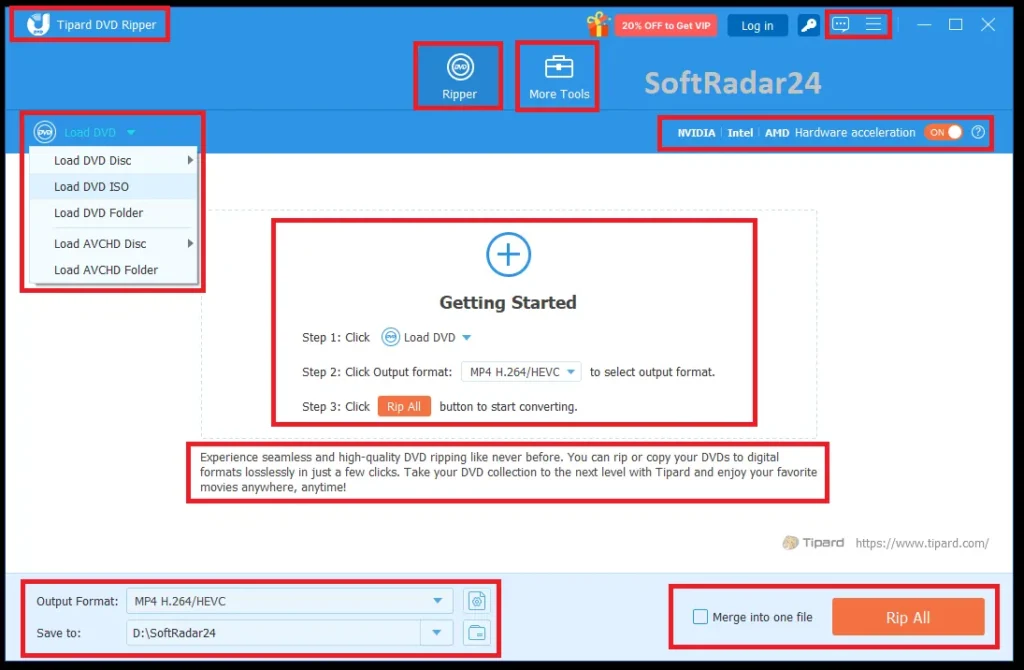
The current Tipard DVD Ripper workflow begins by loading the disc, folder or ISO, deciding whether you need the main movie or the full title list, then choosing between video/audio export, DVD-folder backup or ISO backup.
1. Load the DVD Source Correctly
- Insert the DVD or load a DVD folder / ISO image.
- Choose Main Movie for a simple feature-film disc or Full Title List when the disc has multiple cuts, extras or a 99-title structure.
- Use chapter display when you need an individual chapter rather than an entire title.
2. Choose the Output by End Goal
| Goal | Recommended path | Why |
|---|---|---|
| Complete archival backup | DVD ISO or DVD Folder | Keeps the documented disc structure, menus, chapters, audio tracks and subtitles. |
| Plex / NAS with original-quality focus | Lossless MKV / MPG | A file-based playback path without a normal quality-reducing transcode. |
| TV / phone / tablet compatibility | MP4 H.264 or HEVC | Broad device support with smaller file sizes than a full disc image. |
| Maximum compression efficiency | HEVC or AV1 | Modern codecs can reduce storage requirements, at the cost of encoding time and device-compatibility considerations. |
| Audio-only archive | FLAC / WAV / MP3 / AAC / AC3 | Extracts the soundtrack without keeping the video stream. |
3. Review Tracks, Chapters and Editing Before Ripping
Tipard DVD Ripper can keep, embed, export or disable subtitles; choose audio tracks; rename titles; merge titles or chapters; and apply trimming, cropping, rotation, filters, brightness/contrast adjustments and watermarks. The current guide specifically notes that normal editing is unavailable when MPG Lossless is selected.
4. Enable Hardware Acceleration and Export
The current interface provides hardware-acceleration controls and supports NVIDIA, AMD and Intel acceleration paths. Tipard’s 30× figure is a vendor benchmark; actual ripping time depends on optical-drive speed, disc condition, output codec, quality settings and hardware.
Product Interface & Workflow
The images below show Tipard DVD Ripper product artwork and the main ripping interface.
Compatibility & Coverage
Tipard DVD Ripper covers both optical-disc structure and normal media formats. Source type and output target should be evaluated separately.
DVD Source Coverage
| Source | Current coverage | Practical note |
|---|---|---|
| DVD disc | Supported | Includes commercial and homemade DVDs in the current product description. |
| DVD folder / VIDEO_TS | Supported | Can be converted to normal media files or used as a full-structure backup target. |
| DVD ISO image | Supported | Can be loaded as a source or created as a full-disc backup. |
| DVD-5 / DVD-9 | Supported | Current product material explicitly covers single- and dual-layer DVDs. |
| Scratched / non-standard discs | Vendor-supported with error handling | Recovery depends on physical damage and readable sectors. |
| Blu-ray | Different product category | Tipard DVD Ripper is a DVD-focused product; use a Blu-ray-specific product for Blu-ray discs. |
Protection, Region & Structure Coverage
- CSS
- APS
- CPRM
- Sony ARccOS
- 99-title DVD structures
- DVD region codes 1–6
The current official DVD Ripper page lists these technologies. It does not currently list AACS as a DVD Ripper protection type; AACS is primarily associated with Blu-ray and should not be carried forward from older copy.
Video, Audio & Device Output
The current reference lists a broad output catalog including MP4, MKV, MOV, AVI, WebM, WMV, TS, VOB and 4K UHD profiles, plus FLAC, WAV, MP3, AAC, AC3 and many additional audio formats. Device profiles cover current iPhone families, iPad, Android devices, Apple TV, Samsung TV, Xbox, PlayStation and other playback targets.
Features & Capabilities
The feature set is strongest when separated into disc access, archival backup, transcoding, enhancement and title/track management.
Copy-Protected & Difficult DVD Handling
- CSS, APS, CPRM, Sony ARccOS and region-code handling
- 99-title DVD detection
- Sector scanning for scratched, dirty or non-standard discs
- Main Movie, Full Title List and chapter-level selection
Lossless & Full-Structure Backup
- DVD to ISO image
- DVD to DVD folder / VIDEO_TS
- Lossless MKV / MPG remuxing
- Preservation of selected audio and subtitle tracks
Modern Codec & Compression Options
- H.264 and H.265/HEVC
- AV1, VP9, VP8 and ProRes support in the current product catalog
- MP4, MKV, MOV, WebM and device-oriented profiles
- Vendor-documented compression examples for reducing DVD storage size
Enhancement & DVD Modernization
- 480p DVD upscaling toward 1080p / 4K outputs
- Deinterlacing for older interlaced DVD video
- Noise reduction, brightness and contrast adjustments
- Hardware-accelerated conversion using supported GPU paths
Editing, Subtitle & Toolbox Utilities
- Trim, crop, rotate, filters and watermarking
- Keep, embed, export or disable subtitles
- Merge titles or chapters
- Metadata Editor, Video Compressor, GIF Maker, 3D Maker and Video Enhancer
Important Conditions & Limitations
These conditions matter more than a long feature list because they determine whether the selected output is appropriate and whether a headline capability applies to your hardware or disc.
30× Faster Is a Vendor Benchmark, Not a Guaranteed Time
Tipard’s current product page describes an RTX 4070 SUPER test where an 8.5 GB DVD was transcoded in about four to five minutes with low CPU usage. Optical-drive speed, source condition, encoder choice and output quality can materially change the result.
DVD Upscaling Does Not Restore Original HD Detail
A 480p DVD can be resized, deinterlaced, denoised and sharpened for a 1080p/4K display, but generated or reconstructed detail is not equivalent to an original HD master.
ISO, Lossless MKV and MP4 Solve Different Problems
ISO/DVD Folder is the safer choice for full disc structure and menus. Lossless MKV/MPG is better for file-based playback with original-quality emphasis. MP4/HEVC/AV1 is better when compatibility or storage size matters. Treating these as interchangeable “lossless backup” options can lead to the wrong archive.
Scratched-Disc Recovery Is Limited by Physical Readability
Sector scanning can skip or work around some bad areas, but no software can guarantee recovery when the optical drive cannot read enough of the damaged disc.
Editing Is Not Available with MPG Lossless
The current guide explicitly instructs users to choose an output other than MPG Lossless before using its editing tools.
Platform Licenses Are Not Interchangeable
Tipard’s current purchase FAQ says Windows and Mac licenses are separate and cannot be transferred from one platform to the other.
Reinstallation Can Require Registration Again
Tipard’s current purchase FAQ says uninstalling and reinstalling makes the software unregistered again. Keep the purchase email and registration information available before moving or reinstalling the application.
The Current Public Store Adds a Separate DVD Creator Trial
Tipard currently advertises seven-day access to Tipard DVD Creator with a DVD Ripper purchase and says that separate subscription renews at US$30.00/month unless canceled. Check optional extras at checkout.
The Current Free Edition Is Not the Same as the Full Paid Product
Tipard’s separate Free DVD Ripper page provides a narrower output set and positions current copy-protected DVD support and the broader 500+ profile catalog as paid-version benefits.
Use Copy-Protection Features Only Where You Are Authorized
Copyright, backup and circumvention rules differ by country and content. A technical capability to read a disc does not itself establish legal permission to copy or distribute the content.
Free Trial / Free Version
Tipard currently provides both trial access from the paid-product pages and a separate Free DVD Ripper edition. The vendor does not present them as equivalent to the full paid product.
| Access type | What it can prove | Paid difference |
|---|---|---|
| Paid-product trial | Lets you verify installation, disc detection, title analysis and basic workflow on your hardware. | The current purchase page says the trial has the same services/features except for use conditions, but does not publish a clear DVD Ripper-specific limit table on that page. |
| Tipard Free DVD Ripper | Continuing free edition for common DVD handling and a narrower set of outputs. | The current free-product page positions copy-protected DVD support, wider 500+ profiles and the full feature set as upgrade benefits. |
System Requirements
The current Tipard DVD Ripper reference publishes separate Windows and Mac requirements.
| Requirement | Current value | Notes |
|---|---|---|
| Windows OS | Windows 11 / 10 / 8.1 / 8 / 7 (32-bit / 64-bit) | Current Windows reference. |
| Windows CPU | 1 GHz Intel/AMD CPU or above | Current Windows reference. |
| Windows RAM | 2 GB RAM or above | Current Windows reference. |
| macOS | macOS 10.12 or above | Current Mac reference also states support for recent macOS releases including Tahoe. |
| Mac CPU | 1 GHz or faster Intel or Apple Silicon processor | Current Mac reference. |
| Mac RAM | 2 GB RAM or above | Current Mac reference. |
| Optical drive | DVD-capable drive for physical discs | Not required when the source is already a DVD folder or ISO image. |
| GPU acceleration | Supported NVIDIA / AMD / Intel acceleration path | Useful for transcoding speed; exact capability depends on the GPU and codec. |
Alternatives & Better-Fit Options
The internal links are deliberately limited to the same decision space. For Tipard-wide offers and related optical-media tools, visit the Tipard page on SoftRadar24.
WinX DVD Ripper Platinum
A relevant direct comparison when difficult commercial DVDs, title detection, hardware acceleration and long-running DVD-software development are priorities. Compare its current copy-protection workflow and license model with Tipard DVD Ripper.
WonderFox DVD Ripper Pro
A direct alternative for users who want a compact DVD-ripping workflow and strong lifetime-deal economics. It is more useful as a pricing/workflow comparison than as a generic extra link.
AnyMP4 DVD Ripper
A close cross-brand option when the goal is DVD-to-MP4/MKV conversion with hardware acceleration, output profiles and editing tools. Use the two product pages to compare exact platform support and current license offers.
FAQ
These questions focus on technical behavior, licensing and current documentation rather than repeating the scenario questions above.
Which DVD copy protections does Tipard DVD Ripper currently list?
Tipard’s current product page lists CSS, APS, CPRM, Sony ARccOS, 99-title structures and DVD region codes. Copy-protection support can evolve, so newly authored commercial discs should be tested with the current build.
What is the difference between Main Movie and Full Title List in Tipard DVD Ripper?
Main Movie automatically targets the longest likely feature. Full Title List exposes all detected titles, extras and alternate cuts. The guide specifically recommends Full Title List when a disc contains more than one plausible main movie.
Can Tipard DVD Ripper create an ISO image or DVD folder?
Yes. The current guide provides Rip to DVD ISO File and Rip DVD to DVD Folder modes in addition to video/audio export.
Does Tipard DVD Ripper support AV1 and HEVC?
Yes. The current product page lists AV1, H.265/HEVC, H.264, MPEG-4, VP9, VP8, ProRes and other codecs in its conversion workflow.
What does the 30× ripping-speed claim mean?
It is Tipard’s vendor benchmark for its Level-3 hardware-accelerated workflow. The current product page describes a test using an 8.5 GB DVD, Windows 11 and an RTX 4070 SUPER that completed in roughly four to five minutes. Your result can differ with the optical drive, disc, codec and hardware.
Can Tipard DVD Ripper save subtitles as separate files?
Yes. The current guide provides an export-subtitle option in addition to keeping subtitle tracks in the output, embedding subtitles into the picture, or disabling them.
Why can I not use the editing tools with MPG Lossless?
Tipard’s current guide explicitly says DVD editing requires an output other than MPG Lossless. Use a normal encoded output when trimming, filtering or other edits are required.
What are the current Windows requirements for Tipard DVD Ripper?
The current Windows reference lists Windows 11, 10, 8.1, 8 and 7 in 32-bit or 64-bit editions, a 1 GHz Intel/AMD CPU or faster, and at least 2 GB RAM.
What are the current Mac requirements for Tipard DVD Ripper for Mac?
The current Mac reference lists macOS 10.12 or later, a 1 GHz or faster Intel or Apple Silicon processor, and at least 2 GB RAM. The current Mac product page also states support for recent macOS releases including Tahoe.
Can a Windows Tipard DVD Ripper license be moved to the Mac version?
No. Tipard’s current purchase FAQ says Windows and Mac licenses are platform-specific and cannot be transferred between the two versions.
What happens if I reinstall Tipard DVD Ripper?
Tipard’s current purchase FAQ says uninstalling and reinstalling the registered software makes it unregistered again. Keep the purchase email or registration information available in case reactivation is required.
Does the current Tipard DVD Ripper purchase include another trial product?
Tipard’s current public purchase page promotes 7-day access to Tipard DVD Creator and says that separate subscription renews at US$30.00 per month unless canceled before renewal. Review optional extras at checkout.
What is the difference between Tipard DVD Ripper Free and the paid version?
Tipard’s separate Free DVD Ripper page describes a narrower free edition. It lists common formats and basic DVD handling, while current copy-protected DVD support, wider 500+ profiles and the full paid feature set are positioned as upgrade benefits.
Is the SoftRadar24 Tipard DVD Ripper discount the same as Tipard’s public store price?
No. The available offer includes US$21.39 for 1 Year / 1 PC and US$30.00 for Lifetime / 1 PC. Tipard’s public store may show a different active price grid, so verify the final total at checkout.





