

Quick Summary
Tipard Blu-ray Player is a Windows and macOS Blu-ray player, DVD player and high-resolution media player for physical discs, BDMV folders, ISO images and local video/audio files. Current Tipard documentation covers commercial Blu-ray encryption including AACS and BD+, Blu-ray region handling, menu/title/chapter navigation, 4K/5K/8K file playback, Dolby Atmos and DTS-family audio, hardware decoding, subtitle/audio-track control, DVD playback, snapshots and picture adjustments.
- Disc and image playback
- Blu-ray disc · BDMV folder · Blu-ray ISO · DVD disc · VIDEO_TS/DVD folder · DVD ISO
- High-resolution media
- 1080p · 4K · 5K · 8K local video · up to 200 Mbps and 10-bit HDR in current vendor documentation
- Home-theater audio
- Dolby Atmos · Dolby TrueHD · DTS-HD Master · DTS:X · up to 7.1-channel output
- System baseline
- Windows 7/8/10/11 · Mac OS X 10.9+ · hardware decoding for supported GPUs
Purchase Options
License & Purchase · Tipard Blu-ray Player · 50% OFF Official Discount & Coupon Code
Choose the operating system first, then select a 1-year or lifetime license. The lowest-priced option, US$19.50 for 1 Year / 1 PC, is selected by default.
1-Year License
1 Windows PC · 1-year Tipard Blu-ray Player license
Included with this license- Tipard Blu-ray Player for 1 Windows PC
- Blu-ray disc, BDMV folder, Blu-ray ISO, DVD and local media playback
- Commercial Blu-ray encryption and region-code handling in the current player line
- Audio-track, subtitle, chapter, playlist and hardware-decoding controls
US$19.50 for 1 year on 1 Windows PC. This is the lowest-priced license option.
Tipard’s current public store uses a different plan grid: US$24.00 for 1 Month / 1 PC, US$45.00 for Lifetime / 1 PC and US$70.00 for Lifetime / 3 PCs. The same store also promotes a separate 7-day Tipard Screen Capture trial that renews at US$30.00 per month unless canceled. Review the selected platform, license term, optional extras, renewal conditions, tax and final total before payment.
Can This Software Do What I Need?
Tipard Blu-ray Player can replace a basic desktop media player when the job involves Blu-ray discs, BDMV folders, ISO images, disc menus, high-bitrate 4K/8K files or home-theater audio. The important distinction is whether you need playback, physical-disc access, UHD compatibility, file conversion or only a free media player.
I want to play a commercial Blu-ray disc on Windows 11 without installing separate codec packs
Commercial Blu-ray playback
SupportedTipard Blu-ray Player currently lists commercial Blu-ray playback with AACS, BD+ and Blu-ray region-code handling. A physical disc still requires a Blu-ray-capable optical drive.
I have a BDMV folder or Blu-ray ISO instead of a physical disc
BDMV / ISO playback
SupportedTipard Blu-ray Player can open Blu-ray folders and Blu-ray ISO images directly, making it useful as a Blu-ray ISO player or BDMV player when the movie is already stored on disk.
I want to watch a physical 4K Ultra HD Blu-ray on my computer
4K UHD disc playback
Verify firstTipard’s current 2026 Blu-ray guidance explicitly lists 4K UHD Blu-ray disc playback, while the core product page more generally separates Blu-ray-disc support from 4K/8K video-file playback. If UHD discs are your main reason for buying, test the exact UHD disc and compatible optical drive first.
I need a media player for 4K, 5K or 8K local video files
High-resolution files
SupportedTipard Blu-ray Player currently documents 4K, 5K and 8K file playback, high bitrates up to 200 Mbps and 10-bit HDR, with hardware decoding intended to reduce CPU load.
I want Dolby Atmos, Dolby TrueHD, DTS-HD Master or DTS:X through a home-theater setup
High-resolution audio
SupportedTipard Blu-ray Player lists Dolby Atmos, Dolby TrueHD, DTS-HD Master and DTS:X with up to 7.1-channel output. The final result still depends on the source track, audio device, receiver and operating-system audio path.
I need to play DVDs as well as Blu-rays
Blu-ray + DVD playback
SupportedTipard Blu-ray Player also opens DVD discs, VIDEO_TS folders and DVD ISO images, with menu, chapter, audio-track and subtitle controls.
I want to navigate the disc menu and choose titles or chapters
Disc navigation
SupportedThe current guide provides Play Movie, title and chapter selection, while the product page adds playlist and menu controls for Blu-ray and DVD playback.
I want to change subtitles or audio tracks while the movie is playing
Track controls
SupportedTipard Blu-ray Player provides audio-track, audio-channel and subtitle controls before or during playback, which is useful for multilingual discs and alternate audio mixes.
I want to correct a dark picture, change aspect ratio or deinterlace older video
Playback adjustment
SupportedTipard Blu-ray Player includes hue, contrast, brightness, saturation and gamma controls, multiple aspect-ratio/window-size options, and deinterlacing methods such as Blend, Discard and Mean.
I want to capture still frames from a movie
Snapshots
SupportedThe current product page lists JPEG, PNG and BMP snapshots. The guide’s quick workflow specifically demonstrates the camera control for saving a frame during playback.
My computer has only a DVD drive, not a Blu-ray drive
Physical Blu-ray access
Not supportedA DVD drive cannot read a physical Blu-ray disc. Tipard Blu-ray Player can still play local video files, Blu-ray folders and ISO images already stored on the computer, but physical Blu-ray playback needs a Blu-ray-capable drive.
I want to create MP4 or MKV files from Blu-ray discs for Plex, NAS or mobile playback
Disc conversion
Better fitTipard Blu-ray Player is designed for playback, not for creating portable copies. Tipard Blu-ray Converter is the more appropriate route when the goal is Blu-ray-to-MP4/MKV conversion or a reusable media-server file.
I want a direct cross-brand Blu-ray player comparison before buying
Alternative players
CompareAiseesoft Blu-ray Player and AnyMP4 Blu-ray Player are relevant comparisons because they target the same Windows/macOS disc, ISO and local-media playback problem. Compare current platform support, license terms and the exact discs you use.
I use a recent Mac and want Blu-ray playback with hardware decoding
macOS playback
SupportedTipard Blu-ray Player for Mac currently lists macOS 10.9 or later and hardware-decoding support. Its product-specific tech spec explicitly names Intel plus M2, M3, M4 and M5 chips.
I use an Apple M1 Mac
M1 compatibility
Verify firstThe current Mac technical-reference line names Intel and M2/M3/M4/M5 but does not explicitly name M1. Because the omission is in the vendor’s current product-specific requirements, test the current free build on an M1 Mac before purchasing.
I only need a free Blu-ray player and do not want a paid license
Free-use decision
Verify firstTipard describes Tipard Blu-ray Player as a free media player, but its purchase page separately distinguishes the trial and registered versions and says they differ by use conditions without publishing a detailed restriction table. Test the exact disc and feature you need before relying on free use long term.
How It Works
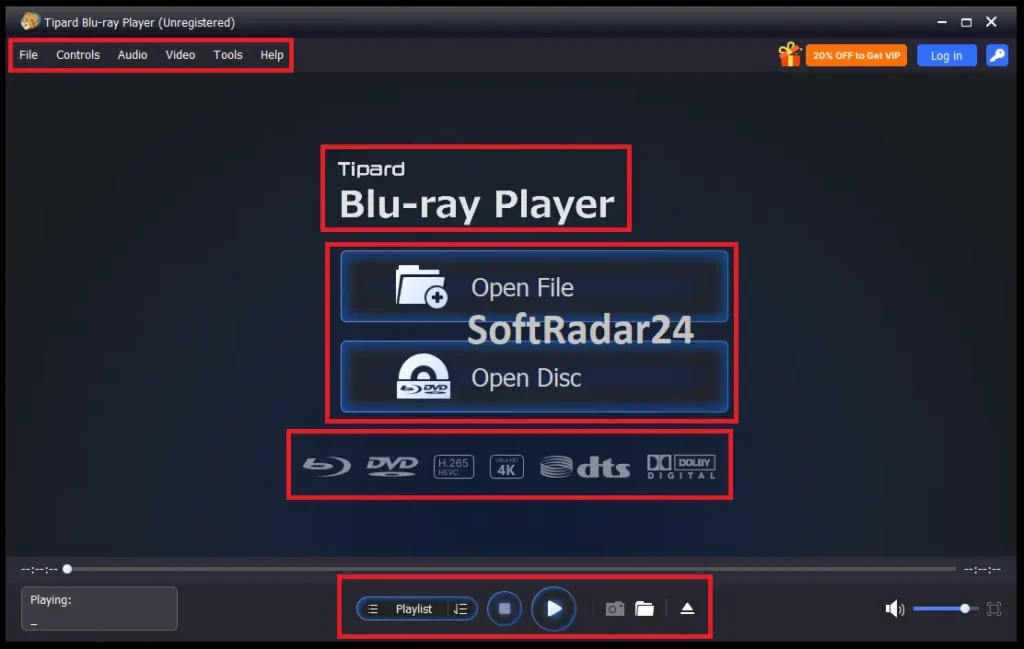
Tipard Blu-ray Player uses two simple entry points: Open Disc for optical media and Open File for stored media. The real value appears after loading, when menus, chapters, audio, subtitles, hardware decoding and picture controls determine the viewing experience.
Play a Physical Blu-ray Disc
- Connect or use a Blu-ray-capable optical drive and insert the disc.
- Launch Tipard Blu-ray Player and choose Open Disc.
- Select Play Movie or navigate to the title or chapter you want to watch.
- Choose the required audio track, subtitle and playback size while the disc is playing.
Open a Blu-ray ISO, BDMV Folder or Normal Media File
Use Open File when the source already exists on the computer. Tipard Blu-ray Player supports Blu-ray folders and ISO images as well as a wide range of video/audio files, so the same application can act as a Blu-ray ISO player, MKV player, 8K media player and hi-res audio player without creating a converted copy first.
Set Audio, Subtitles and Picture Controls
The current guide exposes audio track/channel controls, subtitle selection, playback size, snapshots and color adjustment. The product page adds aspect-ratio choices such as 16:9, 4:3, 1:1, Fit to Screen and Full Screen, plus hue, contrast, brightness, saturation and gamma controls.
Use Hardware Decoding for High-Bitrate Playback
On Windows, Preferences can leave hardware acceleration on Automatic or use a detected NVIDIA, AMD or Intel graphics path. Tipard Blu-ray Player uses hardware decoding to shift compatible video-decoding work away from the CPU, which is particularly relevant for high-bitrate 4K and 8K files.
Product Interface & Workflow
Tipard Blu-ray Player keeps the main workflow focused on opening a disc or file, then exposes playback, playlist, audio, video and tool controls from the same desktop interface.

Compatibility & Coverage
Tipard Blu-ray Player covers three distinct media layers: physical optical media, stored Blu-ray/DVD images and folders, and conventional local video/audio files. Compatibility should be checked against the exact source rather than the resolution label alone.
Disc, Folder & Image Support
| Source | Current coverage | Important condition |
|---|---|---|
| Commercial Blu-ray disc | Supported | Current product page lists AACS, BD+ and Blu-ray region-code handling. |
| Blu-ray BDMV folder | Supported | Useful when the disc structure is already stored on the computer. |
| Blu-ray ISO image | Supported | Can be opened as stored media without re-encoding. |
| DVD disc | Supported | Uses the optical-disc workflow. |
| DVD / VIDEO_TS folder | Supported | Opened through the file workflow. |
| DVD ISO image | Supported | Current reference lists ISO image input alongside DVD disc/folder. |
| 4K UHD Blu-ray disc | Vendor-listed in current 2026 Blu-ray guidance | Test the exact UHD disc and a drive capable of reading that physical disc format. |
Local Video & Audio Coverage
The current technical reference lists MP4, MKV, MOV, AVI, WebM, WMV, MTS, M2TS, TS, MXF, MPEG, FLV, VOB and many other video containers, plus FLAC, WAV, WMA, MP3, AAC, AC3, AIFF, APE, OGG and additional audio formats. The current product page separately highlights H.264, AV1, H.266, ProRes and VP9 playback in high-resolution media workflows.
Windows & macOS Coverage
| Platform | Current official baseline | Processor / memory |
|---|---|---|
| Windows | Windows 7 / 8 / 10 / 11 | 1.2 GHz Intel/AMD CPU or faster · 1 GB RAM or higher recommended |
| macOS | Mac OS X 10.9 or later | Current Mac reference names Intel plus M2/M3/M4/M5 · 1 GB RAM or higher recommended |
Features & Capabilities
Tipard Blu-ray Player is most useful as a dedicated disc-and-media playback layer: it handles protected optical media, high-resolution local files and home-theater audio while keeping navigation and picture controls inside one player.
Blu-ray & DVD Playback
- Blu-ray disc, BDMV folder and Blu-ray ISO playback
- DVD disc, DVD folder and DVD ISO playback
- AACS, BD+ and Blu-ray region-code handling
- Menu, playlist, title and chapter navigation
4K / 8K Media Playback
- 1080p, 4K, 5K and 8K local video playback
- Current vendor documentation lists up to 200 Mbps and 10-bit HDR
- H.264, AV1, H.266, ProRes and VP9 among current highlighted codec families
- Hardware decoding to reduce CPU workload on compatible systems
Dolby, DTS & Audio Control
- Dolby Atmos and Dolby TrueHD
- DTS-HD Master and DTS:X
- Up to 7.1-channel output in current product documentation
- Audio-track and audio-channel selection during playback
Picture & Viewing Controls
- Brightness, contrast, hue, saturation and gamma adjustment
- Full Screen, Half Size, Fit to Screen, 16:9, 4:3 and 1:1 options
- Blend, Discard, Mean and other deinterlacing methods
- Subtitle selection and chapter-level navigation
Snapshots & Playlist Management
- JPEG, PNG and BMP snapshot output on the current product page
- Custom video playlist management
- Chapter selection from supported Blu-ray/DVD sources
- Keyboard shortcuts and standard playback controls
Important Conditions & Limitations
Tipard Blu-ray Player has broad playback coverage, but several details can materially change the result: optical-drive capability, the distinction between 4K files and physical UHD Blu-ray, the exact free-version conditions, platform-specific licenses and the checkout’s additional subscription trial.
A Blu-ray-Capable Drive Is Required for Physical Blu-ray Discs
Tipard Blu-ray Player cannot make a DVD-only drive read a Blu-ray disc. The software handles decoding and playback after the computer can physically read the medium.
4K/8K File Playback and Physical 4K UHD Blu-ray Are Not the Same Requirement
The main product page clearly documents 4K/8K local video playback. Tipard’s current 2026 Blu-ray guidance also lists 4K UHD Blu-ray disc support, but physical UHD playback adds an optical-drive requirement. Test the exact UHD disc and drive when that is the primary use case.
Hardware Acceleration Depends on the Installed GPU and Codec Path
The guide supports NVIDIA, AMD and Intel decoding paths, but the exact accelerator available to Tipard Blu-ray Player depends on the graphics hardware, driver and the media format being decoded.
Lossless Home-Theater Audio Still Depends on the Output Chain
Dolby Atmos, Dolby TrueHD, DTS-HD Master and DTS:X support does not mean every laptop speaker can reproduce the complete surround mix. Source track, output device, receiver, connection and operating-system audio configuration all matter.
The Current Free-Use Wording Is Not Fully Specific
Tipard markets Tipard Blu-ray Player as a free media player, while the purchase page says the trial has the same services/features as the registered edition except for use conditions. A detailed Blu-ray Player restriction table is not published on the reviewed purchase page, so test the exact disc and function instead of assuming unrestricted permanent free use.
Windows and Mac Licenses Are Separate
Tipard’s purchase FAQ says a Windows license cannot be transferred to the Mac edition and vice versa. Choose the operating system carefully before checkout.
Reinstalling Can Require Activation Again
Tipard says uninstalling and reinstalling a registered copy makes it unregistered again. Keep the purchase email or registration code available.
The Checkout Adds a Separate Screen Capture Trial
Tipard’s current Blu-ray Player store promotes seven-day access to Tipard Screen Capture and states that the separate Screen Capture subscription renews at US$30.00 per month unless canceled. Review optional extras before completing payment.
Playback Does Not Create a Portable Media Copy
Tipard Blu-ray Player lets you watch the disc, folder or ISO; it does not replace a Blu-ray ripper or converter when the real goal is an MP4/MKV file for Plex, NAS, a tablet or offline device playback.
M1 Is Not Explicitly Named in the Current Mac Processor Line
The current Tipard Blu-ray Player for Mac reference explicitly lists Intel and M2/M3/M4/M5 processors. Because M1 is omitted from that product-specific line, an M1 buyer should verify the current build rather than infer support from later Apple-chip listings.
Free Trial / Free Version
Tipard Blu-ray Player is promoted as a free Blu-ray/media player, but Tipard also sells registered licenses and states that the trial and registered versions differ by use conditions. The current purchase page does not publish a detailed Blu-ray Player-specific restriction table.
| Access | What is documented | How to use it |
|---|---|---|
| Free download / trial | The product page calls Tipard Blu-ray Player a free media player; the purchase page says trial and registered editions differ by use conditions. | Use it to verify your exact disc, ISO/folder, menu, subtitle, audio and hardware-decoding workflow before purchase. |
| Registered license | Paid licensing is available by term/platform, with lifetime licenses documented for lifetime feature access, upgrades and support. | Choose the paid edition when the free-use conditions do not fit the intended long-term workflow. |
System Requirements
Tipard publishes separate Windows and Mac technical references. Physical Blu-ray playback also requires a compatible optical drive even though that hardware requirement is separate from the CPU/RAM minimums.
| Requirement | Current value | Notes |
|---|---|---|
| Windows OS | Windows 7 / 8 / 10 / 11 | Current product-specific Windows reference. |
| Windows CPU | 1.2 GHz Intel or AMD CPU or above | Current product-specific Windows reference. |
| Windows RAM | 1 GB RAM or higher recommended | Current product-specific Windows reference. |
| macOS | Mac OS X 10.9 or later | Current Mac reference also names current macOS releases including Tahoe and Golden Gate Beta. |
| Mac CPU | Intel processor; M2 / M3 / M4 / M5 explicitly listed | M1 is not explicitly named in the current processor line. |
| Mac RAM | 1 GB RAM or higher recommended | Current product-specific Mac reference. |
| Physical Blu-ray drive | Required for physical Blu-ray discs | A DVD-only optical drive cannot read Blu-ray media. |
| GPU decoding | NVIDIA / AMD / Intel paths documented on Windows | Available decoding options depend on the installed graphics hardware and driver. |
Alternatives & Better-Fit Options
The useful alternatives are either direct Blu-ray player comparisons or a different Tipard workflow when playback is not the real goal. For current Tipard software and offers, visit the Tipard page on SoftRadar24.
Aiseesoft Blu-ray Player
A direct cross-brand comparison for Windows/macOS Blu-ray disc, ISO and local-media playback. It is useful when you want to compare platform support, current license terms and how another dedicated player handles the same disc library.
AnyMP4 Blu-ray Player
Another direct alternative for Blu-ray/DVD/ISO and high-resolution local-media playback. Compare the exact operating-system requirements, current pricing and the commercial discs you own rather than choosing only by the format list.
Tipard Blu-ray Converter
The better fit when the objective changes from watching a Blu-ray to creating MP4, MKV or another reusable file for Plex, NAS, mobile playback or long-term storage. Tipard Blu-ray Player remains the cleaner choice when no conversion is needed.
FAQ
These answers focus on technical requirements, licensing, checkout conditions and current documentation details without repeating the use-case questions above.
What Windows versions does Tipard Blu-ray Player currently support?
The current Windows reference lists Windows 7, Windows 8, Windows 10 and Windows 11. It specifies a 1.2 GHz Intel or AMD CPU or faster and recommends at least 1 GB RAM.
What are the current Mac requirements for Tipard Blu-ray Player for Mac?
The current Mac reference lists Mac OS X 10.9 or later, including current macOS releases, 1 GB RAM or more, and Intel plus M2, M3, M4 and M5 chips in its processor line.
Which Blu-ray protection systems are named on the current Tipard Blu-ray Player page?
Tipard currently names AACS and BD+ for commercial Blu-ray playback and also states support for Blu-ray region codes.
Which local video formats can Tipard Blu-ray Player open?
The current technical reference lists formats including MP4, MKV, MOV, AVI, WebM, WMV, MTS, M2TS, TS, MXF, MPEG, FLV, VOB and others, plus HD variants of several common formats.
Which standalone audio formats are listed in the Tipard Blu-ray Player technical reference?
The current reference includes FLAC, WAV, WMA, MP3, MP2, AAC, AC3, AIFF, APE, OGG, M4A and additional audio formats.
Can I manually choose a GPU for hardware decoding?
The Windows guide says hardware-acceleration decoding can be left on Automatic or changed in Preferences to a detected NVIDIA, AMD or Intel graphics option. Actual choices depend on the hardware installed in the computer.
Does Tipard Blu-ray Player require extra codec packs for common 4K and 8K files?
The current product page says its supported formats and codecs are handled without downloading separate codec packs. Unsupported or unusual media can still depend on the exact codec profile and file condition.
Can a Tipard Blu-ray Player Windows license be transferred to macOS?
No. Tipard’s current purchase FAQ says Windows and Mac licenses are platform-specific and cannot be transferred between the two editions.
Can one Tipard Blu-ray Player license be used on several computers?
Tipard’s current purchase FAQ says single-computer licenses work on one PC or Mac. Multi-user licensing is separate.
What happens if I uninstall and reinstall Tipard Blu-ray Player?
Tipard’s current purchase FAQ says reinstalling a registered copy makes it unregistered again. Keep the purchase email or registration information available so the software can be activated again.
What does Tipard currently charge on its public Blu-ray Player store?
Tipard’s current public Windows store lists a 1-month / 1-PC plan at US$24.00, Lifetime / 1 PC at US$45.00 and Lifetime / 3 PCs at US$70.00. These public-store plans are separate from the offer options shown in the Purchase Options section above.
Does the current Tipard Blu-ray Player checkout include another subscription trial?
Yes. Tipard currently promotes 7-day access to Tipard Screen Capture with Blu-ray Player purchases and states that the separate Screen Capture subscription renews at US$30.00 per month unless canceled.
What refund periods does Tipard currently show for Blu-ray Player licenses?
The current public purchase page lists a 7-day money-back guarantee for the 1-month plan and a 30-day money-back guarantee for lifetime licenses.
What image formats can the snapshot tool save?
The current product page lists JPEG, PNG and BMP snapshot output. The step-by-step guide demonstrates the same snapshot control and specifically mentions saving a captured frame as JPEG.
Does Tipard publish a current software version number for Tipard Blu-ray Player?
The official product, technical-reference, purchase and guide pages reviewed for this update do not publish a clear current Tipard Blu-ray Player version number, so no software version is asserted here.





