
Quick Summary
AnyMP4 Blu-ray Player is Blu-ray player software for Windows and macOS that can play physical Blu-ray and DVD discs, disc folders and ISO images, as well as common digital video and audio files. Its strongest fit is for people who want a region-free Blu-ray player on a computer, need 4K Ultra HD Blu-ray playback, want access to disc menus, titles, chapters, subtitles and audio tracks, or prefer one media player for both optical discs and local files.
- Primary purpose
- Blu-ray / DVD disc, folder, ISO and digital-media playback
- Platforms
- Windows and macOS
- Blu-ray regions
- Regions A, B and C according to AnyMP4
- High-resolution playback
- 4K Ultra HD Blu-ray plus 8K / 4K digital video support
Purchase Options
License & Purchase · AnyMP4 Blu-ray Player · 50% OFF Coupon Code
If you searched for an AnyMP4 Blu-ray Player discount code, the SoftRadar24 purchase buttons below already contain the current promotional coupon parameter. Choose Windows or macOS and then select the annual or Lifetime license that fits your playback setup.
1 Year License
1 PC
Included with this license- Windows license for 1 PC
- Blu-ray, DVD, folder, ISO and digital-media playback
- Region A/B/C Blu-ray and Region 0–6 DVD playback support
- Current SoftRadar24 checkout URL includes the promotional coupon parameter
Regular: US$39.00
US$19.50/ year
Coupon code automatically applied
Buy NowWindows · 1 Year License · 1 PC
At the current SoftRadar24 offer price, the annual Windows license is 50% below the US$39.00 reference price shown on the existing Product page.
Checkout note: AnyMP4’s current public store now highlights a different set of individual plan labels and prices than these existing SoftRadar24 affiliate offers. These buttons preserve the current SoftRadar24 campaign URLs; review the final license, price and optional extras shown at checkout before paying.
Can This Software Do What I Need?
The main buying question is not simply whether AnyMP4 can open a movie file. It is whether your media is a physical disc, protected commercial Blu-ray, folder, ISO image or ordinary digital video—and whether you want playback only or permanent conversion to another format.
I want to play a commercial Blu-ray disc on a Windows PC or Mac
Physical Blu-ray playback
YesAnyMP4 is designed to load Blu-ray discs through a compatible Blu-ray drive. Its current guide says an Internet connection is required while handling encrypted Blu-ray or DVD files.
My Blu-ray disc is from another region
Region-coded discs
Yes — vendor-documentedAnyMP4 says the player supports Blu-ray Regions A, B and C and DVD Regions 0 through 6. This is one of the product’s main reasons to choose it over a basic local-file media player.
I want to play a Blu-ray folder or BDMV backup
Folder playback
YesBlu-ray folders and DVD folders are supported. The current product page also says menu navigation can expose titles, chapters and the original disc-menu structure for local disc images or folders.
I want to play a Blu-ray or DVD ISO image
ISO playback
Yes — check the setup conditionISO files are supported, but the current user guide still instructs users to have a virtual drive installed when working with Blu-ray/DVD ISO images.
I want to watch 4K Ultra HD Blu-ray on my computer
4K UHD Blu-ray
Yes — documentedAnyMP4 says it can open 4K UHD Blu-ray discs, folders and ISO images at 3840 × 2160 when encoded with H.265/HEVC. Physical-disc playback still depends on having suitable Blu-ray hardware.
I want to play 8K local video files
Digital video
YesThe current product page describes 8K, 4K and HD digital-video playback. This should not be confused with an 8K Blu-ray disc capability.
I only want to convert or archive Blu-ray movies to MP4/MKV
Ripping / conversion
Better fit: Blu-ray RipperAnyMP4 Blu-ray Player is primarily a playback tool. If the goal is to create digital copies or convert disc content for storage or other devices, a Blu-ray ripper is the more direct fit.
I only need DVD conversion rather than Blu-ray playback
DVD ripping
Better fit: DVD RipperThe player can play DVDs, but converting or archiving DVDs into digital files is a different job better handled by a DVD ripper.
How It Works
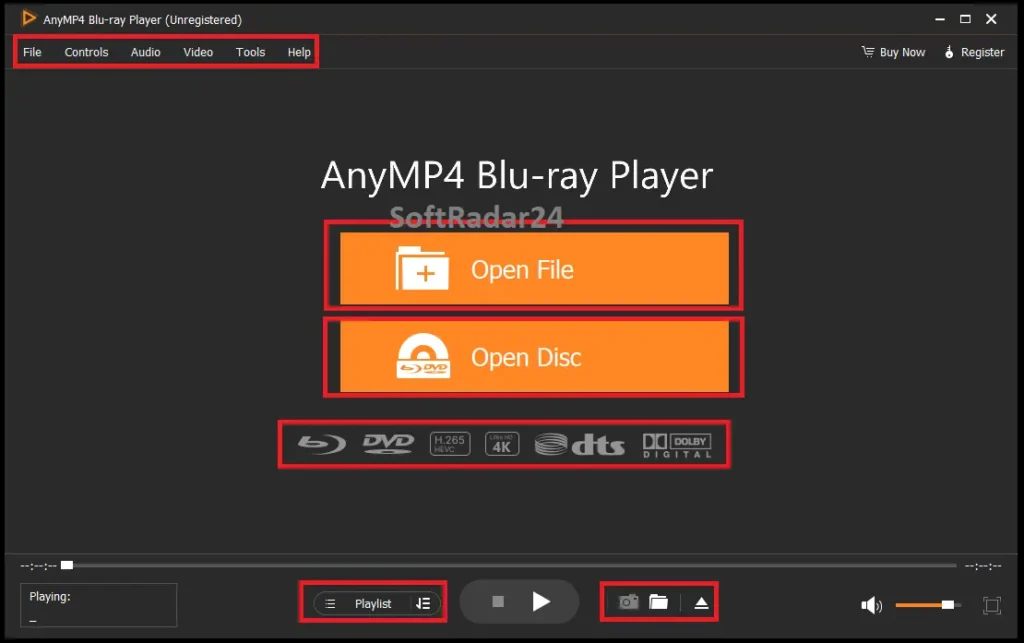
The player has two practical entry points: Open Disc for physical media and Open File / Open Folder for local media. Once content loads, the interface exposes playback, menu, title, chapter, subtitle, audio and visual controls.
Play a Physical Blu-ray or DVD Disc
Connect a compatible optical drive, insert the disc, and use Open Disc. For encrypted Blu-ray or DVD files, AnyMP4’s current guide says the Internet connection is required during the playback/decryption workflow.
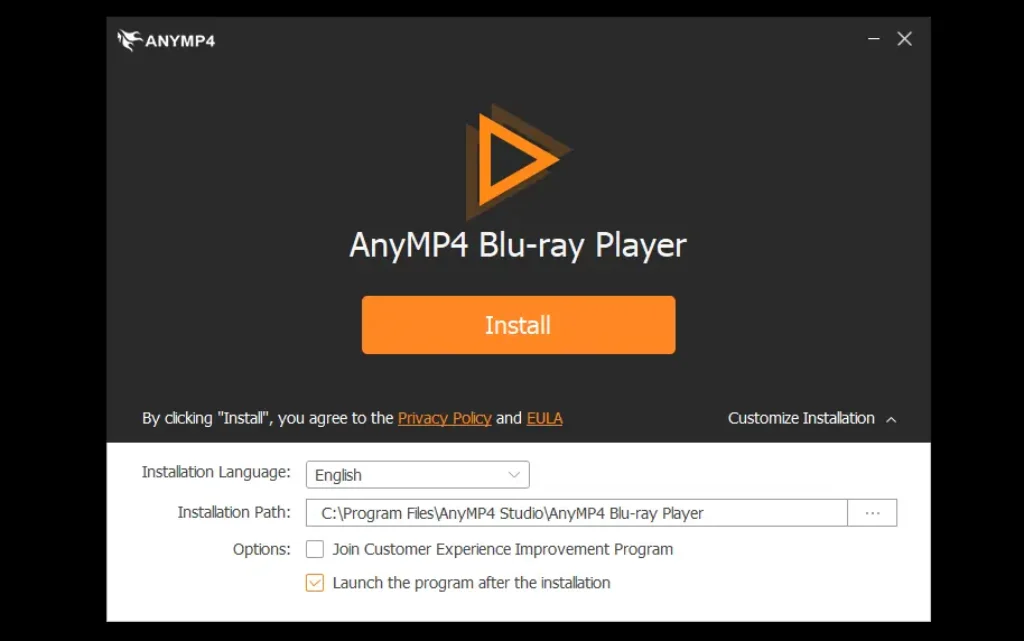
- Install and launch AnyMP4 Blu-ray Player on the Windows PC or Mac.
- Connect the Blu-ray-capable drive, insert the disc, then choose Open Disc.
- Choose the available menu, title, chapter, audio track or subtitle and start playback.
Play a Blu-ray/DVD Folder or ISO Image
Local disc backups can be loaded without a physical movie disc in the drive. Blu-ray/DVD folders are opened from local storage; for ISO images, the current guide also tells users to have a virtual drive installed.
- For a folder, choose Open Folder and select the Blu-ray or DVD directory.
- For an ISO, prepare the virtual-drive workflow described by AnyMP4 Blu-ray Player and load the ISO from local storage.
- Use the menu, playlist and playback controls to select titles, chapters, subtitles and audio tracks.
Play 4K / HD / SD Digital Video
For ordinary local video files, choose Open File. The supported-format reference includes formats such as MP4, MOV, MKV, WebM, M2TS, MTS, AVI, WMV, FLV and MXF, with 4K H.265/HEVC and H.264/AVC support.
- Choose Open File and select the local video.
- The player begins playback after the media loads.
- Use playback settings for screen size, subtitles, audio channels, deinterlacing, hardware acceleration and snapshots when needed.
Product Interface & Workflow
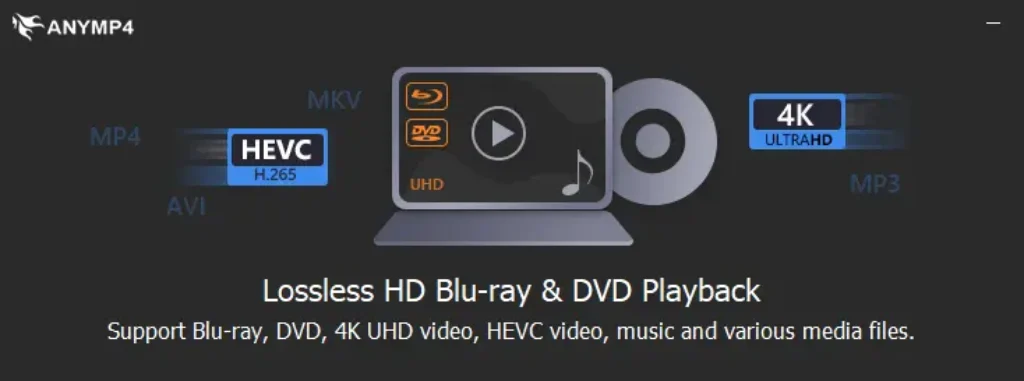
The images below are reused from the existing SoftRadar24 AnyMP4 Blu-ray Player article. No vendor-hosted screenshot is added to this update.
Compatibility & Coverage
Compatibility depends on both the computer and the media source. Physical Blu-ray playback needs Blu-ray-capable optical hardware, while folders and digital files do not; protected-disc playback also has an Internet requirement documented by AnyMP4.
Operating Systems & Playback Sources
| Item | Coverage / Support | Notes |
|---|---|---|
| Windows | Windows 11, 10, 8.1, 8 and 7 | Current English reference-page support list. |
| macOS | OS X 10.9 or later | Current AnyMP4 Mac Blu-ray Player reference material lists Intel and Apple M-series processor support. |
| Physical Blu-ray / DVD | Supported | A compatible optical drive is required; a standard DVD drive cannot read Blu-ray media. |
| Blu-ray / DVD folders | Supported | Open local disc folders from storage. |
| Blu-ray / DVD ISO | Supported | The current guide instructs users to have a virtual drive installed for the ISO workflow. |
| Protected encrypted discs | Supported with Internet access | AnyMP4 Blu-ray Player says Internet access is required during handling of encrypted Blu-ray/DVD files. |
Media & Disc Coverage
| Item | Coverage / Support | Notes |
|---|---|---|
| Blu-ray regions | A, B and C | Region-free playback claim on the current product page. |
| DVD regions | 0 through 6 | Current product-page region list. |
| 4K UHD Blu-ray | Disc, folder and ISO | Current product page specifies 3840 × 2160 H.265/HEVC playback. |
| Digital video | 8K / 4K / HD / SD files | 8K applies to digital video files, not an 8K optical-disc format. |
| Audio | Dolby, DTS, DTS-HD, AAC, TrueHD; 5.1 / 7.1 channels | Also supports common and lossless audio file formats. |
Features & Capabilities
The core feature set is about disc compatibility and playback control rather than editing or conversion. The most important capabilities are region coverage, UHD playback, original menu navigation, high-quality audio and flexible local-media support.
Blu-ray & DVD Playback
- Blu-ray Disc, Blu-ray folder and Blu-ray ISO playback
- DVD Disc, DVD folder and DVD ISO playback
- Blu-ray Regions A/B/C and DVD Regions 0–6 according to the current product page
- Support for disc types including BD-5, BD-9, BD-25, BD-50, BD-R, BD-XL and BD-RE
4K / 8K & Digital Media
- 4K Ultra HD Blu-ray playback for supported H.265/HEVC discs, folders and ISOs
- 8K / 4K / HD digital-video playback
- Broad local-video support including MP4, MOV, MKV, WebM, M2TS, MTS, AVI, WMV, FLV and MXF
- Lossless and common audio formats including FLAC, WAV, MP3, AAC and others
Menus, Chapters & Playback Control
- Original Blu-ray/DVD menu navigation for supported disc images and folders
- Title, chapter, subtitle and audio-track selection
- Playlist management for movies, video and audio
- Hotkeys for play, pause, stop, forward, backward and volume control
Picture, Audio & Performance Controls
- Hue, saturation, brightness, contrast and gamma adjustment
- Audio-track, output-device and channel controls
- Hardware-accelerated decoding option
- HDMI/SPDIF audio passthrough preference and snapshot capture
Important Conditions & Limitations
A Blu-ray player can remove several software-side obstacles, but it cannot replace missing optical hardware or turn every playback workflow into a fully offline one. These conditions matter before buying.
A Blu-ray Drive Is Still Required for Physical Blu-ray Discs
AnyMP4 provides the playback software, not the optical hardware. A standard DVD drive cannot read Blu-ray media, so a physical Blu-ray movie still requires an internal or external Blu-ray-capable drive.
Encrypted Disc Playback Is Not Fully Offline
The current user guide says an Internet connection is required while handling encrypted Blu-ray or DVD files. It also says Internet access can help open newer protected Blu-ray discs even when the installed software is not fully up to date.
ISO Playback Has an Extra Setup Condition in the Current Guide
Although ISO images are a supported input type, AnyMP4’s current tutorial still tells users to have a virtual drive installed before using the ISO workflow. This is worth testing in the trial if ISO playback is your primary reason for buying.
4K Blu-ray and 8K Digital Video Are Different Claims
The current product page documents 4K Ultra HD Blu-ray disc/folder/ISO playback and separately describes 8K digital-video playback. It should not be read as claiming an 8K Blu-ray optical-disc format.
The Player Does Not Replace a Ripper
Playback and conversion solve different jobs. If you want to archive a Blu-ray or DVD collection as MP4, MKV or other portable files, use a dedicated Blu-ray or DVD ripper rather than buying the player for a task it is not designed to perform.
Current Public Store Plans Differ from the Existing SoftRadar24 Campaign
AnyMP4’s current public purchase page now highlights 1 Month, Lifetime and 3-User individual plans, while the existing SoftRadar24 campaign still exposes annual and Lifetime Windows/macOS checkout URLs. Always verify the final plan shown by checkout before paying.
Free Trial / Free Version
AnyMP4 offers a free trial rather than a permanently free full version of this player. Current vendor-published 2026 comparison material describes the AnyMP4 Blu-ray Player trial as 30 days and says Blu-ray playback carries a watermark during the trial.
| Free access | What you can do | What requires payment |
|---|---|---|
| Free trial | Install the Windows or macOS player, test the interface and supported playback workflows, and evaluate whether your discs or files load correctly. | The registered license removes trial limitations; current vendor material specifically identifies a watermark on Blu-ray playback in the trial. |
| Registered version | Full registered playback according to the purchased license and supported-media conditions. | Requires a paid AnyMP4 Blu-ray Player license. |
System Requirements
The current English Blu-ray Player reference page publishes the supported Windows versions but does not list current Windows CPU or RAM minimums. AnyMP4’s current Mac Blu-ray Player reference material lists OS X 10.9 or later, a 1 GHz Intel processor or Apple M-series chip, and 1 GB RAM or more.
| Requirement | Supported / Required | Notes |
|---|---|---|
| Windows OS | Windows 11 / 10 / 8.1 / 8 / 7 | Current English AnyMP4 Blu-ray Player reference page. |
| macOS | OS X 10.9 or later | Current AnyMP4 Mac Blu-ray Player reference material. |
| Mac processor | 1 GHz Intel processor or Apple M-series chip | Current Mac reference material includes Apple M-series support. |
| Mac memory | 1 GB RAM or more | Current Mac reference material. |
| Physical Blu-ray hardware | Blu-ray-capable internal or external drive | Required only when playing a physical Blu-ray disc. |
| Internet | Required for encrypted Blu-ray / DVD handling | Documented in the current AnyMP4 Blu-ray Player user guide. |
| Windows CPU / RAM | Not specified on the current English Blu-ray Player reference page | Older SoftRadar24 hardware figures were not treated as current official minimums. |
Alternatives & Better-Fit Options
Choose an alternative based on the job you actually need to do. If you want more software from the same vendor, explore AnyMP4 software and offers on SoftRadar24.
AnyMP4 Blu-ray Ripper
A better same-brand fit when the goal is to convert or archive Blu-ray content into digital files instead of simply playing the disc, folder or ISO.
AnyMP4 DVD Ripper
A better same-brand fit when your collection is mainly DVD and you want portable digital copies rather than DVD playback inside a media player.
Aiseesoft Blu-ray Player
A direct cross-brand alternative when you want another Windows/macOS Blu-ray player before deciding which interface, licensing offer and playback workflow fits you better.
Tipard Blu-ray Player
Another dedicated Blu-ray player worth comparing if you want a second paid playback option for Blu-ray, DVD and local media rather than a ripping tool.
FAQ
These questions focus on the practical details that usually decide whether AnyMP4 Blu-ray Player is the right Blu-ray player software for a Windows PC or Mac.
Can AnyMP4 Blu-ray Player play commercial Blu-ray discs?
Yes. AnyMP4 is designed for Blu-ray disc playback and its current guide documents handling encrypted Blu-ray files. The same guide says an Internet connection is required during the encrypted-disc workflow.
Is AnyMP4 Blu-ray Player region-free?
AnyMP4 says the current player supports Blu-ray Regions A, B and C and DVD Regions 0 through 6.
Can it play 4K Ultra HD Blu-ray discs?
Yes, according to the current product page. AnyMP4 says it can open 4K UHD Blu-ray discs, folders and ISO images at 3840 × 2160 when encoded with H.265/HEVC.
Does AnyMP4 Blu-ray Player support 8K?
Yes for digital video files according to the current product page. The documented 8K support should not be confused with an 8K Blu-ray optical-disc capability; the disc claim is 4K Ultra HD Blu-ray.
Do I need a Blu-ray drive?
You need a Blu-ray-capable internal or external drive to play a physical Blu-ray disc. You do not need a physical movie disc when playing supported Blu-ray folders, ISO images or ordinary digital files from local storage.
Can AnyMP4 Blu-ray Player play Blu-ray ISO files?
Yes. Blu-ray and DVD ISO images are supported. The current user guide also tells users to have a virtual drive installed for the ISO workflow, so test your preferred setup in the trial if ISO playback is important to you.
Does the player support Blu-ray menus and chapters?
Yes. The current product page and user guide describe menu navigation, title and chapter selection, subtitle and audio-track selection, playlists and playback controls.
What audio formats and surround-sound technologies are supported?
AnyMP4 documents Dolby, DTS, DTS-HD, AAC and TrueHD support with 5.1 and 7.1 channels, plus common and lossless audio files such as MP3, FLAC and WAV.
What are the free-trial limitations?
Current vendor-published 2026 material describes a 30-day trial and says Blu-ray playback includes a watermark in the trial version. A paid registration is required to remove the trial limitations.
Is the AnyMP4 Blu-ray Player coupon code applied automatically?
The current SoftRadar24 Windows and macOS purchase URLs already include the promotional coupon parameter, so no manual coupon entry is required from the SoftRadar24 buttons. Always verify the final license and price shown at checkout.
Should I buy AnyMP4 Blu-ray Player or AnyMP4 Blu-ray Ripper?
Choose Blu-ray Player when the job is watching Blu-ray, DVD, ISO, folders or local media. Choose Blu-ray Ripper when the goal is converting or archiving Blu-ray content into digital files for storage or playback on other devices.





