
Quick Summary
Aiseesoft – FoneLab iPhone Data Recovery is a Windows and macOS recovery utility for retrieving selected iPhone, iPad and iPod touch data through three paths: a directly connected iOS device, a local iTunes/Finder/Apple Devices backup, or iCloud data. It can scan and preview recoverable items before export, but the best recovery route depends on whether the device is still accessible, whether a usable backup exists, and which data type you need.
- Primary purpose
- Selective iPhone / iPad data recovery and backup extraction
- Recovery modes
- iOS device · iTunes/Finder backup · iCloud
- Desktop platforms
- Windows and macOS
- Current device coverage
- iPhone 17 series through older iPhone models, plus iPad and iPod touch
Purchase Options
License & Purchase · FoneLab iPhone Data Recovery · 50% OFF Coupon Code
If you searched for a Aiseesoft – FoneLab iPhone Data Recovery discount code, the purchase buttons below already contain the current SoftRadar24 discount. Choose Windows or macOS and the license that fits your recovery job; no manual coupon entry is required.
1 Month License
1 PC
Included with this license- Short-term Windows license for an urgent recovery job
- Direct-device, local-backup and iCloud recovery modes
- Scan and preview supported recoverable data before export
- Current official purchase material lists a 30-day quality-problem money-back policy for this product family
Regular: US$53.80
US$26.90/ month
Coupon code automatically applied
Buy NowWindows · 1 Month License · 1 PC
The current SoftRadar24 price is 50% below the US$53.80 reference price shown for the monthly offer.
Checkout note: current official purchase material also presents 7-day access to Aiseesoft FoneTrans; after that trial it can renew at US$31.20/month unless canceled. Review the final checkout contents before paying.
Can This Software Do What I Need?
The key question is not simply whether the software supports your iPhone. The correct recovery mode depends on whether you still have the device, whether the computer can trust and scan it, whether a backup exists, and which data category you are trying to retrieve.
I deleted photos or messages and I have no backup
Direct-device recovery
Possible — scan firstUse Recover from iOS Device while the iPhone is still accessible. Aiseesoft FoneLab can scan newer iPhones directly, but the documented direct-device data set is narrower than on very old devices, and direct photo recovery on newer models may be available only as thumbnails.
My iPhone is broken but the computer can still recognize and trust it
Connected damaged device
Potentially usefulA direct scan may still be possible if the device can be connected, unlocked when required and trusted by the computer. If the phone cannot be accessed at all, an existing local or iCloud backup becomes the practical recovery source.
My iPhone is lost, stolen or completely inaccessible
No physical device access
Use a backupDirect-device scanning is not available without the device. Use Recover from iTunes Backup File or Recover from iCloud if a usable backup or cloud data source exists.
I have an encrypted iTunes backup
Local encrypted backup
Yes — password requiredFoneLab for iOS can scan an encrypted iTunes backup, but the backup password must be entered before the backup can be parsed.
My iCloud account uses two-factor authentication
iCloud recovery
Yes — verification requiredThe iCloud workflow asks for Apple ID authentication. If two-factor authentication is enabled, you must complete Apple’s verification-code step before the data can be scanned.
I only want a few files and do not want a full iPhone restore
Selective recovery
Good fitFoneLab lists scan results by category so you can preview and select specific items, then export those files to the computer instead of performing a full-device restore.
I use a recent iPhone such as iPhone 17 / 16 / 15
Modern iPhone support
Supported with limitsCurrent technical specifications include recent iPhone generations, but direct-device recovery on newer models does not expose the same breadth of media categories documented for old iPhone 4/3GS-era hardware.
I need WhatsApp, contacts, messages, notes or call history
Personal data categories
Supported — mode mattersThese categories are documented across the product, but exact availability depends on the selected recovery mode and device generation. For iOS 13 or later, some history data can require an encrypted scan.
I want to repair an iPhone stuck on the Apple logo or in recovery mode
System repair
Different jobiPhone Data Recovery is for extracting data. Repairing iOS system faults is a separate task and should not be confused with data recovery.
I want to prevent future data loss rather than recover something already missing
Backup and restore
Better fit: backup toolUse a dedicated backup workflow instead of waiting for a recovery event. FoneLab iOS Data Backup & Restore is the better-fit same-family product for proactive backup and selective restoration.
How It Works
Aiseesoft – FoneLab iPhone Data Recovery uses three different recovery paths. Choose the one that matches the evidence you still have: the physical device, a local Apple backup, or iCloud.
Recover from the iOS Device
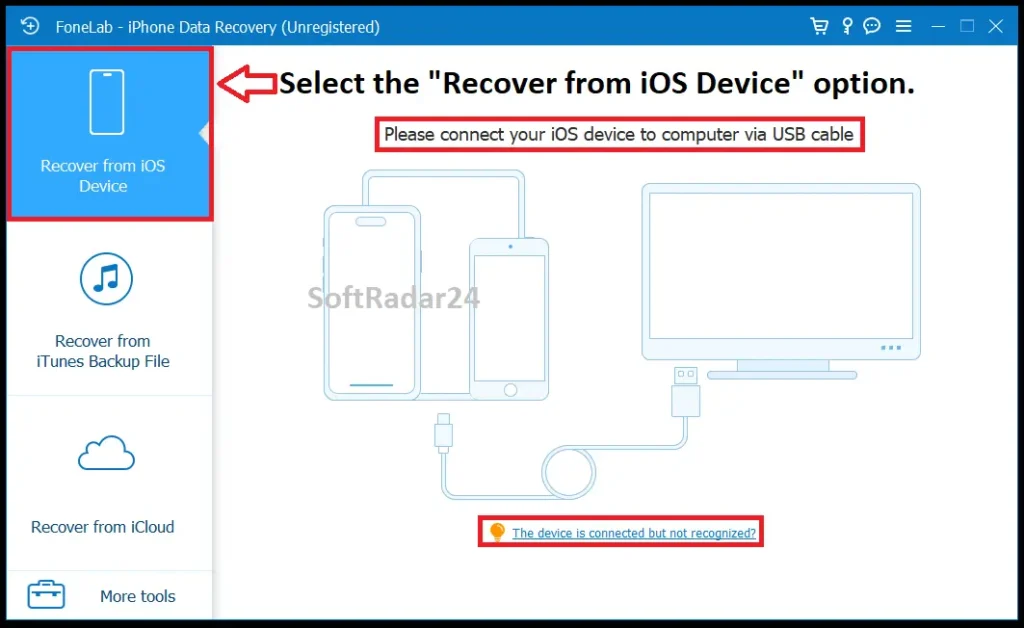
Use this when the iPhone or iPad is still accessible and can be connected to the computer. On iOS 11 or later, the device must be unlocked and you may need to tap Trust before scanning.
- Connect the iPhone, iPad or iPod touch by USB and choose Recover from iOS Device.
- Click Start Scan. You can choose specific data types first when you want to reduce scan time.
- Preview the results by category, select the items you need, and export the selected files to the computer.
Recover from a Local iTunes / Finder / Apple Devices Backup
Use a local backup when the original device is unavailable, damaged, lost or simply not the best source. Aiseesoft – FoneLab iPhone Data Recovery can inspect the backup and export selected items without restoring the whole backup to an iPhone.
- Choose Recover from iTunes Backup File and select the backup detected on the computer.
- If the backup is encrypted, enter the correct backup password before scanning.
- Preview the scanned categories, select the files you need, and recover them to the computer.
Recover from iCloud
Use the iCloud route when the needed data is available through your Apple account and you prefer selective extraction rather than a full iCloud restore to the device.
- Choose Recover from iCloud and sign in with the Apple ID used for the data.
- Complete two-factor authentication when Apple requires it, then choose the data types to scan.
- Review the results and export the selected files to a folder on the Windows PC or Mac.
Which Recovery Mode Should You Choose?
| Method / Mode | Use it when | Important condition |
|---|---|---|
| iOS Device | The device is physically available and can still be connected. | Unlock / Trust access may be required, and newer-device direct recovery supports fewer categories than old hardware. |
| Local Apple backup | You have an iTunes, Finder or Apple Devices backup on the computer. | Encrypted backups require the backup password. |
| iCloud | The device is unavailable or the needed data is in iCloud. | You need the correct Apple account access and any required two-factor verification. |
Product Interface & Workflow
The images below come from the existing SoftRadar24 Product page. The first is our stored product artwork; the second is our existing interface capture showing the three recovery modes and the USB connection screen. No vendor-hosted marketing image is used in this section.
Compatibility & Coverage
Compatibility has two layers: the desktop computer running FoneLab iPhone Data Recovery, and the iPhone/iPad/iPod data source being scanned. Device support alone does not mean every recovery mode exposes every data category.
Desktop & Apple Software Compatibility
The current technical requirements support both Windows and macOS. For macOS, current official pages publish different historical minimums; this page uses Mac OS X 10.12 or later as the safer current baseline.
| Item | Coverage / Support | Notes |
|---|---|---|
| Windows | Windows 11 / 10 / 8 / 8.1 / 7; detailed tech specs also list Vista and XP | The current main product panel highlights Windows 11, 10, 8 and 7. |
| macOS | Mac OS X 10.12 or later | Used here as the more conservative current official minimum. |
| iTunes | iTunes 10.7 or later | The latest available version is recommended in the technical specifications. |
| iOS / iPadOS | iOS 5 and later; current material includes iOS 26 / iOS 27 beta and current iPadOS generations | Exact recoverable data depends on device generation and recovery mode. |
Direct-Device Recovery Coverage
The detailed compatibility table makes a distinction that is easy to miss in marketing summaries: older Apple hardware exposes a broader direct-recovery set than modern iPhones and iPads.
| Item | Coverage / Support | Notes |
|---|---|---|
| Modern iPhones / iPads | 9 text categories + 4 media categories in the detailed direct-device table | Includes contacts, messages, call history, calendar, notes, reminders, Safari data, WhatsApp, Camera Roll, Photo Library, Voice Memos and Photo Stream. |
| Direct photos on newer devices | Documented as thumbnail recovery | Do not assume a direct scan will always reconstruct the original full-resolution photo file. |
| Very old devices | Broader 20-category direct-device table | The older-device table includes additional app/media categories such as attachments, voicemail and app media. |
| iTunes / iCloud backups | Separate recovery routes | A backup may contain data that is not available through a modern direct-device scan. |
Features & Capabilities
The most useful features are not a generic “35+ file types” count; they are the controls that help you choose the right source, verify what was found, and export only the data you actually need.
Three Recovery Sources
- Recover from a directly connected iPhone, iPad or iPod touch
- Extract selected items from a local iTunes / Finder / Apple Devices backup
- Recover selected iCloud data after Apple account verification
- Use backup modes when the original device is lost, stolen, broken or otherwise unavailable
Preview & Selective Export
- Preview supported scanned files before recovery
- Filter by file type and focus on deleted items
- Select individual items instead of restoring an entire backup to the device
- Save recovered files to the Windows PC or Mac
Data Categories & Export Formats
- Contacts, messages, call history, calendar, notes, reminders and Safari data
- Photos, voice memos and supported app / messaging data such as WhatsApp
- Contacts can be exported as CSV, HTML or VCF
- Media and document exports include common image, video, audio and office-document formats depending on the data type
Encrypted & Account-Protected Data
- Encrypted iTunes backups can be scanned after the correct backup password is supplied
- iCloud recovery supports Apple two-factor authentication workflows
- On iOS 13 or later, Call History, FaceTime and Safari History can require the product’s Encrypted Scan path when no encrypted iTunes backup exists
- Selective scanning can reduce scan time when you already know which data type you need
Important Conditions & Limitations
The biggest mistakes with iPhone recovery software happen when “supported device” is confused with “guaranteed recovery.” These conditions matter more than a headline recovery-rate claim.
Modern iPhone Direct Recovery Is More Limited Than Old-Device Recovery
The detailed technical table gives modern iPhones and iPads fewer direct-device categories than legacy devices. On newer models, direct photo recovery is specifically described as thumbnail recovery, so a scan result should be checked before purchasing.
Direct Scanning Requires a Usable Connection
For iOS 11 or later, the tutorial says the device must be unlocked and the computer trusted. A phone that cannot be connected, unlocked or trusted may force you to rely on an existing local or iCloud backup instead.
Encrypted Backups Need the Password
Aiseesoft – FoneLab iPhone Data Recovery can parse encrypted iTunes backups, but it cannot simply bypass the backup password. The correct password is required to continue scanning that backup.
Some iOS 13+ History Data Requires Encrypted Scan
If an iOS 13-or-later device has no encrypted iTunes backup, Call History, FaceTime and Safari History can require the Encrypted Scan option. Skipping that step means those categories are skipped.
Lost or Stolen Device Recovery Depends on What Was Backed Up
If you no longer possess the iPhone, direct-device recovery is impossible. Recovery then depends on a local Apple backup or iCloud data being available and accessible.
This Is Not a Forensic Hardware Repair Service
Do not interpret consumer recovery software as a tool that reconstructs a failed storage chip or repairs physical logic-board damage. If the device is not electrically accessible and no backup exists, software-only options can be exhausted quickly.
Vendor Performance Claims Are Not Our Benchmark
Current product marketing promotes higher success-rate and speed claims. SoftRadar24 has not independently benchmarked those figures against competing recovery tools, so this page does not present them as measured facts.
Free Trial / Free Version
The current product is available as a free trial rather than a full free recovery license. The useful part of the trial is that it can scan and preview lost data before you decide whether paying for export is worthwhile.
| Free access | What you can do | What requires payment |
|---|---|---|
| Free trial | Install the product, scan supported recovery sources and preview data that the software finds. | The current trial can preview lost files but requires a paid license to perform the full recovery/export operation. |
| Preview-first buying check | Use the scan result as evidence that the particular photo, message, contact or backup data you need is visible before buying. | Buy only when the paid export capability is actually useful for the files shown in your scan. |
System Requirements
The current technical specifications publish explicit Windows, macOS, CPU, RAM, Apple-software and storage requirements. The storage requirement is unusual: one computer disk should have more free space than the amount of storage currently used on the iPhone.
| Requirement | Supported / Required | Notes |
|---|---|---|
| Windows | Windows 11 / 10 / 8 / 8.1 / 7; detailed specs also list Vista / XP | The current product panel emphasizes Windows 11, 10, 8 and 7. |
| macOS | Mac OS X 10.12 or later | Used as the conservative current official minimum because current official pages provide different historical Mac minimums. |
| CPU | Windows: 1 GHz Intel / AMD CPU or above | A separate current Apple-silicon minimum is not specified in the referenced technical table. |
| Memory | 1 GB RAM or more | Current published RAM requirement. |
| iTunes | iTunes 10.7 or later | The latest version is recommended. |
| Computer storage | Free space on one computer disk should exceed the storage currently used on the iPhone | Current technical requirement for having enough room for recovered data. |
| iOS / iPadOS | iOS 5 or later; current material includes iOS 26 / iOS 27 beta and current iPadOS versions | Data-category coverage still depends on device generation and recovery mode. |
Alternatives & Better-Fit Options
The better alternative depends on whether you still need iPhone recovery, proactive backup, or computer-drive recovery. For current Aiseesoft offers and coupon-code coverage across the wider product family, visit the Aiseesoft deals and coupon codes page on SoftRadar24.
AnyMP4 iPhone Data Recovery
A direct cross-brand alternative when you still need the same basic job — selective recovery from an iOS device, local Apple backup or iCloud — but want to compare a different recovery tool and license structure.
FoneLab iOS Data Backup & Restore
A better same-family fit when your priority is preventing the next loss event by creating iOS backups and restoring selected data later, rather than trying to recover something that is already missing.
Aiseesoft Data Recovery
A better fit when the deleted files are on a Windows or Mac computer drive, USB device, memory card or other computer storage rather than inside an iPhone/iPad recovery workflow.
FAQ
These questions focus on the recovery conditions, trial behavior and purchase details that are most likely to change the decision to use FoneLab iPhone Data Recovery.
Can FoneLab iPhone Data Recovery recover deleted photos without a backup?
It can scan a supported, accessible iPhone directly without requiring an iTunes or iCloud backup. However, recovery is not guaranteed. The current detailed compatibility table says that on newer iPhones, direct photo recovery can be limited to thumbnails, so run the trial and inspect the scan result before buying.
Can FoneLab recover data if my iPhone is lost, stolen or completely inaccessible?
Not by direct-device scanning, because the physical device is unavailable. In that situation, use a local iTunes/Finder/Apple Devices backup or iCloud if an accessible backup or cloud data source exists.
Can FoneLab read an encrypted iTunes backup?
Yes, but the backup password is required. The tutorial says encrypted iTunes backups must be unlocked with the correct password before the scan can continue.
Does FoneLab support iCloud two-factor authentication?
Yes. The iCloud workflow supports Apple account verification. When two-factor authentication is enabled, you must complete the verification-code step before FoneLab can continue with the iCloud scan.
Can I preview recoverable iPhone files before paying?
Yes. Current official material describes a trial-and-preview workflow. You can scan and preview lost files first; the paid license is required for the full recovery/export operation.
Why does FoneLab recover fewer data types directly from newer iPhones than from very old devices?
The vendor’s detailed compatibility table documents different direct-device data sets by device generation. Modern iPhones are listed with 9 text categories and 4 media categories, while very old devices have a broader direct-recovery table. Backup-based recovery is a separate path and can provide access to additional stored data.
Does FoneLab iPhone Data Recovery repair iOS system problems?
No. This Product page covers data recovery and selective extraction. Repairing boot loops, recovery-mode problems or other iOS system faults is a different software task.
What are the Windows and macOS requirements for FoneLab iPhone Data Recovery?
Current technical specifications list Windows 11, 10, 8, 8.1 and 7, with Vista and XP also present in the detailed Windows table. For macOS, this page uses Mac OS X 10.12 or later as the conservative current official minimum. The published Windows CPU minimum is 1 GHz Intel/AMD and the RAM minimum is 1 GB.
Is there a FoneLab iPhone Data Recovery coupon code?
Yes. The Purchase Options on this page use SoftRadar24 checkout links with the current discount code already embedded. The page currently presents a 50% OFF coupon-code offer, so you do not need to type the coupon manually.
Do I need to enter the FoneLab coupon code manually at checkout?
No. Use the Buy Now button for the Windows or macOS license you selected. The coupon code is already included in the checkout link; the Purchase section also shows “Coupon code automatically applied” under the current price.





