

Quick Summary
Driver Easy Pro is a Windows driver updater and PC driver tool designed to find missing, outdated or mismatched device drivers and automate the Windows driver update process. It scans the PC, matches hardware against Driver Easy’s driver database, and can download and install selected updates or all detected updates with one click. The current product also includes driver backup and rollback, restore-point protection, offline network-driver recovery, driver removal, scheduled scans and hardware information.
- Primary purpose
- Automatic Windows driver detection, download and installation
- Current version
- Driver Easy Pro 7.1.5.5750 · released July 30, 2026
- Platform
- Windows 11 / 10 / 8 / 7 · x64-based devices only
- Current driver database
- 30,000,000+ drivers according to Driver Easy’s current Tour and FAQ
Purchase Options
License & Purchase
Choose how many Windows PCs you need to cover. These are annual DriverEasy Pro subscription options carried over from the current SoftRadar24 Product page.
Driver Easy Pro — 1 PC / 1 Year
1 Windows PC · 1-year Home / Business subscription
Included with this license- Driver Easy Pro for 1 windows pc
- Automatic one-click driver download and installation
- Driver backup, restore and rollback tools
- 30-day money-back policy listed by Driver Easy
The current SoftRadar24 3-PC offer is also US$23.96. If you may use Driver Easy on more than one computer, compare the 3-PC option before paying.
Driver Easy states that Home / Business orders placed after September 11, 2019 have auto-renewal enabled by default. You can disable automatic renewal if you do not want the subscription to renew. Review the final checkout before paying.
Can This Software Do What I Need?
DriverEasy Pro is most useful when the problem is genuinely driver-related and you want to avoid hunting through Device Manager or multiple hardware-manufacturer websites. The situations below separate the jobs it handles directly from cases where Windows or another route is the better fit.
I want Windows driver updates without finding every driver manually
Automatic driver updating
Yes — Pro / trialRun a scan, review the missing, outdated or mismatched drivers, then use Update All or update selected drivers. Driver Easy Pro handles the download and installation automatically.
Windows Update says my PC is current, but I still want manufacturer driver updates
Optional / manufacturer updates
YesDriver Easy Pro says it sources genuine drivers from hardware manufacturers and can surface driver updates that Microsoft treats as optional rather than delivering through Windows Update.
I reinstalled Windows and the PC has no Ethernet or Wi-Fi driver
Offline network recovery
Yes — with another PCOffline Scan identifies the network hardware on the disconnected PC. You then use another Internet-connected computer to download the matching network driver and transfer it back.
I want to update graphics, audio, chipset, Wi-Fi, Bluetooth, printer or USB drivers
Common hardware categories
YesDriver Easy explicitly covers these hardware categories and lets you update individual detected drivers instead of installing everything at once.
I want a safety path before changing drivers
Backup / rollback
YesThe product includes driver backup and restore, rollback to a previous driver version, and automatic Windows restore-point creation.
I want to remove drivers for hardware I no longer use
Unplugged devices
YesDriver Easy includes driver uninstall tools for removed devices so old drivers do not have to remain installed indefinitely.
I have an ARM-based Windows PC such as Surface Pro X
Processor architecture
NoDriver Easy’s current FAQ says the product works only on x64-based devices and does not support driver updates on ARM-based computers.
I use Windows in S mode
Windows environment
NoThe current DriverEasy FAQ specifically lists Windows in S mode as unsupported.
Another driver updater finds more updates than Driver Easy
Driver matching logic
Not automatically a problemDriver-Easy says it prefers hardware-specific drivers over newer generic drivers. A larger update count from another tool does not necessarily mean its matches are more appropriate for the exact PC.
How It Works
The core Windows driver update workflow is Scan → review the matches → install selected updates or use Update All. DriverEasy also provides a separate offline workflow when the target PC cannot get online.
Scan and Update Windows Drivers
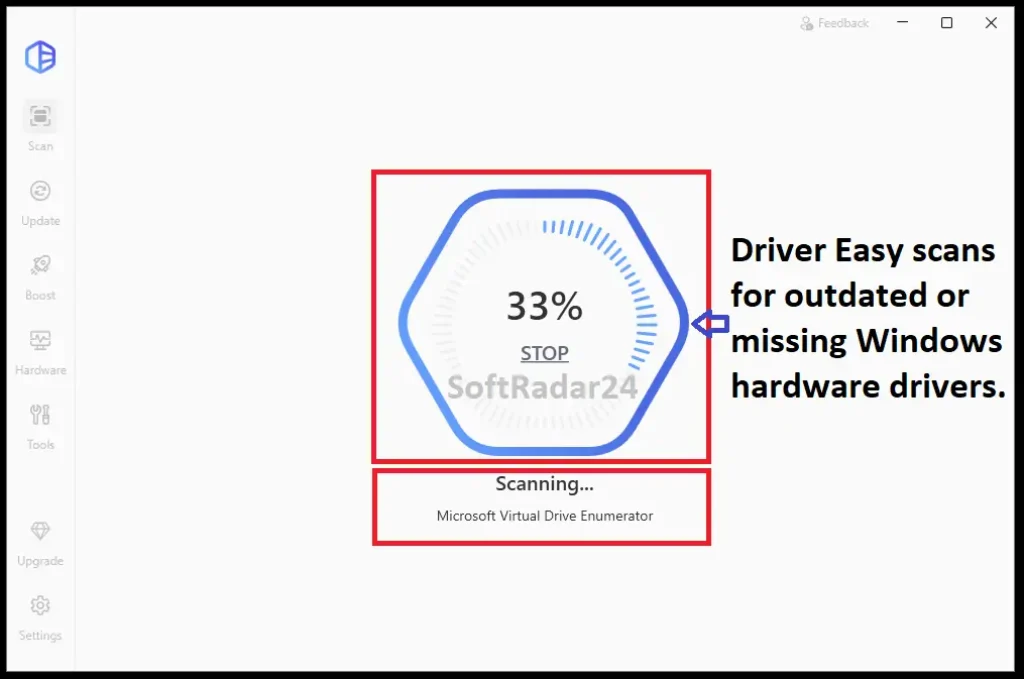
Driver Easy Pro scans the PC for hardware with missing, outdated or mismatched drivers. Pro and the current full-feature trial can then download and install detected updates automatically.
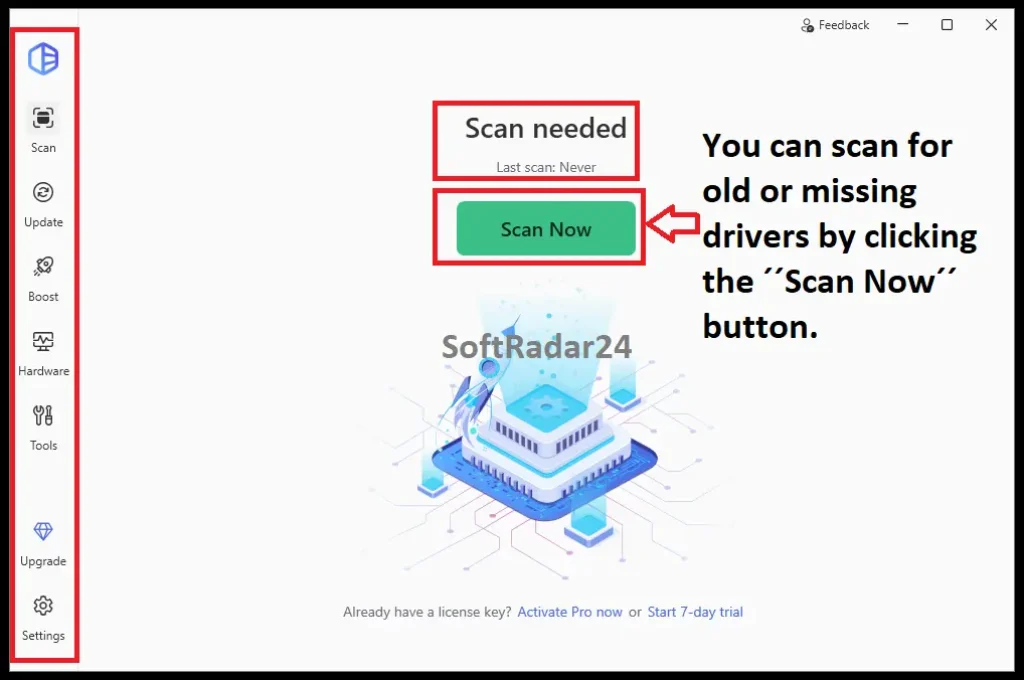
- Open Driver Easy and click Scan Now.
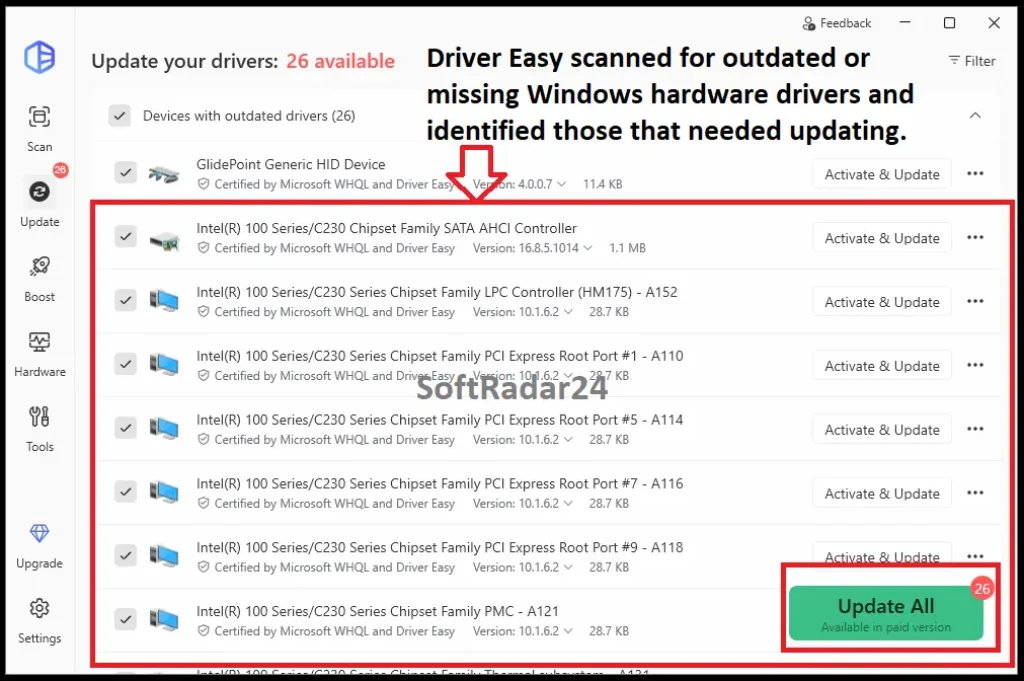
- Review the devices and driver versions DriverEasy flags for attention.
- Update selected drivers individually or use Update All to download and install the detected updates automatically.
| Method / Mode | Use it when | Important condition |
|---|---|---|
| Driver Easy Pro / Trial | You want the driver tool to download and install updates automatically. | The current product uses a paid subscription model after the 7-day Pro trial. |
| Manufacturer website | You know the exact hardware model and prefer to obtain the driver yourself. | Free, but you must identify, download and install the correct package manually. |
| Windows Device Manager | You want to use Windows’ built-in driver-management path. | Updates are handled one device at a time, and DriverEasy notes that Device Manager may not surface every current manufacturer driver. |
Recover a Missing Network Driver Offline
Offline Scan is designed for the fresh-Windows problem where the target PC cannot get online because its Ethernet or Wi-Fi driver is missing.
- Run the offline scan on the disconnected Windows PC and save its hardware information.
- Move that scan information to another computer that has Internet access.
- Download the matching network driver on the connected computer, transfer it back, and install it on the offline PC.
Back Up, Roll Back or Remove Drivers
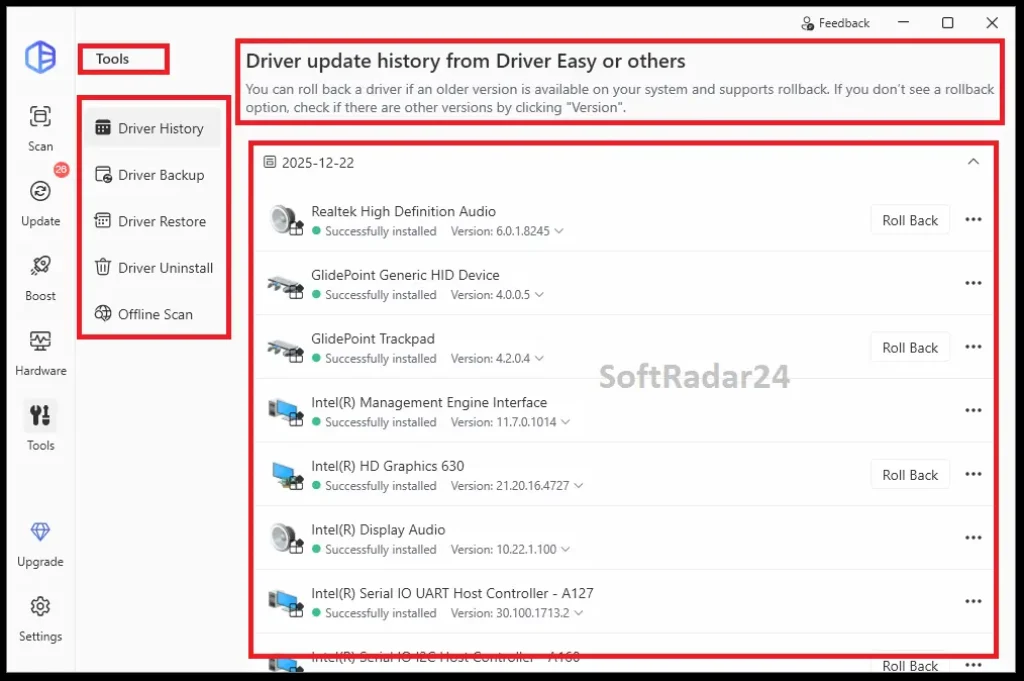
Driver Easy is not limited to installing newer packages. Its Tools area records driver-update history and provides backup, restore, rollback, uninstall and offline-scan functions so driver changes can be reviewed and reversed when needed.
- Back up important drivers or allow DriverEasy to create a Windows restore point before changes.
- If a newer driver causes a problem, use the available rollback or restore path to return to an earlier version.
- Use Driver Uninstall for drivers that belong to hardware you have removed and no longer use.
Product Interface & Workflow
These are the existing SoftRadar24 DriverEasy captures from the current Product page. They show the scan, detected-update and Tools workflows we are describing rather than replacing them with vendor marketing screenshots.
Compatibility & Coverage
Driver Easy’s current consumer support is narrower than a simple ‘Windows’ label suggests. The current Tour lists Windows 11, 10, 8 and 7, while the current FAQ adds the important architecture restriction that Driver Easy works only on x64-based devices.
Windows Compatibility
The current product pages list Windows 11, 10, 8 and 7. Driver Easy’s FAQ further states that the current product is for x64-based devices only.
| Item | Coverage / Support | Notes |
|---|---|---|
| Windows 11 | Supported on x64-based devices | ARM-based Windows devices are not supported by Driver Easy. |
| Windows 10 | Supported on x64-based devices | Windows in S mode is specifically listed as unsupported. |
| Windows 8 / 7 | Supported on x64-based devices | Current Tour still lists both versions in the supported Windows family. |
| ARM / Windows S mode / Android | Not supported | These environments are explicitly excluded in Driver Easy’s current FAQ. |
Driver & Device Coverage
Driver Easy targets common Windows hardware categories and also provides a route for network recovery when the target computer is offline.
| Item | Coverage / Support | Notes |
|---|---|---|
| Graphics / audio / chipset | Supported | These are core driver categories listed by Driver Easy. |
| Ethernet / Wi-Fi / Bluetooth | Supported | Offline Scan can help obtain a missing network driver by using a second Internet-connected PC. |
| Printers / USB / PCI / scanners and other peripherals | Supported categories | The homepage lists these among the device families Driver Easy scans. |
Features & Capabilities
Driver Easy’s useful feature set is best understood as four jobs: finding the right driver, automating installation, protecting the system when drivers change, and managing drivers when the PC is offline or a previous version needs to be restored.
Driver Detection & Matching
- Scans for missing, outdated and mismatched device drivers
- Current Tour and FAQ describe a database of more than 30 million drivers
- Sources genuine driver packages from hardware manufacturers
- Uses hardware matching logic that can prefer a device-specific driver over a newer generic driver
Automatic Windows Driver Updates
- Update All can download and install the detected driver updates automatically
- Individual detected drivers can also be updated separately
- Can surface manufacturer driver updates that Microsoft may treat as optional
- Scheduled scans can periodically check the PC for driver changes
Safety & Recovery
- Driver backup and restore
- Roll back to a previously installed driver version
- Automatic Windows restore-point creation
- Driver Update History and driver uninstall for removed devices
Offline & Additional Tools
- Offline Scan for obtaining a missing network driver through another Internet-connected PC
- Hardware information for CPU, motherboard, graphics, network and other components
- Current 7.x releases also include Game Boost and System Clean as secondary tools
- Technical support is included with the Pro/trial feature set described by Driver Easy
Important Conditions & Limitations
Driver updating is a system-level maintenance task, so the most useful limitations are about hardware compatibility, matching logic, offline behavior and subscription terms—not just whether the Scan button finds an update.
x64 Windows Only
Driver Easy’s current FAQ says the software works only on x64-based devices. ARM-based Windows PCs, Windows in S mode and Android are explicitly unsupported.
More Driver Updates Does Not Automatically Mean Better Matching
Driver Easy explains that it gives preference to hardware-specific drivers identified by the longer hardware ID. It may keep an older specific OEM driver instead of replacing it with a newer generic package simply because the generic version number is higher.
Offline Scan Still Needs an Internet-Connected Computer
Offline Scan helps when the target PC lacks its network driver, but the download step happens on another PC that can access the Internet. It is not a completely offline database of every driver stored on the disconnected machine.
WHQL Policy Depends on the Windows Generation
Driver Easy says Windows 10 and 11 receive Certified for Windows / WHQL drivers. For Windows 7 and 8, WHQL drivers are used by default when available, with an option for non-WHQL drivers on older systems.
A Driver Update Is Not a Guaranteed Hardware Repair
Outdated or mismatched drivers can cause device and Windows problems, but a driver updater cannot repair defective physical hardware. If the problem remains after a suitable driver change, the device or another software layer may be the real cause.
Home / Business Licenses Are Annual Subscriptions
Driver Easy says Home / Business orders placed after September 11, 2019 have auto-renewal enabled by default. Auto-renewal can be disabled; once an unrenewed license expires, Driver Easy says renewal is required to continue using Pro.
Free Trial / Free Version
Driver Easy no longer has a continuing current Free edition. Since version 6.0.0 / May 2024, the current entry point is a 7-day trial of Driver Easy Pro. You can scan the computer before activating the trial, but updating through the current product requires the Pro trial or a paid subscription.
| Free access | What you can do | What requires payment |
|---|---|---|
| Free scan before activation | Scan the Windows PC and see devices that Driver Easy identifies as missing or outdated. | To use the current automatic driver-update workflow, start the 7-day Pro trial or purchase Driver Easy Pro. |
| 7-day Driver Easy Pro trial | Full access to the current Pro feature set for seven days; the current trial is offered with no upfront charge. | The current 1-PC trial converts to US$39.95/year unless you cancel before the trial ends. |
System Requirements
Driver Easy’s current official material clearly documents Windows and architecture support, but the reviewed current pages do not publish a modern minimum CPU, RAM or free-storage requirement. Those hardware numbers are therefore not copied from the older SoftRadar24 article.
| Requirement | Supported / Required | Notes |
|---|---|---|
| Operating system | Windows 11, 10, 8 and 7 | Current Driver Easy Tour support list. |
| Architecture | x64-based devices only | The current FAQ explicitly says Driver Easy does not support ARM-based computers. |
| Unsupported environments | ARM-based Windows PCs, Windows S mode and Android | Explicitly listed as unsupported in the current Driver Easy FAQ. |
| Internet access | Required for normal driver downloads | Offline Scan can identify a missing network driver on a disconnected PC, but another Internet-connected PC is used for the download. |
| CPU / RAM / free storage | Not specified in the current official pages reviewed | The older SoftRadar24 hardware minimums were not carried forward without a current official source. |
Alternatives & Better-Fit Options
Driver Easy is one approach to Windows driver management. If you want to compare a different driver-updating workflow before buying, use the alternatives below. For vendor-specific offers and future Driver Easy products, visit the Driver Easy page on SoftRadar24.
IObit Driver Booster PRO
A direct cross-brand alternative when you want to compare another automated Windows driver updater and its own driver-management workflow.
DriverMax PRO
Another dedicated Windows driver updater worth comparing when you want different licensing choices and a second opinion on driver matching and update workflow.
FAQ
These answers cover the practical questions that most directly affect whether Driver Easy Pro is the right Windows driver updater for your PC.
Is Driver Easy still free?
No. Driver Easy says the continuing Free edition ended in May 2024 with version 6.0.0. The current product offers a 7-day Driver Easy Pro trial instead. You can scan the PC before activating the trial, but continued driver updating requires the trial or a paid subscription.
Does Driver Easy Pro update all drivers automatically?
Yes. After a scan, Driver Easy Pro can use Update All to download and install the detected driver updates automatically. You can also update selected drivers individually.
Does Driver Easy work on ARM-based Windows PCs?
No. Driver Easy’s current FAQ says the product works only on x64-based devices and does not support driver updates on ARM-based computers such as Surface Pro X. Windows in S mode and Android are also listed as unsupported.
Can Driver Easy update a network driver when the PC has no Internet connection?
Yes, with an important condition. Offline Scan can identify the network hardware on the disconnected PC, but you need another Internet-connected computer to download the matching network driver before transferring it back.
Are all Driver Easy drivers WHQL certified?
For Windows 10 and 11, Driver Easy says it installs only drivers that are Certified for Windows through Microsoft’s WHQL program. For Windows 7 and 8, it uses WHQL drivers by default when available and can allow non-WHQL drivers on older systems. Driver Easy also says it applies its own driver-testing process.
Where does Driver Easy get its drivers?
Driver Easy says it uses genuine drivers sourced from hardware manufacturers and tests them before adding them to its live database. Its current Tour and FAQ describe a database of more than 30 million drivers.
Why can another driver updater find more updates than Driver Easy?
A larger update count does not automatically mean Driver Easy missed the correct driver. Driver Easy says its matching logic prefers a hardware-specific driver over a newer generic driver, so it may deliberately keep an older specific OEM package when the newer generic package is less specific to that PC.
Can I roll back a driver after updating it with Driver Easy?
Yes. Driver Easy includes driver backup and restore, rollback to a previous driver version, driver-update history and automatic Windows restore-point functionality.
Does a Driver Easy Pro subscription renew automatically?
Driver Easy says Home / Business license orders placed after September 11, 2019 have auto-renewal enabled by default. 2Checkout sends reminder emails before expiration, and automatic renewal can be disabled if you do not want the subscription to renew.
What happens if I do not renew Driver Easy Pro?
Driver Easy says that after an unrenewed license expires, the program will prompt you to renew before you can continue using Driver Easy Pro.





