
Quick Summary
WinX DVD Ripper Platinum is Windows DVD-ripping and DVD-backup software for converting physical DVD discs, DVD folders and ISO images to MP4, H.264, HEVC, MOV, MPEG, WMV, audio and device-ready profiles. Its strongest use cases are protected or unusual DVD structures, 99-title discs, old or scratched media, GPU-accelerated conversion, 1:1 DVD backup and digitizing a disc library for storage on a PC, NAS, USB drive, TV or mobile device.
- Primary purpose
- DVD / ISO / folder to digital video, audio or lossless backup
- Protected-disc coverage
- CSS, RCE, UOP, Sony ARccOS, Disney X-project, APS and region-coded structures
- Acceleration
- Level-3 pipeline using supported Intel, NVIDIA and AMD hardware
- Current vendor reach
- 86 million users worldwide according to WinX
Purchase Options
License & Purchase · WinX DVD Ripper Platinum · Current SoftRadar24 Discounts
Choose the license by device count and term. This is the Windows edition; if you use macOS, compare the separate MacX DVD Ripper Pro option in Alternatives rather than buying a Windows license by mistake.
Lifetime / 1 PC + Free Gift
1 Windows PC · Lifetime WinX DVD Ripper Platinum campaign license
Included with this option- WinX DVD Ripper Platinum for 1 Windows PC
- Lifetime-use campaign option with ongoing product updates
- Protected DVD, 99-title, ISO/folder, 1:1 backup and GPU-accelerated workflows
- Existing SoftRadar24 offer includes a promotional gift; verify the current gift at checkout
US$29.95one-time
Discount automatically applied
Buy NowLifetime / 1 PC + Free Gift
Best fit when you want a single-PC lifetime license and the current promotional gift is useful to you.
WinX’s current public store now emphasizes a different plan grid: a 1-year / 3-PC plan at US$34.95 for the first year, a 1-PC Lifetime plan at US$59.95, and a 4-in-1 Lifetime bundle at US$79.95. The existing SoftRadar24 campaign contains different promotional SKUs and prices. Review the final product name, PC count, gift or bundle contents, renewal terms and total price at checkout before paying.
Can This Software Do What I Need?
The most important question is what kind of DVD job you actually have: ordinary conversion, a protected 99-title structure, a scratched disc, a lossless archive, a smaller HEVC file, or a Mac workflow. The rows below separate those cases so the product is not treated as a generic ‘one-click DVD fixer.’
I want to convert a DVD movie to MP4 for a PC, TV, NAS or phone
DVD to digital video
YesLoad a physical DVD, ISO image or DVD folder, choose an MP4/H.264, HEVC or device profile, and run the conversion. The current technical page lists hundreds of output profiles and common video/audio formats.
My DVD shows dozens of fake titles or the wrong main movie
99-title / complex structure
Yes — vendor-documentedWinX’s Unique Title Check is designed to identify the main movie in 99-title structures. Current vendor pages also list CSS, RCE, UOP, Sony ARccOS, Disney X-project and APS among supported protection structures.
I need to rip a region-coded DVD that I lawfully own
Region handling
Yes — check local lawWinX documents adaptive region handling for region-coded DVDs. Copyright and circumvention rules vary by country, and the vendor explicitly says not to use the software for rental DVDs or commercial backup.
My old DVD has scratches, read errors or the conversion stops unexpectedly
Damaged / difficult disc
ConditionalSafe Mode is specifically documented for conversion problems such as unexpected stops or incorrect sequence. The product is also marketed for old and damaged DVDs, but software cannot physically repair a cracked, deeply scratched or unreadable disc.
I want a 1:1 archive instead of a smaller converted file
Lossless DVD backup
YesPlatinum can copy to ISO or DVD folder and can back up the full or main title to MPEG while keeping original video, audio and subtitle tracks in the lossless backup workflow.
I want the smallest practical file for a large DVD library
HEVC / H.265 compression
YesHEVC output is supported and can reduce storage compared with MPEG-2 or H.264 at similar perceived quality. The exact size and quality depend on bitrate, resolution, content complexity and output settings.
I want every two-hour DVD to finish in five minutes
Performance expectation
Not guaranteedWinX publishes roughly five-minute and up-to-47× figures on supported hardware, but its own hardware-acceleration article warns that results vary by PC, GPU/CPU, disc and output settings. A documented 132-minute test took 8:45 with NVENC on that test system.
I want to crop, trim, merge chapters or add an external subtitle before export
Light editing
YesThe current guide supports trimming, cropping/expanding, merging, volume adjustment, choosing DVD subtitles and adding external SRT subtitles before ripping.
I use macOS and want the same kind of DVD-ripping workflow
Operating system
Use the Mac productThis SoftRadar24 Product page is for the Windows WinX edition. Mac users should compare MacX DVD Ripper Pro rather than buying a Windows license.
I need Blu-ray ripping rather than DVD ripping
Disc type
Different productWinX DVD Ripper Platinum is a DVD-focused product. Do not buy it for Blu-ray ripping; choose a Blu-ray-specific tool instead.
How It Works
The core workflow is deliberately simple—load the DVD source, choose the output, then run—but the useful settings differ depending on whether you are transcoding for a device, making a lossless archive or troubleshooting a difficult disc.
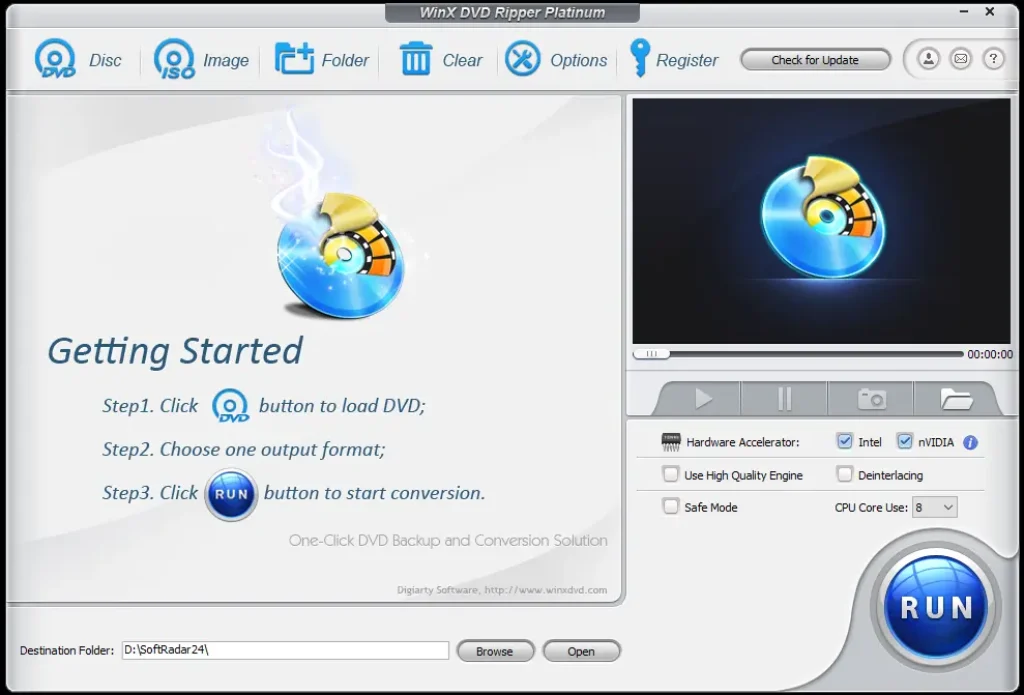
Load a Disc, ISO Image or DVD Folder
The current WinX guide supports three source paths: DVD Disc for an optical disc, ISO Image for a local disc image, and Folder for a local DVD folder. A physical DVD therefore needs a readable DVD drive; ISO and folder workflows do not.
- Insert the DVD or choose the stored ISO / DVD folder.
- Let WinX analyze the disc structure and select the detected main title or other titles you want.
- If the disc is difficult to read, review Auto Detect / UDF / ISO loading options and Safe Mode rather than immediately assuming the source is unusable.
Choose Between Conversion and Lossless Backup
Conversion and backup solve different jobs. MP4/H.264 or HEVC is useful for compatibility and smaller storage; ISO, DVD folder and MPEG backup modes are better when preserving the original disc structure or stream matters more than compression.
| Mode | Use it when | Main trade-off |
|---|---|---|
| MP4 / H.264 | You want broad playback compatibility on TVs, PCs, phones and media servers. | Requires transcoding when the source is changed to H.264. |
| HEVC / H.265 | You want smaller files at a modern codec efficiency level. | Encoding can take more processing and older devices may have weaker HEVC support. |
| ISO / DVD folder | You want a disc-style archive with original structure preserved. | Uses much more storage than a compressed MP4. |
| Main / full title MPEG backup | You want lossless MPEG-2 extraction without re-encoding. | Large files; less convenient for mobile storage than compressed formats. |
Use Hardware Acceleration When the Workflow Supports It
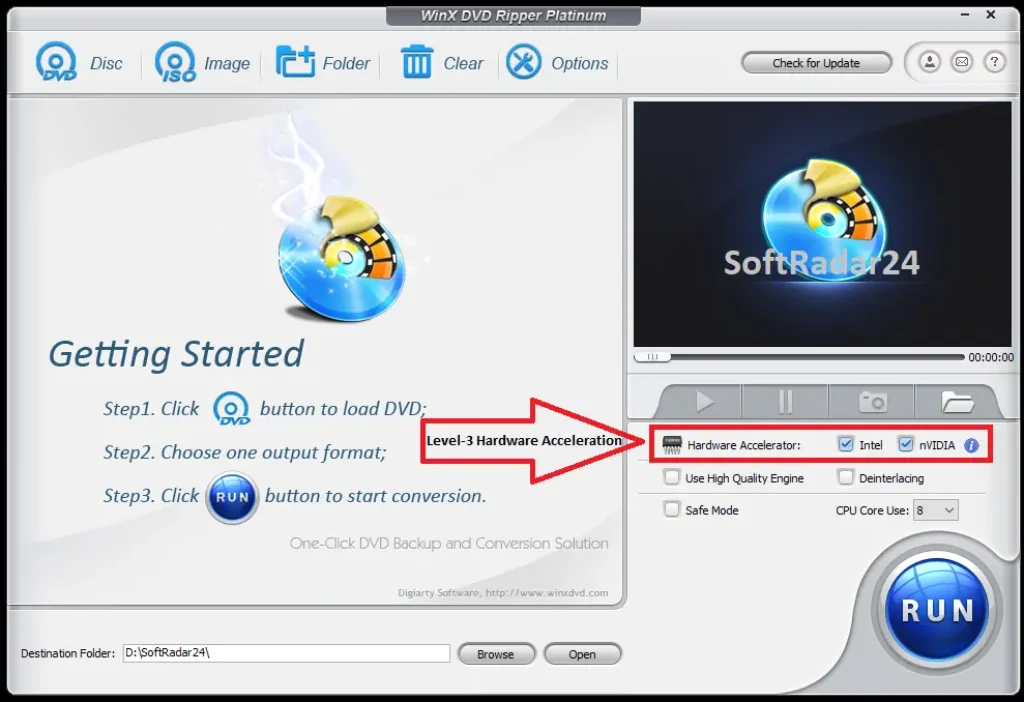
WinX describes its Level-3 pipeline as hardware decode → GPU processing → hardware encode. Intel Quick Sync, NVIDIA NVENC/CUDA and AMD acceleration are documented, but the benefit depends on the actual GPU, driver support, output codec and disc workload.
- Check whether WinX detects a supported hardware encoder on the PC.
- Choose the output format and enable the relevant Hardware Accelerator option.
- Compare the resulting speed and output on your own hardware instead of treating the vendor’s peak benchmark as a universal guarantee.
Product Interface & Workflow
The visuals below are reused from the existing SoftRadar24 WinX DVD Ripper Platinum article. They show our own stored product artwork and interface captures; no vendor-hosted image and no video embed is included.
Compatibility & Coverage
This SoftRadar24 page is for the Windows edition. WinX’s current technical specification page lists Windows 11 through Windows 2000, while macOS is handled through a separate Mac product. Input support includes DVD discs, DVD folders and ISO images; output coverage spans common video/audio formats and hundreds of device profiles.
Windows & Source Compatibility
| Item | Coverage / Support | Notes |
|---|---|---|
| Windows 11 | Supported | Current tech specs explicitly list Windows 11 and identify 32/64-bit support. |
| Windows 10 / 8.1 / 8 / 7 | Supported | Current tech-spec list. |
| Windows Vista / XP / 2003 / 2000 | Still listed | Legacy systems remain on the current technical page; practical GPU acceleration depends on compatible drivers and hardware. |
| macOS | Separate Mac product | Use MacX DVD Ripper Pro instead of assuming the Windows WinX license covers macOS. |
| Physical DVD disc | Supported | Requires a readable DVD drive in or connected to the PC. |
| DVD folder / ISO image | Supported | Can be loaded from storage without inserting the original disc. |
Protected DVDs, Output & Device Profiles
| Item | Coverage / Support | Notes |
|---|---|---|
| Protected structures | CSS, RCE, UOP, Sony ARccOS, Disney X-project, APS and region-coded DVD structures | Vendor-documented compatibility; laws governing circumvention and backup vary by jurisdiction. |
| General video output | MP4/H.264, MOV, MPEG, WMV, AVI, MTS/M2TS, TS, M4V and other listed profiles | Current tech page describes 320+ video/audio codecs and the product page advertises 350+ profiles. |
| HEVC / H.265 | Supported in Platinum | Useful for reducing storage at modern codec efficiency, subject to device compatibility. |
| Audio extraction | MP3, AAC, AC3 and other supported output paths | Useful for concert DVDs or extracting a preferred audio track. |
| Targets | PC, TV, NAS, USB/hard drive, phones, tablets, game consoles and more | Profiles are convenience presets; any specific device still needs to support the selected codec/container. |
Features & Capabilities
WinX’s useful feature set falls into four jobs: correctly reading difficult DVDs, converting or backing them up, accelerating compatible workloads, and making small edits before export.
Protected & Difficult DVD Handling
- Unique Title Check for complex 99-title structures
- Vendor-documented handling for CSS, RCE, UOP, Sony ARccOS, Disney X-project, APS and region-coded DVDs
- Safe Mode for conversion problems such as unexpected stops or incorrect sequence
- Support for new, old, non-standard and damaged DVD structures where the disc remains physically readable
Conversion & Lossless Backup
- DVD disc, ISO image and DVD-folder input
- MP4/H.264, HEVC/H.265, MOV, MPEG, WMV and other digital-output profiles
- Copy DVD to ISO or folder and back up full/main title to MPEG
- Extract audio and target hundreds of device/storage/playback profiles
Level-3 Hardware Acceleration
- Hardware decode, GPU processing and hardware encode pipeline
- Intel Quick Sync support on compatible systems
- NVIDIA CUDA/NVENC support on compatible GPUs
- AMD acceleration support on compatible graphics hardware
Editing & Playback Preparation
- Trim unwanted scenes or split the desired section
- Crop or expand the image and merge chapters
- Choose original subtitles, add external SRT subtitles and adjust subtitle position
- Adjust codec, bitrate, frame rate, aspect ratio, resolution, sample rate and audio volume
Important Conditions & Limitations
The product’s strongest claims—protected-disc support and very high GPU-assisted speed—need context. The most useful limitations are about benchmark scope, physical-disc condition, legal rights, trial restrictions and the difference between DVD ripping and separate AI or Blu-ray workflows.
The Five-Minute / 47× Speed Claim Is Not a Guarantee
WinX publishes peak figures for compatible Level-3 hardware, but its own detailed hardware-acceleration article says results vary substantially by PC, GPU/CPU, disc and settings. In one documented 132-minute test, NVENC finished in 8:45 versus 16:29 for CPU-only processing.
WinX’s Own Benchmark Does Not Say It Wins Every Workload
The current vendor benchmark reports WinX as the fastest protected lossless DVD-backup performer at 389.45 FPS and the strongest cross-workflow performer, while Wondershare UniConverter led the tested MP4 transcoding workload at 252.01 FPS. That is a more useful interpretation than calling any ripper universally fastest.
Safe Mode Cannot Repair Physical Damage
Safe Mode can help when ripping stops, sequence is wrong or the disc structure is difficult. It cannot recreate sectors that are physically unreadable, repair a cracked disc or guarantee recovery from severe scratches or disc rot.
Lossless Backup Uses Much More Storage
ISO, DVD folder and MPEG-2 backup workflows preserve far more of the original disc structure or stream than a compressed MP4, but they also consume significantly more storage.
HEVC Compression Trades Processing and Compatibility for Smaller Files
HEVC can reduce file size efficiently, but the exact result depends on bitrate, resolution and content. Older playback devices may also have weaker HEVC hardware support than H.264.
The Windows and Mac Products Are Separate
The current technical site links users to a separate Mac version. This SoftRadar24 page and its Purchase options are for WinX DVD Ripper Platinum on Windows; Mac users should use the dedicated Mac product.
DVD Ripping Laws Differ by Country
The vendor itself says not to use the software for rental DVDs or commercial backup. Ownership of a disc does not automatically make every decryption or circumvention workflow legal everywhere, so check the law that applies where you live.
AI Upscaling Is a Separate Product Workflow
The current WinX page promotes AI upscaling through Winxvideo AI. Do not read that marketing block as proof that WinX DVD Ripper Platinum itself is an AI 4K-upscaling application.
It Is a DVD Ripper, Not a Blu-ray Ripper
The supported optical-disc workflow is DVD-focused. If your source is Blu-ray, choose software that explicitly supports Blu-ray ripping rather than expecting this product to handle a different disc format.
Free Trial / Free Version
WinX DVD Ripper Platinum has a free trial rather than an unrestricted free Platinum edition. The current official user guide gives the practical limits clearly: the trial converts only the first five minutes for evaluation, does not receive free updates to the latest full version, and keeps advanced functions unavailable until registration.
| Free access | What you can do | What requires payment |
|---|---|---|
| Free trial | Load a DVD, ISO or folder, test source recognition, choose output profiles and convert up to 5 minutes for evaluation. | The full license removes the 5-minute conversion limit and unlocks the advanced Platinum feature set. |
| Registered full version | Full-length ripping, advanced functions and the update benefits attached to the purchased license plan. | Requires a paid WinX DVD Ripper Platinum license. |
System Requirements
The current WinX technical-specification page publishes a broad Windows compatibility list but does not publish a modern minimum CPU, RAM or free-storage requirement on that page. The hardware-acceleration documentation instead shows example test systems and explains that acceleration availability depends on the CPU/GPU media engine.
| Requirement | Supported / Required | Notes |
|---|---|---|
| Operating system | Windows 11, 10, 8/8.1, 7, Vista, XP, Windows 2003 and Windows 2000 are listed | Current official tech-spec page. Windows 11 is explicitly shown with 32/64-bit support. |
| Physical-disc hardware | Readable DVD drive required for DVD discs | ISO images and DVD folders can be loaded from storage without the original disc in the drive. |
| GPU acceleration | Optional; compatible Intel, NVIDIA or AMD hardware can accelerate supported workflows | Actual support depends on the hardware generation, driver and selected output path. |
| CPU / RAM minimum | Not specified on the current official tech-spec page reviewed | Do not confuse vendor benchmark machines with minimum system requirements. |
| Free disk space | Not specified as a current application minimum on the reviewed tech-spec page | Ripped output can require many gigabytes depending on whether you choose compressed video or lossless backup. |
| Internet | Needed for purchase/registration and current update/support workflows | Protected-disc processing itself is performed by the installed desktop application. |
Alternatives & Better-Fit Options
WinX DVD Ripper Platinum is a Windows-first choice for protected DVD ripping and fast DVD-to-digital workflows. If your platform or priority is different, use the alternatives below. For WinX-specific offers and related software, visit the WinX DVD page on SoftRadar24.
MacX DVD Ripper Pro
The most direct better-fit option for macOS users who want a comparable DVD-ripping workflow instead of buying the Windows WinX edition.
Tipard DVD Ripper
A direct cross-brand alternative when you want another paid DVD-to-digital converter and prefer to compare format support, editing workflow and licensing before choosing WinX.
AnyMP4 DVD Ripper
Another Windows/macOS DVD-ripping option worth comparing when you want a different interface and conversion toolkit rather than choosing primarily for WinX’s protected-disc and acceleration positioning.
WonderFox DVD Ripper Pro
A direct Windows alternative when you want to compare protected-disc handling, conversion speed, output profiles and lifetime pricing against WinX.
FAQ
These answers focus on the practical questions that most often determine whether WinX DVD Ripper Platinum is the right DVD-ripping tool: protected discs, 99-title structures, damaged media, hardware acceleration, lossless backup, trial limits and Windows-versus-Mac licensing.
Can WinX DVD Ripper Platinum handle 99-title DVDs?
Yes, according to WinX’s current product documentation. Its Unique Title Check is designed to identify the correct main title when a DVD uses many deceptive titles. The vendor also documents support for structures such as CSS, RCE, UOP, Sony ARccOS, Disney X-project and APS.
Can WinX DVD Ripper Platinum rip region-coded DVDs?
WinX documents adaptive region handling for region-coded DVDs. Whether you may legally bypass a particular protection depends on the law where you live, and WinX explicitly says not to use the software for rental DVDs or commercial backup.
Will WinX DVD Ripper Platinum work with scratched or damaged DVDs?
It can help with some difficult or partially damaged discs, but it cannot physically repair a disc. Safe Mode is documented for problems such as unexpected conversion stops or incorrect sequence, and the current product page also targets old and damaged DVDs that remain readable enough to recover.
What does Safe Mode do in WinX DVD Ripper Platinum?
WinX’s current user guide describes Safe Mode as a troubleshooting option for conversion problems such as the process stopping unexpectedly or the conversion sequence being wrong. It is a recovery-oriented reading mode, not a guarantee that severely damaged media can be restored.
Can WinX DVD Ripper Platinum rip an ISO image or DVD folder?
Yes. The official guide provides three source buttons: DVD Disc, ISO Image and Folder. ISO and DVD-folder workflows can be loaded from storage without inserting the original physical DVD.
Can WinX DVD Ripper Platinum make a 1:1 DVD backup?
Yes. Current product documentation lists copying a DVD to ISO or DVD folder and backing up the full or main title to MPEG. The lossless backup workflow is intended to keep the original video, audio and subtitle tracks rather than recompressing them into a smaller modern codec.
Does WinX DVD Ripper Platinum really rip a full DVD in five minutes?
WinX publishes roughly five-minute and up-to-47-times real-time figures on supported hardware, but those are not guaranteed for every DVD. Its own hardware-acceleration article says performance varies with the PC, GPU/CPU, disc and settings; one documented 132-minute test took 8 minutes 45 seconds with NVENC on that test system.
Which GPUs can accelerate WinX DVD Ripper Platinum?
WinX documents Intel Quick Sync, NVIDIA CUDA/NVENC and AMD acceleration paths. Actual acceleration depends on the processor or GPU generation, graphics driver, output codec and whether the chosen workflow can use the available hardware engine.
What are the WinX DVD Ripper Platinum trial limits?
The current official guide says the trial converts only 5 minutes for evaluation, does not receive free updates to the latest full version and keeps advanced features unavailable until registration.
Does WinX DVD Ripper Platinum work on macOS?
This SoftRadar24 page and its Purchase options are for the Windows WinX edition. WinX links Mac users to a separate Mac product, so macOS users should compare MacX DVD Ripper Pro instead of assuming the Windows license works on a Mac.
Can I add subtitles or extract audio while ripping a DVD?
Yes. The current guide lets you select an original DVD subtitle, add an external SRT subtitle and adjust subtitle position. It also supports audio extraction and volume adjustment, with audio outputs such as MP3, AAC and AC3 documented in the technical specifications.
Is it legal to rip a DVD with WinX DVD Ripper Platinum?
DVD-ripping and protection-circumvention law varies by country and by the purpose of the copy. WinX says the software should not be used to rip rental DVDs or make commercial backups. Check the rules that apply in your jurisdiction before using protected-disc features.





