Quick Summary
Aiseesoft Video Converter Ultimate 11 is a Windows and macOS video converter, AI video enhancer and media-processing toolkit. It converts video and audio across 1,000+ formats, handles 8K/5K/4K sources, supports batch conversion, and adds separate workflows for AI upscaling, denoising, frame interpolation, SDR-to-HDR conversion, compression, vocal isolation/removal and more than 20 editing and utility tools. Its strongest fit is for users who want one desktop application for format conversion plus enhancement and lightweight editing rather than a converter that only changes file extensions.
- Current product generation
- Video Converter Ultimate 11
- Core conversion coverage
- 1,000+ video/audio formats · 8K / 5K / 4K inputs
- Platforms
- Windows and macOS · separate platform licenses in the current SoftRadar24 campaign
- AI Video Enhancer
- 11 AI models · credits required for AI Enhancer processing
Purchase Options
License & Purchase · Aiseesoft Video Converter Ultimate · Up to 50% OFF Coupon Code
If you searched for an Aiseesoft Video Converter Ultimate discount code, the SoftRadar24 links below preserve the existing Windows and macOS campaign URLs. Choose the correct platform first because these campaign licenses use separate Windows and Mac product SKUs.
Aiseesoft Video Converter Ultimate 1-Month License
1 Windows PC · monthly VIP license
Included with this license- Windows license for one PC
- Full video/audio conversion, enhancement, compression and editing toolset under the paid plan
- Current SoftRadar24 checkout URL includes the AIS****H promotional coupon
- Short-term option when you do not need a perpetual license
Regular: US$29.00
US$14.50/ month
Coupon code automatically applied
Buy NowWindows · 1-Month License · 1 PC
The current official public store also lists the 1-month plan at US$14.50, reduced from US$29.00.
The current public Aiseesoft store now highlights 1 Month / 1 PC at US$14.50, Lifetime / 1 PC at US$49.96 and Lifetime / 3 PCs at US$80.56. The existing SoftRadar24 campaign still contains different Lifetime and 5-PC / 5-Mac SKUs. Aiseesoft’s current purchase page also promotes 7-day access to Screen Recorder that renews at US$25/month unless canceled. Review the final license, optional extras, renewal terms and price shown at checkout before paying.
Can This Software Do What I Need?
Aiseesoft Video Converter Ultimate is useful because it combines several media jobs, but not every job uses the same engine or has the same limits. The questions below separate ordinary format conversion from High Speed remuxing, AI enhancement, compression, audio separation and workflows that are better handled by a more specialized alternative.
I need to convert MP4, MKV, MOV, AVI, WebM, M2TS or other video files
General video conversion
YesThe current technical reference lists broad 8K/5K/4K, HD and SD input coverage plus 1,000+ output/device profiles. You can choose one format for all files or set output formats and parameters per file.
I want the advertised 120× speed on every conversion
High Speed Converter
ConditionalAiseesoft’s dedicated High Speed Converter page limits this mode to specific containers and says the 120× path is strongest when the container can be changed without full re-encoding. Ordinary transcoding speed still depends on codec, output settings, file length and hardware.
I want to convert HEVC/H.265 video to MP4 or another easier-to-play format
HEVC / H.265 conversion
YesThe reference page lists H.265/HEVC among supported high-resolution codecs and includes MP4, MKV, MOV and other common containers. Whether the job can use High Speed mode depends on the source/output combination.
I want to upscale old or low-resolution footage to 4K or 8K
AI Video Enhancer
Yes — paid/credits applyThe current product provides 11 AI models, including general enhancement, denoise, frame interpolation and SDR-to-HDR. Paid AI Enhancer processing consumes AI credits; the free mode is limited to short previews and up to 4K.
I want smoother motion at 60, 120 or 240 FPS
Frame interpolation
Yes — AI creditsFrame Interpolation is one of the AI Video Enhancer workflows. The product page advertises 2× or 4× frame generation and examples up to 240 FPS, but output quality depends on the source footage.
I want to reduce a large video for email, storage or social media
Video compression
YesThe Video Compressor lets you set target size, format, resolution and bitrate. Aiseesoft markets reductions of up to 80% while preserving visible quality, but stronger compression or re-encoding can still change image quality.
I want to remove vocals or isolate dialogue from music and noise
AI audio tools
YesAI Vocal Remover creates separated vocal/background tracks, while AI Vocal Isolator targets clearer voice extraction and denoising. Free users have file-count limits and AI-related functions may use credits depending on the workflow.
I need quick editing before conversion
Lightweight editing
YesThe toolkit includes trim/split, crop, rotate/flip, filters, color correction, watermark, subtitle/audio-track controls, speed changes, reverse, GIF creation, metadata editing, split screen and more.
I need a full nonlinear video editor with multi-track timeline, advanced keyframing and project management
Professional editing suite
Different productVideo Converter Ultimate has many useful editing utilities, but its structure is converter/toolbox-first rather than a full NLE. Choose a dedicated editor if complex timeline work is the main job.
My main goal is AI enhancement rather than conversion
Enhancement-first workflow
Compare alternativesAiseesoft Video Converter Ultimate can upscale, denoise and interpolate video, but if AI enhancement is the primary reason for buying, compare a dedicated AI-focused product before choosing an all-in-one converter.
How It Works
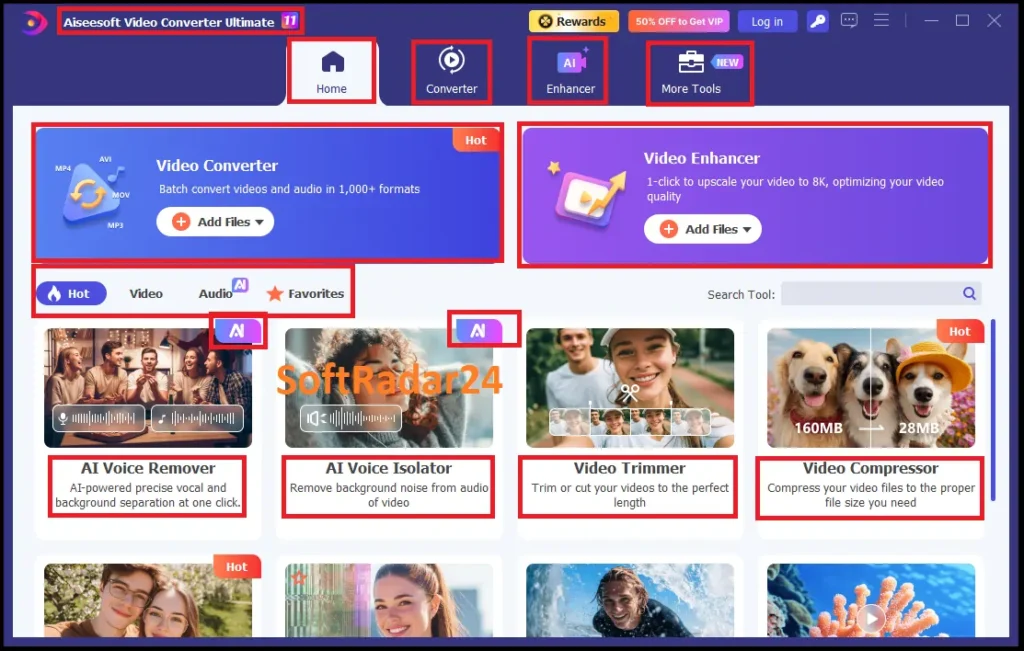
The program is organized around a main conversion workflow plus separate AI Enhancer and More Tools workflows. That separation matters because format conversion, AI enhancement and utility tools have different controls, limits and processing requirements.
Convert Video or Audio
Add files by button or drag-and-drop, choose an output profile, adjust codec/resolution/bitrate/frame-rate settings when needed, then run Convert All. Files in the same batch can use different target formats.
- Add one or more video/audio files and review the detected source format, duration and resolution.
- Choose an output format or device profile, then adjust detailed output parameters if required.
- Enable a supported acceleration mode when appropriate and start Convert All.
| Conversion mode | Use it when | Important condition |
|---|---|---|
| Normal conversion | You need a different codec, resolution, bitrate or other re-encoded output. | Speed and quality depend on source length, resolution, output settings and hardware. |
| GPU hardware acceleration | You want supported encoding/decoding work to use NVIDIA, Intel or AMD GPU resources. | Actual acceleration depends on the graphics hardware and chosen conversion path. |
| 120× High Speed mode | You have a supported input/output combination that can avoid full re-encoding. | Dedicated FAQ lists specific supported containers; it is not a universal 120× transcode mode. |
Enhance Video with AI Models
The Enhancer has its own model-based workflow. Current documentation lists 11 AI models, including General Enhancement, Video Denoise, Frame Interpolation and SDR to HDR, with preview before full export.
- Open Video Enhancer and import the source video.
- Choose the AI model that matches the problem: detail, noise, motion, color/HDR or another supported enhancement task.
- Preview the result, then export the full video if the model is appropriate for the footage and sufficient AI credits are available.
Use the More Tools Workspace
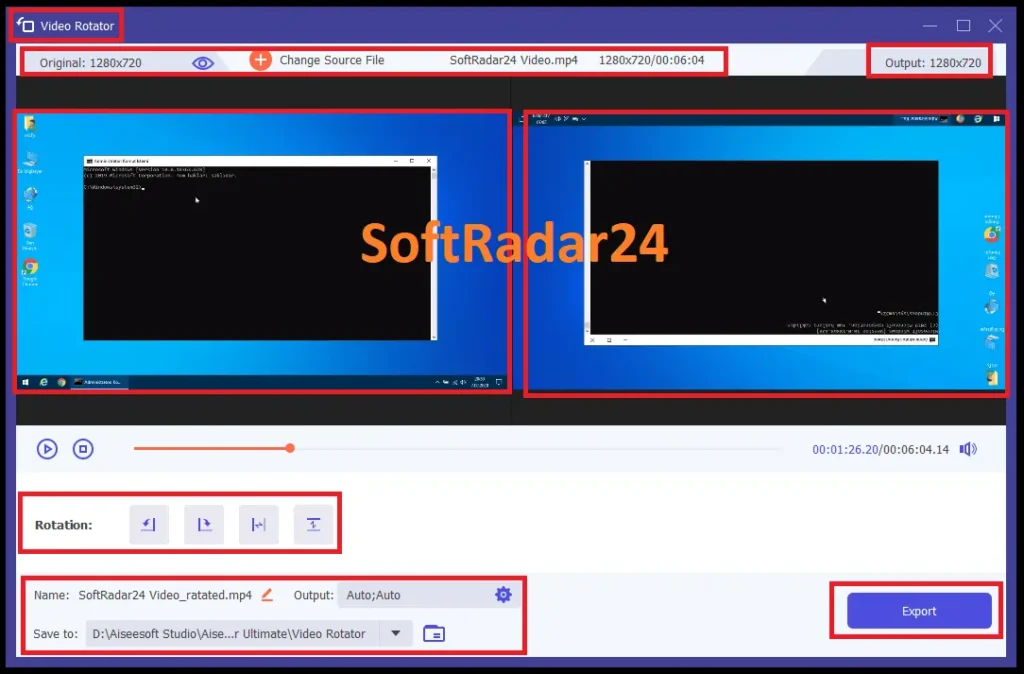
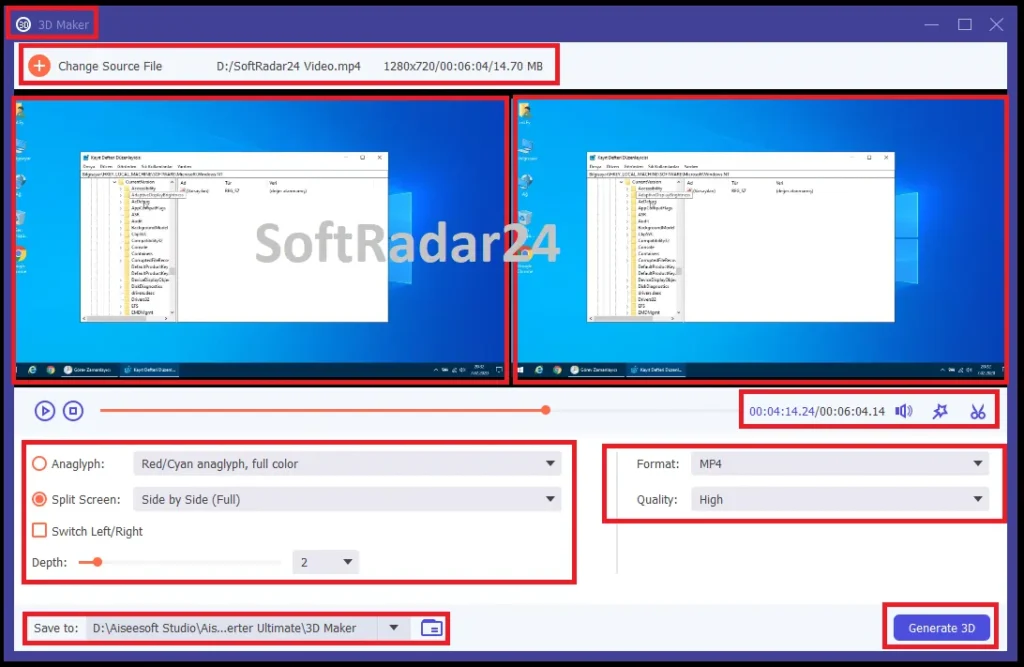
More Tools separates single-purpose utilities from the main converter. Current documentation includes Video Compressor, GIF Maker, 3D Maker, Trimmer, Merger, Cropper, Watermark, Color Correction, Speed Controller, Reverser, Rotator, Video Player, MV Maker, Collage, Audio Compressor, Volume Booster, Audio Sync, Metadata Editor, Image Converter, File Date Changer, AI Vocal Isolator and AI Vocal Remover.
- Choose the tool that matches the specific problem instead of forcing everything through the Converter tab.
- Adjust only the parameters exposed by that tool, such as target size for compression or delay for audio sync.
- Preview where available and export to the chosen destination folder.
Product Interface & Workflow
These visuals are reused from the existing SoftRadar24 Aiseesoft Video Converter Ultimate article. They show our own captured product interface and tools; no vendor-hosted image is added to this update.
Compatibility & Coverage
Aiseesoft Video Converter Ultimate covers both Windows and macOS, but the detailed technical page is more useful than the short product-page badges because it also lists CPU/RAM requirements, legacy Windows support, Apple Silicon support and the actual high-resolution input families.
Operating Systems & Hardware Baseline
| Item | Coverage / Support | Notes |
|---|---|---|
| Windows | Windows 11 / 10 / 8 / 8.1 / 7; detailed table also lists Vista and XP | The shorter product-page badge highlights Windows 11/10/8.1/8/7, while the detailed reference still includes Vista/XP. |
| macOS | macOS 10.12 or later | The current detailed table lists recent macOS generations and Apple M-series support. |
| Windows CPU | 1 GHz Intel/AMD CPU or above | Current technical reference. |
| Mac CPU | 1 GHz Intel processor or Apple M-series chip | Current reference explicitly includes Apple M-series chips, including M5. |
| Memory | 1 GB RAM or more | Current technical reference. |
Video, Audio & High-Speed Format Coverage
| Item | Coverage / Support | Notes |
|---|---|---|
| 8K / 5K / 4K input | MP4, MKV and other listed high-resolution containers | 5K/8K encoding reference includes H.265/HEVC; 4K list also includes H.264, MPEG, XviD, VP8 and VP9. |
| Common video | MP4, MOV, MKV, AVI, WMV, WebM, FLV, TS, M2TS, MTS, MXF and many others | The 1,000+ figure combines format, codec and device-profile coverage. |
| Audio | AAC, FLAC, WAV, MP3, WMA, OGG, AC3 and other listed formats | Audio can be converted separately or extracted/managed with the video workflow. |
| 120× High Speed input | MP4, MKV, AVI, M2TS, MTS, MOV, MPG, TS, TRP, M4V, FLV | Dedicated High Speed FAQ list. |
| 120× High Speed output | MP4, MKV, AVI, MOV, M4V | High Speed mode is only available in the Converter function. |
Features & Capabilities
The product is easiest to understand as four tool groups: format conversion, AI enhancement, compression/audio processing, and lightweight editing/utilities. That is more useful than treating every item in the toolbox as an equal headline feature.
Video & Audio Conversion
- 1,000+ format and device-profile coverage across common, HD, 4K, 5K and 8K media
- Batch conversion with per-file or shared output profiles
- GPU-assisted encoding/decoding support using compatible NVIDIA, Intel and AMD graphics hardware
- High Speed Converter for supported container changes that can avoid full re-encoding
AI Video Enhancer
- 11 current AI models, including General Enhancement, Video Denoise, Frame Interpolation and SDR to HDR
- Upscaling workflows up to 8K in the paid product
- Face/anime/detail restoration and colorization workflows described by the current product
- AI-credit accounting for Video Enhancer processing, with remaining credits and expiration visible in the signed-in profile
Compression & AI Audio
- Video Compressor with target size, format, resolution and bitrate controls
- Audio Compressor plus Volume Booster and Audio Sync
- AI Vocal Isolator for clearer voice extraction / denoising
- AI Vocal Remover that separates isolated vocal and background tracks for supported media
Editing & Utility Toolbox
- Trim, Fast Split, merge, crop, rotate/flip, color/filter controls and watermark tools
- Subtitle and external audio-track import with position, style, volume and delay controls
- Video Speed Controller, Reverser, Player, GIF Maker, 3D Maker, MV Maker and Collage
- Metadata Editor, Image Converter, File Date Changer and other single-purpose utilities
Important Conditions & Limitations
The product does a lot, but several current licensing and processing details materially change the buying decision. These are more important than repeating ‘1,000+ formats’ or ‘120× faster’ without context.
120× Is a Specific High-Speed Path, Not Every Transcode
Aiseesoft markets up to 120× speed, but its dedicated High Speed FAQ says the fastest mode works by changing supported container formats without full re-encoding and lists a limited input/output set. Normal transcoding remains dependent on codec, resolution, bitrate, file size and hardware.
AI Video Enhancer Uses AI Credits
Current 2026 FAQ documentation says enhancement, noise reduction, frame interpolation, colorization and related Video Enhancer tasks require AI credits. When credits run out, those AI Enhancer functions stop until more credits are available; non-credit features remain usable.
AI Credits Can Expire with a Subscription Plan
Aiseesoft says bonus credits tied to a Monthly VIP AI Ultra plan expire and reset when that plan ends, while credits from a lifetime AI-credit plan can accumulate. Check the Profile area for balance and expiration instead of assuming purchased credits never expire.
Failed AI Tasks Should Not Consume Credits
Current Aiseesoft guidance says AI credits are deducted only after a task completes successfully. If a failed task appears to consume credits, the vendor recommends refreshing the account state and contacting support if the balance remains wrong.
The Free Version Is a Trial, Not Unlimited Free Conversion
Current product FAQ limits conversion to 5 minutes per file. AI enhancement previews are 3 seconds per task, free enhancement is capped at 4K and processes one task at a time; AI Vocal Isolator/noise-remover free use is limited to three files per function, and most other tools to five files.
Compression and Re-encoding Can Change Quality
The product markets up to 80% size reduction while maintaining visible quality. In practice, changing bitrate, codec or resolution can change image quality; test the output instead of treating ‘no quality loss’ as a guarantee for every compression setting.
Windows and Mac Campaign Licenses Are Separate
The existing SoftRadar24 purchase links use different Windows and macOS product SKUs. Choose the operating system first; do not assume a Windows campaign license automatically activates the Mac edition or vice versa.
Current Vendor Store and Existing SoftRadar24 Campaign Are Not the Same Plan Grid
The current public Aiseesoft Video Converter Ultimate store highlights 1 Month / 1 PC, Lifetime / 1 PC and Lifetime / 3 PCs. The existing SoftRadar24 campaign still contains separate Lifetime 5-PC / 5-Mac SKUs and lower campaign Lifetime prices, so the final checkout must be treated as the source of truth.
Watch the Optional Screen Recorder Trial at Checkout
The current Aiseesoft purchase page promotes 7-day Screen Recorder access with Video Converter Ultimate purchases and states that it renews at US$25 per month unless canceled. Review optional extras before completing payment.
Free Trial / Free Version
Aiseesoft Video Converter Ultimate is free to download and test, but the current free mode is deliberately limited. The useful question is not ‘can I open the app for free?’ but whether the specific converter, AI or utility workflow can be tested enough before paying.
| Free access | What you can do | What requires payment |
|---|---|---|
| Free conversion trial | Convert up to 5 minutes of each file in the current free mode and verify format compatibility, output settings and performance on your own hardware. | Full-length conversion and unrestricted paid workflow require a VIP license. |
| Free AI / tool testing | Aiseesoft AI enhancement preview: 3 seconds per task, up to 4K and one task at a time. AI Vocal Isolator/noise-remover: 3 files per function. Most other functions: up to 5 files per function. | Paid access removes those trial limits, but Video Enhancer AI processing still uses the product’s AI-credit system. |
System Requirements
Aiseesoft Video Converter Ultimate publishes a very lightweight CPU/RAM baseline. For large 4K/8K transcoding and AI enhancement, that minimum only means the application can meet its baseline requirement; practical processing speed still depends heavily on source media, GPU/CPU capability and the chosen output path.
| Requirement | Supported / Required | Notes |
|---|---|---|
| Windows OS | Windows 11 / 10 / 8 / 8.1 / 7; detailed reference also lists Vista / XP | The product-page badge is shorter; the detailed technical table still lists legacy Windows versions. |
| macOS | macOS 10.12 or later | Current technical reference lists recent macOS generations and Apple M-series support. |
| Windows CPU | 1 GHz Intel/AMD CPU or above | Published minimum, not a performance recommendation for heavy 8K/AI workloads. |
| Mac CPU | 1 GHz Intel processor or Apple M-series chip | Current reference explicitly includes Apple M-series chips, including M5. |
| Memory | 1 GB RAM or more | Published minimum. |
| GPU acceleration | Supported in the conversion workflow | Dedicated High Speed FAQ identifies NVIDIA, Intel and AMD graphics support for hardware-assisted conversion. |
| Free storage | Not specified on the current technical reference page reviewed | Output files, temporary data and AI/video workloads can require substantially more space depending on source length and resolution. |
Alternatives & Better-Fit Options
Aiseesoft Video Converter Ultimate is a broad all-in-one choice, but the better alternative depends on whether your priority is general conversion, AI enhancement or a different workflow. For more software from the same vendor, visit the Aiseesoft page on SoftRadar24.
AnyMP4 Video Converter Ultimate
A direct cross-brand comparison when you want another all-in-one Windows/macOS video converter with its own conversion, enhancement and editing workflow before choosing between closely related toolsets.
VideoProc Converter AI
Worth comparing when your priority is a different conversion-and-AI workflow and you want to evaluate performance, enhancement tools and licensing against Aiseesoft before buying.
MacXvideo AI
A better comparison when AI-driven 4K/8K video enhancement is the main job and general-purpose conversion is secondary.
Tipard Total Media Converter
Another media-conversion option to compare when you want a broader conversion-focused toolkit rather than choosing Aiseesoft only because it includes many secondary utilities.
FAQ
These questions cover the details most likely to change the buying decision: the real scope of 120× conversion, current free limits, AI credits, platform-specific licensing, GPU acceleration and the SoftRadar24 campaign links.
Is Aiseesoft Video Converter Ultimate free?
It is free to download and test, but the current free mode is limited. Video conversion is limited to 5 minutes per file. AI enhancement previews are limited to 3 seconds per task, up to 4K and one task at a time; AI Vocal Isolator/noise-remover free use is limited to 3 files per function, and most other tools to 5 files.
Does Aiseesoft Video Converter Ultimate really convert 120× faster?
Aiseesoft markets up to 120× speed, but its dedicated High Speed Converter documentation limits that workflow to supported containers and explains that the fastest path can change the container without full re-encoding. Normal transcoding speed still depends on source length, resolution, output settings and computer hardware.
Which formats support Aiseesoft High Speed Converter?
The current dedicated FAQ lists MP4, MKV, AVI, M2TS, MTS, MOV, MPG, TS, TRP, M4V and FLV as supported High Speed inputs, with MP4, MKV, AVI, MOV and M4V as supported outputs. High Speed Converter is available only in the Converter function.
Can it convert HEVC or H.265 video?
Yes. The current technical reference lists H.265/HEVC for high-resolution 5K/8K media and includes H.265/HEVC among the supported 4K encoding families. You can convert those sources to supported containers and codecs such as MP4, MKV or MOV depending on the selected profile.
Can Aiseesoft Video Converter Ultimate upscale video to 8K?
Yes in the paid AI Video Enhancer workflow. The current product and tutorial describe 11 AI models and paid enhancement up to 8K. The free enhancement mode is limited to a 3-second preview and up to 4K.
Do Aiseesoft AI Video Enhancer features use credits?
Yes. Current Aiseesoft FAQ documentation says Video Enhancer tasks such as enhancement, noise reduction, frame interpolation, colorization and related AI processing require AI credits. If the credits run out, those AI Enhancer functions stop until more credits are available, while non-credit functions remain usable.
Are AI credits charged when an AI task fails?
Aiseesoft says no. Credits should be deducted only after a task completes successfully. If a failed task appears to consume credits, the vendor recommends refreshing the account state and contacting support if the balance remains incorrect.
Does Aiseesoft Video Converter Ultimate use GPU acceleration?
Yes. The converter preferences include GPU acceleration, and Aiseesoft’s High Speed documentation identifies NVIDIA, Intel and AMD graphics support for hardware-assisted encoding and decoding. Actual performance depends on the GPU, source media and selected output workflow.
Can I use the same SoftRadar24 license on both Windows and macOS?
Do not assume so. The existing SoftRadar24 campaign uses separate Windows and macOS product SKUs, so choose the correct platform before purchasing. The current product is available for both operating systems, but the campaign links are platform-specific.
Is the Aiseesoft Video Converter Ultimate coupon code applied automatically?
For the current SoftRadar24 monthly and single-device Lifetime campaign links, the promotional coupon parameter is already included in the checkout URL. The stored 5-PC and 5-Mac campaign links do not contain a coupon parameter, so they are labeled separately in Purchase Options.
Why are the SoftRadar24 Lifetime and multi-PC prices different from Aiseesoft’s current public store?
SoftRadar24 is preserving existing campaign SKUs from the current article. Aiseesoft’s public store now highlights 1 Month / 1 PC at US$14.50, Lifetime / 1 PC at US$49.96 and Lifetime / 3 PCs at US$80.56, while the existing SoftRadar24 campaign contains US$31.22 single-device Lifetime and US$119 five-device links. Verify the final checkout before paying.
Does the purchase include a Screen Recorder trial?
Aiseesoft’s current public purchase page promotes 7-day access to Aiseesoft Screen Recorder with Video Converter Ultimate purchases and states that the Screen Recorder subscription renews at US$25 per month after the trial unless canceled. Check optional extras at the final checkout.
Does Aiseesoft offer a 30-day money-back guarantee?
The current product pages display a 30-day money-back guarantee. The current purchase page specifically describes a 30-day refund for Lifetime licenses when there is a quality problem, so read the current refund conditions that apply to your selected plan rather than treating every purchase as an unconditional 30-day refund.