Aiseesoft Video Converter Ultimate is a professional media conversion software that enables users to transform video and audio files into a wide range of formats, including MP4, MOV, AVI, and more. It supports HD and 4K processing while maintaining high output quality. With support for over 1000 formats and devices, it is designed for users who need a reliable solution for Windows and Mac to ensure compatibility across different platforms.
The software also provides essential media processing features, including basic editing functions such as trimming, merging, and adjusting visual effects. Aiseesoft Video Converter Ultimate 11 allows users to enhance image quality, compress large files, and create media content with built-in tools. With its fast processing speed and broad format compatibility, it serves as a practical application for managing digital media efficiently.
Key Features of Aiseesoft Video Converter Ultimate
- Ultra-Fast Video Conversion across 1000+ formats up to 8K resolution at 120x speed using hardware GPU acceleration.
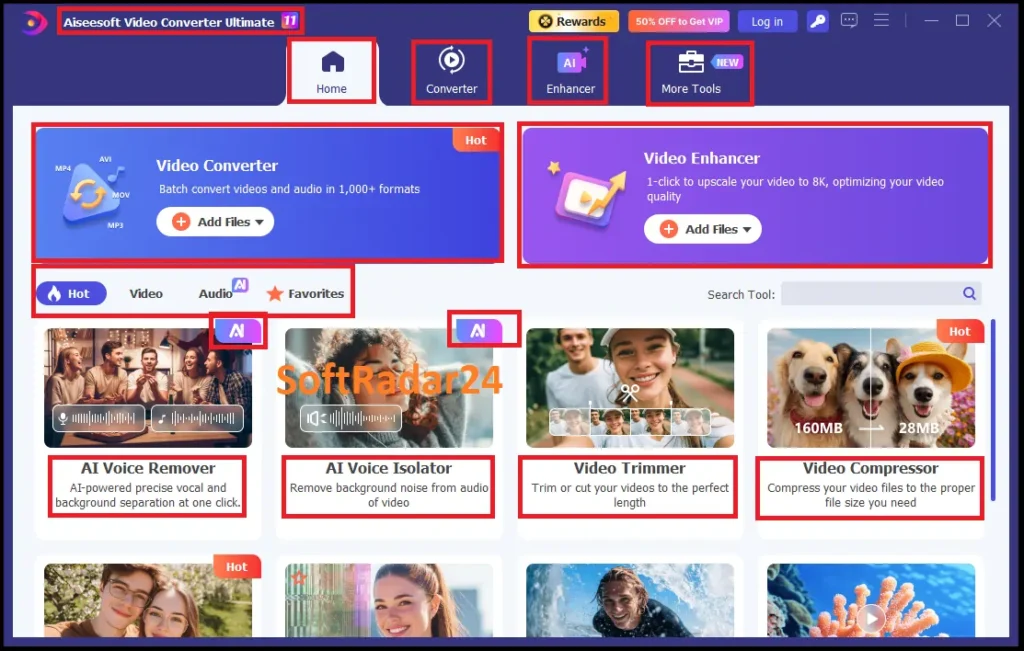
- AI Video Enhancer automatically increases video resolution to 4K or 8K while recovering lost details and unblurring footage.
- Lossless Video Compressor reduces video file sizes by up to 80% without degrading visual quality.
- AI Vocal Isolator extracts clean human vocals from complex audio environments while eliminating background noise.
- AI Vocal Remover strips human voices from video or audio tracks for karaoke creation or background music extraction.
- 3D Video Converter applies spatial effects (Anaglyph, Side-by-Side, Top/Bottom) to standard 2D videos.
- SDR to HDR Conversion upgrades standard dynamic range videos for richer, more natural color depth.
- Frame Interpolation automatically inserts frames into videos to increase FPS for smoother playback.
- B&W Colorizer uses AI models to inject vibrant, accurate colors into old black-and-white footage.
- Video Denoising removes visual grain and artifacts to repair and clear up low-light videos.
- Comprehensive Aiseesoft Video Editor includes tools to trim, merge, crop, rotate, and apply custom filters to video clips.
- Split Screen Creator places two or more videos into a single frame for simultaneous playback.
- Watermark Management erases existing logos or allows the insertion of custom image and text watermarks.
- Playback Speed Control adjusts video speeds dynamically from 0.125X up to 8X.
- GIF Maker & Image Converter generates animated GIFs and batch-converts image formats.
AI Video Enhancer and 8K Resolution Upscaler
Aiseesoft Video Enhancer utilizes deep-learning neural networks to transform low-resolution footage into high-definition assets. High-performance resolution upscaling allows for one-click conversion from 480p to 1080p, 4K, and 8K standards. Aiseesoft Video Converter Ultimate automatically analyzes pixel data to insert missing details, ensuring crisp visual output on modern ultra-high-definition displays. Integrated automatic brightness and contrast optimization corrects exposure issues instantly, balancing light levels across every frame for professional-grade clarity.
Specialized AI Models for Visual Restoration
Advanced image processing includes dedicated AI models tailored for specific content types. The Face Enhancement Model pinpoint-identifies human features to restore texture and clarity in portraits or interviews. For animation enthusiasts, the Anime Model sharpens 2D and 3D lines while reducing compression artifacts. Video noise reduction surgically removes white noise and digital grain from legacy recordings or low-light shots. These specialized restoration tools eliminate blur and mosaic patterns, reviving old family videos and outdated media formats.
Frame Interpolation and Motion Stabilization
Unsteady or choppy footage benefits from professional-grade video stabilization and motion smoothing. AI frame interpolation increases motion fluidity by generating transitional frames up to 240 FPS, ideal for sports and action-camera recordings. Aiseesoft Video Converter Ultimate built-in SDR to HDR converter upgrades standard dynamic range media into vibrant, high-contrast visuals with expanded color depth. Furthermore, video shaking reduction compensates for handheld camera movements, delivering stabilized and polished results suitable for cinematic viewing.
Professional Editing and Media Formatting Suite
The centralized toolkit provides essential post-production features, including video rotation, cropping, and multi-clip merging. Users can flip footage horizontally or vertically and trim black bars to optimize videos for YouTube, TikTok, or Instagram. Aiseesoft Video Converter Ultimate handles watermark management and allows for precise adjustments to saturation, hue, and sharpness. Final exports support wide format compatibility, enabling high-speed rendering for MP4, MOV, and MKV containers while preserving the integrity of the enhanced AI metadata.
Lossless Video Compressor: Shrink File Sizes by 80%
Aiseesoft Video Compressor optimizes high-resolution media by minimizing file footprints while maintaining peak visual clarity. Advanced encoding algorithms reclaim 80% of storage space without compromising image sharpness or color depth. Supporting 8K, 4K, and HD standards, the engine ensures seamless compatibility across MP4, MKV, MOV, and WebM formats. GPU acceleration drives the processing core, delivering rapid results for massive video files compared to traditional software rendering.
Precision Bitrate Control and Real-Time Preview
Flexible file reduction workflows provide total authority over bitrate settings, resolution parameters, and output formats. An interactive slider mechanism defines target file sizes in seconds, while the real-time preview function allows for instant quality verification before final export. Batch video compression capabilities enable the simultaneous processing of hundreds of files, maximizing productivity for large-scale media libraries. Users can maintain original aspect ratios or adapt videos for specific playback environments.
Optimized Sharing for Web and Mobile Platforms
Reducing video dimensions is essential for social media uploads, email attachments, and efficient storage management. The three-step processing logic produces professional results without navigating complex menus. Integrated lossless encoding technology preserves original contrast and brightness levels, specifically for content destined for YouTube, WhatsApp, or Instagram. A watermark-free environment ensures that high-fidelity media remains the primary focus throughout the shrinking process.
High-Performance Encoding and Format Support
Aiseesoft Video Converter Ultimate engine analyzes raw video data to determine the most efficient compression method automatically. Handling resolutions from 1080p to 8K, the system generates optimized outputs for mobile devices and professional displays. Over 16 popular video containers are available for selection, making media ready for immediate distribution. This technical infrastructure provides a reliable solution for content creators and enterprise projects requiring high-density data management.
AI Vocal Remover and High-Fidelity Instrumental Extractor
Aiseesoft AI Vocal Remover utilizes deep learning algorithms to decouple human voices from background instrumentals. Decoupling complex acoustic patterns delivers studio-quality separation for music tracks and voice recordings. Generating high-fidelity karaoke files or extracting clean vocals occurs without introducing audio artifacts. Supporting lossless formats like FLAC, WAV, and MP3 ensures professional acoustic integrity for every output.
Precision Vocal Isolation and Acoustic Cleaning
Advanced vocal isolation separates dialogue from chaotic sound environments or heavy background music. Neural network models preserve natural voice frequencies while eliminating unwanted digital noise. This process provides specialized audio cleaning for content creators, podcasters, and vocalists. Batch audio processing capabilities allow for rapid instrumental creation and vocal extraction within a streamlined workflow.
Lossless Audio Extraction and Format Support
Compatibility covers AAC, OGG, and WMA containers alongside high-definition video files. Extraction logic maintains original sample rates to ensure uncompromising audio fidelity. Removing vocals for remixes or isolating speech for production requires surgical acoustic control. Final exports are ready for immediate integration into professional DAWs or digital media projects.
Karaoke Maker and Background Music Remover
Automated acoustic separation identifies vocal tracks and background scores with high precision. Users can instantly create backing tracks by stripping human voices from any song. The processing engine maintains the original gain levels and stereo imaging of the instrumental layer. This technical infrastructure serves as a reliable solution for DJs, producers, and karaoke enthusiasts seeking clean audio stems from a single source file.
Aiseesoft Video Converter Ultimate: AI Vocal Isolator
Aiseesoft AI Vocal Isolator employs next-generation neural networks to decouple human speech from complex background music and ambient noise. Advanced deep-learning models pinpoint vocal frequencies with surgical precision, delivering studio-grade results for podcasts, interviews, and film post-production. The local processing engine ensures 100% data privacy by executing all tasks directly on your hardware without cloud uploads. Supporting high-resolution containers like WAV, FLAC, and MP3, it maintains uncompromising acoustic integrity for professional audio stems.
Professional Voice Extraction and Noise Suppression
Accurate voice isolation protocols eliminate disruptive background tracks while preserving natural vocal textures. Integrated AI detects and separates speech from multi-layered audio environments, making it ideal for cleaning up dialogue in noisy recordings. Hardware acceleration drives the local AI engine, processing long-form videos and high-bitrate audio files significantly faster than online alternatives. This technical infrastructure allows content creators and musicians to generate clean acapella tracks or crisp voiceovers with zero file size restrictions.
Universal Media Format Support and Lossless Export
Compatibility extends across a wide range of formats, including MP4, MOV, AVI, and MKV for video, alongside AAC, WMA, and OGG for audio. Extraction logic preserves original sample rates and bitrates, ensuring that isolated vocals remain broadcast-ready. Users can customize audio parameters such as channels (up to 5.1) and sample rates before final rendering. Removing background music for remixes or isolating dialogue for dubbing requires the surgical acoustic control provided by these dedicated AI models.
Studio-Grade Audio Cleaning for Content Creators
The centralized processing workflow facilitates rapid background music removal for YouTube, TikTok, and social media exports. This feature eliminates the risk of copyright claims by stripping licensed music while keeping original dialogue intact. Beyond music production, Aiseesoft Video Converter Ultimate serves as a reliable solution for transcribing noisy interviews and enhancing remote meeting recordings. Final exports integrate seamlessly into professional DAWs or video editors, providing a unified solution for high-fidelity vocal recovery and instrumental separation.
MP4 Video Editor: Professional Toolkit to Rotate, Crop, and Edit Media
Aiseesoft Video Editor provides a high-efficiency environment for surgical media manipulation across Windows and Mac platforms. Integrating essential post-production features allows for one-click video cropping to meet aspect ratio requirements for YouTube, TikTok, and Instagram. Aiseesoft Video Converter Ultimate processing engine handles 4K video editing natively, ensuring that final exports maintain peak resolution and bitrates. Correcting orientation through 90-degree rotation and horizontal flipping fixes sideways or inverted clips instantly without introducing digital artifacts.
Precision Video Cropping and Aspect Ratio Adjustment
Tailoring content for diverse social platforms requires flexible framing and precise dimension control. The built-in video cropper removes unwanted background elements and black bars to center the primary subject. Users can select from standardized presets like 16:9, 9:16, or 1:1, or manually adjust crop areas for pixel-level accuracy. This structural formatting ensures that every media asset fits perfectly within mobile or desktop viewing windows while preserving original image clarity.
Cinematic Filters and Visual Effect Controls
Enhancing the atmospheric quality of raw footage occurs through an integrated library of stylish video filters. Advanced parameter tuning allows for precise adjustments to brightness, contrast, saturation, and hue to correct exposure errors. Aiseesoft Video Converter Ultimate software also functions as an SDR to HDR converter, expanding color depth for more vibrant visual results. For creative storytelling, the video speed controller enables dramatic slow-motion or high-speed time-lapse effects, ranging from 0.125X to 8X momentum.
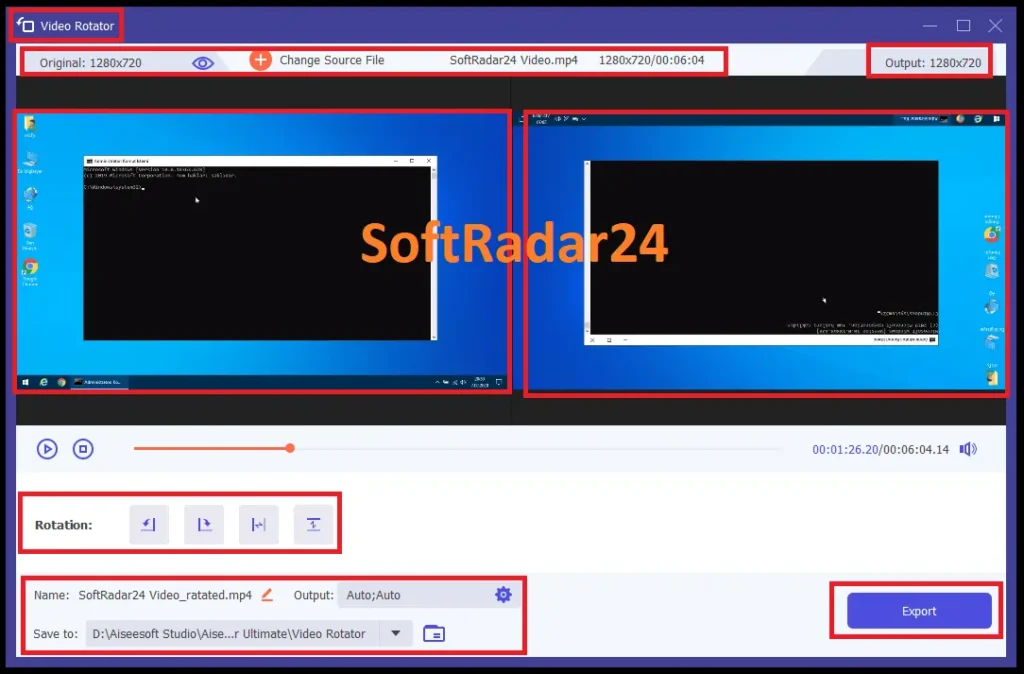
Secure Watermark Management and Branding
Protecting digital property involves embedding custom logos, text, or image overlays directly into the video stream. The watermark editor provides complete control over positioning, transparency levels, and font styles to match corporate identities. Aiseesoft Video Converter Ultimate toolkit features a subtitle editor for integrating .srt files, ensuring clarity for global viewers. Adding background scores or replacing original audio tracks with high-fidelity narration transforms raw recordings into professional-grade tutorials, vlogs, and marketing presentations.
AI-Driven Toolbox and Multi-Screen Collage Maker
The centralized dashboard includes specialized utilities like a video-to-GIF converter, 3D media creator, and multi-screen collage maker. Synchronizing photos and clips into music videos (MV) utilizes beat-synced transitions and professional templates. For audio organization, the ID3 tag editor updates metadata for music files, including artist names and album art. Every task executes locally on hardware to ensure total data privacy, delivering broadcast-ready exports for commercial and social media campaigns.
2D to 3D Video Converter: Create Immersive Anaglyph and Side-by-Side Media
Aiseesoft 3D Converter enables the transformation of standard 2D videos into professional stereoscopic formats. High-speed processing engines convert flat footage into Anaglyph 3D or Split-screen (Side-by-Side and Top/Bottom) modes. Supporting resolutions up to 4K and 1080p HD, the system ensures compatibility with 3D TVs, VR headsets, and specialized glasses. Users can achieve cinematic depth from any source file, making standard videos ready for an immersive viewing experience.
High-Fidelity 3D Transformation and Depth Control
Achieving the perfect stereoscopic effect requires precise calibration of visual parameters. The integrated 3D depth controller allows for manual adjustments from level 1 to 15, tailored to specific audience preferences and hardware requirements. Ten distinct types of Anaglyph 3D modes, including red/cyan and amber/blue color schemes, provide versatile options for different types of 3D glasses. These algorithmic adjustments ensure natural depth perception and visual clarity across all converted media.
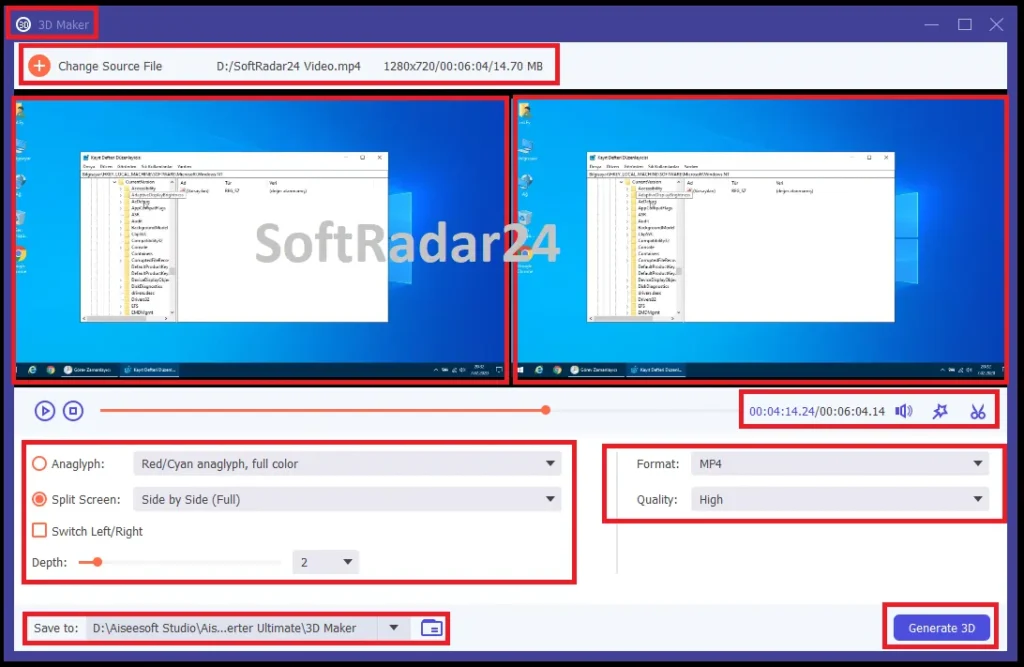
Multi-Mode 3D Switching and 2D Extraction
Changing existing 3D formats occurs seamlessly within a unified media workflow. The processing logic allows for converting Side-by-Side (Half-Width or Full) videos into Top and Bottom layouts or Anaglyph versions. For standard viewing, the 3D to 2D converter extracts high-quality flat video from stereoscopic sources by selecting either the left or right eye perspective. This flexibility ensures that media remains playable on any display, whether it requires polarized lenses or traditional screens.
Aiseesoft Video Converter Ultimate: Hardware-Accelerated Rendering and Format Support
Broad compatibility includes MP4, MKV, AVI, WMV, and MOV containers for both input and output. Utilizing NVIDIA CUDA and AMD APP acceleration technology, the engine executes 3D rendering tasks significantly faster than traditional methods. A real-time preview feature allows for instant visual verification of depth and effects before final export. Users can also utilize built-in editing features to trim clips, add watermarks, and synchronize subtitles, delivering broadcast-ready 3D files with zero quality loss.
Aiseesoft Video Converter Ultimate Discount Codes
Save significantly on professional media tools with verified Aiseesoft Video Converter Ultimate discount codes designed to unlock 8K rendering and AI features at the best value. Users can currently access a 50% official discount on lifetime and monthly licenses, which is automatically applied at the secure checkout for a seamless purchasing experience.
These official promo links guarantee the lowest pricing available without the hassle of manually entering expired codes at checkout. Secure your premium license today to experience 120x faster video processing while this exclusive offer remains active.


Aiseesoft Video Converter Ultimate for Windows
Aiseesoft Video Converter Ultimate (Windows) – 1-Month
Access 120x AI video conversion for short-term projects. Upscale to 8K and extract vocals with full professional features on PC.
Aiseesoft Video Converter Ultimate (Windows) – Lifetime
Best value for PC. Get permanent access to AI 8K upscaling, lossless compression, and 120x rendering speed with a single payment.
Aiseesoft Video Converter Ultimate (Windows) – 5 PCs
Scalable license for teams. Deploy the fastest AI video renderer and 8K enhancer on 5 Windows machines with lifetime updates.
Aiseesoft Video Converter Ultimate for Mac
Aiseesoft Video Converter Ultimate for Mac – 1-Month
Professional macOS AI video processing for 30 days. Perfect for high-speed 8K conversion and vocal isolation on Apple Silicon.
Aiseesoft Video Converter Ultimate for Mac – Lifetime
Unlock permanent macOS media enhancement. Enjoy lossless 8K upscaling and 120x rendering speed on your Mac with this lifetime deal.
Aiseesoft Video Converter Ultimate for Mac – 5 Macs
Enterprise solution for Mac studios. Deploy AI-powered 8K conversion and batch rendering across 5 macOS devices permanently.
Aiseesoft Video Converter Ultimate Tutorial: Master 8K Conversion and AI Enhancement
Achieving professional-grade media results starts with a streamlined workflow for high-speed rendering and visual restoration. Aiseesoft Video Converter Ultimate guide outlines the essential steps to execute 8K video conversion, apply neural network enhancements, and manage complex audio-visual tasks using the centralized processing engine.
High-Speed Batch Video and Audio Conversion
Executing rapid format transitions requires activating the 120x faster rendering mode. Load media into the processing dashboard and select target extensions like MP4, HEVC, or lossless FLAC. Users can customize output parameters including resolution, bitrate, and frame rates for each file or apply a unified preset for batch video conversion. Enabling GPU hardware acceleration ensures that heavy 4K and 8K files render significantly faster than traditional software-based methods. Once configured, a single click on “Convert All” finalizes the process across Windows and Mac environments.
Upscaling Footage with AI Video Enhancer
Transforming low-resolution assets into high-definition media involves utilizing integrated AI video enhancement models. Navigate to the toolbox and select from specialized algorithms designed for 8K upscaling, facial detail restoration, or digital noise reduction. Aiseesoft Video Converter Ultimate analyzes pixel structures to reconstruct lost data, providing one-click clarity for legacy recordings or blurry downloads. Users can preview results in real-time to compare original and enhanced versions before exporting the final full-resolution video.
Precision Video Editing and Frame Formatting
Post-production manipulation includes surgical trimming, merging, and aspect ratio adjustments. The video cropper removes unwanted black bars and centers the primary subject for social media platforms like TikTok or Instagram. Correcting orientation occurs via 90-degree rotation or horizontal flipping, fixing sideways clips instantly. Creative tools allow for SDR to HDR conversion, adding cinematic depth and color contrast. Fine-tuning brightness, saturation, and hue balances exposure levels across every frame for broadcast-ready results.
Audio Stem Extraction and AI Vocal Isolation
Advanced acoustic management provides the ability to separate dialogue from background music with surgical accuracy. Loading media into the AI vocal isolator or remover allows for the extraction of clean acapella stems or instrumental backing tracks. This process preserves original frequencies while eliminating unwanted digital artifacts. Integrated audio sync protocols fix delayed sound tracks, ensuring perfect alignment with the visual stream. Final exports support high-bitrate audio formats, maintaining studio-grade integrity for music production and podcasts.
Professional Media Toolbox and DVD Digitization
Centralized utilities offer specialized functions such as lossless video compression, GIF generation, and 3D media creation. The compression engine reduces file footprints by 80% using smart bitrate allocation for easier sharing. For physical media collections, the DVD ripper extracts content directly into secure digital containers without bypassing original quality. Managing file organization is simplified through the ID3 tag editor, which updates metadata, album art, and artist information for comprehensive digital libraries.
Aiseesoft Video Converter Ultimate Technical Specifications and Supported Formats
Professional media processing requires precise hardware compatibility and extensive codec support. The technical framework below details the environment necessary for 8K video rendering and the comprehensive list of supported file extensions for seamless conversion.
System Requirements and Hardware Compatibility
Efficient GPU hardware acceleration ensures rapid processing across different operating systems. High-performance rendering depends on the following minimum and recommended specifications:
| Feature | Windows Specifications | Mac Specifications |
| Operating System | Windows 11, 10, 8.1, 8, 7 | macOS 10.12 or later (including macOS Sonoma) |
| Processor | 1GHz Intel/AMD CPU or above | Intel Core 2 Duo or Apple M1/M2/M3 chips |
| RAM | 2GB RAM or more | 2GB RAM or more |
| Graphics Card | NVIDIA Super Clock, NVIDIA CUDA, NVENC, AMD APP, Intel HD Graphics | Integrated Graphics or Apple Silicon GPU |
| Hard Disk Space | 200MB free space for installation | 200MB free space for installation |
Supported Input Media Formats
The processing engine decodes over 1,000 media types, including high-definition physical discs and advanced digital codecs.
| Category | Supported Input Extensions |
| 8K / 4K Video | MP4, WebM, MKV, AVI, MOV, TS, FLV |
| Standard Video | HEVC/H.265, H.264, MPEG-4, AVI, WMV, MXF, M4V, M2TS, MTS, MOD |
| Audio Tracks | MP3, FLAC, WAV, WMA, AAC, ALAC, AIFF, OGG, M4A |
| Physical Media | DVD Disc, DVD Folder, DVD ISO Files |
Supported Output Media Formats
Output configurations allow for lossless 8K rendering and device-specific optimizations for mobile and home cinema systems.
| Category | Supported Output Extensions |
| Ultra HD Output | 8K/5K/4K MP4, 4K MKV, 4K WebM, 4K MOV, 4K AVI |
| Standard Video | HEVC/H.265, H.264/MPEG-4 AVC, MPEG-4, AVI, MKV, MOV, WMV, WebM, M4V |
| Audio Output | FLAC, WAV, MP3, AAC, WMA, OGG, AIFF, M4R (iPhone Ringtone) |
| 3D Formats | 3D MP4, 3D MKV, 3D AVI, 3D WMV (Anaglyph, Side-by-Side, Top-Bottom) |
Hardware Acceleration and Encoding Technologies
The core architecture utilizes advanced acceleration protocols to achieve 120x faster rendering speeds for high-bitrate media.
| Technology | Functional Benefit |
| Blu-Hyper | Synchronizes GPU acceleration with CPU-level decoding for 8K/4K files. |
| NVIDIA CUDA / NVENC | Offloads video encoding tasks to the GPU for rapid MP4 and HEVC exports. |
| AMD APP / OpenCL | Optimizes parallel processing for high-speed multi-file batch conversions. |
| Intel Quick Sync Video | Accelerates media processing while maintaining low system resource consumption. |
| AI Neural Engine | Powers 8K upscaling, vocal isolation, and digital noise reduction tasks. |