
Quick Summary
AnyMP4 Video Converter Ultimate is a Windows and macOS multimedia suite for converting, compressing and editing video/audio files, processing supported 8K/5K/4K media, and digitizing compatible DVDs. AnyMP4 Video Converter Ultimate supports 500+ vendor-listed formats and profiles, batch conversion, H.264/HEVC output, GPU acceleration, subtitle/audio-track editing, a dedicated Video Compressor, Video Enhancer, Noise Remover, Audio Sync, Color Correction and other toolbox utilities.
- Best for
- 4K/8K conversion · HEVC compatibility · batch media conversion · compression and quick editing
- Platforms
- Windows and macOS
- Current campaign
- 1-Year · Lifetime license options
- Key limitation
- Codec changes can require lossy re-encoding
AnyMP4 Video Converter Ultimate Pricing, Discount Code & License Options
The current 50% AnyMP4 Video Converter Ultimate coupon discount is applied automatically to the approved SoftRadar24 license options below. No manual coupon-code entry is required.
Choose Windows or macOS first, then select 1 Year or Lifetime. The Windows 1-Year option is selected first because it is the lowest-priced current SoftRadar24 option at US$27.50.
Current AnyMP4 Video Converter Ultimate License Prices
The purchase selector currently includes the following approved SoftRadar24 license options:
- AnyMP4 Video Converter Ultimate 1-Year License · Windows / 1 PC · US$27.50
- AnyMP4 Video Converter Ultimate Lifetime License · Windows / 1 PC · US$37.47
- AnyMP4 Video Converter Ultimate for Mac 1-Year License · macOS / 1 Mac · US$27.50
- AnyMP4 Video Converter Ultimate for Mac Lifetime License · macOS / 1 Mac · US$37.47
AnyMP4 Video Converter Ultimate · 1-Year License
Windows · 1 PC · 1-year license
Included with this license- One year of AnyMP4 Video Converter Ultimate use on 1 Windows PC
- Video/audio conversion across supported formats and resolutions
- Video compression, editing, enhancement and toolbox utilities
- Supported DVD conversion and lossless DVD archive profiles
Selected first because it is the lowest-priced current SoftRadar24 AnyMP4 Video Converter Ultimate option for one Windows PC.
The eligible discount is applied automatically at checkout. Confirm the operating system, license term, applicable tax and final checkout total before payment.
Can This Software Do What I Need?
Global video-conversion questions are usually driven by a compatibility or delivery problem rather than a desire to “convert video” in the abstract. Common searches involve MKV files that will not open on a TV or editor, HEVC recordings that fail on Windows software, subtitles or secondary audio tracks disappearing after conversion, 4K files that are too large to send, and old low-resolution footage that needs cleanup before sharing.
My MKV file will not play on a TV, console or editing program
Container / codec compatibility
SupportedAnyMP4 Video Converter Ultimate can convert MKV into MP4, MOV, AVI, WebM and other supported outputs and provides device/application profiles. Check the actual video, audio and subtitle codecs before conversion, because changing MKV to MP4 can require re-encoding when the streams inside the MKV are not valid for the target player or container.
I only need MKV to MP4 with absolutely no quality change
Container-only remux
Better fitIf the existing video/audio/subtitle streams are already compatible with MP4, a stream-copy/remux workflow can change the container without decoding or encoding. That is genuinely lossless and extremely fast. Buy AnyMP4 Video Converter Ultimate when you need actual codec conversion, batch profiles, editing, compression or its toolbox—not merely a container swap.
My HEVC/H.265 video plays badly or will not import into my editor
Modern codec compatibility
SupportedAnyMP4 Video Converter Ultimate accepts vendor-listed H.265/HEVC sources including 8K/5K/4K MP4 and MKV and can convert to H.264/MP4 and other outputs. This is useful when the target editor, TV or playback device cannot decode the original HEVC profile. Converting HEVC to a different codec is transcoding, so do not describe it as mathematically lossless.
A 4K video is too large for messaging, email or a social upload
Target-size compression
SupportedAnyMP4 Video Converter Ultimate has a dedicated Video Compressor where you can change target size, format, resolution and bitrate before export. Reducing file size always trades against bitrate, resolution, codec efficiency or some combination of them, so preview a representative segment before committing a large batch.
I need to convert dozens of mixed video and audio files in one job
Batch conversion
SupportedAnyMP4 Video Converter Ultimate supports batch conversion and uses vendor-listed Intel, NVIDIA and AMD hardware-acceleration paths where supported. The vendor advertises up to 70× conversion speed, but real throughput depends on source codec, output codec, filters, resolution, GPU support and storage speed. Treat 70× as a vendor claim, not a guaranteed benchmark.
My MKV has several audio languages and subtitles that I need to keep
Track and subtitle handling
ConditionalAnyMP4 Video Converter Ultimate can add or adjust external audio tracks and supports SRT, SSA and ASS subtitle workflows. Track preservation is still constrained by the target container and output profile. Before converting a full season or archive, run one representative file and verify the required language tracks, subtitles and synchronization in the final player.
I want to improve an old, noisy or shaky low-resolution video
Enhancement and cleanup
SupportedAnyMP4 Video Converter Ultimate Video Enhancer provides upscale resolution, noise removal, brightness/contrast optimization and shake reduction. These tools can make damaged-looking footage more watchable, but upscaling cannot recreate detail that was never captured. Use the built-in 10-second preview to check for oversharpening, softness or unwanted artifacts.
I need quick trimming, cropping, rotation, audio sync or color fixes without a full editor
Utility editing
SupportedAnyMP4 Video Converter Ultimate includes trimming, cropping, rotation, filters, subtitle/audio-track editing, Color Correction, Audio Sync, Video Speed Controller, Noise Remover and other focused tools. It is suitable for conversion-adjacent edits; a complex multi-track production with advanced compositing is a different editing workload.
I want to archive my own DVD while keeping the original structure or quality
DVD digitization
SupportedAnyMP4 Video Converter Ultimate documents MPG/MKV Lossless profiles and 1:1 DVD copy to ISO/folder. Those lossless paths are different from transcoding a DVD into a compressed delivery codec. Use the DVD functions only for discs and material you own or are authorized to copy.
How It Works
AnyMP4 Video Converter Ultimate is organized around separate jobs: Converter handles format/profile changes, Ripper handles supported DVD workflows, and More Tools contains targeted utilities such as Video Compressor and Video Enhancer. The best workflow starts by identifying whether the problem is container compatibility, codec compatibility, file size or image quality.
Convert an Incompatible Video to a More Usable Format
- Open AnyMP4 Video Converter Ultimate and use Add Files to import the source video or a folder of files.
- In AnyMP4 Video Converter Ultimate, inspect the source resolution and choose an output profile based on the real destination, such as H.264 MP4 for broad compatibility or another supported codec/container when the target device requires it.
- Before converting a large batch, use AnyMP4 Video Converter Ultimate to verify the audio track, subtitle choice, frame rate and resolution on one representative file.
- Choose the output folder in AnyMP4 Video Converter Ultimate and start Convert All. Hardware acceleration is used only when the selected source/output path and installed hardware support it.
Compress a Large 4K Video for Sharing
- Open Video Compressor from AnyMP4 Video Converter Ultimate More Tools and add the oversized video.
- Use AnyMP4 Video Converter Ultimate to set the target size and then adjust format, resolution and bitrate according to the service or device that will receive the file.
- Preview the compressed result in AnyMP4 Video Converter Ultimate and check fine detail, fast motion and text before exporting the complete video.
- Save the compressed file from AnyMP4 Video Converter Ultimate and verify the actual file size and playback on the target device or service.
Improve Noisy, Shaky or Low-Resolution Footage
- Open Video Enhancer in AnyMP4 Video Converter Ultimate and load a representative clip.
- Enable only the AnyMP4 Video Converter Ultimate options that match the source problem: Upscale Resolution, Remove Video Noise, Optimize Brightness and Contrast and/or Reduce Video Shaking.
- Use the AnyMP4 Video Converter Ultimate 10-second preview and compare it with the source before committing the full file.
- Export from AnyMP4 Video Converter Ultimate at a resolution and bitrate that preserve the improvement without creating an unnecessarily large output.
Create a Lossless Archive from an Authorized DVD
- Open the Ripper module in AnyMP4 Video Converter Ultimate and load the DVD disc, DVD folder or ISO source you are authorized to copy.
- Choose MPG Lossless or MKV Lossless in AnyMP4 Video Converter Ultimate when preserving the DVD stream quality and available tracks is more important than creating a smaller delivery file.
- Review the audio and subtitle selections in AnyMP4 Video Converter Ultimate before starting the archive job.
- Choose an output drive with enough free space and let AnyMP4 Video Converter Ultimate complete the lossless DVD workflow without switching to an ordinary transcoding preset.
Product Interface & Workflow
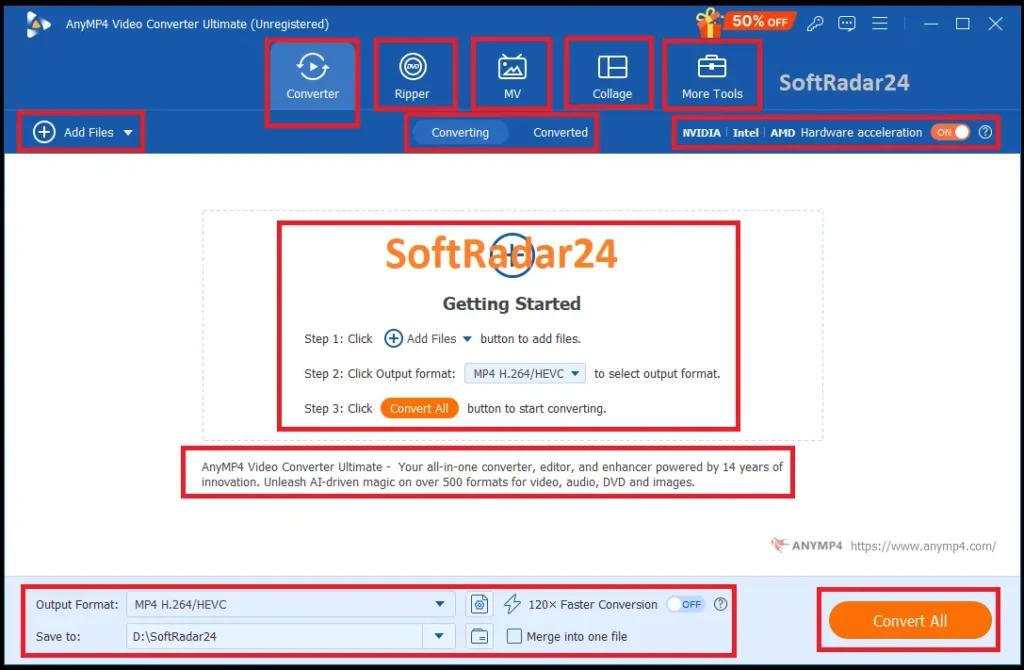
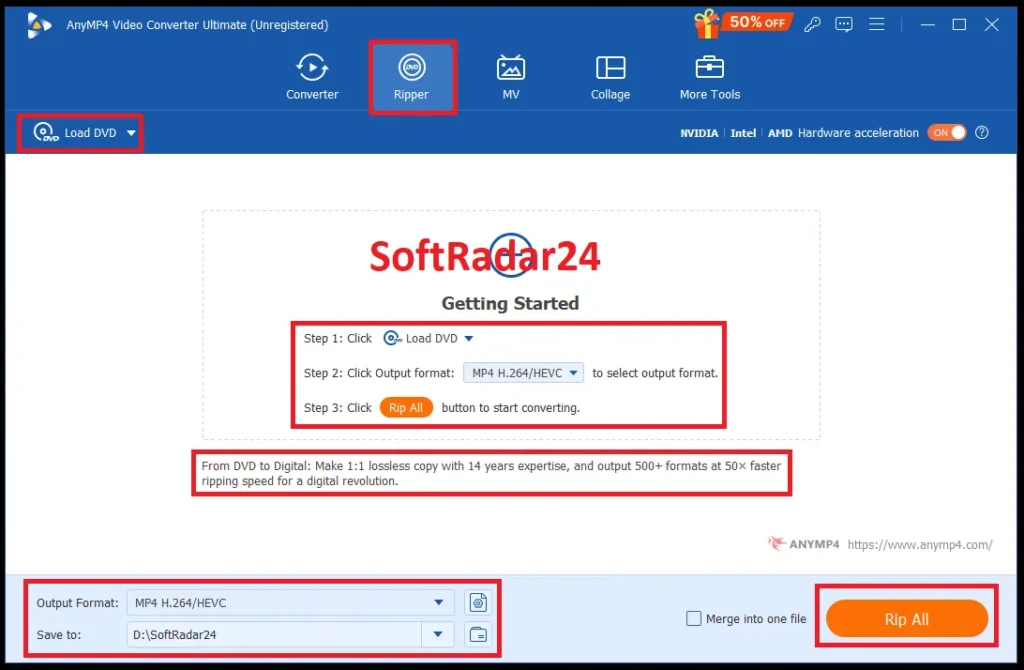
AnyMP4 Video Converter Ultimate separates high-frequency tasks across Converter, Ripper, MV, Collage and More Tools. The Converter dashboard exposes Add Files, output profile, destination folder, merge controls and hardware-acceleration status, while the Ripper uses a parallel workflow for DVD sources.
Compatibility & Coverage
AnyMP4 Video Converter Ultimate has broad format coverage, but “format” can mean container, codec, resolution, audio format, subtitle format or device profile. For buyer decisions, the target device’s codec support matters more than the file extension alone.
| Area | Current documented coverage | Decision note |
|---|---|---|
| Windows | Windows 11 / 10 / 8.1 / 8 / 7 (32-bit and 64-bit) | Current Windows reference requires 1 GHz Intel/AMD CPU and 2 GB RAM minimum. |
| macOS | macOS 10.12 to 15 | Current Mac reference lists Intel and Apple Silicon CPUs, but currently stops at macOS 15; test the free build first on a newer macOS release. |
| High-resolution input | Vendor-listed 8K/5K H.265/HEVC MP4/MKV and multiple 4K H.264/HEVC/VP8/VP9 profiles | Resolution support does not guarantee every codec profile, HDR variant or metadata combination will behave identically on every target device. |
| General video | MP4, MOV, MKV, AVI, WebM, WMV, FLV, TS, MTS, M2TS, MXF, VOB and many additional formats | Choose the output based on the decoder used by the final player/editor, not just the filename extension. |
| Audio | FLAC, WAV, WMA, MP3, AAC, AC3, AIFF, APE, OGG, M4A and other vendor-listed inputs; AAC, AC3, FLAC, MP3, WAV, DTS, ALAC and other outputs | Audio codec compatibility can be the reason an MP4 plays silently even when the video stream itself is valid. |
| Device / platform profiles | Current references include iPhone 17 family, Apple TV, Xbox/PlayStation families, Roku, Chromecast, TVs and social-platform profiles | Profiles simplify output choices but should still be tested on the exact playback or editing target. |
Why Container and Codec Are Different
MKV, MP4, MOV and AVI are containers: they hold video, audio, subtitles and metadata. H.264, H.265/HEVC, VP9 and other codecs define how the media streams are encoded. A TV can therefore reject one MP4 and play another because the two MP4 files contain different codecs or track combinations. AnyMP4 Video Converter Ultimate is useful when the underlying codec/profile must change; a simple remux is enough when only the container must change and every stream is already compatible.
Subtitle & Audio-Track Compatibility
AnyMP4 Video Converter Ultimate can add external SRT, SSA and ASS subtitles and external/multiple audio tracks. However, the destination container/player determines which subtitle and audio formats can survive as separate tracks. Run a small test file before a long batch when multilingual audio, soft subtitles or special metadata are part of the requirement.
Features & Capabilities
The practical value of AnyMP4 Video Converter Ultimate comes from combining conversion with the tasks that usually happen immediately before or after conversion: checking compatibility, reducing size, cleaning a clip, fixing synchronization, adjusting tracks and preparing a file for a specific player or platform.
Video & Audio Conversion
- 500+ vendor-listed video, audio and device/profile outputs
- 8K/5K/4K/HD processing with H.264 and H.265/HEVC options
- Batch conversion for folders or multiple media files
- Device and application-oriented output profiles
- Audio-only output including MP3, FLAC, WAV, AAC and other supported formats
Hardware-Accelerated Processing
- Vendor-listed NVIDIA CUDA/NVENC/NVDEC acceleration
- Vendor-listed Intel hardware-acceleration paths
- Vendor-listed AMD acceleration paths
- Multi-core batch processing
- Vendor advertises up to 70× conversion speed; actual speed varies by workload and hardware
Editing & Track Control
- Trim, merge, crop, rotate and flip video
- Brightness, contrast, saturation, hue and filter adjustments
- Add/edit compatible external audio tracks
- Add and style SRT, SSA and ASS subtitles
- Audio Sync and Volume Booster utilities for targeted corrections
Compression, Enhancement & Utility Tools
- Video Compressor with target size, format, resolution and bitrate controls
- Video Enhancer with resolution upscaling, noise removal, brightness/contrast optimization and shake reduction
- Noise Remover, Color Correction and Video Speed Controller
- Video Watermark Remover for content you own or are authorized to edit
- GIF Maker, Video Reverser, 3D Maker and metadata/file-date utilities
DVD Processing
- Load supported DVD discs, folders and ISO sources
- Transcode authorized DVD content to supported video/audio formats
- MPG/MKV Lossless profiles for vendor-documented lossless DVD output
- 1:1 DVD copy to ISO or folder with original structure
- Preserve supported audio tracks, chapters and subtitles in compatible lossless archive paths
Important Conditions & Limitations
The most important limitation is semantic: “video conversion” is not automatically lossless. A trustworthy buying decision requires separating stream copy, transcoding, compression and AI enhancement because each operation changes media in a different way.
A Codec Change Is Usually Lossy Even When It Looks Visually Identical
Official FFmpeg documentation distinguishes stream copy from transcoding: stream copy avoids decoding/encoding and therefore avoids quality loss, while transcoding decodes and re-encodes a stream and usually degrades it to some degree. AnyMP4 Video Converter Ultimate can produce excellent-looking outputs, but H.265-to-H.264, resizing, filtering and aggressive compression should not be described as mathematically lossless.
A Simple Remux Can Be the Better Tool for Container-Only Changes
If an MKV already contains video, audio and subtitles that are valid in MP4, a pure stream-copy remux can move those streams into a new container without re-encoding. AnyMP4 Video Converter Ultimate earns its value when the underlying codec/profile needs to change or when you also need compression, editing, enhancement, batch profiles or DVD features.
Subtitles and Multiple Audio Tracks Need a Real Test File
A source container can hold track types that a target container or playback device does not support in the same way. Converting a multilingual MKV to MP4 can therefore change how subtitles or audio tracks are stored. Test one representative file and inspect every required track before running a large archive through AnyMP4 Video Converter Ultimate.
Compression Always Trades Something
AnyMP4 Video Converter Ultimate can target a smaller file size, but a dramatic reduction must come from more efficient coding, a lower bitrate, reduced resolution/frame rate or some combination of those factors. “Compress without losing quality” should be interpreted as minimizing visible loss for the target use—not as retaining every encoded bit while shrinking the file substantially.
AI Upscaling Cannot Recover Detail That Was Never Captured
Video Enhancer can upscale resolution, reduce noise, adjust brightness/contrast and reduce shaking, but enhancement models infer or smooth visual information. Old low-resolution or heavily compressed footage can become easier to watch without becoming equivalent to genuine high-resolution source footage. Use the 10-second preview before committing a long export.
The 70× Speed Figure Is a Vendor Claim, Not a Universal Benchmark
AnyMP4 advertises up to 70× video conversion speed using NVIDIA, Intel and AMD hardware acceleration. Actual performance depends on codec support, source and output resolution, filters, GPU generation, CPU, storage speed and whether the selected operation can use hardware encoding/decoding. Do not choose a license based on the headline multiplier alone.
Current Mac Tech Specs Stop at macOS 15
The current AnyMP4 Mac Video Converter Ultimate reference lists macOS 10.12 through 15 and Intel/Apple Silicon processors. On a newer macOS release, run the current free build and test the exact conversion workflow before relying on the published older compatibility ceiling.
DVD Functions Do Not Create Copying Rights
AnyMP4’s own product page warns against ripping rental DVDs or using DVD backup for commercial purposes. Use AnyMP4 Video Converter Ultimate DVD functions only with material you own or are otherwise authorized to copy, and follow applicable copyright rules in your jurisdiction.
The 30-Day Money-Back Guarantee Is Conditional
AnyMP4 publishes a 30-day money-back guarantee but its refund policy explicitly says it is not unconditional. Change of mind, misunderstanding features, buying an unsupported OS version and certain promotion-related requests can be excluded. Try the current build before purchase and review the policy attached to the exact license.
Free Trial / Free Version
AnyMP4 provides desktop trial downloads for Windows and macOS. Current 2026 AnyMP4 conversion articles describe the desktop trial as limiting exported video to the first 5 minutes per file, while the general refund policy says trial versions do not remove core functionality. The practical interpretation is simple: use the trial to test compatibility and tools, but expect output-length limits before registration.
| What to test | Why it matters | Best pre-purchase check |
|---|---|---|
| Problem source file | Codec/container problems are file-specific. | Load the exact HEVC, MKV, MOV, M2TS or other file that currently fails in your player/editor. |
| Target playback/editing device | A successful conversion is useless if the target still rejects the codec or tracks. | Convert a short sample in AnyMP4 Video Converter Ultimate and test it on the real TV, phone, console or editor. |
| Subtitles / audio tracks | Container compatibility can change track behavior. | Verify languages, subtitles and audio synchronization in the trial output. |
| Hardware acceleration | Actual speed depends on whether your hardware and selected codec path can accelerate the job. | Check acceleration status and compare a representative 4K file rather than assuming the advertised maximum. |
| Enhancement / compression | Visual quality is subjective and source-dependent. | Use previews and a short export before applying AnyMP4 Video Converter Ultimate settings to a large batch. |
System Requirements
AnyMP4’s current references publish modest minimum CPU/RAM requirements. Large 4K/8K jobs and AI-enhancement workloads are much more demanding in practice, so the minimum should be read as compatibility—not as a performance recommendation.
| Requirement | Current documented value | Decision note |
|---|---|---|
| Windows | Windows 11 / 10 / 8.1 / 8 / 7 (32-bit / 64-bit) | Current Windows reference. |
| Windows CPU | 1 GHz Intel/AMD CPU or above | Minimum compatibility figure, not a realistic target for heavy 8K workloads. |
| Windows RAM | 2 GB RAM or above | Large batches and high-resolution processing benefit from substantially more memory. |
| macOS | macOS 10.12 to 15 | Current Mac reference currently stops at macOS 15. |
| Mac CPU | 1 GHz or above Intel and Apple Silicon processor | Current Mac reference. |
| Mac RAM | 2 GB RAM or above | Current documented minimum. |
| GPU acceleration | Vendor lists NVIDIA, Intel and AMD acceleration technologies for supported workloads | Availability depends on hardware, drivers, OS edition and selected codec path. |
| Storage | Not expressed as one universal working-space figure on the current reference pages | Keep enough free space for source files, temporary processing and final output; lossless DVD and 4K/8K media can be large. |
Alternatives & Better-Fit Options
Choose an alternative according to the bottleneck: platform, conversion workflow, DVD/media breadth or AI enhancement. For the wider product family and current offers, visit the AnyMP4 software page on SoftRadar24.
Aiseesoft Video Converter Ultimate
A close Windows/macOS alternative when you want another all-in-one conversion, compression and editing environment. Compare the exact codec profiles, toolbox utilities and license structure you need rather than assuming two similarly named multimedia suites handle every workflow identically.
Tipard Total Media Converter
Relevant when your workflow combines ordinary video conversion with broader media-format handling and you want a different interface/licensing option. Use the SoftRadar24 product guide to compare supported formats and current commercial terms against AnyMP4 Video Converter Ultimate.
WonderFox HD Video Converter Factory Pro
A useful Windows-focused comparison when conversion, compression and quick media processing matter more than cross-platform parity. It can be a better decision path for users who do not need a Mac license and prefer a Windows-only media workflow.
Winxvideo AI
A stronger comparison when AI upscaling, frame interpolation, restoration or aggressive large-video processing is the central reason for purchase. AnyMP4 Video Converter Ultimate includes enhancement utilities, but its identity remains broader conversion and multimedia processing.
MacXvideo AI
Worth considering when AI quality enhancement and high-resolution processing are more important than DVD tooling or a large general-purpose converter toolbox. It is especially relevant when the buying decision starts with restoration/upscaling rather than format compatibility.
FAQ
These answers cover current AnyMP4 Video Converter Ultimate pricing, coupon behavior, licensing, format support, trial limits and common technical buying questions without repeating the scenario rows above.
How much does AnyMP4 Video Converter Ultimate cost with the current SoftRadar24 offer?
The current approved SoftRadar24 prices are US$27.50 for a 1-Year license and US$37.47 for a Lifetime license. Windows and macOS use separate checkout products, with one-computer license options shown on this page. Select the operating system before payment.
Is there an AnyMP4 Video Converter Ultimate coupon code or current discount?
Yes. The current SoftRadar24 campaign applies a 50% AnyMP4 Video Converter Ultimate coupon discount automatically through the approved purchase links. No manual coupon-code entry is required.
Does AnyMP4 Video Converter Ultimate offer a lifetime license?
Yes. The current approved SoftRadar24 Lifetime option is US$37.47 for one Windows PC or one Mac, depending on the edition selected. The 1-Year option is US$27.50.
Can AnyMP4 Video Converter Ultimate convert MKV to MP4 without losing quality?
It can convert MKV to MP4, but “without losing quality” depends on what changes. If video/audio streams are re-encoded, the operation is transcoding and is normally lossy even when the result looks visually identical. If only the container needs to change and all streams are MP4-compatible, a stream-copy remux is the genuinely lossless approach.
Does AnyMP4 Video Converter Ultimate support HEVC, 4K and 8K files?
Yes. Current AnyMP4 references list H.265/HEVC 8K/5K MP4 and MKV plus multiple 4K H.264, HEVC, VP8 and VP9 profiles. Actual playback compatibility after conversion still depends on the target device’s codec/profile support.
Can AnyMP4 Video Converter Ultimate keep subtitles and multiple audio tracks?
AnyMP4 Video Converter Ultimate supports adding external/multiple audio tracks and SRT, SSA and ASS subtitles. The final track behavior depends on the output container and target player, so test a representative multilingual file before processing a large collection.
How fast is AnyMP4 Video Converter Ultimate?
AnyMP4 advertises up to 70× video-conversion speed using supported NVIDIA, Intel and AMD hardware acceleration. That is a vendor maximum, not a guaranteed result. Speed changes substantially with codec, resolution, filters, GPU support and storage performance.
What are the AnyMP4 Video Converter Ultimate free-trial limits?
AnyMP4 provides Windows and Mac trial downloads. Current 2026 AnyMP4 conversion articles describe the desktop trial as exporting the first 5 minutes of each media file. Use the trial to verify the exact codec, subtitles, hardware acceleration and quality workflow that matters before paying.
Does AnyMP4 Video Converter Ultimate support current macOS versions?
The current Mac reference lists macOS 10.12 through macOS 15 and Intel/Apple Silicon processors. Because that official table currently stops at macOS 15, test the current AnyMP4 Video Converter Ultimate for Mac build first when using a newer macOS release.
What is the AnyMP4 Video Converter Ultimate refund policy?
AnyMP4 publishes a 30-day money-back guarantee, but its refund policy states that it is conditional rather than unconditional. Product misunderstanding, change of mind, some promotion-related requests and buying an unsupported OS version can be excluded.





