
Quick Summary
FoneLab iOS System Recovery is a Windows and macOS firmware-repair utility for iPhone, iPad and iPod problems that prevent iOS from starting or behaving normally. FoneLab iOS System Recovery targets software-level conditions such as an Apple-logo freeze, restart loop, recovery/DFU mode, black or frozen screens, failed update/restore states and several vendor-listed iTunes/device errors. Standard Mode is designed to repair iOS without erasing personal data, while Advanced Mode performs a deeper repair that erases the device completely.
- Best for
- Apple-logo freezes · boot loops · recovery/DFU mode · failed update/restore repair
- Platforms
- Windows and macOS
- Current campaign
- 6-device promo · 1-Month · 1-Year · Lifetime · multi-computer options
- Key limitation
- Advanced Mode erases all device data
FoneLab iOS System Recovery Pricing, Discount Code & License Options
The current 50% FoneLab iOS System Recovery coupon discount is applied automatically to eligible SoftRadar24 license options below. No manual coupon-code entry is required.
Choose Windows or macOS first, then select the license that fits your repair window and computer allowance. The Windows 6-Device / 1-PC option is selected first because it is the lowest-priced current SoftRadar24 offer at US$15.00.
Current FoneLab iOS System Recovery License Prices
The purchase selector currently includes the following approved SoftRadar24 license options:
- FoneLab iOS System Recovery 6-Device License · Windows / 1 PC · US$15.00
- FoneLab iOS System Recovery 1-Month License · Windows / 1 PC · US$19.90
- FoneLab iOS System Recovery 1-Year License · Windows / 1 PC · US$24.97
- FoneLab iOS System Recovery Lifetime License · Windows / 1 PC · US$34.97
- FoneLab iOS System Recovery Lifetime License · Windows / 3 PCs · US$53.40
- FoneLab iOS System Recovery for Mac 6-Device License · macOS / 1 Mac · US$15.00
- FoneLab iOS System Recovery for Mac 1-Month License · macOS / 1 Mac · US$19.90
- FoneLab iOS System Recovery for Mac 1-Year License · macOS / 1 Mac · US$24.97
- FoneLab iOS System Recovery for Mac Lifetime License · macOS / 1 Mac · US$34.97
- FoneLab iOS System Recovery for Mac Lifetime License · macOS / 3 Macs · US$53.40
FoneLab iOS System Recovery · 6-Device License
Windows · 1 PC · up to 6 iOS devices
Included with this license- FoneLab iOS System Recovery use on 1 Windows PC with the current 6-device allowance
- Standard Mode and Advanced Mode system-repair workflows
- Firmware-based repair for supported iPhone, iPad and iPod system issues
- Supported iOS upgrade/downgrade choices presented by FoneLab iOS System Recovery
US$15.00current offer
50% discount automatically applied
Buy NowWindows · 6 Devices · 1 PC
Selected first because it is the lowest-priced current SoftRadar24 FoneLab iOS System Recovery option and covers up to 6 iOS devices on 1 Windows PC.
Confirm the operating system, device/computer allowance, license term, applicable tax and final checkout total before payment. The approved SoftRadar24 checkout applies the eligible campaign discount automatically.
Can This Software Do What I Need?
Global iPhone-repair searches concentrate on a small number of high-stress situations: an iPhone frozen on the Apple logo, a restart loop after an update or low-storage event, a device trapped on the Connect to Computer screen, a restore that repeatedly fails, a black/frozen display, an unavailable iPhone, and fear of losing unbacked-up data. The safest decision is to separate software-state problems from hardware damage and to distinguish data-preserving repair from erase-and-restore workflows.
My iPhone is stuck on the Apple logo or keeps restarting
Boot failure / restart loop
SupportedApple-logo freezes and loop restarts are explicitly listed FoneLab iOS System Recovery scenarios. First try a force restart and, when Apple offers it, Recovery Mode Update before Restore. If the phone still cannot boot, FoneLab iOS System Recovery Standard Mode is the vendor’s data-preserving repair path; Advanced Mode is destructive.
My iPhone is stuck in recovery mode and Apple Devices/Finder will not complete the update
Recovery-mode loop
SupportedFoneLab iOS System Recovery is specifically documented for devices stuck in Recovery Mode. The useful buying question is whether you have already tried Apple’s Update path, because Apple’s Restore reinstalls iOS and erases the device. FoneLab iOS System Recovery Standard Mode is intended as the lower-data-risk repair option before accepting a full erase.
My iPhone became stuck after an iOS update or while verifying the update
Failed or incomplete system update
SupportedFoneLab iOS System Recovery lists verifying-update problems and update/restore errors among its repair scenarios. Keep the USB connection and Internet connection stable during firmware download and repair. If the iPhone shows a progress bar that is still moving, do not interrupt a legitimate Apple update simply because it is slow.
My iPhone storage was full before it entered a boot loop
Low-storage startup failure
ConditionalLow free storage is a recurring real-world context around failed updates and boot loops, and FoneLab iOS System Recovery lists Error 1110 as a not-enough-space update condition. If preserving unbacked-up data is critical, avoid jumping directly to an erase. Standard Mode requires at least 5 GB free on both the computer and iOS device, so a severely full device may itself limit that route.
The iPhone is black, white, blue, red or completely frozen but still seems powered
Abnormal screen/system state
ConditionalFoneLab iOS System Recovery lists several abnormal-screen and frozen states. A software repair is relevant only when the underlying problem is iOS and the device can still be detected or guided into Recovery/DFU mode. If the display, battery, connector or logic board is physically damaged, software cannot repair that hardware.
I forgot the iPhone passcode and the screen says iPhone Unavailable or Security Lockout
Passcode lockout
Different taskDo not buy FoneLab iOS System Recovery expecting a data-preserving passcode bypass. Aiseesoft lists disabled-iPhone states among repair scenarios, but Apple’s passcode-reset process erases the device when the passcode is forgotten. System repair and credential removal are separate problems.
I see Error 4013, 4014, 3014, 2001 or another update/restore error
Apple Devices / iTunes restore errors
Verify firstFoneLab iOS System Recovery lists those errors, but an error code is not proof that the cause is repairable firmware. USB communication, server access and hardware faults can produce restore failures. Check cable/port/computer conditions first, and use Apple service when recovery mode repeatedly fails or hardware damage is suspected.
My iPhone is stuck in headphone mode even though nothing is connected
Audio-routing symptom
ConditionalHeadphone Mode is a vendor-listed FoneLab iOS System Recovery scenario, but Aiseesoft’s own troubleshooting guide recommends simpler checks first and acknowledges that a damaged headphone/charging port may require hardware repair. Use firmware repair only after ruling out debris, moisture, accessories and obvious physical damage.
The iPhone was dropped, bent, exposed to liquid or has a non-working button
Possible hardware damage
Verify firstFoneLab iOS System Recovery cannot replace a battery, repair a port, fix a broken display connector or restore damaged board components. Apple states that service may be required when recovery mode cannot be used because a button is broken or when update/restore still fails. Diagnose hardware before paying for software repair.
I want to downgrade from a beta or newer iOS version
Firmware version change
ConditionalFoneLab iOS System Recovery includes an upgrade/downgrade workflow, but Aiseesoft qualifies it by device and firmware support. Choose only a version that FoneLab iOS System Recovery currently presents as compatible for the connected device; do not assume any historical iOS release can be installed on demand.
How It Works
FoneLab iOS System Recovery repairs by identifying the connected Apple device, matching firmware and applying either Standard or Advanced repair. The mode decision is the critical step because Standard Mode is designed to retain data while Advanced Mode erases the device.
Repair iOS with FoneLab iOS System Recovery Standard Mode
- Open FoneLab iOS System Recovery on the Windows PC or Mac and choose System Repair.
- Connect the iPhone, iPad or iPod by USB/USB-C and let FoneLab iOS System Recovery detect the device. If normal detection is not possible, follow the FoneLab iOS System Recovery instructions for Recovery or DFU mode.
- Verify the device model and iOS/iPadOS version shown by FoneLab iOS System Recovery, then choose Standard Mode when data preservation is the priority.
- Let FoneLab iOS System Recovery match and download the required firmware over a stable Internet connection.
- Keep the cable connected and the computer awake while FoneLab iOS System Recovery applies the repair and the device restarts.
Use FoneLab iOS System Recovery Advanced Mode Only When Erasure Is Acceptable
- Back up anything still accessible before opening Advanced Mode in FoneLab iOS System Recovery.
- Confirm the exact iPhone/iPad/iPod model and target firmware in FoneLab iOS System Recovery before continuing.
- Choose Advanced Mode only when Standard Mode is insufficient and you accept that FoneLab iOS System Recovery will erase the device completely.
- After the FoneLab iOS System Recovery repair finishes, set up the Apple device again and restore an available backup if required.
Upgrade or Downgrade with FoneLab iOS System Recovery
- Connect the device and open the firmware/version workflow in FoneLab iOS System Recovery.
- Select only an iOS/iPadOS version that FoneLab iOS System Recovery currently offers as compatible for the detected hardware.
- Download the matching firmware and keep the Internet and USB connections stable throughout the FoneLab iOS System Recovery process.
- Verify the device starts normally after the version change before removing any backup or recovery files you may still need.
Product Interface & Workflow
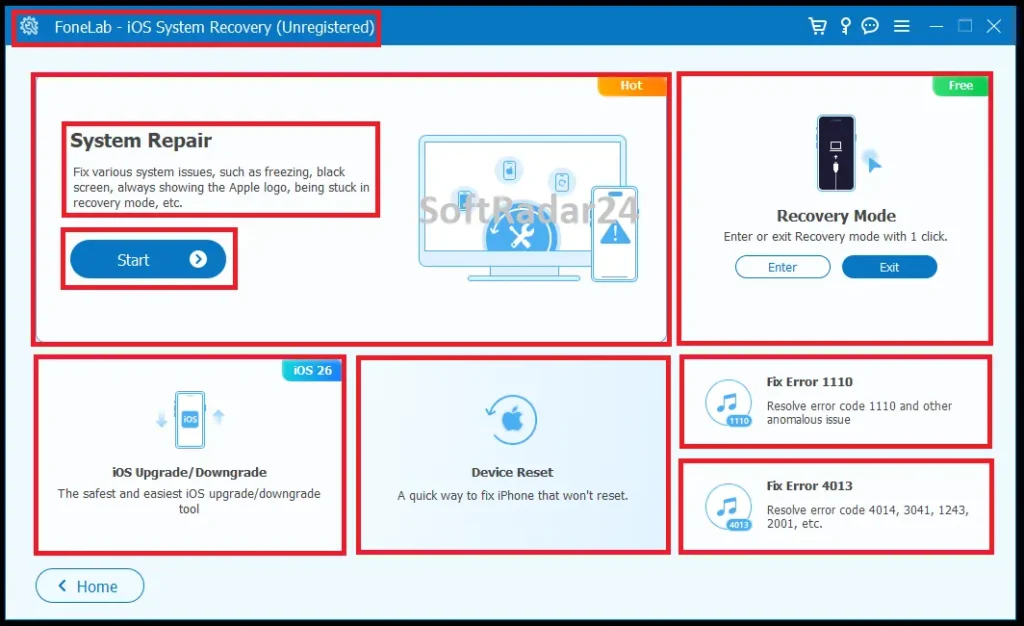
FoneLab iOS System Recovery uses a module-style dashboard rather than one generic Repair button. The current interface exposes System Repair as the main firmware-repair path and also shows dedicated modules for Recovery Mode, iOS Upgrade/Downgrade, Device Reset and specific error workflows. The important distinction for purchase is still inside System Repair: Standard Mode is the data-preserving path described by Aiseesoft, while Advanced Mode erases data.
Compatibility & Coverage
FoneLab iOS System Recovery currently supports iPhone models through the iPhone 17 family, all current iPad families and legacy iPod touch models. Its official support table lists iOS 5 and later through iOS 26, iPadOS 13 through 26, Windows 11 through Windows 7 and Mac OS X 10.7+ including macOS Tahoe.
| Area | Current documented coverage | Decision note |
|---|---|---|
| iPhone | iPhone 17 Pro Max / 17 Pro / Air / 17 through older iPhone generations | Use the current FoneLab iOS System Recovery build with newly released devices. |
| iPad | All models of iPad Pro, iPad Air, iPad mini and iPad | Current vendor-listed tablet coverage. |
| iPod | iPod touch 7 / 6 / 5 / 4 / 3 / 2 / 1 | Legacy iPod support remains listed. |
| iOS | iOS 5 and later, including iOS 26 | Current product page does not list iOS 27 beta in the main compatibility table. |
| iPadOS | iPadOS 13 / 14 / 15 / 16 / 17 / 18 / 26 | Use the latest FoneLab iOS System Recovery build after major iPadOS updates. |
| Desktop OS | Windows 11 / 10 / 8.1 / 8 / 7 · Mac OS X 10.7+ including macOS Tahoe | Windows and macOS editions use separate checkout links. |
Repair Scenarios Aiseesoft Currently Lists
| Problem family | Examples in current FoneLab iOS System Recovery documentation | Important boundary |
|---|---|---|
| Startup / screen | Apple logo, loop restart, frozen screen, black/white/blue/red screen, screen not responding | Relevant when the cause is iOS; physical display/battery/board damage needs hardware service. |
| System modes | DFU Mode, Recovery Mode, Restore Mode, Headphone Mode and other stuck-mode states | Recovery/DFU access may be required for a severely unbootable device. |
| Update / restore | Verifying Update, iTunes/Apple-device update and restore errors, cannot restore | Try Apple’s Update path before destructive Restore when data preservation matters. |
| Specific error codes | 1110, 4013, 4014, 3014, 2001 and other errors | Error codes can have connection, server or hardware causes; software repair is not guaranteed to solve every cause. |
| Firmware version | Supported iOS upgrade/downgrade during repair | Only choose versions currently presented as supported for the detected device. |
Features & Capabilities
FoneLab iOS System Recovery is most useful when the phone is still electronically alive but iOS cannot complete a normal startup, update or restore. The product’s value is the combination of guided firmware matching, two repair depths and support for several failure states that normally push users toward Recovery Mode or a full restore.
Standard & Advanced Repair
- Standard Mode is designed by Aiseesoft to repair supported iOS system problems without erasing device data
- Advanced Mode performs the deeper FoneLab iOS System Recovery repair and erases all device data
- Device-model and system-version confirmation before firmware download
- Guided Recovery/DFU entry when a severe system state requires it
Boot, Screen & Recovery-State Repair
- Apple-logo freezes and restart loops
- Recovery Mode and DFU Mode problems
- Frozen, black, white, blue and red screen states
- Restore-mode and other vendor-listed abnormal iOS modes
Update, Restore & Error Workflows
- Verifying Update and update/restore failure scenarios
- Vendor-listed support for Error 1110, 4013, 4014, 3014 and 2001
- Device-reset and connection-related repair modules in the current interface
- Firmware download matched to the detected Apple device
Supported Firmware Version Changes
- Upgrade or downgrade choices during supported FoneLab iOS System Recovery workflows
- Selection from firmware versions presented for the connected device
- Current product support through iOS 26 and iPadOS 26
- Stable Internet connection required while downloading repair firmware
Important Conditions & Limitations
System-repair software operates at a point where the risk of data loss is real. The most important buying information is therefore not the number of listed iPhone errors; it is knowing when Standard Mode is appropriate, when Advanced Mode will erase the phone, when Apple’s built-in recovery should be tried first and when the problem has crossed into hardware service.
Standard Mode Is Designed to Preserve Data, Not a Substitute for a Backup
Aiseesoft states that FoneLab iOS System Recovery Standard Mode repairs without data loss. Because the workflow still downloads and applies system firmware to a malfunctioning device, important unbacked-up data should not be treated as risk-free. If the iPhone is accessible enough to make a backup first, make one before firmware repair.
Advanced Mode Erases the Device Completely
The current FoneLab iOS System Recovery page is explicit that Advanced Mode erases all data. Do not choose Advanced Mode merely because it sounds stronger. Use it only when Standard Mode is insufficient and you have a usable backup or accept losing the device’s local contents.
Apple’s Recovery Mode Update Is a Free First-Line Option
Apple’s current support guidance says that when an iPhone is stuck on the Apple logo, repeatedly starts Recovery Assistant or cannot update normally, Recovery Mode can be used from Finder or Apple Devices. Apple specifically recommends trying Update before Restore when Update has not already been tried; Restore reinstalls iOS and erases the device. This free route should be considered before paying for firmware repair.
FoneLab iOS System Recovery Cannot Repair Physical Hardware
A dropped, bent, liquid-damaged or electrically failing iPhone can show symptoms that resemble software corruption. FoneLab iOS System Recovery cannot repair a battery, charging port, display connector, storage chip or logic board. Apple says service may be needed when recovery mode cannot be used because a button is broken or when update/restore continues to fail.
A Forgotten Passcode Is Not a Data-Preserving System Repair
The vendor lists disabled-iPhone states, but users searching for “iPhone Unavailable” after forgetting a passcode should not assume FoneLab iOS System Recovery can unlock the device while preserving local data. Apple’s forgotten-passcode recovery process resets the device. Treat passcode removal and iOS firmware repair as separate jobs.
Standard Mode Has Free-Space and Battery Requirements
Aiseesoft currently requires at least 5 GB of free space on both the computer and iOS device for Standard Mode and at least 30% device battery. The vendor also states that at least 500 MB of additional device space is needed to download the firmware package. A phone trapped in a full-storage boot loop may therefore be a particularly difficult data-preserving case.
Firmware Downgrade Is Not an Arbitrary Old-iOS Installer
FoneLab iOS System Recovery advertises iOS upgrade and downgrade during repair, but Aiseesoft ties that feature to versions supported by the device. Choose only the firmware versions FoneLab iOS System Recovery currently presents as compatible; availability can change as Apple firmware support changes.
Headphone Mode, No Service and Charging Symptoms Can Be Hardware-Related
Aiseesoft lists headphone mode, no service and charging problems among FoneLab iOS System Recovery scenarios, but those symptoms can also come from ports, accessories, moisture, batteries or carrier/hardware conditions. Aiseesoft’s own headphone-mode guide recommends hardware repair when the port itself is defective. Diagnose the physical cause before buying system-repair software for an isolated hardware-like symptom.
The Current Compatibility Table Stops at iOS 26
FoneLab iOS System Recovery currently lists iOS 5 and later with iOS 26 included and iPadOS through 26. The main compatibility table does not currently name iOS 27 beta. Test the current build first if your primary device is running a newer or beta system version not explicitly listed.
The 30-Day Refund Statement Is Conditional
The current FoneLab iOS System Recovery product page states a 30-day money-back guarantee when there is a quality problem. Do not read that as an unconditional right to refund merely because a physically damaged or unsupported device cannot be repaired. Verify the current checkout and refund terms for the exact license before payment.
Free Trial / Free Version
Aiseesoft provides Free Download links for FoneLab iOS System Recovery on Windows and Mac. The current primary product page does not publish one complete modern table showing exactly which repair actions are unrestricted before registration. Use the free build first to verify device detection, interface access and firmware compatibility before purchasing a license for a critical repair.
| What to test | Why it matters | Best pre-purchase check |
|---|---|---|
| Device detection | FoneLab iOS System Recovery cannot repair a phone it cannot communicate with. | Connect the actual problem device and confirm that the current build identifies it or guides it into a supported recovery state. |
| Model / firmware match | Installing firmware intended for the wrong device or version is not an acceptable repair path. | Confirm that FoneLab iOS System Recovery identifies the exact device and presents a compatible firmware choice. |
| Available repair mode | Standard and Advanced Mode have radically different data consequences. | Verify that Standard Mode is available for your repair scenario before purchasing specifically to avoid an erase. |
| Free-space requirements | Standard Mode requires free space on both the computer and iOS device. | Confirm the device has enough storage and at least 30% battery before relying on that mode. |
| Hardware warning signs | Software cannot fix physical failure. | If the device is not detected, was dropped/liquid-damaged or has broken buttons, compare service options before paying for software. |
System Requirements
FoneLab iOS System Recovery has modest desktop minimums, but Standard Mode adds unusually important device-side requirements because the repair has to stage firmware while preserving the existing data partition.
| Requirement | Current documented value | Decision note |
|---|---|---|
| Windows | Windows 11 / 10 / 8.1 / 8 / 7 | Current FoneLab iOS System Recovery support range. |
| macOS | Mac OS X 10.7 or above, including macOS Tahoe | Current vendor-listed Mac range. |
| CPU | 1 GHz Intel/AMD CPU or above | Current documented minimum. |
| RAM | 1 GB RAM or more | Current documented minimum. |
| Application disk space | 200 MB or more free space | Does not include the full temporary storage needed for firmware and Standard Mode. |
| Firmware space | At least 500 MB additional free space on the iOS device | Current Aiseesoft firmware-download note. |
| Standard Mode storage | At least 5 GB free on both the computer and iOS device | Critical for users whose boot loop began when storage was already nearly full. |
| Standard Mode battery | At least 30% device power | Charge the device before starting a firmware repair when possible. |
| iOS / iPadOS | iOS 5+ through iOS 26 · iPadOS 13 through 26 | The current main table does not list iOS 27 beta. |
Alternatives & Better-Fit Options
FoneLab iOS System Recovery is specifically for iOS system repair. Choose another tool when the real job is preventive backup, ordinary file movement or deleted-data recovery. For the wider product family and current offers, visit the Aiseesoft software page on SoftRadar24.
FoneLab iOS Data Backup & Restore
Use this before a risky repair when the iPhone or iPad is still accessible and you want a separate local archive of supported data. Backup software is the preventive step; FoneLab iOS System Recovery is the firmware-repair step after iOS stops behaving normally.
Aiseesoft FoneTrans
A better fit when the iPhone starts normally and you simply need to move or organize photos, music, videos, contacts or messages. Aiseesoft FoneTrans solves active file-management problems; it should not be purchased to repair a boot loop or recovery-mode failure.
Aiseesoft MobieSync
Choose Aiseesoft MobieSync when the task is cross-platform phone management involving Android as well as iPhone. That transfer role is separate from FoneLab iOS System Recovery’s Apple-device firmware repair.
FoneLab iPhone Data Recovery
Relevant after data has already been deleted or lost and no usable backup contains it. FoneLab iPhone Data Recovery focuses on recoverable data, while FoneLab iOS System Recovery focuses on making a malfunctioning iOS installation boot and operate again.
AnyMP4 iPhone Data Recovery
A cross-brand data-recovery comparison when the priority is finding deleted photos, messages, contacts or backup content rather than repairing iOS itself. Recovery success depends on whether the missing data still exists in a recoverable source.
AnyMP4 iPhone Transfer Pro
Compare this when the device is healthy and the goal is iPhone/iPad content transfer and organization on Windows or Mac. It belongs on the file-management side of the decision, not the firmware-repair side.
FAQ
These answers focus on current FoneLab iOS System Recovery pricing, coupon behavior, repair modes, data risk, compatibility and practical firmware-repair questions without duplicating the scenario decisions above.
How much does FoneLab iOS System Recovery cost with the current SoftRadar24 offer?
Current SoftRadar24 prices are US$15.00 for the 6-device / 1-PC or 1-Mac offer, US$19.90 for 1 Month, US$24.97 for 1 Year, US$34.97 for Lifetime on 1 PC/Mac, and US$53.40 for the Lifetime / 3-PC or 3-Mac option. Choose Windows or macOS first so the correct checkout product is used.
Is there a FoneLab iOS System Recovery coupon code or current discount?
Yes. The current SoftRadar24 campaign applies the eligible FoneLab iOS System Recovery coupon discount automatically through the approved purchase links. The campaign is presented as 50% off eligible options, so no manual coupon-code entry is required.
Does FoneLab iOS System Recovery offer a lifetime license?
Yes. The current SoftRadar24 Lifetime option is US$34.97 for 1 Windows PC or 1 Mac. A separate Lifetime option for 3 Windows PCs or 3 Macs is currently US$53.40.
What is the difference between Standard Mode and Advanced Mode in FoneLab iOS System Recovery?
Aiseesoft describes Standard Mode as the repair path that preserves device data and Advanced Mode as the deeper repair that erases all data completely. Standard Mode also currently requires at least 5 GB free on both the iOS device and computer plus at least 30% device power.
Can FoneLab iOS System Recovery fix an iPhone without losing data?
Standard Mode is designed by Aiseesoft for repair without data loss, but a malfunctioning device and firmware operation should never be treated as risk-free. Back up the iPhone first whenever that is still possible. Advanced Mode always erases the device.
Does FoneLab iOS System Recovery support iPhone 17 and iOS 26?
Yes. The current support table lists the iPhone 17 Pro Max, iPhone 17 Pro, iPhone Air and iPhone 17, and lists iOS 5 and later with iOS 26 included. The same current table does not name iOS 27 beta.
Can FoneLab iOS System Recovery downgrade iOS?
FoneLab iOS System Recovery includes an upgrade/downgrade workflow when the connected device supports the target version. Use only versions currently offered as compatible inside FoneLab iOS System Recovery; do not assume every old iOS release remains installable.
Is FoneLab iOS System Recovery free?
Aiseesoft provides Free Download installers for Windows and Mac. The current primary product page does not provide one complete feature-limit table for every unregistered repair action, so test device detection and the required workflow before purchasing.
Does FoneLab iOS System Recovery need Recovery Mode or DFU Mode?
Not every normally detected device needs manual Recovery/DFU entry at the first step, but Aiseesoft states that an abnormal device must be able to enter Recovery or DFU mode when required for repair. FoneLab iOS System Recovery provides guidance when that escalation is necessary.
How much free space and battery does FoneLab iOS System Recovery need?
The desktop application requires at least 200 MB free space. Aiseesoft additionally requires at least 500 MB extra on the iOS device for the firmware package. Standard Mode requires at least 5 GB free on both the computer and iOS device and at least 30% device battery.
What is the FoneLab iOS System Recovery refund period?
The current product page states a 30-day money-back guarantee when there is a quality problem. Because repair success depends on the actual device condition, verify the current policy and eligibility terms attached to the exact license before purchase.





