
Quick Summary
Aiseesoft MXF Converter is a Windows and macOS transcoding utility for professional-camera MXF/P2 MXF footage that needs a more compatible playback, editing or delivery format. It accepts MXF plus TS, MTS, M2TS, TP and TRP sources, exports MP4, MOV, AVI, MKV, WebM, WMV, MPEG-family video, HD profiles and audio-only formats, and adds batch processing, preview, output-profile controls and basic editing before conversion.
- Best for
- MXF to MP4/MOV · Panasonic P2 · Sony XDCAM · Canon XF workflows · ProRes 422 on Mac · batch conversion
- Platforms
- Windows & macOS
- License
- 1-Year / Lifetime
- Key limitation
- Re-encoding can lose quality; keep original MXF masters
Aiseesoft MXF Converter Pricing, Discount Code & License Options
The current 50% Aiseesoft MXF Converter coupon discount is applied automatically through the SoftRadar24 standalone checkout links below. No manual coupon-code entry is required.
Choose Windows or macOS first, then select 1 Year or Lifetime. The 1-Year standalone license is $14.50 for one computer; Lifetime is $24.97 for one computer.
Standalone Aiseesoft MXF Converter License Prices
- Aiseesoft MXF Converter · Windows / 1 PC · 1 Year · $14.50
- Aiseesoft MXF Converter · Windows / 1 PC · Lifetime · $24.97
- Aiseesoft MXF Converter for Mac · 1 Mac · 1 Year · $14.50
- Aiseesoft MXF Converter for Mac · 1 Mac · Lifetime · $24.97
Aiseesoft MXF Converter · 1-Year License
Windows · 1 PC · 1-year license
Included with this license- MXF/P2 MXF conversion on one Windows PC for one year
- MP4, MOV, AVI, MKV, WebM, WMV and additional supported outputs
- Batch conversion, preview and adjustable output parameters
- Trim/crop/merge/watermark and picture-setting tools
The 1-Year license is the lowest-cost standalone option at $14.50. Lifetime costs $24.97, a $10.47 increase for long-term use on the same one-computer license tier.
Windows and Mac use separate licenses. Choose the edition that matches the computer where Aiseesoft MXF Converter will run.
Can This Software Do What I Need?
Start with the job you actually need to finish. If an MXF-capable player or your editor already opens the original footage correctly, conversion may add no value. Aiseesoft MXF Converter is most useful when you need a more compatible delivery file, an editing intermediate, batch transcoding or a predictable output profile.
I only need to open and watch an MXF file on Windows or Mac
Playback may not need conversion
Better fitTry an MXF-capable player first. A player that supports the codec inside the container can avoid an unnecessary transcode. Use Aiseesoft MXF Converter when the clip will not play reliably or you need a more widely compatible file for another device, editor or delivery destination.
VLC opens some MXF files but not others
The codec inside MXF matters
ConditionalThat behavior is possible because .mxf describes the container rather than one universal video codec. If a clip fails while other MXF files work, test the source in another MXF-capable application. Convert a copy only when the source is healthy and compatibility—not corruption—is the problem.
I need to convert MXF to MP4 for a TV, phone, browser or client
Broad playback and delivery compatibility
SupportedAiseesoft MXF Converter supports MP4 and H.264-family output and lets you adjust encoder, resolution, bitrate and frame rate. Keep the original MXF master, make a short MP4 test, and verify it on the actual destination before batch-converting a large camera card.
I need to upload MXF footage to YouTube
MXF is not in YouTube’s standard upload list
SupportedConvert a delivery copy first. YouTube’s supported upload list includes MP4, MOV, AVI, WebM, ProRes and several other formats but does not list MXF. MP4 with a broadly compatible codec is a practical Aiseesoft MXF Converter output for ordinary uploads while the camera MXF remains your archive master.
My MXF files are very large and I do not want to upload them to an online converter
Local desktop conversion
SupportedAiseesoft MXF Converter processes files locally on the Windows PC or Mac, so a large production clip does not need to be uploaded to a web service first. This is especially useful for long recordings, large batches and client footage that you prefer to keep on local storage.
Final Cut Pro already imports my MXF footage
Current Final Cut Pro supports the MXF container
Better fitKeep the native footage when it imports, plays and edits correctly. Current Final Cut Pro supports the MXF container and professional formats such as XDCAM and XF-AVC. Transcode only when a particular MXF variant causes trouble, performance is poor, or you deliberately want a ProRes intermediate.
Premiere Pro or DaVinci Resolve already opens my MXF
Native editor support can be preferable
Better fitBoth editing environments support multiple MXF codec/wrapper combinations, so do not transcode simply because the extension is .mxf. Keep native files when they behave correctly. Use Aiseesoft MXF Converter when the exact codec is unsupported, playback is inefficient, a collaborator needs another format or your project requires a different intermediate.
I want MXF to Apple ProRes 422 for editing on Mac
Edit-friendly Mac intermediate
SupportedAiseesoft MXF Converter for Mac includes a Final Cut Pro → Apple ProRes 422 (*.mov) profile. It also lets you adjust bitrate, encoder, frame rate, resolution, aspect ratio, sample rate and channels before conversion.
I have Panasonic P2, Sony XDCAM or Canon XF footage
Professional camera workflows
SupportedThese camera families appear throughout Aiseesoft’s MXF workflows. The converter can create MP4, MOV, AVI and other supported outputs, with ProRes 422 available in the Mac editing workflow. Test a representative camera clip before processing an entire card.
I want to view an MXF file on Android
Create a mobile-friendly copy
SupportedWhen the Android player does not support the codec inside the MXF, convert a copy to a broadly supported mobile format such as MP4. This keeps the original professional master intact while giving you a smaller, easier playback file for the phone or tablet.
I need to batch-convert dozens or hundreds of MXF clips
Large camera-card workflow
SupportedAiseesoft MXF Converter supports loading multiple files and converting them together. Validate one representative clip first—especially video quality, audio channels and frame rate—then apply the proven output profile to the larger batch.
My MXF is corrupted and will not decode in any application
Transcoding is not video repair
Different taskAiseesoft MXF Converter is a transcoder, not a damaged-file reconstruction tool. If several compatible applications cannot decode the source, preserve the original and diagnose file/media corruption rather than expecting a container change to recreate missing data.
How It Works
Choose the output according to the destination: MP4 for broad playback and upload, MOV/ProRes for an editing intermediate, or another supported format required by a particular device or workflow. Keep the MXF camera master unchanged and convert working copies.
Convert MXF to MP4 with Aiseesoft MXF Converter
- Open Aiseesoft MXF Converter and add the MXF file or a group of clips with Add File.
- Choose an MP4 profile. Preserve the source resolution and frame rate unless the destination specifically requires a change.
- Open Settings in Aiseesoft MXF Converter when you need to change encoder, video bitrate, frame rate, resolution or aspect ratio.
- Preview a representative section, choose the destination folder and start the conversion.
- Play the finished MP4 on the real target device or upload workflow before converting the rest of a large batch.
Convert MXF to Apple ProRes 422 on Mac
- Load the MXF recordings into Aiseesoft MXF Converter for Mac; multiple clips can be added together.
- Choose Final Cut Pro → Apple ProRes 422 (*.mov) from the output profile list.
- Use Settings in Aiseesoft MXF Converter to adjust bitrate, encoder, frame rate, resolution, aspect ratio, sample rate or channels when the edit workflow requires it.
- Convert the files and import the ProRes MOV copies into the editing project while retaining the original MXF masters separately.
Convert Panasonic P2 MXF to MOV
- Copy the P2 media to stable storage and keep the original camera structure backed up.
- Add the required P2 MXF clips to Aiseesoft MXF Converter.
- Choose a MOV profile and use Settings if you need to change resolution, frame rate or bitrate.
- Preview and convert one representative clip, then confirm video and audio in the target player/editor before processing the rest of the card.
Prepare MXF for an Editor That Rejects the Original
- Confirm the source MXF plays correctly in another compatible application so corruption is not mistaken for an editor-compatibility problem.
- Load the clip into Aiseesoft MXF Converter and choose a format the destination editor handles reliably, such as MP4, MOV or the appropriate intermediate profile.
- Avoid unnecessary resolution/frame-rate changes and aggressive bitrate reduction when the converted file will become an editing master.
- Import the test conversion into the destination editor and verify picture, audio channels and synchronization before transcoding the full project.
Product Interface & Workflow
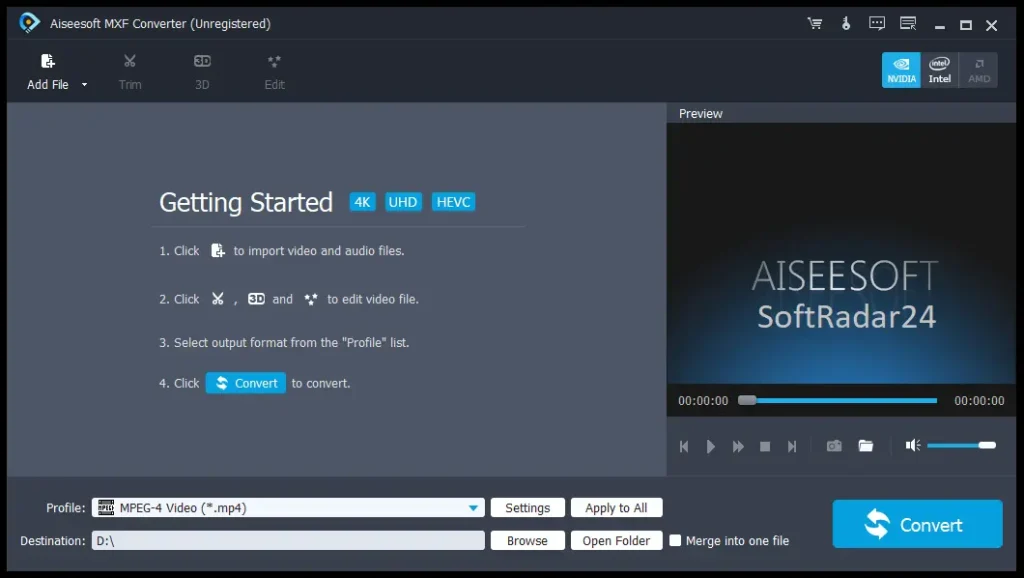
Aiseesoft MXF Converter keeps the main transcoding actions on one screen: Add File, Trim/Edit, output Profile, Settings, Destination, preview and Convert. The Windows dashboard also exposes GPU-acceleration indicators for supported NVIDIA, Intel and AMD hardware paths.
Compatibility & Coverage
The .mxf extension alone does not tell you whether a file will work in a player or editor. The codec, MXF operational pattern, audio layout and application support all matter. Aiseesoft MXF Converter provides a controlled way to create a more conventional derivative when native compatibility is the problem.
| Area | Coverage | What it means |
|---|---|---|
| Primary inputs | MXF · TS · MTS · M2TS · TP · TRP | MXF/P2 is the main focus; AVCHD-style transport streams are also accepted. |
| Video outputs | MP4 · MOV · AVI · MKV · WMV · WebM · MPEG-family · H.264/AVC · DV · VOB and more | Choose the output for the destination workflow rather than treating one container as universally best. |
| HD outputs | H.264/AVC · AVI · ASF · MKV · MOV · MPG · TS · WMV · MP4 · WebM | Output resolution can be adjusted, but transcoding does not create detail absent from the source. |
| Audio outputs | AAC · AC3 · AIFF · FLAC · M4A · MP3 · OGG · WAV · WMA and more | Useful when you need only the soundtrack or production audio from an MXF clip. |
| Camera workflows | Panasonic P2 · Sony XDCAM · Canon XF-family examples | Test the exact camera/recording mode with a representative clip before a large batch. |
| Windows | Windows 11 / 10 / 8.1 / 8 / 7 / Vista / XP SP2+ | Separate Windows license. |
| macOS | Mac OS X 10.7 or higher | Separate Mac license. |
Is MXF Better Than MP4?
Neither container is universally better. MXF is designed for professional media interchange and can carry rich metadata plus complex video/audio arrangements; MP4 is much easier to play, upload and send to ordinary consumer devices. For camera acquisition and archive, preserving the MXF master is often sensible. For review, web delivery or mobile playback, an MP4 derivative is usually more convenient.
MXF in Final Cut Pro, Premiere Pro and DaVinci Resolve
Modern editing software can work with many MXF variants. Final Cut Pro lists MXF as a supported container and supports professional families including XDCAM and XF-AVC. Premiere supports multiple MXF wrapper/codec combinations, and DaVinci Resolve supports numerous MXF OP1A/OP-Atom and camera-codec combinations. Exact support still varies by codec and application edition, so native import should be tested before transcoding everything.
What Cameras Use MXF?
MXF appears in professional acquisition workflows rather than being tied to one camera brand. Aiseesoft’s own conversion guides repeatedly use Panasonic P2, Sony XDCAM and Canon XF/C-series examples. The exact codec carried inside the MXF depends on the camera and recording mode.
Features & Capabilities
The useful value is controlled transcoding rather than AI restoration. Aiseesoft MXF Converter combines broad output coverage with batch processing, preview, basic preparation tools and adjustable encoding parameters so professional camera files can be adapted to a specific playback or editing requirement.
MXF/P2 Transcoding
- MXF/P2 MXF conversion to common video and HD outputs
- MP4, MOV, AVI, MKV, WMV, WebM and additional output containers
- TS, MTS, M2TS, TP and TRP input support
- Apple ProRes 422 MOV workflow on Mac
Batch & Workflow Tools
- Load and convert multiple MXF files together
- Merge multiple clips when a single output is required
- Preview before conversion
- Capture snapshots from the preview window
Output Control
- Video encoder selection
- Frame-rate and bitrate adjustment
- Resolution and aspect-ratio control
- Audio encoder, sample rate, channels and bitrate controls where available in the chosen profile
Basic Pre-Conversion Editing
- Trim unwanted sections
- Crop frame edges
- Add text/image watermarks
- Merge clips
- Adjust brightness, saturation, contrast, hue and volume
Hardware Acceleration
- AMD APP acceleration support
- NVIDIA CUDA acceleration support
- Useful when compatible source/output codecs and hardware can use the acceleration path
- Actual speed improvement depends on the codec, system and output settings
Important Conditions & Limitations
The biggest mistakes are converting MXF when native playback/editing already works, assuming every transcode is lossless, or judging compatibility only from the .mxf extension. Preserve your camera masters and test the exact codec/workflow before committing a large production library.
MXF Is a Container, Not a Codec
MXF can contain different codecs, metadata and audio layouts. That is why one .mxf file may import normally while another from a different camera or recording mode does not. Diagnose the source codec and destination support before converting an entire project.
Re-Encoding Is Not Automatically Lossless
Matching source resolution, frame rate and an appropriate bitrate can preserve visual quality very well, but a codec transcode can still introduce generation loss. Keep the original MXF, avoid repeated conversions and use a high-quality intermediate when the converted file will be edited heavily.
Do Not Convert MXF Just Because the Extension Looks Unfamiliar
Final Cut Pro, Premiere Pro, DaVinci Resolve and other modern NLEs can work with many MXF variants. When native import, playback, timecode and audio channels already work correctly, transcoding first can waste time, storage and quality.
MP4 Is Usually a Delivery Copy, Not the Best Archive Master
A compressed MP4 is easy to play and share but can discard metadata or use a more delivery-oriented codec. Keep original MXF footage for future re-editing and create MP4 copies for review, upload and device playback unless your project has a different archival policy.
Metadata and Multi-Channel Audio Need Verification
MXF can carry production metadata and complex audio layouts. A converted MP4 or MOV may not retain every metadata field or channel arrangement in the same way. If timecode, channel mapping or metadata is mission-critical, verify a converted test clip in the destination NLE before processing the full batch.
Conversion Does Not Repair a Corrupted MXF Master
If the source file is structurally damaged or missing media data, transcoding cannot recreate what is gone. A file that fails across multiple compatible applications should be treated as a repair/recovery problem rather than merely a container-compatibility issue.
Large MXF Files Are Better Suited to Local Batch Work
Professional camera files can be large and numerous. Local desktop processing avoids uploading every source clip to a web service and makes it easier to keep sensitive client footage within your own storage environment.
A Free Download Is Available, but Do Not Assume Unlimited Conversion
Windows and Mac free downloads are available. No clear numeric conversion allowance is stated for the current MXF Converter free build, so use it to test the exact camera codec, output format, audio behavior and destination application before purchasing.
The 30-Day Money-Back Period Applies to Quality Problems
Aiseesoft provides a 30-day money-back period when there is a quality problem. Treat the trial as the first compatibility check when your purchase depends on a specific camera codec or editor workflow.
Free Trial / Free Version
Aiseesoft MXF Converter has separate free downloads for Windows and Mac. Because a single numeric trial limit is not stated for the current free build, the most useful pre-purchase test is whether your real camera file converts correctly into the format required by your player, editor or upload destination.
| What to test | Why it matters | Best pre-purchase check |
|---|---|---|
| Exact MXF source | MXF can contain many different codecs and audio layouts. | Use a real Sony XDCAM, Panasonic P2, Canon XF or other representative project clip. |
| MP4 playback | The final device may have codec/resolution limits. | Convert a short sample and play it on the actual TV, phone, browser or client system. |
| Editor import | The source may already work natively. | Try the original MXF first; convert only if the exact codec/workflow causes a problem. |
| Audio channels | Professional MXF can carry multi-channel audio. | Check channel mapping and synchronization in the destination NLE. |
| ProRes workflow | ProRes working files can be much larger than delivery MP4. | On Mac, create one ProRes 422 test and confirm editing performance and storage requirements. |
| Batch settings | A bad preset multiplied across many clips wastes time. | Approve one representative output before converting the full queue. |
System Requirements
The published minimum Windows requirements are modest, but large MXF batches and high-bitrate intermediate codecs can demand considerably more processing power and storage than the minimum.
| Requirement | Value | Decision note |
|---|---|---|
| Windows | Windows 11 / 10 / 8.1 / 8 / 7 / Vista / XP SP2+ | Standalone Windows edition. |
| Windows CPU | 1 GHz Intel/AMD CPU or above | Batch/high-bitrate transcoding benefits from much stronger hardware. |
| Windows RAM | 1 GB or more | Minimum requirement, not a recommendation for heavy production projects. |
| macOS | Mac OS X 10.7 or higher | Standalone Mac edition. |
| GPU acceleration | AMD APP / NVIDIA CUDA on compatible hardware | Benefit depends on the source codec, output codec and system. |
| Project storage | Depends on source and output codec | Keep space for the original MXF plus converted copies; ProRes intermediates can be substantially larger than delivery MP4. |
Alternatives & Better-Fit Options
Choose an alternative when your workflow needs a broader conversion suite or AI enhancement rather than a dedicated MXF/P2 transcoder. For current Aiseesoft offers, visit the Aiseesoft software page on SoftRadar24.
Aiseesoft Video Converter Ultimate
A better fit when MXF is only one part of a larger workflow involving many modern formats, compression and broader editing/enhancement tools. Choose Aiseesoft MXF Converter when dedicated MXF/P2 transcoding already covers the job.
AnyMP4 Video Converter Ultimate
A broader multimedia option for mixed-format conversion, compression and enhancement tasks when the project extends beyond professional MXF camera footage.
Tipard Total Media Converter
Consider this when you need a wider media-conversion environment rather than a narrowly focused MXF utility. Compare the exact sources and delivery formats required by the project.
WonderFox HD Video Converter Factory Pro
A Windows-focused alternative for general conversion and media processing when Windows-only use is acceptable and MXF is only one of several source types.
Winxvideo AI
Choose an AI-oriented tool when upscaling, denoising, stabilization or restoration is more important than dedicated MXF/P2 transcoding.
Macxvideo AI
A better-fit comparison for Mac users whose priority is AI enhancement and high-resolution restoration rather than converting professional-camera MXF into ordinary playback/editing formats.
FAQ
These answers cover the MXF questions that most directly affect playback, conversion quality, editor compatibility, camera workflows and the Aiseesoft MXF Converter purchase decision.
What software can open MXF files?
An MXF-capable media player or modern professional editor can open many MXF files, but success depends on the codec inside the container. Final Cut Pro supports the MXF container, and Premiere Pro/DaVinci Resolve support multiple MXF codec/wrapper combinations. When the exact clip is incompatible, Aiseesoft MXF Converter can create a more conventional playback/editing copy.
Can VLC open MXF files?
VLC can play some MXF files, but not every MXF/codec combination behaves the same. If a specific clip fails while others work, confirm that the source is healthy in another compatible application before converting it.
Can Aiseesoft MXF Converter convert MXF to MP4?
Yes. MP4 is a supported output alongside MOV, AVI, MKV, WMV, WebM and other formats. MP4 is usually the practical choice for phones, TVs, browser playback, sharing and standard web delivery.
Will converting MXF to MP4 lose quality?
A re-encode can change quality. Match the source resolution/frame rate, use a suitable bitrate and avoid unnecessary repeated conversions. Keep the original MXF as the master rather than treating the MP4 derivative as a mathematically lossless replacement.
Is MXF better than MP4?
They serve different purposes. MXF is strong for professional acquisition, interchange and metadata-rich workflows; MP4 is easier to play, upload and distribute. Keep MXF for the camera/archive master and create MP4 when compatibility is the priority.
Is an MXF file a RAW video file?
Not necessarily. MXF is a container/wrapper. It can carry different compressed or uncompressed video/audio essence and metadata, so the .mxf extension alone does not mean the footage is RAW.
Can Final Cut Pro open MXF files?
Yes, current Final Cut Pro lists MXF as a supported container and supports professional formats including XDCAM and XF-AVC. If your specific camera file imports and edits correctly, conversion is optional. Use ProRes transcoding when the workflow benefits from an intermediate or when a particular MXF variant causes problems.
Can Premiere Pro open MXF files?
Premiere Pro supports multiple MXF wrapper/codec combinations, including professional families used in production. Exact compatibility depends on the codec inside the MXF. Try native import first; transcode only when your source or workflow needs it.
Can DaVinci Resolve open MXF files?
DaVinci Resolve supports numerous MXF OP1A/OP-Atom and camera-codec combinations, although some capabilities depend on codec and edition. Native import should be tested before converting the source library.
Can I upload an MXF file directly to YouTube?
MXF is not in YouTube’s standard supported-upload-format list. Convert a delivery copy to a supported format such as MP4, MOV, AVI, WebM or ProRes. For ordinary delivery, MP4 is usually the simplest option.
Can I convert MXF to MOV on Mac?
Yes. Aiseesoft MXF Converter for Mac provides MOV profiles and an Apple ProRes 422 (*.mov) workflow, with adjustable output settings for editing requirements.
Which cameras commonly use MXF workflows?
Professional-camera examples covered by Aiseesoft include Panasonic P2, Sony XDCAM and Canon XF/C-series workflows. The codec inside the MXF varies by camera model and recording mode.
Can Aiseesoft MXF Converter batch-convert large MXF projects?
Yes. Multiple MXF files can be loaded and converted together. For a large shoot, test one representative clip first so an incorrect bitrate, frame-rate or audio setting is not repeated across the whole queue.
Can I extract audio from an MXF file?
Yes. Supported audio outputs include AAC, AC3, AIFF, FLAC, M4A, MP3, OGG, WAV and WMA. WAV or FLAC is a useful choice when preserving available audio quality matters more than file size.
What is the current Aiseesoft MXF Converter coupon code and discount?
SoftRadar24 currently applies a 50% Aiseesoft MXF Converter coupon discount automatically through the standalone purchase links. The 1-Year license is $14.50 for 1 PC or 1 Mac, and Lifetime is $24.97 for 1 PC or 1 Mac.
What are the Aiseesoft MXF Converter free-trial limits?
Free Windows and Mac downloads are available, but a clear numeric conversion allowance is not stated for the current free build. Use the trial with the exact MXF camera codec and output workflow that matters to you.
What is the Aiseesoft MXF Converter refund period?
Aiseesoft provides a 30-day money-back period when there is a quality problem. Use the free download to test your actual camera/editor workflow before purchase when compatibility is critical.





