
Quick Summary
WonderFox HD Video Converter Factory Pro 28.9 is a Windows multimedia suite built around video/audio conversion, compression, online-media downloading, basic editing and screen recording. Its current official product page supports 500+ export formats and device profiles, including AV1, HEVC/H.265, H.264, VP9, ProRes, MP4, MKV, MOV, AVI and common lossless audio formats. It also handles high-resolution workflows through 12K/8K/4K where the source, codec and target profile support them. The strongest reason to choose it is breadth: one application can solve format incompatibility, shrink large files, collect permitted online media, record the desktop and make simple edits without moving between several utilities.
- Current version
- 28.9 · Released April 16, 2026
- Platforms
- Windows 11 / 10 / 8.1 / 8 / 7
- Primary job
- Video/audio conversion, compression, downloading, editing & recording
- Key codecs
- AV1 · HEVC/H.265 · H.264 · VP9 · ProRes
WonderFox HD Video Converter Factory Pro Pricing, Discount Code & License Options
The current 83% WonderFox HD Video Converter Factory Pro coupon discount is applied automatically to the eligible Lifetime / 1-PC offer below. Other verified annual, family and two-product bundle options are available in the same selector. No manual coupon code entry is required.
License & Purchase · WonderFox HD Video Converter Factory Pro · Windows · Current Coupon & Discount Pricing
Current WonderFox HD Video Converter Factory Pro License Prices
The purchase selector currently includes the following verified license-price options:
- WonderFox HD Video Converter Factory Pro · Lifetime License · 1 Windows PC · US$11.96
- WonderFox HD Video Converter Factory Pro · 1-Year Subscription · 1 Windows PC · US$29.95
- WonderFox HD Video Converter Factory Pro Family Pack · Lifetime License · 3 Windows PCs · US$24.95
- WonderFox DVD Ripper Pro + HD Video Converter Factory Pro Bundle · US$24.95
The Lifetime / 1-PC license is selected first because it is the lowest current standalone option at US$11.96. The 1-Year / 1-PC plan costs US$29.95, the Family Pack covers up to 3 Windows PCs for US$24.95, and the US$24.95 WonderFox DVD Ripper Pro + HD Video Converter Factory Pro bundle is the better fit when both DVD ripping and video conversion are needed. Confirm the selected product, device count, license term, tax and final total at checkout.
WonderFox HD Video Converter Factory Pro · Lifetime License
1 Windows PC · lifetime license
Included with this license- Full Pro video/audio conversion and compression features
- Online-media downloader, screen recorder and GIF maker
- Basic editing, subtitle and toolbox functions
- Lifetime free updates under the current lifetime-license terms
At the current verified prices, the Lifetime / 1-PC offer costs US$17.99 less than the 1-Year / 1-PC subscription. The Family Lifetime / 3-PC option costs US$12.99 more than the single-PC Lifetime license. The US$24.95 WonderFox DVD Ripper Pro + HD Video Converter Factory Pro bundle is a separate two-product offer and should be chosen only when DVD ripping is also part of the workflow.
Can This Software Do What I Need?
Match the software to the actual job before choosing a license. WonderFox HD Video Converter Factory Pro covers much more than format conversion, but high-resolution support, hardware acceleration, online downloading and picture enhancement each have different conditions.
A video will not play because the codec or container is unsupported
Compatibility conversion
SupportedThis is a core use case. Convert the source to a broadly compatible target such as H.264/MP4 or choose one of the device profiles. Smart Fit can automatically choose output parameters, while advanced users can control resolution, bitrate, frame rate and codecs manually.
I need to convert AV1, HEVC/H.265, H.264 or VP9 video
Modern codec conversion
SupportedThe current official format tables and product page list AV1, HEVC/H.265, H.264 and VP9 workflows. Actual encoding options depend on the source, target container and hardware path selected.
I work with 4K, 8K or unusually high-resolution source footage
UHD conversion
SupportedWonderFox advertises conversion workflows through 12K, including 8K and 4K. This is resolution support, not a promise that every codec/container combination can be encoded at every resolution or that upscaling creates genuine detail absent from the source.
I need to convert several videos at once
Batch conversion
SupportedThe current product page documents batch conversion for up to 10 video/audio files at one time. This is distinct from the downloader, where the documented concurrent batch limit is up to 5 online-media items.
I want smaller files for storage, sharing or a media server
Video compression
SupportedWonderFox supports both lossy and lossless-oriented compression strategies. Smaller output can come from a more efficient codec, lower bitrate/resolution or trimming unused sections. A large size reduction with re-encoding can affect quality, so “lossless” should not be used as a blanket description for every compression mode.
I want to use my NVIDIA or Intel GPU to accelerate conversion
Hardware acceleration
ConditionalWonderFox documents NVIDIA NVENC/CUDA and Intel QSV acceleration plus multi-CPU and Hyper-Threading support. Whether acceleration is available depends on the GPU, driver and selected encode/decode path. Lightning Mode is also unavailable in the unregistered trial.
I want to download permitted online video or audio for offline use
Online-media downloading
SupportedThe downloader supports 1000+ sites according to WonderFox, including YouTube, Vimeo, Facebook, X/Twitter, Instagram, Dailymotion, Twitch and SoundCloud. Site changes can temporarily break individual services, and source rights/terms still apply.
I need to record my desktop, game or system audio
Screen recording
SupportedThe Pro recorder provides Custom, Full-screen, Game and Audio-only modes. WonderFox documents system and microphone audio and advertises Game mode at 60 fps. Recording suitability still depends on system performance and the content being captured.
I need trimming, cropping, merging, subtitles or a watermark
Basic editing
SupportedThese are built-in finishing tools. The editor also supports rotate/flip, filters, split-screen layouts and subtitle handling. It is appropriate for conversion-stage edits, not a replacement for a full multi-track nonlinear editor.
I want AI restoration that reconstructs faces, interpolates frames or generates missing detail
AI enhancement
Different taskWonderFox PET-1 is presented as picture enhancement and sharpening. It should not be described as the same class of AI restoration used by dedicated super-resolution, frame-interpolation or generative enhancement applications.
I use macOS and need the same WonderFox application
Mac requirement
Not supportedHD Video Converter Factory Pro is a Windows product. The current official product and purchase pages list Windows compatibility and do not provide a corresponding macOS edition of this application.
I want to convert, download or record copy-protected media
Protected content
Not supportedWonderFox’s current product page explicitly says not to use HD Video Converter Factory Pro to convert, download or record copy-protected media. The software should be used only with content you are authorized to process.
How It Works
WonderFox HD Video Converter Factory Pro separates its major jobs into conversion, downloading, recording and toolbox workflows. The most reliable approach is to choose the task first, then configure only the settings that matter for that output.
Convert Video or Audio
- Open Converter and add individual files or a folder of media.
- Choose a format or device profile. H.264/MP4 is a practical compatibility target; AV1 or HEVC can be useful where smaller size or newer playback support matters.
- Use Smart Fit for automatic parameters or manually adjust codec, resolution, frame rate, bitrate, audio channels and sample rate.
- Apply any required trim, crop, merge, subtitle, watermark, rotation or filter changes.
- Choose the output folder and start the conversion. Batch mode can process up to 10 items in one job.
Compress a Large Video
- Load the source and determine whether quality, compatibility or the smallest possible file is the priority.
- Prefer a more efficient codec when the target devices support it, or reduce bitrate/resolution when stronger size reduction is required.
- Trim material that is genuinely unnecessary before re-encoding.
- Test a short representative segment before committing to a long high-resolution job.
Download Online Media
- Use Downloader and paste a supported source URL for media you are permitted to download.
- Analyze the URL and select the available resolution, audio and subtitle combination offered for that source.
- Choose the destination folder and start the download. Current documentation allows up to 5 items in a batch download.
- If the site changes its delivery method, update WonderFox before assuming a previously supported source is permanently unavailable.
Record Screen or Audio
Recorder provides Custom-area, Full-screen, Game and Audio-only modes. Choose system audio, microphone audio or both, set the capture area where applicable, and run a short test to verify audio routing and performance before recording a long meeting or gameplay session.
Product Interface & Workflow
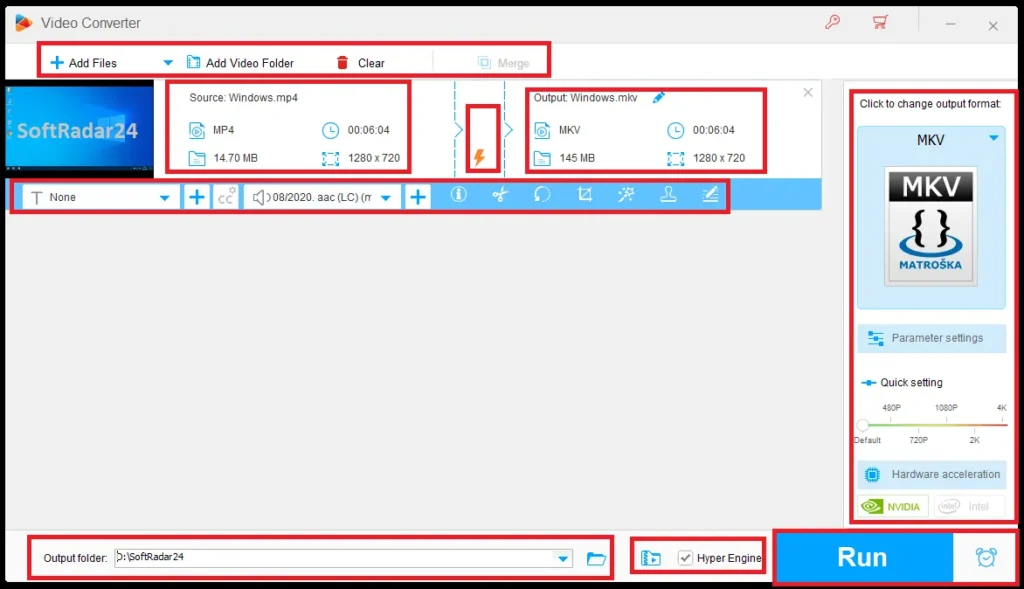
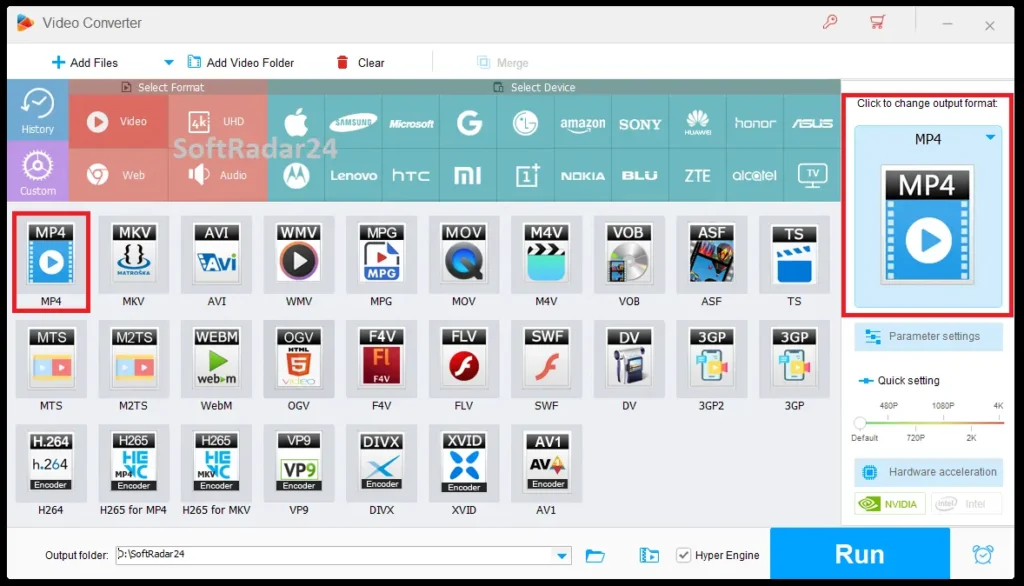
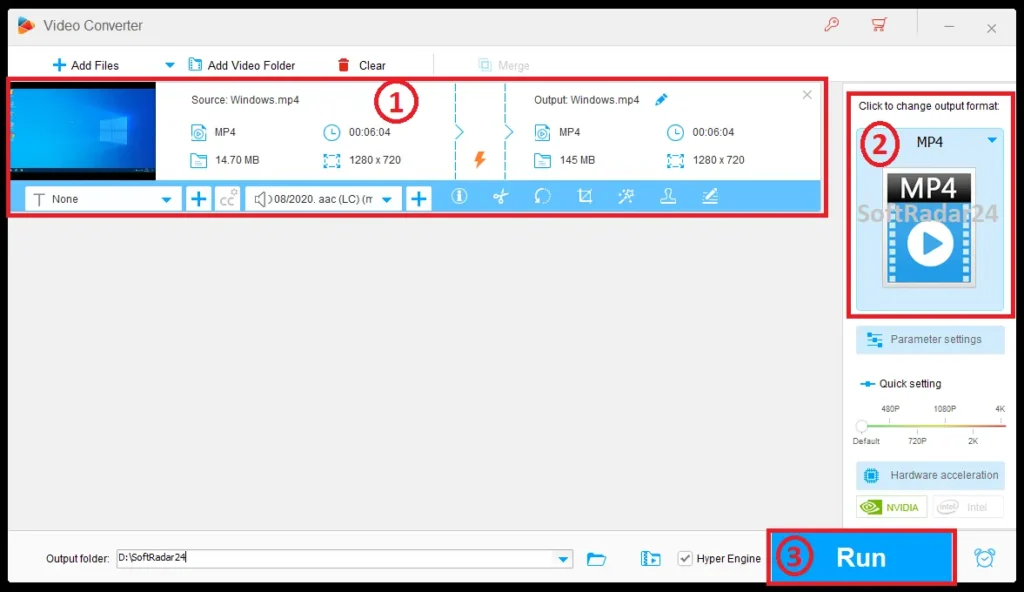
The application is task-oriented rather than timeline-oriented. Converter is the central workspace, while Downloader, Recorder, GIF Maker and Toolbox handle separate jobs. Output profiles are grouped by format and device family, and the right side of the converter workflow exposes the selected target plus resolution and parameter controls.
Converter Workspace
After media is imported, each file appears in the conversion queue with source information and the selected output. Format/device presets reduce setup time for users who only need compatible playback, while Parameter Settings exposes the codec, resolution, frame rate, bitrate and audio options required for more controlled transcoding.
Editing During the Conversion Workflow
The edit controls sit close to the source item rather than inside a full editing timeline. This makes trimming, cropping, rotating, adding subtitles or applying a watermark quick before export, but it also defines the product’s role: HD Video Converter Factory Pro is primarily a converter/toolbox suite, not a full professional video editor.
Acceleration Indicators
Compatible systems can expose hardware-acceleration choices after GPU detection. WonderFox documents Intel QSV and NVIDIA acceleration for supported paths. A visible acceleration option does not mean every codec, filter or source can use the same GPU path.
Compatibility & Coverage
Compatibility is one of the strongest parts of the current product. WonderFox publishes broad input/output support across common containers, modern codecs, lossless audio and device presets, but format names alone do not guarantee every profile, level, color format or hardware-accelerated combination.
| Area | Current documented coverage | What it means |
|---|---|---|
| Operating system | Windows 11 / 10 / 8.1 / 8 / 7 | Windows-only current product baseline. |
| Video input | AVI, MP4, H.265, VP9, H.264, MPEG, VOB, MOV, FLV, MKV, MTS/M2TS/TS, AVCHD, AV1 and more | Broad container/codec ingestion for local media conversion. |
| Video output | MP4, MKV, MOV, AVI, WMV, WebM, AV1, H.264, HEVC/H.265, VP9, ProRes and more | Useful for compatibility, compression and modern-codec workflows. |
| Resolution | SD through HD/FHD/2K/4K/8K; vendor also markets up to 12K workflows | Actual available output depends on codec/profile/source and hardware. |
| Audio | MP3, AAC, AC3/EAC3, WAV, FLAC, ALAC, DTS, AIFF, M4A and more | Includes lossy and lossless audio conversion. |
| Surround audio | 5.1 / 7.1 channel output workflows | Source and selected output must support the channel layout. |
| Device presets | Apple, Samsung, Microsoft/Xbox/Surface, Google/Android, Amazon Fire, Sony/PlayStation, LG, Lenovo, TVs and projectors | Profiles simplify playback compatibility without manually entering every parameter. |
| Online sources | 1000+ websites claimed by WonderFox | Support can change when websites alter delivery methods. |
Features & Capabilities
The suite is strongest when several everyday media jobs need to stay in one Windows application. These capabilities are grouped by actual workflow so conversion, enhancement and downloading are not treated as interchangeable features.
Conversion & Encoding
- 500+ export formats and device profiles
- AV1, HEVC/H.265, H.264, VP9 and ProRes workflows
- 12K/8K/4K/2K/1080p/720p/SD resolution handling where supported
- VFR-to-CFR conversion
- Video-to-audio extraction such as MP4-to-MP3
- Up to 10 files in a batch conversion
- Smart Fit automatic parameters
Acceleration & Output Control
- Lightning Mode based on WonderFox GRVE-2 technology
- NVIDIA NVENC/CUDA acceleration
- Intel Quick Sync Video support
- Multi-CPU and Hyper-Threading support
- Manual bitrate, resolution, frame-rate and audio settings
- 5.1/7.1 surround and lossless audio formats including FLAC/ALAC/WAV
Compression & Picture Enhancement
- Lossy and lossless-oriented compression methods
- Codec-based size reduction
- Bitrate and resolution reduction when smaller output is more important than maximum fidelity
- PET-1 picture enhancement based on sharpening/edge-detail processing
- SD-to-HD and other resolution-upscaling workflows
Editing & Subtitles
- Trim and split
- Crop and remove black bars
- Merge compatible media
- Rotate and flip
- Text/image/logo watermarks
- Filters and picture adjustments
- Soft/hard subtitle workflows
- 2- or 3-video split-screen layouts
Online-Media Downloader
- 1000+ supported sites claimed by WonderFox
- Up to 5 items per batch download
- YouTube channels and playlists
- Available video resolution selection through high-resolution source variants
- Audio/subtitle selection when the source provides multiple tracks
Recorder, GIF Maker & Toolbox
- Custom-area, full-screen, game and audio-only recording
- System and microphone audio
- Game recording up to the vendor-documented 60 fps mode
- Video-to-GIF and photo-to-GIF creation
- Subtitle extraction to ASS/SSA/SRT/TXT
- Ringtone creation
- Image-to-video and split-screen tools
Important Conditions & Limitations
Most purchasing mistakes with HD Video Converter Factory Pro come from reading maximum-resolution and speed claims too broadly. The limits below are more important than the headline feature count.
Windows Only
WonderFox HD Video Converter Factory Pro is not a cross-platform Windows/macOS license. Current official pages position it as Windows software. Mac users should choose a macOS-native alternative rather than assuming the Windows license transfers.
50× Lightning Mode Is a Vendor Maximum, Not a Universal Speed
WonderFox markets GRVE-2 Lightning Mode as up to 50× faster than normal conversion. A particular job can be slower because re-encoding, filters, resolution changes, source complexity and unsupported hardware paths all affect processing time.
PET-1 Is Picture Enhancement, Not Full AI Restoration
The product page describes PET-1 in terms of image sharpening, edge/detail and contrast enhancement. Increasing resolution does not restore real information that was never captured. Users seeking AI face restoration, frame interpolation or model-based super-resolution should compare dedicated AI alternatives.
“Up to 12K” Does Not Mean Every Format Can Produce 12K
High-resolution marketing describes supported processing scenarios. Actual output choices depend on the source, codec, target container, selected profile, GPU/CPU path and available memory/storage. A resolution number alone is not a quality guarantee.
Online Downloader Support Can Change
Online platforms modify URLs, APIs, signatures and playback delivery systems. A site listed today can temporarily stop working until WonderFox updates its analysis engine. That is normal for this software category and is not equivalent to local-file conversion support.
Protected Media Is Explicitly Excluded
WonderFox’s current page says not to use HD Video Converter Factory Pro to convert, download or record copy-protected media. For online media, copyright, website terms and download rights must also be respected.
Official System-Requirement Pages Do Not Fully Agree
The dedicated tech-spec page still publishes older/lower minimums, including 512 MB RAM and 50 MB disk space, while the current main product page lists a more demanding 1 GB RAM, 300 MB installation space and 1.5 GHz CPU baseline. This guide uses the newer product-page figures as the safer current requirement.
Free Trial / Free Version
WonderFox provides a trial so the actual PC, codecs and target workflow can be checked before purchase. The current official trial documentation gives clear limits rather than an unrestricted temporary Pro license.
| Function | Unregistered / trial limit | Registered Pro |
|---|---|---|
| Video/audio conversion | First 5 minutes of each converted file | Restriction removed |
| Online-media download | 5 files | Full licensed downloader subject to source availability |
| Screen recording | Official trial pages describe limited recording; current comparison material lists 5 trial uses/minute-limited guidance depending on page | Pro page advertises no watermark and no time limit |
| GIF creation | Output GIF is watermarked | Watermark restriction removed |
| Lightning Mode | Not available | Available where the conversion path supports it |
| Hardware acceleration | Not available in current trial-restriction guidance | Available on compatible hardware/codec paths |
| Free upgrades / technical support | Not included under trial terms | Depends on selected paid license term |
System Requirements
The current main product page provides the safest baseline because it is newer and more demanding than the separate legacy-style tech-spec table.
| Requirement | Current safer baseline | Practical note |
|---|---|---|
| Operating system | Windows 11 / 10 / 8.1 / 8 / 7 | The main product page also says “and lower,” but very old Windows versions should be verified with the current installer rather than assumed. |
| Processor | Intel or AMD · 1.5 GHz or higher | High-resolution software encoding benefits substantially from a newer CPU. |
| RAM | 1 GB or higher | 4K/8K jobs and large batches can need much more practical memory than the minimum. |
| Graphics | NVIDIA GeForce · Intel HD Graphics · AMD Radeon families listed | Specific encoder acceleration still depends on GPU generation, drivers and codec. |
| Display | 1200 × 768 or higher | Current main product-page requirement. |
| Installation space | 300 MB available disk space | Source, cache and output media require additional storage beyond the application itself. |
| Internet | Required for online-media downloading and other network-dependent tasks | Local file conversion is a different workflow from online-source analysis. |
Alternatives & Better-Fit Options
WonderFox HD Video Converter Factory Pro is unusually broad for a Windows converter, so the best alternative depends on what you want to improve: AI restoration, Mac support, a larger modern toolbox or a different license ecosystem. For the wider same-brand catalog and current offers, visit the WonderFox software page on SoftRadar24.
Winxvideo AI
Winxvideo AI is the stronger comparison when AI restoration, super-resolution, frame interpolation or model-based video enhancement matters as much as conversion and compression. WonderFox is broader as a classic Windows media toolbox; Winxvideo AI becomes more relevant when improving damaged or low-quality footage is the primary task.
Macxvideo AI
Macxvideo AI is the natural better-fit route for Mac users who need conversion plus AI-oriented enhancement. HD Video Converter Factory Pro is Windows-only, so this is a platform decision first and a feature comparison second.
Aiseesoft Video Converter Ultimate
Aiseesoft Video Converter Ultimate is a direct current-generation Windows/macOS converter comparison when a large toolbox, modern enhancement functions, compression and platform choice matter more than WonderFox’s integrated online downloader.
AnyMP4 Video Converter Ultimate
AnyMP4 Video Converter Ultimate is another broad Windows/macOS alternative for local conversion, compression, editing and modern media tools. Compare it when cross-platform licensing and a larger post-processing toolbox matter more than WonderFox’s downloader-and-recorder combination.
Tipard Total Media Converter
Tipard Total Media Converter is a legacy-style Windows/Mac alternative focused on DVD, video and audio conversion with conventional editing. It is a better comparison for users who prioritize older-media conversion and a Mac option over WonderFox’s current AV1/downloader/recorder breadth.
FAQ
These answers focus on current version, pricing, lifetime licensing, codec support, trial limits and performance conditions without repeating the scenario guide above.
What is the current version of WonderFox HD Video Converter Factory Pro?
WonderFox’s current product page lists version 28.9, released April 16, 2026, with a download size of 172 MB.
How much is WonderFox HD Video Converter Factory Pro?
The current SoftRadar24 campaign prices are US$11.96 for Lifetime / 1 PC, US$29.95 for 1 Year / 1 PC, US$24.95 for the Family Lifetime / 3-PC license, and US$24.95 for the separate WonderFox DVD Ripper Pro + HD Video Converter Factory Pro bundle. The final checkout total should always be checked.
Is there a WonderFox HD Video Converter Factory Pro coupon code or discount?
Yes. The current Lifetime / 1-PC campaign price is US$11.96 versus a US$69.95 reference price, an 83% reduction. Commercial campaign pricing can rotate, so verify the final selected offer before payment.
Is the Lifetime / 1-PC license better value than the 1-year plan?
At the current verified prices, yes: the US$11.96 Lifetime / 1-PC offer is US$17.99 cheaper upfront than the US$29.95 annual plan and also carries lifetime free updates under the current lifetime-license terms.
Does WonderFox HD Video Converter Factory Pro support AV1?
Yes. WonderFox lists AV1 in its current product and format documentation alongside HEVC/H.265, H.264 and VP9. Available acceleration and container combinations depend on the selected workflow and hardware.
Can it convert 8K or 12K video?
WonderFox markets processing and conversion workflows up to 12K and specifically highlights 8K/4K conversion. That does not mean every source/codec/container supports every maximum resolution, and upscaling does not recreate genuine source detail.
How many files can it batch-convert?
The current official product page states that batch conversion can process up to 10 video/audio files at one time. The online downloader has a separate documented batch limit of up to 5 items.
What are the main free-trial limits?
The current official trial guidance limits conversion to the first 5 minutes of each file and online downloading to 5 files. GIF output is watermarked, while Lightning Mode and hardware acceleration are unavailable in the unregistered trial.
Does WonderFox HD Video Converter Factory Pro work on Mac?
No. The current application is for Windows. Mac users need a separate macOS-compatible converter rather than the WonderFox Windows license.
Is WonderFox PET-1 an AI video enhancer?
It is safer to describe PET-1 as WonderFox’s picture-enhancement technology. The current page explains it through sharpening, edges, detail and contrast. That is not the same as model-based AI super-resolution, face reconstruction or frame interpolation.
Does WonderFox offer a money-back guarantee?
The current official purchase page displays a 30-day money-back guarantee. Refund eligibility is governed by WonderFox’s refund policy and the transaction circumstances, so it should not be presented as an unconditional try-and-return promise.
Can HD Video Converter Factory Pro process copy-protected media?
WonderFox’s current product page explicitly instructs users not to use the software to convert, download or record copy-protected media files. Process only media you are authorized to use.





