Watching a newly released foreign movie at home often turns into a frustrating experience when discs simply refuse to play. Many optical drives and standard media players fail to read physical media or ISO image files due to region restrictions or missing codecs. Tipard Blu-ray Player completely removes these barriers for both Windows and Mac users. This 4K media player allows you to open any Blu-ray disc, DVD folder, or ISO file directly on your computer without any playback limitations. You can easily bring the authentic theater feeling into your living room, enjoying those highly anticipated movies exactly as they were meant to be seen.
This high-definition video player handles almost every media format available. From an 8K MKV file and a 4K UHD MP4 to an older AVI, the Tipard Blu-ray video player runs them smoothly while preserving the original video and audio quality. Instead of wasting time searching for specific video codecs online, you can rely on this multi-format media player to support HEVC/H.265 natively. It delivers a fast, uncompromised viewing experience right on your Windows 11 desktop or Mac system, turning your screen into a complete home theater.
Why You Need a Dedicated Blu-ray Player for PC
Most default operating system media applications do not natively support physical media playback. When you insert a Blu-ray disc or try to open an ISO image file, standard applications usually return playback errors or a blank screen because they lack the necessary built-in decoders. A dedicated Blu-ray disc player eliminates this problem entirely, giving you immediate access to your entire media collection while offering significant performance upgrades over basic alternatives.
Unrestricted Playback and High-Fidelity Audio
Standard media apps often fail due to missing codecs or regional locks. Tipard Blu-ray Player bypasses these issues directly.
- No Playback Limitations: Open any physical disc, DVD folder, or ISO image file directly. You can easily watch newly released foreign movies that are not available in local theaters with full main menu and chapter control.
- High-Resolution Video Handling: This 4K UHD video player runs 1080p, 4K, and 8K videos smoothly. It natively supports popular formats like MP4, MKV, AVI, WMV, FLV, and MTS.
- Lossless Audio Output: The media player decodes high-resolution sound, including Dolby Atmos, Dolby TrueHD, DTS-HD Master, and DTS:X, providing up to 7.1 channel surround sound. It also supports high-bitrate music formats like FLAC, MP3, AAC, and OGG for pristine audio quality.
Hardware Performance and Visual Adjustments
Playing heavy, high-definition files requires efficient resource management to prevent your computer from freezing or dropping frames.
- Hardware Acceleration: This feature offloads video decoding from your CPU to GPU video decoders, making playback faster while taking up fewer system resources.
- Advanced Visual Controls: Adjust the video hue, contrast, brightness, saturation, and gamma. You can also change the aspect ratio instantly (Full Screen, Half Size, Fit to Screen, 16:9, 4:3, or 1:1) to match your display.
- Deinterlacing Options: Improve the clarity of interlaced videos using methods like Blend, Discard, and Mean.
- Instant Screenshots: Grab your favorite movie scenes at any moment and save them as high-quality JPEG, PNG, or BMP image files directly to your hard drive.
How to Play Blu-ray Discs and ISO Files Without Limits
Getting your media ready for playback requires no technical skills or complicated setups. The entire process takes only a few seconds. Follow these quick steps to load and manage your movies directly from your desktop.
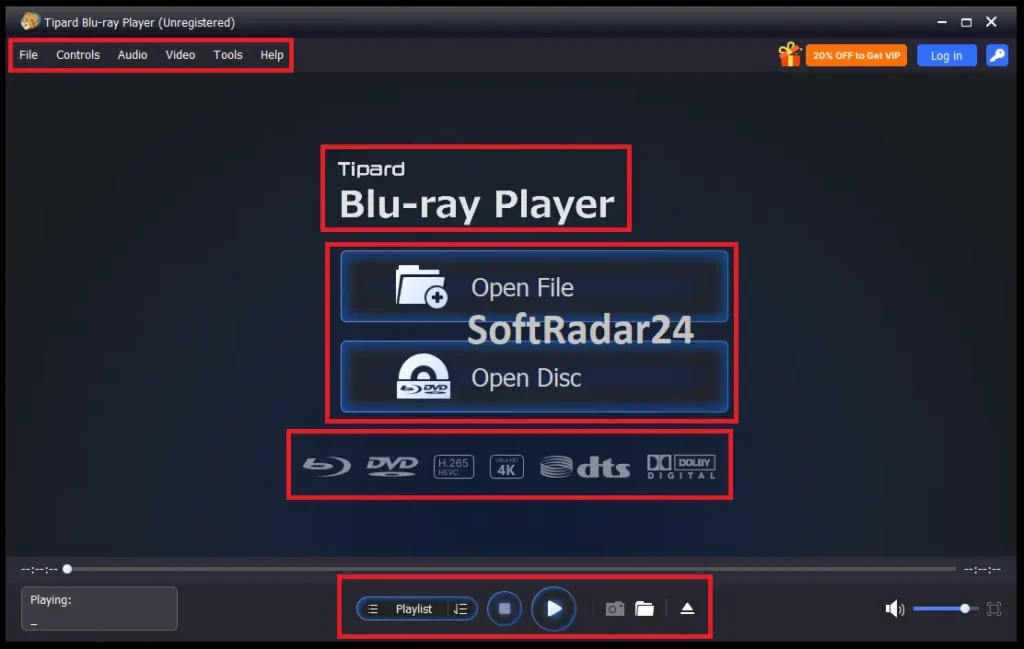
Step 1: Choose Your Media: First, download and install Tipard Blu-ray Player on your computer. Once you open the player, insert your physical disc into the drive or locate your digital file on your hard drive. Click the Open Disc button to load a physical Blu-ray or DVD. For a digital video format or an ISO image, click the Open File button instead.
Step 2: Start the Playback: Once you select your media, it loads instantly. You can now sit back and watch the movie with excellent visual and audio quality, completely free from stuttering or region locks.
Step 3: Manage Your Viewing Experience: While the movie is running, you have full control over the playback. Click the Menu or Playlist buttons to navigate through the disc content. You can quickly skip to a specific chapter, switch audio tracks, or change subtitles at any moment.
Tipard Blu-ray Player Discount Code
Verified for May 2026: The official Tipard Blu-ray Player coupon code TIPAG**D guarantees a strict 50% price drop on both 1-year and lifetime plans. You do not need to copy or paste anything manually. This specific code is fully integrated into the secure payment links below, triggering your half-price reduction instantly at checkout.


50% OFF – Tipard Blu-ray Player for Windows

Tipard Blu-ray Player for Windows (1-Year)
Enjoy region-free physical media and 4K ISO playback on your PC for a full year.
Tipard Blu-ray Player for Windows (Lifetime)
Secure permanent access to watch any physical media or 4K videos on your desktop.
50% OFF – Tipard Blu-ray Player for Mac
Tipard Blu-ray Player for Mac (1-Year)
Turn your Mac into a complete home theater with full 4K media support for one year.
Tipard Blu-ray Player for Mac (Lifetime)
Get lifetime access to bypass region locks and enjoy lossless audio on your Mac.
Paid License vs. Giveaway Version
If you manage to catch a promotional giveaway offer, it provides a functional way to test the player, but it comes with strict limitations. Upgrading to the official paid license unlocks the full potential of the software and protects your investment.
Promotional Giveaway Edition: This provides a standard 1-year license restricted to a single PC for strictly non-commercial use. It does not include any future free updates or technical support, and you are required to register before the temporary offer ends.
Official Paid Version: Available as a 1-year or lifetime license. Upgrading removes all functional restrictions. It guarantees free ongoing updates to handle new media formats, provides direct customer support, and secures your purchase with a 30-day money-back guarantee.
Supported Media Formats and Technical Details
Reviewing compatibility details helps ensure your specific files run properly. The table below strictly outlines all the accepted input methods, video resolutions, and audio codecs compatible with Tipard Blu-ray Player.
| Category | Supported Formats and Specifications |
|---|---|
| Physical Media & Images | Blu-ray Disc, Blu-ray Folder, DVD Disc, DVD Folder, ISO Image Files |
| Video Formats & Codecs | MP4, MKV, AVI, WMV, MOV, FLV, MTS (HEVC/H.265 supported) |
| Video Resolution Support | 8K, 4K UHD, 1080p, and standard HD |
| Audio Output & Codecs | Dolby Atmos, Dolby TrueHD, DTS-HD Master, DTS:X (Up to 7.1 channel) |
| Lossless Music Formats | FLAC, MP3, AAC, OGG |
| Operating Systems | Windows 11, Windows 10, Windows 8, Windows 7, and macOS |
| Snapshot Export Types | JPEG, PNG, BMP |
Frequently Asked Questions
Does Tipard Blu-ray Player support physical disc playback on Windows 11?
Users running Windows 11, as well as older versions like Windows 10, 8, and 7, can directly open physical Blu-ray media, DVD folders, and ISO image files. The media player processes these formats natively without requiring you to download any extra third-party decoders.
How does Tipard Blu-ray Player handle heavy 4K and 8K media files?
Decoding high-definition resolutions relies on built-in hardware acceleration. Tipard Blu-ray Player transfers the heavy video processing tasks directly from the CPU to your GPU decoders, ensuring smooth 4K UHD and 8K playback without dropping frames or freezing the system.
What audio output quality can I expect from Tipard Blu-ray Player?
Movie enthusiasts get native support for lossless, high-resolution audio codecs, including Dolby Atmos, Dolby TrueHD, DTS-HD Master, and DTS:X. The media player accurately decodes these specific formats to provide up to 7.1 channel surround sound for an authentic theater atmosphere.
Will Tipard Blu-ray Player open foreign movies and ISO image files without errors?
Loading newly released foreign movies and complex physical media happens without any standard playback limitations. Tipard Blu-ray Player bypasses common reading errors, granting full access to any optical disc, DVD folder, or ISO image directly on your computer screen.