
Quick Summary
Tipard Blu-ray Copy is Windows Blu-ray copying software built around disc-structure backup rather than video transcoding. It can copy Blu-ray discs, folders and ISO images to another Blu-ray disc, a Blu-ray folder or an ISO image, with four workflows: Full Disc, Main Movie, Clone and Write Data. The clearest distinction is between a true 1:1 copy and a capacity-reduced copy: BD50-to-BD50 and BD25-to-BD25 can preserve the source structure at the same target capacity, while fitting BD50 content onto BD25 requires compression and should not be described as a bit-for-bit lossless clone.
- Primary job
- Blu-ray disc/folder/ISO copying, cloning and structured backup
- Copy modes
- Full Disc · Main Movie · Clone · Write Data
- Platforms
- Windows 11 · Windows 10 · Windows 8 · Windows 7
- Important distinction
- 1:1 cloning preserves the source structure; BD50-to-BD25 is a compression workflow
Tipard Blu-ray Copy Pricing, Discount Code & License Options
The current 50% Tipard Blu-ray Copy coupon discount is applied automatically to the eligible SoftRadar24 license options below. No manual coupon code entry is required.
License & Purchase · Tipard Blu-ray Copy · Windows · Current Discount & Coupon Offer
Current Tipard Blu-ray Copy License Prices
The purchase selector currently includes the following discounted license options:
- Tipard Blu-ray Copy 1-Year License · 1 Windows PC · US$17.50
- Tipard Blu-ray Copy Lifetime License · 1 Windows PC · US$31.25
Choose the license duration that matches how long you expect to use Tipard Blu-ray Copy on one Windows PC. The 1-Year / 1 PC option is selected first because it has the lowest current upfront price. The Lifetime / 1 PC option costs US$13.75 more and is intended for ongoing use on the same licensed computer.
Tipard Blu-ray Copy · 1-Year License
1 Windows PC · 1-year Tipard Blu-ray Copy license
Included with this license- Tipard Blu-ray Copy for 1 Windows PC
- Full Disc, Main Movie, Clone and Write Data copy modes
- Blu-ray disc, folder and ISO input/output workflows
- One-year licensed access for the selected Windows PC
The current 1-Year / 1 PC SoftRadar24 offer is US$17.50 versus a US$35.00 reference price. The Lifetime / 1 PC offer is US$31.25 and removes the fixed one-year license term for the selected Windows PC.
Tipard’s public store can show different standard promotions from these SoftRadar24 campaign offers. Its current purchase page also advertises optional 7-day access to Tipard Blu-ray Player that can renew separately at US$30.00 per month unless canceled. Check the final product, license term, optional add-ons, renewal settings, taxes and total price shown at checkout before payment.
Can This Software Do What I Need?
Match Tipard Blu-ray Copy to the actual Blu-ray workflow before choosing a license. The key decision is whether you need to preserve Blu-ray disc structure, reduce capacity, create an ISO/folder backup, convert to a normal video file, or simply play the disc.
I want a 1:1 copy of a Blu-ray without converting it to MP4 or MKV
Disc-structure cloning
SupportedClone mode is the dedicated 1:1 path for Blu-ray disc or ISO duplication. Same-capacity targets such as BD50-to-BD50 and BD25-to-BD25 are the clearest fit when preserving the source structure is more important than reducing storage size.
I want to save a Blu-ray to my hard drive as an ISO image or Blu-ray folder
Hard-drive backup
SupportedTipard Blu-ray Copy can use a physical Blu-ray source and save the result as a Blu-ray folder or ISO image. This preserves a Blu-ray-style backup structure instead of transcoding the movie into a normal standalone video file.
I need a BD50 movie to fit on a BD25 target
Capacity reduction
ConditionalBD50-to-BD25 is supported as a capacity-compression workflow. Because the target is substantially smaller, do not treat it as the same bit-for-bit 1:1 process as BD50-to-BD50. Final visual quality depends on the source and compression required to meet the smaller target size.
I want only the main movie, selected chapters, audio tracks or subtitles
Selective Blu-ray backup
SupportedMain Movie mode is designed for selective copying. It can expose movie titles or chapters and lets you choose the desired audio and subtitle tracks before the copy starts, which is useful when menus and extras are unnecessary.
I already have a Blu-ray folder and want to write it to disc or package it as ISO
Write Data workflow
SupportedWrite Data is the folder-oriented copy mode. It is distinct from Main Movie selection and from Clone mode, and is intended when the source is already stored as Blu-ray folder data.
I want to work with an existing Blu-ray ISO image
ISO source
ConditionalBlu-ray ISO is a documented input and output type, but Tipard’s current product page says a virtual drive is needed when copying a Blu-ray ISO image. Confirm that the required mounting workflow is available on the Windows PC.
I need to copy a physical Blu-ray disc but my PC has only a DVD drive
Optical hardware
Not supportedA physical Blu-ray source requires Blu-ray-capable optical hardware. A DVD-only drive cannot read a Blu-ray disc. Existing folder or ISO sources can be handled from storage without reading the original physical disc at that moment.
I want the Blu-ray movie as MP4, MKV, HEVC or another portable video file
Video conversion
Different taskTipard Blu-ray Copy’s documented outputs are Blu-ray disc, Blu-ray folder and Blu-ray ISO. A Blu-ray ripper or converter is the correct category when the goal is a reusable video file for a phone, tablet, NAS, Plex library or general media player.
I only want to watch a Blu-ray disc on my computer
Playback only
Different taskCopying the disc first adds an unnecessary workflow when playback is the only requirement. A dedicated Blu-ray player is the better-fit software category for opening discs, folders or ISO images for viewing.
I need a Blu-ray Copy license for macOS
Mac requirement
Not supportedThe current English Tipard Blu-ray Copy technical specifications and purchase flow identify Blu-ray Copy as a Windows product. Do not assume Tipard’s separate Mac Blu-ray Converter or Blu-ray Player products mean a Mac Blu-ray Copy edition is included.
How It Works
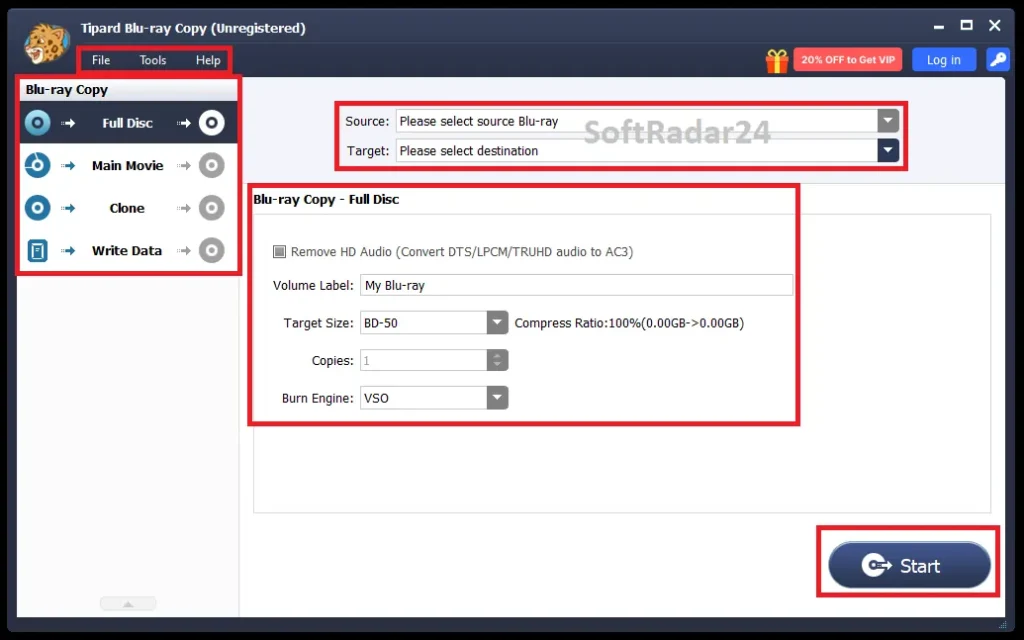
Tipard Blu-ray Copy separates source selection, copy mode and target configuration. The workflow changes slightly depending on whether the objective is a full-disc backup, a selected main movie, a 1:1 clone or writing existing Blu-ray folder data.
Copy an Entire Blu-ray to Disc, Folder or ISO
- Connect a Blu-ray-capable drive and insert the source disc, or load an existing Blu-ray folder/ISO source.
- Choose Full Disc when the complete source structure is required.
- Select a Blu-ray disc, folder or ISO target, set the volume label and choose BD25 or BD50 as the target size.
- Review the target carefully and start the copy only after confirming the correct source, destination and capacity.
Back Up Only the Main Movie
- Load the Blu-ray disc or folder and switch to Main Movie.
- Use the content panel and preview to identify the required title or chapter.
- Choose the audio and subtitle tracks you want to retain.
- Set the target name and size, then begin the copy.
Clone or Write Existing Blu-ray Data
Use Clone when a direct duplicate of a Blu-ray disc or ISO is the goal. Use Write Data when starting from Blu-ray folder data. These modes solve different source/target problems and should not be treated as interchangeable names for the same operation.
Adjust Copy Preferences
The Preferences area can set update intervals, the temporary folder, completion sounds, a default target size and copy encoding preferences. Tipard also exposes alternative burning-engine choices for troubleshooting some disc-writing problems.
Product Interface & Workflow
The interface is organized around four large copy modes and source/target controls rather than a long video-format profile list. That makes the product easier to classify correctly: it is a Blu-ray structure copier, not a general-purpose transcoder.
Compatibility & Coverage
Tipard Blu-ray Copy has a deliberately narrow format scope: Blu-ray disc structure in, Blu-ray disc structure out. Compatibility decisions therefore depend more on source type, target type, optical hardware and target capacity than on normal MP4/MKV codec lists.
| Area | Current coverage | Decision note |
|---|---|---|
| Operating system | Windows 11 · Windows 10 · Windows 8 · Windows 7 | Current English technical reference is Windows-only. |
| Input sources | Blu-ray disc · Blu-ray folder · Blu-ray ISO | These are the official technical-reference input categories. |
| Output targets | Blu-ray disc · Blu-ray folder · Blu-ray ISO | No MP4/MKV output is listed for Blu-ray Copy. |
| Blu-ray dimensions | 2D and 3D Blu-ray workflows | Tipard also documents 3D-to-2D backup scenarios. |
| Target sizes | BD25 · BD50 | BD50-to-BD25 requires compression; same-capacity cloning is the cleaner 1:1 scenario. |
| Physical media | Blu-ray-capable optical drive required for physical-disc sources/targets | A DVD-only drive cannot read or write Blu-ray media. |
| ISO source | Supported | Current Tipard product copy says a virtual drive is required for Blu-ray ISO copying. |
| Interface languages | English · French · German · Japanese | Current product page lists four application languages. |
Features & Capabilities
The useful feature set is best understood by how much of the Blu-ray structure you want to retain and where the result should be stored.
Full-Structure Copying
- Full Disc copies the complete Blu-ray source structure
- Disc-to-disc, disc-to-folder and disc-to-ISO workflows
- Blu-ray folder and ISO can also be used as sources
- Custom volume labels for output media
Selective Main-Movie Backup
- Main Movie mode for selected title/chapter copying
- Audio-track selection
- Subtitle-track selection
- Built-in preview for identifying the intended movie/title/chapter
Clone & Write Data Modes
- Clone for direct Blu-ray disc or ISO duplication
- Write Data for Blu-ray folder workflows
- Multiple-copy count for supported disc duplication tasks
- Multiple burning-engine choices when disc writing has problems
Capacity & Audio Control
- BD25 and BD50 target-size selection
- BD50-to-BD25 compression
- Custom output-size control
- Optional HD-audio reduction by converting Dolby TrueHD or DTS-HD Master Audio to Dolby AC3
2D & 3D Blu-ray Workflows
- 2D Blu-ray copying
- 3D Blu-ray source support
- 3D 50/25 to 2D 50/25 backup workflow documented by Tipard
Important Conditions & Limitations
The most important limits come from the difference between cloning, compression, optical-disc hardware and video conversion. Understanding those boundaries prevents buying the right brand but the wrong product.
BD50-to-BD25 Is Compression, Not a 1:1 Clone
A 50 GB-class source cannot fit a 25 GB-class target without reducing the stored data. Tipard supports BD50-to-BD25 as a compressed capacity workflow, but it should not be described as the same bit-for-bit process as a same-capacity Clone operation.
Blu-ray Copy Does Not Produce MP4 or MKV Files
The current technical reference lists Blu-ray disc, Blu-ray folder and Blu-ray ISO for both input and output. If the real objective is a portable video file, choose a Blu-ray ripper/converter rather than forcing a copy utility into a transcoding job it is not designed to perform.
Physical Discs Still Depend on Optical Hardware
Reading a physical Blu-ray requires a Blu-ray-capable drive, and writing to a blank Blu-ray requires compatible writable media and burner hardware. Software cannot make a DVD-only optical drive read Blu-ray media.
ISO Copying Can Require a Virtual Drive
Tipard’s current product page explicitly says a virtual drive is needed when copying a Blu-ray ISO image. Plan for that additional local mounting requirement if ISO files are the primary source format.
HD Audio Reduction Changes the Audio Stream
The space-saving option can convert Dolby TrueHD or DTS-HD Master Audio to Dolby AC3. That is useful for smaller output, but it is not preservation of the original lossless HD-audio stream.
Windows Only
The current English Blu-ray Copy technical page lists Windows 7, 8, 10 and 11, and the current purchase page identifies a Windows version. Tipard sells separate Mac products in other Blu-ray categories, but that does not make this Blu-ray Copy license cross-platform.
Copy Only Media You Are Authorized to Copy
Copyright law, license terms and rules around protected media vary by jurisdiction and source. Use Blu-ray copying functions only for content you own or are otherwise authorized to copy, and follow the law applicable to your location and intended use.
Free Trial / Free Version
Tipard provides a free-download/trial path for Blu-ray Copy, but the current primary product, purchase and technical-reference pages reviewed for this update do not publish one clear numerical trial-limit table for Blu-ray Copy. The safest use of the trial is to verify installation, source recognition, optical-drive compatibility and the required copy mode before purchasing.
| Option | What it is for | What to know |
|---|---|---|
| Blu-ray Copy trial | Evaluate the application and workflow | Usage conditions apply; current primary pages do not state one complete numerical limit table. |
| Registered license | Use the licensed Blu-ray Copy feature set for the selected term | SoftRadar24 currently lists 1-Year and Lifetime options for 1 Windows PC. |
| Separate Blu-ray Player promotion | Optional playback product promoted on Tipard’s public store | Do not confuse its 7-day access/renewal terms with the Blu-ray Copy trial itself. |
System Requirements
Tipard publishes modest base Windows requirements. The practical bottleneck for physical-disc workflows is often the optical drive and blank-media compatibility rather than CPU or RAM.
| Requirement | Current documented value | Decision note |
|---|---|---|
| Operating system | Windows 11 / 10 / 8 / 7 | No current Mac Blu-ray Copy edition is listed in the English technical reference. |
| CPU | 1.2 GHz Intel or AMD CPU or above | Current official Blu-ray Copy reference minimum. |
| Memory | 1 GB RAM or higher recommended | Current official recommendation. |
| Physical source | Blu-ray-capable optical drive | Required to read a physical Blu-ray disc. |
| Physical target | Blu-ray writer + compatible blank media | Required when the destination is a writable Blu-ray disc. |
| ISO workflow | Virtual drive required by current Tipard product guidance | Relevant when a Blu-ray ISO image is the source. |
Alternatives & Better-Fit Options
Choose an alternative by the output you actually need, not simply because every product mentions Blu-ray. For the wider Tipard catalog and current offers, visit the Tipard page on SoftRadar24.
Tipard Blu-ray Converter
Choose Tipard Blu-ray Converter when the goal is to turn Blu-ray content into MP4, MKV or other reusable digital formats rather than retain Blu-ray disc/folder/ISO structure. It is the strongest same-brand better fit for ripping and transcoding workflows.
AnyMP4 Blu-ray Ripper
AnyMP4 Blu-ray Ripper is a cross-brand better-fit option when Blu-ray-to-digital-file conversion is the main job. Compare it when device playback, NAS/Plex storage or codec selection matters more than preserving a Blu-ray copy structure.
Tipard Blu-ray Player
Choose Tipard Blu-ray Player when you only need to watch Blu-ray discs, folders, ISO images or local media. Playback does not require creating a backup first, so the player is the cleaner same-brand route for viewing rather than copying.
Aiseesoft Blu-ray Player
Aiseesoft Blu-ray Player is a cross-brand playback alternative for users comparing dedicated Blu-ray players rather than copy utilities. It is relevant when the purchase decision is about disc/ISO playback and platform support, not Blu-ray duplication.
AnyMP4 DVD Converter
AnyMP4 DVD Converter belongs to a different optical-media workflow. Consider it when the source collection is DVD and the required result is a converted digital video file; it is not a direct replacement for Blu-ray-to-Blu-ray copying.
FAQ
These answers focus on the commercial and technical details that most often change a Tipard Blu-ray Copy purchase decision without repeating the scenario guide above.
How much does Tipard Blu-ray Copy currently cost on SoftRadar24?
The current SoftRadar24 offers are US$17.50 for the 1-Year / 1-PC Windows license and US$31.25 for the Lifetime / 1-PC Windows license. Taxes or checkout conditions can affect the final total.
Is there a Tipard Blu-ray Copy coupon code or current discount?
Yes. The current SoftRadar24 purchase options apply the eligible Tipard Blu-ray Copy discount automatically at checkout, so no manual coupon code entry is required. The annual offer is currently shown at US$17.50 versus a US$35.00 reference price, a 50% reduction.
Does Tipard Blu-ray Copy have a lifetime license?
Yes. SoftRadar24 currently lists a Lifetime / 1-PC Windows license at US$31.25. It is the better commercial fit when you expect to keep using Tipard Blu-ray Copy beyond a single one-year term on the licensed PC.
Which Tipard Blu-ray Copy license should I choose?
Choose the 1-Year / 1-PC license for the lowest current upfront price. The Lifetime / 1-PC option costs US$13.75 more and removes the fixed one-year term, so it is usually the stronger long-term value if you expect continued use on the same Windows PC.
Does Tipard Blu-ray Copy work on Windows 11?
Yes. The current official technical reference lists Windows 11, Windows 10, Windows 8 and Windows 7.
What input and output formats does Tipard Blu-ray Copy support?
The current technical reference lists Blu-ray disc, Blu-ray folder and Blu-ray ISO as inputs, with Blu-ray disc, Blu-ray folder and Blu-ray ISO as outputs. MP4, MKV and other normal video formats belong to a Blu-ray converter/ripper workflow instead.
Can Tipard Blu-ray Copy make a truly lossless 1:1 Blu-ray clone?
Clone mode is the intended direct-duplication workflow, especially when source and target capacity match. Do not apply the same description to BD50-to-BD25: fitting a larger source onto a smaller target requires compression and is not a bit-for-bit 1:1 copy.
Can Tipard Blu-ray Copy remove HD audio to save space?
Tipard documents an option that converts Dolby TrueHD or DTS-HD Master Audio to Dolby AC3 to reduce storage use. Because that changes the audio stream, leave it disabled when retaining the original HD-audio format is more important than saving space.
Does Tipard Blu-ray Copy have a free trial?
Yes, Tipard provides a trial/free-download path. However, the current primary Blu-ray Copy pages do not publish one clear numerical table covering every trial restriction, so use the trial to verify your source, drive and intended copy mode before purchase.
What is the Tipard Blu-ray Copy money-back period?
Tipard’s current Blu-ray Copy product and purchase pages advertise a 30-day money-back guarantee. The refund policy and transaction terms in force at the time of purchase should control the final eligibility.
Why might Tipard Blu-ray Player appear during Blu-ray Copy checkout?
Tipard’s current public purchase page separately promotes 7-day access to Tipard Blu-ray Player and says that player subscription can renew at US$30.00 per month unless canceled. Treat it as a separate optional product/renewal condition and review the checkout selections before payment.





