
Quick Summary
Allavsoft is a Windows and macOS video and music downloader/converter built around a simple URL workflow: paste a supported media link, download the source media, or download and convert it to another video or audio format in the same job. Its current official product page advertises video, music and subtitle downloading from 1,000+ websites, including current workflows for Spotify, YouTube, Vimeo, Viki, Crunchyroll, Deezer, SoundCloud, Udemy and other media sites. It also includes batch processing, audio extraction, pause/resume, scheduling, download history, chapter preservation and a built-in player.
- Best for
- Batch video, music, playlist and subtitle downloads · format conversion · audio extraction
- Platforms
- Windows and macOS
- Current campaign
- 1-Month · 6-Month · 1-Year · 3-Year · Lifetime license options
- Key limitation
- Website compatibility can change; Allavsoft does not guarantee permanent support for every site
Allavsoft Pricing, Discount Code & License Options
The current up to 82% Allavsoft coupon discount is applied automatically to eligible license options below. No manual coupon code entry is required.
Choose Windows or macOS first, then select the license term. The Windows Lifetime option is selected first because the current one-time price is US$18.00, only US$3.01 above the displayed 6-month or 1-year promotional price.
Current Allavsoft License Prices
The purchase selector currently includes the following discounted license options:
- Allavsoft Lifetime License · Windows / 1-3 PCs· US$18.00
- Allavsoft 1-Month License · Windows / 1-2 PCs · US$9.99
- Allavsoft 6-Month License · Windows / 1-2 PCs · US$14.99
- Allavsoft 1-Year License · Windows / 1-2 PCs · US$14.99
- Allavsoft 3-Year License · Windows / 1-2 PCs · US$29.99
- Allavsoft for Mac Lifetime License · macOS / 1-3 Macs · US$18.00
- Allavsoft for Mac 1-Month License · macOS / 1-2 Macs · US$9.99
- Allavsoft for Mac 6-Month License · macOS / 1-2 Macs · US$14.99
- Allavsoft for Mac 1-Year License · macOS / 1-2 Macs · US$14.99
- Allavsoft for Mac 3-Year License · macOS / 1-2 Macs · US$29.99
Allavsoft · Lifetime License
Windows · lifetime Allavsoft license
Included with this license- Lifetime Allavsoft license for Windows
- Video, music, playlist and subtitle downloading from supported sites
- Built-in media conversion and audio extraction
- Batch download, resume, scheduling and download history tools
Selected first because the lifetime promotional price is only US$3.01 above the 6-month or 1-year promotional price.
Promotional checkout prices can differ from Allavsoft’s public store grid. The eligible discount is applied automatically at checkout. Confirm the operating system, license term, applicable tax and final total before payment.
Can This Software Do What I Need?
Allavsoft covers more than single-video downloading, but website-specific compatibility is the deciding factor. For the wider product and offer context, visit the Allavsoft page on SoftRadar24.
I need the video and available subtitles together for offline viewing
Subtitle downloading
SupportedAllavsoft’s current product page explicitly includes subtitle downloading among its supported media tasks and lists sites such as Viki and Crunchyroll in its examples. Subtitle availability still depends on what the source service exposes for the specific title.
I want to paste many media URLs and process them in one batch
Batch downloading and conversion
SupportedBatch download and batch conversion are core current features. Multiple URLs can be queued, which is materially different from a one-link-at-a-time web downloader when the job involves playlists, course material or a larger media list.
I want to download a video and convert it directly to MP4, MKV, MP3 or another format
Download plus conversion
SupportedAllavsoft can save the original source format or use its Automatically Convert to workflow during the download. The current product page lists common video outputs such as MP4, AVI, WMV, MOV, WebM and others, plus audio outputs including MP3, WAV, M4A, FLAC and OGG.
I already have local media and only need conversion or audio extraction
Local conversion
SupportedAllavsoft is also a local converter. It can convert existing video files and extract audio without downloading the source again, so a downloaded or local video can be prepared for another player, device or audio-only library.
I need 4K or 8K downloads when the source offers that resolution
High-resolution downloading
ConditionalThe current vendor page advertises 8K, 4K, 2K, 1080p and lower-resolution downloading. This is a source-dependent ceiling, not an upscaler: a 1080p source does not become a true 4K or 8K download merely because the software supports higher-resolution sources.
I need to pause, resume or schedule a long download queue
Download management
SupportedAllavsoft currently documents breakpoint resume, scheduled download times, history tracking and an optional action after all tasks finish. These controls are useful for large queues or limited off-peak bandwidth windows.
I need one downloader that is guaranteed to support every website permanently
Long-term website compatibility
Not supportedAllavsoft’s own refund policy explicitly says website changes can require software updates and that it cannot guarantee support for every website forever. Long-term buyers should treat ongoing site compatibility as a maintenance dependency rather than a permanent entitlement.
I mainly need Netflix, Disney+, Prime Video or another protected streaming service
Protected streaming services
Verify firstDo not infer support for a protected streaming service from the general 1,000+ website claim. Current Allavsoft pages focus on broad video/music sites and the vendor itself warns that website support changes. Test the exact service and title before paying specifically for that workflow.
I need AI upscaling, restoration, compression or editing after I download a file
Post-processing and AI enhancement
Different taskAllavsoft converts and extracts media, but it is not positioned as a modern AI restoration suite. If the real job is denoise, upscale, frame interpolation, advanced compression, recording or heavier editing, compare the dedicated multimedia tools in the alternatives section instead of treating a downloader as an AI post-production package.
How It Works
The core Allavsoft workflow stays consistent across many supported sites: add a URL, decide whether to keep the source format or convert it, then start the download. Music, playlist, subtitle and local-conversion jobs add a few task-specific choices.
Download a Video or Playlist
- Copy the video or playlist URL from the supported website and paste it into Allavsoft; drag-and-drop is also documented for several workflows.
- Leave conversion disabled when you want the source format, or enable Automatically Convert to and choose the required video or audio output.
- Start the download. Playlist and multi-URL jobs can be handled as batches instead of one file at a time.
- Use Activity/history plus pause and resume controls when a larger queue needs to be managed over time.
Download Spotify Music to MP3 or FLAC
- Copy a Spotify track or playlist link and add it to Allavsoft.
- For the documented MP3 workflow, start the download without forcing another output; Allavsoft describes preserving artwork and ID3 metadata.
- For FLAC, WAV, M4A, OGG, AIFF or another supported audio output, choose the desired format through the conversion control before starting.
Download Video with Available Subtitles
Paste the supported video or playlist URL and let Allavsoft inspect the source. The current product page includes subtitle downloading as a core capability. Availability depends on the source website and the specific media item, so verify the language track you actually need rather than assuming every title exposes the same subtitle options.
Convert Local Video or Extract Audio
Open the Convert workflow for media already stored on the computer, add the local file and choose the target video or audio format. This is useful when the download stage is already complete and the remaining job is device compatibility, audio extraction or a smaller delivery format.
Product Interface & Workflow
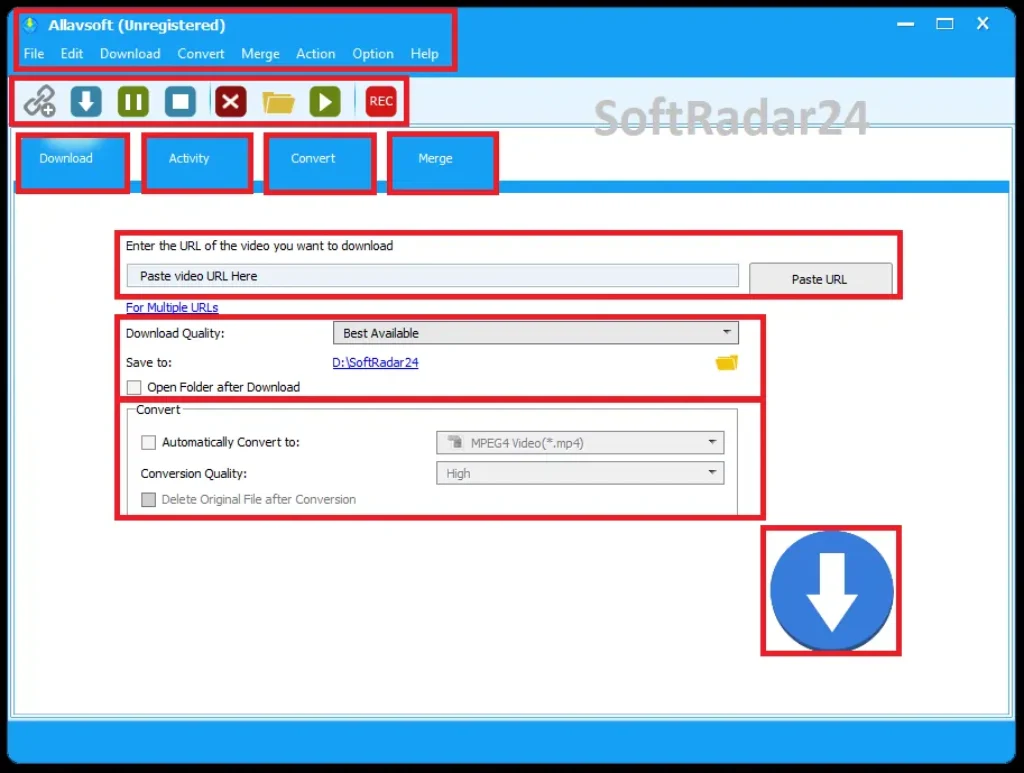
Allavsoft uses a traditional desktop-tool layout rather than a browser-only workflow. Download, Activity, Convert and Merge are separated into task areas, while the main download panel combines URL entry, quality selection, output folder and optional conversion.
Compatibility & Coverage
Allavsoft’s current website advertises support for 1,000+ media websites, but the useful interpretation is task-based rather than treating that number as a permanent whitelist. Website delivery systems change, so current support should be verified against the exact service you use.
| Source / task | Current vendor position | Decision note |
|---|---|---|
| YouTube | Currently listed and documented | Video, playlist, music-to-audio and resolution workflows are available; test current target URLs before long-term purchase. |
| Spotify | Currently listed and documented | Track/playlist to MP3 plus artwork/ID3 workflow is documented; site compatibility can change. |
| Vimeo / Dailymotion / Twitter / Facebook | Included in current site examples | General URL-download workflow; output and source availability vary by service. |
| Viki / Crunchyroll / other subtitle sources | Subtitle downloading is advertised | Available language tracks depend on what the source exposes for each title. |
| Udemy and learning-media sites | Included in current vendor examples | Course/playlist behavior can depend on authentication and site changes; verify your exact course workflow. |
| Deezer / SoundCloud and other music sites | Included in vendor music examples | Music and playlist downloading is a documented use case; verify current account/site behavior. |
| Local video/audio files | Conversion supported | No web download is required; use Convert for format changes and audio extraction. |
| Protected subscription streaming | Do not infer from the 1,000+ claim | Use the trial with the exact service; Allavsoft states that website support is not guaranteed forever. |
Video & Audio Output Coverage
The current Allavsoft product page lists common video outputs including MP4, AVI, WMV, MOV, MPEG-1/2, VOB, ASF, RMVB, DV, TS, Apple ProRes, WebM, FLV and OGV. Audio extraction/conversion examples include MP3, WMA, WAV, AAC, Apple Lossless M4A, AIFF, RA, FLAC, OGG and AU. The practical benefit is that download and conversion can be combined instead of running every file through a second application afterward.
Resolution Coverage
Allavsoft currently advertises download support up to 8K, together with 4K, 2K, 1080p, 720p and lower resolutions where the source provides them. Treat those values as supported source resolutions, not as quality enhancement. The software does not turn a low-resolution source into true higher-resolution detail merely by selecting a larger number.
Features & Capabilities
The product is strongest when the downloading and media-conversion layers are considered together. It can take a supported URL from acquisition through output-format preparation without requiring a separate downloader, converter and basic player for every job.
Video, Music & Playlist Downloading
- Current vendor claim of 1,000+ supported media websites
- Single URL, multiple-URL and playlist workflows
- Video, music and subtitle downloading from supported sources
- Spotify track/playlist workflow with artwork and ID3 metadata
- YouTube playlist and high-resolution source workflows
Conversion & Audio Extraction
- Download in source format or convert during the download
- Local video and audio conversion without redownloading
- MP4, MOV, AVI, WMV, WebM and other documented video outputs
- MP3, FLAC, WAV, M4A, OGG, AIFF and other documented audio outputs
- Extract audio from online or local video sources
Batch & Download Management
- Batch downloading and batch conversion
- Pause and breakpoint resume
- Scheduled downloads for chosen time windows
- Download history
- Optional action after a download queue finishes
Quality, Chapters & Playback
- Vendor-listed source resolutions from SD through 1080p, 4K and 8K where available
- Chapter preservation for supported downloaded video
- Built-in player for previewing downloaded media
- Download-quality controls for resolution selection
- AV1-related preference guidance for current high-resolution YouTube workflow
Important Conditions & Limitations
Downloader software depends on third-party websites that can change independently. Allavsoft’s own policy acknowledges that reality, so the most useful limitations are about compatibility, evidence freshness and what the product does not promise.
Website Support Can Change
Allavsoft states that when websites update, it will try to update the software, but it cannot guarantee support for any website forever. This is the central long-term limitation of a lifetime downloader license. Buy for workflows that work for you now, not for an assumption that every future site change will always be solved immediately.
The 1,000+ Website Claim Is Not a Permanent Compatibility Guarantee
The current homepage names many services and advertises 1,000+ sites, but that number should not be read as a permanent, simultaneously verified list of every service. A named site can change its delivery, login or protection method after the product page was written.
8K and 4K Support Is Source-Dependent
High-resolution support means Allavsoft can request or process those source qualities where available. It is not an AI upscaler. If a website only provides 1080p for a particular item, the downloader cannot recover genuine 4K or 8K source detail that does not exist.
Current macOS Documentation Stops at Sonoma
Allavsoft’s current compatibility page explicitly names macOS Sonoma, Ventura, Monterey, Big Sur, Catalina, Mojave, High Sierra and older releases. Because that public list does not name newer macOS releases, users on a newer Mac should test the current installer and their real download workflow before buying specifically for that machine.
The Refund Policy Is Conditional
Allavsoft publishes a 30-day money-back policy, but its detailed terms tie refunds to technical problems the company cannot fix within the first month. That is not the same as an unconditional 30-day use-and-return promise. Test the free trial first and read the applicable terms before purchase.
The Free Trial Is Best Used as a Compatibility Test
A free trial is available, but the current primary pages reviewed do not publish one clear, detailed trial-limit table covering every download and conversion workflow. Do not rely on an old third-party trial-limit summary. Use the installed trial to test the exact site, playlist, subtitle, resolution and output format that matters to you.
Older How-To Pages Are Workflow Evidence, Not Permanent Site Guarantees
Allavsoft has a large how-to library built over many years. Those pages are useful for understanding URL import, playlist handling, output selection, subtitle workflows and conversion steps, but an older article mentioning a website is not enough by itself to prove that the same service works unchanged today.
Download Rights Still Depend on the Content and Service
A technical ability to save media does not automatically grant permission to copy or redistribute it. Use Allavsoft only for content you are authorized to download and follow the applicable service terms and copyright rules for your situation.
Free Trial / Free Version
Allavsoft provides a free trial for Windows and Mac, and its own refund policy recommends testing the trial before purchase. For this product category, the trial is most valuable as a website-compatibility and workflow test rather than merely checking whether the application launches.
| What to test | Why it matters | Best test |
|---|---|---|
| Your main website | Site delivery systems change independently of Allavsoft. | Use a current URL from the exact service you plan to use. |
| Playlist or batch job | Single-item success does not prove the workflow you need for a long queue. | Try a representative playlist or multiple-URL batch. |
| Subtitle language | Subtitle tracks vary by source and title. | Test a title that exposes the language you actually need. |
| MP3 / FLAC / other audio | Music workflows depend on both source access and output expectations. | Check metadata, artwork and the exact audio format you want. |
| 4K / 8K source | Resolution depends on what the source makes available. | Use a known high-resolution item and inspect the saved output. |
| Current macOS release | The vendor’s public compatibility list currently names releases only through Sonoma. | Install the current Mac build and run your real target workflow. |
System Requirements
The current official purchase/download pages publish a broad operating-system range but do not provide one modern, detailed CPU/RAM table on the primary pages reviewed. The safest requirement summary therefore separates what the vendor explicitly lists from workload-dependent practical needs.
| Requirement | Current documented value | Decision note |
|---|---|---|
| Windows | Windows 11 / 10 / 8 / 7 / Vista / XP / 2000 | Current Allavsoft purchase/download pages still list this broad legacy range; test very old systems before purchase. |
| macOS | Vendor compatibility page names macOS Sonoma through older Mac OS X releases to 10.4 | Newer macOS releases are not named on the current public list; use the trial to verify the current build. |
| Internet access | Required for online-media downloading | Bandwidth and source-server behavior affect download speed and high-resolution jobs. |
| Local storage | Depends on source length, bitrate, resolution and chosen output | 4K/8K video and large playlist jobs can require substantial free space; the vendor does not publish one universal media-storage requirement. |
| CPU / RAM | No single current detailed minimum is published on the primary purchase/download pages reviewed | Conversion and high-resolution media processing can be more demanding than a simple download; test the real workload on older hardware. |
Alternatives & Better-Fit Options
There is no need to force a generic converter into the same role as Allavsoft. The closest alternatives are products that also include online downloading; pure conversion or AI tools become better fits only when the real job begins after the media is already on your computer.
WonderFox HD Video Converter Factory Pro
The closest alternative in this set when you want a Windows-focused all-in-one toolbox. Its current feature set combines online video downloading with conversion, compression, editing and screen recording, so it fits users who want more post-processing around the download stage.
VideoProc Converter AI
A better fit when downloading is only one part of the workflow and you also need AI enhancement, conversion, compression, recording or broader media tools. Its downloader covers online video/music while the rest of the suite is built for post-download processing.
Winxvideo AI
Another broad multimedia option with a downloader plus AI video/image/audio tools, compression, conversion and recording. Compare it when restoration or enhancement matters as much as collecting the original online media.
AnyMP4 Video Converter Ultimate
Better suited when web downloading is not the central requirement. Its strength is local media conversion, compression, editing, AI enhancement and DVD processing, making it a post-download media toolbox rather than a direct substitute for Allavsoft’s main URL-downloader role.
FAQ
These answers cover current pricing, coupon behavior, licensing, trial/refund conditions and high-value technical questions without repeating the scenario rows above.
How much does Allavsoft cost with the current SoftRadar24 offer?
The current campaign shows US$9.99 for 1 Month, US$14.99 for 6 Months, US$14.99 for 1 Year, US$29.99 for 3 Years and US$18.00 for Lifetime. The same displayed campaign prices are available through the Windows and Mac selectors. Applicable tax can change the final checkout total.
Does Allavsoft offer a lifetime license?
Yes. The current SoftRadar24 campaign includes a Windows Lifetime license and an Allavsoft for Mac Lifetime license at US$18.00. At the displayed campaign prices, lifetime is only US$3.01 above the 6-month or 1-year option, so it is the strongest long-term value after you have verified that Allavsoft works with your target sites.
Is there an Allavsoft coupon code or current discount?
Yes. The eligible promotional discount is applied automatically when you use the purchase options on this page; no manual coupon entry is required. The current headline lifetime offer is US$18.00, advertised as up to 82% off the regular US$99.99 lifetime price.
Which Allavsoft license should I buy?
Choose the 1-month option for a short one-off project. The current 6-month and 1-year campaign prices are both US$14.99, so compare the final checkout terms before choosing between them. Lifetime is US$18.00 and is the strongest long-term value if your target websites and operating system already pass your trial test. The 3-year option is currently US$29.99, so compare it carefully with lifetime before payment.
Is there a free trial of Allavsoft?
Yes. Allavsoft provides free-trial downloads for Windows and Mac, and its own refund policy recommends testing the trial before purchase. The current primary pages reviewed do not publish one detailed modern restriction table for every workflow, so use the trial to test the exact site and output you care about instead of relying on an old third-party limit summary.
What is the Allavsoft refund policy?
Allavsoft publishes a 30-day money-back policy for qualifying technical problems. Its detailed policy says the company will refund an order within the first month when it cannot fix the technical issue; orders older than one month are not covered by that policy. Treat the guarantee as conditional and read the current terms before purchase.
Are the current Allavsoft Windows and Mac promotional prices the same?
Yes for the current SoftRadar24 campaign shown here. Windows and Mac both display US$9.99 for 1 Month, US$14.99 for 6 Months, US$14.99 for 1 Year, US$29.99 for 3 Years and US$18.00 for Lifetime. Select the operating system before buying so the checkout receives the correct product edition.
Does Allavsoft still list YouTube and Spotify support in 2026?
Yes. Allavsoft’s current official homepage still lists both services and provides current YouTube and Spotify workflows. That is not a permanent guarantee: the vendor’s own policy says websites can change and support cannot be guaranteed forever. Test the exact YouTube or Spotify job you need before committing to a long-term license.
Does Allavsoft preserve Spotify artwork and ID3 metadata?
The current official Spotify workflow says downloaded MP3 files can keep artwork, ID3 tags and metadata. Because the source service can change, verify the result with a representative track or playlist if library metadata is an important part of your buying decision.
Is Allavsoft a downloader only, or can it also convert local media?
It is both a downloader and converter. The current product and About pages describe conversion of downloaded media plus local video and audio files, including audio extraction to common formats. This makes Allavsoft useful after the URL-download stage when a file needs a different playback format.
Does Allavsoft include download management tools?
Yes. Current official feature pages list batch processing, pause/resume, scheduled downloading, download history, chapter preservation and a built-in player for previewing downloaded media.





