
Quick Summary
MacX DVD Ripper Pro 6.9.0 is a macOS DVD ripper and DVD-backup tool for turning physical DVD discs, DVD folders and ISO images into MP4, MOV, H.264, HEVC, AVI, audio files and device-ready formats. MacX DVD Ripper Pro is especially relevant for 99-title discs, region-coded or copy-protected structures, old or partially damaged DVDs, 1:1 backups and Mac users who want hardware-assisted DVD-to-digital workflows without building a multi-tool setup.
- Current Mac release
- MacX DVD Ripper Pro 6.9.0 · released June 4, 2026
- Current macOS family
- macOS Tahoe 26 through High Sierra 10.13 · separate legacy build for 10.12 or earlier
- DVD inputs
- Physical DVD disc · DVD folder · ISO image
- Core output / backup paths
- MP4/H.264 · HEVC · MOV · AVI · MP3/AC3 · MKV/ISO/MPEG2 1:1 backup
Purchase Options
License & Purchase · MacX DVD Ripper Pro · 67% OFF Official Discount & Coupon Code
If you searched for a MacX DVD Ripper Pro promo codes, compare the actual license term and Mac count before buying. The 67% official discount is currently confirmed for the single-Mac lifetime campaign; bundle options use their own promotional pricing.
MacX Media Master 4-in-1 Bundle – Lifetime
1 Mac · Lifetime bundle campaign
Included with this option- MacX DVD Ripper Pro — Lifetime
- Macxvideo AI — Lifetime
- MacX MediaTrans — Lifetime
- 5KPlayer — Lifetime-use promotional gift
US$49.95one-time
Discount automatically applied
Buy NowMacX Media Master 4-in-1 Bundle – Lifetime
Selected by default because it combines MacX DVD Ripper Pro with the vendor’s broader Mac media tools. The existing campaign checkout currently lists the four included items above at US$49.95 before applicable tax.
The current public MacX DVD Ripper Pro store now emphasizes a 1-year / 3-Mac subscription at US$39.95 for the first year, a Lifetime / 1-Mac license at US$59.95, and a 3-in-1 Lifetime bundle at US$79.95. The existing SoftRadar24 campaigns are different promotional SKUs. Review the final product names, included apps, Mac count, renewal behavior, tax and total price before payment.
Can This Software Do What I Need?
MacX DVD Ripper Pro is most useful when the problem is specifically a DVD-to-digital workflow on macOS. The decision points below separate ordinary conversion, protected 99-title discs, damaged media, lossless backup, Apple Silicon performance, AI enhancement and cases where another product is the better fit.
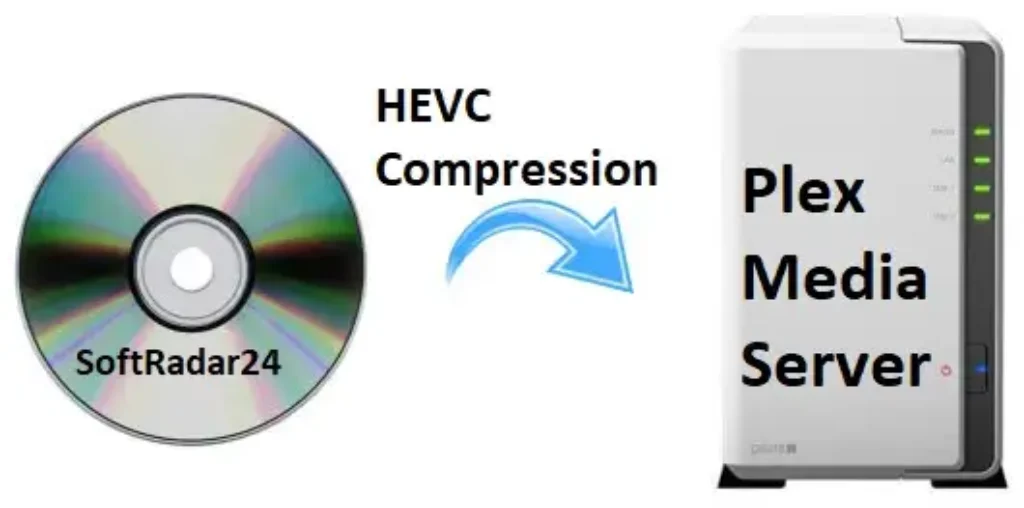
I want to rip a DVD to MP4 on a Mac for TV, NAS, Plex, iPhone or iPad
DVD to digital video
YesMacX DVD Ripper Pro can load a DVD disc, DVD folder or ISO image and convert the content to MP4/H.264, HEVC, MOV, AVI and device-oriented profiles. The current product page also positions NAS, hard-drive, USB and cloud storage as target workflows.
My DVD has 99 titles, fake titles or strong copy protection
Protected DVD structure
Yes — vendor-documentedMacX DVD Ripper uses a Unique Title Check algorithm, adaptive structure analysis and Safe Mode for difficult discs. Current documentation also lists CSS, RCE, UOP, Sony ARccOS, Disney X-project, APS and CPRM among supported protection structures.
My old DVD is scratched, partially damaged or stops during ripping
Difficult physical media
ConditionalMacX DVD Ripper Pro is designed to handle some damaged or difficult discs, and Safe Mode is documented for failed opens, crashes, wrong sequence and similar problems. It cannot reconstruct data that is physically unreadable from a badly cracked, deeply scratched or degraded disc.
I want a 1:1 backup instead of a compressed MP4
Lossless DVD backup
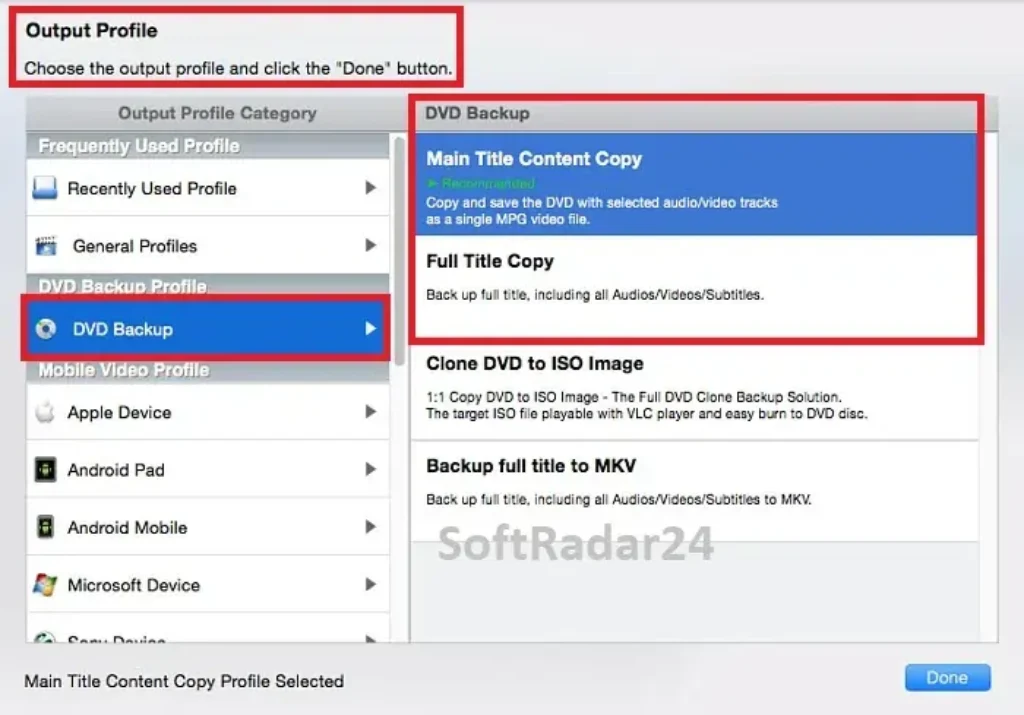
YesMacX DVD Ripper offers Main Title Content Copy, Full Title Copy, Clone DVD to ISO Image and full-title MKV backup. These modes are designed to preserve the original streams rather than re-encode them into a smaller modern codec.
I want to save storage by using HEVC / H.265
Smaller digital library
YesHEVC output is part of the current MacX DVD Ripper Pro format set and can reduce storage compared with MPEG-2 or some H.264 settings. File size and visual quality still depend on bitrate, resolution, source complexity and playback-device support.
I have an Apple Silicon Mac and want native support
Apple Silicon
Yes — current releaseMacX DVD Ripper Pro 6.9.0, released June 4, 2026, adds native Apple Silicon support. The product also uses hardware-assisted processing where the selected codec and Mac hardware support the workflow.
I expect every full DVD to finish in exactly five minutes
Performance expectation
Not guaranteedMacX DVD Ripper Pro is marketed with five-minute and 47× real-time figures, but the vendor’s own performance guidance says actual speed depends on the computer configuration, source DVD and acceleration path. Safe Mode can also be slower than normal mode.
I want to crop, trim, merge chapters or add subtitles before export
Light editing
YesMacX DVD Ripper includes crop, trim, merge, subtitle selection, forced-subtitle handling, external SRT import, audio-track selection and output-parameter controls.
I want AI upscaling to 1080p or 4K
AI enhancement
Use the companion AI productThe current MacX DVD Ripper Pro product page promotes AI enhancement through Macxvideo AI. Do not treat AI upscaling as a built-in MacX DVD Ripper Pro function. The selected MacX Media Master 4-in-1 Bundle includes Macxvideo AI as a separate application.
My source is Blu-ray rather than DVD
Disc type
Better fit: Blu-ray ripperMacX DVD Ripper Pro is a DVD-focused product. If the physical source is Blu-ray, use software that explicitly supports Blu-ray ripping rather than expecting a DVD ripper to handle a different optical format.
How It Works
MacX DVD Ripper Pro follows a three-stage workflow: load the DVD source, choose either a digital-output or backup profile, then start the rip. The useful choices are different for protected discs, lossless archives and GPU-assisted conversion.
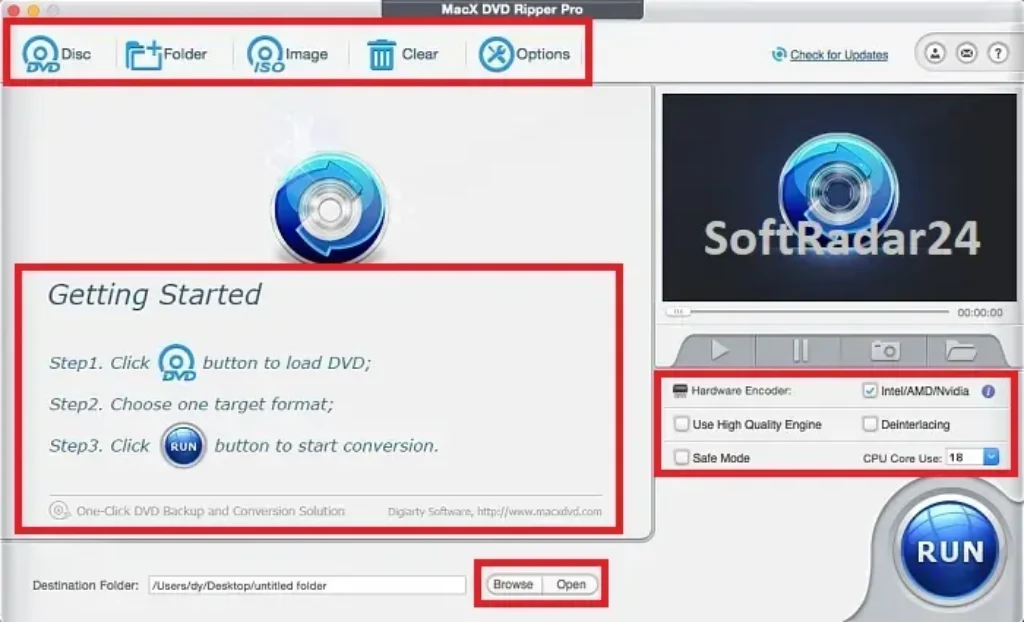
Load a DVD Disc, ISO Image or DVD Folder
MacX DVD Ripper Pro accepts three practical source types. A physical DVD needs a readable internal or external optical drive; ISO images and DVD folders can be loaded directly from Mac storage.
- Open MacX DVD Ripper and choose DVD Disc, ISO Image or Folder.
- Let MacX DVD Ripper Pro analyze the title structure and identify the likely main movie.
- If a protected or difficult disc does not behave normally, try Safe Mode or manually confirm the correct title before converting.
Choose Conversion or 1:1 Backup
The best output depends on whether you want a smaller playable file or a more archival copy. MP4/H.264 and HEVC target convenience and storage efficiency; the dedicated backup modes preserve far more of the original DVD structure or streams.
| Mode | Best fit | Main trade-off |
|---|---|---|
| MP4 / H.264 | Broad compatibility across Macs, TVs, phones, tablets and media servers. | Requires re-encoding when the DVD stream is converted to H.264. |
| HEVC / H.265 | Smaller digital library with a modern codec. | Older playback hardware may have weaker HEVC support. |
| Clone DVD to ISO | Disc-style archive preserving the full DVD structure. | Uses much more storage than a compressed video file. |
| Full-title MKV / MPEG2 backup | Preserving original video/audio/subtitle streams without a normal transcode. | Large output files compared with compressed MP4/HEVC. |
Use Hardware Acceleration When Available
MacX DVD Ripper Pro can use hardware-assisted processing and multi-core resources. The current release adds native Apple Silicon support, while older performance documentation also describes Intel Quick Sync workflows. Actual acceleration depends on the Mac, codec and selected output.
- Use the current MacX DVD Ripper Pro release so the application can detect supported hardware correctly.
- Choose the output profile and enable the available hardware-encoder path where appropriate.
- Judge speed from your own disc and Mac; Safe Mode and difficult discs can take longer than a straightforward H.264 workflow.
Product Interface & Workflow
The images below are reused from the existing SoftRadar24 MacX DVD Ripper Pro article. They are SoftRadar24-hosted assets showing the product artwork, MacX DVD Ripper Pro interface, a NAS/Plex use-case visual and the backup-profile screen. No vendor-hosted image and no video embed is included.
Compatibility & Coverage
MacX DVD Ripper Pro is the macOS-focused edition. The current technical page lists macOS Tahoe 26 through High Sierra 10.13 and provides a separate compatible download for macOS 10.12 or earlier; the current user guide says the legacy line reaches back to Mac OS X 10.6.
macOS & Hardware Environment
| Item | Coverage / Support | Notes |
|---|---|---|
| macOS Tahoe 26 | Supported on the current technical page | Current MacX DVD Ripper Pro platform list. |
| macOS Sequoia 15 through High Sierra 10.13 | Supported | Current technical page lists Sequoia, Sonoma, Ventura, Monterey, Big Sur, Catalina, Mojave and High Sierra. |
| macOS 10.12 or earlier | Separate compatible build | The current product/technical pages provide a legacy-download route; the user guide says Mac OS X 10.6 and above. |
| Apple Silicon | Native support in MacX DVD Ripper Pro 6.9.0 | The June 2026 update specifically adds native Apple Silicon support. |
| Physical DVD | Supported with a readable optical drive | Modern Macs usually need an external DVD drive because Apple no longer includes optical drives in current Mac hardware. |
| DVD folder / ISO | Supported | No physical movie disc is required when the source is already stored locally. |
DVD, Protection & Output Coverage
| Item | Coverage / Support | Notes |
|---|---|---|
| DVD structures | Homemade, commercial, 99-title, workout, TV-series, Japanese and other non-standard DVD structures | Current product/guide coverage; success still depends on the disc being physically readable. |
| Documented protection types | CSS, RCE, UOP, Sony ARccOS, Disney X-project, APS; guide also lists CPRM | Use only where your rights and local law permit the workflow. |
| Video output | MP4/H.264, HEVC/H.265, MOV, AVI, MPEG, M4V, FLV and other profiles | Current product page advertises 350+ profiles; the technical page describes 320+ video/audio codecs. |
| 1:1 backup | MKV, ISO and MPEG2 backup paths | Designed for original-quality or stream-preserving archival workflows. |
| Audio | MP3, AAC, AC3 and other supported extraction paths | Useful for music, lecture or concert DVDs when only the audio track is needed. |
| Playback targets | Mac, iPhone, iPad, Apple TV, Android, TV, NAS/Plex, USB and other devices | Device profiles are presets; the target device still needs to support the chosen codec/container. |
Features & Capabilities
MacX DVD Ripper Pro is strongest when its features are grouped by the actual job: reading difficult DVDs, converting or backing them up, accelerating compatible workloads and preparing the output for playback.
Protected & Difficult DVD Handling
- Unique Title Check for 99-title and fake-title structures
- Adaptive Structure Analysis for non-standard DVD layouts
- Safe Mode for heavily encrypted, damaged or otherwise difficult discs
- Current documentation for CSS, RCE, UOP, Sony ARccOS, Disney X-project, APS and CPRM handling
DVD Conversion & 1:1 Backup
- DVD disc, DVD folder and ISO image input
- MP4/H.264, HEVC/H.265, MOV, AVI and broad device-profile conversion
- Main Title Content Copy, Full Title Copy, Clone DVD to ISO and full-title MKV backup
- Audio extraction to formats such as MP3, AAC and AC3
Mac Performance & Hardware Assistance
- MacX DVD Ripper Pro 6.9.0 adds native Apple Silicon support
- Hardware-assisted processing where the Mac and selected codec expose a supported path
- Multi-core processing and workload distribution documented by the current product page
- Current release also adds HEVC/H.265 and AV1 encoding for DVD-to-MKV backups
Editing & Output Preparation
- Crop black bars and change the visible frame area
- Trim unwanted sections and merge chapters
- Choose subtitle tracks, forced subtitles or external SRT subtitles
- Select audio tracks and adjust codec, frame rate, resolution, bitrate, aspect ratio and volume
Important Conditions & Limitations
The product page makes strong claims about speed, protection handling and AI enhancement. The useful buying decision comes from separating what MacX DVD Ripper Pro itself does from hardware-dependent performance, separate companion software and problems no DVD ripper can solve.
Five Minutes / 47× Is a Peak Performance Claim, Not a Guaranteed Runtime
MacX DVD Ripper Pro is marketed with up to 47× real-time and roughly five-minute full-DVD figures. The vendor’s performance guidance also says computer configuration and DVD size materially affect speed, and Safe Mode is explicitly slower than normal mode.
A Difficult DVD Is Not the Same as a Physically Unreadable DVD
MacX DVD Ripper Pro can work around many title-layout, encryption and read-sequence problems. It cannot recreate optical data that the drive cannot physically read because of severe scratches, cracks, disc rot or a failing optical drive.
Safe Mode Trades Speed for Compatibility
The current user guide recommends Safe Mode when conversion stops, sequence is wrong or a protected/damaged disc is difficult to process. The same guide says ripping under Safe Mode takes more time than normal mode.
AI Upscaling Is Promoted Through Macxvideo AI, Not Built Into MacX DVD Ripper Pro
The current MacX DVD Ripper Pro page contains an AI-upscaling section but its Learn More route points to Macxvideo AI. Treat AI restoration, denoise, frame interpolation and 4K enhancement as a separate companion-product workflow. The selected 4-in-1 bundle includes that separate application.
1:1 Backup and HEVC Conversion Solve Different Storage Problems
ISO, MKV and MPEG2 backup modes preserve far more of the original DVD data and therefore use much more storage. HEVC conversion is better when smaller files matter more than retaining disc structure or untouched streams.
The Trial Is Limited to Five Minutes per DVD
The official MacX DVD Ripper Pro guide says the free trial converts only five minutes for evaluation, does not get free updates to the latest full version and keeps some advanced features unavailable.
The Current Public Store and Existing SoftRadar24 Campaign Are Different Offer Grids
The public store currently highlights a 1-year / 3-Mac subscription, a 1-Mac Lifetime license and a 3-in-1 Lifetime bundle. The existing SoftRadar24 article contains different single-Mac, family and bundle campaigns. The final checkout screen should control.
The Current 1-Year Public Plan Auto-Renews
The official purchase page says the current 1-year / 3-Mac Premium License renews every year, with notice before the next charge and an option to stop renewal. Do not assume every annual campaign has identical renewal terms; check the selected checkout.
MacX DVD Ripper Pro Does Not Rip Blu-ray
MacX DVD Ripper Pro is designed around DVD disc, DVD folder and ISO workflows. If your source is Blu-ray, choose a Blu-ray-specific ripper instead of expecting DVD software to support another optical format.
DVD-Ripping Law Depends on Your Jurisdiction
Protection bypass and personal backup rules vary by country. Use MacX DVD Ripper Pro only for material and purposes you are legally allowed to process.
Free Trial / Free Version
MacX DVD Ripper Pro offers a free trial rather than an unrestricted free Pro edition. The current official guide defines the most important limit clearly: the trial converts only the first five minutes of each DVD for evaluation.
| Free access | What you can do | What requires payment |
|---|---|---|
| MacX DVD Ripper Pro free trial | Load a DVD disc, ISO image or DVD folder, verify title detection, choose an output profile and convert up to 5 minutes of the DVD to test compatibility and output behavior. | The full MacX DVD Ripper Pro license removes the 5-minute evaluation limit and unlocks the paid feature set. |
| Trial update / advanced-feature limits | The official guide says free users do not receive free updates to the latest full MacX DVD Ripper Pro version and some advanced features remain unavailable. | A registered MacX DVD Ripper Pro license is required for unrestricted full-version use. |
System Requirements
The current MacX DVD Ripper Pro technical page is strongest on macOS compatibility and media support; it does not publish a modern CPU, RAM or installation-storage minimum in the reviewed current specification. Those values are therefore not invented or carried forward from the older SoftRadar24 article.
| Requirement | Supported / Required | Notes |
|---|---|---|
| Current macOS | macOS Tahoe 26 through macOS High Sierra 10.13 | Current official MacX DVD Ripper Pro technical-specification list. |
| Legacy macOS | Separate compatible build for macOS 10.12 or earlier; current guide says Mac OS X 10.6 and above | Use the vendor’s legacy download route on older Macs. |
| Apple Silicon | Native support in MacX DVD Ripper Pro 6.9.0 | Current June 4, 2026 upgrade notes. |
| Physical DVD hardware | Readable internal or external DVD drive | Needed only for a physical DVD disc; ISO images and DVD folders can be loaded from storage. |
| CPU / RAM | Not specified as current minimums on the reviewed MacX DVD Ripper Pro technical page | Do not treat old benchmark machines as minimum requirements. |
| Installation / output storage | No current minimum published on the reviewed technical page | Output storage can be substantial, especially for ISO, MKV or MPEG2 1:1 backup modes. |
| Hardware acceleration | Depends on supported Mac hardware and selected codec/workflow | The vendor documents hardware-assisted processing but performance varies by system and source. |
Alternatives & Better-Fit Options
MacX DVD Ripper Pro is the Mac-focused choice in this workflow. If the platform or source disc changes, the better fit may be a different product rather than forcing MacX DVD Ripper Pro into the wrong job. For related offers and future MacX DVD Ripper updates, visit the MacX DVD page on SoftRadar24.
WinX DVD Ripper Platinum
The natural same-family better fit for Windows users who want a comparable protected-DVD, 99-title, backup and hardware-accelerated workflow on a PC rather than macOS.
AnyMP4 DVD Ripper
A direct cross-brand DVD-ripping alternative when you want to compare another Windows/macOS conversion workflow, output profiles, editing tools and licensing before choosing MacX DVD Ripper Pro.
Tipard DVD Ripper
Another dedicated DVD-ripping option worth comparing when the job is DVD-to-digital conversion and you want a different interface, format toolkit and commercial offer.
AnyMP4 Blu-ray Ripper
A better-fit category change when the source is Blu-ray rather than DVD. MacX DVD Ripper Pro is not a Blu-ray ripper, so use Blu-ray-specific software for that optical format.
FAQ
These answers focus on the details most likely to determine whether MacX DVD Ripper Pro is the right DVD ripper for a Mac: current macOS support, Apple Silicon, protected discs, 99-title structures, damaged media, lossless backup, speed claims, trial limits and licensing.
What is the current version of MacX DVD Ripper Pro?
The current official upgrade page lists MacX DVD Ripper Pro 6.9.0, released June 4, 2026. The update adds native Apple Silicon support, HEVC/H.265 and AV1 encoding for DVD-to-MKV backups, and fixes DVD-to-MKV and hardware-acceleration detection issues.
Does MacX DVD Ripper Pro support macOS Tahoe?
Yes. The current technical specification lists macOS Tahoe 26, Sequoia 15, Sonoma 14, Ventura 13, Monterey 12, Big Sur, Catalina, Mojave and High Sierra. A separate compatible download is provided for macOS 10.12 or earlier, while the current guide says Mac OS X 10.6 and above.
Does MacX DVD Ripper Pro run natively on Apple Silicon?
Yes. MacX DVD Ripper Pro 6.9.0 specifically adds native Apple Silicon support. Hardware-assisted ripping performance still depends on the selected codec, source DVD and the capabilities exposed by the Mac.
Can MacX DVD Ripper Pro rip 99-title and copy-protected DVDs?
MacX DVD Ripper Pro is specifically designed for complex DVD structures. Current documentation describes Unique Title Check, Adaptive Structure Analysis and Safe Mode, and lists CSS, RCE, UOP, Sony ARccOS, Disney X-project, APS and CPRM among supported protection types.
Can MacX DVD Ripper Pro recover a scratched or damaged DVD?
It can help with some difficult or partially damaged DVDs, but it cannot physically repair a disc. Safe Mode can improve compatibility when a disc fails to open, crashes, has the wrong sequence or is heavily protected, but unreadable physical sectors remain a hardware/media problem.
Can MacX DVD Ripper Pro make a 1:1 DVD backup?
Yes. The official guide lists Main Title Content Copy, Full Title Copy, Clone DVD to ISO Image and full-title MKV backup. These workflows are intended to preserve the original streams instead of performing a normal compressed transcode.
Does MacX DVD Ripper Pro support HEVC or H.265?
Yes. HEVC/H.265 is part of the current MacX DVD Ripper output set, and the 6.9.0 release notes also add HEVC/H.265 encoding for DVD-to-MKV backups. HEVC is useful when smaller files matter, provided the playback device supports it.
Can MacX DVD Ripper Pro really rip a full DVD in five minutes?
MacX DVD Ripper Pro is marketed with five-minute and up-to-47-times real-time performance figures, but that is not a guaranteed runtime for every disc. The vendor’s performance guidance says computer configuration and DVD size affect speed, and the user guide says Safe Mode takes longer than normal mode.
Is AI upscaling built into MacX DVD Ripper Pro?
No. The current MacX DVD Ripper Pro product page promotes AI enhancement through the separate Macxvideo AI product. The selected MacX Media Master 4-in-1 Bundle includes Macxvideo AI, but AI enhancement should not be described as a built-in MacX DVD Ripper Pro function.
What are the MacX DVD Ripper Pro free-trial limits?
The current official guide says the trial converts only five minutes of each DVD for evaluation. Free users do not receive free updates to the latest full MacX DVD Ripper Pro version, and some advanced features remain unavailable until registration.
Is there a MacX DVD Ripper Pro official discount or coupon code?
SoftRadar24 currently lists several MacX DVD Ripper Pro promotional license and bundle options. The official merchant checkout currently confirms a 67% discount for the single-Mac lifetime campaign, while bundles and family plans have their own pricing. Review the final product, Mac count, renewal terms and total price before payment.
What is included in the MacX Media Master 4-in-1 Bundle?
The existing SoftRadar24 bundle checkout currently lists MacX DVD Ripper Pro Lifetime, Macxvideo AI Lifetime, MacX MediaTrans Lifetime and a 5KPlayer lifetime-use promotional gift. This bundle is selected by default in Purchase Options because it covers DVD ripping, AI video work, iPhone/iPad media transfer and playback.
Does MacX DVD Ripper Pro have a money-back guarantee?
The current official purchase page states that all orders come with a 30-day money-back guarantee. Refund eligibility is governed by the vendor and payment-provider terms that apply to the specific order.
Can MacX DVD Ripper Pro rip Blu-ray discs?
No. MacX DVD Ripper Pro is a DVD-focused product. If your source is Blu-ray, use a Blu-ray-specific ripper rather than expecting a DVD workflow to support another optical-disc format.





