
Quick Summary
AnyMP4 DVD Converter is a Windows and macOS conversion utility for turning homemade DVD video and ordinary media files into MP4, MKV, MOV, AVI, WebM, audio formats and device-ready profiles. It is particularly useful for old wedding, family and camcorder DVDs that need to become normal computer files, because AnyMP4 DVD Converter can select titles or chapters, trim unwanted footage, crop black borders, rotate video, deinterlace older recordings, adjust picture settings, extract audio and add external subtitles before export.
- Best for
- homemade DVD digitizing · DVD to MP4/MKV · old home-video cleanup · device-ready conversion
- Platforms
- Windows and macOS
- License
- 1-Year / Lifetime
- Key limitation
- Current DVD input specification focuses on homemade discs
AnyMP4 DVD Converter Pricing, Discount Code & License Options
The approved SoftRadar24 AnyMP4 DVD Converter checkout links carry the current 50% campaign automatically. No manual coupon-code entry is required.
Choose Windows or macOS first, then select 1 Year or Lifetime. The Windows 1-Year option is selected first because its current SoftRadar24 price is fully verified at $22.50. The approved Lifetime checkout also carries the 50% campaign; its final amount should be confirmed in checkout before payment.
Current AnyMP4 DVD Converter License Options
- AnyMP4 DVD Converter · Windows · 1 Year · $22.50
- AnyMP4 DVD Converter · Windows · Lifetime · 50% off · final price shown at checkout
- AnyMP4 DVD Converter for Mac · macOS · 1 Year · $22.50
- AnyMP4 DVD Converter for Mac · macOS · Lifetime · 50% off · final price shown at checkout
AnyMP4 DVD Converter · 1-Year License
Windows · 1-year license
Included with this license- One year of AnyMP4 DVD Converter use for the Windows edition
- Homemade DVD and ordinary video-file conversion to supported formats
- Title/chapter selection, editing, audio extraction and profile customization
- Update access during the active license period
The 1-Year offer is the clearest current entry point at $22.50 instead of the $45.00 reference price. Choose Lifetime only when you expect to keep digitizing or converting media over a longer period and confirm its final total in checkout.
Confirm the operating system, license term, applicable tax and final checkout total before payment. Windows and macOS use separate checkout products.
Can This Software Do What I Need?
AnyMP4 DVD Converter is best understood as a conversion-and-editing tool for homemade DVDs and media files. It is a strong match when you want a normal digital video from a personal DVD, but several adjacent jobs—full-disc cloning, DVD menu preservation, burning video back to disc and broad commercial-disc decryption—belong to different workflows.
I want to convert an old wedding, family or camcorder DVD to MP4
Homemade DVD digitizing
SupportedThis is the clearest AnyMP4 DVD Converter use case. The current input specification explicitly lists homemade DVD discs, DVD folders and IFO files. After loading the disc, you can choose MP4 or another supported profile and optionally trim footage, remove black borders, rotate a sideways recording or deinterlace older material before export.
I only need the main movie, one episode or selected DVD chapters
Title and chapter selection
SupportedAnyMP4 DVD Converter includes DVD loading preferences and recommends DVD Navigator Mode. Its conversion settings can be restricted to titles or chapters, which is useful for home-video compilations, recorded TV episodes, performances or discs that contain several unrelated clips.
I want to convert a DVD to MP4 without losing any quality
Quality expectation
ConditionalAnyMP4 DVD Converter can create high-quality MP4 output and lets you control resolution, bitrate, frame rate and encoder settings, but a normal codec conversion is not a bit-for-bit clone of the DVD stream. If exact disc preservation is the goal, keep the original VIDEO_TS/IFO structure or use a dedicated DVD-copy/ISO workflow instead of treating an MP4 transcode as lossless archival preservation.
I need to keep the original interactive DVD menus
Full disc structure
Different taskA standalone MP4, MOV or normal MKV export is not a navigable DVD clone. AnyMP4 DVD Converter is designed to turn titles/chapters into media files. Preserving menus, DVD navigation and the complete disc structure is a DVD-copy/ISO/VIDEO_TS task rather than the normal AnyMP4 DVD Converter workflow.
I need the right audio language or want to add external subtitles
Audio and subtitle control
SupportedAnyMP4 DVD Converter lets you select an audio track, adjust audio channels/sampling/encoder settings and add an external subtitle file. Do a short test before converting a long disc so you can confirm language choice, synchronization and subtitle readability on the actual TV, phone or player.
I want to extract only the soundtrack or spoken audio from a DVD
DVD audio extraction
SupportedAnyMP4 DVD Converter can output audio formats including MP3, FLAC, WAV, AAC, AC3, M4A, OGG and others. This can be useful for authorized concert recordings, lectures or personal video discs when the audio track is the part you actually need.
I want an iTunes- or Apple TV-friendly file from a homemade DVD
Apple playback workflow
SupportedAnyMP4 DVD Converter lists MP4, M4V and MOV outputs plus current Apple-device profiles including iPhone 17 and Apple TV. Convert the DVD to a compatible file first, then import that finished file into the relevant Apple media library separately. The conversion itself is not a direct iTunes library-sync operation.
I want to make a standard-definition DVD look like true 1080p or 4K
Resolution vs. real detail
Not supportedAnyMP4 DVD Converter can output HD-profile files and lets you change resolution, but raising pixel dimensions does not recreate native high-resolution detail that was never stored on the DVD. Deinterlacing, cropping and careful encoding can improve presentation; true detail reconstruction is a separate AI-restoration workload.
I need to convert ordinary video files as well as my homemade DVDs
2-in-1 media conversion
SupportedAnyMP4 DVD Converter also accepts a wide range of ordinary video and audio files. That makes it useful when one project includes VOB/DVD material plus MP4, MOV, MKV, MTS, AVI or other camera/computer files that need a common output format.
I need to convert a commercial, rental, region-coded or strongly protected DVD
Protection support boundary
Verify firstThe formal AnyMP4 DVD Converter input table classifies its DVD source support as Homemade DVD. The current guide also notes that an Internet connection is required when encrypted DVD files are encountered, but that should not be read as a blanket guarantee for every commercial protection scheme. Test the exact disc in the free build before buying for protected-disc use, and follow applicable copyright and anti-circumvention rules.
I have a DVD ISO file and want to load it directly
ISO input documentation mismatch
Verify firstThe current product overview mentions DVD ISO input, while the formal reference table lists DVD Disc, DVD Folder and DVD IFO Files. Because those two current descriptions are not perfectly aligned, use the trial with your actual ISO before purchasing specifically for direct ISO conversion.
I have MOV or MP4 files and want to burn a playable DVD with menus
Opposite conversion direction
Different taskAnyMP4 DVD Converter converts DVD/video sources into digital media files; it is not the DVD-authoring product. Burning MOV or MP4 to a playable DVD, choosing PAL/NTSC and designing menus requires DVD Creator or another DVD-authoring workflow.
My old DVD is scratched and the optical drive keeps failing at the same point
Physical read failure
ConditionalAnyMP4 DVD Converter can process readable DVD content, but software cannot recreate sectors the optical drive cannot read reliably. Clean the disc carefully, test a known-good drive and confirm the source can be read before assuming a conversion setting will fix a physical media problem.
How It Works
AnyMP4 DVD Converter follows a straightforward load → select → edit → profile → convert workflow. The best result comes from choosing the destination first: a TV-friendly MP4, an editable MOV, an audio-only file, or a cleaned-up digital copy of an old home-video DVD.
Convert a Homemade DVD to MP4
- Insert the homemade DVD into a compatible internal or external optical drive and open AnyMP4 DVD Converter.
- Choose Load Disc in AnyMP4 DVD Converter, then use DVD Navigator Mode when prompted so the program can present the disc structure cleanly.
- Select the required title or chapters in AnyMP4 DVD Converter instead of converting bonus material or unrelated clips you do not need.
- Choose an MP4 profile and review resolution, bitrate, frame rate, encoder, aspect ratio and audio settings when the destination device has specific requirements.
- Set the destination folder in AnyMP4 DVD Converter, run the conversion and play the finished file on the actual target device before processing the rest of a large collection.
Clean Up an Old Home-Video DVD Before Conversion
- Load the personal DVD in AnyMP4 DVD Converter and preview the section that contains the most obvious visual problem.
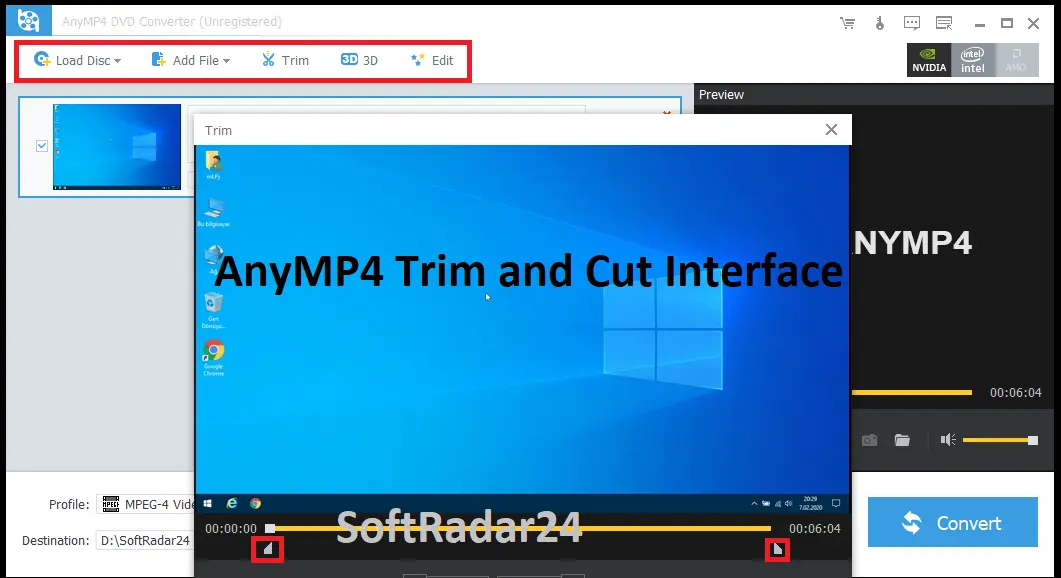
- Use Trim to remove blank lead-in/out footage or split a long recording, and use Crop to remove unwanted black edges when appropriate.
- Use Rotate/Flip in AnyMP4 DVD Converter if the source orientation is wrong, then enable Deinterlacing when visible interlacing artifacts from older video are the problem.
- Adjust brightness, contrast, saturation or hue conservatively and preview the result so faded footage is not overprocessed.
- Export a short test file from AnyMP4 DVD Converter before applying the same settings to hours of family footage.
Convert Only Selected Titles or Chapters
- Open Preferences in AnyMP4 DVD Converter and switch to the DVD settings.
- Use DVD Navigator Mode and restrict the AnyMP4 DVD Converter conversion settings to the titles or chapters you actually need.
- Use Trim when you need a time range inside a chapter rather than the entire chapter itself.
- Merge selected clips in AnyMP4 DVD Converter only when a single continuous output is more convenient than separate files.
Prepare a DVD Video for Apple Playback
- Load the homemade DVD in AnyMP4 DVD Converter and choose an Apple-compatible MP4, M4V or MOV profile suitable for the target device.
- Verify the required audio track and subtitles, then convert the file to a normal computer folder.
- Open the relevant Apple media application and add/import the finished AnyMP4 DVD Converter file separately. The Apple-library step occurs after conversion.
Convert Ordinary Video Files in the Same Project
- Use Add File in AnyMP4 DVD Converter for compatible camera, phone or computer video files alongside the DVD workflow.
- Choose a common output profile when you want mixed MP4, MOV, MTS, MKV or AVI sources to end up in one playback format.
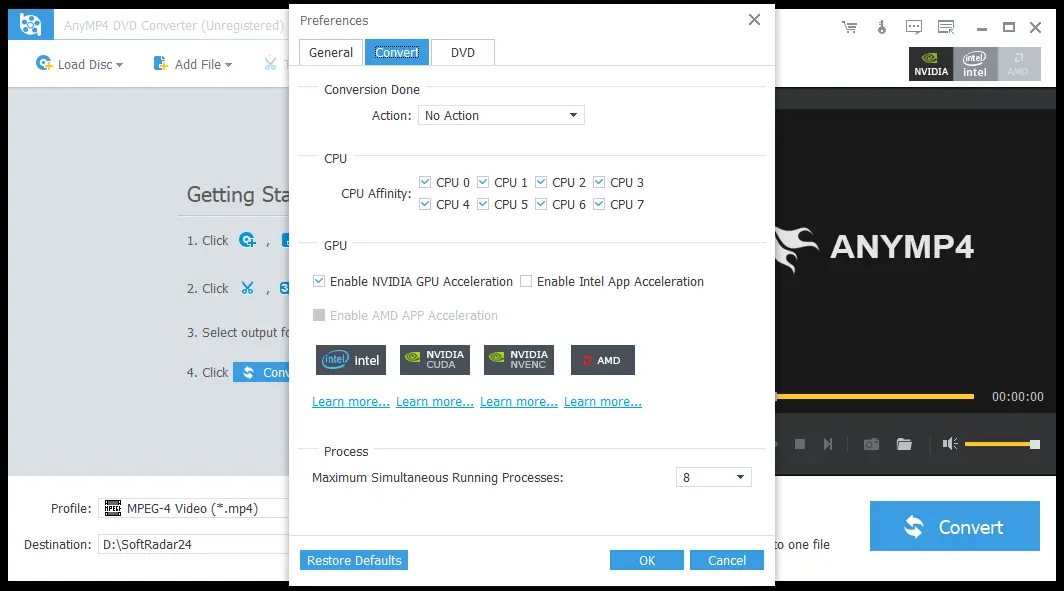
- Use the CPU/GPU and maximum-simultaneous-process settings in AnyMP4 DVD Converter when organizing a larger conversion queue.
Product Interface & Workflow
AnyMP4 DVD Converter keeps the core actions visible: Load Disc, Add File, Trim, Edit, output Profile, Destination and Convert. The Preferences panel adds CPU/GPU controls, maximum simultaneous processes, post-conversion actions and DVD loading behavior without forcing every user into advanced settings.
Compatibility & Coverage
AnyMP4 DVD Converter handles more than optical media. Its Windows reference lists homemade DVD sources plus a large set of video/audio files, and the output list covers general video, HD profiles and audio-only formats. The target player’s codec support still matters more than the filename extension alone.
| Area | Current documented coverage | Decision note |
|---|---|---|
| DVD input | Homemade DVD Disc · DVD Folder · DVD IFO Files | This is the formal reference-table wording and should define expectations for the product. |
| Overview-only DVD input | DVD ISO is also mentioned on the current overview | Because the formal input table omits ISO, trial-test direct ISO loading before purchasing for that use. |
| General video input | MP4, M4V, MOV, MPG/MPEG, AVI, FLV, WMV, MKV, VOB, WebM, MTS/M2TS, MXF and many additional formats | Useful when a home-video project mixes DVD and camera/computer files. |
| General video output | MP4, M4V, MKV, MOV, AVI, WMV, WebM, MPEG-1/2/4, H.264, ProRes variants and more | Choose the format/codec for the target player or editing workflow. |
| Audio output | MP3, FLAC, WAV, AAC, ALAC, AC3, AIFF, M4A, OGG and other listed formats | Supports audio-only extraction from authorized DVD/video sources. |
| Device profiles | Current list includes iPhone 17 family, Apple TV and a broad range of mobile/media-device profiles | Profiles simplify setup, but always test the final file on the real device. |
| Windows | Windows 11 / 10 / 8 / 8.1 / 7 / Vista / XP SP2+ | Current Windows reference range. |
| macOS | Separate Mac edition available | The current Mac product/reference material supplied here does not publish one clear exact macOS minimum table; trial-test the current build on your Mac. |
MP4 vs. MKV for a Digitized DVD
| Priority | Better starting point | Why |
|---|---|---|
| Broad TV/phone/computer playback | MP4 with a widely supported codec such as H.264 | Strong compatibility across ordinary players and devices. |
| Flexible computer/media-center file | MKV | Useful as a flexible container, but final track behavior still depends on how AnyMP4 DVD Converter creates the file and what the player supports. |
| Full DVD structure and menus | Neither normal MP4 nor normal MKV | Use a dedicated ISO/VIDEO_TS copying workflow when preserving interactive disc navigation is the real goal. |
| Editing on Apple-oriented software | MOV/ProRes profile where appropriate | The current output list includes MOV and multiple ProRes profiles for workflows that benefit from those formats. |
DVD Source Resolution vs. HD Output
AnyMP4 DVD Converter lists HD MP4, HD MKV, HD MOV and other HD output profiles. Those profiles control the output dimensions/encoding; they do not change the historical fact that DVD-Video source material is standard-definition. For old interlaced home video, deinterlacing and a well-chosen bitrate can matter more than simply selecting a larger resolution number.
Features & Capabilities
The useful part of AnyMP4 DVD Converter is the combination of disc conversion and pre-export cleanup. Instead of digitizing an old DVD first and opening a second editor for every small correction, you can prepare titles, framing, orientation, picture settings, audio and subtitles in the same workflow.
Homemade DVD & Video Conversion
- Homemade DVD Disc, DVD Folder and DVD IFO input in the formal Windows reference
- Broad general-video input including MP4, MOV, MKV, AVI, MTS/M2TS, MXF, VOB and WebM
- General and HD output profiles including MP4, MKV, MOV, AVI, WMV, WebM and H.264
- Device-oriented profiles including current iPhone and Apple TV entries
Title, Chapter & Clip Control
- DVD Navigator Mode
- Conversion settings for selected titles or chapters
- Trim by start/end time
- Split a source into multiple clips
- Merge selected clips or output files into one file
Home-Video Cleanup
- Crop black borders and change aspect-ratio handling
- Rotate 90 degrees or flip horizontally/vertically
- Adjust brightness, contrast, saturation, hue and volume
- Deinterlacing option for interlaced video artifacts
- Text/image watermark controls
Audio, Subtitle & Output Control
- Select the appropriate audio track
- Add external subtitles from the computer
- Change video resolution, bitrate, frame rate, encoder and aspect ratio
- Change audio channels, sample rate, encoder and bitrate
- Extract DVD/video audio to MP3, FLAC, WAV, AAC and other supported formats
Conversion Preferences
- CPU and GPU preference controls
- Maximum simultaneous running-process setting
- Custom output and snapshot folders
- Post-conversion action including automatic shutdown
- Automatic update-check preference
Important Conditions & Limitations
AnyMP4 DVD Converter sits between a video converter, a basic editor and a DVD digitizing tool. It should not be confused with a full disc-copy application, a DVD authoring/burning suite or AnyMP4’s broader dedicated DVD Ripper. Those distinctions matter more than the raw number of output formats.
The Formal DVD Input Specification Focuses on Homemade DVDs
Current supported-input specifications identify DVD Disc, DVD Folder and DVD IFO Files under the heading Homemade DVD. The user guide separately notes that Internet access is required when encrypted DVD files are handled, but the safest buying interpretation is still to treat commercial/protected-disc compatibility as something to test rather than assume.
DVD ISO Support Is Not Documented Consistently
The product overview includes DVD ISO among compatible sources, while the formal reference table lists disc, folder and IFO input without ISO. If ISO is your primary source format, use the current trial on your actual image file before paying specifically for that workflow.
Converting to MP4 Does Not Preserve Interactive DVD Menus
A DVD menu is part of the disc-navigation structure. AnyMP4 DVD Converter’s normal output is a standalone media file, so selecting MP4/MOV/MKV does not create a fully navigable copy of the original menu. For menu-preserving backup, use a dedicated DVD copy workflow that creates ISO/VIDEO_TS or another structure-preserving archive.
DVD Converter and DVD Creator Run in Opposite Directions
AnyMP4 DVD Converter takes DVD/video sources and creates digital media files. If you need to turn MOV, MP4 or another video into a playable DVD with PAL/NTSC settings and a menu, that is DVD authoring and requires a DVD Creator/burning workflow.
HD Output Is Not Native HD Restoration
Selecting an HD MP4/MKV/MOV profile can resize the output, but a standard-definition DVD does not contain native 1080p or 4K detail. For old home video, deinterlacing, careful cropping and sensible encoding settings can improve presentation without pretending that resolution scaling restores information that is absent from the source.
Codec Conversion Can Introduce Quality Loss
When AnyMP4 DVD Converter decodes DVD video and re-encodes it into another codec, output quality depends on the codec, bitrate, resolution and other profile settings. A file can look visually close to the DVD without being a bit-for-bit copy. Keep an original disc/folder backup separately when archival preservation matters.
An Optical Drive Is Still Needed for Physical Discs
A laptop without a DVD drive needs a compatible external optical drive to read a physical DVD. Once you already have a supported DVD folder/IFO source on storage, the original disc does not need to remain in the drive for that file-based workflow.
Physical Disc Damage Is Outside Software Control
Repeated read errors at the same physical location can come from scratches, disc deterioration or an unreliable optical drive. AnyMP4 DVD Converter cannot recreate data that the drive cannot read. Test the disc and drive before buying software to solve a media-health problem.
The Current Trial Documentation Does Not Publish a Clear Numeric Limit
A free trial is available and the current AnyMP4 DVD Converter guide says it has limitations, but the supplied current guide does not publish one clear numeric conversion-length limit. Use the trial to test the exact disc, title/chapter detection, audio/subtitles and target profile rather than relying on an old trial-limit claim.
The 30-Day Refund Guarantee Is Conditional
AnyMP4 provides a 30-day money-back period, but its current refund policy explicitly states that this is not an unconditional refund guarantee. Product misunderstanding, unsupported-system purchases, change-of-mind cases and other exclusions can apply. Try the software first and review the current refund terms before purchase.
Copying Rights Depend on the Disc and Jurisdiction
Use AnyMP4 DVD Converter only for media you own or are authorized to process and for uses permitted where you live. The current Mac product guidance specifically warns against ripping rental DVDs or backing up DVDs for commercial use.
Free Trial / Free Version
AnyMP4 provides a free DVD Converter trial for Windows and Mac. The current guide confirms that trial limitations exist but does not publish one reliable numeric limit on the supplied product pages, so the best use of the trial is compatibility testing rather than guessing how much of a full DVD it will export.
| What to test | Why it matters | Best pre-purchase check |
|---|---|---|
| Your actual DVD | Homemade, encrypted and unusual disc structures can behave differently. | Load the exact disc and confirm AnyMP4 DVD Converter detects the title/chapter structure you need. |
| MP4/MKV playback | A format name alone does not guarantee TV/editor compatibility. | Export a short sample and play it on the actual television, phone, media server or editor. |
| Audio language | Wrong-track selection is easy to discover only after a long conversion. | Verify the intended track and synchronization in the trial output. |
| Subtitles | External subtitle rendering can vary by player and styling. | Add the subtitle file you actually plan to use and check timing/readability. |
| Old interlaced footage | Home-video DVDs can show combing or black-border problems. | Test Deinterlacing and Crop on a short representative scene before converting the entire disc. |
| Direct ISO input | Current overview and formal reference are not perfectly aligned. | Load your real ISO in the trial before buying primarily for ISO conversion. |
System Requirements
The current Windows reference publishes an exact OS, processor and RAM baseline. The current Mac product material confirms a separate Mac edition but does not expose one equally clear current minimum-specification table, so the Mac build should be trial-tested on the actual machine instead of assigning an unsupported OS floor.
| Requirement | Current documented value | Decision note |
|---|---|---|
| Windows | Windows 11 / 10 / 8 / 8.1 / 7 / Vista / XP SP2+ | Current Windows reference. |
| Windows CPU | Intel Core 2 Duo or AMD Athlon · 2 GHz or faster | Published baseline; modern conversion workloads benefit from stronger hardware. |
| Windows RAM | 2 GB or more recommended | Current published recommendation. |
| macOS | Separate AnyMP4 DVD Converter for Mac edition | No single exact current macOS minimum is stated in the supplied current Mac product/reference material; verify with the trial. |
| Optical drive | Required for physical DVD discs | An internal or compatible external DVD drive can supply the source. |
| Internet | Required by the current guide when encrypted DVD files are handled | Do not assume fully offline operation for every disc type. |
| Storage | Depends on source length and output profile | Keep room for the converted files plus an archival copy when the original material is important. |
Alternatives & Better-Fit Options
Choose an alternative according to the actual media problem: broader all-in-one conversion, AI restoration, Windows-focused processing, Blu-ray input or a wider media-conversion suite. For the wider product family and current offers, visit the AnyMP4 software page on SoftRadar24.
AnyMP4 Video Converter Ultimate
A better fit when DVD conversion is only one part of a larger workflow involving modern high-resolution video, compression, enhancement and a broader toolbox. Choose AnyMP4 DVD Converter when the simpler homemade-DVD-plus-video conversion workflow already covers the job.
Winxvideo AI
Worth comparing when AI restoration, upscaling or heavy video processing matters more than classic DVD title/chapter conversion. This is the stronger direction when improving difficult old footage is the main purchase goal rather than simply digitizing it.
WonderFox HD Video Converter Factory Pro
A Windows-focused comparison for users who want general video conversion and media-processing tools in addition to disc-related workflows. It is most relevant when cross-platform Windows/Mac parity is not required.
Tipard Blu-ray Converter
Choose a Blu-ray-oriented product when the physical library includes Blu-ray discs rather than only DVDs. AnyMP4 DVD Converter should not be purchased on the assumption that DVD and Blu-ray sources are interchangeable.
Tipard Total Media Converter
A broader media-conversion comparison when the project spans several optical and digital source types. Compare the exact source formats and editing requirements instead of choosing solely from the number of advertised output profiles.
FAQ
These answers cover AnyMP4 DVD Converter pricing, DVD-to-MP4 conversion, menus, quality, trial use and the product boundaries that matter before purchase.
How much is AnyMP4 DVD Converter with the current SoftRadar24 offer?
The current verified 1-Year SoftRadar24 price is $22.50 instead of $45.00, a 50% saving. Approved Windows and Mac Lifetime links also carry the 50% campaign, but the final Lifetime numeric amount should be confirmed at checkout rather than inferred.
Is there an AnyMP4 DVD Converter coupon or discount?
Yes. The approved SoftRadar24 purchase links apply the current 50% AnyMP4 DVD Converter campaign automatically. No manual coupon-code entry is required.
Can AnyMP4 DVD Converter convert a homemade DVD to MP4?
Yes. Homemade DVD Disc, DVD Folder and DVD IFO Files are explicitly listed in the current input reference, and MP4 is one of the supported output formats. Title/chapter selection and editing can be applied before conversion.
Can AnyMP4 DVD Converter convert a DVD to MP4 without quality loss?
It can create high-quality MP4 output, but ordinary transcoding is not a bit-for-bit copy. If exact preservation matters, keep the original disc/folder structure separately and use the MP4 as a convenient playback copy.
Should I choose MP4 or MKV for a digitized DVD?
MP4 is usually the safer choice for broad TV, phone and general-player compatibility. MKV can be useful for flexible computer/media-center playback. Neither normal format preserves an interactive DVD menu in the same way as a full disc image or VIDEO_TS copy.
Can AnyMP4 DVD Converter keep DVD menus?
Not as part of a normal MP4/MOV/MKV conversion. AnyMP4 DVD Converter converts selected DVD content into standalone media files. Preserving interactive menu/navigation structure requires a disc-copy format such as ISO/VIDEO_TS and a dedicated copying workflow.
Can AnyMP4 DVD Converter handle subtitles and different audio tracks?
AnyMP4 DVD Converter lets you choose an audio track, adjust audio parameters and add external subtitles from the computer. Test a short section before processing a full disc when multilingual audio or subtitle timing is important.
Can AnyMP4 DVD Converter convert only one DVD chapter or title?
Yes. The current guide includes DVD Navigator Mode and conversion preferences that can restrict processing to titles or chapters. Trim can then isolate a smaller time range when required.
Can AnyMP4 DVD Converter convert a DVD for iTunes or Apple TV?
Yes for compatible digital output. AnyMP4 DVD Converter supports MP4, M4V, MOV and Apple-oriented profiles. Convert the file first, then add/import the resulting media into the relevant Apple library separately.
Can AnyMP4 DVD Converter make a DVD true 1080p or 4K?
No. It can create an HD-resolution output, but standard-definition DVD source material does not contain native 1080p/4K detail. Deinterlacing and careful encoding can improve presentation without creating missing source detail.
Does AnyMP4 DVD Converter support commercial or encrypted DVDs?
The formal input table defines DVD support as Homemade DVD, while the current guide also notes an Internet requirement when encrypted DVD files are handled. Because those statements do not amount to a universal commercial-disc guarantee, test the exact disc first and follow applicable copyright rules.
Can AnyMP4 DVD Converter load DVD ISO files?
The current overview mentions DVD ISO input, while the formal reference table lists Disc, Folder and IFO input. Because the documentation is not perfectly consistent, trial-test your actual ISO before purchasing primarily for direct ISO conversion.
Can AnyMP4 DVD Converter burn MOV or MP4 files to a playable DVD?
No; that is the opposite workflow. A playable DVD with menus, PAL/NTSC settings and disc authoring requires a DVD Creator/burning application rather than AnyMP4 DVD Converter.
What are the AnyMP4 DVD Converter trial limits?
A free trial is available, and the current guide states that the trial has limitations, but the supplied current DVD Converter documentation does not provide one clear numeric limit. Use the trial to test your exact disc, output profile, audio/subtitles and editing workflow before purchase.
What is the AnyMP4 DVD Converter refund period?
AnyMP4 provides a 30-day money-back period, but the current refund policy says the guarantee is conditional rather than unconditional. Review the policy and test the free build before purchase.





