
Quick Summary
Tipard Blu-ray Converter is a Windows and macOS media-digitization application that combines Blu-ray/DVD ripping, lossless disc backup, video/audio transcoding and editing in one desktop workflow. It can load physical Blu-ray or DVD media as well as supported ISO images and folders, then either preserve the source in lossless MKV/ISO form or convert it to playback-oriented formats such as MP4 and MKV with H.264, HEVC/H.265 or AV1. The important buying decision is not simply “Blu-ray to MP4”: preservation, file size, editing and playback compatibility require different output paths, and the lossless MKV profile cannot be edited without switching to a re-encoding format.
- Best for
- Blu-ray/DVD digitization · lossless MKV/ISO backups · MP4/HEVC/AV1 conversion
- Platforms
- Windows & macOS · Intel and Apple Silicon support on the current Mac edition
- Source coverage
- Blu-ray/DVD discs · Blu-ray/DVD ISO and folders · BDMV · AVCHD where supported
- Important boundary
- Lossless MKV preserves the source without re-encoding, but Tipard’s guide requires a non-lossless profile before trimming or editing
Purchase Options
License & Purchase · Tipard Blu-ray Converter · Current Discount & Coupon Code Information · Windows & Mac License Options
Choose Windows or macOS, then select the 1-Year or Lifetime license. The 1-Year option is selected first because it has the lowest upfront price shown here; both choices cover one licensed computer and unlock the same core Blu-ray/DVD conversion feature set.
Tipard Blu-ray Converter · 1-Year License
1 Windows PC · 1-year Tipard Blu-ray Converter license
Included with this license- Full Blu-ray and DVD ripping feature set on 1 Windows PC
- Lossless MKV/ISO backup plus MP4, HEVC and AV1 conversion workflows
- GPU-accelerated conversion and the built-in editing/toolbox features
- One-year licensed access for the selected Windows computer
Best fit when one Windows PC needs the full converter for a defined one-year term at the lowest current upfront price.
The purchase options on this page include 1-Year and Lifetime licenses for Windows or macOS. The 1-Year license has the lower upfront price, while Lifetime is a one-time option for the selected platform. The available discount is applied automatically at checkout. Tipard’s standard public store may show a different plan mix, so confirm the operating system, license term, final total, tax and refund terms before payment.
Can This Software Do What I Need?
Tipard Blu-ray Converter covers ripping, preservation, compression and editing, but those jobs should not be treated as interchangeable. For the wider product family, the Tipard software page on SoftRadar24 provides the broader brand route.
I want to turn a Blu-ray into an MP4 or MKV file for normal playback
Digital conversion
SupportedThe Ripper workspace can load a Blu-ray disc, ISO image or BDMV folder and transcode selected titles to common digital formats. MP4 and MKV are practical choices when the target is a computer, TV, phone, tablet or media server rather than a disc structure.
I want a lossless archive that keeps original audio tracks, subtitles and chapters
Lossless preservation
SupportedMKV Lossless is the relevant path. Tipard describes it as a remux workflow that avoids re-encoding and bitrate changes while retaining the original tracks, subtitles and chapter information available from the source.
I want a 1:1 Blu-ray ISO file instead of a normal video file
ISO backup
SupportedThe current guide provides a separate “Rip to Blu-ray ISO File” output path and describes it as a 1:1 backup without quality loss. ISO preserves a disc-oriented archive, but its direct playback compatibility is narrower than a normal MP4 or MKV file.
I need smaller files for a NAS, Plex library or mobile devices
Space-efficient output
SupportedInstead of lossless remuxing, choose a re-encoding profile such as MP4 with HEVC/H.265 or AV1. These codecs are intended to reduce file size, with the final quality and encoding time depending on bitrate, resolution, codec and hardware settings.
I want to trim, crop, rotate, filter or watermark the movie before export
Editing before output
ConditionalThe editor supports those changes, but Tipard’s guide specifically says the output must not be MKV Lossless when editing a Blu-ray. Editing therefore requires a different output profile and normally introduces a re-encoding step.
I need to clone a Blu-ray to another disc or use dedicated full-disc copy modes
Disc-to-disc copying
Better fitConverter can create an ISO backup, but a dedicated copier is the cleaner fit when disc-to-disc cloning, full-disc copy modes or BD capacity workflows are the main task. Tipard Blu-ray Copy is built specifically around Blu-ray copying rather than media transcoding.
I only want to watch Blu-ray discs on my computer and do not need digital copies
Playback only
Better fitRipping first adds an unnecessary conversion step if playback is the only goal. Tipard Blu-ray Player is the more direct same-brand option for disc and media playback.
I also need to digitize DVD discs and DVD ISO or folder sources
DVD workflow
SupportedThe application includes DVD ripping in the same Ripper workspace. It can use common digital outputs and also documents MPG Lossless and MKV Lossless paths plus DVD ISO/folder backup options.
I do not have a physical Blu-ray drive, but I already have an ISO image or BDMV folder
File-based source
SupportedA physical optical drive is needed only when reading a physical disc. The current guide can load Blu-ray ISO images and BDMV folders directly from storage, so an existing file-based source can be processed without a disc drive.
I want to use one purchased license on both Windows and macOS
Cross-platform licensing
Not supportedTipard states that licenses are platform-specific. A Windows license works with the Windows edition and cannot be transferred to the macOS edition, and the same restriction applies in the other direction.
I want a 4K result from a normal 1080p Blu-ray
Upscaling vs native UHD
ConditionalThe enhancer can upscale 1080p video to a 4K-sized output, while the product also supports native 4K UHD Blu-ray workflows. Those are different: upscaling increases output resolution but cannot recreate source detail that was never present in a 1080p disc.
I need to process a copy-protected commercial disc
Protection and usage rights
Verify firstTipard currently markets the product for copy-protected Blu-ray/DVD sources, but the right to bypass protection or make a personal copy varies by jurisdiction and by the media’s license terms. Confirm that your intended use is permitted where you live before processing protected content.
How It Works
The workflow starts with the source, then branches according to preservation versus compression. Choosing the output strategy before editing is important because lossless remux profiles and editable transcoding profiles behave differently.
1. Load the Disc, ISO or Folder and Check the Title List
- Insert a supported Blu-ray/DVD disc or load a supported ISO/folder source.
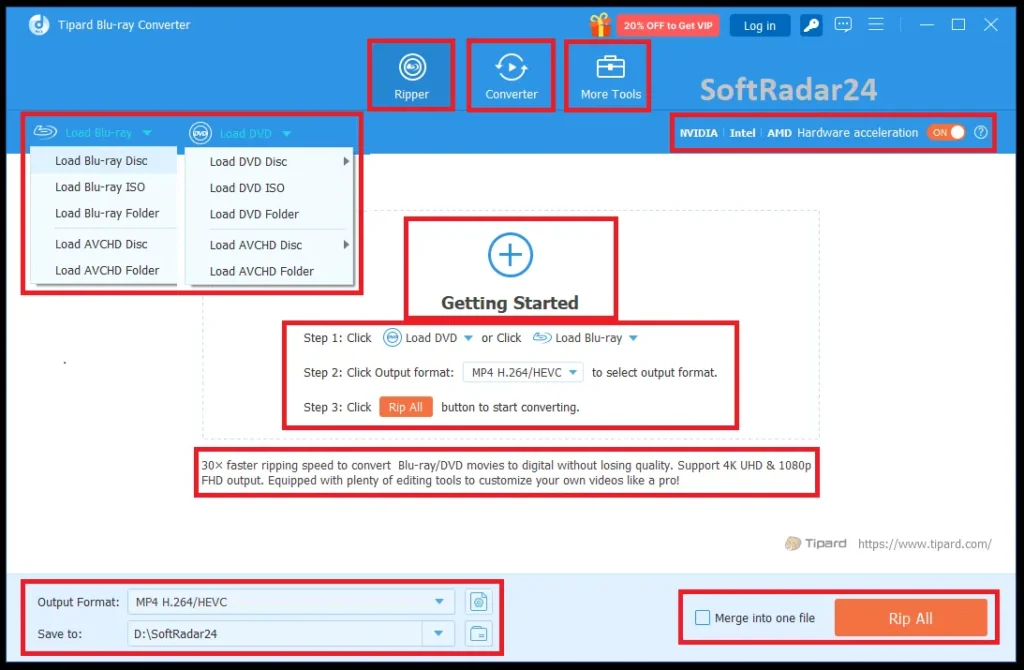
- Use Main Movie for the longest detected title or open Full Title List when the disc contains episodes, extras or several long titles.
- Check the selected title instead of assuming the longest title is always the movie you want.
2. Decide Between Lossless Preservation and Re-encoding
For source-preserving storage, select MKV Lossless or the Blu-ray ISO output path. For smaller files or wider playback compatibility, choose a digital format such as MP4 or MKV and then use H.264, HEVC/H.265 or AV1. HEVC and AV1 are compression choices, so they re-encode the source rather than simply remuxing it.
3. Select Audio, Subtitles and Editing Options
The Blu-ray workflow exposes audio and subtitle track selection before ripping. If trimming, cropping, filters, watermarking or other edits are required, switch away from MKV Lossless first; the current guide explicitly blocks editing in that lossless profile.
4. Rip or Convert and Verify the Output
Choose the destination folder and start Rip All. Hardware acceleration can be enabled for supported NVIDIA, Intel and AMD GPUs. After completion, verify the video, selected language tracks, subtitles, chapter behavior and playback compatibility before deleting or repurposing any source files.
Product Interface & Workflow
Tipard separates disc ripping from ordinary file conversion. The Ripper workspace handles Blu-ray/DVD sources and title selection, while the Converter workspace handles normal video/audio files and profile customization.
Compatibility & Coverage
Compatibility is broader than a format count. The useful distinction is whether the source is a physical disc, ISO/folder, lossless remux target or re-encoded digital file, because each path has different storage, playback and editing consequences.
| Area | Current documented coverage | Decision note |
|---|---|---|
| Blu-ray input | Disc · ISO · BDMV folder · AVCHD · BD-25/BD-50 · 4K UHD · 3D Blu-ray | A compatible Blu-ray drive is required only for physical discs. |
| DVD input | Disc · ISO · DVD folder | The same application handles DVD ripping as well as Blu-ray. |
| Lossless preservation | MKV Lossless · Blu-ray ISO · DVD MPG/MKV Lossless | Prioritizes source preservation over small file size. |
| Digital video | MP4 · MKV · MOV · AVI · WebM · WMV and hundreds of additional profiles | Tipard advertises 500+ video/audio output formats and presets. |
| Modern video codecs | H.264 · H.265/HEVC · AV1 | HEVC and AV1 are useful when reducing storage is more important than lossless remuxing. |
| Audio | MP3 · AAC · FLAC · WAV · WMA · OGG and additional formats | Source audio tracks can be retained in lossless workflows or extracted separately. |
| Hardware acceleration | NVIDIA · Intel · AMD | Tipard advertises up to 30× acceleration; real speed varies by hardware and settings. |
| Device profiles | Apple devices · Android devices · TVs · game consoles · media players | Profiles simplify compatibility but do not replace checking the target device’s actual codec support. |
Native 4K UHD Is Different from 1080p-to-4K Upscaling
Standard Full HD Blu-ray is commonly 1920×1080, while native 4K UHD is 3840×2160. Tipard can process 4K UHD sources and can also upscale a lower-resolution source to a 4K-sized output. Upscaling may improve presentation through processing, but it does not turn missing 1080p source detail into native UHD detail.
Lossless MKV vs ISO vs Compressed MP4
Lossless MKV is useful when you want the movie, original tracks, subtitles and chapters in one playback-friendly container without re-encoding. ISO is closer to a disc-oriented 1:1 archive but has narrower direct playback compatibility. MP4 with H.264, HEVC or AV1 is a better fit when storage size and broad device playback matter more than preserving the source bitstream unchanged.
Features & Capabilities
The product is easiest to evaluate when its features are grouped by job rather than by marketing count: preservation, transcoding, title/track control, ordinary media conversion and editing each solve a different problem.
Lossless Blu-ray & DVD Preservation
- Remux Blu-ray to MKV Lossless without re-encoding or changing bitrate
- Retain available original audio tracks, subtitles and chapter information
- Create a 1:1 Blu-ray ISO backup through the dedicated ISO output path
- Use MPG Lossless or MKV Lossless for supported DVD preservation workflows
Space-Efficient Blu-ray Transcoding
- Convert Blu-ray/DVD titles to MP4, MKV, MOV, AVI, WebM, WMV and other formats
- Use H.264, HEVC/H.265 or AV1 depending on compatibility and compression priorities
- Customize resolution, frame rate, bitrate and encoder settings
- Apply one profile to multiple titles or assign formats individually
Titles, Chapters, Audio & Subtitles
- Switch between Main Movie and Full Title List views
- Batch-rip selected Blu-ray titles and chapters
- Select the desired subtitle and audio tracks before output
- Merge selected titles into one output file when appropriate
DVD, Video & Audio Conversion
- Rip DVD disc, ISO and folder sources from the same Ripper workspace
- Convert ordinary video and audio files in the separate Converter workspace
- Batch-process multiple files with shared output settings
- Extract or convert audio to formats such as MP3, AAC, FLAC and WAV
Editing & Video Enhancement
- Trim and split clips before final encoding
- Rotate, flip and crop video to a chosen aspect ratio
- Adjust brightness, contrast, saturation and hue or apply filters
- Add text/image watermarks plus replacement or additional audio/subtitle tracks
- Upscale supported video, reduce noise and stabilize shaking through the enhancer
Toolbox & Utility Features
- Video Compressor for reducing output size
- GIF Maker for creating animated GIFs from video or images
- Media Metadata Editor for tags such as title, artist, album and genre
- 3D Maker for supported 2D/3D conversion workflows
- NVIDIA, Intel and AMD hardware acceleration where the selected workflow supports it
Important Conditions & Limitations
A Blu-ray ripper can offer both preservation and compression, but those goals conflict. The most important limitations come from the selected output mode, source hardware, license platform and the difference between vendor speed claims and real-world workloads.
Lossless MKV Cannot Be Edited in the Same Output Mode
Tipard’s current guide explicitly requires a format other than MKV Lossless before editing a Blu-ray. DVD editing has the same restriction for MPG Lossless and MKV Lossless. If you need trimming, cropping, filters or watermarking, plan on a re-encoded output rather than a pure lossless remux.
Lossless Preservation Uses More Storage
A lossless remux keeps the source video/audio data rather than aggressively compressing it, so files can remain large. HEVC or AV1 can reduce storage requirements, but that smaller size comes from re-encoding and should be evaluated against quality, compatibility and conversion time.
A Physical Blu-ray Still Needs a Compatible Optical Drive
Software cannot read a physical Blu-ray without compatible Blu-ray hardware. ISO images and BDMV folders can be loaded from local storage, but a disc workflow needs a working internal or external Blu-ray drive.
A 4K Upscale Is Not a Native 4K UHD Source
The enhancer can create a 4K-sized output from 1080p material, but it cannot recreate source detail that was never captured. Use native UHD source support when the goal is to preserve genuine 3840×2160 source detail.
The 30× Speed Figure Is a Vendor “Up To” Claim
Tipard advertises up to 30× acceleration using NVIDIA, Intel and AMD GPU technologies. We did not independently benchmark that figure. Actual throughput varies with the source, codec, resolution, quality settings, GPU support, storage speed and whether the job is a remux or a full transcode.
Windows and Mac Licenses Are Separate
Tipard’s current purchasing FAQ states that licenses are platform-specific and cannot be transferred between Windows and macOS. Choose the operating system before checkout rather than assuming one purchase activates both editions.
Available License Plans Can Differ
The purchase options on this page show 1-Year and Lifetime licenses, while Tipard’s standard public store can show a different plan mix, including a 1-Month option. Treat the checkout order summary as the final authority for the selected term, renewal status, tax and total.
Protected-Disc Support Does Not Override Local Law or License Terms
Tipard advertises support for copy-protected Blu-ray/DVD sources, but copyright and anti-circumvention rules vary by jurisdiction. Process only media you are authorized to copy, and verify local requirements when protection bypass or redistribution rights are relevant.
ISO Is an Archive Format, Not the Most Universal Playback Format
A Blu-ray ISO preserves a disc-oriented copy, but many phones, TVs and everyday media apps expect normal video containers instead. Choose ISO for archival structure and MP4/MKV for broader direct playback.
Free Trial / Free Version
Tipard provides a trial build rather than an unrestricted permanent free edition. Its current FAQ states that trial functionality is the same as the full version except for a 5-minute length limit when converting files.
| Trial check | What you can evaluate | Important boundary |
|---|---|---|
| Source loading | Whether the application detects your Blu-ray/DVD, ISO or folder workflow correctly | A physical disc still depends on a compatible optical drive. |
| Title discovery | Whether Main Movie / Full Title List identifies the content you need | Multi-title discs should be checked manually before a full job. |
| Format/profile setup | Whether MKV, MP4, HEVC, AV1, audio and subtitle options fit your target | Trial conversion length is limited to 5 minutes. |
| Short output sample | Picture quality, audio/subtitle selection and target-device playback | A short sample does not prove full-disc speed or final file size. |
System Requirements
The published minimums are modest, but Blu-ray transcoding is workload-sensitive. A modern GPU can help supported acceleration paths, and storage needs can become much larger than the application footprint when retaining lossless disc-quality files.
| Requirement | Current documented value | What it means |
|---|---|---|
| Windows | Windows 11 / 10 / 8.1 / 8 / 7 · 32-bit & 64-bit | Current Windows technical specification. |
| Windows CPU | 1 GHz Intel/AMD CPU or above | Published minimum; encoding speed benefits from stronger hardware. |
| Windows RAM | 2 GB RAM or above | Published minimum. |
| macOS | macOS 10.12 or later · current page includes macOS Tahoe | Current Mac product specification. |
| Mac CPU | 1 GHz or above Intel or Apple Silicon processor | Current Mac product specification. |
| Mac RAM | 2 GB RAM or above | Current Mac product specification. |
| Physical Blu-ray | Compatible internal or external Blu-ray drive | Required to read a physical Blu-ray disc; not needed for an existing ISO/BDMV source. |
| Acceleration | Supported NVIDIA / Intel / AMD GPU path | Relevant to vendor-advertised hardware acceleration; support and speed vary by workflow. |
| Storage | Depends on source and output mode | Lossless Blu-ray archives can be large; plan storage separately from the app’s installation needs. |
Alternatives & Better-Fit Options
The best alternative depends on whether you still need ripping/conversion or whether the job is actually playback. Compare workflow fit—not just format counts—before choosing another Blu-ray tool.
AnyMP4 Blu-ray Ripper
A direct cross-brand comparison when the main requirement is converting Blu-ray discs, ISO/folder sources and movie titles to digital video or lossless-style outputs. Compare the exact lossless workflow, current codec support, platform requirements and license terms that matter to your archive.
Aiseesoft Blu-ray Player
A better-fit comparison when the real task is watching Blu-ray/DVD and common media files rather than building a converted movie library. A playback-first product avoids the storage and waiting time of ripping every disc before viewing it.
FAQ
These answers cover current license prices, checkout discounts, system requirements, trial limits, supported sources and formats, licensing, and other practical details without repeating the use-case decisions above.
What Windows versions does Tipard Blu-ray Converter support?
Tipard’s current Windows technical specification lists Windows 11, Windows 10, Windows 8.1, Windows 8 and Windows 7 in both 32-bit and 64-bit editions.
What are the minimum Windows hardware requirements?
Tipard currently lists a 1 GHz or faster Intel/AMD processor and at least 2 GB of RAM. Ripping a physical Blu-ray also requires a compatible Blu-ray drive, and large lossless backups need additional storage beyond the program itself.
What macOS versions does Tipard Blu-ray Converter for Mac support?
Tipard’s current Mac product page lists macOS 10.12 or later, including macOS Tahoe, with support for Intel and Apple Silicon processors.
Which Blu-ray sources can the program load?
The current guide documents physical Blu-ray discs, Blu-ray ISO images and BDMV folders, and it also states that AVCHD media can be loaded. The product page additionally lists BD-25, BD-50, 4K UHD and 3D Blu-ray support.
Which DVD sources are supported?
Tipard Blu-ray Converter can load DVD discs, DVD ISO images and DVD folders. DVD output can use common digital formats or lossless MPG/MKV profiles, and the product page also documents DVD ISO and folder backup workflows.
Which output formats and codecs are available?
Tipard advertises more than 500 video and audio formats. Current documentation includes MP4, MKV, MOV, AVI, WebM and WMV plus H.264, H.265/HEVC and AV1 encoding, along with audio formats such as MP3, AAC, FLAC, WAV, WMA and OGG.
What is the current free-trial limit?
Tipard’s current FAQ says the trial has the same functionality as the full version except for a 5-minute length limit when converting files. It is therefore an evaluation build rather than an unrestricted permanent free edition.
Does Tipard Blu-ray Converter always run 30 times faster?
No fixed speed should be expected. Tipard advertises up to 30× hardware-accelerated ripping and conversion with supported NVIDIA, Intel and AMD GPUs, but actual speed depends on the source, output codec, quality settings and computer hardware.
What are the current Tipard Blu-ray Converter license prices?
The current checkout prices shown on this page are US$22.50 for the 1-Year license and US$37.50 for the Lifetime license. Each option covers either 1 Windows PC or 1 Mac, depending on the platform selected before checkout.
Do I need a coupon code to get the current Tipard Blu-ray Converter discount?
No separate coupon code needs to be entered when you use the purchase buttons on this page. The available Tipard Blu-ray Converter discount is applied automatically at checkout. Confirm the final price, platform and license term on the Tipard order page before payment.
How many computers does each Tipard Blu-ray Converter license cover?
Each 1-Year or Lifetime option shown on this page covers one licensed Windows PC or one Mac. Tipard states that licenses are platform-specific, so a Windows license cannot be transferred to the macOS version or vice versa.
Is the Lifetime license a one-time purchase?
Tipard’s current store describes its Lifetime license as a one-time purchase with lifetime access to the product’s features plus lifetime upgrades and support. The final order summary should still be checked before payment.
What refund period does Tipard currently advertise?
Tipard’s Blu-ray Converter product page advertises a 30-day money-back guarantee, and its current store applies 30-day coverage to Lifetime plans. Refund eligibility can depend on the purchased plan and policy terms, so check the final checkout terms for the selected license.
Can the software also convert ordinary video and audio files?
Yes. The Converter workspace accepts ordinary video and audio files and lets you choose output format, encoder, resolution, frame rate, bitrate, audio channel, sample rate and other profile settings before batch conversion.
Can it preserve high-resolution Blu-ray audio?
Tipard documents lossless MKV preservation of original audio tracks and also lists extraction of DTS-HD Master Audio, Dolby TrueHD and Dolby Atmos sources to formats such as MP3, AAC, FLAC, WAV, WMA and OGG.
Does 1080p-to-4K enhancement create the same result as a native 4K UHD Blu-ray?
No. The enhancer can upscale a 1080p video to a 4K-sized output, but upscaling cannot recreate source detail that was never present. A native 4K UHD source starts with 3840×2160 source resolution, while standard Full HD Blu-ray is typically 1920×1080.





