
Quick Summary
Aiseesoft – FoneLab Android Data Recovery is a Windows and macOS recovery utility for finding lost or deleted Android contacts, messages, call history, WhatsApp data, photos, video, audio and documents from supported phones, tablets, SD cards, SIM cards and—through a separate recovery mode—Google Drive backups. The current workflow is more hands-on than a generic ‘connect and scan’ description suggests: direct device recovery uses USB connection, USB debugging, the FoneGo helper app and permission approval before scanning. The paid PRO layer adds deleted media/document recovery and Deep Scan beyond the narrower Free edition.
- Current recovery sources
- Android device · SD card · SIM card · Google Drive backup
- Supported data categories
- Contacts · messages · call history · WhatsApp · photos · video · audio · documents · attachments
- Connection baseline
- USB debugging + FoneGo authorization for the current direct-device workflow
- Free vs paid
- Free covers selected text-data recovery; PRO adds deleted media/documents, Deep Scan and broader Android support
Purchase Options
License & Purchase · Aiseesoft FoneLab Android Data Recovery · 50% OFF Official Discount & Coupon Code
Choose Windows or macOS, then choose the retained monthly, lifetime or multi-computer SoftRadar24 campaign. The lowest-priced US$19.90 option is selected first.
1-Month License
1 Windows PC · 1-month Aiseesoft FoneLab Android Data Recovery campaign license
Included with this option- Aiseesoft – FoneLab Android Data Recovery for 1 Windows PC
- Current retained SoftRadar24 short-term campaign
- Paid recovery beyond the narrower Free edition
- Best fit for a one-time recovery incident or short project
US$19.90/ month
Discount automatically applied
Buy NowWindows · 1-Month License · 1 PC
The current public Aiseesoft for Android page also lists 1 Month / 1 PC at US$19.90 versus US$39.80 and says the individual plan supports 6 Android devices on 1 PC.
Aiseesoft’s current public purchase page lists Android Data Recovery at US$19.90 for 1 Month / 1 PC / 6 Android devices, US$49.96 for Lifetime / 1 PC / 6 devices, and US$79.00 for 18 devices / 3 PCs. It separately sells the broader FoneLab for Android package containing Android Data Recovery, Broken Android Data Extraction and Android Data Backup & Restore. The retained SoftRadar24 links are Android Data Recovery campaigns only; review the final platform, computer count, Android-device allowance, renewal terms, refund conditions, tax and total before payment.
Can This Software Do What I Need?
Aiseesoft – FoneLab Android Data Recovery is easiest to judge by the state of the phone and the type of missing data. A working phone that can authorize USB access, a locked phone, a black-screen phone, an SD-card problem, a Google Drive backup and a simple phone migration are not interchangeable recovery scenarios.
I accidentally deleted photos or videos from a working Android phone
Deleted Android media
Yes — use the paid recovery layerAiseesoft – FoneLab Android Data Recovery PRO is the relevant path when the phone can connect and authorize access. The current Free-vs-PRO comparison places deleted photos, music and video in the paid column, so the Free edition should not be assumed to restore those media categories.
I need deleted SMS, contacts or call history from Android
Text and communication records
YesThe current product supports contacts, messages and call history. Contacts can be exported with fields such as phone number, email and address, while messages and call records can be previewed before recovery.
I need deleted WhatsApp chats or WhatsApp attachments
WhatsApp recovery
Supported — outcome depends on what the scan can still findCurrent Aiseesoft documentation lists WhatsApp and WhatsApp Attachments among supported data types. Do not treat that as a guarantee that every deleted chat or media item remains recoverable on every Android device.
I deleted files from a microSD card that is still used with the Android device
Android SD card recovery
YesSD card is a current documented recovery source. Keep the card available to the device/workflow and use the relevant media or document categories rather than treating internal storage and removable storage as the same source.
I need contacts or other information from a SIM card
SIM card recovery
Vendor-listed supportSIM card is listed as a current recovery source. Exact recoverable fields depend on what the SIM actually stores; modern phones often keep richer contact data in device or cloud accounts instead.
I have a Google Drive backup and want selected Android data instead of a full device reset
Google Drive backup recovery
YesThe current tutorial has a dedicated Google Drive Data Recovery mode. It requires Google sign-in, identity verification and authorization, then lets you choose categories such as contacts, messages, calendar and call logs before recovery.
My phone is working, but I want to protect data before anything is deleted
Prevention / local backup
Better fit: FoneLab Android Data Backup & RestoreRecovery software is reactive. If the data still exists and the goal is a reusable local backup with selective restore, the dedicated Aiseesoft FoneLab Android Data Backup & Restore workflow is a cleaner fit.
I am moving existing photos, contacts and messages to a new phone
Phone-to-phone migration
Better fit: Aiseesoft MobieSyncAiseesoft FoneLab Android Data Recovery is for lost/deleted data. Aiseesoft MobieSync is better aligned with transferring existing files between Android, iOS and a computer when nothing has been deleted.
I forgot the screen lock or I am blocked by Google FRP
Unlock / FRP problem
Better fit: Aiseesoft Android UnlockerA locked phone is an access-control problem, not automatically a deleted-data problem. Use an unlocker only on a device you are authorized to access, and check its data-retention conditions before proceeding because modern lock removal can involve a reset.
The screen is black or unresponsive and I cannot approve USB debugging
No on-device authorization
Standard recovery may not fitThe current direct-recovery tutorial requires USB debugging, FoneGo installation and permission approval. Broken Android Data Extraction is a separate function/product with a narrow legacy Samsung device list, and its current documentation says it extracts existing data rather than deleted data.
My phone is stuck in Android Recovery Mode
System recovery menu
Do not choose Factory Reset just to make data recovery easierAndroid Recovery Mode is a system-maintenance environment, not Aiseesoft FoneLab Android Data Recovery. The supplied recovery-mode guide warns that Wipe data/Factory reset can erase data you intend to keep. If the data matters, avoid destructive reset steps until recovery options are evaluated.
The phone has already been factory-reset
Post-reset recovery
Uncertain — do not buy on a guaranteeThe current product pages describe many data-loss scenarios but do not provide a reliable guarantee for recovery after a factory reset. Treat a completed reset as a high-risk case and use the Free/preview path to see whether anything is actually detectable before paying.
I only want to see whether my deleted photos are detectable before paying
Pre-purchase verification
Use the Free edition / preview firstCurrent official pages describe free access somewhat differently, but both support using the free software to test detection or preview. The safest purchase decision is to verify your own device and target data before buying.
I use Android 16 on a current phone
Modern Android compatibility
Supported by current reference — exact model still mattersThe current Aiseesoft reference explicitly includes Android 16 for USB and wireless connection support. The named device list is not exhaustive, so verify the exact phone model and connection behavior before a critical recovery.
I need Samsung Android data recovery
Samsung recovery
Yes — if the phone is detectable and authorizableSamsung is heavily represented in the current supported-device list. For normal Android Data Recovery, the same USB-debugging/FoneGo authorization path applies; broken-screen extraction is a separate legacy-Samsung workflow.
I want a completely read-only scan that installs nothing on the phone
Zero-touch forensic workflow
NoThe current recovery tutorial is not literally zero-touch: it enables USB debugging, installs the FoneGo helper app and grants permissions. Users who require a no-install forensic acquisition process should not treat Aiseesoft FoneLab Android Data Recovery as that kind of tool.
How It Works
The current Aiseesoft FoneLab Android Data Recovery workflow has two main acquisition paths: direct recovery from an Android device and selective recovery from a Google Drive backup. Direct device recovery requires on-device authorization; Google Drive recovery requires account sign-in and identity verification.
Recover Deleted or Lost Data from a Connected Android Device
- Launch Aiseesoft FoneLab Android Data Recovery and connect the Android phone or tablet to the computer with USB. If detection fails, switch the phone to a compatible file-transfer / MTP-style USB mode as instructed.
- Enable USB debugging and approve the computer on the phone.
- Allow the software to install FoneGo through the documented Install via USB path, then grant FoneGo access to the categories you want to scan.
- Choose data types, start the scan, preview the results and recover the selected items to the computer.
Use Deep Scan Only When the Normal Result Is Not Enough
Aiseesoft’s current FoneLab Android Data Recovery Free-vs-PRO page lists Deep Scan as a PRO feature and also documents root-related capability, while the current main tutorial does not state that every recovery requires rooting. The safe interpretation is that basic recovery begins with the normal authorized scan; deeper access may introduce additional device-specific requirements.
| Stage | Purpose | What to expect |
|---|---|---|
| Normal authorized scan | Start with accessible categories after USB debugging and FoneGo authorization | Lowest-complexity first step; preview before committing to paid recovery. |
| Deep Scan | Search for more lost data | PRO feature; additional access/root-related requirements may depend on the device and data category. |
| Broken Android Data Extraction | Existing data from certain inaccessible Samsung devices | Separate tool/function; not a universal deleted-data recovery mode. |
Recover Selected Data from Google Drive
- Choose Google Drive Data Recovery from the application.
- Sign in to the Google account, complete the required identity verification and authorize access.
- Choose supported categories such as contacts, messages, calendar or call logs.
- Preview the available backup data and recover the specific items you need instead of treating the workflow as a full-phone restore.
Do Not Confuse Android Recovery Mode with Data Recovery
Android Recovery Mode is the phone’s maintenance environment for actions such as rebooting or factory reset. It does not replace Aiseesoft FoneLab Android Data Recovery. If the phone is stuck in Recovery Mode and the files matter, avoid Wipe data/Factory reset until you have decided whether a non-destructive recovery path is still available.
Product Interface & Workflow
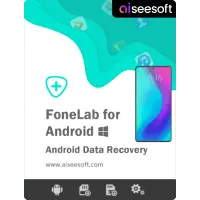
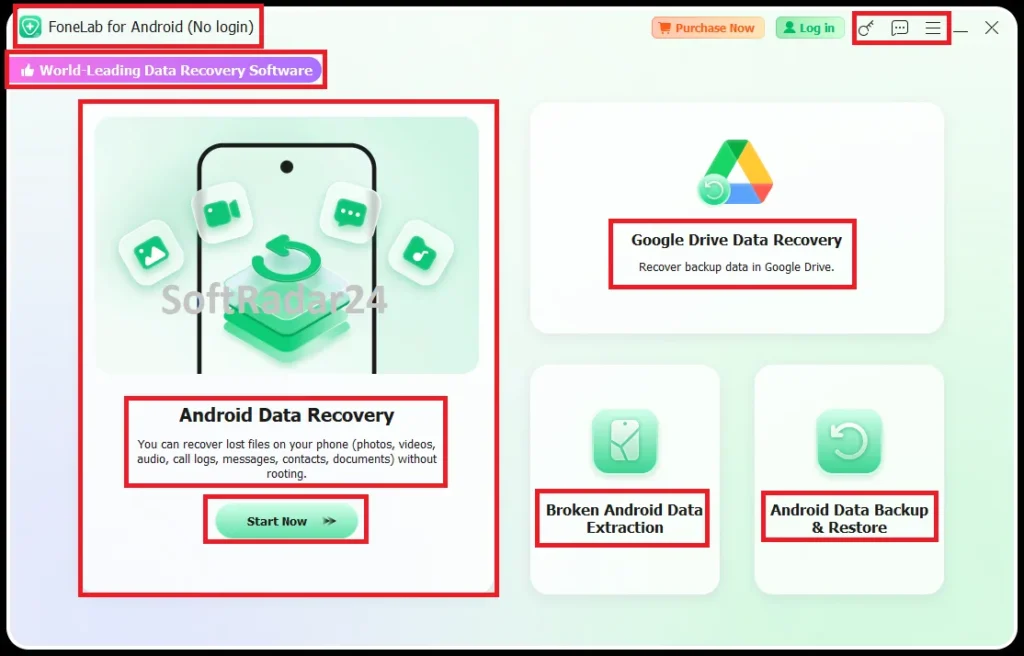
The visuals below are reused from the existing SoftRadar24 Aiseesoft FoneLab Android Data Recovery article. They show the product artwork and our captured dashboard with Android Data Recovery, Google Drive Data Recovery, Broken Android Data Extraction and Android Data Backup & Restore modules. No vendor-hosted image is added.
Compatibility & Coverage
The current reference is unusually specific about connection requirements: USB recovery supports Android 4.0+ and wireless connection is listed from Android 5.0+, both including Android 16. However, the current Android Data Recovery tutorial itself documents the recovery process through USB debugging and FoneGo, so that USB path remains the clearest recovery baseline.
Computer & Android Requirements
| Item | Current official coverage | Important detail |
|---|---|---|
| Windows | Windows 11 / 10 / 8.1 / 8 / 7 / XP | Current product-specific reference. |
| macOS | Mac OS X 10.7 or above | Current reference explicitly includes macOS Tahoe and macOS 27 Golden Gate beta. |
| CPU | 1 GHz Intel / AMD CPU or above | Apple M-series chips, including M5, are listed in the current reference. |
| RAM | 1 GB or more | Current official minimum. |
| Free storage | 200 MB or more | Application-space minimum; recovered data needs additional destination space. |
| USB connection | Android 4.0+ | Android 16 included; direct-recovery tutorial uses USB debugging + FoneGo. |
| Wireless connection | Android 5.0+ | Listed by the broader product reference; the direct Android Data Recovery tutorial still documents USB as its recovery path. |
Recoverable Sources & Data Types
| Source / category | Current coverage | Practical note |
|---|---|---|
| Internal Android storage | Supported | Device must be detected and the recovery workflow authorized. |
| SD card | Supported | Useful for deleted photos, video, audio and documents stored on removable media. |
| SIM card | Vendor-listed support | Recoverable information depends on what the SIM itself stores. |
| Google Drive | Supported through a dedicated mode | Requires account sign-in, identity verification and authorization. |
| Text categories | Contacts, Messages, Call History, WhatsApp | Current product-specific reference. |
| Media / file categories | Camera Roll, Photo Library, Videos, Audio, Documents, Message Attachments, WhatsApp Attachments | Current product-specific reference. |
Phone & Tablet Coverage
Current FoneLab Android Data Recovery documentation claims support for 6,000+ Android phones and tablets and lists brands including Samsung, Motorola, LG, HTC, OnePlus, OPPO, ASUS, Google, Lenovo, Meizu and vivo. Aiseesoft’s product-specific model table also lists many Samsung, Sony, LG, HTC and Motorola devices. Treat the 6,000+ figure as vendor coverage and verify the exact handset because the named model list is not a complete catalogue of every current device.
Features & Capabilities
Aiseesoft FoneLab Android Data Recovery is strongest when its features are separated by source and data type: communication records, media/documents, removable storage, Google Drive backup and selective preview/export.
Contacts, Messages & Call History
- Recover lost contacts with fields such as name, phone number, email, job title and address
- Export contacts in VCF, CSV or HTML
- Recover deleted SMS/message attachments and save message data in readable computer formats
- Recover call-history details such as phone number, name, date/time and duration
Photos, Video, Audio, WhatsApp & Documents
- Paid PRO recovery for deleted photos, songs and video according to the current Free-vs-PRO comparison
- WhatsApp and WhatsApp Attachments are current supported categories
- Recover documents including Word, Excel, PPT, PDF, HTML, ZIP and RAR-class files where the scan can find them
- Preview found items before choosing what to recover
Multiple Recovery Sources
- Direct recovery from supported Android internal storage
- SD card recovery for removable-media loss
- SIM card is listed as a recovery source
- Google Drive Data Recovery for selected backup categories
Connection, Scan & Recovery Control
- USB-debugging guidance built into the workflow
- FoneGo helper app installation and category-specific permission approval
- Select only the data types you need before scanning
- PRO Deep Scan for more lost-data searching when the normal result is insufficient
Important Conditions & Limitations
The most important limitations are not cosmetic: direct recovery depends on phone-side authorization, broken-device extraction is a different product with narrow hardware coverage, deeper scans may introduce root-related requirements, and the current official pages describe Free access differently. These conditions belong before the purchase button, not after a failed scan.
The Current Direct-Recovery Workflow Is Not Literally Read-Only
The present tutorial enables USB debugging, installs the FoneGo helper app and grants phone-data permissions. That is materially different from a no-install forensic acquisition workflow. Do not describe Aiseesoft FoneLab Android Data Recovery as making absolutely no changes to the device.
A Phone That Cannot Authorize USB Access Is a Different Problem
The standard tutorial requires the phone to accept USB debugging and FoneGo permissions. If the screen is dead or touch input is unavailable, normal Android Data Recovery may not be usable even if the storage itself still exists.
Broken Android Data Extraction Is Separate and Narrow
Current FoneLab for Android documentation says Broken Android Data Extraction supports specific older Samsung Galaxy S4/S5/S6, Note 3/4/5 and a Tab Pro model, and that it extracts existing data rather than deleted data. It should not be marketed as a universal black-screen recovery mode inside Android Data Recovery.
Deep Scan and Rooting Need Careful Wording
Aiseesoft’s current Free-vs-PRO page lists Deep Scan as PRO and explicitly includes root-related capability, while the current main recovery tutorial does not say every scan requires root. The accurate conclusion is that rooting is not a universal first step, but deeper recovery may introduce additional device-specific access requirements.
Factory Reset Is a Data-Loss Risk, Not a Recovery Step
The supplied Android Recovery Mode guide warns that Wipe data/Factory reset can erase data the user intends to keep. Do not reset a phone merely to make it easier to connect to recovery software when preserving data is the priority.
Google Drive Recovery Requires Account Authorization
The current Google Drive Data Recovery tutorial requires account sign-in, password entry, identity verification and consent. Users who do not want to authorize a desktop recovery workflow against their Google account should use another recovery path.
Official Free-Access Pages Are Not Perfectly Aligned
The current upgrade comparison presents a Free edition that can recover contacts, call history and messages, while current FoneLab FAQ wording emphasizes free scanning/preview with payment required for restoration. Use the installed Free edition on the actual device to establish what is available before purchasing.
Recovery Is Not a Guarantee
The vendor lists many recoverable scenarios and categories, but current documentation does not guarantee that every deleted item remains recoverable. The only useful pre-purchase proof is whether the software can actually detect and preview the target data on your device or backup.
Exact Device Support Still Matters
Current documentation claims 6,000+ phones/tablets and lists many brands, but the detailed named model list is not exhaustive. Android version support alone does not prove that every model, USB driver and permission state will behave identically.
The Current Public License Grid Differs from the Retained SoftRadar24 Campaigns
Aiseesoft now lists individual Android Data Recovery plans as 6 Android devices / 1 PC and the multi-user plan as 18 devices / 3 PCs. The older SoftRadar24 campaign labels primarily identify the computer count. Let the final checkout control the current mobile-device allowance.
The 30-Day Refund Wording Is Conditional
The current purchase page says Aiseesoft supports 30-day refunds for lifetime licenses when there is a quality problem. Treat the vendor’s current refund policy and the final order terms as controlling instead of assuming an unconditional refund.
Device Recovery Normally Exports to the Computer
The current direct-recovery tutorial ends by selecting found data and recovering it to the computer. If the real goal is moving existing data into another phone, use a transfer or backup/restore workflow rather than treating deleted-data recovery as a migration tool.
Free Trial / Free Version
Aiseesoft currently maintains a Free Android Data Recovery edition as well as the paid Aiseesoft FoneLab Android Data Recovery PRO layer. The official upgrade table gives the clearest feature split, although a separate current FAQ describes free access more conservatively as scanning and preview before paid restoration.
| Free access | What you can do | What requires payment |
|---|---|---|
| Free Android Data Recovery | Current upgrade comparison lists recovery of contacts, cleared call history, text messages and message attachments in the Free edition, plus the ability to test the software on the device. | Deleted photos, songs, videos, documents, Deep Scan and full Android-version coverage are listed in the paid PRO column. |
| Free scan / preview path | Current FoneLab FAQ wording says device, SD-card and SIM-card scanning/preview can be used for free so you can inspect what the software sees. | That FAQ says paid access is required to restore Android data. Because the two current official descriptions are not identical, verify your exact category in the installed Free edition. |
System Requirements
Aiseesoft’s current product-specific reference publishes computer, Android and connection requirements together. The important distinction is that Android-version support and computer compatibility do not remove the need for USB authorization in the current direct-recovery tutorial.
| Requirement | Supported / Required | Notes |
|---|---|---|
| Windows | Windows 11 / 10 / 8.1 / 8 / 7 / XP | Current Aiseesoft FoneLab for Android reference. |
| macOS | Mac OS X 10.7 or above | Current reference explicitly includes macOS Tahoe and macOS 27 Golden Gate beta. |
| Processor | 1 GHz Intel / AMD CPU or above | Apple M-series chips, including M5, are listed as supported. |
| RAM | 1 GB or more | Current official minimum. |
| Free disk space | 200 MB or more | Application-space minimum; recovered files require additional storage. |
| USB-connected Android | Android 4.0+ | Android 16 included; the current direct recovery guide uses USB debugging and FoneGo. |
| Wireless-connected Android | Android 5.0+ | Android 16 included in the current broader reference; not the main direct-recovery tutorial path. |
| Phone-side authorization | USB debugging + FoneGo installation/permissions for the current direct recovery workflow | A phone that cannot approve these steps may require a different workflow. |
| Supported-device claim | 6,000+ Android phones/tablets in current FoneLab documentation | Treat as vendor-listed coverage; verify the exact model and connection state. |
Alternatives & Better-Fit Options
Aiseesoft FoneLab Android Data Recovery is specialized around missing/deleted Android data. The internal links below are used only when the visitor’s real task changes. For current same-brand products and offers, visit the Aiseesoft page on SoftRadar24.
Aiseesoft FoneLab Android Data Backup & Restore
The better fit when the phone still works and the goal is prevention: create a local computer backup, preview an existing archive and selectively restore supported data later instead of waiting for deletion to happen.
Aiseesoft MobieSync
Use this when the files still exist and you are moving or managing them between Android, iOS and a computer. Phone migration and file organization are different jobs from deleted-data recovery.
Aiseesoft Android Unlocker
Use this when the primary problem is an authorized screen lock or Google FRP barrier rather than deleted files. Check the exact device and data-retention behavior before using any unlock workflow.
FAQ
The FAQ below concentrates on product mechanics, licensing and documentation boundaries rather than repeating the scenario questions from the decision guide.
Which file categories does Aiseesoft FoneLab Android Data Recovery officially support?
The current product-specific reference lists Contacts, Messages, Call History and WhatsApp as text categories, plus Camera Roll, Photo Library, Videos, Audio, Documents, Message Attachments and WhatsApp Attachments as media/file categories.
Which storage sources can Aiseesoft FoneLab Android Data Recovery scan?
Current Aiseesoft documentation lists Android internal memory, SD card, SIM card and Google Drive as recovery sources. The Google Drive path is a separate recovery mode from direct USB device scanning.
What is FoneGo in the Aiseesoft FoneLab Android Data Recovery workflow?
FoneGo is the helper app that the current direct-recovery tutorial installs on the Android phone through the Install via USB option. The user then grants it access to the phone information needed for the selected scan categories.
Is USB debugging required for direct Android recovery?
Yes in the current documented direct-device workflow. Aiseesoft FoneLab Android Data Recovery prompts the user to enable USB debugging and approve the computer before FoneGo authorization and scanning.
What information is required for Google Drive Data Recovery?
The current tutorial requires signing in to the Google account, entering the password, completing identity verification by an available method and authorizing access before selecting backup data to recover.
Does the Free edition include deleted photo, music and video recovery?
Not according to Aiseesoft’s current Free-vs-PRO comparison. It places deleted photos, songs, videos, documents and Deep Scan in the paid PRO column while selected contact/message/call-history recovery is shown in Free.
Does every Aiseesoft FoneLab Android Data Recovery scan require rooting?
Current official documentation does not support a blanket yes. The main tutorial starts with USB debugging and FoneGo permissions, while the Free-vs-PRO page separately documents root-related capability and a PRO Deep Scan. Treat root as device/data-path dependent rather than a universal first step.
What computer and Android versions are currently supported?
The current reference lists Windows 11/10/8.1/8/7/XP, Mac OS X 10.7 or above, USB connection from Android 4.0 and wireless connection from Android 5.0, with Android 16 included. It also lists Apple M-series chips including M5.
Is Broken Android Data Extraction included in the Android Data Recovery function?
Aiseesoft currently sells and displays Broken Android Data Extraction as a separate function/product alongside Android Data Recovery and Android Data Backup & Restore. The broader FoneLab for Android package can include all three, but the retained SoftRadar24 purchase links on this page are Android Data Recovery campaigns.
What is the difference between Android Data Recovery and Android Data Backup & Restore?
Android Data Recovery is for finding lost/deleted data from supported sources. Android Data Backup & Restore is for proactively creating a computer backup and later restoring selected data from that saved archive.
Where does the standard device-recovery workflow save recovered files?
The current Aiseesoft tutorial ends by previewing the scan results, selecting the target items and using Recover to save them through the computer workflow. It is not presented as a phone-to-phone migration process.
What refund language does Aiseesoft currently publish for this product?
The current purchase page displays a 30-Day Money Back policy and specifically states support for 30-day refunds on lifetime licenses when there is a quality problem. The current vendor policy and final order terms should control.
How many Android devices can the current public Aiseesoft license cover?
The current public purchase page lists 6 Android devices / 1 PC for the individual monthly and lifetime plans and 18 Android devices / 3 PCs for the multi-user plan. The retained SoftRadar24 campaign labels are older promotional SKUs, so verify the device allowance on final checkout.
Why is the SoftRadar24 lifetime campaign price different from Aiseesoft’s current public lifetime price?
SoftRadar24 retains an existing US$31.22 lifetime campaign destination, while Aiseesoft’s current public lifetime offer is US$49.96 versus US$62.45. They are different promotional surfaces; use the final checkout as the source of truth for the selected campaign.
Is Aiseesoft FoneLab Android Data Recovery the same as the full FoneLab for Android package?
No. Android Data Recovery is one function/product. Aiseesoft currently also sells Broken Android Data Extraction and Android Data Backup & Restore separately, while the broader FoneLab for Android package combines the three functions under one package price.
Does Aiseesoft publish a current software version number for FoneLab Android Data Recovery?
The current product, reference and tutorial pages reviewed for this update do not publish a current softwareVersion value. For that reason, this page does not invent one in visible content or SoftwareApplication structured data.





