A forgotten pattern lock or a triggered Google Factory Reset Protection (FRP) barrier can instantly turn a functional Android device into an inaccessible. While many users attempt manual FRP bypass methods involving complex firmware flashing or sketchy APK downloads, these unauthorized workarounds often result in permanent hardware damage. As security protocols tighten up to Android 16, finding a reliable screen lock removal tool becomes critical for safe recovery.
Aiseesoft Android Unlocker 1.1.18 serves as a straightforward desktop tool built to handle these exact emergencies, completely eliminating the need for any technical background. This review breaks down how the software maintains such a high success rate when removing complex passcodes and bypassing FRP barriers across thousands of supported models. Rather than risking a permanently locked device or paying steep repair shop fees, check out the official performance metrics, data retention facts, and the actual limitations of this unlocking utility.
Accidentally deleted crucial messages or lost your photo gallery after a failed iOS update? You do not have to rely on expensive repair shops or outdated iTunes backups. We secured a verified 50% price drop on FoneLab’s powerful iOS retrieval software. It runs a deep scan directly on your device’s internal storage to restore lost media, contacts, and app data instantly—even if your iPhone is stuck on the Apple logo or you never enabled iCloud sync.
Click here to activate your FoneLab iPhone Data Recovery Discount Code (Automatically applied at secure checkout).
Key Features of Aiseesoft Android Unlocker
| Universal Screen Lock Removal: | It clears everything from a basic 4-digit PIN and swipe patterns to advanced biometric barriers like fingerprint and facial recognition. If a device is completely disabled due to too many incorrect passcode attempts or has a shattered screen preventing touch input, this function forces entry and restores access. |
| Instant Google FRP Bypass | Getting stuck on the Google account verification screen after a hard reset is a massive roadblock, especially on second-hand phones. The Aiseesoft Android Unlocker software permanently strips this protection layer—boasting a 99.9% success rate on Samsung hardware—allowing users to immediately set up a new account without needing the previous owner’s credentials. |
| Android 16 and Broad Hardware Support | The compatibility roster covers over 6,000 specific models across major manufacturers including Samsung, Xiaomi, OPPO, and Vivo. It is consistently updated to support the latest Android 16 framework and runs natively on both Windows and Mac environments, including Apple Silicon architecture. |
| Risk-Free Operation (No Flashing Required) | Manual workarounds often require flashing custom ROMs with complicated utilities like Odin or navigating hidden TalkBack menus, which carry a high risk of permanently bricking the phone. This desktop application replaces those dangerous methods with a straightforward three-step interface, eliminating the need for rooting or advanced command-line knowledge. |
| Selective Android Data Retention | While modern Android encryption forces a factory reset during screen lock removal, this tool includes a specialized bypass protocol for legacy hardware. Users with early Samsung models (like the Galaxy S6 series) can remove forgotten passwords while keeping every photo, message, and contact completely intact. |
Official Android Recovery Protocols vs. Dedicated Unlockers
When faced with a locked Android screen, default manufacturer tools and Google services offer several official workarounds. However, these built-in recovery protocols operate under strict prerequisites, frequently demanding legacy operating systems, prior account synchronizations, or active internet connections. Analyzing these native limitations reveals exactly when manual recovery is viable and when a dedicated utility becomes mandatory.
Broken Android Data Extraction (Pre-Reset Salvage)
Designed primarily for hardware failure or unresponsive screens, this desktop-based approach bypasses the active lock to extract internal storage data. It requires manually forcing the device into Download Mode via specific hardware button combinations. While highly effective for salvaging files and backing up data to a PC before a forced factory wipe, it does not actually remove the active screen lock for daily use.
The Legacy “Forgot Pattern” Feature
Devices running Android 4.4 KitKat or older feature a native bypass mechanism. After five consecutive incorrect pattern entries, a prompt appears on the lock screen. Inputting the pre-configured Backup PIN instantly drops the security barrier without triggering a data wipe. Due to massive security updates, this straightforward method is entirely obsolete for modern hardware.
Google Find My Device (Remote Execution)
Utilizing Google’s remote tracking infrastructure allows users to issue an overwrite command from a desktop browser. This method replaces or clears the existing screen credential. The critical constraint is mandatory connectivity: the locked phone must maintain an active Wi-Fi or cellular connection and remain linked to a known Google account. If the device is offline, the command remains pending indefinitely.
Samsung Find My Mobile Protocol
Exclusive to Samsung hardware, this official web portal features an “Unlock my screen” command. It remotely disables the lock interface within seconds, fully preserving all internal data. Success depends entirely on a major prerequisite: the user must have previously registered a Samsung account and manually enabled the remote control feature in the device settings prior to the lockout.
Direct Google Account Verification
Similar to the Backup PIN method, this legacy workaround applies strictly to Android 4.4 and earlier. Following multiple failed pattern attempts, the system permits bypassing the lock screen by entering the primary Google email address and password associated with the device.
The Analytical Verdict: The recurring theme across these official methods is conditional access. They demand outdated OS versions, pre-configured accounts, or immediate network connectivity. When a device fails to meet these exact criteria—which is standard for second-hand purchases, modern Android versions, or offline devices—software like Aiseesoft Android Unlocker transitions from an optional tool to a necessary utility, forcing the removal of screen locks and FRP barriers without relying on prerequisite credentials.
Navigating Google FRP: Free Workarounds vs. Safe Software
Factory Reset Protection (FRP) is a heavy-duty security layer. If an Android device is wiped via Recovery Mode rather than the standard settings menu, FRP locks the phone until the original Google account credentials are provided. This creates a massive roadblock, especially for buyers of second-hand devices.
While several free bypass tutorials circulate online, they carry significant risks and strict limitations:
- Firmware Flashing via Odin: This Samsung-specific method requires downloading and installing raw system files (AP/CP/CSC) via a computer. Flashing the wrong region code or an incompatible version will instantly result in a “dead device,” permanently killing the device.
- TalkBack & Gboard Exploits: These tactics rely on manipulating accessibility menus or keyboard microphone glitches to sneak into the system settings. However, continuous Android security patches actively target and close these loopholes, rendering them useless on modern operating systems.
- Pangu FRP Tool (APK): This involves installing unverified third-party applications directly onto the locked device. Aside from the obvious security risks, this method frequently crashes and fails on devices running Android 11 or newer.
Rather than risking hardware damage through unauthorized firmware flashes or wasting time on patched software loopholes, utilizing a dedicated desktop unlocker provides a stable alternative. A proper bypass utility forces the removal of the FRP verification screen through secure USB protocols in just a few minutes, clearing the path to set up a brand-new Google account.
Analyzing Samsung FRP Bypass Methods (Effectiveness & Risks)
Samsung’s Knox security framework adds an extra layer of complexity to Factory Reset Protection. When selecting a bypass method, the success rate depends entirely on your current Android version and whether you have access to secondary devices or recovery credentials. Based on official security protocols and software capabilities, here is a definitive breakdown of the available recovery methods:
| Recovery Method | Primary Prerequisites | Difficulty & Success Rate | Major Drawbacks / Risks |
|---|---|---|---|
| Dedicated Unlocker (Aiseesoft Android Unlocker) | A computer (Windows/Mac) and a USB cable. | Very Easy / High Success. Works up to Android 16. | Requires a desktop or laptop to execute the software. |
| Official Account Recovery | Access to the registered backup email or phone number. | Easy / High Success. (If data is available). | Fails completely if the backup phone number or email is inaccessible. |
| Google Find My Device | A secondary device and an active internet connection. | Easy / Medium Success. | Requires prior login on the locked device; strictly wipes all local data. |
| SIM PIN Code Exploit | An active SIM card with a known, manually set PIN. | Hard / Low Success. | Relies on precise timing and TalkBack activation; highly device-specific. |
| Google Keyboard / Voice Typing | None (Operated directly from the locked setup screen). | Very Hard / Low Success. | Only works on heavily outdated Android versions; patched on modern OS. |
Step-by-Step Guide: Bypassing Samsung FRP via Aiseesoft Android Unlocker
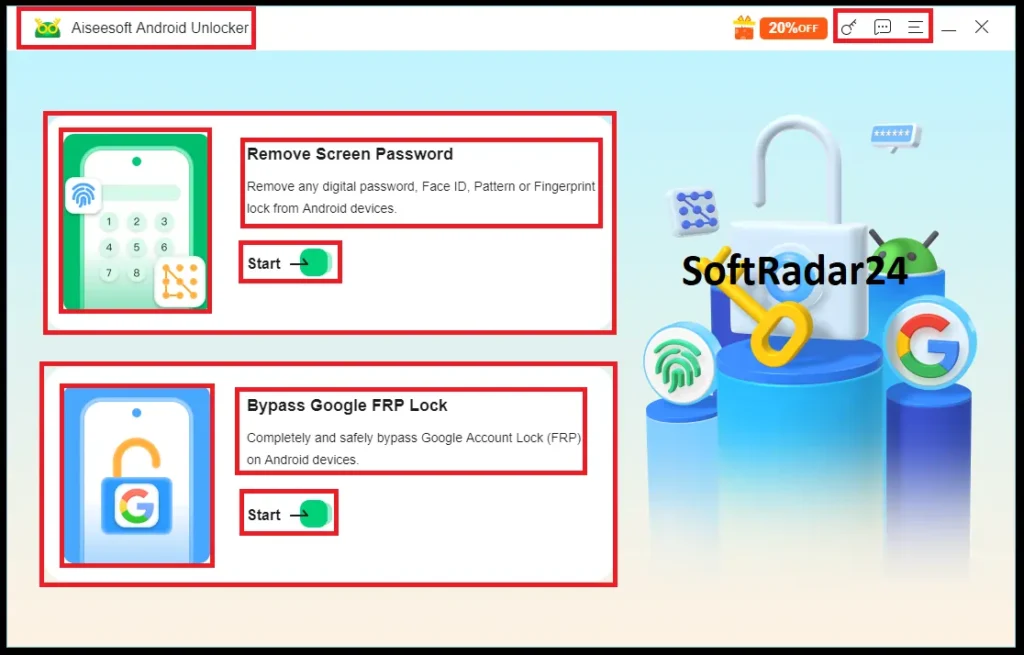
When manual loopholes fail due to updated security patches, forcing the removal via secure USB protocols is the most reliable approach. Aiseesoft Android Unlocker automates the complex command-line processes into a visual interface. Here is how the bypass protocol operates:
If Aiseesoft Android Unlocker fails to detect your phone, the underlying issue is usually a missing or corrupted Windows USB driver. Modern Android hardware requires specific bridging protocols to establish a secure data link. If your device shows up as an “Unknown Device” or only charges without triggering a data transfer prompt, you must manually refresh the system’s hardware signatures.
Consult the official Microsoft Driver Update Guide to properly configure your Device Manager before initiating the bypass commands.
- Step 1: Initialize the Desktop Software: Download and install the Aiseesoft Android Unlocker on a Windows or Mac computer. Launch the application and select the “Bypass Google FRP Lock” module from the main dashboard. This specific mode is engineered to target the verification screen without touching standard lock screen settings.
- Step 2: Establish a Secure Connection: Connect the locked Samsung device (or supported brands like Pixel, Xiaomi, and OPPO) to the computer using a high-quality USB data cable. The software features an auto-detection engine that instantly recognizes the hardware model and current OS version, including devices running the latest Android 16 architecture.
- Step 3: Execute the Removal Protocol: Once the hardware is identified, click the prominent action button to initiate the bypass. The software will push authorized debugging commands to the device. Do not disconnect the cable during this phase. Within minutes, the system will clear the previous Google account token from the firmware. The phone will reboot directly to the standard home screen, allowing you to link a completely new Google account as if it were out of the box.
Aiseesoft Android Unlocker Discount Coupon Codes 2026
Paying full price for Android Unlocker software is frustrating, especially when you are already dealing with the stress of a locked phone. To make the process a bit easier, we secured a direct 50% discount for our readers. You don’t need to waste time searching for random promo codes or worrying about expired links. Simply click the “Buy Now” button on this page, and the 50% price drop will automatically apply when you reach the official Aiseesoft Android Unlocker checkout. It is the exact same premium Android unlocker tool, just at half the cost.


Aiseesoft Android Unlocker for Windows – 50% OFF
Aiseesoft Android Unlocker (Windows) – 1 Month Plan
Gain immediate access to bypass screen locks and FRP on Android devices for 30 days. Perfect for a quick, one-time recovery task.
Aiseesoft Android Unlocker (Windows) – 1 Year Plan
Secure your Android devices for an entire year. A cost-effective choice for multiple recoveries and ongoing device management.
Aiseesoft Android Unlocker (Windows) – Lifetime Plan
Enjoy permanent access and free future updates. The ultimate value package for long-term Android security and lockout prevention.
Aiseesoft Android Unlocker for Mac – 50% OFF
Aiseesoft Android Unlocker (Mac) – 1 Month Plan
Resolve sudden lockouts directly from your Mac. This short-term license provides full unlocking capabilities for a single month.
Aiseesoft Android Unlocker (Mac) – 1 Year Plan
Maintain unlocking tools on your macOS system for a full year. Ideal for families or users handling multiple Android devices.
Aiseesoft Android Unlocker (Mac) – Lifetime Plan
A one-time payment for perpetual Mac access. Never pay subscription fees again while keeping your Android devices fully accessible.
System Requirements of Aiseesoft Android Unlocker
| Supported System | |
| Windows | Windows 11, Windows 10, Windows 8.1, Windows 8, Windows 7 (64 & 32 bits) |
| macOS | macOS 26 (macOS Tahoe), macOS 15 (macOS Sequoia), macOS 14 (macOS Sonoma), macOS 13 (macOS Ventura), macOS 12 (macOS Monterey), macOS 11.5 (macOS Big Sur), macOS 10.15 (macOS Catalina), macOS 10.14 (macOS Mojave), macOS 10.13 (High Sierra). |
| Supported Android OS | Android 6.0 and above (Android 16 Included) |
| CPU | 1GHz Intel/AMD CPU or above (32-bit or 64-bit) |
| Mac CPU | 1GHz Intel® processor and Apple M-series chips (including M5) |
| Memory | 256 MB (1028 MB recommended) |
| RAM | 1G RAM or more |
| Supported Devices | |
| Supported Devices for Removing Screen Passcode | Phones and tablets of Samsung, Huawei, OPPO, realme, Motorola, oneplus, and Vivo |
| Supported Devices for Bypassing FRP Lock | Phones and tablets of Samsung and Xiaomi |