
Quick Summary
IObit Super Bundle 6-in-1 – 94% OFF & Discount & 2 Extra Months is a Windows utility bundle built around six current IObit PRO products: Advanced SystemCare PRO, Driver Booster 14 PRO, IObit Malware Fighter 13 PRO, IObit Uninstaller 16 PRO, IObit Software Updater 9 PRO and Smart Defrag 12 PRO. It is a practical fit when the same PCs need system cleanup and tuning, driver maintenance, malware protection, software updates, program removal and disk optimization rather than one narrowly focused utility.
- Best for
- Multi-tool Windows maintenance across cleanup, drivers, security, updates, uninstalling and disk optimization
- Platform
- Windows 11 / 10 / 8.1 / 8 / 7
- Bundle
- 6 IObit PRO applications
- License
- 14 months · 3 PCs
- Key limitation
- Six separate utilities rather than one merged application
IObit Super Bundle 6-in-1 – 94% OFF & 2 Extra Months Pricing, Discount Code & License Options
The SoftRadar24 checkout link applies the current 94% discount automatically at checkout. Manual coupon-code entry is not required.
The current bundle price is $21.44 for six PRO applications. Each included product is supplied as a 14-month subscription for up to 3 PCs; the extra two months extend the stated term beyond 12 months.
Current IObit Bundle 6-in-1 License Price
- IObit Super Bundle 6-in-1 – Coupon Code & 2 Extra Months · 14-Month Subscription · 3 PCs · $21.44 · 94% OFF
IObit Super Bundle 6-in-1 · 14-Month Subscription
6 PRO applications · 14 months · up to 3 PCs · Windows
Included with this license- Driver Booster 14 PRO · 14 months · 3 PCs
- IObit Malware Fighter 13 PRO · 14 months · 3 PCs
- IObit Uninstaller 16 PRO · 14 months · 3 PCs
- IObit Software Updater 9 PRO · 14 months · 3 PCs
- Smart Defrag 12 PRO · 14 months · 3 PCs
- Advanced SystemCare 19 PRO · 14 months · 3 PCs
One purchase covers the six listed PRO utilities for the stated 14-month term on up to 3 PCs. The offer is most relevant when you expect to use several of the included maintenance categories rather than buying the bundle only for one narrow task.
Choose this option only for the Windows PCs covered by the bundle; the six included applications do not add macOS editions.
Can This Software Do What I Need?
Choose the bundle when several Windows maintenance jobs belong on the same PCs. If only one job matters, use the routing below to decide whether the six-product package adds useful coverage or simply duplicates software you do not need.
I want one purchase to cover several routine Windows maintenance jobs
Broad multi-PC maintenance
SupportedThe package combines PC cleanup and optimization, driver updating, malware protection, software updating, program removal and disk optimization. This is the bundle’s clearest use case when those jobs are all relevant to the same household or small set of PCs.
I need automatic driver maintenance and recovery tools
Driver Booster 14 PRO workload
SupportedDriver Booster 14 PRO is the bundle component assigned to driver maintenance. It strengthens the case for the bundle when driver work is one of several recurring needs; if drivers are the only need, a standalone driver product is the narrower purchase.
I want malware and ransomware protection alongside maintenance tools
IObit Malware Fighter 13 PRO
SupportedIObit Malware Fighter 13 PRO is the dedicated security component. The bundle is a logical fit when you want this protection alongside cleanup, drivers, updates and other maintenance; security-only buyers do not need the other five applications.
I regularly remove stubborn programs and want leftover cleanup
IObit Uninstaller 15 PRO
SupportedIObit Uninstaller 15 PRO is the dedicated removal component. Choose the bundle when stubborn-program and leftover cleanup is one part of a broader maintenance plan; choose the standalone uninstaller when removal is the only recurring job.
I want third-party applications kept current with less manual checking
IObit Software Updater 9 PRO
SupportedIObit Software Updater 9 PRO is the specialist application for third-party software maintenance. It makes the bundle more useful when application updates sit beside other PC-care jobs rather than being your only requirement.
I need automatic, scheduled or boot-time disk defragmentation
Smart Defrag 12 PRO
SupportedSmart Defrag 12 PRO is the disk-optimization component. It belongs in the bundle decision when fragmentation-related maintenance is relevant to your Windows PCs in addition to the other utility categories.
I use only macOS
Operating-system mismatch
Not supportedThe six included applications are presented by IObit as Windows products. This bundle does not provide a macOS edition of these six utilities.
I only need one narrow task, such as drivers or uninstalling
Bundle breadth may be unnecessary
Better fitA single-product license can be the cleaner choice when the other five categories would go unused. The alternatives section separates the focused IObit options and two non-IObit choices by workload.
How It Works
The bundle is modular: use the application that matches the task instead of running every utility for every maintenance session. Start with the highest-value problem on a representative PC, review the result, then apply the same workflow to the other licensed PCs where needed.
Run a Core Maintenance Pass
- After purchasing IObit Super Bundle 6-in-1 – 94% OFF & Discount & 2 Extra Months, install Advanced SystemCare 19 PRO on a licensed Windows PC and open the Care tab.
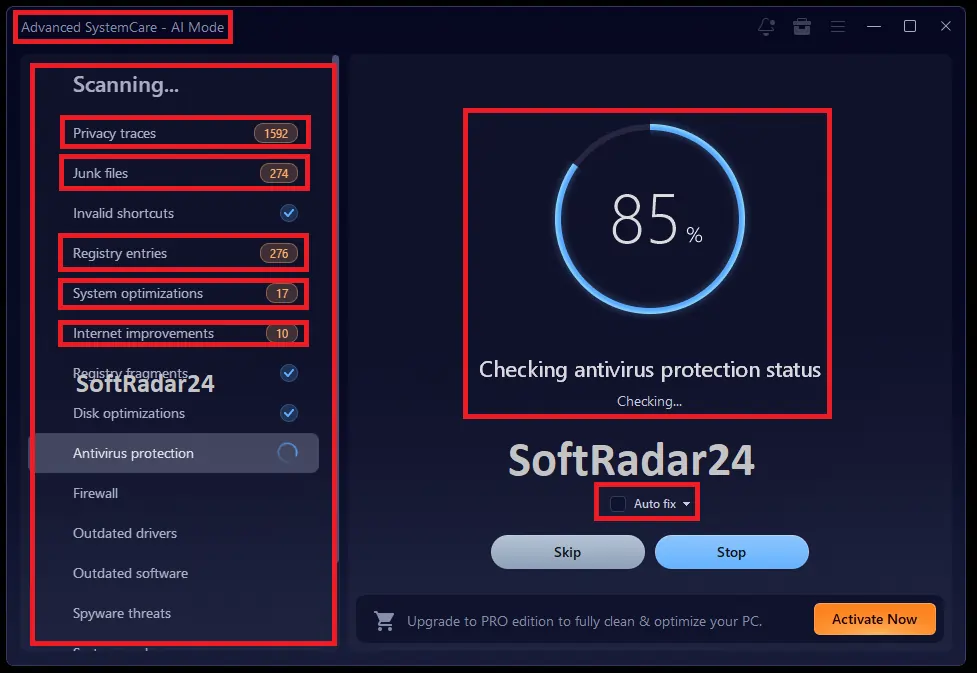
- Start the Advanced SystemCare AI Mode scan, review the detected items, then use Fix for the cleanup and system issues you want the program to address.
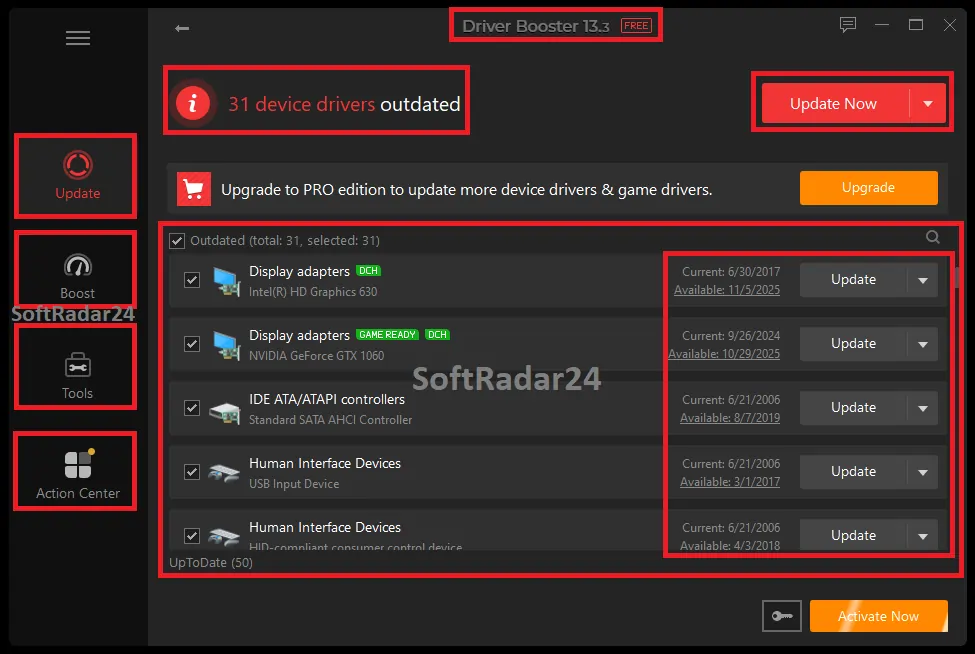
- Open Driver Booster 14 PRO and run its driver scan separately; review outdated or problematic device drivers before applying updates.
- Open IObit Software Updater 9 PRO for third-party application updates, using its automatic, scheduled or batch-update controls according to your preferred maintenance routine.
Remove a Problem Application Cleanly
- With IObit Super Bundle 6-in-1 – 94% OFF & Discount & 2 Extra Months active on the PC, open IObit Uninstaller 15 PRO and select the unwanted program or programs.
- Use the normal uninstall flow for ordinary software; use the PRO stubborn-app tools when the standard uninstaller is missing, broken or leaves the application behind.
- Review detected leftover files, folders and registry entries before removing them, particularly when the software stores shared data you still need.
Add the Dedicated Security Layer
- After activating IObit Super Bundle 6-in-1 – 94% OFF & Discount & 2 Extra Months, open IObit Malware Fighter 13 PRO on each PC that needs the bundle’s dedicated malware-protection component.
- Keep real-time protection enabled and use malware scans when you need an on-demand check.
- Configure ransomware and privacy features such as Ransomware Shield, SafeBox, web/download protection and anti-tracking according to the files and browsing activity you need to protect.
Optimize Fragmented Disk Workloads
- Within IObit Super Bundle 6-in-1 – 94% OFF & Discount & 2 Extra Months, use Smart Defrag 12 PRO when disk fragmentation is the maintenance task rather than treating Advanced SystemCare as a substitute for every specialist tool.
- Choose automatic or scheduled defrag for routine maintenance, boot-time defrag for supported startup-file work, or targeted optimization when only selected files, folders or game data need attention.
- Use the result of the analysis to decide what actually needs optimization instead of repeatedly running every available mode.
Product Interface & Workflow
Two approved SoftRadar24 screenshots illustrate the bundle’s modular workflow: Advanced SystemCare handles broad PC-care scanning, while Driver Booster uses a separate driver-focused scan and result screen. The purchase does not merge the six products into one dashboard.
Compatibility & Coverage
Treat this as a Windows bundle of six separate applications. Compatibility for one component should not be assumed to prove identical operating-system support for all five others, especially on an older PC.
| Area | Current coverage | Decision note |
|---|---|---|
| Bundle platform | Windows | IObit lists Advanced SystemCare, Driver Booster, Malware Fighter, Uninstaller, Software Updater and Smart Defrag in its Windows product families. |
| License coverage | Up to 3 PCs | The bundle option provides the six PRO products for the same stated device allowance. |
| License term | 14 months | The supplied offer includes two extra months beyond a 12-month term; this is not a lifetime license. |
| Older Windows versions | Coverage varies by component | Do not use one application’s broad Windows support as proof that every bundled component has the same minimum OS. The detailed verified baselines are separated in System Requirements. |
| macOS | Not included | IObit separates its Mac product line from these Windows utilities; do not buy this six-app offer for a Mac-only workflow. |
Features & Capabilities
Each included PRO application owns a different maintenance job. The useful question is which component you will actually open for that job, not how many individual feature labels can be counted across the bundle.
Advanced SystemCare 19 PRO
- Deep junk cleanup and registry cleaning
- Startup, memory and broader PC-health optimization
- Automatic RAM release and PC-health fixes
- Safe Folder, privacy controls and protection against untrusted program access
- One-click outdated-software updating inside the broader PC-care tool
Driver Booster 14 PRO
- One-click scanning for missing, outdated, broken or incompatible drivers
- 18 million+ verified-driver database documented by IObit
- Automatic driver updates and offline scan support
- Automatic backup protection before driver changes
- Tools for network, sound and device issues linked to drivers
IObit Malware Fighter 13 PRO
- Real-time malware protection using IObit and Bitdefender engines
- Ransomware Shield and SafeBox file protection
- Web, download and anti-tracking protection
- Behavior and system guards against suspicious or unauthorized changes
- Automatic and customizable scans and updates
IObit Uninstaller 16 PRO
- Batch uninstall and Windows-app removal
- Force uninstall support for 4,000+ stubborn apps
- Deep scanning for hidden leftovers and incomplete uninstall cleanup
- Preinstalled and unwanted bundled-software removal
- Browser-extension management and real-time monitoring of system changes
IObit Software Updater 9 PRO
- Coverage for 1,100+ applications
- Automatic, scheduled and unlimited batch updates
- Automatic restore-point creation before updates
- Vulnerability patching for outdated applications
- App exclusions and a custom auto-update list
Smart Defrag 12 PRO
- Automatic and scheduled disk defragmentation
- Boot-time defrag
- Large-file optimization
- Targeted file, folder, disk and game-oriented optimization
- Intelligent file and registry optimization controls
Important Conditions & Limitations
The main buying risks are scope, platform and subscription expectations—not a shortage of features. Check these points before choosing the bundle instead of assuming six utilities automatically fit every PC-care workflow.
The Bundle Is Six Applications, Not One Unified Console
Advanced SystemCare, Driver Booster, Malware Fighter, Uninstaller, Software Updater and Smart Defrag retain separate interfaces and specialist roles. Expect to install, configure and use the relevant component for each task rather than manage every feature from one combined dashboard.
Do Not Treat Every Utility as Mandatory for Every Maintenance Session
The package is broad enough that some functions overlap at the edges—for example, Advanced SystemCare includes software-updating and protection features while dedicated Software Updater and Malware Fighter products go further in those categories. Use the specialist application when its extra controls are the reason you bought the bundle instead of running every module automatically.
Driver Changes Still Deserve a Recovery Path
Driver Booster 14 PRO includes automatic backup protection, and IObit Software Updater creates restore points before application updates. Keep those recovery safeguards available before a large batch of system changes rather than treating automatic updating as irreversible.
The 14-Month Offer Is Not a Lifetime License
The supplied commercial option is a 14-month subscription for 3 PCs. No lifetime entitlement, future renewal price or future renewal discount has been supplied for this bundle, so the current $21.44 purchase should not be described as permanent ownership or as a guaranteed renewal price.
Performance Multipliers Are Vendor Claims, Not a Purchase Guarantee
Individual IObit pages advertise speed and performance multipliers for selected tasks. Actual results depend on the PC, storage, drivers, installed software and the maintenance action being performed. This guide does not convert those marketing figures into a SoftRadar24-tested benchmark.
Refund Eligibility Has Policy Conditions
IObit provides a 60-day Money Back Guarantee framework for qualifying purchases, but its refund policy also lists accepted and non-refundable circumstances. Treat the period as a policy window with conditions rather than an unconditional promise for every situation.
Free Trial / Free Version
IObit provides free editions for the six product families, so you can evaluate the relevant maintenance category before depending on the bundle’s PRO-only features. The free products do not equal the 14-month, 3-PC PRO bundle entitlement.
| Component | Free edition | What PRO adds that matters here |
|---|---|---|
| Driver Booster 14 | One-click scan · 12M+ verified drivers · manual updates | 18M+ verified drivers, automatic updating, offline scan, incompatible-driver repair, automatic backup protection and premium support. |
| Advanced SystemCare 19 | Startup help · junk cleaning · core PC optimization · manual RAM release · email protection | Deeper junk cleaning, automatic RAM release, broader real-time protection, registry cleaning, PC-health auto fixes, Safe Folder, software updating and privacy controls. |
| IObit Malware Fighter 13 | Real-time protection with IObit engine · 9M virus database · unsafe-link/download blocking | IObit + Bitdefender engines, 209M virus database, ransomware protection, SafeBox, anti-tracking, privacy controls, automatic scans/updates and premium support. |
| IObit Uninstaller 16 | Batch uninstall · Windows-app removal · drag-and-drop uninstall · automatic leftover cleanup | 4,000+ stubborn-app support, deep hidden-leftover scanning, preinstalled/bundled-software removal, incomplete-uninstall cleanup, extension controls and system-change monitoring. |
| IObit Software Updater 9 | One-click updates · setup-file cleanup · restore points · batch updates limited to 2 per day | Unlimited batch updates, automatic and scheduled updates, vulnerability patching, exclusions, custom auto-update lists and premium support. |
| Smart Defrag 12 | Basic file defrag · scheduled defrag · game optimization | Automatic defrag, boot-time defrag, large-file and targeted optimization, deeper file/registry optimization, automatic updates and premium support. |
System Requirements
There is no useful single hardware number to substitute for six separate applications. Check the requirements of the components you plan to use, and be especially careful with older Windows PCs because broad support on one IObit product does not establish the same baseline for the entire bundle.
| Component / requirement | Current documented value | Decision note |
|---|---|---|
| Bundle operating system | Windows | The six included product families are Windows utilities. |
| Advanced SystemCare 19 OS | Windows XP / Vista / 7 / 8 / 8.1 / 10 / 11 | Current IObit documentation for Advanced SystemCare. |
| Advanced SystemCare 19 CPU | 1 GHz or faster | Hardware baseline for Advanced SystemCare 19. |
| Advanced SystemCare 19 RAM | 512 MB | Hardware baseline for Advanced SystemCare 19. |
| Advanced SystemCare 19 storage | 300 MB free disk space | Additional working space can still be required by Windows and other bundle components. |
| Advanced SystemCare 19 display | 1024 × 768 or higher | Current documented display requirement. |
| Driver Booster 14 CPU / RAM / storage | 1 GHz CPU · 1 GB RAM · 1 GB free disk space | IObit lists this lightweight baseline for the current Driver Booster line. |
| Driver Booster 14 Windows coverage | Windows 11 through XP · Windows 10/11 ARM64 supported | Do not transfer this broad OS range to every other bundle component automatically. |
| Smart Defrag 12 OS | Windows 11 / 10 / 8.1 / 8 / 7 / Vista / XP | The current Smart Defrag 12 page lists this range directly. |
| Smart Defrag 12 download size | 15.7 MB | This is the listed Smart Defrag package size, not the storage requirement for the entire six-app bundle. |
Alternatives & Better-Fit Options
Choose a narrower product when most of the six bundle components would remain unused, or choose a different vendor when you want a comparable maintenance or driver workflow outside the IObit ecosystem. For the wider catalog, see the IObit software deals page on SoftRadar24.
Advanced SystemCare Ultimate
A better IObit fit when you want PC optimization and antivirus protection centered in one product rather than a six-utility package. IObit positions Ultimate as an all-in-one protection and PC-performance product.
IObit Malware Fighter Pro
Choose the standalone security product when real-time malware, ransomware, web and privacy protection is the main requirement and the bundle’s driver, uninstall, updater and disk tools are unnecessary.
Advanced SystemCare Pro
A narrower choice for Windows cleanup, PC health, optimization and privacy features when the dedicated driver, malware, uninstall, updater and defrag applications are not needed.
IObit Uninstaller Pro
A focused fit for stubborn-program removal, leftover cleanup, preinstalled apps and browser-extension management without buying the other five maintenance categories.
IObit Driver Booster Pro
Choose the dedicated driver product when outdated, missing or incompatible drivers are the primary problem and you do not need the broader PC-care bundle.
Wise Care 365
A different-vendor Windows PC cleaner and system optimizer when your priority is an integrated cleanup, tune-up, privacy and monitoring workflow rather than six separate IObit utilities.
Driver Easy Pro
A different-vendor driver-focused option when automatic Windows driver detection and installation is the only specialist maintenance task you need.