
Quick Summary
Aiseesoft Blu-ray Player is a Windows and macOS desktop player for commercial Blu-ray discs, Blu-ray folders, mounted Blu-ray ISO images, DVDs and a broad range of local video and audio files. Its strongest role is replacing a basic media player when disc menus, region-aware Blu-ray playback, lossless Blu-ray audio, subtitles, multiple audio tracks, playlists and UHD 4K video files matter in the same application. The critical distinction is that current Aiseesoft documentation describes Blu-ray-disc playback at 1080p while describing UHD 4K for local video files, so physical 4K Ultra HD Blu-ray support should not be inferred from the 4K file specification.
- Best for
- Commercial Blu-ray playback · Blu-ray folders · mounted Blu-ray ISO images · DVDs · 4K local video · lossless audio · general media playback
- Platforms
- Windows and macOS · current technical reference lists Windows 11/10/8.1/8/7/Vista/XP and Mac OS X 10.12+
- Physical-disc requirement
- A Blu-ray-capable optical drive is required for physical Blu-ray discs
- Important boundary
- Playback software, not a Blu-ray ripper, converter, professional video editor or confirmed physical UHD Blu-ray solution
Purchase Options
License & Purchase · Aiseesoft Blu-ray Player · Official Discount & Coupon Code
Choose Windows or macOS first, then select the license term and device count. The Windows 1-Year / 1 PC option is selected first because its displayed price is only US$0.40 above the 1-month option.
Aiseesoft Blu-ray Player · 1-Year License
1 Windows PC · 1-year Aiseesoft Blu-ray Player license
Included with this license- Aiseesoft Blu-ray Player for 1 Windows PC
- One year of Blu-ray, DVD, folder/ISO and local-media playback
- Menu, playlist, snapshot, audio-track and subtitle controls
- Current licensed features and updates during the active term
Selected first because the displayed annual price is only US$0.40 above the 1-month option.
Promotional checkout prices can differ from Aiseesoft’s public store grid. The current public purchase page shows US$15.60 for 1 Month / 1 PC, US$49.96 for Lifetime / 1 PC and US$79.96 for a multi-user license. It also promotes a separate 7-day Aiseesoft Screen Recorder trial that renews at US$25.00 per month unless canceled. Confirm the product edition, operating system, license term, device count, optional extras, renewal setting, tax and final total before payment.
Can This Software Do What I Need?
Aiseesoft Blu-ray Player covers disc playback, ISO/folder playback and ordinary media playback, but it is not automatically the right tool for every Blu-ray job. For the wider Aiseesoft software range and current offers, visit the Aiseesoft page on SoftRadar24.
I want to play a commercial Blu-ray disc on a Windows 11 PC
Physical Blu-ray playback
SupportedAiseesoft Blu-ray Player is documented for commercial Blu-ray discs, including discs released in different regions. A physical disc still requires a Blu-ray-capable optical drive, and newer protected discs can require an Internet connection during the initial loading stage.
I want to play Blu-ray movies on a Mac
Mac Blu-ray playback
SupportedAiseesoft Mac Blu-ray Player has a separate macOS edition. The current technical reference lists Mac OS X 10.12 or later, while another current product page still shows 10.9 or later, so older Macs should be tested before purchase.
I have a Blu-ray folder stored on my computer instead of a physical disc
Blu-ray folder playback
SupportedAiseesoft Blu-ray Player can load a Blu-ray folder from local storage and then expose movie, audio-track and subtitle choices without requiring the original disc in the drive.
I have a Blu-ray ISO image and want to open it like a disc
Blu-ray ISO playback
ConditionalAiseesoft’s current ISO instructions require the Blu-ray ISO to be mounted in a virtual Blu-ray drive first. After mounting, Aiseesoft Blu-ray Player treats the virtual drive as a disc and provides movie, chapter, audio and subtitle navigation.
I want to play DVDs and DVD ISO images in the same application
DVD playback
ConditionalDVD discs and folders are supported. The current tutorial says DVD ISO playback requires a virtual drive, so an ISO image follows a different workflow from opening a normal MP4 or MKV file.
I want to watch 4K HEVC, MKV or MP4 video files
4K local video
SupportedAiseesoft Blu-ray Player is documented for UHD 4K local video, including H.265/HEVC and common containers such as MP4, MKV, MOV, AVI, TS, FLV and WebM.
I want to play a physical 4K Ultra HD Blu-ray disc
UHD Blu-ray disc
Verify firstThe current core product page separates 1080p Blu-ray-disc playback from UHD 4K video-file playback. Do not treat 4K file support as proof of physical UHD Blu-ray disc support; test the exact disc and drive if UHD discs are the buying reason.
I need Dolby TrueHD or DTS-HD Master Audio from Blu-ray movies
Lossless disc audio
SupportedAiseesoft Blu-ray Player documents Dolby TrueHD and DTS-HD Master Audio playback. The final result still depends on the source track, operating-system audio path, output device and receiver or speakers.
I want to choose chapters, audio tracks and subtitles from a disc menu
Disc navigation
SupportedThe Blu-ray and DVD workflows expose menu navigation plus audio-track and subtitle selection. The dedicated Blu-ray ISO guide also documents chapter and title selection after the image is mounted.
I want to build playlists that mix local videos, music, DVDs and Blu-ray content
Playlist playback
SupportedAiseesoft Blu-ray Player includes playlist creation for movies, TV series, music, local media, DVD films and Blu-ray content, so it can serve as a general desktop media player as well as a disc player.
I want to capture still images while a movie is playing
Snapshots
SupportedAiseesoft Blu-ray Player includes a snapshot function for saving frames during playback.
I want another dedicated Blu-ray player before choosing
Direct player comparison
Better fitCompare AnyMP4 Blu-ray Player when you want another Windows/macOS player aimed at Blu-ray, DVD, ISO and high-resolution media playback.
I want a second disc-focused player with a similar job
Alternative player
Better fitCompare Tipard Blu-ray Player if you want another dedicated player before deciding on platform support, license terms and the exact discs you use.
I want to convert Blu-ray discs into MP4 or MKV files for Plex or NAS
Blu-ray ripping
Different taskAiseesoft Blu-ray Player does not create a reusable media-server copy. AnyMP4 Blu-ray Ripper is the better fit when the goal is disc-to-file conversion rather than watching the disc.
I want conversion, editing and output profiles instead of simple playback
Blu-ray conversion
Different taskA player is the wrong tool when the goal is to transform the source. Tipard Blu-ray Converter is a better fit for Blu-ray conversion and broader file-output workflows.
I want to use one single-computer license on two computers at the same time
Single-device license
Not supportedAiseesoft’s support documentation says a single registration is intended for one computer and can become invalid on a second machine until reset. Choose a multi-device license when several computers need simultaneous licensed use.
I want to play 3D Blu-ray discs
3D Blu-ray playback
Verify firstAiseesoft still hosts a support article stating 3D Blu-ray playback, but that specific FAQ is older than the current product pages. Test a representative 3D disc before buying specifically for 3D playback.
How It Works
Aiseesoft Blu-ray Player uses different loading paths for physical discs, Blu-ray folders, ISO images and ordinary media files. Understanding that distinction avoids the most common setup mistakes.
Play a Physical Blu-ray Disc
- Connect an internal or external Blu-ray-capable optical drive and insert the disc.
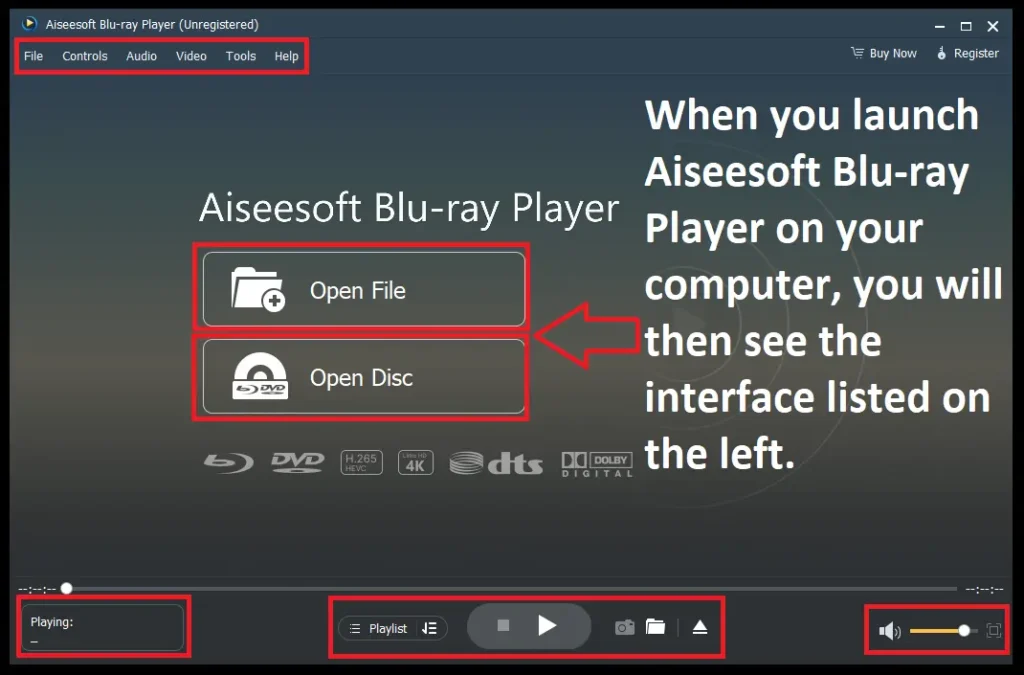
- Launch Aiseesoft Blu-ray Player and choose Open Disc.
- Allow the disc to load; newer protected titles can require Internet access during this stage.
- Choose the required audio track and subtitle, then use the disc menu, title or chapter controls to start playback.
Play a Blu-ray Folder
A Blu-ray folder stored on the computer can be loaded from local storage without putting the original disc in the drive. After loading, Aiseesoft Blu-ray Player exposes the movie, audio-track and subtitle choices documented in its Blu-ray workflow.
Play a Blu-ray ISO Image
Aiseesoft’s dedicated Blu-ray ISO instructions require a virtual Blu-ray drive. Mount the ISO first, then open the mounted virtual drive through Aiseesoft Blu-ray Player. The mounted image can then expose Play Movie, chapters, audio, subtitles and other titles.
Play 4K, HD or Standard Media Files
Use the file-opening workflow for ordinary video and audio. Current documentation covers UHD 4K H.265/HEVC and H.264 video plus common containers such as MP4, MKV, MOV, AVI, TS, FLV and WebM, together with lossless and compressed audio formats including FLAC, AAC, MP3, WAV and WMA.
Product Interface & Workflow
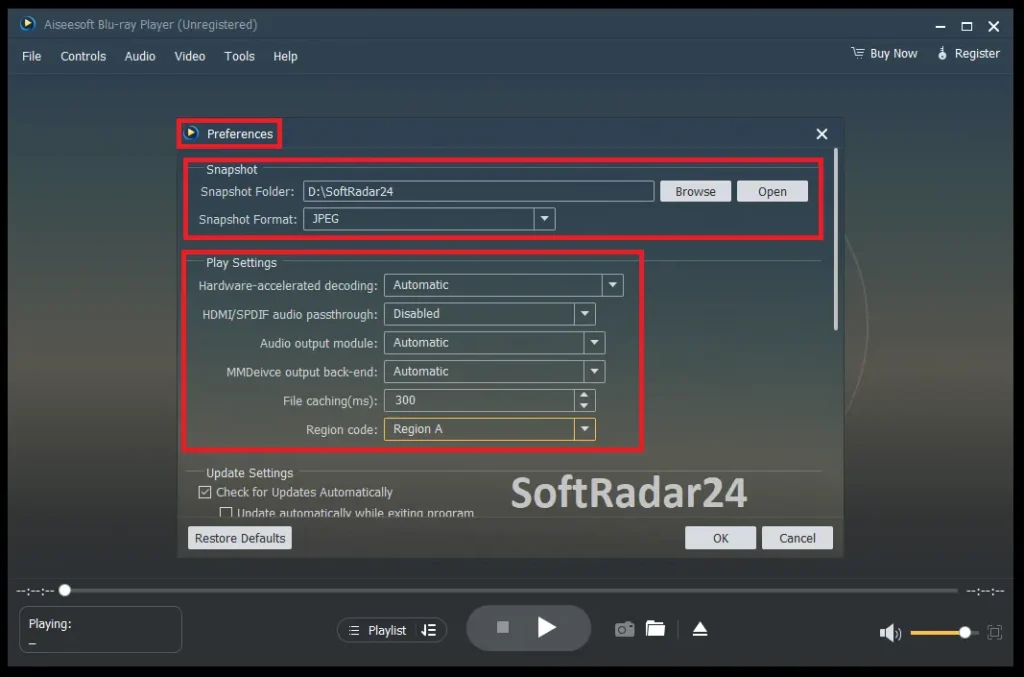
Aiseesoft Blu-ray Player keeps the primary workflow centered on opening a disc or file, then exposes playlist, playback, audio, subtitle, display and snapshot controls around the viewing window.
Compatibility & Coverage
Compatibility is best understood by separating optical media, stored disc structures and conventional local files. Aiseesoft’s format coverage is broad, but ISO playback and newer protected discs have additional requirements.
| Source | Current coverage | What to know |
|---|---|---|
| Commercial Blu-ray disc | Supported | Physical Blu-ray drive required; newer protected discs can need Internet access during loading. |
| Blu-ray folder | Supported | Can be loaded from local storage. |
| Blu-ray ISO image | Supported with an extra step | Current Aiseesoft guidance requires mounting the ISO in a virtual Blu-ray drive first. |
| DVD disc / folder | Supported | Menu, audio-track and subtitle controls are documented. |
| DVD ISO | Supported with an extra step | The current tutorial requires a virtual-drive workflow. |
| UHD 4K local video | Supported | Current product documentation lists common H.264/H.265 4K containers. |
| Physical 4K UHD Blu-ray disc | Not clearly documented | Current core page specifies 1080p Blu-ray discs and 4K local video separately. |
Video & Audio File Coverage
The current technical reference lists video formats including MPG, VOB, MP4, M4V, TS, MTS, M2TS, MXF, RM/RMVB, WMV, ASF, MKV, AVI, 3GP, FLV, MOV and WebM. Audio coverage includes AAC, AIFF, CUE, FLAC, M4A, MP3, APE, OGG, AC3, WAV, WMA and other listed formats.
Windows & macOS Coverage
The current technical reference lists Windows 11, 10, 8/8.1, 7, Vista and XP, while the main product page emphasizes Windows 11/10/8/7. For Mac, the technical reference and FAQ list Mac OS X 10.12 or later, while the main product page still shows 10.9 or later. Using 10.12+ as the safer documented baseline avoids relying on the less strict page.
Features & Capabilities
Aiseesoft Blu-ray Player is strongest when its capabilities are treated as playback functions rather than editing tools. Its value comes from handling commercial discs, stored disc structures and general media in one player while preserving menu and track control.
Blu-ray Playback
- Commercial Blu-ray disc playback across regions according to current product documentation
- Full HD 1080p Blu-ray disc playback
- Blu-ray folder playback from local storage
- Blu-ray ISO playback after mounting in a virtual drive
- Menu, title, chapter, audio-track and subtitle navigation
DVD Playback
- DVD disc and DVD folder playback
- DVD ISO playback through a virtual-drive workflow
- DVD menu navigation
- Audio-track, channel and subtitle selection
- Snapshots during playback
4K & General Media Playback
- UHD 4K local video playback
- H.265/HEVC and H.264/MPEG-4 AVC support
- MP4, MKV, AVI, MOV, TS, FLV, WebM and many legacy containers
- HD and SD media playback in the same application
- Broad standalone audio-file playback
Lossless Audio & Playback Control
- DTS-HD Master Audio
- Dolby TrueHD
- Selectable audio tracks and subtitles
- Playback-size and full-screen controls
- General viewing and playback adjustments
Playlists & Snapshots
- Create playlists for video, music, DVD and Blu-ray content
- Queue media for sequential playback
- Capture still frames during playback
- Use Aiseesoft Blu-ray Player as a general desktop media hub as well as a disc player
Important Conditions & Limitations
The biggest buying mistakes come from treating every “Blu-ray,” “ISO” and “4K” claim as the same capability. Aiseesoft’s own documentation separates these workflows, and several details materially affect real-world use.
4K Video Files Are Not the Same as Physical UHD Blu-ray
The current core product page documents Blu-ray disc playback at 1080p and local video playback up to UHD 4K. That is not enough evidence to promise physical 4K Ultra HD Blu-ray disc playback.
Blu-ray ISO Playback Requires a Virtual Drive
Aiseesoft’s ISO guide instructs users to mount a Blu-ray ISO with a virtual Blu-ray drive first, then open that mounted drive as a disc. This is a different workflow from opening a normal media file.
Newer Blu-ray Discs Can Need Internet Access
Aiseesoft’s support documentation explains that newer protected discs can require an Internet connection during loading. The current tutorial also asks for Internet access while loading Blu-ray/DVD disc, folder and ISO sources. After a Blu-ray is loaded, continuous connectivity is not always required.
A Blu-ray Drive Is Still Required for Physical Media
Software cannot make a DVD-only drive read Blu-ray media. Physical Blu-ray playback requires a Blu-ray-capable optical drive; stored folders, mounted ISO images and normal video files do not.
The Mac Minimum Version Differs Across Current Pages
The technical-reference and FAQ pages list Mac OS X 10.12 or later, while the main product page shows 10.9 or later. Mac OS X 10.12+ is the safer baseline when evaluating compatibility.
The “AI Technology” Label Does Not Mean AI Video Enhancement
Aiseesoft uses AI wording on the Blu-ray Player page, but the documented Aiseesoft Blu-ray Player workflow focuses on disc loading, playback, tracks, subtitles, playlists, settings and snapshots. Do not buy it expecting AI upscaling, restoration, frame interpolation or a professional editing timeline.
Single-Computer Registration Is a Real License Limit
Aiseesoft’s support documentation says a single registration is intended for one computer and can become invalid on a second machine until reset. Multi-device use should be matched to a multi-device license.
Refund Coverage Is Conditional
The current purchase page explicitly describes 30-day refunds for lifetime licenses when there is a quality problem. Treat the refund policy as conditional rather than as an unconditional 30-day use-and-return promise.
The Checkout Includes a Separate Screen Recorder Trial
Aiseesoft’s current Blu-ray Player purchase page promotes seven days of Aiseesoft Screen Recorder access and states that the separate Screen Recorder subscription renews at US$25.00 per month unless canceled. Review optional extras before completing payment.
3D Blu-ray Support Comes from Older Support Documentation
Aiseesoft still publishes a support article stating 3D Blu-ray playback, but that specific FAQ is older than the current product page. A buyer choosing Aiseesoft Blu-ray Player mainly for 3D should test the exact disc and display chain first.
Playback Does Not Create a Portable Copy
Aiseesoft Blu-ray Player watches the source; it does not create a new MP4 or MKV file for Plex, NAS, a tablet or archival storage. That is a ripping or conversion job.
Free Trial / Free Version
Aiseesoft provides a free download, and a current Aiseesoft resource page describes Aiseesoft Blu-ray Player as a 30-day free trial. The direct product and purchase pages do not publish a detailed Blu-ray Player-specific restriction table, so the trial is most useful as a compatibility test rather than as a basis for assuming a particular permanent free feature set.
| What to test | Why it matters | Best evidence |
|---|---|---|
| Commercial Blu-ray disc | Disc protection, region and drive behavior can differ by title. | Load the kind of commercial disc you actually own. |
| Blu-ray ISO | The current workflow requires a virtual drive. | Mount a representative ISO and verify menu/title navigation. |
| 4K HEVC video | Minimum system requirements do not guarantee smooth playback for every high-bitrate file. | Use a representative 4K H.265/HEVC file. |
| Audio and subtitles | Home-theater playback depends on the entire output chain. | Check the actual audio track, subtitle and receiver/output setup. |
System Requirements
The current technical reference provides a lightweight Windows minimum and a separate macOS baseline. Physical Blu-ray discs add an optical-drive requirement that ordinary local video files do not have.
| Requirement | Current documented value | Decision note |
|---|---|---|
| Windows | Windows 11 / 10 / 8.1 / 8 / 7 / Vista / XP | The main product page highlights Windows 11/10/8/7; verify especially old operating systems before purchase. |
| Windows CPU | 1 GHz Intel or AMD CPU or above | Minimum requirement, not a 4K performance guarantee. |
| Memory | 1 GB RAM or more | High-bitrate 4K files can benefit from substantially stronger hardware. |
| macOS | Mac OS X 10.12 or later | Used here as the safer baseline because the main product page still shows 10.9+. |
| Blu-ray optical drive | Required for physical Blu-ray discs | Internal or external Blu-ray-capable drive. |
| Internet | Needed in some Blu-ray loading situations | Newer protected discs can require server-assisted loading; playback may continue offline after loading. |
| Blu-ray ISO | Virtual Blu-ray drive required by current Aiseesoft instructions | Mount the ISO before opening it as a disc. |
Alternatives & Better-Fit Options
The most relevant alternatives depend on whether the real need is another Blu-ray player or a completely different job such as disc-to-file conversion.
AnyMP4 Blu-ray Player
A direct Windows/macOS player comparison for Blu-ray, DVD, ISO and local-media playback. It is useful when you want to compare current system requirements, license terms and the exact discs you use.
Tipard Blu-ray Player
Another dedicated disc-focused player to compare when Blu-ray, DVD, ISO, audio-track and high-resolution local-media playback are the priority.
Blu-ray Ripping
Choose a Blu-ray ripper when the goal is MP4, MKV, Plex, NAS or portable playback. That workflow creates a reusable file instead of simply playing the source.
Blu-ray Conversion
Choose a Blu-ray converter when output formats, conversion controls and file preparation matter more than disc-menu playback.
FAQ
These answers focus on platform requirements, licensing, ISO behavior, trial access, refund terms and technical details without repeating the scenario questions above.
What operating systems does Aiseesoft Blu-ray Player currently list?
The current technical reference lists Windows 11, Windows 10, Windows 8/8.1, Windows 7, Windows Vista and Windows XP, plus Mac OS X 10.12 or later. The main product page highlights Windows 11/10/8/7 and separately shows Mac OS X 10.9 or later, so the vendor’s current pages are not perfectly aligned on the minimum Mac version.
What are the current Windows CPU and memory requirements?
Aiseesoft’s current technical reference lists a 1 GHz Intel or AMD CPU or above and 1 GB RAM or more. These are minimum playback requirements, not a guarantee that every high-bitrate 4K file or heavily protected disc will perform identically on older hardware.
Do I need a Blu-ray drive to play a physical Blu-ray disc?
Yes. The technical reference lists a Blu-ray optical drive, and the tutorial instructs users to connect an internal or external Blu-ray drive before loading a physical disc.
Does Aiseesoft Blu-ray Player need an Internet connection for Blu-ray playback?
Sometimes. Aiseesoft’s tutorial says an Internet connection is needed while loading Blu-ray and DVD disc/folder/ISO sources, and its support documentation explains that newer protected Blu-ray discs can require server-assisted loading. After a Blu-ray is loaded, continuous Internet access is not always required.
Can Aiseesoft Blu-ray Player open a Blu-ray ISO file directly?
The current Aiseesoft ISO guide tells users to mount the Blu-ray ISO in a virtual Blu-ray drive first, then open that virtual drive through the player. Blu-ray folders can be loaded directly.
Which video formats are listed in the Aiseesoft Blu-ray Player technical reference?
The current reference lists formats including MPG, VOB, MP4, M4V, TS, MTS, M2TS, MXF, RM/RMVB, WMV, ASF, MKV, AVI, 3GP, FLV, MOV, WebM and others. The main product page separately highlights UHD 4K playback for common H.264 and H.265/HEVC containers.
Which audio formats can Aiseesoft Blu-ray Player play?
The technical reference lists AAC, AIF/AIFF, CUE, FLAC, M4A, MP3, MP2, APE, OGG, AC3, RA/RAM, AU, WAV and WMA. Blu-ray playback also documents DTS-HD Master Audio and Dolby TrueHD.
Does Aiseesoft Blu-ray Player preserve Blu-ray video and audio quality?
Aiseesoft’s support documentation states that the player can play Blu-ray discs without quality loss and preserve the original audio and video during playback. Display scaling, output hardware and the listening chain can still affect what the viewer ultimately sees and hears.
Is Aiseesoft Blu-ray Player a 4K Ultra HD Blu-ray disc player?
The current core product page documents 1080p Blu-ray-disc playback and UHD 4K local video-file playback as separate capabilities. It does not clearly establish physical 4K UHD Blu-ray disc playback, so that use case should be tested rather than inferred from the 4K file specification.
Is there a free trial of Aiseesoft Blu-ray Player?
Aiseesoft provides a free download, and a current Aiseesoft resource page describes the Blu-ray Player as having a 30-day free trial. The direct product and purchase pages do not publish a detailed Blu-ray Player-specific trial restriction table, so use the installed trial to verify the exact disc and workflow you need.
What refund coverage does Aiseesoft currently state for Blu-ray Player purchases?
The current purchase page explicitly states 30-day refunds for lifetime licenses when there is a quality problem. Other product-page wording is broader, so the safest interpretation is that refund eligibility is conditional and the applicable license terms should be checked before purchase.
Does the Aiseesoft Blu-ray Player checkout include another subscription trial?
Yes. The current purchase page promotes seven days of Aiseesoft Screen Recorder access and states that the separate Screen Recorder subscription renews at US$25.00 per month unless canceled before renewal.
Can I use a one-computer Aiseesoft Blu-ray Player license on a second computer?
Aiseesoft’s support documentation says a single registration is intended for one computer and can become invalid on a second machine until the registration is reset. Use a multi-device license when more than one computer needs licensed access.
Can Aiseesoft Blu-ray Player replace a Blu-ray ripper or converter?
No. Aiseesoft Blu-ray Player is designed to play discs, folders, mounted ISO images and local media. It does not replace software whose job is to create MP4, MKV or other reusable output files from Blu-ray sources.
Does Aiseesoft Blu-ray Player publish a current software version number on the current product pages?
The current product, purchase, technical-reference and tutorial pages do not provide a clear current software version number, so no version number is asserted here.





