Review + Deal

FoneLab iPhone Data Recovery Review: 50% Coupon (2026)

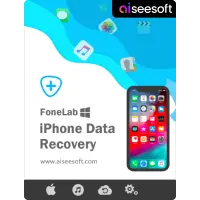
Aiseesoft FoneLab iPhone Data Recovery software product box, featuring iOS data retrieval tools for Windows and macOS Sequoia.
$26.90 $53.80 See Offers
Is Aiseesoft FoneLab iPhone Data Recovery safe? Read our honest review and get an exclusive 50% discount coupon (2026). Recover deleted photos & messages easily

Losing photos, messages, or important files on an iPhone can feel overwhelming—especially when you’re told the data is “permanently deleted.” Naturally, people start asking the same questions: Does iPhone data recovery software actually work? Is deleted data really gone forever? Can these tools be trusted, or are they just false promises?

The truth sits somewhere between hope and limitation. Yes, iPhone data recovery is sometimes possible, but not in every situation—and no software can guarantee a 100% success rate. Much depends on how the data was lost, when it was deleted, whether the device was overwritten, and whether backups (like iCloud or iTunes) exist. This is why some users successfully recover photos from months ago, while others can’t retrieve files deleted just days earlier.

Another common concern is trust and safety. Can data recovery software see your files? Is it risky to use? Could hackers, companies, or even authorities access permanently deleted photos? These fears are understandable. Reputable recovery tools work locally on your device or backup files and don’t upload personal data to remote servers—but not every app claiming to “recover everything for free” plays by those rules. Knowing what to look for before using recovery software is often more important than the software itself.

Cost is another big question. Many users wonder whether it’s worth paying for iPhone data recovery, why professional recovery services are so expensive, or whether free apps actually work. The honest answer: free tools are useful for testing and previewing, while paid solutions usually unlock the actual recovery process.. Professional services, on the other hand, are typically reserved for extreme cases—like physical damage—and can cost far more than most people expect.

This guide is written for people who want realistic answers, not marketing claims. We’ll explain where deleted iPhone data actually goes, when recovery is possible (and when it’s not), how safe recovery tools really are, and how to decide whether a software-based solution makes sense before you spend money or risk your device. If you’re looking for clear expectations rather than exaggerated promises, you’re in the right place.

🎥

Looking for a Screen Recorder?

Check out our in-depth review of Aiseesoft Screen Recorder. It captures video, audio, and gameplay in 4K. Plus, we’ve included an exclusive 50% OFF COUPON inside.

Do iPhone Data Recovery Tools Really Work?

This is the most important—and most misunderstood—question in iPhone data recovery. The honest answer is not a simple yes or no. iPhone data recovery tools can work, but only under the right conditions. When they succeed, it’s not because of magic software tricks, but because the data still exists somewhere and hasn’t been overwritten or fully encrypted beyond access.

When you delete photos, messages, or contacts on an iPhone, the data is usually not erased instantly. Instead, the system marks that space as “available.” Until new data overwrites it, recovery may still be possible—either directly from the device, from an iTunes/Finder backup, or from an iCloud backup. This is why some users manage to recover permanently deleted photos, while others don’t, even using the same tool.

However, there are clear limitations that no software can bypass. If an iPhone has been factory reset, heavily used after deletion, or restored with new data, recovery chances drop dramatically. Apple’s encryption and security model is designed to protect user privacy, which also means no third-party tool can guarantee full recovery—especially without a backup. Any software claiming a 100% success rate should be treated with caution.

Another point many people miss: “Recovery software” doesn’t always mean pulling files directly from the phone. In many real-world cases, these tools work by scanning existing backups more efficiently than Apple’s own restore process. That still counts as recovery—but it’s important to understand what’s actually happening behind the scenes.

So, do iPhone data recovery softwares really work?
✔ Yes — when the data still exists and conditions are favorable
✖ No — when the data is truly overwritten or securely erased

The key is realistic expectations. These tools are best viewed as a last chance, not a miracle. Used early, carefully, and with the right understanding, they can save important data. Used blindly, they often lead to disappointment—not because the software is fake, but because recovery was never technically possible to begin with.

💬

Trending on Microsoft Community

Topic: Data Recovery on Windows 11/10

Hi everyone, I need some recommendations for the best iPhone data recovery tools or software that work well on Windows 11… I’ve seen a ton of options online but not sure which ones are actually reliable and worth paying for. Ideally, a tool that’s beginner-friendly and has a good success rate.

Is FoneLab iPhone Data Recovery Software Safe to Use?

When it comes to data recovery software, “safe to use” usually means more than just virus-free installation. According to the official information provided by the developer, Aiseesoft – FoneLab iPhone Data Recovery is designed to operate as a read-only recovery tool, meaning it scans existing data on the device or backup files without intentionally modifying iOS system files.

The software does not require jailbreaking the iPhone, which is an important safety factor. Jailbreaking can expose devices to security risks and system instability, but Aiseesoft – FoneLab for iOS is positioned as a solution that works within Apple’s standard data access framework. From the vendor’s perspective, this helps reduce the risk of unintended data loss or system damage during the recovery process.

Another point highlighted by the official seller is local data processing. Recovery scans are performed on the user’s own computer, and data is not uploaded to external servers during standard use. This approach is generally presented as a privacy-friendly design choice, especially for users dealing with personal photos, videos, messages, or sensitive files.

That said, no third-party iphone recovery app can override Apple’s core security architecture. The effectiveness and safety of any iOS data recovery tool still depend on factors such as iOS version, device condition, and whether the data has been overwritten. FoneLab software does not claim guaranteed recovery, nor does it position itself as a system-level repair tool.

In summary, based on the official documentation and stated design principles, Aiseesoft – FoneLab iPhone Data Recovery is presented as a non-invasive and privacy-conscious solution, intended to minimize risk while attempting data recovery. As with any recovery software, realistic expectations and careful use remain essential.

Can FoneLab iPhone Data Recovery Really Solve This Recover Problem?

iPhone data recovery tools are often marketed as miracle solutions, but in practice, results depend heavily on how and when the data was lost. Based on how FoneLab is designed to work and the limitations of iOS itself, it’s important to approach recovery with realistic expectations.

When It FoneLab iPhone Data Recovery Works Well

FoneLab tends to perform best in scenarios where the deleted data has not yet been overwritten by new system or user activity. This commonly includes:

Recently deleted photos, messages, or contacts
Data loss caused by accidental deletion
iOS system crashes or failed updates where data still exists in device storage
Situations where iTunes or iCloud backups are available and intact

In these cases, the software can scan the device or backup files and allow users to preview recoverable items before restoring them, which helps avoid unnecessary recovery attempts.

When It FoneLab iPhone Data Recovery May Fail

There are also situations where recovery is unlikely or impossible, regardless of the tool used:

Data that has been overwritten after deletion
Factory-reset devices with no usable backups
Severely damaged devices that cannot establish a stable connection
Encrypted backups where credentials are unavailable

These limitations are not specific to FoneLab but are inherent to how iOS manages data security and storage.

Why No Software Guarantees 100% Success

Apple’s security model is intentionally strict. Once data is permanently erased or overwritten, there is often no technical path to retrieve it. Recovery software can only access data that still exists in some form—either on the device or inside a backup.

This is why reputable tools avoid offering “100% recovery” promises. Success depends on timing, device state, and user behavior after data loss. FoneLab positions itself as a recovery attempt tool, not a guarantee.

In short, FoneLab iPhone Data Recovery can be effective in the right conditions, but it is not a magic fix. Understanding what recovery software can and cannot do is the key to avoiding disappointment—and making smarter decisions when data loss happens.

FoneLab Key Features That Matter in Real Use

Most iPhone data recovery tools list dozens of features, but in real-iphone data recovery scenarios, only a few of them actually make a difference. What matters is not how many data types are “supported” on paper, but whether the software helps users avoid unnecessary risks, wasted time, and false hope. This is where FoneLab’s core capabilities become relevant.

Preview Before Recovery

One of the most practical features of FoneLab iPhone Data Recovery is the ability to preview recoverable data before restoring anything. Instead of blindly recovering everything, users can see which photos, messages, or files are actually detected by the scan.

This matters because iPhone data recovery is rarely all-or-nothing. Some files may still exist, others may already be overwritten. Previewing results helps users decide whether recovery is worth proceeding with at all, which saves time and avoids unrealistic expectations. It also reduces the risk of restoring large amounts of irrelevant or outdated data.

Selective Data Recovery

Selective recovery allows users to recover only the data they actually need, rather than restoring entire backups. In real use, this is especially valuable for people who lost a specific set of photos, messages, or contacts and don’t want to disturb the rest of their data.

Instead of forcing a full device restore, FoneLab iPhone Data Recovery lets users export chosen items directly to their computer. This approach is safer and more controlled, particularly for beginners who are worried about accidentally overwriting current data on their iPhone.

Backup-Based Recovery (iTunes & iCloud)

Backup-based recovery is often the most reliable recovery path on iOS, and FoneLab supports both iTunes and iCloud backups. This is important because many “successful” recoveries don’t come from scanning the device itself, but from extracting data that already exists inside backups.

FoneLab iOS Data Recovery allows users to access backup files without restoring the entire backup to their device. Users can log in, download the backup, preview its contents, and extract specific files. For situations involving lost, broken, or factory-reset devices, this method is often more realistic than direct device scanning.

Download & Try FoneLab iPhone Data Recovery Before You Buy

When it comes to iPhone data recovery, most users are understandably hesitant to pay upfront. Data loss is already stressful, and no one wants to spend money on a tool without knowing whether it can actually find their files. That’s why trying a recovery tool before purchasing is not just a bonus — it’s a necessity.

FoneLab iPhone Data Recovery offers a trial version that allows users to test real recovery potential before making a decision, which aligns well with how cautious users approach data recovery software.

What You Can Test for Free

With the free version of FoneLab iPhone Data Recovery, users can connect their device or backup and run a full scan. This means you can see whether your deleted photos, videos, messages, contacts, or other data types are detectable at all.

The preview feature is fully accessible during the trial, allowing users to browse recoverable files and verify timestamps, file names, and content structure. For many users, this step alone answers the most important question: “Is my data still there in any form?” If nothing relevant appears in the scan results, users can walk away without spending anything.

This makes the trial especially valuable for beginners who want reassurance before committing.

What Is Locked Behind the FoneLab Paid Version

The main limitation of the FoneLab iPhone Data Recovery free version is the actual recovery process. While scanning and previewing are available, exporting or restoring files to a computer requires a paid license.

This is a common and reasonable limitation in the data recovery space. Recovery itself is the core function of the software, and locking it behind the paid version prevents misuse while still allowing users to make an informed decision.

In practical terms, FoneLab for iOS lets users confirm recoverability first, then decide whether the results justify the purchase. There is no forced commitment, no hidden scanning limits, and no misleading “fake recovery” screens — just a clear separation between testing and restoring.

FoneLab for Windows Free Download

FoneLab iPhone Data Recovery – Windows

Free Trial Version: Compatible with Windows 11, 10, 8, and 7. Scan your device and preview recoverable files for free before buying.

FoneLab for Mac Free Download

FoneLab iPhone Data Recovery – Mac

macOS Free Trial: Optimized for macOS Sequoia, Sonoma, and Apple Silicon (M1/M2/M3). Safe read-only scan.

How to Use FoneLab iPhone Data Recovery (Step-by-Step)

You don’t need technical knowledge to use FoneLab iPhone Data Recovery. The process is designed around simple choices and clear results, so even if you’ve never used recovery software before, you can follow the steps without feeling lost. Below is a practical, beginner-friendly walkthrough of all recovery options.

Recover Data Directly from Your iPhone

This method is best if your iPhone is still working and you can connect it to a computer.

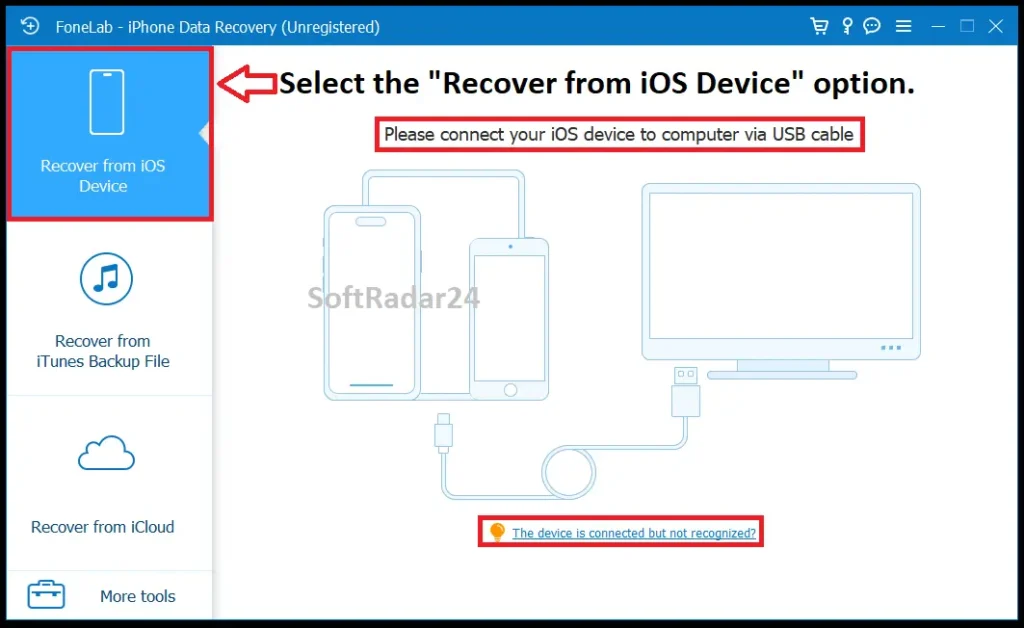
Step 1: Connect your iPhone to the computer
Launch FoneLab and connect your iPhone using a USB cable. If your iPhone asks you to “Trust This Computer,” unlock your phone and tap Trust.
Expected result: Your device is detected and shown inside the program.

Screenshot of FoneLab iPhone Data Recovery interface showing the "Recover from iOS Device" mode selected and the USB connection prompt for iPhone.

Step 1: Select “Recover from iOS Device” from the left sidebar and connect your iPhone to the computer via USB cable.

Step 2: Start scanning your device
Choose Recover from iOS Device and click Start Scan. If you want to save time, you can select specific data types (such as Photos or Messages) before scanning.
Expected result: The software begins analyzing your device for recoverable data.

Step 3: Preview found data
After the scan, files are organized into clear categories like Photos, Videos, Contacts, Messages, or Call History. You can click any item to preview it before recovering.
Expected result: You can visually confirm whether the files are the ones you’re looking for.

Step 4: Recover selected files
Select the files you want and click Recover. The data will be saved safely to your computer, not back onto the phone.
Expected result: Your recovered files are exported to a folder on your computer.

Note: In some cases (such as encrypted backups or newer iOS versions), the software may ask for permission or a password to scan certain data types. This is normal and part of Apple’s security system.

Recover Data from an iTunes Backup

This option works well if your iPhone is lost, broken, or no longer usable, but you previously backed it up with iTunes.

Step 1: Select iTunes recovery mode
Open FoneLab and choose Recover from iTunes Backup File. The software will automatically find backups stored on your computer.
Expected result: A list of available iTunes backups appears.

Screenshot of FoneLab software interface selecting "Recover from iTunes Backup File" mode. Shows the backup list table and Start scan button.

Select “Recover from iTunes Backup File” from the sidebar. The software will automatically list all iTunes backups found on your computer.

Step 2: Scan the backup file
Choose the backup you want and start scanning. If the backup is encrypted, you’ll be asked to enter the password.
Expected result: The contents of the backup are extracted and displayed.

Step 3: Preview and recover
Browse through the data, preview files, and select only what you need. Click Recover to save them to your computer.
Expected result: Selected files are restored without affecting your current iPhone data.

Recover Data from iCloud Backup

This method is useful if you rely on iCloud and don’t have local backups.

Step 1: Sign in to iCloud
Choose Recover from iCloud Backup and log in using your Apple ID. If two-factor authentication is enabled, enter the verification code sent to your iPhone.
Expected result: Your iCloud backups become accessible inside the program.

Screenshot of FoneLab software interface showing the "Recover from iCloud" login screen. Displays fields for Apple ID and Password along with privacy policy notes.

Select “Recover from iCloud” from the menu and sign in with your Apple ID. FoneLab does not save your account information during this process.

Step 2: Choose what to scan
Select the data types you want (Photos, Notes, Contacts, etc.) and start the scan.
Expected result: Only the selected categories are downloaded and analyzed.

Step 3: Preview and recover files
Once scanning is complete, preview the files and choose what you want to recover. Click Recover and select a destination folder.
Expected result: Your iCloud data is saved locally to your computer.

What This Process Does Not Do

FoneLab iPhone Data Recovery does not overwrite your existing iPhone data, does not modify backups, and does not push recovered files back onto your device automatically. Everything is restored safely to your computer first, giving you full control.

This step-by-step structure is why many beginners feel more comfortable starting with FoneLab iOS Data Recovery — each stage is visible, reversible, and easy to understand, even if you’re dealing with data recovery for the first time.

Aiseesoft FoneLab iPhone Data Recovery Discount Coupon 2026

Pricing is one of the biggest pain points for people searching for iPhone data recovery software. Some tools are priced close to professional recovery services, while others look cheap but offer very limited real-world value. Aiseesoft FoneLab follows a more transparent approach by allowing users to test the software first and apply discounts automatically on the official checkout page, without requiring manual coupon codes.

All discounts listed on this page are applied directly when you click the “Buy Now” button and proceed to the official Aiseesoft payment screen. There is no need to search for extra promo codes or worry about expired coupons. This saves time and removes uncertainty during the purchase process. Every license also comes with a 30-day money-back guarantee, giving you the option to try the software in your own recovery scenario with minimal risk.

For users who want more than just a single recovery tool, Aiseesoft also offers an 11-in-1 Prime Lifetime Bundle, which includes multiple utilities under one license. This bundle provides a significantly higher discount compared to purchasing individual tools separately and is often a better choice for long-term or multi-purpose use.

Aiseesoft FoneLab Price, License Options, and Value for Money

Aiseesoft – FoneLab iPhone Data Recovery offers flexible licensing options designed for different types of users. Short-term licenses are suitable for people dealing with a one-time data loss incident, while lifetime licenses are a better fit for users who want long-term access without recurring costs. Licenses are also structured based on the number of devices and computers, helping users avoid paying for capacity they don’t actually need.

From a value-for-money perspective, FoneLab is not just about recovering files once. The license includes free software updates, ongoing compatibility with new iOS versions, and official technical support. These factors help keep the software usable long after purchase, which is especially important for lifetime license holders.

The Aiseesoft – FoneLab 11-in-1 Prime Bundle, For users who frequently manage iOS devices or work with backups, conversions, and system tools, this option often delivers the strongest long-term value.

Rather than focusing solely on the lowest price, the key advantage here is clarity—knowing exactly what you get, how long you can use it, and what level of support is included. Aiseesoft FoneLab’s pricing and discount structure is designed to reflect that transparency.

🎁

Aiseesoft Prime Bundles (11-in-1) Lifetime

🪟

Prime Bundle 11-in-1 for Windows

Lifetime / 1 PC: Includes FoneLab, Video Converter, Screen Recorder, and 8 more premium tools. 80% Saving.

$155.00

BUY BUNDLE

🍎

Mac Prime Bundle 11-in-1

Lifetime / 1 Mac: The ultimate multimedia and recovery toolkit for macOS. Includes 11 premium apps.

$155.00

BUY BUNDLE

🪟

FoneLab iPhone Data Recovery for Windows
FoneLab Windows 1 Month

FoneLab iPhone Data Recovery – 1 Month License / 1 PC

Emergency Plan: Perfect for a one-time data rescue operation. Full access for 30 days. 1 Month/6 Devices/1 PC

$26.90

BUY NOW

FoneLab Windows Lifetime

Lifetime License / 1 PC

⭐ Best Seller: Pay once, use forever. Includes free lifetime updates and support. Lifetime/6 Devices/1 PC

$39.97

BUY NOW

FoneLab Windows Business

Business License / 3 PCs

Multi-User Plan: Lifetime license valid for installation on up to 3 different computers. Lifetime/6 Devices/3 PCs

$76.30

BUY NOW

🍎

FoneLab iPhone Data Recovery for Mac

FoneLab Mac 1 Month

1 Month License / 1 Mac

Short-Term Project: Ideal for retrieving data quickly on macOS Sequoia/Sonoma.

$26.90

BUY NOW

FoneLab Mac Lifetime

Lifetime License / 1 Mac

⭐ Recommended: Permanent access to recovery tools for future iOS updates.

$39.97

BUY NOW

FoneLab Mac Business

Business License / 3 Macs

Office Plan: Install on up to 3 Mac computers with a single lifetime key.

$65.40

BUY NOW

FoneLab iPhone Data Recovery Free Trial vs Paid Version

Pros (What Works Well in Real-World Use)
  • Beginner-friendly interface: Designed for users with little to no technical background. The workflow is clear, guided, and easy to follow without overwhelming menus or jargon.
  • True preview before recovery: Users can actually preview photos, messages, contacts, and other files before deciding what to recover, helping avoid paying for uncertain results.
  • Multiple recovery modes: Supports recovery directly from the iOS device, iTunes backups, and iCloud backups, which increases flexibility across different data-loss scenarios.
  • Selective recovery saves time: Instead of restoring everything, users can recover only the files they need, reducing clutter and speeding up the process.
  • Read-only recovery process: The software scans and extracts data without modifying existing files on the device, which lowers the risk of further data loss.
  • Good compatibility with modern iOS versions: Works with recent iOS releases and newer iPhone models, which is critical for long-term usability.
  • Clear and transparent recovery steps: The scanning, preview, and recovery stages are visible and understandable, helping users feel in control of the process.
  • Effective for common data loss cases: Performs best in everyday situations such as accidental deletion, failed updates, or data loss after a reset when backups exist.
⚠️ Cons (Limitations You Should Be Aware Of)
  • No Linux support: Available only for Windows and macOS, which may exclude some advanced or technical users.
  • Free version is limited to preview: The trial version allows scanning and previewing, but exporting recovered files requires a paid license.
  • Not effective if data has been heavily overwritten: Files deleted long ago and replaced by new data are often unrecoverable — a limitation shared by all consumer recovery tools.
  • Scan time can be long on large storage devices: iPhones with high storage usage may require longer scanning times, especially during deep scans.
  • Some recovery results depend on backup availability: For certain data types, having an iTunes or iCloud backup significantly improves recovery success.
  • Not a forensic-grade recovery solution: This is a consumer-level recovery tool, not the same software used by law enforcement or professional forensic labs.

Editor’s Perspective: This software is not a miracle tool, but it does what it claims within realistic limits. For users who want a safe, guided, and transparent recovery attempt, it offers a reasonable balance between simplicity and control.

FoneLab vs AnyMP4 iPhone Data Recovery – Which One Should You Choose?

When users search for “FoneLab vs AnyMP4” or “FoneLab alternatives”, they’re usually not looking for a winner — they’re looking for confidence. The truth is, both tools are built on a very similar recovery engine and follow the same core recovery logic. The real difference lies in how they feel to use and who they are best suited for.

Instead of forcing a “better vs worse” narrative, the smarter approach is to match each tool with the right type of user.

Feature Comparison (At a Glance)

FeatureAiseesoft FoneLab iPhone Data RecoveryAnyMP4 iPhone Data Recovery
Core Recovery EngineSame recovery logic and scan structureSame recovery logic and scan structure
Recovery ModesiOS Device, iTunes Backup, iCloud BackupiOS Device, iTunes Backup, iCloud Backup
Preview Before Recovery✅ Yes✅ Yes
Selective File Recovery✅ Yes✅ Yes
Supported Data TypesPhotos, videos, messages, contacts, app data, morePhotos, messages, contacts, app data, videos, more
Ease of Use⭐ Very beginner-friendly⭐⭐ Slightly more control-oriented
Interface StyleClean, guided, minimalMore technical, information-dense
Best ForFirst-time & non-technical usersUsers who like more visible options
Risk LevelLow (read-only scan)Low (read-only scan)
Typical Use Case“I just want my files back safely”“I want to see more recovery details”

How to Choose Without Overthinking It

Choose FoneLab if you:
Want the most straightforward and guided experience
Are not very technical and prefer fewer decisions
Just want to recover data without diving into settings
Value clarity and simplicity over fine-grained control

Choose AnyMP4 if you:
Are comfortable exploring recovery options
Like seeing more technical feedback during scans
Want a similar recovery result but with a slightly more “tool-like” interface
Prefer a layout that feels closer to professional utilities

💡 Important note: Recovery success depends far more on data condition, backup availability, and timing than on the brand name itself.

⚠️ About “Better Than X?” Searches

Neither recovery tool is universally “better.” They solve the same problem using the same recovery principles — the difference is user experience, not magic recovery power.

If your priority is confidence and simplicity, FoneLab usually feels safer.
If your priority is control and visibility, AnyMP4 may feel more comfortable.

🔗 Looking for Alternatives?

AnyMP4 iPhone Data Recovery will be fully reviewed and available here soon. Once published, you’ll be able to compare both tools side by side and decide which fits your situation best.

Who Should Choose FoneLab iPhone Data Recovery (And Who Shouldn’t)

Choose FoneLab for iOS if you:
Accidentally deleted photos, messages, or contacts
Don’t want to risk your iPhone with complex tools
Prefer a guided, step-by-step recovery process
Want to try first before paying
Value safety and clarity over technical depth

You may want to look elsewhere if you:
Expect guaranteed recovery after factory reset with no backups
Need forensic-level or law-enforcement recovery tools
Want a completely free, unlimited recovery solution
Are comfortable with advanced, command-style utilities

This tool is designed to help real users recover data — not to promise the impossible.

Final Verdict – Is FoneLab iPhone Data Recovery Worth Trying?

If I step back and look at Aiseesoft FoneLab iPhone Data Recovery purely as an editor — not a seller — this is how I’d frame it:

Data recovery on iPhone is one of those areas where expectations matter more than features. No software can promise miracles, and FoneLab doesn’t magically break Apple’s security model either. What it does offer is something far more realistic — a structured, relatively safe way to try recovering what might still be recoverable, without making the situation worse.

If I had just lost photos, messages, or contacts due to accidental deletion, a failed update, or a device issue — and especially if I had an iTunes or iCloud backup — FoneLab Recovery would absolutely be on my shortlist. The ability to preview files before recovery, choose exactly what to restore, and stop at the free scan stage before paying removes a lot of the usual anxiety around recovery tools.

At the same time, I wouldn’t recommend it to someone expecting guaranteed results after a factory reset with no backups, or to users looking for forensic-level recovery. That’s not what this software is built for — and pretending otherwise would be dishonest.

Where FoneLab stands out is balance:

It’s beginner-friendly, without feeling “toy-like”
It respects the limits of iOS instead of overselling outcomes
It lets users decide with their own eyes before committing money

If I were advising a friend with limited technical knowledge who just wanted a clear, safe, and realistic attempt at getting their data back, I’d say this:

Try FoneLab first. Scan, preview, see what’s there. If it shows what you need, then it’s worth paying. If not, you walk away without guessing.

That, in this crowded and often exaggerated recovery market, is a surprisingly honest value proposition. Not perfect. Not magical. But for the right situation — reasonable, transparent, and worth trying.

Technical Specifications & FAQ

⚙️ Technical Specifications & System Requirements

💻 System Requirements

  • Supported OS:
    Windows 11/10/8.1/8/7/Vista/XP
    Mac OS X 10.7 or higher (macOS Sequoia included)
  • CPU: 1GHz Intel/AMD CPU or above
  • RAM: 1GB RAM or more
  • iOS Version:
    iOS 5 up to iOS 26 (and all versions in between)
  • iPadOS Version: iPadOS 13 to iPadOS 26
  • Disk Space: Free space must be larger than your device’s data size.

📱 Supported Devices

iPhone iPhone 17 Series: 17 Pro Max / 17 Pro / 17 Air / 17
iPhone 16 Series: 16 Pro Max / 16 Pro / 16 Plus / 16 / 16e
iPhone 15/14/13/12/11 Series (Pro/Max/Plus/Mini)
iPhone XS/XR/X, iPhone 8/7/6s/6 Plus, SE (1/2/3)
Legacy Support: iPhone 5s/5c/5, 4S/4, 3GS
iPadiPad Pro (All models), iPad Air (All), iPad mini (All), Standard iPad
iPodiPod touch 7, 6, 5, 4, 3, 2

📂 Recoverable Data & Modes

3 Recovery Modes:

  • Recover from iOS Device (Direct Scan)
  • Recover from iTunes Backup
  • Recover from iCloud Backup
Supported File Types:

  • Text: Messages, Contacts, Call History, Notes, WhatsApp, Safari History.
  • Media: Photos, Videos, Audio, Voice Memos, Attachments.

💾 Output Formats (Export)

Contacts
CSV, HTML, VCF
Messages/Call Log
CSV, HTML
Photos/App Images
JPG, PNG, GIF, BMP, TIFF
Videos
MOV, MP4, M4V, AVI, 3GP
Audio/Voice Memos
M4A, MP3, AAC, AMR, AIFF
Documents/Notes
HTML, TXT, DOC, PDF, XLS

Frequently Asked Questions About FoneLab iPhone Data Recovery

Q1. Does FoneLab iPhone Data Recovery actually work for deleted iPhone data?

FoneLab iPhone Data Recovery can work if the deleted data hasn’t been fully overwritten or if a usable iTunes or iCloud backup exists. Results vary depending on how the data was lost and how long ago it happened, which is why previewing scan results before purchase is important.

Q2. Is FoneLab iPhone Data Recovery safe to use on my iPhone?

Yes, FoneLab operates in read-only mode and does not modify or overwrite existing data on your device. According to the official documentation, it extracts recoverable data without jailbreaking or altering iOS system files.

Q3. Can FoneLab recover permanently deleted photos from an iPhone?

In some cases, yes — but only if the photos are still present in an iTunes or iCloud backup or haven’t been overwritten at the system level. FoneLab iPhone Data Recovery cannot bypass Apple’s encryption, so success depends on how the data was deleted and whether backups exist.

Q4. Is FoneLab iPhone Data Recovery worth paying for?

It can be worth paying for if the free scan shows previewable files you actually need to recover. If nothing meaningful appears in the scan results, paying for the license is unlikely to change the outcome.

Q5. Who should use FoneLab iPhone Data Recovery — and who shouldn’t?

FoneLab iPhone Data Recovery is best for everyday users who want a guided, low-risk recovery attempt without technical complexity. It may not be suitable for users expecting guaranteed recovery after factory resets with no backups or for forensic-level data recovery needs.
FoneLab iPhone Data Recovery Review: 50% Coupon (2026)
$26.90 $53.80
      SoftRadar24
      Logo