Decision-first comparison
The Short Answer
WinX DVD Ripper Platinum and WonderFox DVD Ripper Pro overlap on the essentials, but they are not interchangeable. Both accept a DVD disc, ISO image, or DVD folder; both document protected-disc and main-title handling; and both can produce common playback files or preserve a disc as an ISO or VIDEO_TS folder.
WonderFox is the clearer documented Windows choice when the job requires MKV, multiple selectable audio or subtitle tracks, AV1, Apple ProRes, or built-in high-resolution scaling profiles. WinX is the clearer documented choice when AMD hardware acceleration, Safe Mode controls, or its four-part backup set—ISO, DVD folder, main-title MPEG-2, and full-title MPEG-2—matters more.
That overlap does not make one product right for every DVD. Protection type, disc condition, desired output, computer hardware, operating system, and license scope can change the sensible choice.
Product documentation and purchase information checked August 29, 2026How This Comparison Was Prepared
This comparison separates a documented capability from a marketing promise. Current materials from the official WinX DVD Ripper Platinum page and the official WonderFox DVD Ripper Pro page, together with their technical guides, change logs, trial limits, and policy pages, define what each product is documented to do.
No speed or quality champion is declared because vendor figures do not use one controlled set of discs, drives, computers, and output settings. A feature missing from current documentation is marked not documented, not treated as proof that the function is impossible.
Start With the Output Goal, Not the Product Name
The most important choice happens before comparing brands: decide whether the destination is a compact playback file, a flexible multi-track file, or a structural disc backup. These outcomes solve different problems.
| Goal | Suitable route | Product fit | Decision impact |
|---|---|---|---|
| Easy playback on phones, TVs, PCs, or media servers | MP4 with H.264; HEVC where device support is known | Both | A compressed file is convenient and can be much smaller, but it does not retain an interactive DVD menu. |
| Several selectable audio and subtitle tracks in one Windows file | MKV, or a compatible multi-track MP4 workflow | WonderFox documentedWinX Windows MKV | WonderFox provides the clearer current Windows documentation for keeping selectable tracks in a digital file. |
| Preserve menus, extras, and disc structure | ISO image or DVD Folder / VIDEO_TS | Both | This route uses more storage and may require compatible player or mounting software, but it is the relevant choice when the DVD experience matters. |
| Copy MPEG-2 video without a new H.264/HEVC encode | Main-movie MPEG/MPG; full-title MPEG-2 where available | Both for main movieWinX full-title mode | MPEG-2 files are usually larger than a compressed H.264/HEVC output. WinX documents an additional full-title MPEG-2 route. |
| Increase the output dimensions | Resolution scaling | WonderFox profilesWinX AI route | WonderFox documents built-in profiles up to 8K. WinX points to Winxvideo AI, a separate product. Neither route can recreate source detail that is absent from a 480p/576p DVD. |
Can This Software Do What I Need?
I want a normal MP4 copy of a movie
Either product can fit. Both document MP4/H.264 and HEVC output from discs, ISO images, and DVD folders. Choose the output profile according to the playback device rather than treating the largest resolution or bitrate as automatically better.
I need MKV with selectable languages or subtitles on Windows
WonderFox has the clearer documented route. Its current materials explicitly cover Windows MKV and multi-audio/subtitle workflows. The current WinX Windows specifications do not list MKV, and an official WinX menu guide identifies MKV as a Mac-version option.
I want the original DVD menu and extras
Use ISO or DVD Folder / VIDEO_TS with either product. MP4 and MKV are playback-file routes, not interactive DVD-menu containers. Keeping a menu also keeps more of the disc structure, so storage needs are normally higher.
My computer uses an AMD GPU
WinX is the explicitly documented candidate. WinX lists Intel, NVIDIA, and AMD hardware acceleration. Current WonderFox materials name Intel Quick Sync Video and NVIDIA NVENC; an AMD acceleration path is not documented there.
The disc shows 99 titles or selects the wrong movie
Both products provide title-detection features. WinX documents Unique Title Check plus title-selection controls; WonderFox documents intelligent main-title detection. Episodic and unusually authored discs may still require the user to confirm the correct titles and episode order.
The disc is difficult to read
Both offer a conditional fallback. WinX provides Safe Mode and file-system choices; WonderFox provides Enhanced Decryption and notes that it takes longer. These modes can change how readable data is processed, but no software can reconstruct sectors an optical drive cannot read.
I need enough trial time to evaluate a long chapter
WonderFox allows 15 minutes; WinX allows five. The longer limit is useful, but neither trial exposes the complete paid workflow. WonderFox withholds advanced decryption and ISO/folder cloning, while WinX makes advanced functions unavailable.
I use macOS or need Blu-ray support
Neither exact offer covers that full requirement. WonderFox DVD Ripper Pro is a Windows product. Digiarty publishes a separate WinX Mac product, but it is not the Windows offer compared here. Neither DVD ripper is documented as a Blu-ray ripper.
WinX vs WonderFox: Comparison at a Glance
| Decision factor | WinX DVD Ripper Platinum | WonderFox DVD Ripper Pro | Why it can change the purchase |
|---|---|---|---|
| DVD, ISO, and folder input | Built in | Built in | No deciding difference for these three source types. |
| Protected and 99-title DVD positioning | Title Check, Safe Mode; several named protection types | Title Detection, Enhanced Decryption; several named protection types | Both are candidates, but neither protection list guarantees every disc. |
| Windows MKV | Not documented | Built in | WonderFox is the clear documented route if MKV is mandatory on Windows. |
| MP4/H.264 and HEVC | Built in | Built in | Both cover the most common compact playback-file needs. |
| AV1 and Apple ProRes | Not listed in current Windows specs | Built in | WonderFox fits workflows that specifically require these codecs. |
| ISO / VIDEO_TS with menus | Built in | Built in | Either can preserve a menu-led disc archive. |
| MPEG-2 copy modes | Main title and full title | Main Movie (MPG) | WinX documents an extra full-title route; WonderFox still covers the main movie. |
| Multiple tracks in a digital file | Comparable Windows route unclear | Explicit multi-audio/subtitle guidance for compatible MP4/MKV output | WonderFox removes uncertainty for multilingual or commentary-track libraries. |
| Hardware acceleration | Intel, NVIDIA, AMD | Intel QSV, NVIDIA NVENC | AMD users have an explicit WinX path; actual acceleration still depends on codec and hardware support. |
| Difficult-disc fallback | Safe Mode; Auto Detect, Force UDF, or Force ISO | Enhanced Decryption, with longer processing noted | Both provide fallback logic, but through different controls. |
| Native resolution scaling | AI route is separate | Profiles up to 8K | WonderFox includes scaling profiles; WinX’s promoted AI enhancement belongs to another product. |
| Trial conversion limit | Five minutes; advanced features unavailable | 15 minutes; advanced decryption and ISO/folder cloning unavailable | WonderFox gives more sample duration, but both omit paid functions that may be decisive. |
| Approved lifetime offer | 1-PC Windows campaign + promotional gift | 1-PC, 3-PC family, and software-bundle options | WonderFox has the lower listed entry and multi-PC cost; the exact figures and terms are separated in the pricing section. |
Protected DVDs, 99 Titles, and Difficult Discs
Protection support is not a single yes-or-no specification. A disc may combine region coding, deliberate false titles, structural tricks, authoring errors, or physical read problems. The more useful question is how each product identifies the playable title and what fallback it offers when normal analysis fails.
WinX: title checking plus manual fallback controls
WinX documents support for CSS, region coding, RCE, UOP, Sony ARccOS, Disney X-project, and APS. Unique Title Check is intended to select the main feature on discs that expose many misleading titles. Safe Mode and the Auto Detect, Force UDF, and Force ISO file-system choices provide alternate handling for problematic sources.
Why this matters: the additional controls are useful when automatic analysis does not return the expected title. They are conditional tools, not a promise that every protected or damaged disc will become readable.
WonderFox: title detection plus Enhanced Decryption
WonderFox documents CSS, CPRM, region coding, RCE, Sony ARccOS, UOP, Disney X-project, and Cinavia among its supported protection categories. Its main-title detection addresses discs that present large numbers of decoy titles. Enhanced Decryption is the fallback for difficult cases, and the vendor notes that this deeper mode requires more time.
Why this matters: WonderFox keeps the difficult-disc option inside a simpler mode choice. Buyers who prefer direct controls may value WinX’s file-system options; buyers who prefer a guided fallback may value WonderFox’s Enhanced Decryption approach.
Episodic discs need an extra check. Automatic main-title detection is designed around the feature title, while a TV disc may contain several valid episodes of similar length. Confirming the title list, duration, language, and episode order is therefore part of an episodic workflow with either product.
Output Formats, Audio Tracks, and Subtitles
Long profile counts are not useful comparison scores because vendors count codecs, containers, devices, and presets differently. The decision should be based on the exact container, codec, tracks, and playback target required.
| Requirement | WinX DVD Ripper Platinum | WonderFox DVD Ripper Pro | Practical meaning |
|---|---|---|---|
| MP4/H.264 | Documented | Documented | A broadly compatible choice for everyday playback. |
| HEVC/H.265 | Documented | Documented | Can reduce size at comparable settings, but older players may lack support. |
| MKV on Windows | Not documented in the current Windows product specifications | Documented | WonderFox is the safer documented choice when MKV is non-negotiable. |
| AV1 / Apple ProRes | Not listed in current Windows specifications | Documented | Relevant for newer compression or editing-oriented intermediate workflows. |
| Original subtitle selection and external SRT | Documented, including position controls | Documented | Both cover the common need to select an original stream or add an external subtitle file. |
| Soft, hard, forced, and multiple subtitles | Comparable Windows multi-track file workflow is not clearly documented | Explicitly documented for compatible outputs | WonderFox offers clearer control when viewers must switch tracks after conversion. |
Why subtitle type matters
- Hard subtitles are rendered into the picture. They play everywhere but cannot be turned off.
- Soft subtitles remain selectable in a compatible container and player.
- Forced subtitles show only designated dialogue or signs, such as foreign-language lines inside an otherwise same-language movie.
- External subtitles come from a separate file, commonly SRT, and depend on correct timing and language selection.
WonderFox’s current guidance is more explicit for retaining several selectable audio and subtitle tracks in compatible MP4/MKV outputs. WinX documents original subtitle selection and adding an external SRT, while ISO and DVD-folder backups retain the disc’s broader structure. Those are different outcomes: a structural backup can keep tracks without proving that the same tracks will remain selectable in every compressed-file profile.
Hardware Acceleration and Speed: What Can Actually Be Compared?
WinX explicitly documents Intel, NVIDIA, and AMD acceleration. WonderFox explicitly documents Intel Quick Sync Video and NVIDIA NVENC. That makes AMD the clearest hardware-level difference; the absence of a current WonderFox AMD statement is recorded as not documented, not converted into a claim of impossibility.
| Acceleration path | WinX DVD Ripper Platinum | WonderFox DVD Ripper Pro | What to understand |
|---|---|---|---|
| Intel | Documented | Intel QSV documented | Availability depends on the processor, drivers, codec, and selected profile. |
| NVIDIA | Documented | NVIDIA NVENC documented | A supported GPU does not accelerate every stage of reading and conversion. |
| AMD | Documented | Not documented | WinX is the product with an explicit current AMD path. |
Vendor peak-speed figures cannot establish a fair speed ranking. Optical-drive read rate, disc condition, protection analysis, Safe Mode or Enhanced Decryption, source length, output codec, bitrate, resolution, filters, and supported GPU paths can all alter elapsed time. ISO/folder copying is also a different workload from H.264, HEVC, or AV1 encoding.
Purchase implication: match the documented encoder path to the computer and required codec. Treat a headline multiplier as a vendor peak statement, not as the time a particular disc will require.
Interface, Editing, and Upscaling
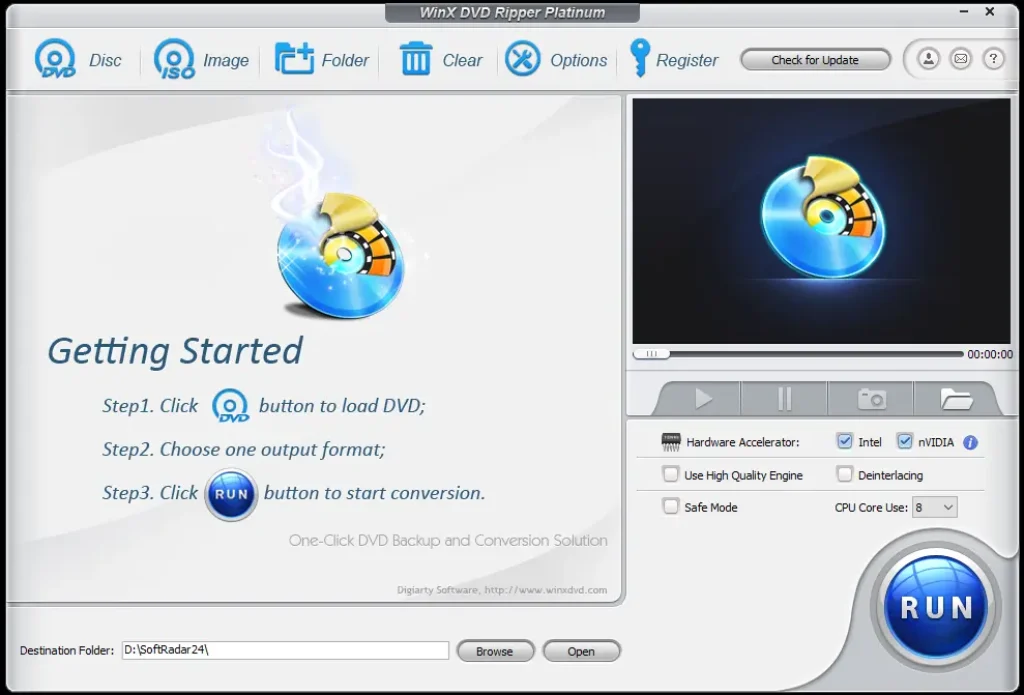
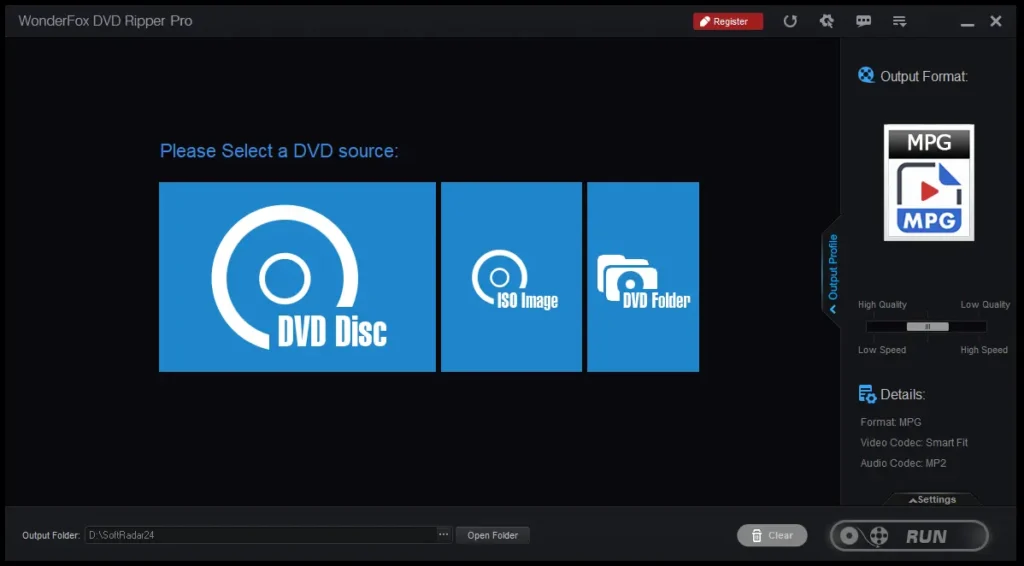
Both products use the same broad workflow: load a disc, ISO, or folder; let the software analyze titles; confirm the title, audio, and subtitles; choose an output profile; then start the conversion. The difference is less about the number of screens and more about which controls are exposed for the intended job.
Editing tools
WinX documents trimming, cropping or expanding the frame, merging titles, volume adjustment, original-subtitle selection, external SRT addition, output parameters, and deinterlacing controls. WonderFox documents trimming, flipping, filters or effects, subtitle options, and output parameters.
Why this matters: WinX’s title merge and crop/expand controls can be decisive for combining segments or removing borders. WonderFox’s flip and filter options may fit quick visual corrections. Neither should be mistaken for a full nonlinear video editor.
Upscaling and AI claims
WonderFox built in Current WonderFox materials document output-resolution profiles up to 8K. This changes the pixel dimensions of the output; it does not prove recovery of fine detail absent from the DVD source.
WinX separate product The AI enhancement area associated with the WinX page points to Winxvideo AI. It should not be counted as a native WinX DVD Ripper Platinum function or assumed to be included with the ripper license.
Free Trial Limits and Operating-System Fit
A trial can confirm whether the application opens, recognizes a drive, identifies a title, and produces a short sample. It cannot represent a paid-only function that the vendor disables.
| Question | WinX DVD Ripper Platinum | WonderFox DVD Ripper Pro | Decision impact |
|---|---|---|---|
| Conversion duration in trial | Up to five minutes | Up to 15 minutes | WonderFox permits a longer sample from an ordinary title. |
| Protected-disc features in trial | Advanced features unavailable | Advanced decryption unavailable | A trial result cannot confirm the full paid handling of a difficult protected disc. |
| ISO / folder cloning in trial | Advanced-function restriction applies | 1:1 ISO and DVD-folder cloning unavailable | WonderFox states the restriction specifically; do not assume the trial represents its archival workflow. |
| Windows | Documented Windows product | Documented Windows product | Both exact offers fit Windows licensing. |
| macOS | Separate Mac product exists; not the Windows offer here | Not documented for this product | A Mac buyer should not assume either Windows license transfers across platforms. |
| Current 32-bit legacy Windows support | Consult the current build requirements for the exact system | Unclear for the current build | WonderFox’s legacy OS list conflicts with a current change log stating a move to 64-bit architecture, so 32-bit compatibility should not be inferred. |
Pricing, Discount, and License Options
Compare the license duration and the number of Windows PCs before comparing discount percentages. A lifetime term does not automatically mean unlimited devices, cross-platform use, or ownership of a separately advertised product.
WinX DVD Ripper Platinum
$29.95 one-time
- Lifetime license for 1 Windows PC
- Promotional gift included
- Listed regular price: $109.95
- Listed reduction: 73%
WonderFox DVD Ripper Pro
$11.96 one-time
- Lifetime license for 1 Windows PC
- Listed regular price: $69.95
- Listed automatic reduction: 83%
- Family lifetime option: $19.96 for 3 Windows PCs
- DVD Ripper + HD Video Converter Factory Pro lifetime bundle: $24.95 for 1 Windows PC
Purchase information checked August 29, 2026.
Both vendors publish 30-day refund policies with stated qualifying circumstances. Neither policy should be described as an unconditional, no-questions-asked guarantee.
Final Decision: Choose by the Constraint That Cannot Move
A universal recommendation would hide the differences that matter. WinX DVD Ripper Platinum may fit when the decisive requirement is AMD acceleration, Safe Mode controls, or the combination of ISO, folder, main-title MPEG-2, and full-title MPEG-2 backup. Those are documented advantages for those particular workflows—not evidence of higher quality or faster processing on every disc.
WonderFox DVD Ripper Pro may fit when the decisive requirement is Windows MKV, selectable multi-track output, AV1, Apple ProRes, native resolution-scaling profiles, or lower-cost 1-PC and 3-PC lifetime licensing. Its longer trial also gives more sample duration, although the disabled decryption and cloning functions remain important limitations.
For ordinary MP4/H.264 or HEVC conversion and for menu-preserving ISO or VIDEO_TS archives, both remain candidates. Neither should be selected for Blu-ray ripping, promised recovery of unreadable sectors, or a guaranteed speed result. At that point, the exact disc, output target, computer hardware, and license scope—not a brand-level score—should decide.
Frequently Asked Questions
Is converting a DVD to MP4 the same as backing it up to ISO?
No. MP4 extracts and normally re-encodes a selected title into a convenient playback file. ISO preserves the disc structure in one image, including menus and other titles where the source can be read. The outputs serve different purposes and usually require different amounts of storage.
Will a 4K or 8K output setting create real detail from a DVD?
No output dimension can restore source information that was never present. Scaling may help fit a modern display or a later workflow, but a standard-definition DVD remains the source. WonderFox documents high-resolution profiles; WinX’s promoted AI enhancement route belongs to a separate product.
Can hardware acceleration change picture quality?
It can change which encoder path is used, and different codec, bitrate, quality, and hardware settings can affect the result. Hardware acceleration mainly addresses processing efficiency; it should not be treated as an automatic quality upgrade. Compatibility also depends on the GPU, driver, codec, and selected profile.
Why can an ISO or MPEG-2 copy be much larger than an MP4?
DVD video already uses MPEG-2 at relatively high bitrates. ISO retains the disc structure, while a direct MPEG-2 copy avoids a newer compression pass. H.264 and HEVC can create smaller playback files by re-encoding the selected title, with size and quality controlled by the chosen settings.
Can either program repair a scratched DVD?
Recovery-oriented modes may help the software process sectors that remain readable, but they cannot recreate data the optical drive cannot access. Cleaning, drive condition, disc deterioration, and the location of the damaged sectors can all affect whether a usable title can be read.
Can I use these products to rip Blu-ray discs?
No Blu-ray-ripping capability is established for either product in this comparison. They are DVD rippers. A Blu-ray workflow requires software that explicitly supports Blu-ray media, structures, and protection handling.
Is it legal to rip a DVD I own?
Ownership does not automatically make every copy-protection or format-shifting action lawful. Copyright exceptions and anti-circumvention rules vary by country and intended use. Check the rules that apply in the relevant jurisdiction; this comparison is product information, not legal advice.