
Quick Summary
AnyMP4 iPhone Transfer Pro is a Windows and macOS iPhone/iPad/iPod manager built for selective local transfer rather than full-device cloning. It can move supported photos, music, videos, contacts, ebooks and other media between an Apple mobile device and a computer, send supported contacts and media between iOS devices, export messages and selected messaging records to a computer, organize iOS libraries and handle practical extras such as HEIC conversion and ringtone creation.
- Desktop platforms
- Windows & macOS
- Mobile focus
- iPhone · iPad · iPod
- Best for
- Selective iPhone↔computer transfer & iOS file management
- Connection
- USB-based desktop workflow
AnyMP4 iPhone Transfer Pro Pricing, Discount Code & License Options
AnyMP4 currently offers short-term, single-computer lifetime and multi-computer lifetime licensing for Windows and Mac. Choose the desktop platform first, then choose the license term and computer allowance that match how often and where you will manage your iPhone or iPad.
License & Purchase · AnyMP4 iPhone Transfer Pro · Windows & macOS
Current AnyMP4 iPhone Transfer Pro License Prices
The purchase selector includes the following current license options:
- AnyMP4 iPhone Transfer Pro for Windows · 1 Year · 1 PC · US$22.50
- AnyMP4 iPhone Transfer Pro for Windows · Lifetime · 1 PC · US$31.22
- AnyMP4 iPhone Transfer Pro for Mac · 1 Year · 1 Mac · US$22.50
- AnyMP4 iPhone Transfer Pro for Mac · Lifetime · 1 Mac · US$31.22
Choose 1 Year for the lower upfront cost when you need AnyMP4 iPhone Transfer Pro for a defined period. Choose Lifetime when one Windows PC or Mac will remain your long-term iPhone transfer and iOS management computer.
AnyMP4 iPhone Transfer Pro — 1-Year License
1 Windows PC · 1-year AnyMP4 iPhone Transfer Pro license
Included with this license- AnyMP4 iPhone Transfer Pro for 1 Windows PC
- Full paid iPhone, iPad and iPod transfer and management feature set
- Transfer supported photos, music, videos, contacts and other documented iOS data
- Lower upfront cost than the lifetime Windows option
Choose 1 Year / 1 PC when you need the full Windows feature set now but do not need a lifetime license.
Choose the Windows license when AnyMP4 iPhone Transfer Pro will be installed on a Windows PC. Select 1 Year for a lower upfront cost or Lifetime for long-term use on one Windows PC.
Can This Software Do What I Need?
The easiest way to judge AnyMP4 iPhone Transfer Pro is by transfer direction and data type. It is strong at selective iOS file management, but a full new-iPhone migration, Android crossover or deleted-data recovery is a different job.
I want to transfer iPhone photos and videos to a Windows PC
iPhone to PC media transfer
SupportedPhotos, Camera Shot and several video categories are listed for export to PC. The normal workflow is USB connection, Trust authorization, category selection, item preview and Export to PC.
I want to copy iPhone photos, music or videos to a Mac
iPhone to Mac transfer
SupportedThe separate Mac edition supports export of the current documented media categories to macOS and can manage the connected iOS library without using Finder as the day-to-day file browser.
I want to add videos or music from my computer to iPhone without traditional iTunes syncing
PC/Mac to iPhone media
SupportedThe current import table includes music, movies, TV shows, music videos, podcasts, ringtones, audiobooks, voice memos and photos. AnyMP4 also documents automatic conversion when imported video or audio is not compatible with the target iOS device.
I want to export my iPhone contacts to a computer
Contacts backup / migration
SupportedContacts are supported for export to Windows and Mac. The manager can also edit contact details, merge duplicates and use the dedicated Contacts Backup and Contacts Restore tools before a device change.
I want to add contacts from my computer to iPhone
Computer to iPhone contacts
SupportedContacts are included in the current import-to-iOS table. The user guide also documents contact imports from formats and sources such as CSV, vCard, Outlook and Windows Address Book in supported Windows workflows.
I want to move contacts, photos, music and videos from an old iPhone to a new iPhone
Selective iPhone-to-iPhone transfer
SupportedThe current iOS-to-iOS reference explicitly lists Contacts plus photos, music, movies, TV shows, music videos, podcasts, ringtones, audiobooks, voice memos, playlists and related media. This is selective migration rather than a full clone of every app, setting and account.
I want to save SMS, iMessages or messaging records on my PC or Mac
Message archive to computer
SupportedMessages are listed for computer export. Current reference material also lists WhatsApp, Kik, Line, Viber and Messenger records in the computer-export text category. Treat this as computer export/archiving, not proof of full chat-database migration back to another phone.
I need to transfer text messages directly from one iPhone to another
Direct message migration
Verify firstAnyMP4’s broader guide describes messages in its one-click Phone-to-Phone workflow, but the current product-specific iOS-to-iOS reference does not list Messages in that transfer table. If message migration is essential, verify it in the current build before relying on it.
I want to migrate installed apps and their full app data to a new iPhone
App migration
Better fitThe current technical reference does not list Apps as an iOS transfer category. Apple’s Quick Start is the more appropriate route when the goal is a new-device migration that includes apps, settings and broader device state.
I want a complete new-iPhone migration including settings, accounts and apps
Full-device migration
Better fitAnyMP4 is designed around selectable data categories. For a full old-iPhone-to-new-iPhone migration, Apple Quick Start or an iCloud/Finder backup-and-restore workflow is a better match because those tools are designed to restore broader device state.
I want to transfer iPhone contacts or files directly to Android
iPhone to Android transfer
Better fitiPhone Transfer Pro’s current product reference is iOS-focused. AnyMP4’s own iPhone-to-Android contacts guide uses its separate TransMate product, so choose a cross-platform phone-transfer tool when Android is part of the workflow.
I want full WhatsApp migration between two iPhones
Messaging-app database migration
Different taskComputer export of WhatsApp records is not the same as restoring a complete WhatsApp database to another device. AnyMP4 has a separate WhatsApp Transfer product for that class of job.
I need to copy iPhone voicemail to my computer
Voicemail export
Verify firstThe overview page mentions voicemail in general marketing copy, but the current product-specific Windows and Mac transfer tables do not list Voicemail as a separate supported export category. Verify this exact workflow in the trial before purchasing for voicemail alone.
I want to convert HEIC photos to JPEG or PNG while managing my iPhone library
HEIC compatibility
SupportedHEIC Converter is included in the Toolbox and can use images from the iOS device or computer, output JPEG or PNG and let you choose output quality.
I want to create a custom ringtone and add it to iPhone
Ringtone creation
SupportedRingtone Maker can load audio from the computer or iOS device, trim the desired segment, apply fade-in/fade-out controls and generate the ringtone for iPhone use.
I deleted photos or messages and need to recover them
Deleted-data recovery
Different taskiPhone Transfer Pro manages data that can still be accessed on the device. Deleted-data recovery requires an iPhone data-recovery workflow rather than a normal file-transfer manager.
I want wireless-only transfer without connecting the iPhone to a computer by USB
Wireless transfer
Not supportedThe documented AnyMP4 workflow starts with a USB-connected iOS device and Trust authorization. Use AirDrop, iCloud, Finder Wi-Fi sync or another wireless-focused method if cable-free transfer is mandatory.
How It Works
AnyMP4 uses the computer as a local control point. Connect the iPhone or iPad by USB, authorize the computer, select the source device and data category, then choose whether selected items go to the computer, another iOS device or iTunes.
Transfer iPhone Photos, Videos or Music to PC or Mac
- Install the Windows or Mac edition that matches your computer.
- Connect the iPhone by USB, unlock it and approve Trust This Computer when iOS asks.
- Choose Photos, Music or Videos from the left-side category list and preview/select the required items.
- Choose Export to PC or the equivalent Mac export command and select the destination folder.
- Verify representative files at the destination before deleting anything from the phone.
Transfer Videos or Music from Computer to iPhone Without Traditional iTunes Sync
Select the target iOS device, open the relevant media category and add the files from the computer. The current product documentation says incompatible video or audio can be converted automatically to a format suitable for iPhone/iPad/iPod during import, which is useful when a local media file is not natively accepted by iOS.
Move Supported Data Between Two iOS Devices
Connect both iOS devices, choose the old device as the source, select the supported contacts/media you want and export to the second device. Use the current iOS-to-iOS reference as the boundary: Contacts and the listed media categories are supported; do not assume the transfer automatically includes every app, setting, account or message database.
Export iPhone Messages to a Computer
Open Messages after the device is recognized, review the available conversations and export the required records to the computer. Current AnyMP4 reference material includes Messages and several messaging-service records in the computer-export category. This is useful for local archiving, but it should not be confused with restoring a complete chat database to another phone.
Back Up, Restore and Clean Up Contacts
Contacts can be edited before transfer, duplicate entries can be merged and the Toolbox provides dedicated Contacts Backup and Contacts Restore functions. This is a practical workflow before replacing an iPhone because the address book can be cleaned first instead of blindly carrying duplicate records to the next device.
Use HEIC Converter and Ringtone Maker
HEIC Converter turns selected HEIC images from the phone or computer into JPEG or PNG. Ringtone Maker loads audio from either source, lets you trim the clip, choose start/end points and fade behavior, then produces an iPhone ringtone without requiring a separate audio editor.
Product Interface & Workflow
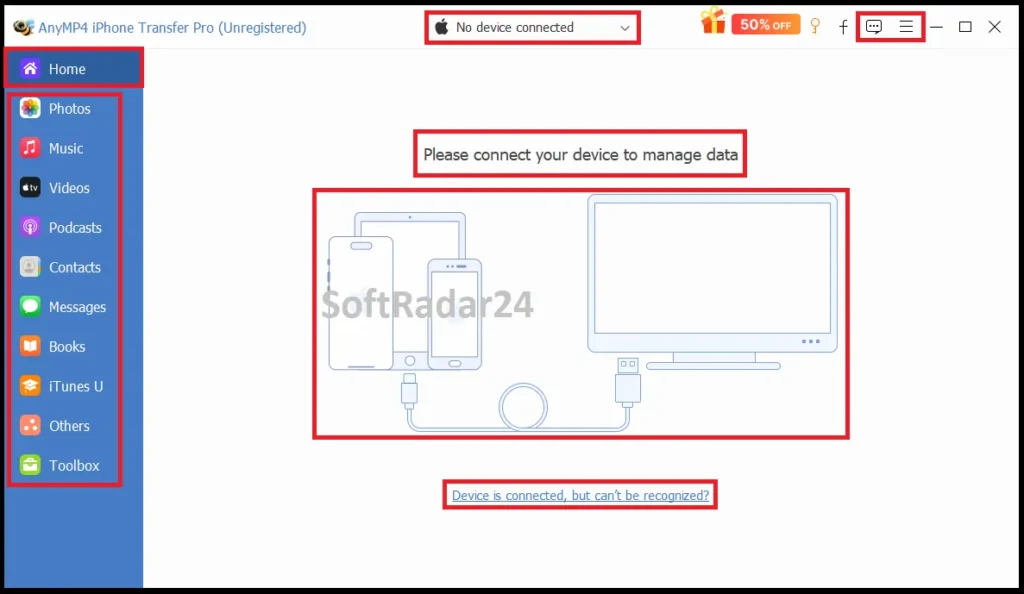
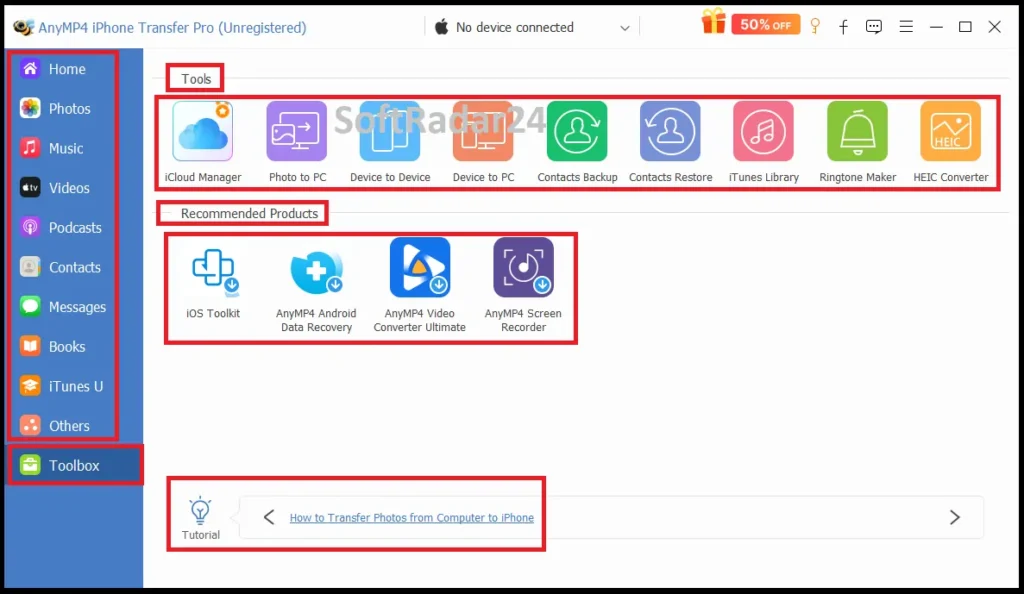
The interface is category-driven rather than built around a single full-device backup button. Device selection defines the source, the left navigation separates Photos, Music, Videos, Contacts, Messages and other supported areas, and the top actions determine whether selected data is exported, imported, edited or sent to another destination.
Device Selection & Trust Authorization
The connected iPhone/iPad/iPod must be recognized before its library can be browsed. On newer iOS versions, unlocking the device and confirming Trust may be required, and the user guide notes that additional passcode confirmation can appear for protected data. An encrypted Apple backup can also require its password where relevant.
Category-Based Selection
Instead of copying an entire device blindly, users can work with media, contacts and messages independently. This matters for large libraries: a photo-only export, a contacts cleanup or a music transfer can be completed without treating every other data category as part of the same job.
Toolbox
The current Toolbox groups Phone-to-Phone Transfer, Phone-to-PC, Contacts Backup/Restore, iTunes Library tools, Ringtone Maker and HEIC Converter. These are shortcuts around the same underlying categories; they do not turn the product into a full iOS image-backup or deleted-data-recovery application.
Compatibility & Coverage
Compatibility is best understood across three layers: the computer running AnyMP4, the iOS/iPadOS version on the mobile device, and the exact data category/direction you need. A supported iPhone model does not mean every data category can be moved in every direction.
| Area | Current documented coverage | Decision note |
|---|---|---|
| Windows | Windows 11 / 10 / 8.1 / 8 / 7 | Current Windows reference. |
| macOS | Mac OS X 10.7+ including macOS Tahoe 26 | Separate Mac edition/license. |
| Windows iOS coverage | iOS 6.0+ including iOS 26 and vendor-listed iOS 27 beta | Beta entry is a compatibility target, not a promise for a future final build. |
| Mac iOS coverage | iOS 6.0+ including iOS 26 | Current Mac reference. |
| iPadOS | iPadOS 13+; current references include iPadOS 26 | Windows reference also includes a 27 beta entry. |
| Current iPhone family | iPhone 17 / Air / 17 Pro / 17 Pro Max and earlier listed generations | Check the installed build again when using a newly released iOS update. |
| Import to iOS | ePub · PDF · Contacts + documented media categories | Does not establish installed-app migration. |
| Export to computer | ePub · PDF · Contacts · Messages / listed messaging records + documented media | Computer archive/export is broader than iOS-to-iOS transfer. |
| iOS to iOS | Contacts + documented photos/music/video/audio/playlist categories | Current reference omits Messages from this table. |
| Android | Not part of current iPhone Transfer Pro reference | Use a cross-platform phone-transfer product instead. |
Features & Capabilities
The feature set is strongest when treated as a selective iOS library manager: move supported files, inspect them before transfer, organize the destination and use the built-in utilities only where they solve a specific workflow.
Photos & Camera Media
- Export iPhone/iPad photos to Windows or Mac
- Import photos from computer to iOS
- Transfer supported photos between iOS devices
- Create/manage photo albums
- Inspect photo metadata where available
- Convert HEIC images to JPEG or PNG
Music & Audio
- Move music between iOS and computer
- Transfer supported music between iOS devices
- Manage playlists and music-library organization
- Edit supported track information
- Handle ringtones, audiobooks and voice memos in documented directions
- Create custom iPhone ringtones
Videos & Playback Compatibility
- Export Movies, Home Videos, TV Shows and Music Videos
- Add supported computer video to iPhone/iPad/iPod
- Automatically convert incompatible imported video/audio to iOS-friendly formats
- Transfer documented video categories between iOS devices
- Organize video into supported categories/playlists
Contacts
- Export contacts to Windows or Mac
- Import contacts to iOS
- Transfer contacts between supported iOS devices
- Edit names, numbers and other supported contact fields
- Merge duplicate contacts
- Contacts Backup and Contacts Restore
Messages & Records
- View supported Messages from a connected iOS device
- Export Messages to a computer
- Current reference also lists WhatsApp, Kik, Line, Viber and Messenger records for computer export
- Use computer export as an archive rather than assuming a reversible phone-to-phone chat migration
Books, iTunes & Utilities
- Import/export ePub and PDF in documented directions
- Export supported media and ebooks to iTunes
- View/manage iTunes library data through the software
- Phone-to-Phone and Phone-to-PC Toolbox shortcuts
- HEIC Converter
- Ringtone Maker
Important Conditions & Limitations
Most buying mistakes in this category happen when “iPhone transfer” is treated as one universal capability. The current AnyMP4 documentation shows clear differences between computer export, computer import, iOS-to-iOS transfer and full-device migration.
It Is iOS-Focused, Not an iPhone-to-Android Manager
The current product reference lists iPhone, iPad and iPod workflows. AnyMP4’s own iPhone-to-Android contacts article uses TransMate instead, which is strong evidence that Android crossover should not be attributed to iPhone Transfer Pro.
Computer Export Is Broader Than iOS-to-iOS Transfer
Messages and several messaging-service records are listed for export to a computer, but the current iOS-to-iOS reference omits Messages. A computer archive therefore should not be treated as proof that every text/chat category can be restored directly to another iPhone.
Voicemail Needs Verification
The overview page mentions voicemail in broad marketing copy, yet the current technical tables do not list it as a separate exportable content category. If voicemail is the reason you are buying the software, test the exact workflow first.
App Migration Is Not Established by the Current Reference
AnyMP4 hosts an article about moving apps between iPhones, but the product-specific transfer tables do not list Apps as an import/export category. Do not interpret media/contact migration as full App Store app and app-data migration.
USB & Trust Authorization Are Part of the Normal Workflow
The current guide starts with a USB-connected device. iOS may require Trust confirmation, passcode entry or other authorization before protected categories become available. A faulty cable, locked device or unapproved Trust prompt can block transfer even when the model is otherwise supported.
“iTunes Alternative” Does Not Mean Every Apple Migration Task Is Replaced
AnyMP4 can be more convenient for selective local file management, but Apple’s own tools remain useful. Photos can import pictures/video natively; Finder can sync supported media and personal-information categories on Mac; Quick Start is purpose-built for moving broader apps, settings and device state to a new iPhone.
Do Not Delete the Source Until You Verify the Destination
For large photo/video moves or important contact/message exports, open representative files and confirm counts at the destination first. A transfer manager reduces manual work but should not replace basic verification before source data is removed.
Free Trial / Free Version
AnyMP4 provides a free trial for Windows and Mac. The current official user guides confirm that trial limits exist but do not publish one reliable consolidated numerical limit table for every transfer category, so the trial is most useful as a compatibility and workflow test rather than as an unrestricted free edition.
| What to test | Why it matters |
|---|---|
| Device recognition | Confirm your exact iPhone/iPad and OS version are detected after USB/Trust authorization. |
| Required data category | Open the exact Photos, Music, Videos, Contacts or Messages workflow you plan to use. |
| Transfer direction | Verify computer export, computer import or iOS-to-iOS behavior instead of assuming all three support the same data. |
| Message / voicemail requirement | Especially important where current documentation is narrower or internally inconsistent. |
| HEIC / media conversion | Test the actual files and formats that matter to your library. |
System Requirements
The desktop requirements are modest, but practical compatibility also depends on the iOS version, USB connection and Apple authorization state. Use the platform-specific license because Windows and Mac are separate applications.
| Requirement | Current documented value | Practical note |
|---|---|---|
| Windows OS | Windows 11 / 10 / 8.1 / 8 / 7 | Current Windows technical reference. |
| Windows CPU | 1 GHz Intel/AMD or above | Official minimum. |
| Windows RAM | 1 GB or more | Official minimum. |
| Mac OS | Mac OS X 10.7+ including macOS Tahoe 26 | Current Mac technical reference. |
| Mac CPU | 1 GHz Intel or supported Apple M-series chips including M3 | Current Mac reference. |
| Mac RAM | 1 GB or more | Official minimum. |
| iOS | iOS 6.0+; current references include iOS 26 | Windows page also lists iOS 27 beta. |
| iPadOS | iPadOS 13+ | Current references include iPadOS 26; Windows page also lists 27 beta. |
| Connection | USB + device authorization | Unlock the device and approve Trust when requested. |
| Registration | Internet connection recommended/required during activation | Current guide asks for stable Internet while registering Email Address + License Key. |
Alternatives & Better-Fit Options
The best alternative depends on the missing workflow rather than the longest feature list. For other products, bundles and licensing in the same ecosystem, browse the AnyMP4 software offers.
Aiseesoft MobieSync
Choose Aiseesoft MobieSync when Android must participate in the same desktop transfer workflow. It is the stronger fit for iPhone↔Android contacts/media movement and phone↔Windows management rather than an iOS-only device set.
Aiseesoft FoneTrans
Aiseesoft FoneTrans is the closest direct iOS-manager comparison when you want another Windows/macOS route for selective photos, music, video, contacts and message management. Compare its current data-direction table and license terms rather than assuming closely related interfaces have identical transfer scope.
WinX MediaTrans
WinX MediaTrans is a leaner Windows-focused option when the job is dominated by iPhone photos, music, video, books and local media handling. It can be a cleaner purchase when broad contacts/message workflows and native Mac support are not priorities.
iMobie AnyTrans
iMobie AnyTrans is the broader better-fit comparison when the requirement expands into full new-device migration, local backup browsing, iCloud management, supported app handling and messaging-app workflows. Its scope is wider than a focused selective iOS file manager.
FAQ
These answers cover current platform support, transfer direction, licensing and documented boundaries without repeating the scenario matrix above.
Does AnyMP4 iPhone Transfer Pro work on Windows 11?
Yes. The current Windows reference lists Windows 11, Windows 10, Windows 8.1, Windows 8 and Windows 7.
Does AnyMP4 iPhone Transfer Pro work on Mac?
Yes. AnyMP4 provides a separate Mac edition. The current Mac reference lists Mac OS X 10.7 or later, including macOS Tahoe 26, with Intel and supported Apple M-series processors.
Does AnyMP4 iPhone Transfer Pro support iPhone 17 and iOS 26?
Yes. Current technical references list the iPhone 17 family and iOS 26. The Windows reference also includes an iOS 27 beta compatibility entry, which should not be treated as a guarantee for every future final build.
What can AnyMP4 iPhone Transfer Pro import to iPhone?
The current Windows reference lists ePub, PDF and Contacts plus Music, Movies, Home Videos, TV Shows, Music Videos, Podcasts, iTunes U, Ringtones, Audio Books, Voice Memos, Photos, Camera Shot, Playlists and Albums.
What can AnyMP4 iPhone Transfer Pro export to a computer?
The current reference lists ePub, PDF, Contacts, Messages and selected messaging-service records plus the documented music, video, photo, ringtone, audiobook, voice-memo, playlist and album categories.
Can AnyMP4 iPhone Transfer Pro export text messages?
Yes, Messages are part of the current computer-export table. Direct iPhone-to-iPhone message migration is less clear because the current iOS-to-iOS table omits Messages even though broader guide material references them.
Can it transfer WhatsApp chats to another iPhone?
The current reference lists WhatsApp records for export to a computer, but that does not establish full WhatsApp database migration/restoration to another phone. AnyMP4 has a separate WhatsApp Transfer product for that task.
Can it transfer contacts from iPhone to Android?
Not as a documented iPhone Transfer Pro workflow. AnyMP4’s own iPhone-to-Android contacts guide uses TransMate, while iPhone Transfer Pro’s current technical reference is focused on iOS devices and computers.
Can it transfer apps from one iPhone to another?
The current product-specific transfer tables do not list Apps as a supported data category. For a new-iPhone migration that includes apps and broader device state, Apple Quick Start is the more appropriate route.
Does AnyMP4 iPhone Transfer Pro transfer voicemail?
The overview page mentions voicemail, but the current technical transfer tables do not list it as a separate exportable category. Test the exact voicemail workflow before buying specifically for that purpose.
Is AnyMP4 iPhone Transfer Pro a complete iTunes replacement?
It can replace many day-to-day selective transfer and library-management tasks, especially copying supported media and contacts without using the traditional sync workflow. It does not replace every Apple function such as full-device migration, app restoration, account setup or all backup/restore behavior.
What are the current AnyMP4 iPhone Transfer Pro prices on this page?
The current purchase options on this page list US$22.50 for 1 Year / 1 Windows PC, US$31.22 for Lifetime / 1 Windows PC, US$22.50 for 1 Year / 1 Mac and US$31.22 for Lifetime / 1 Mac.
Does this page offer both annual and lifetime licenses?
Yes. The current selector provides a 1-Year license and a Lifetime license for both Windows and Mac. Choose the operating system first because the Windows and Mac editions use separate checkout products.
What is the AnyMP4 iPhone Transfer Pro refund period?
The current purchase page displays a 30-day money-back guarantee. Actual refund eligibility is governed by AnyMP4’s current refund policy and the circumstances of the order.





