Apple users searching for a reliable iTunes alternative require a direct method to transfer iPhone photos to PC and backup iPhone without iTunes. Official Apple migration methods often force a factory reset, while standard synchronization triggers a sync block that permanently erases existing mobile media. iMobie AnyTrans bypasses these restrictions, establishing a two-way offline transfer route to move music, custom ringtones, and contacts directly between desktop computers and iOS devices without data loss.
Finding a working Move to iOS alternative is the biggest hurdle when users need to transfer WhatsApp from Android to iPhone. Instead of overwriting existing device data, iMobie AnyTrans can directly restore Google Drive WhatsApp to iPhone and safely merge Android and iOS chat histories into one inbox. For heavy media users, the desktop interface acts as an automated converter to change HEIC to JPG and decode iOS 17 JXL pictures during PC export, making it incredibly easy to bulk delete unwanted shots and free up iPhone storage.
Following the iTunes 12.7 update, Apple officially removed the native desktop App Store. AnyTrans restores this exact functionality, empowering users to download .ipa files directly to a local hard drive, downgrade iOS apps to older versions, and transfer game saves to a new handset. For documentation purposes, individuals can also bypass Sandbox restrictions to export iPhone messages to PC, saving SMS and iMessage threads in PDF or HTML formats to strictly preserve the original chat layouts for legal evidence.
Core Capabilities of iMobie AnyTrans
- Offline Mobile Device Backups: Create full device copies or space-saving incremental backups without iTunes synchronization.
- Cross-System Chat Migration: Merge Android and iOS WhatsApp data or restore Google Drive backups to iPhone without overwriting existing files.
- Bulk Media Management: Export iPhone photos to PC, batch convert HEIC and JXL formats to JPG, and generate custom ringtones.
- App Store Management: Reclaim iTunes 12.7 functionality to download .ipa files, downgrade iOS apps, and transfer game saves.
- Legal Evidence Extraction: Export SMS and iMessage history to PDF or HTML while strictly preserving original chat layouts.
- Personal Data Organization: Export contact lists to CSV or VCF formats and extract offline Safari bookmarks for secure archiving.
- Wireless Screen Mirroring: Project an iOS display directly to a desktop monitor using a local Wi-Fi connection.
WhatsApp Transfer: Why AnyTrans Beats Move to iOS
Switching operating systems often turns into a frustrating experience when official migration apps fail or crash. For users desperately searching for a reliable Move to iOS alternative, this platform delivers a flawless and high success rate solution. The most significant drawback of Apple’s official transfer app is the strict requirement for a factory reset. AnyTrans completely bypasses this limitation, allowing users to transfer WhatsApp from Android to iPhone without erasing device data. Existing photos, saved contacts, and downloaded applications on the target handset remain perfectly intact during the entire process.
| Features | Move to iOS | AnyTrans |
|---|---|---|
| Supported WhatsApp Versions | iOS version 2.22.10.70 or above Android version 2.22.7.74 or above | ✅ All WhatsApp versions |
| Supported iOS System | iOS 15.5 or above | ✅ All iOS versions |
| Factory Reset (overwriting device data) | ❌ Needed | ✅ No factory reset |
| Backup & Restore WhatsApp Data | ❌ Not supported | ✅ Supported |
| Merge Android and iOS Device WhatsApp data | ❌ Not supported | ✅ Supported |
| Export WhatsApp Chats | ❌ Not supported | ✅ Supported |
| Success Rate | Low success rate | ✅ High success rate |
AnyTrans also shatters the technical barrier between rival cloud storage servers. Normally, retrieving Android chats on an Apple handset is impossible due to OS restrictions. However, this manager empowers users to directly restore Google Drive WhatsApp to iPhone. For individuals with active conversations on multiple phones, the tool can securely merge Android and iOS WhatsApp data into a single, unified inbox. Furthermore, professionals can easily export WhatsApp chat to PC in HTML format for printing or archiving, while also utilizing comprehensive backup support for other major social applications like LINE and Viber.
Advanced Media Management and Smart Backup Solutions
Finding a reliable method on how to backup iPhone without iTunes often leads users to complex workarounds. This iPhone manager simplifies the entire process by offering three distinct offline backup modes tailored to specific storage needs. To guarantee absolute privacy, individuals can encrypt iPhone backup PC files and later view iPhone backup files to extract specific data without a full system restore.
| Backup Mode | How It Works | Best For |
|---|---|---|
| Full Backup | Creates a complete, exact copy of all device data. | Switching to a brand new handset. |
| iPhone Incremental Backup | Exclusively records new data changed since the last sync. | Saving massive amounts of time and hard drive space. |
| Air Backup iOS | Secures data wirelessly over local Wi-Fi on a custom schedule. | Automated, hands-free daily protection. |
Mastering Media: The Ultimate Photo Management Interface
Handling enormous media libraries presents a significant challenge. By utilizing the desktop-based photo management interface, users can view thousands of images automatically categorized into distinct folders. This layout makes it incredibly easy to bulk delete unwanted shots and permanently free up iPhone storage without tapping through a small screen.
- Seamless File Transfers: Overcoming standard sync limits, users can effortlessly batch import entire photo albums or move files between devices using a simple drag-and-drop action.
- Dynamic Media Creation: Beyond static images, the software allows individuals to select specific live memories and instantly convert them into an animated GIF or MP4 for universal social media sharing.
- Reliable Archives: Users can securely export their entire gallery to a local hard drive. This offline archive makes it incredibly fast to restore backups whenever switching to a brand new handset, eliminating any dependency on cloud limits.
Recover the Missing iOS App Store
When Apple released iTunes 12.7, the official App Store removed the native ability to download mobile applications from a desktop computer. A dedicated desktop interface directly restores that control, making it possible to browse, download, and install .ipa files directly to iOS handsets. Saving .ipa files on a local drive allows users to downgrade apps to previous versions or quickly reinstall a mistakenly deleted app even if it is no longer available in the public store.
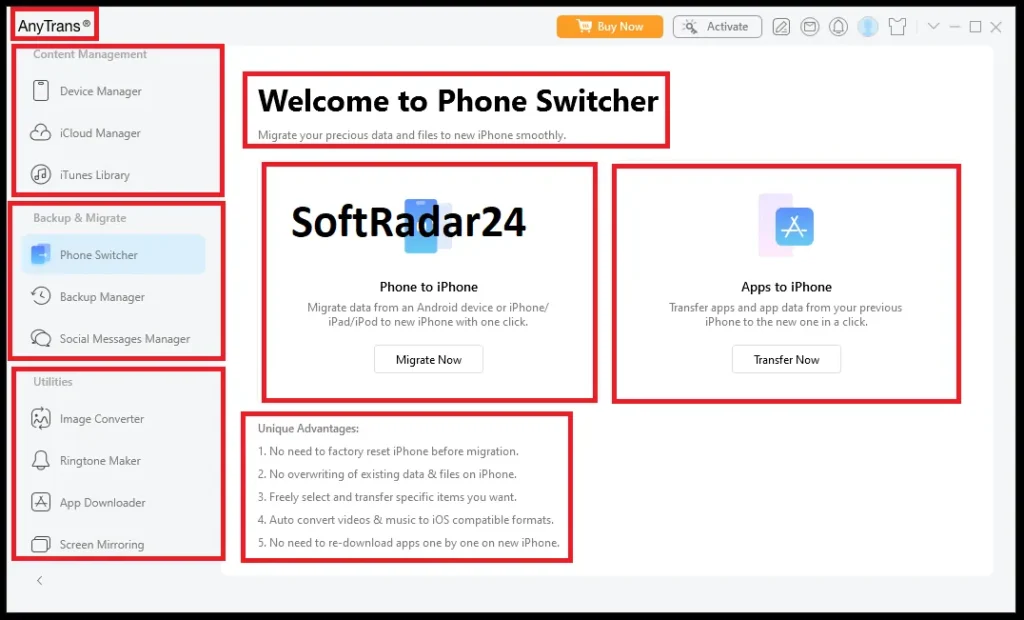
A large desktop monitor interface makes it incredibly easy to arrange iPhone apps. Users can instantly batch move multiple icons into custom folders or utilize drag and drop to reorganize the entire home screen. Backing up game saves and personal settings guarantees zero data loss during migrations. The integrated App File Sharing feature enables high-speed document transfers between computers and productivity applications like Keynote or iMovie.
Unrestricted Music and File Transfer
Transferring audio files between computers and mobile devices often leads to unwanted data erasure. Bypassing the strict all-or-nothing iTunes sync permanently eliminates these data loss risks. Users can securely add new tracks from a desktop directly to an iPhone without sync block restrictions, ensuring that existing songs remain completely intact.
Unlike native Apple limitations, the two-way synchronization protocol makes it possible to select specific albums, purchased music, or voice memos and perform a rapid batch export from an iOS device directly to a PC or Mac. In the event of a system crash or erased hard drive, extracting existing tracks from a connected iPhone, iPad, or iPod completely rebuilds iTunes library databases. A dedicated audio editing module trims favorite songs or downloaded audio files to generate custom ringtones natively on the handset.
Export iPhone Messages to PC for Legal Evidence
Standard mobile screenshots often fail to meet the strict documentation standards required for legal-related issues. Extracting a complete message history—including SMS, WhatsApp, and iMessage threads—directly to a desktop computer solves this documentation problem. To ensure total visual authenticity, iOS chat records can be saved in PDF/TXT/HTML format. Utilizing the PDF option specifically preserves the original layouts, capturing exact chat bubbles, timestamps, and inline images.
The desktop layout also makes it simple to independently export audio files and video attachments. If an Apple device is damaged, individuals can selectively extract from backup files stored on iTunes or iCloud to retrieve critical conversations without performing a full iPhone restore.
AnyTrans Screen Mirror: How to Mirror iPhone to PC Without Apple TV
Finding a reliable method on how to mirror iPhone to PC without Apple TV usually requires expensive hardware. Users looking for AirPlay to Windows 11/10 compatibility can utilize the AnyTrans screen mirror feature to instantly mirror screen from iOS device to computer.
The setup entirely eliminates USB cables. To initiate screen mirroring iPhone to PC, simply connect iPhone to PC same Wi-Fi network. If a local router is unavailable, establishing a direct Wi-Fi hotspot works perfectly. Once both devices are on the same Wi-Fi, open the iOS Control Center and tap the native screen mirroring option to project the mobile display onto the desktop monitor.
Personal Data Extraction and Contact Management
Managing hundreds of phone numbers and addresses on a small mobile screen is highly inefficient. Transferring these details to a computer monitor makes bulk editing and organizing simple. Users can instantly export contact list databases directly to a local hard drive. Saving these directories in csv or vcf formats ensures seamless, immediate integration with desktop spreadsheet programs like Microsoft Excel or external address books like Google Contacts.
Extracting Safari bookmarks and personal daily notes keeps vital information accessible without relying on active internet connectivity. To guarantee strict readability across different desktop operating systems, these text-based files can be downloaded in a universal HTML/text format.
Retrieving lost personal details does not always require a physical, working handset. If an Apple device is broken, stolen, or missing, securely extracting this personal information directly from an existing iTunes backup and iCloud account prevents permanent data loss. This direct extraction method completely bypasses the need to perform a time-consuming, full system restore just to recover a few missing phone numbers or web links.
iMobie AnyTrans Discount Code 2026
An active iMobie AnyTrans coupon code provides immediate savings at checkout. The official activation license is fully available for both Windows and Mac operating systems. Applying a verified AnyTrans promocode instantly lowers the final price for annual subscriptions and lifetime plans. Buyers searching for an official AnyTrans promo can easily secure the best possible deal before finalizing their online purchase.


iMobie AnyTrans for Windows
AnyTrans for Windows – 3-Month
Short-term solution for PC users. Quickly transfer media, export messages, and backup an iPhone without iTunes.
AnyTrans for Windows – 1-Year
Annual desktop access to fully manage iOS data. Migrate WhatsApp, downgrade apps, and extract contacts securely.
AnyTrans for Windows – One-Time
Permanent PC license. Bypass sync blocks permanently, restore game saves, and control mobile data forever.
AnyTrans for Windows – Family Plan
Covers 5 Windows computers with free upgrades. Secure backups and unlimited file transfers for the whole household.
iMobie AnyTrans for Mac
AnyTrans for Mac – 3-Month
Ideal for brief macOS needs. Easily export photos, backup chat histories, and arrange home screens instantly.
AnyTrans for Mac – 1-Year
Full macOS access for 12 months. Download .ipa files, merge WhatsApp threads, and rebuild Apple Music libraries.
AnyTrans for Mac – One-Time
Lifetime Mac license. Mirror displays wirelessly, extract legal evidence, and keep offline backups with zero limits.
AnyTrans for Mac – Family Plan
Connect up to 5 Macs with free lifetime upgrades. Ultimate file management and offline archiving for multiple users.