

Quick Summary
Winxvideo AI is an AI-powered video, image and audio enhancement toolkit that also converts, compresses, downloads, records and edits media. Its current AI layer can upscale low-resolution or heavily compressed video to 4K, stabilize shaky footage, interpolate 24/30 FPS video up to 60/120/240/480 FPS, restore faces, enhance images up to 10K, remove background noise and separate vocals or instrumentals. The non-AI toolbox covers AV1, HEVC, ProRes, 4K/8K/HDR conversion, large-file compression and up to 4K 60 FPS screen recording.
- AI video
- Super Resolution · stabilization · frame interpolation · up to 4K video enhancement
- AI image / audio
- Image up to 10K · face recovery · old-photo restoration · noise suppression · vocal removal
- General media tools
- Convert · compress · download · record · edit · 320+ codecs/formats documented
- Platforms
- Windows 7–11 and macOS 10.15+ in current tech specs; vendor purchase flow routes Mac buyers to a dedicated Mac version
Purchase Options
License & Purchase · Winxvideo AI · Up to 67% OFF Official Discount & Coupon Code
Compare the existing SoftRadar24 Winxvideo AI annual, lifetime, family and creator-bundle campaigns by PC count and license scope. The current campaign discount is applied automatically at checkout.
Winxvideo AI — Lifetime / 1 PC
1 Windows PC · lifetime Winxvideo AI campaign license
Included with this option- Winxvideo AI for 1 Windows PC
- Lifetime campaign access
- AI model, video-processing and media-toolbox workflows
- Existing SoftRadar24 lifetime checkout destination preserved
US$15.95 one-time
Discount automatically applied
Buy NowWinxvideo AI — Lifetime / 1 PC
The existing SoftRadar24 article lists this lifetime campaign at US$15.95. WinX DVD’s current public store now highlights Lifetime / 1 PC at US$69.95 during its present sale.
WinX DVD’s current public store now highlights 1 Year / 3 PCs at US$34.95, Lifetime / 1 PC at US$54.95 and Family / 3–5 PCs at US$79.95. The 1-year public plan renews at US$39.95 per year after the first term, while lifetime plans are documented as non-expiring and include future upgrades. The existing SoftRadar24 campaigns are different promotional SKUs, so verify the final license, device count, renewal behavior, tax and total before payment.
Can This Software Do What I Need?
Winxvideo AI is a broad media toolkit, but the buying decision is easiest when you separate AI restoration, frame generation, audio cleanup, conversion, recording and physical-disc work. The rows below map the current Winxvideo AI feature set to real search intent without treating every media problem as the same job.
I want to upscale old 480p, DVD-rip, VHS or home-video footage to 1080p or 4K
Old / low-resolution video restoration
YesWinxvideo AI’s current Super Resolution workflow is designed for low-resolution, noisy, blurry and heavily compressed footage, including VHS, DVD/mini-DV and old home recordings. The current product page describes up to 4X video upscaling and 480p-to-1080p/4K use cases.
I want to improve soft or artifact-heavy AI-generated video
AI-generated video cleanup
YesThe current product page explicitly includes AI-generated video among its enhancement use cases. Its updated V3 Super Resolution models are marketed for denoising, deblurring and generating clearer detail while upscaling to 4K.
I need to stabilize shaky GoPro, DJI, drone or smartphone footage
Video stabilization
YesAI Video Stabilization is documented for handheld, GoPro, DJI, DSLR and iPhone footage. The tool provides multiple stabilization modes, quality/speed presets and crop controls so the user can trade processing depth against cropping and speed.
I want to convert 24/30 FPS video to 60, 120, 240 or 480 FPS
AI frame interpolation
Yes — generated frames should be testedWinxvideo AI can interpolate 2X, 3X, 4X or 5X frame rates and the current vendor pages list outputs up to 120/240/480 FPS. Because the added frames are AI-generated rather than captured by the original camera, fast motion and scene changes should be previewed before a long export.
I want to restore blurry, scratched or low-resolution faces in old photos
Face recovery
YesWinxvideo AI has dedicated face restoration with three targeting modes: high-quality faces, center face and all faces. The official face-recovery page describes removal of blur, noise, scratches, creases, spots and compression damage while rebuilding facial detail.
I want to upscale photos to 4K, 8K or 10K
AI image enhancement
YesThe current image-enhancement page documents up to 400% image upscaling, output up to 10K, four AI image models, old-photo restoration, denoise/deblur and batch GPU-accelerated processing.
I want to colorize black-and-white photos
Photo restoration / colorization
YesAI Image Colorizer is part of the current Winxvideo AI image toolset and is positioned for restoring black-and-white archival photos.
I need to remove wind, hum, keyboard clicks, echo or background chatter from audio/video
AI noise suppression
YesWinxvideo AI Audio AI removes background noise from audio and video and supports real-time preview, batch processing and individual-track processing. The current noise-removal page also documents reduction of echo and reverberation.
I want to isolate vocals or instrumentals for karaoke, remixing or background music
AI vocal separation
YesThe current product page includes an AI Vocal Remover that separates vocals or instrumental elements from audio/video for karaoke, a cappella, remixes and background-score workflows.
I need to convert AV1, HEVC, ProRes, MKV, MOV or other 4K/8K/HDR media
Video conversion
YesWinxvideo AI supports a wide codec/container range including AV1, H.264, HEVC, ProRes, MP4, MKV, MOV, WebM and many device-specific profiles. The official tech specs also list 8K/4K/2K/HD/SD inputs.
I want to shrink a large 4K or 8K video without changing the workflow to a separate compressor
Video compression
YesCompression is built into Winxvideo AI. The current product page shows bitrate/codec-based compression examples and supports hardware-accelerated 4K/8K/HDR processing.
I need to record my screen, webcam or picture-in-picture at high resolution
Screen recording
YesThe current Winxvideo AI recorder supports full/custom screen, webcam, audio and picture-in-picture recording with up to 4K 60 FPS listed on the current product page.
I want to download an authorized online video instead of screen-recording it
Media downloading
Yes — platform and source dependentWinxvideo AI includes a downloader and the current tech specs list 1000+ supported sites. The paid version is currently documented up to 4K/8K, while the trial is limited to 1080p. The downloader is no longer supported on Windows 7.
My PC has no Vulkan 1.2-capable GPU
AI hardware compatibility
No for the AI layerThe current AI requirements specify Vulkan 1.2.x and OpenCL 1.0 plus supported NVIDIA, Intel or AMD graphics. The general converter/editor/compressor/recorder tools have lower requirements, but Video AI and Image AI should not be assumed to work without the required GPU-compute support.
I want maximum NVIDIA TensorRT acceleration
Deep-learning performance
ConditionalWinxvideo AI documents TensorRT optimization for NVIDIA GPUs with compute capability 6.0+, GeForce GTX 1050 or higher, CUDA Runtime 11.1+ and NVIDIA driver 452.39+. Systems below that can still meet the general AI GPU floor but will not meet this maximum-performance path.
I am buying specifically for a Mac and want the clearest Mac-first product route
macOS purchase decision
Better fit: Macxvideo AIWinxvideo AI’s current tech specs list macOS 10.15+ and Apple Silicon support for general processing, but the WinX DVD purchase page explicitly routes Mac buyers to a separate Mac version. For a Mac-first purchase, the SoftRadar24 Macxvideo AI page is the cleaner product route.
My source is a physical protected DVD that I need to rip first
WinX DVD / optical-disc workflow
Different product firstWinxvideo AI enhances and converts existing media files; it is not the dedicated protected-disc ripper in the WinX DVD family. Use WinX DVD Ripper Platinum first, or consider the WinX Media Master bundle if you also need Winxvideo AI, DVD copying and iOS media tools.
How It Works
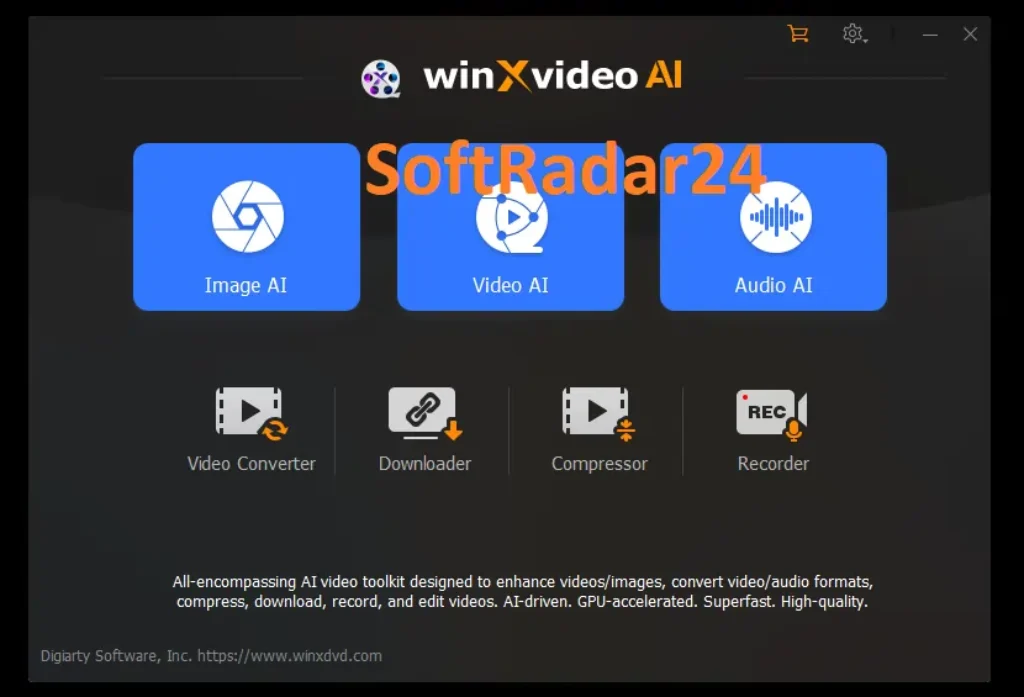
Winxvideo AI combines three AI workspaces—Video AI, Image AI and Audio AI—with a conventional media toolbox. The correct workflow starts by choosing whether the problem is quality restoration, motion, sound, format compatibility or file size.
Enhance Video: Super Resolution, Stabilization or Frame Interpolation
Open Video AI and choose the tool that matches the defect instead of enabling every AI process by default. Super Resolution targets low resolution, blur, noise and compression artifacts; Stabilization targets camera shake; Frame Interpolation targets low frame rate and slow-motion workflows.
- Import the video and choose Super Resolution, Stabilization or Frame Interpolation.
- Choose the scale, target frame rate or stabilization preset and preview a representative segment.
- Export only after checking detail, crop, motion and processing speed on the real footage.
Restore Photos and Faces
Image AI covers general upscaling, denoise/deblur, old-photo restoration, colorization and dedicated face recovery. Current image documentation supports up to 400% enlargement and output up to 10K.
- Use the general image model for full-image enhancement or the face-restoration mode when portraits are the priority.
- For faces, choose the mode that targets high-quality faces, the center face or all faces in a group.
- Batch-process multiple images only after checking one sample for texture and facial realism.
Remove Noise or Separate Vocals with Audio AI
Audio AI can process audio-only files or the audio track inside video. Noise Suppression targets wind, hum, traffic, chatter, keyboard clicks, echo and similar interference, while Vocal Remover separates vocals and instrumental material.
- Import the audio or video into Audio AI.
- Choose Noise Suppression or Vocal Remover and preview the result before export.
- For multi-track media, process the appropriate track rather than applying the same suppression to every track automatically.
Convert, Compress, Record or Edit Without the AI Layer
The WinX DVD product family began with conventional media processing, and Winxvideo AI still includes that toolbox. You can convert AV1/HEVC/H.264/ProRes media, compress large 4K/8K files, record the screen at up to 4K 60 FPS, and perform basic edits such as cut, merge, crop, subtitles, effects and watermarks.
| Tool | Best fit | Important distinction |
|---|---|---|
| Converter | Codec/container/device compatibility | Does not improve source detail unless an AI enhancement step is also used. |
| Compressor | Reducing 4K/8K/HDR file size | File size depends on codec, bitrate and resolution choices. |
| Recorder | Screen, webcam, audio and picture-in-picture capture | Current maximum listed recording is 4K 60 FPS. |
| Editor | Cut, merge, crop, subtitles, effects and watermarks | Useful quick editing, not a full multi-track NLE. |
Product Interface & Workflow
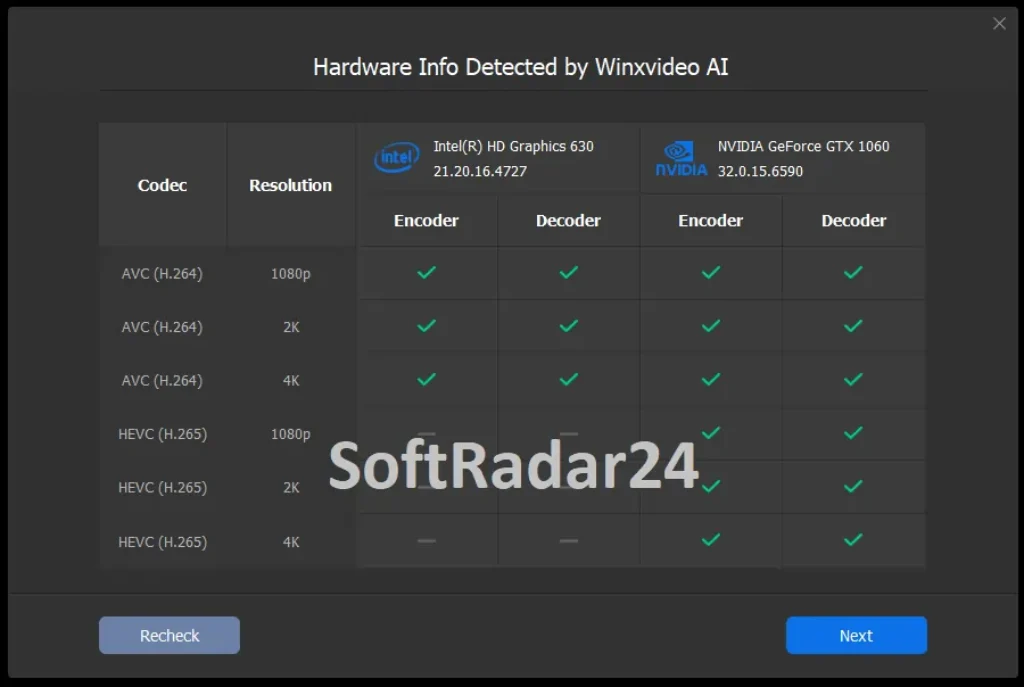
The visuals below are reused from the existing SoftRadar24 Winxvideo AI article. They show the Winxvideo AI product artwork, the current module-based interface and a real hardware-detection screen from our previous page. No vendor-hosted image is added.

Compatibility & Coverage
Winxvideo AI has two different hardware floors: AI enhancement needs substantially more GPU-compute capability than ordinary conversion, compression, editing and recording. The current WinX DVD tech-spec page also lists macOS 10.15+ and Apple Silicon for general tools, while the purchase page sends Mac buyers to a dedicated Mac version.
AI Video / Image Requirements
| Requirement | Current official minimum | Why it matters |
|---|---|---|
| GPU compute APIs | Vulkan 1.2.x or later · OpenCL 1.0 or later | Required for the current Video AI and Image AI processing path. |
| NVIDIA | Quadro 410+, GeForce GT 630+ or GTX 645+ | General AI GPU floor documented by WinX DVD. |
| Intel | UHD Graphics 620 or Graphics 510+ | Integrated graphics can qualify for the general AI floor when the required APIs are available. |
| AMD | Radeon RX550 series or later | General AI GPU floor documented by WinX DVD. |
| RAM | 2 GB or more | AI tools have a higher memory floor than the general toolbox. |
| Free disk space | 1 GB or more | Official minimum for AI enhancement. |
| Operating systems | Windows 7 / 8 / 8.1 / 10 / 11 or later; macOS 10.15+ | Current AI requirements page lists both platforms. |
TensorRT & General Media-Tool Requirements
| Item | Current official requirement | Notes |
|---|---|---|
| TensorRT optimization | Compute capability 6.0+ · GeForce GTX 1050+ · CUDA 11.1+ · NVIDIA driver 452.39+ | This is the higher NVIDIA deep-learning optimization path, not the minimum for every AI task. |
| General Windows GPU | GeForce GT 630+ · Intel HD Graphics 2000+ · AMD Radeon HD 7700+ | For converter, editor, compressor and recorder acceleration. |
| Apple Silicon | M1 / M2 / M3 / M4 families listed | Current general-tool requirements explicitly list Apple Silicon generations through M4. |
| Processor | 1 GHz Intel or AMD minimum | Published for the general media tools. |
| RAM | 1 GB; 2 GB or more recommended | Published for converter/editor/compressor/recorder. |
| Install space | 200 MB | Published application-installation minimum for general tools. |
| Windows 7 downloader | Not supported | The current tech-spec page explicitly says the video downloader is no longer supported on Windows 7. |
Media, Codec & Device Coverage
The current technical reference lists 8K/4K/2K/HD/SD video inputs, common image formats including PNG/JPG/WebP/AVIF/HEIC, extensive audio input, HDR/360°/M3U8 content and broad output profiles. Current output examples include AV1, H.264, HEVC, MKV, MOV, ProRes, WebM, MP4, FLAC and device presets for Apple, Android, Xbox, PlayStation and more.
Features & Capabilities
Winxvideo AI is not one AI upscaler with a few extras. The current WinX DVD product architecture combines video restoration, image restoration, audio cleanup and a mature conventional media-processing layer.
AI Video Enhancement
- Super Resolution for low-resolution, blurry, noisy and compressed footage with current V3 models
- AI Video Stabilization with multiple stability/speed presets and crop controls
- AI Frame Interpolation from 24/30 FPS toward 60/120/240/480 FPS
- Use cases for VHS, DVD rips, mini-DV, home recordings, GoPro, drone, smartphone and AI-generated video
AI Image & Face Restoration
- Image upscaling up to 400% and vendor-listed 4K/8K/10K output
- Four AI image models with batch GPU-accelerated processing
- Face Recovery modes for high-quality faces, center face or all faces
- Old-photo restoration, denoise/deblur and black-and-white colorization
AI Audio Enhancement
- Background-noise removal for wind, traffic, hum, keyboard clicks, chatter and other interference
- Echo and reverberation reduction documented by the current Audio AI page
- Multi-track noise removal and real-time preview
- AI Vocal Remover for vocal/instrumental separation
Video Conversion, Compression, Download & Recording
- AV1, H.264, HEVC, ProRes, MP4, MKV, MOV, WebM and broad device-profile conversion
- 4K/8K/HDR compression with hardware acceleration
- Downloader with current paid support up to 4K/8K where the source and platform allow
- Screen/webcam/audio picture-in-picture recording up to 4K 60 FPS
Quick Editing & Delivery
- Cut, merge, crop, rotate/flip and speed control from 0.1x to 16x
- Subtitle enable/disable/extract plus external ASS/SSA/SRT support
- Effects and image adjustments for brightness, contrast, hue, gamma and saturation
- Text/image/logo/timecode watermarks, GIF and snapshot tools
Important Conditions & Limitations
Winxvideo AI covers more workflows than a typical AI upscaler, but that breadth creates several buying conditions: AI tools need a stronger GPU floor, generated detail is not the same as recovered source information, Mac purchasing is routed differently, and the current trial rules have changed from older Winxvideo AI articles.
AI Enhancement Requires More Hardware Than the General Video Toolbox
The current WinX DVD tech specs separate Video AI / Image AI from the converter, editor, compressor and recorder. AI needs Vulkan 1.2.x, OpenCL 1.0, at least 2 GB RAM and supported NVIDIA/Intel/AMD graphics, while the general toolbox has a lower 1 GB RAM / 1 GHz CPU baseline.
TensorRT Is an Optimization Path, Not the Universal Minimum
Winxvideo AI can use NVIDIA TensorRT for higher deep-learning performance, but that path requires compute capability 6.0+, GeForce GTX 1050+, CUDA Runtime 11.1+ and driver 452.39+. A computer can meet the general AI minimum without meeting the TensorRT requirements.
AI Upscaling Does Not Recover Ground-Truth Detail
Super Resolution can sharpen edges, reduce noise and reconstruct plausible texture, but newly generated detail is an inference from the source. For archives, faces, text and historical footage, preserve the original file and compare the enhanced result rather than treating AI-generated detail as documentary truth.
Higher Frame Rate Means More AI-Generated Frames
Frame Interpolation can raise 24/30 FPS footage to 60/120/240/480 FPS, but those intermediate frames did not exist in the source capture. Preview fast motion, occlusion and scene changes before a long job because motion complexity can affect the result.
Stabilization Can Change the Visible Frame
The current stabilization feature includes crop controls because removing camera shake often requires moving and cropping the frame. Choose the stabilization preset with the final framing in mind rather than assuming every edge of the original shot will remain visible.
The Current Trial Rules Are Export-Based for AI Enhancement
Older Winxvideo AI descriptions often summarized the AI trial as a five-minute limit. The current official comparison now lists five watermark-free exports for AI video enhancement/stabilization/interpolation and five image exports. Audio-only AI files remain limited to five minutes.
Screen Recording Is Watermarked in the Trial
The current official Trial-vs-Paid comparison lists screen/webcam/picture-in-picture recording as watermarked in the trial and watermark-free in the paid version.
Conversion and Basic Editing Still Have a Five-Minute Trial Limit
The current official comparison lists video conversion and basic editing at up to five minutes in the trial. Compression is limited to HD in trial, while the paid version is listed for 4K/HD compression.
Downloader Quality Is Restricted in the Trial
The current Trial-vs-Paid comparison lists downloader output up to 1080p in the trial and up to 4K/8K in the paid version. The current tech-spec page also says the downloader is no longer supported on Windows 7.
Mac Support Exists in the Tech Specs, but the Purchase Route Is Separate
Winxvideo AI’s current tech specs list macOS 10.15+ and Apple Silicon for general tools, but the WinX DVD purchase page explicitly links Mac buyers to a separate Mac version. A Mac-first buyer should compare Macxvideo AI rather than assume the Windows campaign applies.
Winxvideo AI Does Not Replace WinX DVD Ripper Platinum
Winxvideo AI can enhance DVD-rip video files, but protected physical-disc extraction belongs to WinX DVD Ripper Platinum. If your workflow starts with a DVD disc, use the WinX DVD ripping tool first or compare the WinX Media Master 5-in-1 bundle.
Noise Reduction Can Be Over-Applied
WinX DVD’s current Audio AI FAQ notes that excessive noise reduction can distort audio. Use the real-time preview and lower suppression when necessary instead of assuming stronger reduction always sounds better.
Local AI Processing Does Not Make Every Feature Offline
The current Audio AI page describes its AI processing as local, but Winxvideo AI also includes an online-media downloader and licensing/update functions. Do not generalize the local-processing statement to every network-related feature.
The Current Public Store and the Existing SoftRadar24 Campaign Are Different
WinX DVD currently highlights US$34.95/year for 3 PCs, US$54.95 Lifetime / 1 PC and US$79.95 Family / 3–5 PCs. The existing SoftRadar24 campaigns are lower-priced promotional SKUs. The final checkout should control the actual license, renewal and included extras.
Free Trial / Free Version
Winxvideo AI has a free trial with different limits for AI enhancement, audio, conversion, downloading and recording. The current official comparison is more useful than a single generic ‘5-minute trial’ label because the AI-video rules have changed to a limited number of watermark-free exports.
| Free access | What you can do | What requires payment |
|---|---|---|
| AI video / image trial | Current official comparison: five watermark-free exports for AI video enhancement, stabilization, frame interpolation and the updated V3 Super Resolution workflow; five image exports for denoise, unblur, upscale, face restoration and colorization. | Paid Winxvideo AI removes those trial export limits and includes future version/model updates under the applicable paid plan. |
| Audio / toolbox trial | Audio AI: video uses five watermark-free exports and audio-only files are limited to five minutes. Conversion and basic editing are limited to five minutes, downloader quality to 1080p, compression to HD and screen recording carries a watermark. | Paid version removes the recorder watermark, enables full conversion/editing length, 4K/HD compression and downloader output up to 4K/8K where supported. |
System Requirements
Winxvideo AI publishes separate minimums for AI enhancement and for the conventional converter/editor/compressor/recorder. That split is important: a computer that can convert video may still fail the Video AI or Image AI GPU requirements.
| Requirement | Supported / Required | Notes |
|---|---|---|
| AI operating systems | Windows 7 / 8 / 8.1 / 10 / 11 or later; macOS 10.15+ | Current WinX DVD AI-tool requirements. |
| AI GPU APIs | Vulkan 1.2.x+ and OpenCL 1.0+ | Required for Video AI / Image AI. |
| AI NVIDIA | Quadro 410+ / GeForce GT 630+ / GTX 645+ | Current general AI GPU floor. |
| AI Intel | UHD Graphics 620 or Graphics 510+ | Current general AI GPU floor. |
| AI AMD | Radeon RX550 series+ | Current general AI GPU floor. |
| AI RAM / disk | 2 GB RAM+ · 1 GB free disk+ | Current Video AI / Image AI minimums. |
| TensorRT optimization | Compute capability 6.0+ · GTX 1050+ · CUDA 11.1+ · NVIDIA driver 452.39+ | Higher-performance NVIDIA inference path. |
| General processor | 1 GHz Intel or AMD minimum | Converter / editor / compressor / recorder. |
| General RAM | 1 GB · 2 GB+ recommended | Converter / editor / compressor / recorder. |
| General install space | 200 MB | Application installation minimum. |
| General GPU | NVIDIA GT 630+ · Intel HD 2000+ · AMD HD 7700+ · Apple Silicon M1–M4 families listed | Hardware acceleration for conventional media tools. |
| Windows 7 downloader | Not supported | Current tech-spec note; other general tools remain listed for Windows 7. |
Alternatives & Better-Fit Options
Winxvideo AI overlaps with several media categories, so the better-fit options below are routed by the visitor’s actual workflow rather than by a generic “competitor” label. For current WinX DVD products, bundles and offers across the same Digiarty ecosystem, visit the WinX DVD page on SoftRadar24.
WinX Media Master 5-in-1 Bundle
The strongest same-brand value route when Winxvideo AI is only one part of the job. The current SoftRadar24 bundle combines Winxvideo AI with WinX DVD Ripper Platinum, WinX DVD Copy Pro, WinX MediaTrans and 5KPlayer, making it more appropriate for users who also digitize physical DVDs, make 1:1 disc backups or manage iPhone/iPad media.
VideoProc Converter AI
The most direct internal cross-brand comparison for users who want an all-in-one AI video enhancer plus conversion, compression, downloading, recording and editing. Compare the specific AI models, hardware requirements and current license terms rather than assuming either toolkit is universally better.
Macxvideo AI
The cleaner Mac-first route. Winxvideo AI’s technical page lists macOS support, but the current WinX DVD purchase page sends Mac buyers to a dedicated Mac version. Macxvideo AI is therefore the more natural SoftRadar24 destination when Apple Silicon and macOS purchasing are the starting requirement.
FAQ
These answers focus on the details that most often change the Winxvideo AI purchase decision: 4K versus 8K claims, AI hardware, frame interpolation, face and image restoration, audio cleanup, trial limits, Mac routing, WinX DVD workflows and current promotional licensing.
What does Winxvideo AI do?
Winxvideo AI combines AI video enhancement, video stabilization, frame interpolation, AI image enhancement, face recovery, old-photo restoration, AI noise suppression and vocal separation with conventional video conversion, compression, downloading, screen recording and quick editing.
Can Winxvideo AI upscale old 480p, VHS or DVD-rip video to 4K?
Yes. The current WinX DVD product page specifically lists old home recordings, VHS, DVD/mini-DV footage and 480p-to-1080p/4K restoration as Winxvideo AI use cases. The source still limits what real detail exists, so preserve the original and preview the AI reconstruction.
Can Winxvideo AI upscale video to 8K or 10K?
The current official pages make an important distinction: Video AI is described as upscaling video to 4K, while Image AI is documented up to 4K/8K/10K. Winxvideo AI can convert and compress existing 8K video, but that is different from claiming the current Video AI upscaler generates 8K or 10K video.
Can Winxvideo AI convert 24 or 30 FPS video to 60, 120, 240 or 480 FPS?
Yes. The current AI Frame Interpolation documentation lists 2X, 3X, 4X and 5X increases and target frame rates up to 120/240/480 FPS. Those intermediate frames are AI-generated, so fast motion and scene changes should be previewed before a long export.
Can Winxvideo AI stabilize GoPro, DJI, drone and smartphone footage?
Yes. The current AI Video Stabilization feature is documented for handheld, GoPro, DJI, DSLR and iPhone footage and includes multiple stabilization modes, speed/quality presets and crop controls.
Can Winxvideo AI restore blurry faces in old photos?
Yes. The current face-recovery page documents restoration for blur, noise, scratches, creases, spots and compression artifacts, with separate modes for high-quality faces, the center face or all faces in a group photo.
Can Winxvideo AI upscale images to 10K?
Yes. The current Image AI page documents up to 400% enlargement and output up to 10K, with four AI image models, batch processing, old-photo restoration and denoise/deblur tools.
Can Winxvideo AI remove background noise and echo?
Yes. The current Audio AI documentation covers wind, traffic, hum, keyboard clicks, chatter and other noise, and its FAQ also says echo and reverberation can be reduced. Real-time preview and multi-track processing are available.
Does Winxvideo AI have an AI vocal remover?
Yes. The current product page includes AI Vocal Remover for separating vocals and instrumental material from audio or video for karaoke, a cappella, remix and background-score workflows.
Can Winxvideo AI record the screen in 4K?
Yes. The current Winxvideo AI product page documents full/custom screen, webcam, audio and picture-in-picture recording up to 4K at 60 FPS.
What GPU does Winxvideo AI need for AI enhancement?
The current AI minimums require Vulkan 1.2.x and OpenCL 1.0. The vendor lists NVIDIA Quadro 410 / GeForce GT 630 / GTX 645 or higher, Intel UHD Graphics 620 or Graphics 510 or higher, or AMD Radeon RX550 series or higher, plus at least 2 GB RAM and 1 GB free disk space.
What does Winxvideo AI require for NVIDIA TensorRT acceleration?
The current WinX DVD technical page lists compute capability 6.0 or higher, GeForce GTX 1050 or higher, CUDA Runtime 11.1 or later and NVIDIA graphics driver 452.39 or later for its TensorRT optimization path.
Does Winxvideo AI work on Mac?
The current technical specifications list macOS 10.15 Catalina or later and Apple Silicon support for the general media tools. However, the WinX DVD purchase page explicitly routes Mac buyers to a dedicated Mac version. For a Mac-first purchase, compare Macxvideo AI.
What are the current Winxvideo AI free-trial limits?
The current official comparison lists five watermark-free exports for AI video enhancement, stabilization and frame interpolation, plus five image exports. Audio-only AI files are limited to five minutes, conversion and basic editing to five minutes, downloading to 1080p, compression to HD, and screen recording carries a watermark.
Does Winxvideo AI process files locally?
The current WinX DVD Audio AI page describes AI noise-removal processing as entirely local. Winxvideo AI also has network-related functions such as downloading, licensing and updates, so that local-processing statement should not be generalized to every feature.
Is Winxvideo AI the same as WinX DVD Ripper Platinum?
No. Winxvideo AI enhances, converts, compresses, records and edits existing media files. WinX DVD Ripper Platinum is the dedicated WinX DVD product for extracting and backing up physical DVD content. If you need both, the WinX Media Master 5-in-1 bundle is the relevant same-brand package to compare.
What is the difference between Winxvideo AI and VideoProc Converter AI?
Both cover AI video enhancement plus conventional video-processing tasks, making VideoProc Converter AI a direct internal comparison. The useful decision is to compare the exact AI models, hardware requirements, trial behavior and current license terms for your footage rather than rely on a generic winner label.
Is there an official Winxvideo AI discount or coupon code?
SoftRadar24 currently retains four Winxvideo AI campaign options, including US$19.95 for 1 Year / 3 PCs, US$15.95 for Lifetime / 1 PC and US$39.95 for Family Lifetime / 3–5 PCs. The family campaign is approximately 67% below the US$119.90 reference price shown on the existing SoftRadar24 article. Verify the final checkout before payment.





