You paid for your e-book legally. You downloaded it. But when you try to open it on your preferred device, transfer it to your Kobo, or print a single page, you are hit with a frustrating wall: DRM Encryption
Amazon, Apple, and Google use proprietary locks (like KFX, KCR, and AZW3) to keep you trapped in their specific hardware ecosystems. You don’t actually own the books you buy; you are just renting them.
If you want to reclaim your digital library, bypass DRM restrictions legally for personal backup, and convert any encrypted file into a universally readable format, standard free converters will fail you. You need a dedicated decryption engine. In this guide, we break down exactly how to use Epubor Ultimate to permanently unlock your library—and how to get it at the lowest verified price for 2026.
🎁 Verified 2026 Deal: Save 20% on Epubor Ultimate
Ready to unlock your eBooks? Skip the search for expired coupons. Clicking our links automatically applies a secure, guaranteed 20% discount code directly at the official Epubor checkout.
Barnes & Noble Nook User?
While Epubor Ultimate handles Kindle and Kobo perfectly, Barnes & Noble utilizes a notoriously strict, separate DRM system. If your digital library is primarily locked inside the B&N system, you will need a specialized tool. Check out our in-depth Epubor Nook Converter review to learn how to securely bypass Nook restrictions and back up your purchased titles.
Why Epubor Ultimate Stands Out: Key Features
Most converters just change file types. Epubor acts as a complete bridge between your purchases and your devices. Here is what actually makes it worth installing:
- Unlocks Books from Any Major Retailer: Stop worrying about where you buy your books. You can safely strip DRM from Amazon Kindle, Kobo, Google Play, Smashwords, Lulu, and more. If you bought it, you can now read it anywhere.
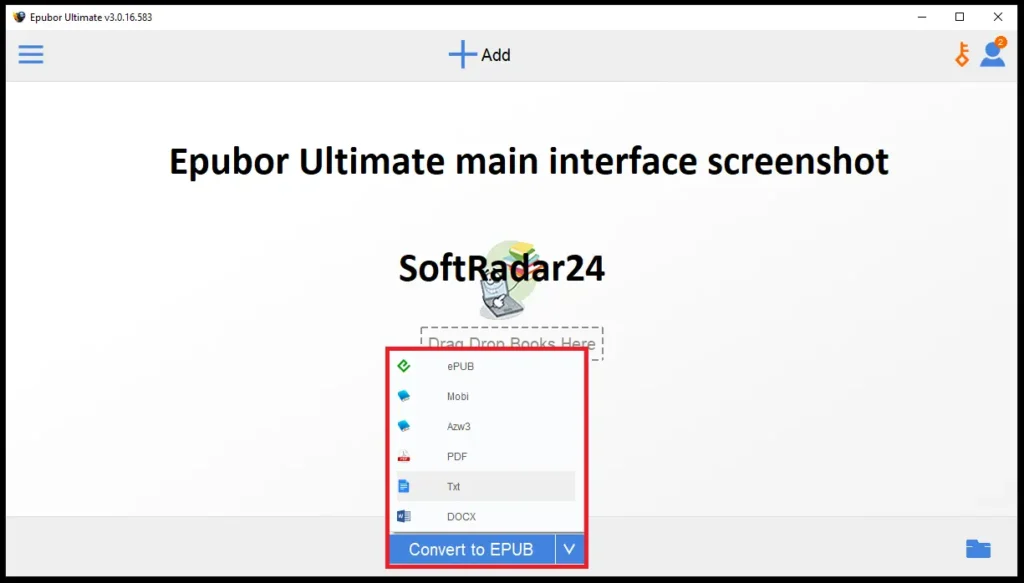
- Converts to All Popular Formats: Need an EPUB for your iPad or a PDF for a research paper? Done. It seamlessly turns strict input formats (including modern KFX, AZW, and PRC) into universally friendly EPUB, PDF, Mobi, AZW3, and TXT files.
- Drag, Drop, and Batch Convert: Got a massive digital library? You don’t have to convert titles one by one. Just highlight a batch of books, drag them into the window, choose your format, and click convert. It processes dozens of books in seconds while keeping the original layout and fonts intact.
- Smart Device & App Detection: Forget digging through hidden computer folders to find your downloaded files. Plug in your e-reader (Kindle, Kobo, etc.) via USB, and Epubor instantly displays your books. It also automatically pulls titles directly from your Kindle for PC/Mac or Adobe Digital Editions apps.
- Cleans Up Messy Libraries (Metadata Editor): Nothing ruins a digital bookshelf like a missing cover or a misspelled author name. The built-in editor lets you quickly fix titles, correct publishing dates, and swap in high-resolution covers so your collection looks perfectly organized.
- Always Up-to-Date: E-book platforms constantly update their security to block format changes, but Epubor actively keeps pace. It runs smoothly on Windows 10/11 and modern macOS versions, offering reliable support for the latest Kindle desktop apps (like PC v2.0 and Mac v1.40).
Kindle eBook Formats Comparison Matrix (2026)
Why do standard converters fail? Because Amazon uses dynamic DRM. Here is why you need a dedicated decryption tool like Epubor Ultimate:
| Format Name | DRM Status | Key Characteristic | Can Free Tools Convert It? |
|---|---|---|---|
| KFX | Encrypted (Strict) | Dynamic downloader, supports Enhanced Typesetting. | ❌ No (Requires Epubor Ultimate) |
| KCR | Encrypted (New) | Newest format downloaded via Kindle for Mac v1.25.2+. | ❌ No (Requires Epubor Ultimate) |
| AZW3 | Often Encrypted | Standard format for modern e-Ink Kindles. | ⚠️ Sometimes (If DRM-free) |
Epubor Ultimate Free Trial vs. Full: Is the Upgrade Worth It?
Before you spend any money, Epubor offers a free trial for both Windows and Mac. I highly recommend downloading it first, but you need to know exactly what it does—and what it doesn’t do.
The Free Trial (Strictly a Diagnostic Tool)
The trial version gives you full access to the interface. You can test the automatic device detection, play around with the metadata editor, and see how the batch conversion works.
The Catch (The 20% Limit): Do not expect to convert and read a full book for free. The trial only decrypts and converts the first 20% of your eBook’s content. It is essentially a diagnostic tool. Its sole purpose is to let you test your specific files and devices to prove that the DRM removal actually works before you open your wallet.
The Full License: Why People Upgrade
If the trial successfully processes your 20% sample, upgrading to the full version is the logical next step to unlock your entire library. Priced at $29.99, here is what the paid tier actually secures for you:
- 100% Full-Book Conversion: Decrypt your books from cover to cover without any missing pages or watermarks.
- Future-Proof DRM Updates: This is the most critical feature. Amazon and Apple constantly update their DRM protocols (like recent KFX changes) to block converters. A paid license ensures Epubor continuously pushes software updates to bypass these new restrictions.
- 1-on-1 Tech Support: Sometimes, a specific macOS security update or a stubborn Kindle firmware can block a conversion. Paid users get direct access to Epubor’s support team for step-by-step troubleshooting.
- The 30-Day Safety Net: The checkout is backed by a 100% money-back guarantee. If a retailer updates their DRM, your software stops working, and the support team can’t fix it, you get your money back. It makes the $29.99 price tag virtually risk-free.
How to Use Epubor Ultimate: The 4-Step Guide
You don’t need an IT degree to strip DRM. The entire workflow relies on a simple drag-and-drop interface. Here is exactly how to liberate your digital library in minutes:
Step 1: Load Your Books Open Epubor Ultimate. If you use desktop reading apps (like Kindle for PC/Mac or Adobe Digital Editions), the software automatically finds your default download folders and lists your books in the left-hand column.
Step 2: Drag, Drop, and Decrypt Select the books you want to process from that left panel and drag them directly into the large, blank space on the right. The moment you drop them, Epubor works its magic. The DRM is stripped instantly, and you’ll see a green “Decrypted” checkmark next to each title.
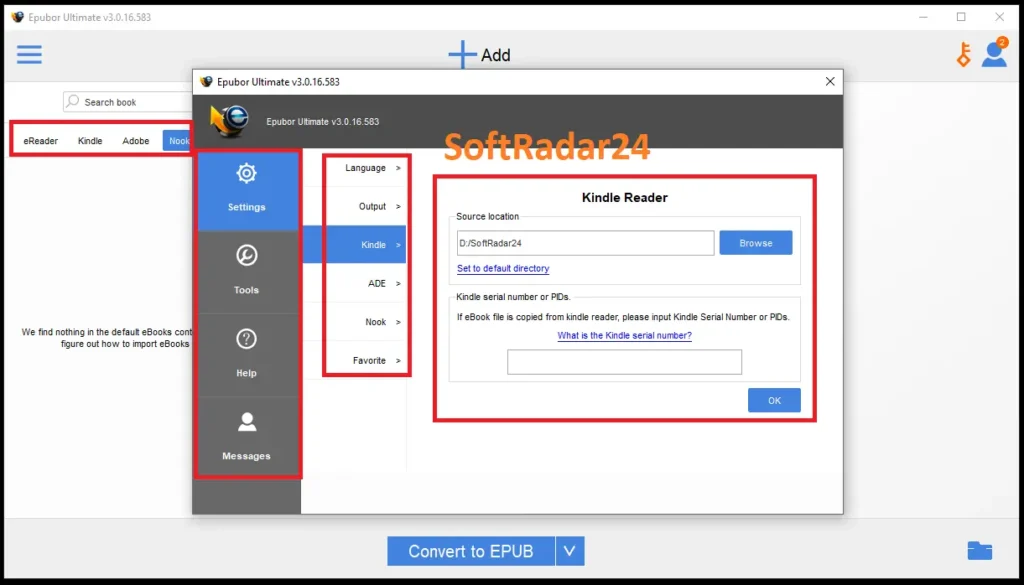
Step 3: Clean Up the Details (Optional but Recommended) Click the small “Edit” icon (it looks like a pencil) next to any decrypted book. A menu pops up where you can fix typos in the author’s name, update the publishing year, or upload a crisp new book cover.
Step 4: Choose Your Format and Convert Look at the bottom center of the screen. Click the drop-down menu and select your target format (EPUB, PDF, AZW3, or Mobi). Hit the big blue “Convert” button. Once it says “Succeeded,” click the folder icon in the bottom right corner to find your brand-new, DRM-free files.
How to Transfer Purchased Kindle Books to Another Account
Amazon really doesn’t want you sharing your purchased books outside of your registered account. If you buy a new Kindle and register it with the same Amazon account, you can just click “Deliver” from the Kindle Cloud. Easy.
But what if you want to send a book to a friend’s Kindle, or to a completely different account? Cloud syncing won’t work. Here is the workaround:
- Run your downloaded Amazon book through Epubor Ultimate (following the steps above) and convert it to a standard Mobi or AZW3 file.
- Connect the destination Kindle to your computer using a USB cable.
- Open the Kindle drive on your computer and locate the “Documents” folder.
- Drag and drop your newly converted, DRM-free file directly into that folder.
- Disconnect the USB. The book will now appear on the Kindle’s home screen, entirely bypassing Amazon’s account restrictions.
Troubleshooting: How to Fix KFX & Mac DRM Failures
Even the best software occasionally hits a wall, especially since retailers constantly update their encryption. If Epubor throws an error message, don’t panic. Here are the most common fixes:
- 1. The Incomplete Download Error: The number one reason conversions fail is a corrupted or incomplete file. If a book won’t decrypt, delete it completely from your Kindle desktop app or e-reader. Re-download it cleanly without interrupting your internet connection, and try dragging it into Epubor again.
- 2. The Firmware Trap (Downgrading): Amazon occasionally rolls out aggressive DRM updates (like newer KFX protocols). If the latest version of Epubor is struggling, the standard workaround is to roll back your desktop reading app. Uninstall your current Kindle for PC app and install an older, specific build (like version 2.7.1 or older). Older apps use older, easier-to-break DRM.
- 3. The Mac-Specific DRM Block: Apple environments (macOS) sometimes deal with a tougher, exclusive variation of DRM that automated tools struggle to strip. If you are on a Mac, have a complete file, and are running the latest Epubor update but still get a failure notice, you need human help. Reach out directly to epubor.iris@outlook.com. Their support team actually provides specialized, tailored workarounds specifically for Mac users.
Epubor Ultimate Pricing and 2026 Discount Codes
If you have tested the free trial, verified that the software recognizes your e-reader, and are ready to unlock your entire digital library, the next logical step is looking for a deal. We know the drill—nobody wants to pay full price if there is an active Epubor Ultimate discount code floating around the internet.
The good news? You do not need to waste time hunting through sketchy promo sites or testing dozens of expired coupon codes.
To guarantee you get the best possible rate in 2026, we have streamlined the process. By selecting your preferred plan in the official pricing box below, a verified 20% discount is automatically applied directly at the official seller’s secure checkout. No typing in random promotional strings, no hidden fees—just a straight price drop.
Which Epubor Ultimate License Should You Choose?
Every paid tier includes full DRM removal, regular software updates to remove new encryption methods, and a 30-day money-back guarantee. Your choice simply depends on your reading habits:
- The 1-year license ($23.99): Perfect if you just bought a new e-reader and need to do a one-time, massive transfer of your old library to the new device.
- The 5-year license ($47.99): The smart middle ground. It offers half a decade of uninterrupted updates, ensuring your software survives whatever new DRM Amazon or Apple rolls out next.
- The lifetime license ($87.99): The ultimate choice for avid readers. It is a strict one-time payment with zero recurring subscription fees. You buy it once, own it forever, and get lifetime technical support.
Ready to completely own your purchased books? Choose your operating system (Epubor Ultimate for Windows or Mac) and your discounted plan in the box below to get started immediately.


Epubor Ultimate for Windows – 20% OFF

Epubor Ultimate (1-Year License / Windows)
Perfect for Quick Fixes: Unlock your newly purchased e-reader library with a full year of DRM removal and format conversion on your PC.
Epubor Ultimate (5-Year License / Windows)
Best Value Choice: Secure half a decade of uninterrupted software updates to easily bypass the newest Kindle and Kobo DRM protections.
Epubor Ultimate (Lifetime License / Windows)
Buy Once, Read Forever: Get permanent access and lifetime technical support without ever paying another recurring subscription fee for your PC.
Epubor Ultimate for Mac – 20% OFF

Epubor Ultimate (1-Year License / Mac)
Instant Mac Conversion: Quickly convert your Amazon or Apple books into standard formats for one full year on your macOS environment.
Epubor Ultimate (5-Year License / Mac)
Long-Term Mac Solution: Keep your Apple computer fully equipped to handle evolving eBook security updates and strict DRM rules for the next five years.
Epubor Ultimate (Lifetime License / Mac)
Ultimate Mac Freedom: Enjoy permanent DRM removal capabilities and direct access to specialized macOS technical support for life.
Epubor Ultimate System Requirements
You don’t need a high-end gaming PC to run Epubor Ultimate. The software is incredibly lightweight and won’t hog your computer’s memory or storage. However, because eBook encryption is constantly evolving, running the right operating system and having the correct versions of your reading apps installed is absolutely critical for the decryption process to work.
Before you download the software, quickly check your setup against the essentials below:
| Component | Minimum Specification |
|---|---|
| Windows Operating System | Windows XP, Vista, 7, 8, 10, 11 (32-bit and 64-bit) |
| Mac Operating System | Mac OS X 13 and later versions |
| Processor (CPU) | Pentium 1 GHz or above |
| System Memory (RAM) | 4 GB or above |
| Hard Disk Space | Minimum 70 MB of free storage for installation |
| Supported Desktop Apps | Kindle for PC (version 2.0), Kindle for Mac (version 1.40), Adobe Digital Editions, Kobo Desktop |
| Supported e-Readers | Kindle Paperwhite, Kindle Voyage, Kindle Oasis, Kobo eReaders |
| Direct Device Decryption | Kindle e-ink devices running firmware older than 5.10.2 |
Epubor Ultimate Frequently Asked Questions (FAQ)
Is it legal to use Epubor Ultimate to remove DRM from my eBooks?
Removing digital restrictions from books you have legally purchased is generally considered acceptable for personal backups. Epubor Ultimate is designed exclusively to help you read your own digital library on the devices you own. However, sharing those decrypted files online, distributing them, or using the software for piracy strictly violates copyright laws.
Can Epubor Ultimate convert Kindle Unlimited or borrowed library books?
The software is strictly built to process files you permanently own. It cannot strip security protocols from rented materials, digital library loans, or books temporarily accessed through a Kindle Unlimited subscription. You must purchase the title outright for the decryption process to trigger.
Does the Epubor software still work with the newer Kindle KFX formats in 2026?
Processing modern Amazon KFX files requires a specific software environment. Since retailers constantly update their encryption to block converters, you typically need to downgrade your desktop reading app—such as installing an older version of Kindle for PC (like v2.0)—before downloading your books. The software includes built-in guides to help you navigate these continuous format changes.
Why am I getting a “Decryption Failed” error when I drag and drop my files?
Encountering a decryption error usually points directly to a corrupted or incomplete file download. The quickest fix is to completely delete the problematic book from your desktop reading app (like Adobe Digital Editions), redownload it with a stable internet connection, and drag the fresh file back into the Epubor Ultimate interface.
If I own both a Mac and a Windows PC, do I need to buy two separate licenses?
Epubor Ultimate registration codes are tied specifically to the operating system. A license purchased for a Windows machine will not activate the macOS application, and the reverse is also true. If you manage your digital library across both Apple and PC environments, you will need to secure a separate plan for each platform.