Quick Summary
IObit Driver Booster 14 PRO is a Windows driver updater and driver-recovery toolkit built around automatic hardware scanning, verified driver matching, one-click installation and recovery options when a driver update causes trouble. The current PRO edition expands the Free edition’s 12-million-plus driver pool to 18-million-plus verified drivers, adds automatic idle-time updating, offline network-driver recovery, driver backup, stability-first update priority, 35+ device-error fixes and premium support. It also supports Windows 10/11 ARM64 devices and gaming-focused driver/component updates. You can also browse other Windows driver updater software to explore more options.
- Current product generation
- Driver Booster 14 PRO
- PRO driver database
- 18,000,000+ verified drivers from 1,200+ major brands
- Platform
- Windows 11 through XP · Windows 10/11 ARM64 supported
- Main PRO advantage
- Automatic updates, offline recovery, backup/restore and larger stability-first driver coverage
Purchase Options
License & Purchase · IObit Driver Booster 14 PRO · Up to 90% OFF Coupon Code
If you searched for an IObit Driver Booster PRO coupon code or Driver Booster discount code, the options below preserve the current SoftRadar24 campaign links from the existing Product page. This is Windows-only licensing.
Driver Booster 14 PRO — 1 Year / 3 PCs
3 Windows PCs · 1-year Driver Booster PRO subscription
Included with this license- Driver Booster 14 PRO for up to 3 Windows PCs
- 18M+ verified-driver database and automatic driver updating
- Offline Driver Updater, automatic driver backup and recovery tools
- Existing SoftRadar24 checkout URL includes the UPS*****40 promotional coupon
Reference: US$74.85
US$7.47/ year
Coupon code automatically applied
Buy NowDriver Booster 14 PRO — 1 Year / 3 PCs
The existing SoftRadar24 page lists this campaign at US$7.47 versus the US$74.85 reference price. IObit’s current public PRO page shows a different 12-month campaign price, so verify the final checkout before payment.
IObit’s current public PRO page now emphasizes a different plan grid, including 3 Months, 6 Months + 6 Months Free and 12 Months, with its current 12-month / 3-PC public price shown as US$22.95. The existing SoftRadar24 page contains older campaign SKUs and lower promotional prices. Always verify the final term, auto-renewal status, bundled items and price shown at checkout.
Can This Software Do What I Need?
Driver Booster is more than a single Scan button, but the useful distinction is which jobs are available in Free, which depend on PRO, and which are really hardware or system-optimization problems rather than driver problems.
I want Driver Booster to scan and update Windows drivers automatically
Automatic driver updating
Yes — PROPRO can automatically download and install selected driver and game-driver updates while the system is idle. Free remains a manual-update workflow.
I only need a free driver updater for occasional updates
Driver Booster Free
Yes — with limitsThe current comparison gives Free one-click scanning, a 12M+ verified-driver pool and manual updates. PRO expands the database and automation.
I use a Windows 10 or Windows 11 ARM64 PC
ARM64 support
YesIObit’s current Free page and PRO comparison explicitly say Driver Booster supports Windows 10/11 ARM64 driver updating.
My newly installed PC has no working network driver
Offline recovery
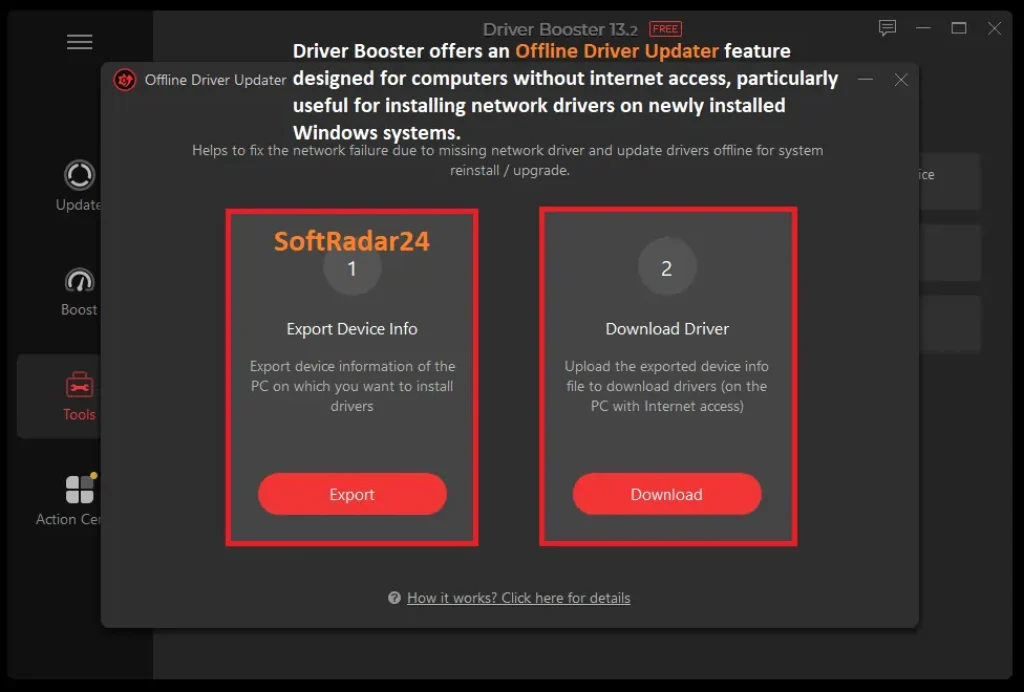
Yes — PRO workflowOffline Driver Updater can export device information from the disconnected PC, use another Internet-connected PC to download the matching package, then return the package for installation.
A new driver causes crashes, flicker or instability
Recovery
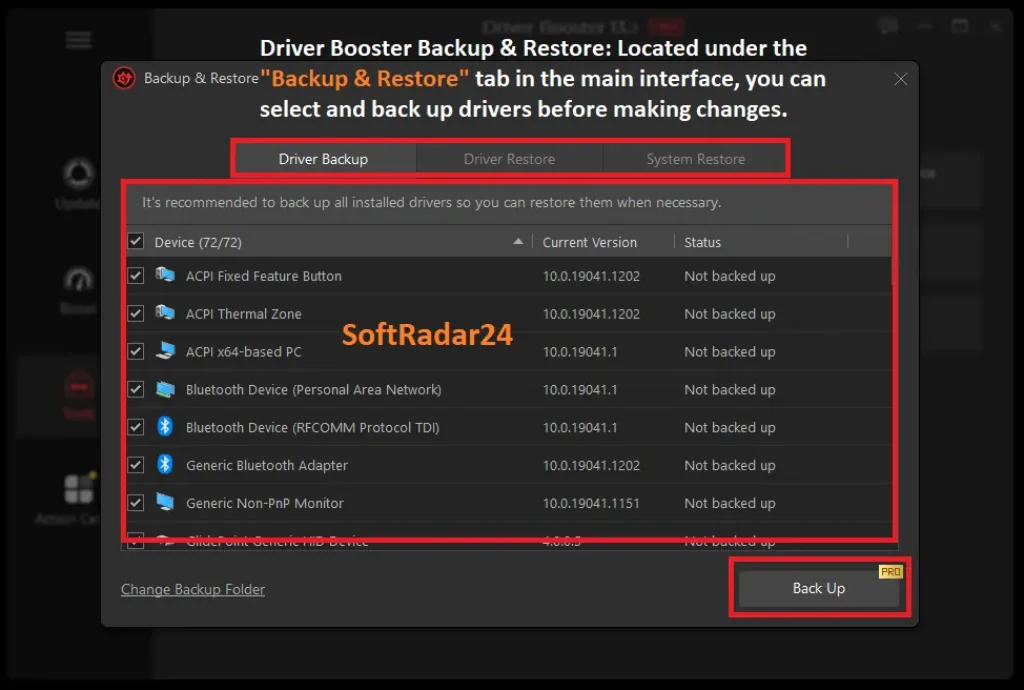
YesDriver Booster supports Roll Back and System Restore. PRO also adds driver backup/restore so a backed-up previous driver can be reinstalled.
I prefer conservative driver choices instead of always chasing the newest release
Driver priority
SupportedSettings expose Latest First and Stability First scan priorities; the current PRO comparison specifically highlights priority for stability-first drivers.
I need to fix no sound, network failure or bad resolution
Repair tools
YesThe Tools area includes Fix No Sound, Fix Network Failure and Fix Bad Resolution. Fix Device Error is explicitly PRO-only.
I want gaming-focused graphics drivers and fewer background processes
Gaming workflow
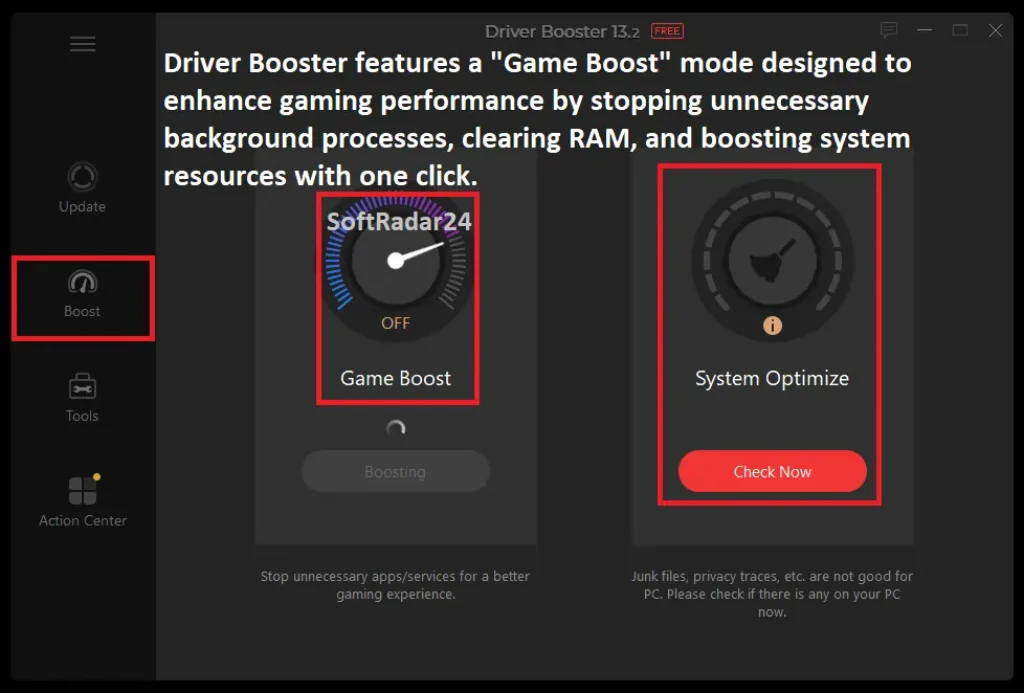
YesDriver Booster can update Game Ready graphics drivers and Game Boost can stop selected unnecessary apps/services. This can free resources, but it is not a guaranteed FPS upgrade on every PC.
I want Driver Booster itself to clean registry junk and optimize Windows
System optimization
Different IObit productThe System Optimize entry in Driver Booster hands that job to Advanced SystemCare; it is not a hidden full Advanced SystemCare engine inside Driver Booster.
Driver Booster shows an unplugged device
Unplugged hardware
Usually no action neededIObit’s manual says an unplugged device is not automatically a problem. Remove its driver only if you are sure the hardware will no longer be used.
I need a driver updater for macOS
Operating system
NoDriver Booster is a Windows driver updater. IObit offers other Mac utilities, but there is no Driver Booster macOS edition.
My graphics card, SSD, Wi-Fi adapter or other hardware is physically failing
Hardware failure
NoA driver updater can correct missing, faulty or incompatible driver software; it cannot repair failed physical hardware.
How It Works
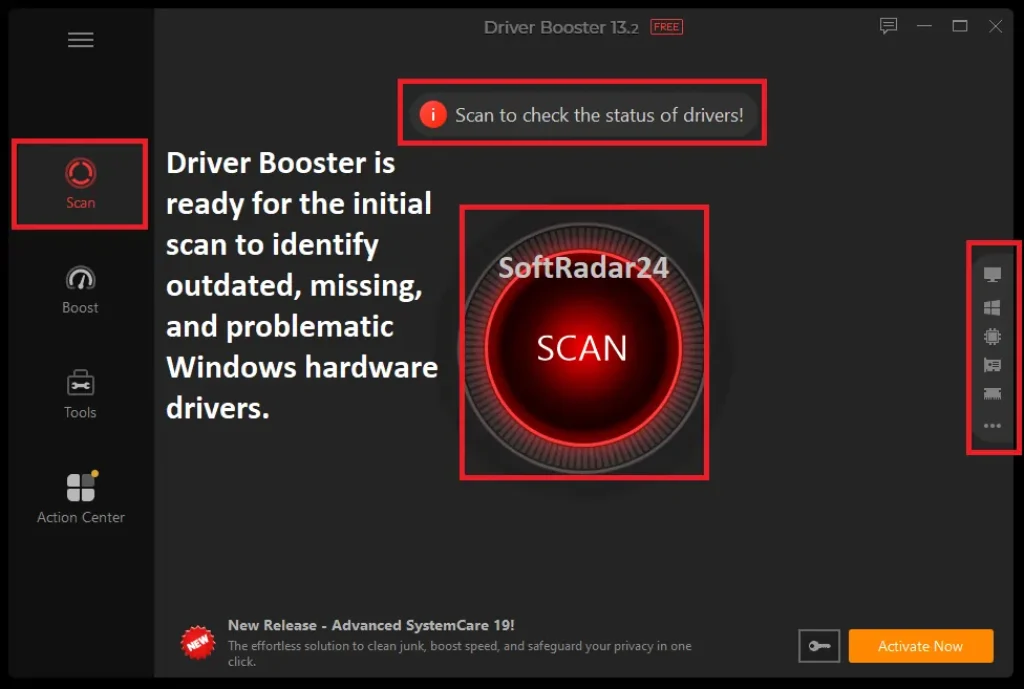
The normal workflow is Scan → review the matches → update selected drivers. Driver Booster then adds separate recovery, offline and automatic-update workflows around that core process.
Scan, Review and Update Drivers
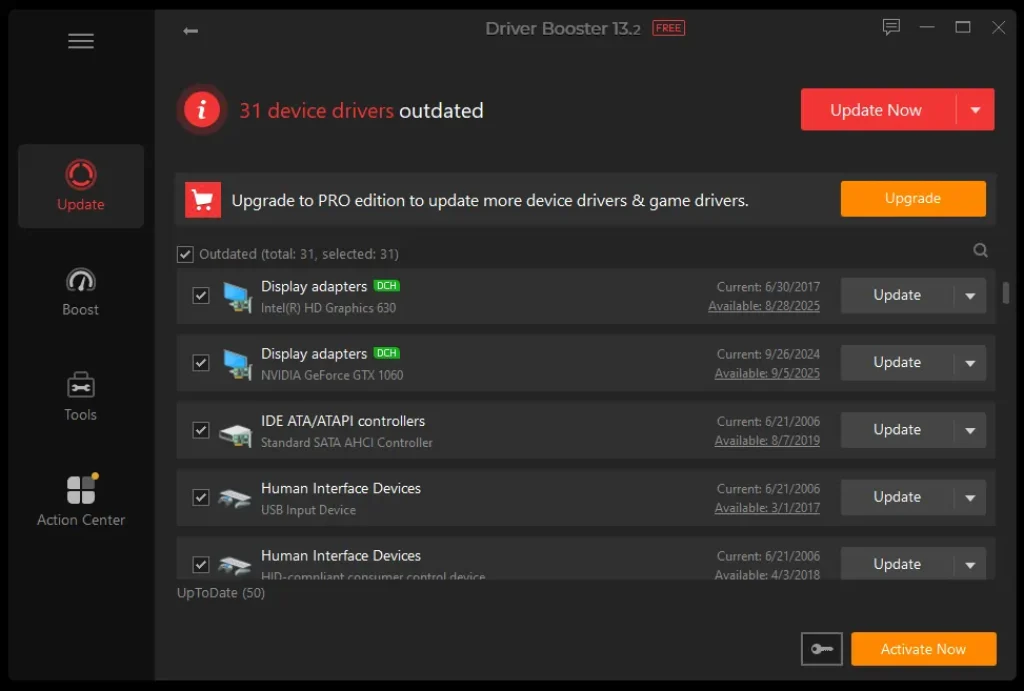
By default, Driver Booster can scan at launch. The results distinguish outdated, missing and faulty drivers plus not-installed game drivers, and each line can be updated individually or selected for a broader update.
- Run Scan and review which devices Driver Booster flags as outdated, missing or faulty.
- Choose the driver priority you prefer and ignore any update you intentionally do not want.
- Update selected drivers. The normal update sequence downloads the package, creates a restore point unless that setting is disabled, and installs the driver; PRO can also back up the previous driver first.
| Stage | What Driver Booster does | Why it matters |
|---|---|---|
| Download | Downloads the selected driver with resume support. | An interrupted download can continue instead of restarting from zero. |
| Restore point | Creates a Windows restore point by default before installation. | Provides a system-level path back if the new driver causes problems. |
| PRO backup | Can automatically back up the previous driver when enabled. | Lets Driver Restore reinstall a backed-up earlier version. |
| Install | Installs the downloaded driver and can optionally reboot/shut down afterward. | Some driver changes need a restart before the final state is clear. |
Recover a PC That Has No Network Driver
Offline Driver Updater is designed for a reinstalled/updated Windows PC or a machine that cannot get online because its network driver is missing.
- On the offline PC, export the device information from Tools → Offline Driver Updater.
- Move the exported information to another PC with Internet access and use Driver Booster to download the required driver package.
- Copy the package back to the offline PC and install the matching network driver.
Recover from a Driver Update That Goes Wrong
Driver Booster documents three recovery paths: Driver Roll Back, Driver Restore and System Restore. Roll Back depends on Windows having an earlier version available; Driver Restore depends on a prior Driver Booster backup; System Restore returns Windows to a previous restore point.
- Try Roll Back for the specific driver when an earlier version is available.
- Use Driver Restore when PRO has already backed up the previous driver.
- Use System Restore when the update affected broader Windows behavior and the relevant restore point is available.
Product Interface & Workflow
All visuals below are reused from the existing SoftRadar24 Driver Booster article. No vendor-hosted image is added to this update.
Compatibility & Coverage
Driver Booster is Windows-only, but the current compatibility story is broader than older articles suggest: IObit now explicitly supports Windows 10/11 ARM64 devices in addition to the traditional x86/x64 Windows family.
Windows Compatibility
| Item | Coverage / Support | Notes |
|---|---|---|
| Windows 11 | Supported | Current IObit FAQ also states Windows 11 ARM64 support. |
| Windows 10 | Supported | Current IObit FAQ also states Windows 10 ARM64 support. |
| Windows 8 / 8.1 / 7 | Supported | Included in IObit’s current Windows support family. |
| Windows Vista / XP | Still listed | Current FAQ says support extends from Windows 11 down to XP. |
| macOS | Not supported | Driver Booster is a Windows driver updater; no Mac edition is offered. |
Driver & Hardware Coverage
| Item | Coverage / Support | Notes |
|---|---|---|
| PRO driver pool | 18M+ verified drivers | Current PRO page; IObit says coverage spans 1,200+ major brands. |
| Free driver pool | 12M+ verified drivers | Current PRO comparison describes Free as a smaller manual-update pool. |
| Graphics / audio / network / printer / chipset / peripherals | Supported driver categories | IObit’s current Free page explicitly discusses graphics, printer, audio and other common device drivers. |
| Windows ARM64 | Supported on Windows 10/11 | Current IObit pages explicitly document ARM64 driver support. |
| Game Ready drivers / game components | Supported | Driver Booster can update gaming drivers and required game components; PRO gives them higher-priority automation features. |
Features & Capabilities
The feature set is best understood as four jobs: finding an appropriate driver, automating routine updates, recovering from a bad update, and handling the special cases that normal Windows Update may not solve conveniently.
Driver Detection & Verification
- Scans for outdated, missing and faulty drivers plus not-installed game drivers
- PRO database of 18M+ verified drivers; Free comparison lists 12M+
- IObit says drivers are checked through Microsoft WHQL plus an IObit security scan
- Latest First and Stability First scan-priority choices are exposed in Settings
PRO Automation & Recovery
- Auto Driver Update can download or download-and-install updates while the system is idle
- PRO can automatically back up a previous driver before installation when enabled
- Driver Roll Back, Driver Restore and Windows System Restore provide different recovery paths
- PRO comparison lists unlocked update speed, simultaneous automation and premium technical support
Offline & Device-Fix Tools
- Offline Driver Updater for a PC without a working network driver
- Fix No Sound, Fix Network Failure and Fix Bad Resolution tools
- Fix Device Error is explicitly PRO-only
- System Information plus invalid/unplugged-device data cleanup tools
Gaming & Related Components
- Game Ready driver updates for NVIDIA/AMD/Intel graphics workflows
- Game Boost temporarily stops selected unnecessary apps/services to free resources
- Current PRO comparison lists required game-component updates
- System Optimize is a handoff to Advanced SystemCare, not a hidden full optimizer inside Driver Booster
Important Conditions & Limitations
Driver updates touch a low-level part of Windows. The most useful limitations are therefore about recovery, automation, offline requirements and the difference between driver problems and actual hardware faults.
Free and PRO Do Not Use the Same Driver Pool
IObit currently describes Free as 12M+ verified drivers with manual updating, while PRO expands coverage to 18M+ and emphasizes rare/outdated-driver coverage. A driver shown only in PRO is therefore not proof that the Free scanner is malfunctioning.
Automatic Driver Updating Is a PRO Feature
The current manual says Auto Driver Update is PRO-only. Free can scan and update drivers, but the idle-time background download/install workflow belongs to PRO.
Offline Update Still Requires a Second Connected PC
Offline Driver Updater solves a disconnected target PC by exporting device information and using another Internet-connected PC to download the package. It is not a completely offline local copy of all 18M+ drivers.
Driver Backup Is PRO-Only
Driver Booster can create a Windows restore point before an update in the normal workflow, but Driver Backup / Driver Restore is separately documented as a PRO function. Do not treat those two recovery mechanisms as the same thing.
WHQL / IObit Verification Does Not Mean Every Update Is Risk-Free
IObit says its driver packages are verified through Microsoft WHQL plus an IObit security scan. That addresses authenticity/security checks, but a compatible driver can still behave badly with a particular BIOS, device revision or software stack—hence the rollback/restore features.
Game Boost Is Resource Management, Not a Hardware Upgrade
Game Boost stops selected unnecessary apps and services. It may help when background activity is a real bottleneck, but it cannot create GPU/CPU performance that the hardware does not have, and IObit’s percentage performance claims should not be treated as guaranteed FPS gains.
System Optimize Requires Advanced SystemCare
The Driver Booster manual says System Optimize cleans/optimizes through Advanced SystemCare and can guide you to install it if it is missing. Those cleaning/registry features should not be attributed to Driver Booster itself.
An Unplugged Device Is Not Automatically a Problem
The manual explicitly says an unplugged-device marker simply means the hardware is not currently connected. Remove its driver only when you know the device will no longer be used.
Old SoftRadar24 Campaign SKUs Differ from the Current Public Store
The existing article includes 14-month, two-year and gift-pack campaign links that are not the same plan grid currently emphasized on IObit’s main PRO page. Final checkout terms and renewal behavior should be verified before payment.
Free Trial / Free Version
Driver Booster has a continuing Free edition rather than only a short trial. The current Free-vs-PRO material makes the upgrade decision mostly about database size, automation, recovery depth and specialized PRO tools.
| Access type | What you can do | What PRO adds |
|---|---|---|
| Driver Booster Free | One-click scanning, 12M+ verified-driver pool, manual driver updates, Windows 10/11 ARM64 support, restore-point/rollback paths and several repair/gaming utilities. | 18M+ verified-driver pool, automatic idle-time updates, larger rare-driver coverage, offline network-driver workflow, PRO backup/restore, Fix Device Error and premium support. |
| Driver Booster PRO | Full PRO driver/update workflow for the active subscription period. | Paid subscription required; current IObit page advertises a 60-day money-back guarantee. |
System Requirements
IObit’s current Free-page FAQ publishes a simple minimum hardware baseline and explicitly adds ARM64 support for Windows 10/11. This replaces the older SoftRadar24 storage figure.
| Requirement | Supported / Required | Notes |
|---|---|---|
| Operating system | Windows 11 / 10 / 8 / 8.1 / 7 / Vista / XP | Current IObit FAQ says support ranges from Windows 11 down to XP. |
| ARM64 | Windows 10 / 11 ARM64 supported | Current IObit pages explicitly document ARM64 driver updating. |
| Processor | 1 GHz processor | Current published minimum. |
| Memory | 1 GB RAM | Current published minimum. |
| Free disk space | 1 GB | Current FAQ says 1 GB free space for downloads; this supersedes the older 500 MB figure on the old SoftRadar24 article. |
| Internet connection | Needed for normal driver downloads | Offline Driver Updater can service a disconnected target PC, but a second Internet-connected PC is required to download the package. |
Alternatives & Better-Fit Options
Driver Booster is a strong all-round Windows driver updater, but database strategy, offline behavior and licensing differ across competitors. For more software from the same vendor, visit the IObit page on SoftRadar24.
Driver Easy Pro
A direct alternative when you want another dedicated Windows driver updater with automatic installation, backup/rollback tools and its own matching/database model.
DriverMax PRO
A direct alternative if you want to compare DriverMax’s Free/PRO limits, offline workflow, licensing and driver-matching behavior against IObit.
Driver Genius
Worth exploring when you want another driver-management family before choosing among automated Windows driver updaters. This link goes to SoftRadar24’s Driver Genius brand/deal page.
FAQ
These questions focus on the details that most directly change the Driver Booster buying decision: Free vs PRO, ARM64, offline recovery, backup/restore, stability-first updating and the current SoftRadar24 campaign links.
Is IObit Driver Booster still free?
Yes. Driver Booster has a continuing Free edition. The current PRO comparison describes Free as one-click scan plus a 12M+ verified-driver database with manual updates, while PRO expands coverage and automation.
What does Driver Booster 14 PRO add over Free?
PRO expands the driver pool to 18M+ verified drivers and adds automatic idle-time updating, offline network-driver recovery, automatic driver backup, stability-first prioritization, 35+ device-error fixes and premium technical support.
Does Driver Booster support Windows 11 ARM64?
Yes. IObit’s current Driver Booster pages explicitly state support for Windows 10/11 ARM64 devices.
Can Driver Booster update a PC that has no network driver?
Yes, through Offline Driver Updater. Export device information on the offline PC, use another PC with Internet access to download the required package, then copy the package back and install it on the offline machine.
Does Driver Booster create a restore point before updating drivers?
By default, the documented update workflow creates a Windows restore point before installation unless that setting is disabled. PRO can additionally back up the previous driver when the backup option is enabled.
Can I roll back a bad driver update?
Yes. Driver Booster provides Driver Roll Back and System Restore, while PRO also provides Driver Backup and Driver Restore when a previous driver has been backed up.
Are Driver Booster drivers WHQL certified?
IObit says its current driver database uses a two-step verification process involving Microsoft WHQL and an IObit security scan. That does not guarantee that every compatible driver will behave perfectly on every hardware revision, so recovery options still matter.
Does Driver Booster always choose the newest driver?
Not necessarily. Driver Booster exposes Latest First and Stability First scan priorities, and the current PRO comparison specifically highlights priority for stability-first drivers.
What does Game Boost actually do?
The manual says Game Boost stops selected unnecessary apps and services to free system resources. It is a resource-management feature, not a hardware upgrade, so any FPS benefit depends on whether background activity is actually limiting the game.
Does Driver Booster include Advanced SystemCare optimization?
No. The Driver Booster manual says System Optimize uses Advanced SystemCare and can guide you to install Advanced SystemCare if it is missing. Those broader cleaning and registry-optimization functions belong to the separate product.
Is an unplugged device in Driver Booster a problem?
Not by itself. IObit says the unplugged marker means the device is not currently connected. Uninstall its driver only if you are sure you will not use that hardware again.
Is the Driver Booster PRO coupon code applied automatically on SoftRadar24?
Yes. The four current SoftRadar24 campaign checkout URLs used on this page already contain their promotional coupon parameters, so the discount is passed through the link. Always verify the final term, renewal status, bundle contents and price at checkout.
What are the current Driver Booster system requirements?
IObit currently lists Windows 11 down to XP, a 1 GHz processor, 1 GB RAM and 1 GB free disk space. Windows 10/11 ARM64 devices are also supported.