

Quick Summary
Wise Care 365 is a Windows maintenance suite that brings system cleanup, startup management, privacy tools, basic system tuning and hardware information into one interface. The Free edition covers basic registry and disk cleaning; the current WiseCleaner FAQ identifies Wise Protection, automatic program updates, Big Files Manager, Startup Manager, Context Menu Cleaner and Privacy Eraser among the PRO additions.
- Best for
- Routine Windows cleanup, startup control, privacy maintenance and light system monitoring
- Current platform
- Windows 11, 10, 8/8.1 and 7 · 32-bit and 64-bit
- Current release
- Version 8.0.5 · 36.1 MB · released August 10, 2026
- Important boundary
- Not a full antivirus, driver updater, dedicated uninstaller or hardware-repair service
Purchase Options
License & Purchase · Wise Care 365 Pro · Up to 90% OFF Official Discount & Coupon Code
Choose a bundle or a standalone Wise Care 365 Pro license. The lowest-priced 1-year / 3-PC bundle is selected first, while standalone annual and lifetime options remain available in the same list.
Wise Care 365 Pro + Wise Folder Hider Pro
Both products · 1-year licenses · up to 3 Windows PCs
Included with this option- Wise Care 365 Pro for 1 year / up to 3 Windows PCs
- Wise Folder Hider Pro for 1 year / up to 3 Windows PCs
- One official WiseCleaner checkout for both licenses
- Best fit for PC maintenance plus private folder protection
$6.79/ year
90% off combined standalone value
Buy NowWindows · Wise Care 365 Pro + Wise Folder Hider Pro · 1 Year / 3 PCs
The 90% figure compares the $6.79 bundle price with the US$69.90 combined standalone value of the two included licenses. It is not a 90% comparison against Wise Care 365 Pro alone.
The three US$6.79 options are different bundles, each combining Wise Care 365 Pro with one additional WiseCleaner product. Annual plans may renew unless cancelled; lifetime options are one-time licenses for the listed number of PCs. Review the selected products, term, PC count, renewal setting, optional checkout add-ons, tax and final total before payment. WiseCleaner’s published 60-day refund policy contains eligibility conditions rather than an unconditional change-of-mind promise.
Can This Software Do What I Need?
Wise Care 365 Pro is most useful when the actual task matches its Windows maintenance modules. Use the situations below to separate supported cleanup and tuning work from jobs that need a dedicated security, driver, uninstaller or storage-health product.
I want one dashboard for Windows cleanup, startup control, privacy tools and system information
All-in-one maintenance
SupportedThis is the product’s core use case. Wise Care 365 combines PC Checkup, System Cleaner, System Tune-up, Privacy Protector and System Monitor rather than requiring a separate interface for each routine task.
I need to review and remove Windows temporary files, browser caches and other defined junk
Disk cleanup
SupportedCommon Cleaner and Advanced Cleaner cover this job. Review each detected category before fixing it, especially saved-password, browser-history and application-cache entries that may affect convenience or signed-in sessions.
I want routine cleanup to run daily, weekly, monthly, when idle or at login
Scheduled maintenance
SupportedThe current quick tutorial documents those five schedule types and Silent Mode. Because WiseCleaner’s public Free/PRO descriptions do not present every feature boundary identically, confirm that the installed edition exposes the exact automation controls you intend to use.
I need to reduce unnecessary programs that launch with Windows
Startup management
SupportedStartup Manager is listed among the current PRO additions. It can help when startup load is the real bottleneck, but disabling an entry should follow a review of what that program or service does.
I want to erase local activity traces or permanently shred selected files
Privacy and irreversible deletion
ConditionalPrivacy Eraser, Disk Eraser and File Shredder are designed for this purpose. Secure deletion is intentionally difficult or impossible to reverse, so verify the target drive and files before starting.
I need antivirus protection or malware removal
Threat detection
Different taskWise Protection monitors selected system changes such as registry, startup, context-menu and browser-setting modifications. That is not the same as a full antivirus engine with malware signatures, quarantine and threat-removal workflows.
I need to scan for and install hardware-driver updates
Driver maintenance
Better fitWise Care 365 is not positioned as a dedicated driver updater. A product such as Driver Booster PRO is aligned with driver discovery, backup, installation and recovery workflows.
I need to remove stubborn programs and inspect application leftovers
Deep uninstallation
Better fitGeneral cleanup is not a replacement for installation tracing, forced removal and application-specific leftover scanning. See IObit Uninstaller PRO when software removal is the primary job.
I need ongoing HDD or SSD health, S.M.A.R.T. analysis and failure warnings
Drive-health monitoring
Better fitWise Care 365 displays hardware and process information, but a dedicated tool such as Hard Disk Sentinel Professional is the more appropriate route for storage-health monitoring and drive diagnostics.
I only need occasional basic registry and disk cleaning without paying
Free maintenance
SupportedWiseCleaner’s current FAQ describes basic registry and disk cleaning as part of the Free edition. Start there before purchasing if those are the only functions you need.
I use macOS
Operating system
Not supportedThe current Wise Care 365 reference lists Windows editions only. Do not purchase a Windows campaign expecting a native macOS installer.
I expect a guaranteed FPS increase or a fix for failing hardware
Outcome guarantee
Not supportedRemoving junk or unnecessary startup load can help only when those conditions are relevant. It cannot repair a failing drive, replace insufficient RAM, overcome thermal throttling or guarantee a gaming-performance increase.
How It Works
Wise Care 365 separates a broad one-click checkup from focused cleaning, tuning, privacy and monitoring modules. A review-first workflow is safer than fixing every detected item without checking its category.
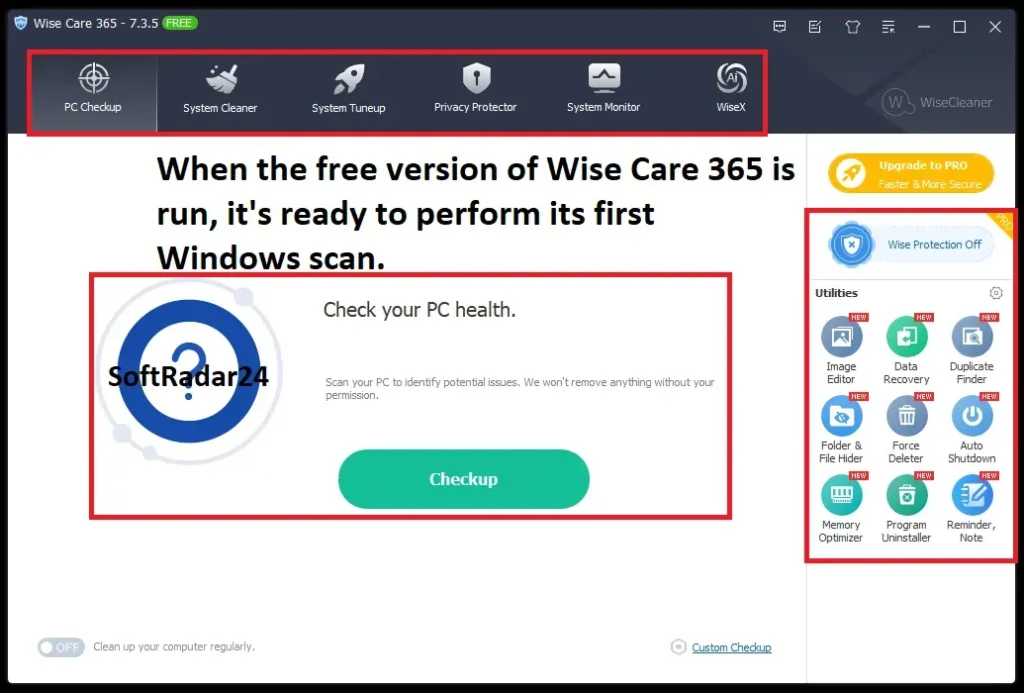
Start with PC Checkup and Review the Result
- Open PC Checkup and run the initial scan.
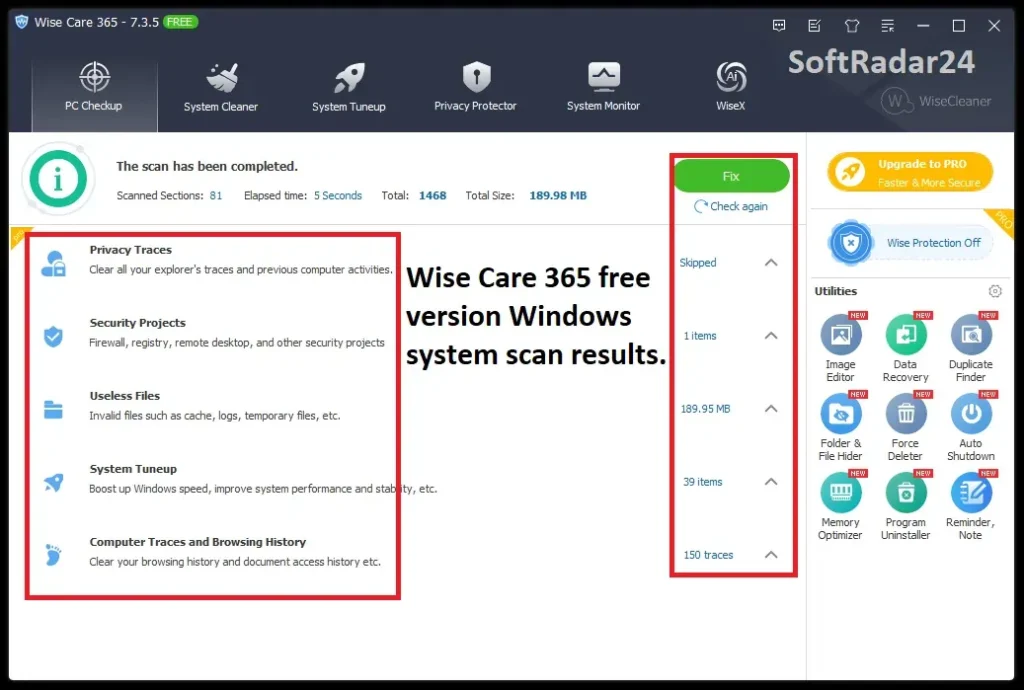
- Expand the result categories to see detected privacy risks, security-project items, useless files, invalid Registry entries and other optimization items.
- Use Ignore for an item you do not want the checkup to change.
- Run Fix only after the selected categories match what you intended to clean or tune.
Customize What the One-Click Scan Includes
The current quick tutorial places Custom Checkup under Menu → Settings. Its six documented groups are Privacy Traces, Useless Files, Registry Entries, System Tuneup, Computer Traces and Security Projects. Deselecting a group before saving is more controlled than repeatedly ignoring the same item after each scan.
Use the Focused Module for the Actual Job
| Module | Use it for | Review before action |
|---|---|---|
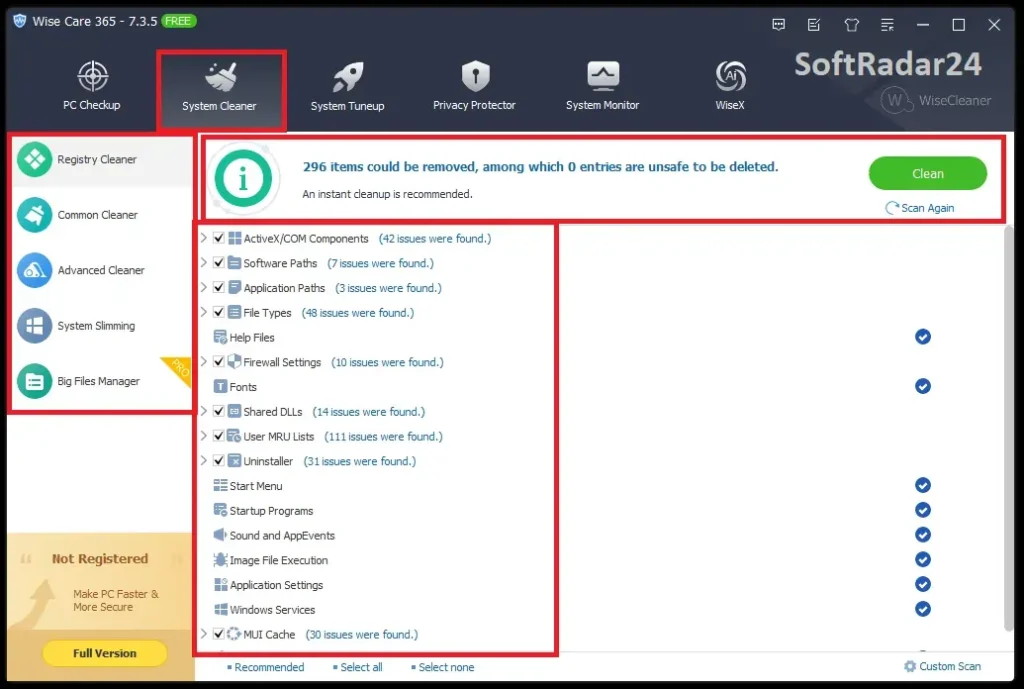
| System Cleaner | Common junk, advanced file patterns, system slimming and large-file discovery | Selected file types, browser data, saved credentials and Windows components |
| System Tune-up | Startup entries, services, selected Windows settings and supported drive/Registry maintenance | Whether an entry is required by hardware, security or daily software |
| Privacy Protector | Local activity traces, secure file deletion and related privacy controls | Irreversible targets and whether browser/session data should be retained |
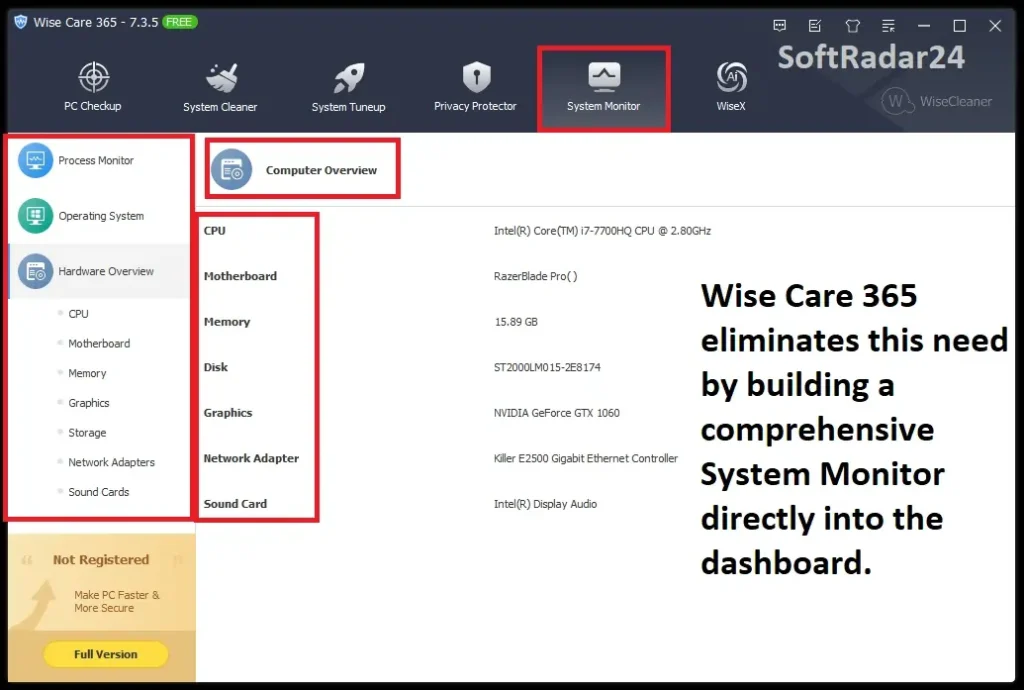
| System Monitor | Running processes, hardware overview and operating-system information | Whether a process is safe to close and whether deeper diagnostics need a dedicated tool |
Configure Automation Only After a Manual Review
WiseCleaner’s tutorial documents Daily, Weekly, Monthly, On Idle and At Login schedules, with Silent Mode available for background execution. Run the intended cleanup manually first, confirm the exclusions and then automate the same controlled scope.
Product Interface & Workflow
These SoftRadar24 screenshots show the dashboard, checkup result, cleaner result and hardware-information workflow in Wise Care 365 version 7.3.5. WiseCleaner’s current public release is version 8.0.5, so some labels, rules and visual details may have changed while the main module structure remains recognizable.
Compatibility & Coverage
Wise Care 365 is a Windows-only desktop utility. The current reference page narrows official operating-system coverage to Windows 7 through Windows 11 and publishes a 4 GB RAM baseline.
Current Product Coverage
| Area | Current documented coverage | Practical note |
|---|---|---|
| Operating systems | Windows 11, 10, 8/8.1 and 7 · 32-bit and 64-bit | No native macOS edition is listed for Wise Care 365. |
| Current release | Version 8.0.5 · 36.1 MB · August 10, 2026 | The release added and refined cleaning rules and fixed a minor Advanced Cleaner issue. |
| Display scaling | 100%, 125%, 150%, 175% and 200% · 4K UHD support | The XUI interface is designed to follow the Windows scale setting. |
| Languages | Multiple languages including English, Turkish, German, French, Spanish, Italian, Japanese and others | The current reference page publishes the complete language list. |
| License migration | Vendor migration form for moving a PRO key to another PC | WiseCleaner asks users to uninstall from the old PC when possible and use the original purchase email and license code. |
Scope: What the Suite Covers and What It Does Not
| Task | Wise Care 365 role | Boundary |
|---|---|---|
| Junk and trace cleanup | Core function | Review browser credentials, caches, histories and custom file patterns before deletion. |
| Registry maintenance | Cleaning, backup/restore and defragmentation tools | Registry cleanup should not be presented as a guaranteed speed improvement. |
| Startup and system tuning | Startup Manager and selected Windows optimization controls | Disabling a required entry can remove functionality or create troubleshooting work. |
| Privacy and secure deletion | Privacy Eraser, Disk Eraser and File Shredder | Secure-deletion actions are intentionally irreversible. |
| System information | Process, hardware and operating-system overview | Not a specialist S.M.A.R.T., stress-testing or component-repair platform. |
| Malware protection | Selected system-change monitoring through Wise Protection | Not a full antivirus or malware-removal engine. |
Features & Capabilities
The value of Wise Care 365 comes from combining several related Windows maintenance workflows. The list below separates those workflows instead of treating every tool as a generic “speed boost.”
PC Checkup & System Cleaning
- One dashboard for scanning selected cleanup and optimization categories
- Common Cleaner for Windows, browser and application traces
- Advanced Cleaner for user-defined file patterns across local drives
- System Slimming and Big Files Manager for storage review
Startup, Tune-up & Automation
- Startup Manager for reviewing programs that launch with Windows
- System Tune-up controls for supported Windows settings and services
- Daily, weekly, monthly, idle-time and login scheduling documented in the current tutorial
- Silent Mode for background execution of configured tasks
Privacy & System-Change Protection
- Privacy Eraser for supported browser and local activity traces
- Disk Eraser and File Shredder for deliberate secure deletion
- Wise Protection monitoring selected Registry, startup, context-menu and browser-setting changes
- Website-notification controls described on the current product page
Monitoring & Maintenance Utilities
- Process Monitor for viewing and ending selected running processes
- Hardware Overview for component inventory
- Operating System tab for edition, version, build and related system information
- Registry backup/restore and supported disk/Registry maintenance tools
Important Conditions & Limitations
These conditions materially affect whether Wise Care 365 Pro is a sensible purchase and how safely its maintenance tools should be used.
A Cleaner Cannot Guarantee a Faster PC
Removing temporary files can reclaim storage, and reducing unnecessary startup load can shorten a cluttered startup path. Neither action guarantees a general speed or FPS increase when the real limitation is hardware, heat, malware, a damaged Windows installation or a slow application.
Wise Protection Is Not a Full Antivirus
The current product page describes monitoring for unauthorized changes to selected Registry, startup, context-menu and browser settings. It does not document a complete antivirus stack with malware signatures, quarantine and broad threat-removal coverage.
Review Browser and Privacy Categories Before Cleaning
WiseCleaner lists browser cache, history, cookies and saved passwords among cleanable data. Deleting these items can sign you out, remove stored convenience data or clear information you intended to keep. Use Ignore and Custom Checkup rather than treating every detected trace as unwanted.
Secure Erasure Is Deliberately Irreversible
File Shredder and Disk Eraser are intended to prevent ordinary recovery. Confirm the exact files, folders and drive before execution; data-recovery software should not be treated as a fallback plan after deliberate secure erasure.
System Slimming and Registry Work Need a Recovery Path
WiseCleaner’s current FAQ says System Slimming creates a System Restore Point, and the product documents Registry backup and restore. Use those safeguards, but do not assume that every module creates the same backup automatically.
Do Not Assume HDD-Style Maintenance Is Useful for Every SSD
The suite documents disk and Registry defragmentation, but the reviewed public pages do not explain every drive-type decision in detail. Check the detected drive type and the current module guidance before running storage maintenance. WiseCleaner’s 8.0.2 release notes separately state that bad-sector detection and repair are not supported on SSDs to avoid unnecessary wear.
Free and PRO Descriptions Are Not Perfectly Aligned
The current FAQ clearly names several PRO additions, while the product comparison and quick tutorial present some automation features without equally clear edition labels in extracted text. Install the Free edition first when one specific feature is the deciding factor, then confirm whether that control is locked behind PRO.
The Interface Screenshots Show an Earlier Release
The SoftRadar24 captures on this page show version 7.3.5. The current public release is 8.0.5, so the screenshots are useful for workflow orientation but should not be treated as pixel-for-pixel documentation of the latest build.
The 60-Day Refund Policy Is Conditional
WiseCleaner publishes accepted and denied refund circumstances. Its policy specifically excludes several situations, including simple change of mind, requests after 60 days and dissatisfaction caused by not reading the product description. Try the Free edition and read the current vendor policy before purchasing.
Free Trial / Free Version
Wise Care 365 has a usable Free edition rather than a download that only scans and demands payment. The current WiseCleaner FAQ describes basic Registry and disk cleaning as Free, then names the following tools among the PRO additions.
| Area | Free edition | PRO edition |
|---|---|---|
| Basic Registry and disk cleaning | Included according to the current FAQ | Included with the broader paid tool set |
| Wise Protection | Not listed as a Free feature in the current FAQ comparison | Listed as a PRO addition |
| Automatic program updates | Not listed as a Free feature in the current FAQ comparison | Listed as a PRO addition |
| Big Files Manager | Not listed as a Free feature in the current FAQ comparison | Listed as a PRO addition |
| Startup Manager | Not listed as a Free feature in the current FAQ comparison | Listed as a PRO addition |
| Context Menu Cleaner | Not listed as a Free feature in the current FAQ comparison | Listed as a PRO addition |
| Privacy Eraser | Not listed as a Free feature in the current FAQ comparison | Listed as a PRO addition |
| Premium support | Standard free-product support path | Premium support promoted with the paid edition |
System Requirements
The table below follows WiseCleaner’s current Wise Care 365 reference page rather than the broader legacy Windows list previously shown on this page.
| Component | Current official requirement | Practical note |
|---|---|---|
| Operating system | Windows 11, 10, 8/8.1 or 7 · 32-bit and 64-bit | Windows XP and Vista are not listed on the current reference page. |
| Processor | Pentium 1 GHz or above | A faster system may still be needed for comfortable multitasking during scans. |
| Memory | 4 GB RAM or above | This is the currently published minimum. |
| Installation space | At least 70 MB | The current installer is listed as 36.1 MB; working space and backups may require more. |
| Current version | 8.0.5 | Published August 10, 2026. |
| Activation and updates | Internet access required for checkout, registration and online update/support functions | WiseCleaner provides license-retrieval and migration pages for registered customers. |
Alternatives & Better-Fit Options
Wise Care 365 Pro is the right comparison only when the task is broad Windows maintenance. The alternatives below route visitors by a materially different need. For current same-brand products and offers, visit the WiseCleaner page on SoftRadar24.
Advanced SystemCare PRO
The closest broad-suite alternative when you want another Windows cleanup, privacy and optimization dashboard with a different automation and companion-product ecosystem.
IObit Uninstaller PRO
The better fit when the main job is uninstalling stubborn applications, scanning for leftovers, monitoring new installations and maintaining installed software rather than general PC cleanup.
Hard Disk Sentinel Professional
The better fit when storage health is the real concern: HDD/SSD monitoring, S.M.A.R.T. data, temperature history, alerts and drive-focused diagnostics are different from a general hardware overview.
FAQ
These answers focus on licensing, edition differences, current compatibility and product boundaries that can change a purchase decision.
What is the current version of Wise Care 365?
WiseCleaner’s public product and reference pages list Wise Care 365 version 8.0.5 with a 36.1 MB installer. The release log dates version 8.0.5 to August 10, 2026.
Is Wise Care 365 free?
Yes. Wise Care 365 has a Free edition for basic maintenance. WiseCleaner’s current FAQ specifically describes basic Registry and disk cleaning as Free, while identifying Wise Protection, automatic program updates, Big Files Manager, Startup Manager, Context Menu Cleaner and Privacy Eraser among the PRO additions.
What is the difference between Wise Care 365 Free and PRO?
The current official FAQ places basic Registry and disk cleaning in Free. It lists Wise Protection, automatic program updates, Big Files Manager, Startup Manager, Context Menu Cleaner and Privacy Eraser as PRO additions. Because separate official pages do not label every automation feature identically, verify the installed Free build when one specific feature is the deciding factor.
Is Wise Care 365 an antivirus?
No. Wise Protection monitors selected changes to the Registry, startup items, context menu and browser settings. That is not equivalent to a full antivirus product with malware signatures, quarantine and broad threat-removal coverage.
Can Wise Care 365 schedule automatic cleanup?
WiseCleaner’s current quick tutorial documents Daily, Weekly, Monthly, On Idle and At Login task schedules and says Silent Mode can run the task in the background. Confirm the exact edition requirement in the current installed build before buying solely for automation.
Can I review items before Wise Care 365 fixes them?
Yes. The current tutorial says users can open a detected item category before cleaning and use Ignore to exclude an item. Custom Checkup also allows categories to be selected or deselected before future scans.
Can Wise Care 365 remove saved browser passwords?
The current product page lists saved passwords among the browser data that can be cleaned. Review the selected browser and privacy categories carefully if you want to retain saved credentials, cookies or signed-in sessions.
Does Wise Care 365 work on Windows 11?
Yes. The current reference lists Windows 11, Windows 10, Windows 8/8.1 and Windows 7 in both 32-bit and 64-bit editions.
Does Wise Care 365 support macOS?
No native macOS edition is listed on the current Wise Care 365 reference page. The checkout options on this page are Windows licenses.
Can I move a Wise Care 365 Pro license to another PC?
WiseCleaner provides a license-migration form. Its instructions ask users to uninstall the PRO program from the old PC when possible, then submit the original purchase email, license code and verification code for migration.
Does WiseCleaner offer a 60-day money-back guarantee?
WiseCleaner publishes a 60-day refund policy, but approval is limited to its accepted circumstances. The policy lists exclusions including simple change of mind, requests made after 60 days and dissatisfaction caused by not reading the product description. The current vendor policy controls.
Why are some Wise Care 365 screenshots on this page version 7.3.5?
They are SoftRadar24 interface captures used to show the product’s workflow. The current public version is 8.0.5, so visual details and cleanup rules may differ from the earlier screenshots.
What does the US$6.79 Wise Care 365 offer include?
Each US$6.79 option is a 1-year / 3-PC bundle containing Wise Care 365 Pro plus one additional product: Wise Folder Hider Pro, Wise Duplicate Finder or Wise Hotkey. Choose the matching bundle in Purchase Options and verify both product names and the final total at checkout.
Are the lifetime Wise Care 365 licenses subscriptions?
The lifetime options on this page are presented as one-time license campaigns for either one or three Windows PCs. Confirm the lifetime update entitlement, optional checkout services and final billing terms before payment.





