
Quick Summary
DriverMax Pro is a Windows driver updater and PC driver-management tool for finding missing or outdated device drivers, installing matched updates, scheduling driver checks, backing up existing drivers and rolling back changes when a new driver causes trouble. Its current official pages emphasize automatic installation, more than 2.3 million supported devices, signed-driver controls in Pro, restore points, simultaneous downloads and a separate PRO offline-update workflow.
- Primary purpose
- Windows driver detection, updating, backup and rollback
- Supported Windows family
- Windows 11 through XP plus Windows Server editions
- Driver coverage
- Latest drivers for more than 2,300,000 devices according to DriverMax
- Free vs Pro
- Free: 2 updates/day · Pro: unlimited updates plus automation and priority features
Purchase Options
License & Purchase · DriverMax PRO · Up to 85% OFF Coupon Code
If you searched for a DriverMax PRO discount code, the discounted SoftRadar24 options below preserve the current promotional checkout URLs from the existing Product page. This Product uses Windows-only licensing.
30 Days Subscription
DriverMax PRO home subscription · vendor FAQ says standard home plans allow up to 20 computers; promotional packages may differ
Included with this license- Unlimited DriverMax PRO driver updates during the subscription
- Automated driver installation, priority downloads and simultaneous downloads
- Driver and system restore points plus rollback to a previous driver version
- Current checkout also includes two promotional bonus products at no additional subtotal
Regular: US$19.90
US$2.99/ 30 days
Coupon code automatically applied
Buy Now30 Days Subscription
Current SoftRadar24 checkout subtotal is US$2.99 before applicable tax. The linked cart applies an approximately 85% discount to the DriverMax 30-day line.
DriverMax’s current public purchase page now shows US$8.95 for 30 Days and US$10.39 for 1 Year, while the existing SoftRadar24 campaign links currently resolve to US$2.99 and US$8.66 respectively. The 2-Year and Lifetime campaign prices match the current public store. Always verify the final plan, device allowance, tax and price shown by checkout before paying.
Can This Software Do What I Need?
DriverMax covers both ordinary Windows driver maintenance and recovery-oriented jobs such as backing up drivers before reinstalling Windows. The important distinction is whether you need occasional free updates, fully automated PRO updating, an offline-target workflow, or a different solution because the PC is behind a proxy or is not running Windows.
I want DriverMax to find and install outdated Windows drivers automatically
Automatic Windows driver update
Yes — PRODriverMax PRO supports automated installation, unlimited updates, simultaneous downloads and priority downloading. The Free edition can still scan and update drivers, but it is limited to two updates per day.
I only need a free driver updater for occasional fixes
DriverMax Free
Yes — limitedThe current download page allows two driver updates per day and retains restore-point, rollback and unknown-device identification functions, but automation and unlimited downloads are PRO features.
I want the newest version number for every device no matter what
Driver matching
Not exactlyDriverMax says its scan algorithm does not rely on version number alone. It also considers driver date, hardware ID, compatible ID and other factors to choose what it considers the best match for the specific device.
I reinstalled Windows and the target PC has no working Internet connection
Offline driver update
Yes — PRO workflowThe current Offline Driver Update page lets a PRO user create an offline scan file on the target PC and use DriverMax’s web service to obtain the required drivers through an Internet-connected device.
I want to save my working drivers before reinstalling Windows
Driver backup and restore
YesDriverMax supports full driver backups and restore. Its FAQ specifically recommends backing up the current drivers before reinstalling Windows so they can be restored afterward.
I want only signed driver updates
Signed-driver control
Yes — PROThe current Free-vs-PRO table lists ‘Signed Driver Updates Only’ as a PRO feature, not a Free feature.
I need DriverMax on several home PCs
Home licensing
Up to 20 PCs — vendor FAQDriverMax says standard home versions purchased since January 1, 2019 can be installed on up to 20 computers using the same account, but promotional packages may use a different device allowance. Check the final checkout.
I manage an unlimited number of business PCs
Commercial fleet
Better fit: BusinessDriverMax says its Business subscription is paid yearly and is intended for an unlimited number of computers.
My network uses a proxy server
Connectivity
Not supportedDriverMax’s current FAQ says it cannot search for driver updates when it is behind a proxy server and associates that situation with error 5321.
I need a driver updater for macOS
Operating system
NoDriverMax is a Windows product. Its current homepage lists Windows desktop and Windows Server editions; it does not present a macOS edition.
How It Works
The normal workflow is Scan → review the matched updates → install one driver or several. DriverMax also separates backup/restore and offline-target recovery into their own workflows, which is useful before a clean Windows installation or when a network driver is missing.
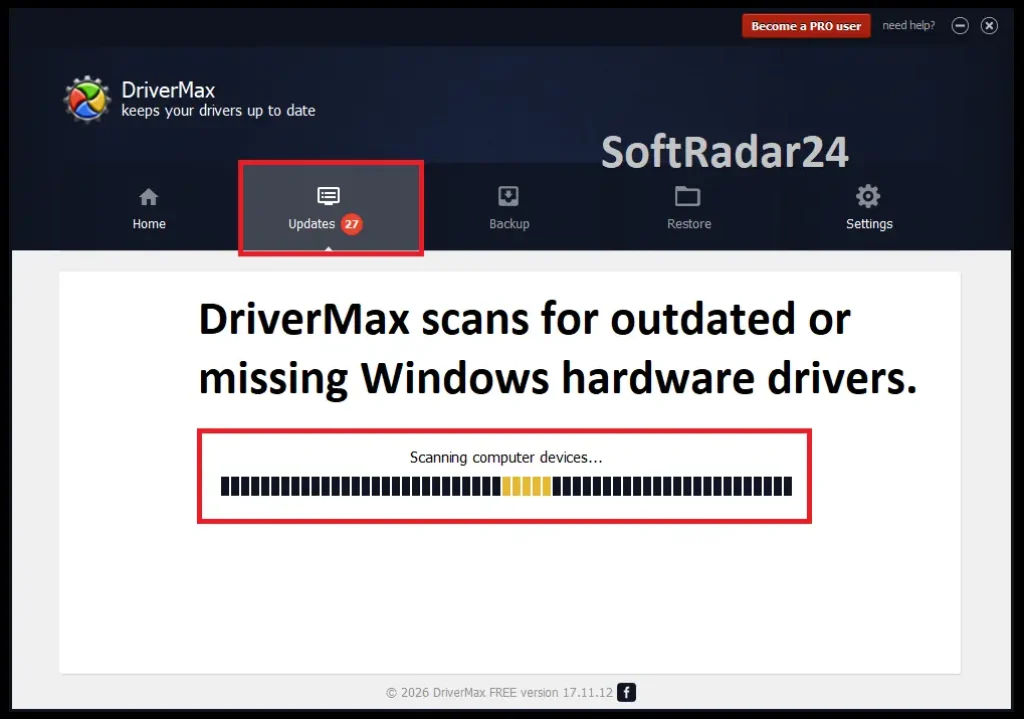
Scan and Update Windows Drivers
DriverMax analyzes the drivers already installed on the PC and compares the hardware against its online driver data. The FAQ says the matching algorithm considers more than version number alone.
- Open DriverMax and start Scan for driver updates from Home.
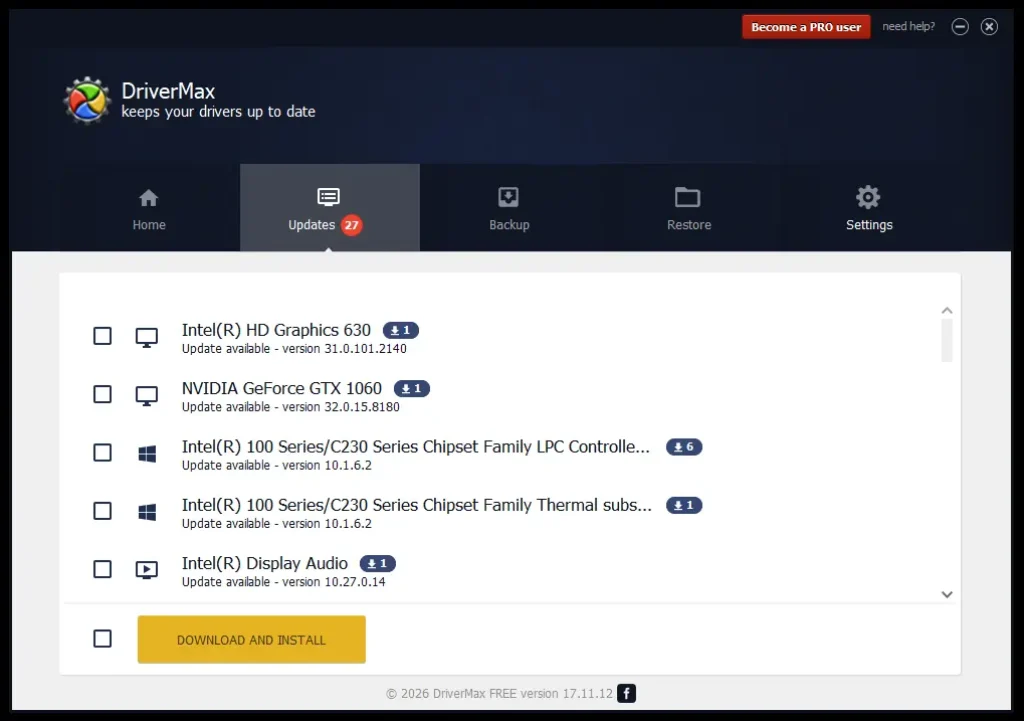
- Review the outdated or missing drivers that DriverMax matches to the hardware.
- Update one driver at a time or, with PRO, use the unlimited and automated update features for a broader maintenance session.
| Method / Mode | Use it when | Important condition |
|---|---|---|
| DriverMax Free | You need occasional driver updates without paying. | Current limit: two updates per day; no automated installation, hourly checks, download priority or simultaneous downloads. |
| DriverMax PRO | You want unlimited updates and a more automated Windows driver-update workflow. | Adds unlimited downloads, instant start, hourly checks, priority, signed-driver-only updates, simultaneous downloads, automation and support. |
Create an Offline Driver Update File
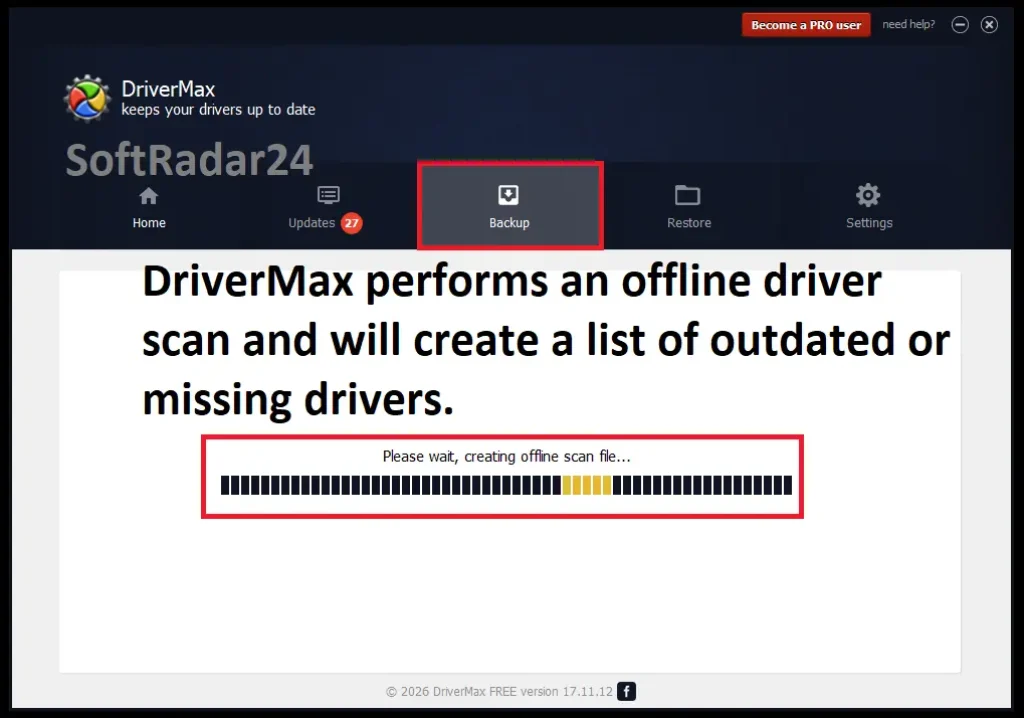
DriverMax now provides a dedicated PRO offline workflow for a target PC that cannot access the Internet. The target machine creates an offline scan file; the next step uses DriverMax’s online service with a PRO account from a connected device.
- Open the Backup tab on the offline target PC and choose Create offline scan file.
- Move the scan information to a device that can reach the DriverMax Offline Driver Update service and sign in with the PRO account.
- Use the downloaded driver packages to restore the required hardware functionality on the target PC.
Back Up Drivers Before Reinstalling Windows
Backup and restore are useful when you already have a working driver configuration and do not want to rediscover every network, audio, chipset or peripheral driver after a Windows reinstall.
- Create a backup of the working drivers before reinstalling or making major system changes.
- Reinstall Windows or perform the planned maintenance.
- Use DriverMax Restore to reinstall the saved drivers when the new Windows environment is ready.
Product Interface & Workflow
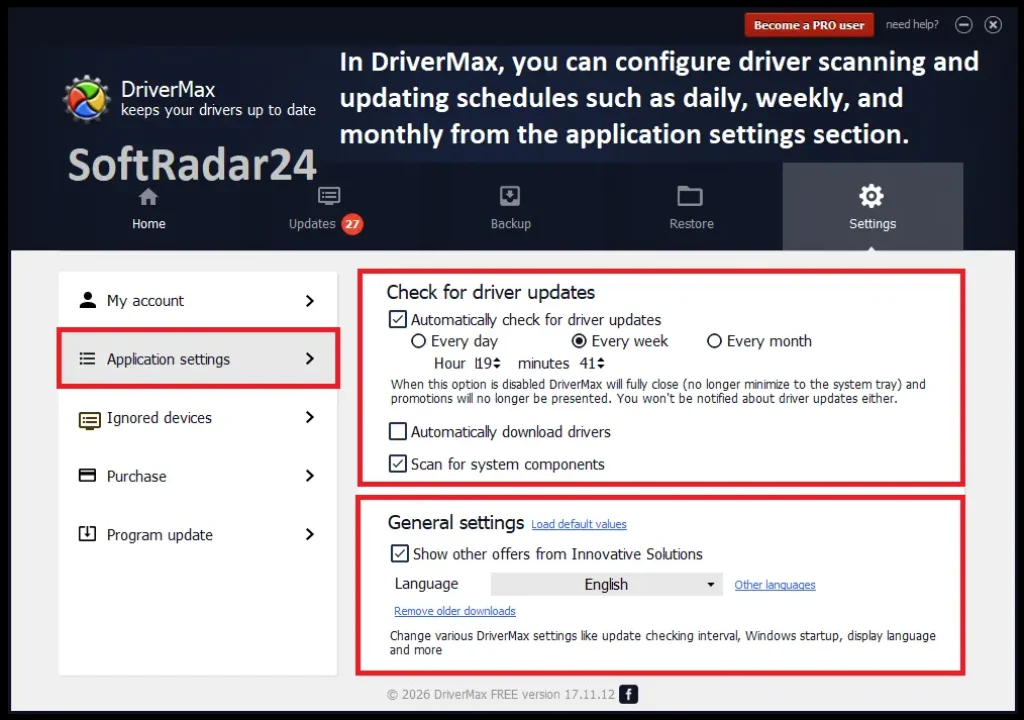
The visuals below are reused from the existing SoftRadar24 DriverMax article. They show DriverMax scanning, offline-scan preparation, update results and settings; no vendor-hosted image is introduced in this update.
Compatibility & Coverage
DriverMax is a Windows-only driver updater. The current homepage explicitly lists Windows 11 through Windows XP plus all Windows Server editions, with both 32-bit and 64-bit support. Network conditions matter too: ordinary online scanning needs access to DriverMax servers, and the FAQ says proxy-based updating is not supported.
Windows & Architecture Support
| Item | Coverage / Support | Notes |
|---|---|---|
| Windows 11 | 32-bit and 64-bit support as listed by DriverMax | Current homepage includes Windows 11 in the supported family. |
| Windows 10 / 8.1 / 8 / 7 | 32-bit and 64-bit support | Explicitly listed on the current homepage. |
| Windows Vista / XP | 32-bit and 64-bit support | Still listed by DriverMax for legacy systems. |
| Windows Server | All Windows Server editions | Current homepage says all Windows Server editions are supported. |
| macOS | Not supported | DriverMax is presented as a Windows product; no Mac edition is offered. |
Network & Driver Coverage
| Item | Coverage / Support | Notes |
|---|---|---|
| Online driver database | More than 2,300,000 devices | Current homepage wording. |
| Offline target PC | Supported through PRO offline workflow | Create an offline scan file on the target PC, then use the DriverMax online service with a PRO account from a connected device. |
| Proxy server | Not supported for driver search | Current FAQ says DriverMax cannot search for updates from behind a proxy server. |
| Unknown devices | Identification supported in Free and PRO | Listed in the current Free-vs-PRO comparison. |
Features & Capabilities
DriverMax’s useful feature set is broader than a simple ‘update all drivers’ button. The current product separates driver matching, automation, recovery and update safety, with several capabilities reserved for PRO.
Driver Detection & Matching
- Scans installed drivers and identifies available updates
- Current homepage says DriverMax provides latest drivers for more than 2,300,000 devices
- Matching considers driver date, hardware ID, compatible ID and other factors rather than version number alone
- Unknown-device identification is available in both Free and PRO
PRO Automation & Download Controls
- Unlimited driver downloads
- Instant download start and download priority
- Hourly driver checks and automated driver installation
- Simultaneous driver downloads and signed-driver-only update control
Backup, Restore & Rollback
- Full device-driver backups
- Driver and Windows system restore points
- Rollback to a previous driver version
- Driver restore workflow recommended by DriverMax before reinstalling Windows
Security & Additional Updates
- DriverMax says each new driver is tested before installation
- Driver packages are scanned for viruses and threats before being provided to users
- Current homepage also lists updates for components such as OpenAL, DirectX, C++ Runtime and Oracle Java
- PRO includes customer support; the current contact page distinguishes Free and PRO users
Important Conditions & Limitations
DriverMax can automate a large part of Windows driver maintenance, but several conditions materially affect how safe or convenient that workflow is. These are the details worth checking before treating it as a universal one-click repair tool.
Free Is Limited to Two Driver Updates per Day
DriverMax Free remains a usable free driver updater, but the current download page caps it at two updates per day. Unlimited downloads, automation, hourly checks, priority and simultaneous downloads require PRO.
Signed-Driver-Only Updating Is a PRO Feature
The current Free-vs-PRO comparison marks ‘Signed Driver Updates Only’ as available in PRO and unavailable in Free. DriverMax separately says most newer drivers are digitally signed by the manufacturer, but the stricter signed-only control belongs to PRO.
Offline Driver Update Still Uses an Online Service
The current Offline Driver Update page supports a disconnected target PC, but the workflow is not an air-gapped local database. You create an offline scan file on the target machine and then use DriverMax’s web service with a PRO account from an Internet-connected device.
Proxy-Based Driver Search Is Not Supported
DriverMax’s FAQ says the application cannot search for driver updates from behind a proxy server. The same FAQ associates that connection failure with error 5321.
A Newer Version Number Is Not Always the Best Match
DriverMax explicitly says it does not simply choose the most recent driver. Hardware ID, compatible ID, driver date and other matching factors can make an older package the better fit for a particular device.
Home License Device Count Can Differ in Promotions
DriverMax says standard home versions purchased since January 1, 2019 allow up to 20 computers under the same account, but it also warns that promotional packages may differ. The final checkout or license confirmation should control.
Driver Updates Cannot Repair Failed Hardware
A correct driver can resolve software-to-hardware communication problems, but it cannot repair a physically failed graphics card, storage controller, network adapter or other device. Keep the hardware-failure possibility separate from the driver-update diagnosis.
Free Trial / Free Version
DriverMax still offers a continuing Free edition rather than only a short trial. It can scan the PC, identify unknown devices, create restore points, roll back drivers and install up to two driver updates per day. PRO removes the daily update limit and adds the automation, priority and support features listed below.
| Free access | What you can do | What requires payment |
|---|---|---|
| DriverMax Free | Two driver updates per day, driver/system restore points, rollback to a previous driver version and unknown-device identification. | Unlimited updates, instant download start, hourly driver checks, priority, signed-driver-only updating, support, simultaneous downloads and automated installation require PRO. |
| DriverMax PRO | Unlimited driver updates plus the current PRO automation, signed-driver, priority, simultaneous-download and customer-support features. | Requires a paid 30-day, 1-year, 2-year, Lifetime or eligible Business license. |
System Requirements
DriverMax’s current official pages clearly publish the Windows family, architecture and connectivity conditions, but they do not publish current CPU, RAM or installation-storage minimums in the source set reviewed for this update. Those hardware values are therefore not copied from the older SoftRadar24 article.
| Requirement | Supported / Required | Notes |
|---|---|---|
| Operating system | Windows 11, 10, 8.1, 8, 7, Vista and XP | Current DriverMax homepage support list. |
| Windows Server | All Windows Server editions | Current DriverMax homepage states all Windows Server editions are supported. |
| Architecture | 32-bit and 64-bit Windows | Current homepage explicitly lists both architectures. |
| Internet connection | Required for normal online driver search/download | DriverMax must reach its servers for the standard online workflow. |
| Offline target workflow | Available to PRO users through an offline scan file | The target PC may be offline, but the scan file is used with DriverMax’s online service and a PRO account from a connected device. |
| Proxy server | Not supported for driver search | Current FAQ says DriverMax cannot search for updates from behind a proxy. |
| CPU / RAM / installation storage | Not specified in the current official pages reviewed | The old SoftRadar24 hardware minimums were not carried forward as current vendor requirements. |
Alternatives & Better-Fit Options
DriverMax is one Windows driver-updating approach. If you want to compare matching logic, automation, free-version limits or licensing before buying, use the alternatives below. For DriverMax-specific offers and future updates, visit the DriverMax page on SoftRadar24.
Driver Easy Pro
A direct alternative when you want another dedicated Windows driver updater with automatic installation, backup/rollback tools and its own hardware-matching logic.
IObit Driver Booster PRO
A better comparison point when you want another automated driver updater with a broader PC-maintenance ecosystem around the driver tool.
Driver Genius
Another dedicated Windows driver-management option worth comparing if driver backup, restore, update workflow and licensing details matter more than staying with DriverMax.
FAQ
These questions cover the practical details that most directly affect whether DriverMax PRO is the right Windows driver updater for your PC, including Free limits, offline updates, device count, driver matching and the current SoftRadar24 coupon links.
Is DriverMax still free?
Yes. DriverMax still has a Free edition. The current download page allows two driver updates per day and keeps driver/system restore points, rollback and unknown-device identification. Unlimited updates and the main automation features require DriverMax PRO.
What does DriverMax PRO add over the Free version?
The current comparison gives PRO unlimited driver downloads, instant download start, hourly driver checks, download priority, signed-driver-only updates, customer support, simultaneous downloads and automated driver installation. Free and PRO both include restore points, rollback and unknown-device identification.
Does DriverMax always install the driver with the highest version number?
No. DriverMax says its matching algorithm considers driver date, hardware ID, compatible ID and other factors, so the highest version number is not automatically treated as the best match for a specific device.
Can DriverMax update drivers on a PC without Internet access?
Yes, through the current PRO offline workflow. DriverMax lets you create an offline scan file on the disconnected target PC, then use the DriverMax Offline Driver Update service with a PRO account from an Internet-connected device to obtain the required drivers.
Can DriverMax work through a proxy server?
DriverMax’s current FAQ says no. It says DriverMax cannot search for driver updates when it is behind a proxy server and associates this connection problem with error 5321.
How many computers can I use DriverMax PRO on?
DriverMax says standard home versions purchased since January 1, 2019 can be installed on up to 20 computers using the same username and password. The vendor also says promotional packages may differ, so the device allowance shown by the final offer or license confirmation should control.
Does DriverMax support Windows 11 and Windows Server?
Yes. The current DriverMax homepage lists Windows 11, 10, 8.1, 8, 7, Vista and XP, plus all Windows Server editions, with both 32-bit and 64-bit support.
Does DriverMax install only signed drivers?
The current Free-vs-PRO comparison lists ‘Signed Driver Updates Only’ as a PRO feature and not a Free feature. DriverMax separately says most newly available driver versions are digitally signed by their manufacturers.
Should I back up drivers before reinstalling Windows?
DriverMax recommends doing so. Its FAQ specifically advises saving the currently installed drivers with the Backup drivers function before reinstalling Windows so they can be restored afterward.
How do I activate DriverMax PRO after purchase?
DriverMax sends the registration code by email. Its recommended method is to copy the code while DriverMax is open so the application can detect it automatically; manual registration is also available through Settings, My account and Register.
Is the DriverMax PRO coupon code applied automatically on SoftRadar24?
For the current SoftRadar24 30-day, 1-year, 2-year and Lifetime purchase links, the promotional coupon parameter is already included in the checkout URL, so no manual coupon entry is required. The existing 90-day link does not contain a coupon parameter.
What is the DriverMax refund period?
DriverMax’s current Terms and Conditions state that eligible refund requests must be made within 30 calendar days of purchase and describe that period as a 30-day no-questions-asked refund window.





