
Quick Summary
IObit Malware Fighter 13 PRO is Windows anti-malware and antivirus software that combines IObit’s core anti-malware engine with a Bitdefender engine, dedicated anti-ransomware protection, browser defenses and privacy/security guards. The current IObit Malware Fighter release is 13.4.0, published July 13, 2026. IObit Malware Fighter 13 PRO is strongest for users who want real-time malware and ransomware protection together with controls for unsafe downloads, suspicious websites, browser tracking, saved browser passwords, webcams and USB devices.
- Best for
- Real-time malware · ransomware · web · browser · privacy protection on Windows
- Platforms
- Windows · current user manual lists Windows 11 / 10 / 8
- Current release
- IObit Malware Fighter 13.4.0 · July 13, 2026
- Important setup detail
- Bitdefender and anti-ransomware engines are disabled by default and must be enabled after PRO activation
IObit Malware Fighter 13 PRO Pricing, Discount Code & License Options
The current 90% IObit Malware Fighter 13 PRO coupon discount is applied automatically to the eligible 1-year / 1-PC offer below. Other verified bundle options are available in the same selector. No manual coupon code entry is required.
Current IObit Malware Fighter 13 PRO License & Bundle Prices
The purchase selector currently includes the following discounted license and bundle options:
- IObit Malware Fighter 13 PRO · 1-Year License · 1 Windows PC · US$3.89
- IObit Malware Fighter 13 PRO Gift Pack [5-in-1] · 1 Windows PC · US$9.07
- IObit Malware Fighter 13 PRO Valuable Gift Pack [5-in-1] · 3 Windows PCs · US$11.02
- IObit Malware Fighter 13 PRO in IObit Xmas Best Selling Bundle [8-in-1] · 1 Windows PC · US$15.24
- IObit Malware Fighter 13 PRO in IObit Xmas Best Selling Pack [8-in-1] · 3 Windows PCs · US$19.32
The IObit Malware Fighter 13 PRO 1-Year / 1-PC license is selected first because it is the lowest-priced standalone option at US$3.89. Choose a 5-in-1 or 8-in-1 bundle only when the additional software or wider PC coverage fits your needs.
IObit Malware Fighter 13 PRO (1 Year / 1 PC)
1 Windows PC · 1-year IObit Malware Fighter 13 PRO subscription
Included with this license- IObit Malware Fighter 13 PRO for 1 Windows PC
- IObit and Bitdefender real-time protection engines
- Anti-ransomware protection, SafeBox and premium Security Guards
- Automatic program/database updates and premium technical support
US$3.89/ year
90% discount automatically applied
Buy NowIObit Malware Fighter 13 PRO · 1 Year / 1 PC
Selected first because the US$3.89 1-year / 1-PC campaign is the lowest-priced standalone IObit Malware Fighter 13 PRO option in the current selector.
Promotional checkout prices can differ from IObit’s public store grid. The eligible discount is applied automatically at checkout. Confirm the product edition, PC count, bundle contents, renewal terms, tax and final total before payment.
Can This Software Do What I Need?
IObit Malware Fighter 13 PRO covers several different security jobs, but the correct answer depends on whether you need malware scanning, always-on protection, ransomware defense, browser/privacy controls or a broader Windows maintenance suite.
I need real-time malware and virus protection on a Windows 11 PC
Always-on Windows protection
SupportedIObit Malware Fighter 13 PRO combines the always-on IObit anti-malware engine with an optional Bitdefender engine and premium real-time guards. The Bitdefender engine must be enabled manually after PRO activation.
I want ransomware protection for documents and important folders
Ransomware defense
SupportedIObit Malware Fighter 13 PRO includes an anti-ransomware engine, Ransomware Shield and PRO-only SafeBox for password-protecting selected files and folders. The anti-ransomware engine is disabled by default until it is enabled after PRO activation.
I specifically want the Bitdefender engine inside IObit Malware Fighter 13 PRO
Bitdefender engine
SupportedThe Bitdefender engine is a documented PRO feature. IObit’s current manual says it is off by default, so activate IObit Malware Fighter 13 PRO and then enable the Bitdefender engine from the engine controls.
I want Smart, Full, Custom and single-file malware scans
Scan flexibility
SupportedIObit Malware Fighter 13 documents Smart Scan, Full Scan, Custom Scan and Windows right-click scanning. Custom Scan can target disks, system-critical areas, suspicious processes or a specific folder.
I want automatic scheduled scans and security database updates
Security automation
SupportedIObit Malware Fighter 13 PRO supports Auto Scan and automatic program/database updates. The current manual says automatic updates are enabled by default for PRO users, while Free users update manually.
I want protection against malicious downloads, phishing and browser hijacking
Web and browser security
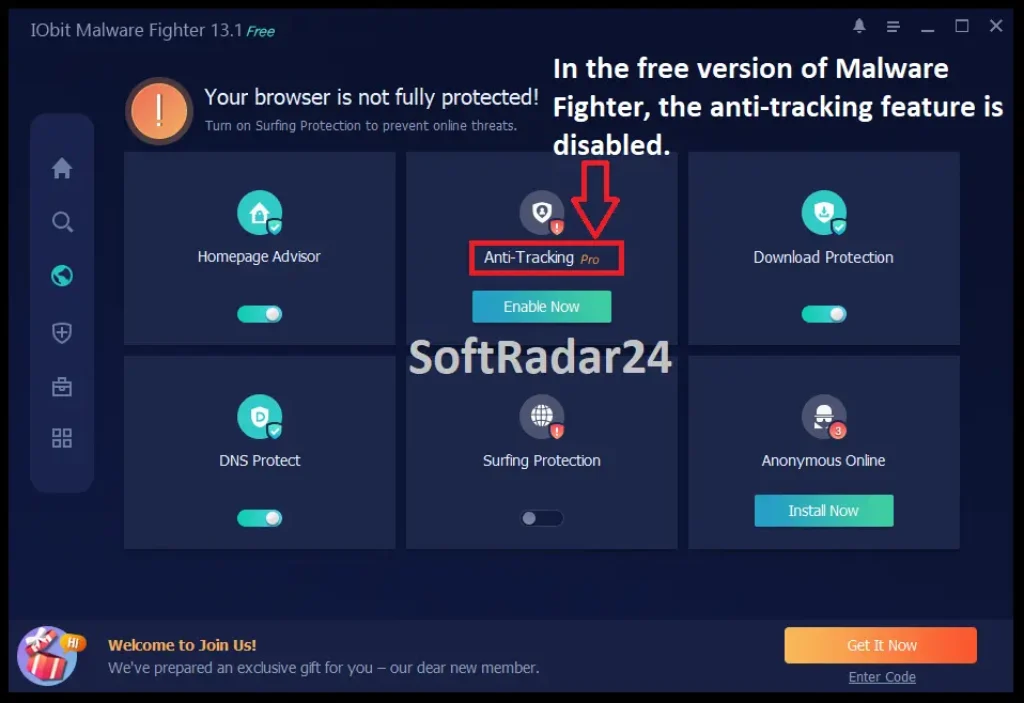
SupportedIObit Malware Fighter 13 includes Download Protection, DNS Protect, Homepage Advisor and Surfing Protection. PRO also adds Anti-Tracking, while the browser extension is required for the documented surfing-protection functions.
I want webcam and USB-device protection
Peripheral privacy and malware
SupportedCamera Guard and USB Disk Guard are documented PRO-only Security Guard modules. Camera Guard monitors unauthorized camera access, while USB Disk Guard is designed to prevent USB-borne malware from harming the PC.
I want extra protection for passwords saved in my browser
Browser Password Guard
SupportedBrowser Password Guard protects stored browser passwords. The current manual lists Chrome, Chromium-based Edge, Firefox, Opera and Brave for this module.
I already use another mainstream antivirus and want an additional security layer
Coexistence with antivirus
ConditionalIObit’s current support material says IObit Malware Fighter can work with most mainstream antivirus programs. Security-software combinations still vary by vendor, drivers and real-time settings, so verify the exact combination if you plan to run multiple always-on engines.
I want a built-in VPN included with IObit Malware Fighter 13 PRO
VPN capability
Not supportedThe current IObit Malware Fighter manual says the Free & Fast VPN entry recommends a third-party VPN program. Do not treat that menu entry as an included IObit Malware Fighter 13 PRO VPN service.
I need malware protection on macOS
Mac security
Not supportedIObit Malware Fighter 13 PRO is a Windows security product. The current user manual does not list macOS support.
I mainly need Windows repair, cleanup, driver and hardware maintenance
Broader PC maintenance
Different taskKerish PC Doctor is a broader Windows maintenance and repair suite with hardware monitoring, cleanup, driver updating and virus-defense functions. It is not presented here as a like-for-like replacement for IObit Malware Fighter 13 PRO’s dedicated anti-malware stack.
How It Works
IObit Malware Fighter 13 PRO separates scanning from always-on protection. A strong setup starts by activating PRO, enabling the premium engines, choosing an initial scan and then reviewing the browser and Security Guard modules that match the PC’s real risk profile.
1. Activate PRO and Enable the Premium Engines
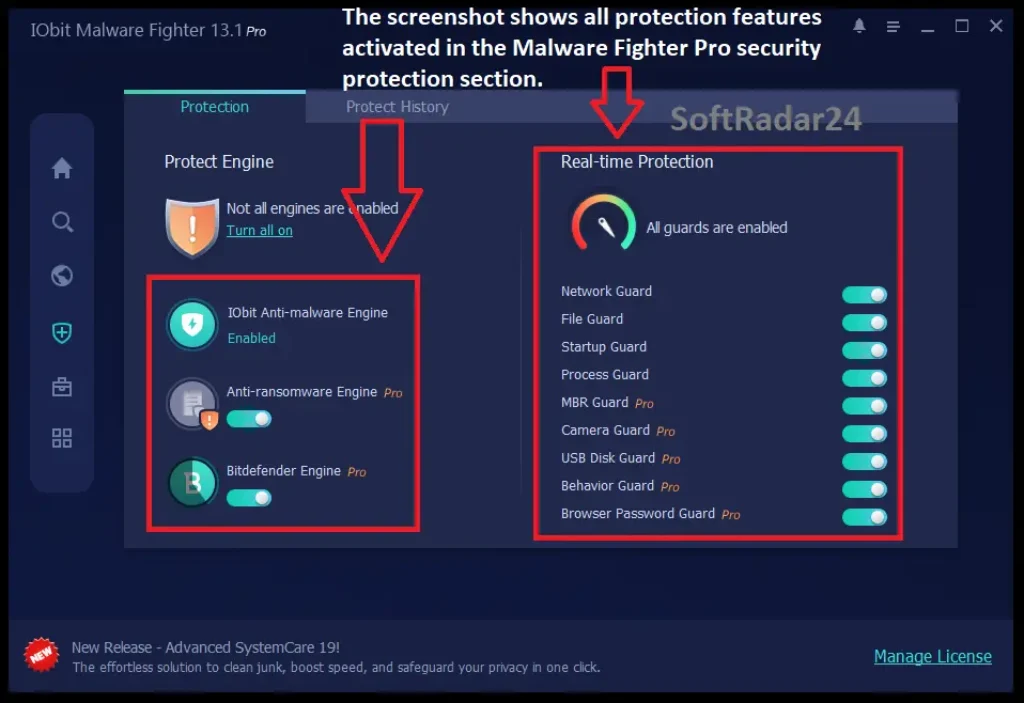
Enter the license code through the registration control to activate IObit Malware Fighter 13 PRO. The IObit anti-malware engine is enabled by default and cannot be disabled. The anti-ransomware engine and Bitdefender engine are both off by default in the current manual and must be enabled manually after PRO activation.
2. Run the Scan That Matches the Job
Use Smart Scan for critical system areas, Full Scan when every hard drive needs a deeper check, Custom Scan for selected drives/folders/system areas, or Right-click Scan for one file or folder. Scan results can be removed, ignored, whitelisted or inspected at the file location.
3. Configure Browser Protection
Homepage Advisor watches homepage/search-engine changes; DNS Protect monitors protected DNS settings; Download Protection checks downloaded files; Surfing Protection covers malicious pages and web-email threats. Anti-Tracking is a PRO feature, and the documented surfing-protection workflow requires the IObit browser extension.
4. Turn On the Security Guards You Need
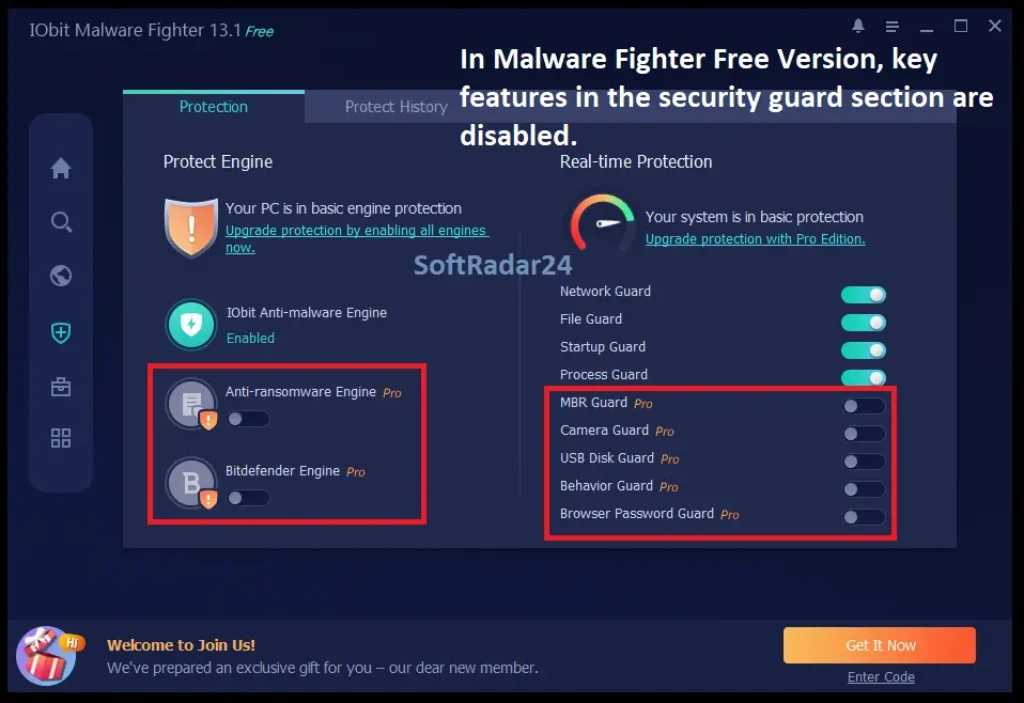
IObit Malware Fighter 13 PRO unlocks all Security Guard modules, including File Guard, MBR Guard, Camera Guard and USB Disk Guard, alongside Network, Startup, Process, Behavior and Browser Password protection. The dashboard status reflects whether protection modules and databases are fully active.
5. Automate Routine Protection
Configure Auto Scan for a suitable schedule and leave automatic program/database updates enabled if you want the PRO installation to stay current without manual update checks. If a trusted file is flagged, the scan-results workflow includes a whitelist and a false-positive reporting route.
Product Interface & Workflow
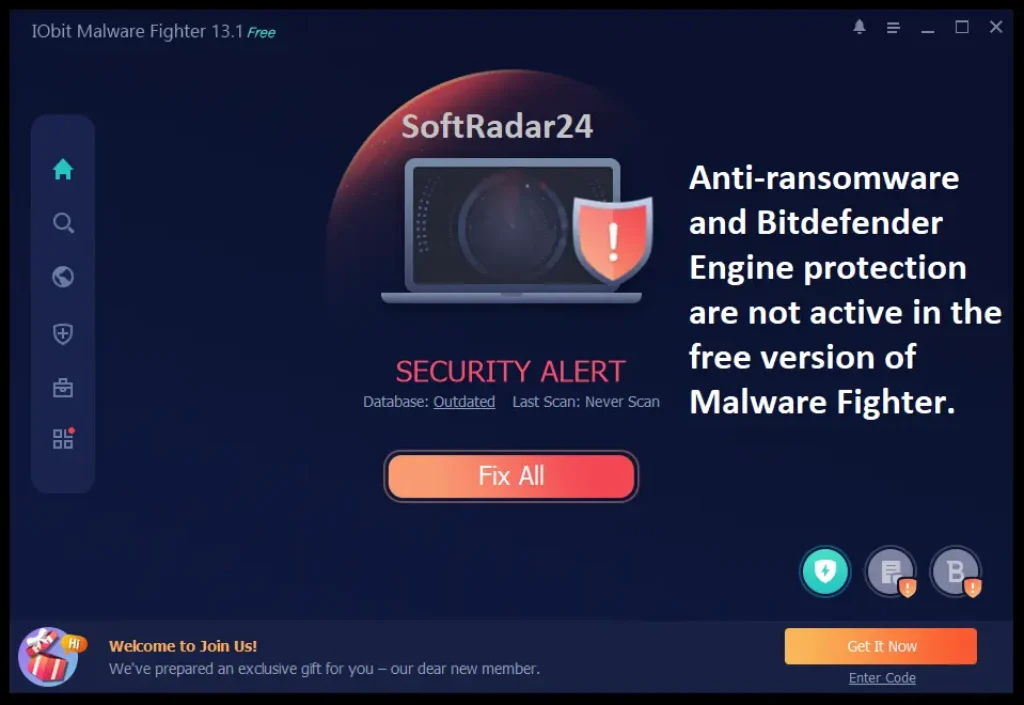
IObit Malware Fighter 13 organizes the workflow around Home, Scan, Browser Protect, Security Guard, Tools and Action Center. The important buying difference is visible inside Security Guard: Free exposes the core protection layer, while IObit Malware Fighter 13 PRO unlocks premium engine and guard controls.
Compatibility & Coverage
IObit Malware Fighter 13 PRO is Windows-only. Compatibility also depends on which browser-protection module you use and whether another real-time security product is installed on the same PC.
| Area | Current documented coverage | What to know |
|---|---|---|
| Windows | Windows 11 / 10 / 8 in the current user manual | The current product landing page still lists Windows 8.1 / 7 / Vista too; buyers on legacy Windows should verify the current installer before purchase. |
| Browser Password Guard | Chrome · Chromium Edge · Firefox · Opera · Brave | Designed to protect stored browser passwords from theft. |
| Homepage Advisor / Anti-Tracking | Internet Explorer · Chrome · Firefox · Edge in current manual | Anti-Tracking is PRO-only. |
| Surfing Protection | Chrome · Edge · Internet Explorer · Firefox | The IObit Surfing Protection extension is required for this documented browser workflow. |
| Email Protection | Gmail · Outlook · Yahoo Mail | Part of the documented Surfing Protection workflow for web email. |
| Other antivirus software | IObit says most mainstream antivirus products can coexist | Verify your exact combination if two products run real-time engines simultaneously. |
| macOS | Not supported | IObit Malware Fighter 13 PRO is a Windows product. |
Features & Capabilities
IObit Malware Fighter 13 PRO is broader than a simple on-demand malware scanner. The PRO edition adds a second antivirus engine, ransomware/data controls, premium Security Guards and automation around IObit’s core scanning and browser-protection framework.
Malware Detection & Scan Engines
- IObit anti-malware engine enabled by default
- Bitdefender engine available in IObit Malware Fighter 13 PRO
- IObit advertises a 209-million-plus threat database for PRO
- Smart Scan, Full Scan, Custom Scan and Right-click Scan
- Threat removal, ignore, whitelist, file-location and false-positive reporting controls
Ransomware & Data Protection
- Dedicated anti-ransomware engine
- Ransomware Shield against unauthorized file-encryption attempts
- PRO-only SafeBox for protected files and folders
- MBR Guard for attacks targeting the master boot record
- System Guard against unauthorized changes to files, startup and system areas
Web, Download & Browser Protection
- Web and network protection against suspicious pages
- Download Protection for downloaded files
- DNS Protect and Homepage Advisor
- PRO Anti-Tracking
- Surfing Protection and documented web-email protection
- Browser Password Guard for supported browsers
Security Guards & Privacy Controls
- Network Guard
- PRO-only File Guard
- Startup and Process Guards
- PRO-only Camera Guard
- PRO-only USB Disk Guard
- Behavior Guard for suspicious activity
Automation & Maintenance of Protection
- Configurable Auto Scan
- Automatic program and database updates for PRO
- Protection history and recently detected-item records
- PC-status indicators for outdated databases, disabled guards or overdue scans
- Premium technical support with IObit Malware Fighter 13 PRO
Important Conditions & Limitations
Security software should be evaluated by exact protection layers, defaults and evidence rather than by marketing labels alone. Several IObit Malware Fighter 13 PRO details materially change setup and buying expectations.
The Bitdefender and Anti-Ransomware Engines Are Off by Default
The current IObit Malware Fighter manual says the IObit anti-malware engine is always enabled, while the Bitdefender and anti-ransomware engines must be enabled manually after PRO activation. Buying PRO does not mean those two engines are automatically active the moment registration finishes.
209 Million Threats Is a Database Claim, Not a Detection-Rate Benchmark
IObit currently advertises 209,000,000+ threats for the PRO database. That number describes the vendor’s threat database coverage and should not be converted into a percentage detection score or an independent laboratory result.
Current Independent Comparative Lab Coverage Is Limited
IObit’s own 2026 antivirus guide acknowledges that IObit Malware Fighter is rarely featured in major independent antivirus lab tests. The presence of the Bitdefender engine is useful product information, but it does not make IObit Malware Fighter 13 PRO identical to Bitdefender’s complete consumer security products or their published test results.
SafeBox Is a PRO Feature
The current manual explicitly marks SafeBox as available only after PRO activation. Free-edition users should not assume that password-protected file/folder storage is included in IObit Malware Fighter 13 Free.
The VPN Entry Is a Third-Party Recommendation
The Tools area includes a Free & Fast VPN entry, but the current manual says it recommends a third-party VPN program. IObit Malware Fighter 13 PRO should not be purchased on the assumption that an integrated VPN subscription is included.
Legacy Windows Information Differs Across Current IObit Pages
The current user manual lists Windows 11, 10 and 8, while the current public product page also lists Windows 8.1, Windows 7 and Vista. Windows 11/10/8 is the safer current documentation baseline; verify the current installer before buying for an older operating system.
Running Multiple Real-Time Security Products Still Deserves a Compatibility Check
IObit says IObit Malware Fighter can work with most mainstream antivirus programs, but real-time security products install low-level services and filters. If another antivirus is already active, verify performance and alert behavior on the exact PC rather than assuming every combination will behave identically.
Bundle Contents Are a Separate Buying Decision
The 5-in-1 and 8-in-1 offers combine IObit Malware Fighter 13 PRO with promotional software extras. Choose a bundle for the additional software or multi-PC coverage, not because a larger package automatically improves IObit Malware Fighter 13 PRO’s malware-detection engine. Confirm the final bundle lineup at checkout.
Public IObit Prices Can Differ by Campaign
IObit’s current official pages show different active campaign grids, including US$19.95 on the main PRO/comparison pages and US$14.77 on the current update page for a 1-PC annual offer. Promotional campaigns are separate; use the final checkout total for the specific purchase option you selected.
Free Trial / Free Version
IObit Malware Fighter 13 has a genuine Free edition rather than requiring a paid license just to evaluate the interface. The important distinction is which protection engines, guards and automation features remain PRO-only.
| Capability | IObit Malware Fighter 13 Free | IObit Malware Fighter 13 PRO |
|---|---|---|
| Core anti-malware engine | IObit engine | IObit engine + Bitdefender engine |
| Advertised threat database | 9 million+ | 209 million+ |
| Real-time protection | Basic protection | Premium real-time protection |
| Anti-ransomware engine | Not included as the PRO engine | Included; enable after PRO activation |
| SafeBox | Not available | Available |
| Camera / USB / premium guards | Limited | Premium guards unlocked |
| Anti-Tracking | Not the PRO Anti-Tracking feature | Available |
| Automatic program/database updates | Manual update routes documented | Automatic updates documented and enabled by default |
| Scheduled automatic scanning | More limited | Auto Scan available |
System Requirements
The current IObit Malware Fighter user manual provides a more conservative operating-system baseline than the public landing page. The values below use the current manual for the core hardware requirements.
| Requirement | Current documented value | Decision note |
|---|---|---|
| Operating system | Windows 11 / 10 / 8 | Current manual baseline; public product page still lists 8.1 / 7 / Vista as well. |
| Processor | 1 GHz or faster | Minimum requirement. |
| Memory | 2 GB RAM | Current manual minimum. |
| Free storage | 1,000 MB | Current manual requirement. |
| Display | 1024 × 768 or higher | Current manual minimum. |
| Current release | IObit Malware Fighter 13.4.0 | Released July 13, 2026. |
| Current product-page installer size | 64.7 MB | The installed footprint and later database updates require additional space. |
| Internet access | Needed for PRO activation and ongoing security updates | Keep the program and malware database current for ongoing protection. |
Alternatives & Better-Fit Options
The closest alternative depends on whether malware protection is actually the main job. Do not replace a dedicated anti-malware decision with an unrelated optimizer simply to create a comparison.
Kerish PC Doctor
Kerish PC Doctor is a broader Windows maintenance product with crash prevention, hardware monitoring, disk care, driver updating, system repair and vendor-documented virus-defense functions. Kerish PC Doctor is a better-fit comparison when PC maintenance and repair are as important as security, but it is not treated as a like-for-like replacement for IObit Malware Fighter 13 PRO’s dedicated malware/ransomware protection stack.
More IObit Security & Windows Utilities
Use the IObit software page on SoftRadar24 when you need to distinguish IObit Malware Fighter 13 PRO from IObit’s separate optimization, driver-update, uninstall and multi-product bundle options.
FAQ
These answers cover the commercial, licensing and technical questions that most directly affect an IObit Malware Fighter 13 PRO buying decision.
How much does IObit Malware Fighter 13 PRO cost?
The current SoftRadar24 purchase selector lists IObit Malware Fighter 13 PRO (1 Year / 1 PC) at US$3.89. Current bundle options are US$9.07 for a 1-PC 5-in-1 gift pack, US$11.02 for a 3-PC 5-in-1 gift pack, US$15.24 for a 1-PC 8-in-1 bundle and US$19.32 for a 3-PC 8-in-1 pack. Final checkout terms and tax should be reviewed before payment.
Is there an IObit Malware Fighter 13 PRO coupon code or current discount?
Yes. The current 1-year / 1-PC offer is displayed at US$3.89 versus a US$39.95 reference price, a 90% advertised reduction. The eligible discount is applied automatically at checkout, so no manual coupon code entry is required.
Which IObit Malware Fighter 13 PRO license should I buy?
Choose the US$3.89 1-year / 1-PC option when you need IObit Malware Fighter 13 PRO for one Windows PC without extra software. Choose the 1-PC or 3-PC 5-in-1 gift pack when the promotional extras are useful, or an 8-in-1 bundle when you want a broader IObit software package. Confirm current bundle contents at checkout.
How many PCs can I protect with IObit Malware Fighter 13 PRO?
The selected standalone campaign covers one Windows PC for one year. The current selector also includes promotional bundle options labeled for one PC or three PCs. Use the device count shown for the exact selected offer rather than assuming one license covers every computer.
Does IObit Malware Fighter 13 PRO have a money-back guarantee?
IObit’s current PRO page advertises a 60-day money-back guarantee. The applicable refund terms and the final order terms at checkout control eligibility.
What is the difference between IObit Malware Fighter 13 Free and PRO?
IObit Malware Fighter 13 Free uses the IObit anti-malware engine, a 9-million-plus database and basic protection. IObit Malware Fighter 13 PRO adds the Bitdefender engine, the vendor’s 209-million-plus threat database, anti-ransomware protection, SafeBox, premium real-time guards, Anti-Tracking, automatic scans/updates and premium support.
Is IObit Malware Fighter 13 PRO the same as Bitdefender Antivirus?
No. IObit Malware Fighter 13 PRO integrates a Bitdefender engine as one layer inside IObit’s own security application. That does not make the interface, feature set, configuration or complete protection stack identical to a separate Bitdefender consumer product.
What are the current IObit Malware Fighter 13 system requirements?
The current user manual lists Windows 11, Windows 10 and Windows 8, a 1 GHz or faster processor, 2 GB RAM, 1,000 MB free disk space and a 1024 × 768 or higher display. The public landing page still lists some older Windows versions, so legacy systems should be verified before purchase.
What happens when an IObit Malware Fighter 13 scan finds a threat?
The current manual provides Remove, Ignore, Add to White List and Open file location actions for detected items. It also provides a false-positive reporting route so a trusted file can be submitted to IObit for review instead of being treated as malicious without recourse.
What is the current version of IObit Malware Fighter 13?
IObit’s current update page lists IObit Malware Fighter 13.4.0, released July 13, 2026. That update strengthened real-time protection, optimized Download Protection, upgraded Anti-Tracking and expanded the malware database for newer threats.





