
Cloud storage limits usually force users into a frustrating cycle of paying for monthly subscription upgrades. However, a massive portion of that occupied space consists of identical files, hidden backups, and synced copies scattered across multiple folders. Instead of constantly buying more gigabytes, the most logical step is identifying and clearing out those hidden clones.
This is exactly what Sorcim – Cloud Duplicate Finder (CDF) does directly through your web browser. It securely connects to your accounts via official APIs to scan for redundant files without requiring any local downloads. Users struggling with strict storage limits can easily use it as a Google Drive duplicate finder, while Windows users can perform a precise OneDrive dedup to clean up automated sync errors across their devices.
The platform supports both personal and corporate infrastructures. Professional teams can reduce their monthly AWS billing by utilizing it as an Amazon S3 duplicate scanner, or safely remove duplicates from Dropbox to free up space for large project files. Cloud Duplicate Finder handles the entire process online, leaving you with organized folders and zero extra subscription costs.
Why Sorcim – Cloud Duplicate Finder? (Core Features)
100% Online Scanning with Zero Local Downloads
Cleaning gigabytes of redundant data should never force anyone to save those files to a local hard drive first. Sorcim – Cloud Duplicate Finder (CDF) connects directly to Google Drive, OneDrive, Dropbox, Box, and Amazon S3 infrastructures. The entire deduplication process happens purely over the web. This method completely eliminates local storage usage and saves massive amounts of internet bandwidth, making it ideal for large corporate accounts or extensive personal media libraries.
Content-Based File Matching (Not Just File Names)
People frequently rename documents or save the same photos in different folders. Standard scanners easily miss these variations because they only look at file titles or sizes. Cloud Duplicate Finder analyzes the actual internal content of every single file. Even if an MP4 video or a PDF document has a completely different name, the algorithm detects the exact byte-to-byte match with absolute accuracy. It supports all known file formats without any compatibility issues.
Bank-Level Security via Official APIs
Granting third-party access to private cloud accounts requires absolute trust. CDF Cloud Duplicate Finder never stores user passwords and never moves private files to external servers. Instead, it utilizes the official OAuth APIs provided by Microsoft, Google, Dropbox, and Amazon. The connection is secured by military-grade 256-bit encryption. Furthermore, users retain total administrative control and can instantly revoke these scanning permissions directly from their primary cloud provider settings whenever they choose.
Custom Filters and Complete Deletion Authority
Automated deletion often leads to accidental data loss, which is why Cloud Duplicate Finder CDF never removes anything without explicit manual consent. Users can speed up the scanning time by applying custom filters—such as targeting only heavy archive files, specific video formats, or audio tracks. Once the scan finishes, the dashboard presents a clear list. Users then make the final call: either authorize a permanent deletion or safely move the redundant items to a dedicated review folder.
The Hidden Costs of Manual Cloud Cleanup
Many people attempt to clear their online storage using built-in operating system functions, such as Windows File Explorer or Mac Finder. While this seems like a free and straightforward solution, the manual route quickly becomes a massive drain on internet bandwidth and local drive space.
To search for redundant files manually, a user must first install the respective desktop synchronization client—whether for Google Drive, Dropbox, or Box—and wait for their entire cloud archive to download to their local computer. Processing tens or hundreds of gigabytes locally consumes tremendous amounts of time.
Furthermore, operating systems lack the ability to analyze file content. Searching with basic parameters like kind:format and sorting columns by “Date modified” or “Size” only provides a superficial comparison. If two different videos happen to have the exact same file size, the system will flag them as identical. Users are then forced to open and manually inspect every single file to avoid accidental data loss. This tedious process makes manual deletion highly inefficient and risky, especially for large accounts holding years of personal or business data.
Find and Remove Duplicate Files from Cloud Storage
Removing redundant data directly through the browser circumvents the massive bandwidth drain of desktop synchronization. Sorcim Cloud Duplicate Finder integrates seamlessly with the largest cloud infrastructures, offering specific duplicate file removal methods tailored to each provider’s unique architecture.
Google Drive Duplicate Finder: Bypass 15GB Limits
Google Drive accounts frequently hit the strict 15GB free storage cap due to repeated uploads of identical documents and media. Instead of purchasing Google One upgrades, identifying and deleting exact file copies frees up massive amounts of storage.
Cloud Duplicate Finder [CDF] scans the entire Google Drive directory to locate hidden duplicate files, ensuring only original versions remain intact without requiring any local downloads.
OneDrive Deduplication: Resolve Cross-Device Sync Clones
Microsoft OneDrive frequently generates file clones when synchronizing data across Windows computers, tablets, and mobile devices. These automatic sync processes often create multiple versions of identical Office documents and media files.

Performing a targeted OneDrive dedup process targets these specific sync errors, removing unwanted iterations and restoring order to the storage directory.
Delete Duplicate Files from Dropbox and Box Archives
Dropbox and Box cater heavily to professional environments handling large project files, heavy videos, and corporate archives. The strict 10GB limit on free Box accounts and the bandwidth constraints on Dropbox make duplicate file accumulation highly problematic.

Scanning for and removing redundant data directly over the cloud preserves local internet bandwidth while keeping professional directories strictly organized.
Amazon S3 Duplicate Scanner: Reduce AWS Bucket Costs
Enterprise AWS billing scales directly with the amount of data stored inside S3 buckets. Unnoticed duplicate objects inflate these monthly corporate expenses significantly.

Integrating an Amazon S3 duplicate finder via official Access Key credentials identifies redundant files with byte-to-byte precision. This allows IT administrators to execute safe bulk deletions and instantly optimize cloud storage costs.
Find Visually Similar Photos in Cloud Storage
Standard duplicate scanners only check file names and sizes. However, phone cameras often capture multiple shots of the exact same scene, and messaging applications constantly compress forwarded images. These files possess different byte sizes and names, causing basic scanners to miss them entirely. Cloud Duplicate Finder solves this by analyzing the actual visual pixels.
Users can choose between two distinct photo scanning methods:
- Exact Match: Identifies 100% identical image files based on strict data hashes.
- Similar Match: Groups lookalike pictures, resized images, or burst-mode shots.
- Custom Scan Levels: Selecting Low, Medium, or Hard thresholds dictates the strictness of the visual comparison, leaving the final deletion choice strictly to human review.
Delete Duplicates from Google Photos via Browser Extension
Google Photos implements strict privacy restrictions regarding bulk file deletion by third-party services. To bypass complex API limitations, Cloud Duplicate Finder provides a dedicated Chrome Extension that functions directly inside the web browser.
This method ensures maximum privacy while clearing out massive photo libraries:
- Client-Side Execution: Private photos are never uploaded to external servers. The extension only reads the DOM elements currently visible on the screen.
- Targeted Album Cleanup: Selecting specific albums allows for quick, focused scans instead of analyzing years of historical media at once.
- Controlled Removal: The extension groups identical shots together and waits for manual confirmation before moving any image to the trash bin.
How to Remove Duplicate Files in 3 Steps
Executing a cloud cleanup does not require complex technical configurations. The entire deduplication process is streamlined into three straightforward actions directly from a web browser.
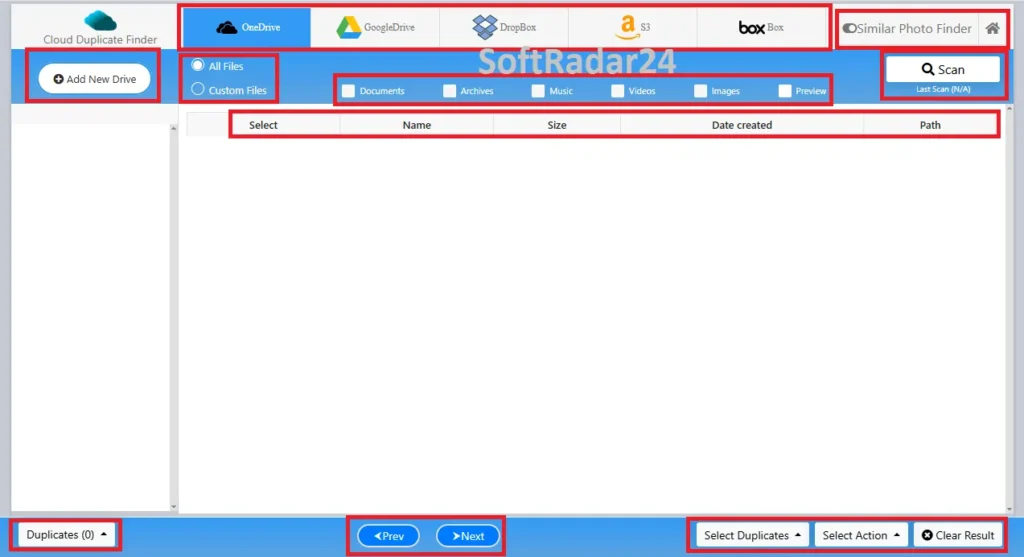
- Step 1 – Connect the Cloud Account: Navigate to the Cloud Duplicate Finder website and create a free account. Select the preferred cloud provider from the dashboard. The system redirects to the official login portal of the selected provider to authenticate the connection. Passwords are never collected or stored.
- Step 2 – Configure Scan Parameters: Once the cloud directories appear on the screen, mark the specific folders for inspection. Users can perform a comprehensive scan across all data or set custom filters to target specific formats, such as duplicate videos, images, or archive files. Clicking the scan button initiates the byte-to-byte comparison.
- Step 3 – Review and Delete Duplicates: The completed scan groups identical files together for easy review. Instead of manual sorting, automated selection rules like “Keep Newest” or “Keep Oldest” instantly mark redundant items across thousands of results. The final action moves the selected files directly to the respective cloud trash bin, securely reclaiming storage space.
Sorcim Cloud Duplicate Finder Discount Code
Claiming a Sorcim Cloud Duplicate Finder coupon code provides a highly cost-effective alternative to paying for continuous storage upgrades. The official pricing structure features multiple options, including a Quarterly Service, 1 Year of Service, 2 Years of Service, a one-time Lifetime Account, and dedicated Enterprise Support. This promotional discount is automatically applied on the official checkout page, meaning buyers do not need to manually enter any extra codes during the transaction.



Cloud Duplicate Finder
Cloud Duplicate Finder License Options: Quarterly, 1 Year of Service, 2 Years of Service, Lifetime Account and Enterprise Support.
Frequently Asked Questions (FAQ)
Does Google Drive automatically delete duplicate files from full accounts?
Google Drive lacks a built-in feature to automatically identify or remove identical file copies. Account holders must manually search for repeated files or utilize authorized web services to automate the scanning and removal process across the entire storage quota.
Are private Dropbox and Box files secure during a duplicate scan?
Security remains a top priority during the scanning process. Cloud Duplicate Finder utilizes official API connections and 256-bit AES encryption to analyze data. Passwords are never collected, and the system never downloads or stores private Dropbox or Box files on external servers.
How does Cloud Duplicate Finder scan Amazon S3 and OneDrive without downloading data?
The Cloud Duplicate Finder scanning process operates entirely cloud-to-cloud through official provider APIs. Instead of downloading heavy files to a local hard drive, the algorithm directly analyzes the file content and byte structure within Amazon S3 buckets or OneDrive directories to detect exact matches.
What is the difference between exact image matching and similar photo scanning?
Exact match scanning looks for images that share the exact same byte size and digital signature. Similar photo scanning uses a specific algorithm to identify visually lookalike images, such as burst-mode camera shots or compressed WhatsApp forwards, even if their file sizes and names differ completely.
Are deleted duplicate files permanently lost after the cleanup process?
The system does not execute irreversible deletions by default. Selected duplicate files are simply moved to the respective provider’s standard Trash or Recycle Bin, such as the Google Drive Trash or Box Recycle Bin. Users retain the ability to restore any file before the cloud provider empties the bin permanently.