Do you love your Storytel library but feel restricted by the official app? Thousands of readers want to enjoy their favorite stories on different e-readers and media players. Epubor Telstory Converter provides a direct way to download Storytel audiobooks and ebooks to a local computer drive. As a dedicated Storytel to MP3 converter, a reliable program quickly unlocks your digital library. It transforms restricted media into standard formats without losing original audio fidelity.
Converting Storytel audiobooks to MP3 takes almost no time. A premium Storytel downloader extracts the media up to 100 times faster than traditional recording methods. You get pristine MP3 tracks ready for offline listening in your car, on an MP3 player, or via Apple CarPlay. Similarly, exporting Storytel to EPUB format lets you transfer text files directly to a Kindle, Kobo, or Pocketbook.
Related Resource: If you also need to back up your Barnes & Noble Nook library, we have a detailed guide for that specific software. Read our full review and apply your exclusive Epubor Nook Converter Discount Code to automatically save 20% on all available licenses.
Where Are Storytel Downloads Stored? How to Export Files to MP3
Many users tap the offline listening button but immediately run into a frustrating problem: they cannot find their media files anywhere. Why are your downloads not showing up on your local drive? By default, the platform hides these files deep inside the operating system to prevent external sharing. Even if you manage to locate the specific folder path (such as data/data/grit.storytel.app/files/abooks on a rooted Android system), you cannot play these proprietary, DRM-locked files on a standard media player.
To truly control your Storytel library and put audiobooks on an MP3 player or transfer text files to a Kindle, you must bypass these restrictions. The most reliable method involves setting up an Android emulator on your Windows or Mac computer. By installing the official Storytel APK inside this virtual environment, you download your entire library locally.
Once your titles finish downloading, Epubor Telstory Converter automatically detects the hidden files within the emulator. It instantly strips away the DRM encryption and exports your Storytel audiobooks to MP3 format with 100% original sound quality. This straightforward method ensures you can keep your audiobooks forever, even if you decide to cancel your Storytel subscription later.
How to Download and Extract Storytel Files on PC or Mac
Visiting the official Storytel website via a desktop browser only lets you listen to short audio samples. You cannot read full texts or save media directly to a local hard drive. Gaining full offline desktop access requires a virtual mobile environment.
Setting up an Android emulator provides a direct workaround. Windows users achieve the best results using LDPlayer9, while Mac owners should install Android Studio. After setting up the virtual device, sideload the official Storytel APK and log into your account. The interface works exactly like a standard smartphone.
Tap the download icon to save your library inside the emulator. The platform hides these downloads deep within the system folders as DRM-protected .stb and .exo files. Normal media players cannot recognize or open these proprietary formats. Getting these raw files onto your local computer is the essential first step before exporting them to standard, playable formats.
Batch Exporting Storytel to MP3 and EPUB Formats
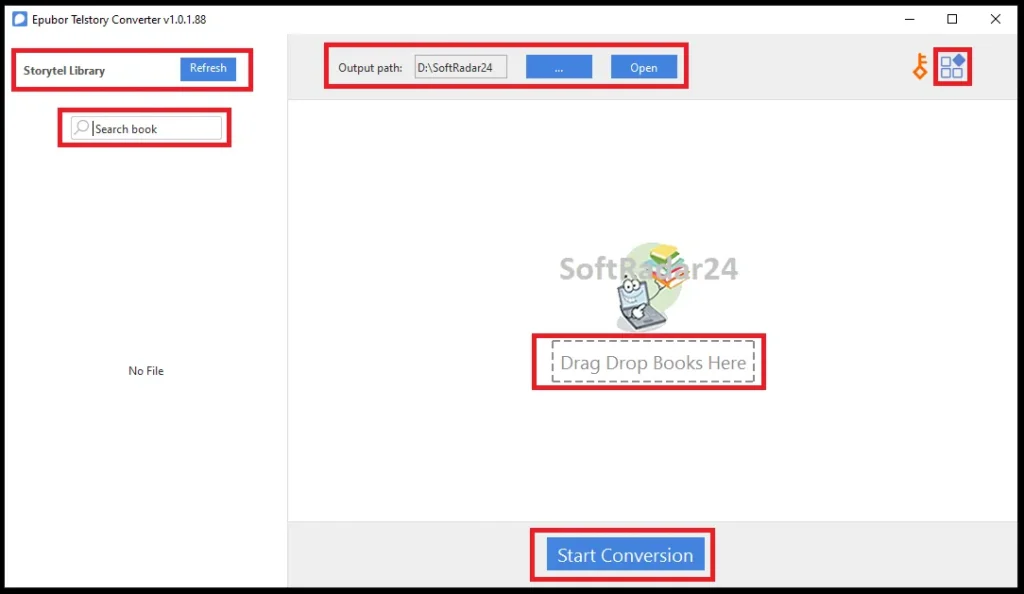
Once the hidden files reside inside the emulator, Epubor Telstory Converter extracts the media directly. Clicking the “Refresh” button automatically syncs the program with the virtual device, loading all downloaded titles into the left panel. You never have to manually search through rooted Android system folders.
Dragging the items to the right side prepares them for a rapid export. A premium Storytel audiobook downloader operates up to 100 times faster than traditional real-time recording methods, preserving 100% of the original audio quality. Simultaneously, proprietary text files instantly become standard, DRM-free EPUBs.
For audio formats, the built-in chapter split feature provides a massive advantage. Instead of generating one giant audio track, Epubor Telstory Converter divides the output into individual MP3 chapters and organizes them into separate folders. This structure makes tracking your listening progress incredibly easy on any standard media player.
What to Do with Your Unlocked Storytel Library?
Having your audiobooks and ebooks in standard formats completely changes how you consume media. Instead of relying entirely on a single mobile app, you can easily distribute your library to dedicated offline devices using the practical steps below.
Reading Storytel eBooks on a Kindle eReader
Kindle devices do not support third-party Android reading apps, and they run on a closed operating system. However, Amazon provides a free, official method to transfer standard text formats to your e-ink screen.
- Locate your files: Open the output folder on your computer containing your newly extracted EPUB files.
- Access Amazon’s service: Open your desktop web browser and visit the official Amazon “Send to Kindle” page.
- Upload the EPUBs: Drag and drop your EPUB files directly into the upload box. Amazon allows file sizes up to 200 MB.
- Sync your eReader: Turn on your Kindle, connect to a Wi-Fi network, and tap the “Sync” button. The books will automatically populate in your Kindle Library, ready for a distraction-free reading experience.
Playing Audiobooks in the Car via USB Drive
Using Apple CarPlay or Android Auto requires a stable internet connection. When driving through areas with poor cellular reception, streaming apps often crash, buffer, or fail to recognize voice commands. A physical USB drive guarantees uninterrupted playback.
- Prepare a USB flash drive: Plug a standard USB drive into your PC or Mac.
- Find the chapters: Navigate to your audiobook output folder. Because the extraction organizes everything into split MP3 chapters, you will see a neatly arranged folder for each specific title.
- Transfer the media: Copy the entire book folder and paste it onto your USB drive.
- Plug and play: Insert the USB drive directly into your car’s stereo system. You can now navigate between chapters using your steering wheel controls, entirely independent of mobile data or CarPlay glitches.
Keeping Your Storytel Books After Canceling the Subscription
Storytel operates strictly as a rental service. The moment your subscription expires, your entire library vanishes, including the titles you saved for offline listening. Exporting the media is the only way to secure long-term access.
- Create a safe archive: Set up a dedicated “Digital Library Backup” folder on your primary computer, an external SSD, or a private cloud storage account.
- Move the extracted media: Cut and paste all your DRM-free MP3 and EPUB files into this secure location.
- Enjoy permanent ownership: You now have permanent local copies. Even if you stop paying for your monthly subscription, your favorite stories remain safely stored and fully accessible forever.
Storytel Official App vs. Epubor Telstory Converter: Key Features Comparison
To understand why thousands of readers prefer extracting their Storytel library, look at the direct comparison between the official Storytel subscription experience and the freedom of owning your files.
| Feature | Official Storytel App | Epubor Telstory Converter |
|---|---|---|
| Primary Platforms | Android, iOS, Apple Watch | Windows, Mac, Kindle, Kobo, MP3 Players |
| Audiobook Format | Proprietary (.stb / .exo) | Universal MP3 |
| Ebook Format | Hidden DRM-EPUB | Standard DRM-Free EPUB |
| Access Control | Linked to Active Subscription | Permanent Offline Ownership |
| Conversion Speed | Real-time Streaming Only | 100X Ultra-Fast Extraction |
| File Organization | App-Managed Library | Automated Chapter Splitting |
| Offline Playback | Requires Official App | Works on any USB/Media Player |
Epubor Telstory Converter Discount Coupon Code
Getting the best deal on Epubor Telstory Converter is now incredibly easy. We provide an official 20% discount across all available license types. You do not need to waste time hunting for valid promo codes online. Simply select your preferred plan and click the buy button below. The system automatically applies your 20% savings directly on the official secure checkout page. Backup Storytel ebooks to epub, or Storytel audiobook to mp3.


20% OFF – Epubor Telstory Converter for Windows

Epubor Telstory Converter for Windows (1-Year / 1 PC)
Unlock your Storytel library for a full year on a single Windows PC. Convert audiobooks to MP3 and enjoy offline listening anywhere.
Epubor Telstory Converter for Windows (5-Year / 1 PC)
Get long-term value with a 5-year license. Keep permanent local backups of your favorite audiobooks and ebooks on one Windows computer.
Epubor Telstory Converter for Windows (5-Year / 5 PCs)
The perfect family plan. Install the converter on up to 5 Windows PCs and manage your entire household’s digital reading materials.
20% OFF – Epubor Telstory Converter for Mac
Epubor Telstory Converter for Mac (1-Year / 1 Mac)
Easily export your audiobooks and EPUBs on a single Mac for one year. Enjoy 100X conversion speed and original audio quality.
Epubor Telstory Converter for Mac (5-Year / 1 Mac)
Secure a 5-year Mac license to continually extract your subscription files into DRM-free formats without ever losing access.
Epubor Telstory Converter for Mac (5-Year / 5 Macs)
Maximize your savings with 5 Mac licenses. Share the tool with family to easily transfer audiobooks to external media players.
Epubor Telstory Converter Frequently Asked Questions
Does Epubor Telstory Converter work on Mac computers?
The software fully supports both Windows and Mac operating systems. Mac users simply need to install Android Studio as their emulator to download the media files before running Epubor Telstory Converter to extract them into standard formats.
Will I lose my converted files if my Storytel subscription expires?
Any files you process through Epubor Telstory Converter remain permanently saved on your local hard drive. Even if you cancel your monthly subscription, your extracted MP3 and EPUB files stay completely accessible for offline use forever.
Does Epubor Telstory Converter output one large MP3 file for an audiobook?
The program features an automatic chapter splitting function. Instead of generating a single massive audio track, it divides the audiobook into smaller, organized MP3 segments, making it much easier to track your listening progress on portable media players.
Why do I need an Android emulator to use Epubor Telstory Converter?
The official streaming platform restricts full media downloads to its mobile applications. An Android emulator creates the necessary virtual environment on your desktop, allowing the converter to locate the hidden proprietary files and export them into DRM-free formats.